
A single accidental deletion or cyberattack on Active Directory can paralyze your entire organization. Employee logins, authentication requests, Group Policy processing, and application access can all be affected.
Setting up a reliable Active Directory (AD) backup and restore strategy keeps your identity infrastructure safe, compliant, and operational.
This guide explains what AD backup and restore really means, what you should back up, why backing up AD matters, and how to recover deleted users and other AD objects quickly.
What Is Active Directory Backup and Restore?
AD backup and restore is the process of creating recovery copies of Active Directory data and using those copies to recover deleted, corrupted, or unavailable AD objects and services.
An AD backup captures directory data at a specific point in time. Depending on the backup method, this can include users, groups, organizational units, Group Policy Objects, computer objects, and other directory components.
The distinction between backup and recovery comes down to the outcome:
- Active Directory Backup:
The ongoing, proactive process of capturing Active Directory data and recovery information from your domain controllers. - Active Directory Recovery:
The targeted, reactive process of reconstructing missing objects, fixing corrupted settings, or rebuilding domain state after a failure.
An efficient Active Directory backup and restore solution lets you restore single objects or perform comprehensive directory rollbacks.
Why Active Directory Backup Matters
Active Directory changes every day as you create new users or modify groups. If you don't have the right protection, even a simple error can be problematic.
Here are six reasons why you need an Active Directory backup:
Deleted Users
Let's say you accidentally delete a key account. The user can no longer sign into email and is stripped of their user permissions, mailbox associations, and SID histories.
Deleted OU
An engineer mistakenly deletes an Organizational Unit containing hundreds of user accounts and computer objects.
Deleted Groups
The disappearance of core security groups locks entire departments out of essential line-of-business applications.
GPO Corruption
Incorrect or malicious edits to Group Policy Objects disable security controls or disrupt network configurations enterprise-wide.
Domain Controller Failure
Hardware crashes or virtual machine disk corruption can take down primary domain controllers.
Ransomware
Malware encrypts directory databases or local system states to lock admins out of identity infrastructure.
Without a reliable backup, restoring Active Directory can take hours or even days.
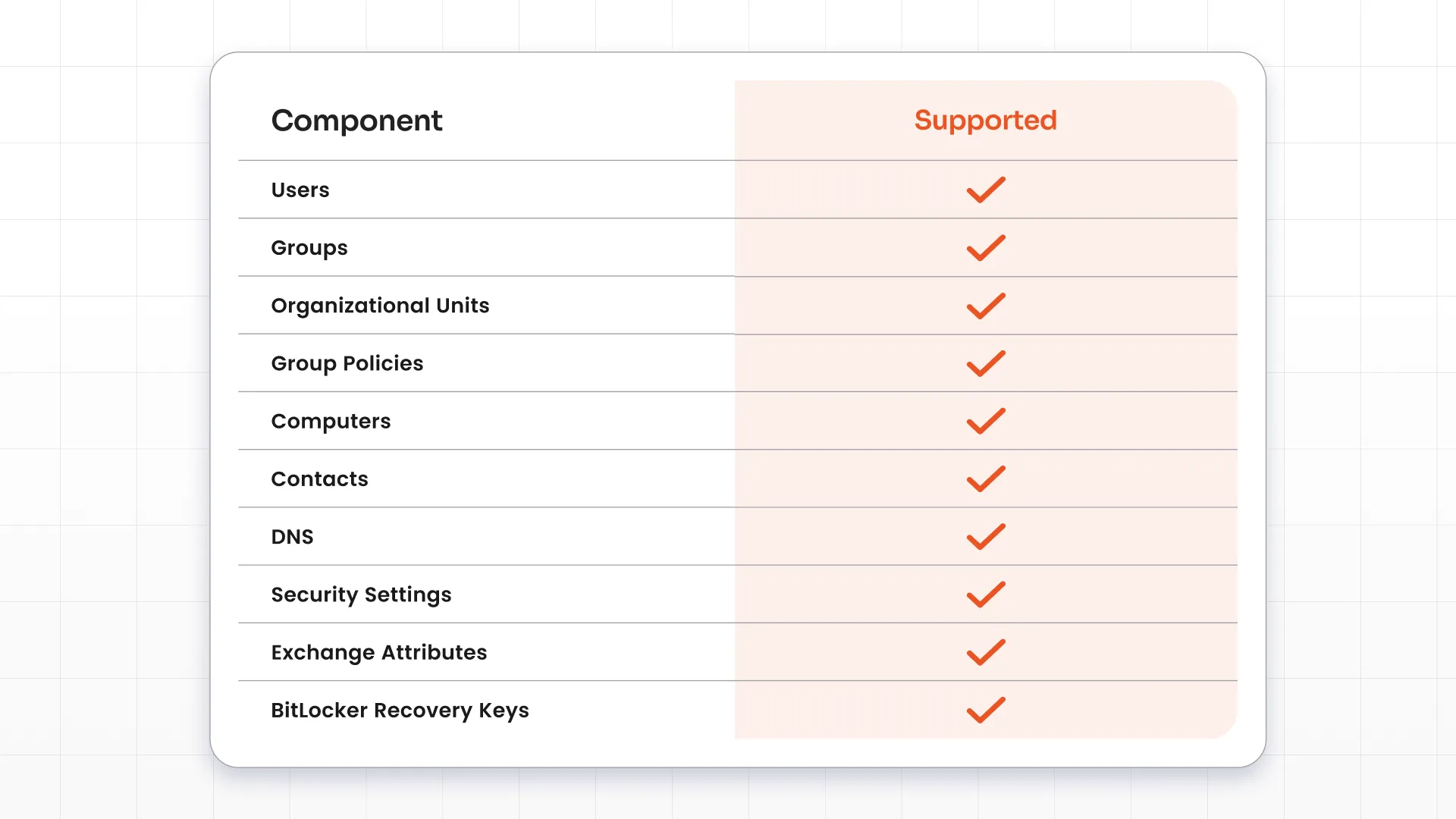
What Can You Back Up in Active Directory?
A robust AD backup strategy covers every layer of your directory topology, not just users. It captures object metadata along with core directory components for improved recovery readiness.
Key Features to Look for in an Active Directory Backup Tool
Choosing the right AD backup tool determines how quickly your team recovers from an identity disruption. Focus on the features that directly affect recovery time and accuracy.
Automated Backup Scheduling
Manual backups are easily forgotten, and that's risky. Your recovery point is only as recent as your last backup. Automated scheduling runs background backups at set intervals so your recovery points stay current without taking up IT staff time.
Incremental Backup
Full database backups consume network bandwidth and storage space. With incremental backups, after the initial backup, only changes are captured. This cuts backup windows and storage costs.
Point-in-Time Recovery
Data corruption can go unnoticed for hours or days. Point-in-time recovery lets you roll directory states back to an exact moment before unauthorized modifications or corruption occurred.
Granular Object Restore
Sometimes you might need to recover something minor, like a single user account. Restoring an entire domain controller doesn't make sense. Granular object recovery restores individual users, groups, or attributes directly to live Active Directory instances. Other objects remain unaffected.
Version History
Having multiple recovery points always helps. With version history, you can recover from changes that were not noticed immediately. Also, you can isolate modified settings and compare historic snapshots against live object values to pinpoint problematic updates.
Backup Encryption
Your directory database holds sensitive authentication data and password hashes. Enterprise-grade encryption protects stored backups at rest and in transit against unauthorized exposure.
Audit Logs
Many compliance standards demand clear visibility into directory changes. Detailed audit logs record every backup operation, restore request, and administrative action to help with regulatory compliance.
Multi-Domain Backup
Enterprise environments often span multiple domains and forests. Multi-domain support lets you manage backup routines across complex directory structures from a single console.
Fast Recovery
Downtime directly impacts your business revenue. Fast recovery capabilities restore critical objects and services quickly, keeping recovery time objectives (RTO) minimal.
How Active Directory Backup and Restore Works
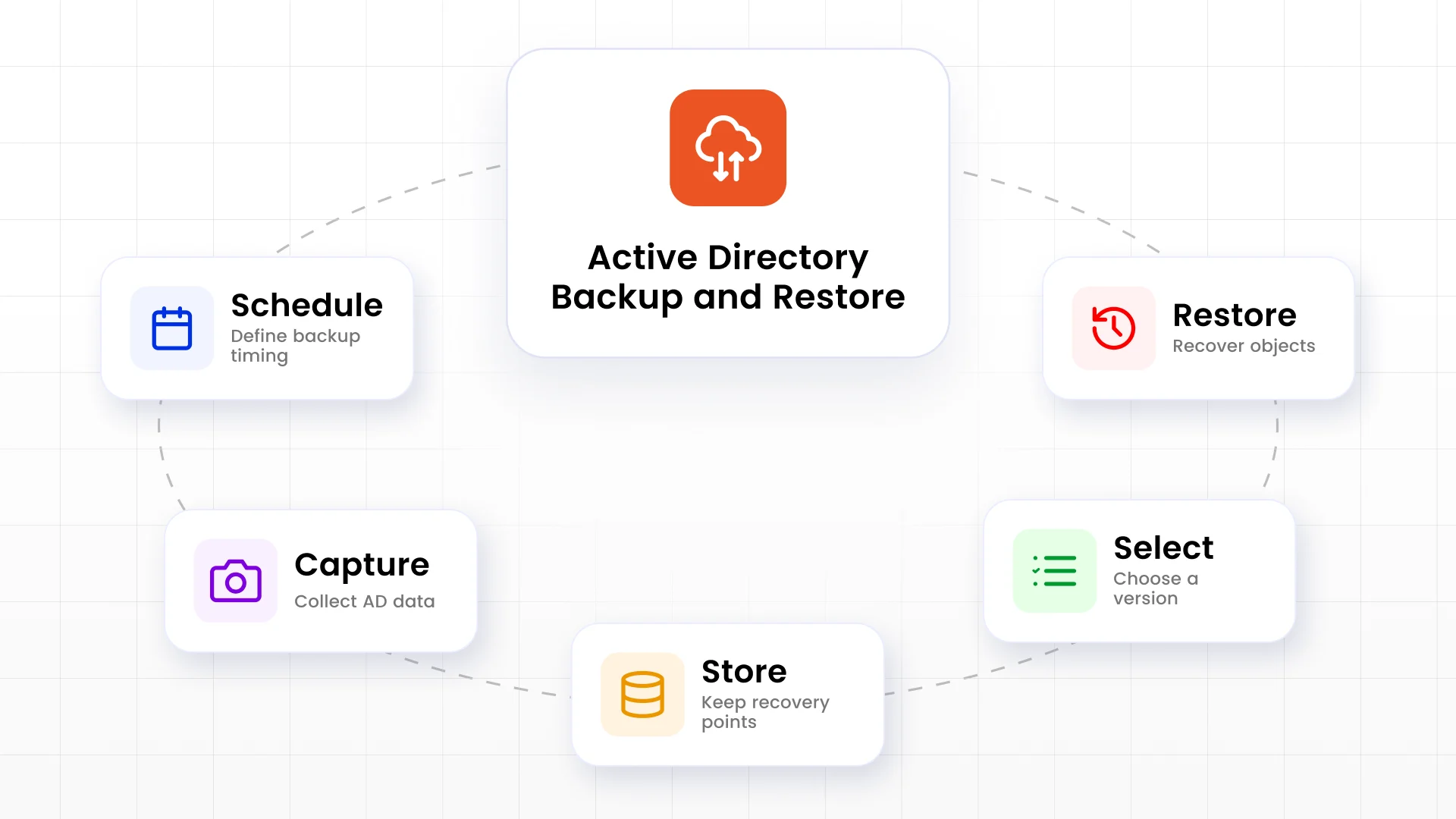
A practical Active Directory backup and restore workflow is straightforward. The goal is to create regular recovery points and restore the correct version when needed.
Implementing an efficient Active Directory recovery process involves five direct steps:
Step 1: Schedule Backups
Set automated backup policies based on your organization's recovery point objectives (RPO).
Step 2: Capture AD Objects
Extract directory snapshot data, system state components, and object metadata from domain controllers.
Step 3: Store Recovery Points
Save snapshot files into secure, encrypted backup locations for future use.
Step 4: Select Restore Version
Locate the cleanest point-in-time snapshot created right before the failure event.
Step 5: Restore
Restore the missing objects or complete directory states directly into your active network.
Common Active Directory Recovery Scenarios
Most recovery requests involve a small number of objects, not a complete forest recovery. These are the scenarios you will encounter most often.
1. Restore Deleted User
A help desk administrator deletes the wrong account during an offboarding request. To restore a deleted user in Active Directory, you need granular recovery tools. The restore operation brings back the account, original Security Identifiers (SIDs), and group memberships without requiring a domain controller reboot.
2. Restore Deleted Group
A security group is removed accidentally. The access rights across connected services break immediately. Targeted group recovery restores the main group object alongside all original member associations in one step.
3. Restore Deleted OU
An OU containing many users and computers is deleted. The parent containers along with all child objects inside them are removed. Granular tree recovery restores the top-level OU container, nested child OUs, and assigned accounts without creating orphaned records.
4. Restore GPO
A policy change causes login issues or security configuration problems. This can lock users out of corporate workstations or disable core security features. Reverting corrupted GPOs back to prior versions restores normal policy enforcement instantly.
5. Restore Computer Object
A domain-joined device loses its AD account or is removed accidentally. This leads to broken domain trust relationships. Restoring the computer object re-establishes secure channel trusts without forcing admins to rejoin machines manually.
6. Recover After Ransomware
If ransomware compromises or encrypts your domain controllers, your Active Directory environment can become unavailable. You can isolate infected servers, deploy clean OS instances, and execute point-in-time system state restores from secure backups.
Native Windows Backup vs Active Directory Backup Tool
Windows Server includes built-in backup tools like Windows Server Backup (WSB) and the Active Directory Recycle Bin. They provide basic backup and recovery capabilities for many environments.
A dedicated AD backup and recovery platform, like miniOrange AD Backup, goes beyond by delivering greater efficiency, automation, and speed for complex environments.
| Capability | Native Windows Tools | miniOrange AD Backup |
|---|---|---|
| Backup scheduling | Manual or basic scripting | Fully automated, policy-based |
| Object-level restore | Limited (Recycle Bin, retention window) | Granular restore of users, groups, OUs, GPOs |
| Point-in-time recovery | Not natively supported | Yes, choose any recovery point |
| Reboot required for restore | Often required for full recovery | Not required for granular restores |
| Backup encryption | Basic / OS-dependent | Enterprise-grade encryption at rest and in transit |
| Multi-domain management | Managed per domain controller | Centralized, single console |
| Recovery speed | Slower for large-scale recovery | Optimized for fast RTO |
Best Practices for Active Directory Backup
Implementing strong directory protection relies on disciplined management habits. Follow these standard best practices to ensure your directory stays recoverable:
Automate Backups The problem with manual backups is that they are easily overlooked. Automating them ensures that you always have recent recovery points available. You can recover the latest changes to users, groups, organizational units (OUs), and Group Policy Objects (GPOs) whenever needed.
Test Your Restores Regularly A successful backup does not guarantee a successful recovery. Periodically restore Active Directory objects in a test environment to verify that your backups are complete and usable. Testing also helps your team become familiar with the recovery process, like a drill, before an actual emergency.
Encrypt Your Backups Your backups contain sensitive identity information and configuration data. If backup files are stolen or accessed by unauthorized users, they can become a security risk. Always encrypt backup data both at rest and during transfer to protect your Active Directory environment.
Maintain Multiple Recovery Points Certain problems, like a configuration error or malware infection, may go unnoticed for days. Keeping multiple recovery points allows you to restore Active Directory to a clean state before the issue occurred instead of restoring compromised data.
Follow the 3-2-1 Backup Strategy A reliable backup strategy includes redundancy. The 3-2-1 rule recommends:
- Keep three copies of your data.
- Store them on two different types of storage.
- Keep one copy offsite or in a separate secure location.
This approach helps protect your backups from hardware failures, ransomware, and site-wide disasters.
Monitor Backup Health Regularly monitor backup status and address failed or incomplete backups immediately so your organization is never left without a valid recovery point. Set up automated administrative alerts to flag failed or incomplete backup jobs right away.
Why Choose miniOrange for Active Directory Backup and Restore
miniOrange provides a reliable, easy-to-use platform designed to protect enterprise identity structures. The platform simplifies daily administrative tasks while giving you complete control over your directory data.
Automated Scheduled Backups miniOrange lets you schedule Active Directory backups automatically, ensuring recovery points are created regularly as your directory changes. This helps reduce the risk of data loss while eliminating repetitive administrative tasks.
Granular Recovery of AD Objects Not every incident requires restoring your entire directory. miniOrange enables granular recovery, allowing you to restore only the objects affected by an issue. Whether you need to recover a deleted user, group, Organizational Unit (OU), computer object, or Group Policy Object (GPO), you can restore only what you need and minimize disruption to the rest of your environment.
Point-in-Time Restore Sometimes the latest backup isn't the right one. If an unwanted configuration change or security incident occurred days earlier, miniOrange lets you choose an earlier recovery point and restore Active Directory to a known healthy state. This provides greater flexibility during recovery while helping reduce the impact of configuration errors and malicious changes.
Secure Encrypted Backups Your AD backup will contain sensitive information that should be protected. miniOrange secures backup data with encryption, helping safeguard your recovery points from unauthorized access.
Fast Recovery to Reduce Downtime When Active Directory is unavailable, users may lose access to critical applications, which can halt operations. miniOrange is designed to help administrators recover affected Active Directory objects quickly, reducing downtime and helping you resume normal operations faster.
Easy-to-Use Management Console Managing backups should be simple. miniOrange provides a centralized management interface for scheduling backups, monitoring recovery points, and initiating restores, making routine backup administration easier for IT teams.
Scalable for Enterprise Environments Your AD environment will grow with your organization. miniOrange is designed to support enterprise environments, making it easier to manage AD backups across growing infrastructures while maintaining consistent protection.
Conclusion
Your Active Directory is the foundation of authentication and access across your organization. A single error can bring your operations to a stop if you don't have a reliable recovery plan.
A well-planned Active Directory backup and restore strategy helps you recover users, groups, Organizational Units, Group Policy Objects, and other critical directory objects quickly and with minimal disruption. This helps you recover quickly from both human error and cyberattacks.
If you're looking for a reliable AD backup and recovery solution, choose one that combines automated backups, granular recovery, point-in-time restores, and secure backup management to help keep your Active Directory protected when it matters most.
FAQs
What is Active Directory backup?
Active Directory backups protect directory objects and configuration data. Depending on the backup method, they may also include System State and other components required for recovery. It lets admins restore missing objects or recover domain controllers after operational errors, corruption, or hardware failure.
How do I restore Active Directory?
You can restore Active Directory using native tools like Directory Services Restore Mode (DSRM) or a specialized solution like miniOrange. Specialized tools let you select specific snapshot recovery points and restore lost objects or full directory components without taking domain controllers offline.
Can I restore a deleted user in Active Directory?
Yes, you can restore deleted users. Using a dedicated solution like miniOrange lets you recover deleted user accounts, along with their original group memberships, password states, and security identifiers (SIDs), without needing a server reboot.
What should be included in an Active Directory backup?
A complete Active Directory backup should cover the NTDS.dit database file, SYSVOL folder contents, system registry keys, Schema data, Group Policy Objects (GPOs), and object metadata.
What is the difference between System State Backup and Active Directory backup?
A System State backup captures operating system components, registry files, and boot data alongside Active Directory files. A dedicated Active Directory backup focuses directly on directory database objects, relationships, and attributes, offering faster, granular object-level recovery.
How often should I back up Active Directory?
You should back up Active Directory daily at minimum. High-growth environments with frequent user, group, and policy updates should run automated incremental backups multiple times a day to maintain low recovery point objectives (RPO).
Does Active Directory Recycle Bin replace backups?
No, the Active Directory Recycle Bin only retains deleted objects for a limited retention period. It cannot recover corrupted GPOs, damaged directory schemas, or systemic database failures caused by ransomware or server crashes. Dedicated backups remain essential.
What is the best Active Directory backup tool?
The best backup tool offers automated scheduling, granular object restoration without reboots, point-in-time rollbacks, and strong encryption. miniOrange provides a scalable solution with intuitive console management to ensure continuous AD backup and recovery protection.
About the Author

Senior Content Writer
Chinmay has extensive experience in writing thought leadership and marketing content for B2B IT companies. He specializes in cybersecurity, AI, ERP, CRM, and custom software development, creating content that not just informs, but sells.


Leave a Comment