

We’ve all heard about Mobile Device Management (MDM), which helps enterprises secure their devices. But what ensures identity verification of that device? This is where certificate management comes in.
If your organization possesses an MDM solution, then somewhere, right now, a certificate is quietly doing more security work than any password ever could.
That’s the power of an MDM certificate: it lets a device prove its identity through cryptography instead of asking a user to remember, protect, and never share a secret.
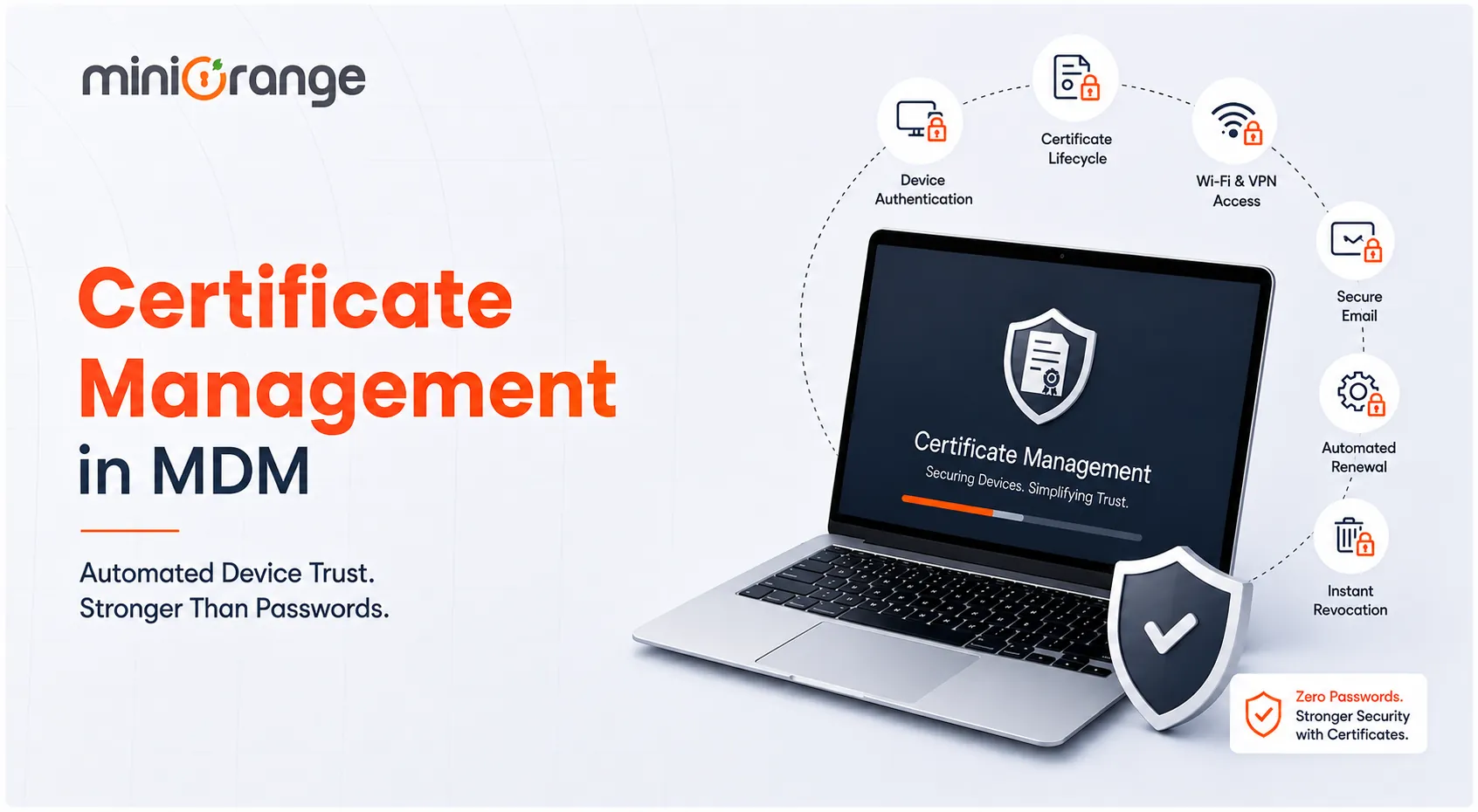
This guide breaks down how certificate management works inside MDM, the methods used to deploy it, and how to keep it running smoothly at scale.
What Is Certificate Management in MDM?
Certificate management in MDM is the process of issuing, distributing, renewing, and revoking digital certificates across every device your organization manages — all from a single console.
Think of it as an ID badge system for your device fleet. A certificate acts like that badge, quietly confirming to your network, email server, or VPN that a device belongs to your organization and has permission to connect.
A certificate management system built into an MDM platform handles this without manual intervention. Here’s how:
- A new laptop or phone enrolls.
- The system requests a certificate from a Certificate Authority (CA).
- The system delivers the certificate to the device.
- The system keeps track of when to renew or pull the certificate.
In this case, no one has to remember a password. No one has to type the wrong password three times in a row before locking themselves out. The device simply proves who it is.
This matters because most people still equate “what is certificate management” with something reserved for web servers and HTTPS padlocks. In an MDM context, it’s much broader. It covers laptops, tablets, phones, and even IoT endpoints. It also touches nearly every service those devices connect to, from corporate Wi-Fi to internal apps.
The Certificate Lineup: Which Type Does What
Not every certificate on a managed device does the same job. Some establish baseline trust between the device and your network, while others are tied to a specific person or use case.
1. Trust Certificates
Trust certificates, sometimes called root or intermediate certificates, establish the foundational chain of trust between a device and your organization’s certificate authority.
They tell the device, “this network, this server, and this app can be trusted,” without requiring the user to accept a warning screen every time they connect.
2. User-Specific Certificates
These certificates are issued to an individual and tied to their identity, not just their device.
They’re commonly used for email signing, encrypted messaging, and authenticating to internal systems. Through this, organizations know exactly which person is behind an action, not just which machine.
3. Device Certificates
Device certificates authenticate the hardware itself, independent of who is logged in. They’re the backbone of Wi-Fi and VPN authentication.
They let IT confirm a laptop or a phone is a known, managed asset before it ever touches a corporate resource.
4. SSL/TLS Certificates
These secure the actual data in transit between a device and a server, encrypting traffic so it can’t be intercepted or read by an outside party.
On managed devices, MDM platforms often deploy these alongside device certificates to lock down browser and app traffic.
Certificate Management Methods That Actually Work at Scale
Every MDM platform gives IT teams a handful of ways to actually issue and maintain these certificates. The method you choose usually comes down to fleet size, existing infrastructure, and how much manual control your security team wants to retain.
1. Simple Certificate Enrollment Protocol (SCEP)
SCEP is the workhorse of enterprise certificate deployment. It lets devices automatically request and receive certificates directly from a certificate authority without an admin manually generating and pushing each one.
For organizations managing hundreds or thousands of endpoints, SCEP removes the single biggest bottleneck: manual issuance.
It’s especially useful for automating renewal cycles, so certificates never lapse unnoticed.
2. Distributed Component Object Model (DCOM)
DCOM is a Microsoft protocol that allows software components to communicate directly across a network.
In MDM, DCOM acts like a secure backend communication channel that lets the MDM server speak to an on-prem Microsoft Certificate Authority (CA) to request and issue certificates.
3. Sectigo Certificate Manager (SCM)
SCM is a cloud-based certificate lifecycle management layer that plugs directly into an MDM platform.
Once integrated, devices enrolled in the MDM automatically receive certificates based on predefined policies. SCM handles monitoring, renewal alerts, and re-issuance in the background.
It’s particularly useful for hybrid environments spanning mobile, desktops, and cloud infrastructure. It also simplifies compliance reporting for standards like HIPAA and PCI DSS.
4. Certificate Authority (CA)
Whether it’s a built-in CA native to the MDM console or a third-party CA integrated through APIs, this is the source of truth that signs and issues every certificate.
Some organizations run their own internal CA for full control; others rely on a public or managed CA to reduce infrastructure overhead.
Either way, the CA is the anchor that every other method in this list depends on.
Why Is Certificate Management Important for IT and Security Teams?
Certificates aren’t nice-to-have bolted onto MDM. They’re increasingly the backbone of how modern IT teams handle certificate lifecycle management across an expanding, hard-to-track device fleet.
1. It Eliminates Password-Based Vulnerabilities
Passwords get reused, phished, and forgotten. Certificates can’t be typed into a fake login page, which removes an entire category of attack from the table.
2. It Reduces IT Support Overhead
Every password reset ticket takes time away from higher-value work.
Automated certificate issuance and renewal means fewer interruptions and a lighter workload for the help desk.
3. It Closes the Offboarding Gap
When an employee leaves, or a device is lost, revoking a certificate is instant.
There’s no waiting for someone to manually disable ten different accounts across ten different systems.
4. It Strengthens Compliance Posture
Regulations like HIPAA, PCI DSS, and GDPR increasingly expect organizations to demonstrate strong authentication controls.
A documented, automated certificate lifecycle gives auditors exactly the paper trail they’re looking for.
5. It Prevents Costly Outages
An expired certificate can silently break VPN access, email sync, or Wi-Fi authentication for an entire team.
Proactive lifecycle management catches this before it turns into a business disruption.
Where Is Certificate Management Used Across Enterprises?
A well-implemented certificate management solution doesn't sit in one corner of the network. It touches nearly every point where a device or user needs to prove trust.
1. Corporate Wi-Fi Access
Certificates let devices connect to secure Wi-Fi networks automatically.
Here, no one can type a shared password that eventually gets leaked or shared beyond its intended audience.
2. VPN Authentication
Remote and hybrid teams rely on VPNs daily.
Certificate-based authentication confirms a device is legitimate before it ever establishes a tunnel into internal systems.
3. Email Encryption and Signing
User-specific certificates secure corporate email, both encrypting sensitive messages and confirming the sender is actually who they claim to be.
4. Enterprise App and SSO Access
Certificates can authenticate a device before it’s even allowed to load an internal app or Single Sign-On (SSO) portal.
This adds a layer of trust that sits underneath the login screen.
5. IoT and Endpoint Fleets
As organizations connect more sensors, kiosks, and specialized hardware, certificates provide a scalable way to authenticate devices.
This averts the need for humans to type in credentials at all.
Common Risks and Challenges in Certificate Management
Certificates solve a lot of problems, but they introduce a few of their own if the lifecycle isn't managed carefully.
1. Expired Certificates Causing Outages
An overlooked expiration date can quietly cut off VPN, email, or Wi-Fi access for entire teams, often without a clear warning until someone is already locked out.
2. Manual Tracking Through Spreadsheets
Many IT teams will track certificates in spreadsheets. This works fine at a small scale and falls apart once the fleet grows past a few hundred devices.
3. Shadow Certificates
Shadow certificates are those that are issued outside of official policy, sometimes by a well-meaning developer or contractor.
They create blind spots that security teams don't even know exist until something breaks.
4. Weak or Outdated Cryptographic Standards
Older certificates issued with short key lengths or deprecated algorithms create exploitable weaknesses, even if the certificate itself hasn't expired.
5. Compromised Certificate Authorities
If a CA is breached, every certificate it has issued becomes suspect.
Without a fast revocation process, a single compromised CA can put an entire device fleet at risk.
Certificate Management Best Practices for IT Teams
Getting certificate management right isn't about buying the fanciest tool. It's about building consistent habits around a process that's easy to ignore until it fails.
1. Build a Complete Certificate Inventory
You can't handle what you don’t know.
Start by cataloging every certificate across your environment, including expiration dates, issuing CA, and the device or service it's tied to.
2. Automate Renewal and Issuance Wherever Possible
Manual processes don't scale, and they don't fail gracefully.
Protocols like SCEP take the guesswork out of renewal cycles, so certificates refresh before they lapse.
3. Set Tiered Expiration Alerts
Don't wait for a single warning right before expiration.
Configure alerts at 90, 60, and 30 days out so there's ample time to react if something goes wrong with a renewal.
4. Assign Clear Ownership
Every certificate should have a named owner responsible for its lifecycle.
Orphaned certificates with no accountability are exactly how expirations slip through the cracks.
5. Enforce Consistent Cryptographic Policy
Standardize key lengths, algorithms, and validity periods across the organization, and block issuance of anything that falls outside policy.
6. Choose a Platform With Cross-Platform Support
Your fleet almost certainly spans Android, iOS, Windows, macOS, and maybe Linux.
An MDM platform that supports certificate deployment consistently across all of them saves your team from juggling separate tools and workflows.
The Bottom Line: Trust Shouldn’t Be a Manual Process
Passwords were never designed to secure a fleet of thousands of devices spread across offices, home networks, and airport Wi-Fi. Certificates were.
The organizations getting this right aren't the ones with the most certificates. They're the ones that treat certificate management as an ongoing discipline rather than a one-time setup task, with automation, clear ownership, and consistent policy doing the heavy lifting.
Whether you're rolling out your first MDM solution or refining one you've had in place for years, certificate management is the layer that quietly keeps devices trusted, connections secure, and your help desk queue a little shorter.
FAQs
What is certificate management in simple terms?
Certificate management is the process of issuing, tracking, renewing, and revoking digital certificates that verify the identity of a device, user, or service, so systems can trust each other without relying on passwords.
How do you manage device certificates in an MDM platform?
Most MDM platforms manage device certificates through protocols like SCEP, direct upload via DCOM, or integration with a third-party certificate authority.
This allows IT to automate issuance, monitor expiration, and revoke certificates remotely when a device is lost or decommissioned.
Why do certificates expire, and what happens when they do?
Certificates expire to limit the damage a compromised key could cause over time.
When one expires, the device or service using it loses trusted access, which can block Wi-Fi, VPN, or email connections until the certificate is renewed.
Leave a Comment