

Introduction
WordPress powers more than 43% of all websites on the internet, making it the most widely used Content Management System (CMS) for everything from small blogs to enterprise sites. Its popularity comes from being easy to use, flexible, and supported by a large ecosystem of plugins and themes.
In recent years, many businesses have started using WordPress in a new way called Headless. Industry research shows that nearly 64% of enterprise companies now use a Headless CMS strategy.
In simple words, Headless using WordPress serves as the backend for managing and storing content, while the frontend is built with modern frameworks like React, Vue, Angular, Gatsby, Next.js, etc. The frontend determines how the content is displayed to users and shapes the speed, design, and interactivity of the digital experience.
This gives more flexibility but also creates challenges in managing authentication and secure user access. These challenges can be solved with Headless SSO for WordPress, which allows users to log in once and access everything securely.
In this blog, we’ll look at how Headless using WordPress works, why businesses are adopting it, and how Single Sign On (SSO) for Headless using WordPress ensures a seamless and secure login experience.
What is Headless using WordPress ?
A Headless using WordPress site uses WordPress to manage and organize content, while a separate frontend determines how that content is displayed. Developers can integrate modern JavaScript frameworks like React, Vue, Angular, Gatsby, Next.js, etc. to build fast, interactive, and scalable digital experiences.
This setup separates responsibilities between teams. Content editors continue using the familiar WordPress dashboard without worrying about design or code, while developers focus on building highly dynamic, customized user interfaces. The result is a flexible system where content can easily be delivered across websites, mobile apps, or any digital platform.
The frontend communicates with WordPress through the REST API (or GraphQL), fetching data in real time and rendering it into user-friendly pages. This not only creates smoother, more intuitive experiences for end users but also gives organizations the ability to reuse the same content across multiple channels.
Understanding the Headless Architecture
Headless using WordPress organizes a site into three interconnected layers:
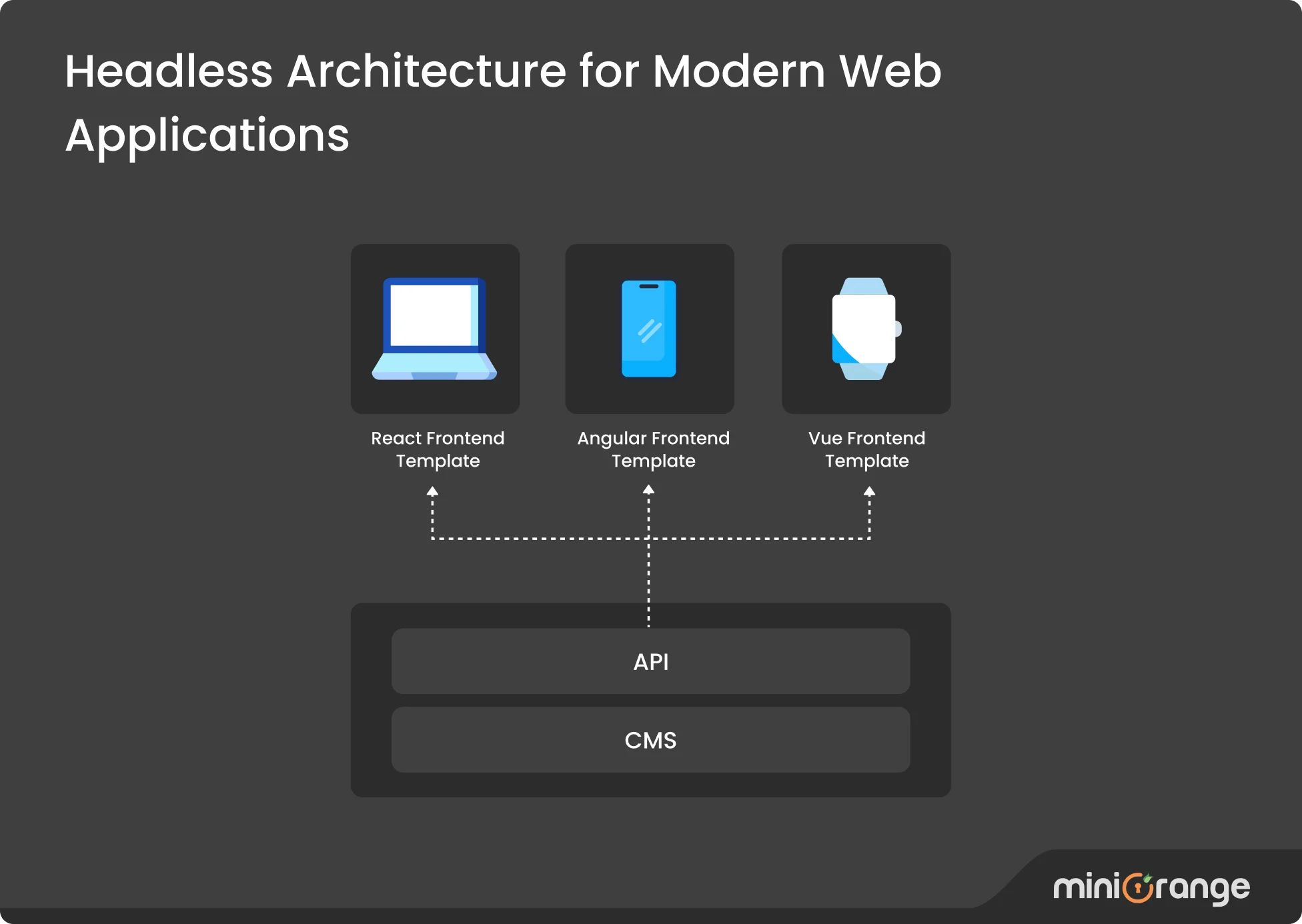
Content Layer (WordPress Backend)
- Manages all your content, users, and business logic
- Provides REST API endpoints for data access
- Handles authentication and user management
- Runs on your secure server infrastructure
API Layer
- Serves content as JSON data
- Handles authentication tokens
- Manages data formatting and filtering
- Enables real-time content updates
Presentation Layer (Frontend Framework)
- Creates user interfaces and experiences
- Consumes API data and displays content
- Handles user interactions and navigation
- Can be deployed anywhere (CDN, cloud platforms, etc.)
How Data Flows in Headless using WordPress
Here’s a simple breakdown of how Headless using WordPress delivers content:
- Content creators add or edit content in the familiar WordPress dashboard.
- WordPress saves this content in its backend database.
- Frontend frameworks like React, Vue, Angular, Gatsby, Next.js, etc. request data through the REST API or GraphQL.
- WordPress responds with structured JSON data.
- The frontend renders this data into user-friendly pages or app screens.
- User interactions (like logins, form submissions, or comments) send data back through the API when needed.
This flow ensures editors never have to change their workflow, while developers gain the freedom to design flexible, high-performance WordPress sites. Together, the two sides create a system that is future-proof, omnichannel, and highly adaptable.
Why Choose Headless using WordPress
Headless using WordPress is gaining popularity because it offers many benefits that modern websites and digital businesses need. Some of them are:
- Speed Boost: Decoupling WordPress from the site’s visual layer allows developers to use high-speed web technologies, resulting in content that loads far quickly. Users can navigate with minimal delays, which can make a dramatic difference for large or complex sites.
- Unlimited Creative Freedom: Instead of being boxed in by standard WordPress themes, designers can build whatever they imagine, with interactive features and unique layouts powered by tools like React or Vue. This creative liberty helps sites stand out and adapt to modern design trends.
- Universal Content Distribution: With Headless architecture, updates made in WordPress instantly reach not just the website but also apps, devices, or platforms connected via APIs, including mobile apps and smart displays. This ensures consistency and saves time.
- Stronger: By moving the user-facing site away from the WordPress backend, it becomes much harder for hackers to exploit security gaps. Attackers cannot reach systems through the usual theme or plugin routes, which minimizes risk.
- Ready for Growth Headless setups allow teams to revamp the look and feel of a site or adopt new front-end frameworks without overhauling the core content management. This makes it simpler to grow, evolve, and keep pace with web innovations.
- Effortless Connections: Since content is delivered by APIs, integrating WordPress with external platforms, business tools, or smart products becomes straightforward and reliable. This helps automate tasks and power smarter workflows.
How to convert a WordPress site to Headless using WordPress
miniOrange provides you with an easy solution that can enable you to convert your WordPress CMS into a headless CMS. You can integrate any frontend environment developed in Angular, React, Vue.js, Flutter, etc using WordPress APIs or you can create your own Custom APIs.
Let’s take a detailed look at the JS frameworks supported for WordPress:
| Framework | Strengths | Best For | Learning Curve | SEO Support | Example Use Cases |
|---|---|---|---|---|---|
| React | Large ecosystem, reusable components, React Native support | Scalable web and mobile apps | Moderate | Depends on setup (requires SSR/Next.js for strong SEO) | SaaS platforms, interactive apps, and content-driven sites |
| Angular | Strong TypeScript support, built-in enterprise tools | Complex enterprise-grade applications | Steep | Moderate (requires server-side rendering setup) | Enterprise dashboards, intranets, complex portals |
| Vue.js | Lightweight, flexible, easy to learn | Startups and SMBs | Easy | Good with Nuxt.js | Marketing sites, e-commerce, single-page apps |
| Gatsby | Static site generation, blazing-fast performance | Blogs, SEO-driven websites | Moderate | Excellent (static pre-rendering) | Blogs, documentation, content-heavy sites |
| Next.js | Hybrid static + server rendering, full-stack support | Modern web apps and enterprise portals | Moderate | Excellent (SSR + SSG out of the box) | E-commerce, portals, enterprise web apps |
Each of these frameworks integrates seamlessly with WordPress, enabling you to create modern, engaging, and dynamic WordPress websites.
Why SSO is Essential in Headless using WordPress
When organizations implement Headless using WordPress, it creates a significant challenge: how do you handle user logins across multiple WordPress sites?
With traditional WordPress, users log in once and everything works within the same system. But Headless using WordPress is different. Now you might have websites, mobile apps, and customer portals all using the same content. This makes it hard to keep users logged in consistently.
This is exactly where Single Sign On (SSO) for Headless using WordPress becomes essential. SSO lets users log in once and stay logged in across all your connected WordPress sites. They don't need to enter their password every time they switch between sites. This makes everything easier and faster for users.
SSO works through two key components. First, there's the Identity Provider (IDP), which acts as the central authentication system. This could be a commonly used service like Okta, Azure AD, Keycloak, Google Workspace, etc. The IDP's job is to verify who users are and confirm their credentials.
The second component is the Service Provider (SP), which is the WordPress site itself. The WordPress installation trusts the Identity Provider's verification and grants access based on that confirmation. The two systems communicate through secure protocols like SAML, OAuth, OpenID Connect, JWT, WS-Fed, etc., to make this handoff simple and secure.
When using SSO with Headless using WordPress, organizations can enforce the same security rules everywhere. Users can't create weak passwords or reuse the same password on multiple sites.
For businesses, this means seamless access across multiple platforms. Organizations can set different access levels for employees, customers, or partners. Everyone gets a secure and smooth experience without the hassle of multiple logins.
Benefits of SSO in Headless using WordPress
- Consistent and Secure Access: SSO enables smooth and secure user authentication across the WordPress backend and various frontend applications or microservices, upholding strong security practices within a decoupled architecture, etc.
- Enhanced User Experience: Users can log in once and gain instant access to all connected frontends and apps with a single credential set, eliminating the need to repeatedly enter usernames and passwords across different platforms, etc.
- Integration with Multiple Frontend Frameworks: Works seamlessly with a range of frontend technologies such as React, Angular, Gatsby, Flutter, Vue, and others by using REST APIs and token-based authentication methods like JWT, etc.
- Centralized Access Management: Simplifies user provisioning, session control, and access revocation, making it easier for IT teams to centrally manage security and reduce password-related support tickets, etc.
- Protocol and Identity Provider Support: Compatible with popular authentication protocols like SAML, OAuth 2.0, and OpenID Connect, and integrates with many Identity Providers, including Azure AD, Okta, Google Workspace, and others etc.
- Security Enhancements: Minimizes risks linked to password reuse and fatigue by letting users maintain a single strong password, with optional multi-factor authentication and conditional access capabilities to bolster security, etc.
Introducing the miniOrange Headless SSO Plugin for WordPress
To meet the growing need for secure and seamless authentication in decoupled WordPress environments, we developed the miniOrange Headless SSO Plugin for WordPress. Designed specifically for Headless architectures, it bridges modern JavaScript frontends with enterprise-grade authentication, making WordPress a secure, flexible, and future-ready CMS.
How Our Plugin Works
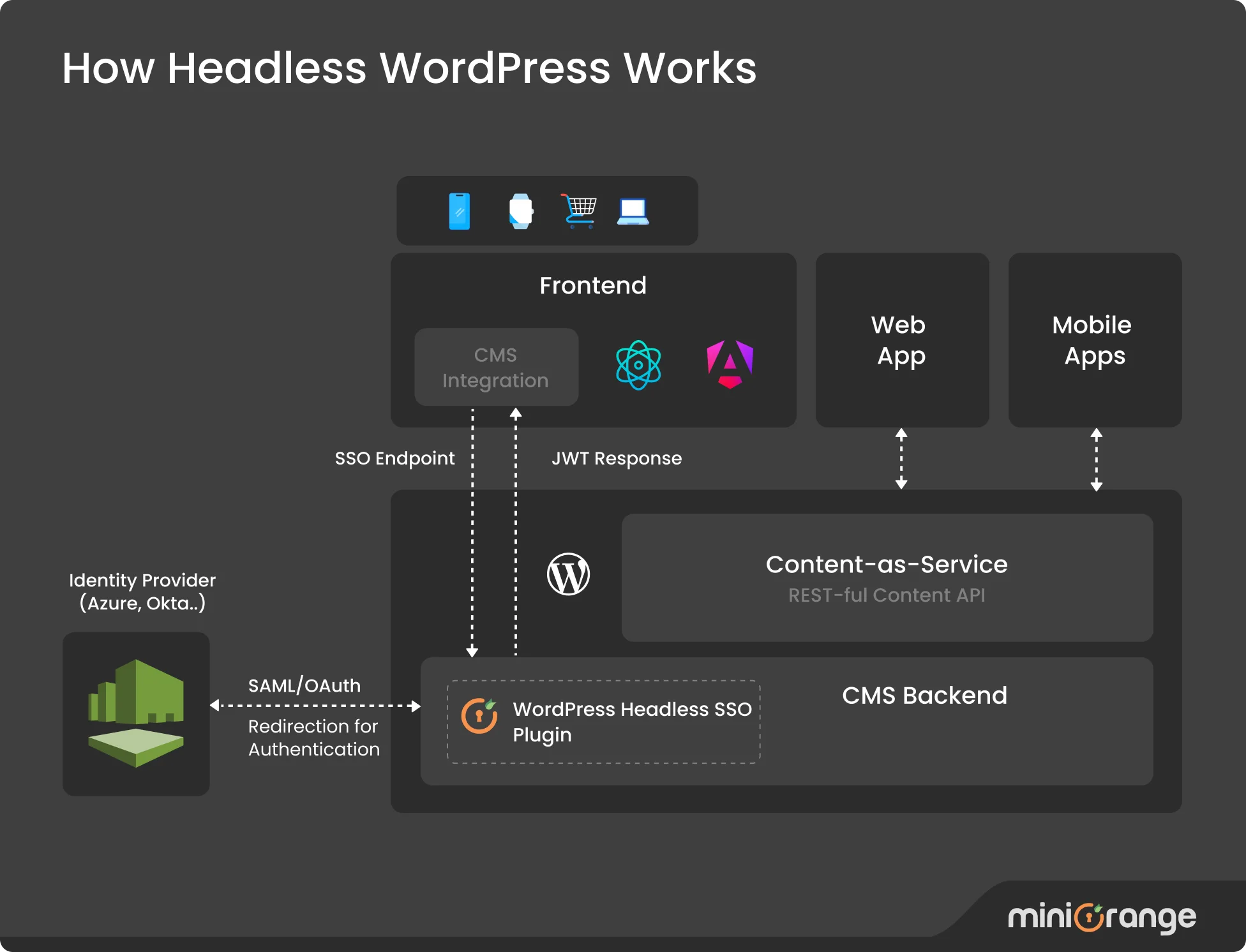 Step 1: User Request and Authentication Redirect
When a user tries to access a frontend application such as a website or mobile app built with React, Angular, Vue, Gatsby, Flutter, etc., the application redirects them to the chosen Identity Provider (Azure AD, Okta, Google Workspace, Keycloak, or others). Authentication is performed using protocols such as SAML or OAuth to ensure a secure, enterprise-grade login.
Step 2: Identity Provider Validation
The Identity Provider (IDP) verifies the user’s credentials. Once authentication is successful, it returns a response (SAML or OAuth) to the Headless SSO plugin for WordPress inside the CMS backend.
Step 3: Session and User Management in WordPress
The Headless SSO plugin for WordPress processes the response, checks if the user already exists, and can automatically create a new WordPress user account if needed. A WordPress session is then generated and managed for the authenticated user.
Step 4: Secure Token Transmission to Frontend
The plugin converts the validated SAML or OAuth response into a secure JSON Web Token (JWT). This token is sent back to the frontend app through a protected SSO endpoint, enabling a seamless connection with WordPress.
Step 5: Access to Content and Services
The frontend uses the JWT to confirm the authenticated session. This allows the user to securely access content, features, and services delivered through WordPress APIs.
How miniOrange Powers Enterprise-Ready Headless SSO for WordPress
Unlike generic SSO tools, this plugin is built specifically for Headless using WordPress and is uniquely positioned to address the authentication needs of both developers and businesses working in Headless environments.
Key Advantages
- Wide Protocol Support: SAML, OAuth, OIDC, JWT, WS-Fed, compatible with every major IDP.
- Cross-Platform Support: Works with all popular JavaScript frameworks and mobile applications.
- High Security: Features such as token encryption, session validation, and endpoint hardening protect sensitive data.
- Enterprise Scalability: Multi-tenant support, Multi-Factor Authentication (MFA), adaptive policies, and role-based access are available.
- Frictionless User Experience: One login for all frontends without affecting speed or performance.
Conclusion
Headless using WordPress is rapidly becoming the foundation for delivering content across websites, apps, and digital platforms. To keep these experiences seamless, authentication must be unified, secure, and scalable across every channel.
The miniOrange Headless SSO Plugin for WordPress makes this possible. It integrates with leading enterprise Identity Providers (IDPs) including Azure AD, Azure AD B2C, Okta, Keycloak, Ping Identity, Auth0, Google Workspace, etc. This turns WordPress into an identity-aware backend ready to scale confidently into the future.
To manage authentication easily across Headless using WordPress sites, visit our website or install the free plugin from the WordPress directory.
FAQs
Can WordPress be used Headless?
Yes. WordPress can function purely as a backend CMS, exposing content via REST API or GraphQL. Frontends built with React, Angular, Vue, Gatsby, or Next.js fetch JSON data from WordPress, enabling fully custom interfaces while retaining its content management.
When to use Headless using WordPress?
Use Headless using WordPress when you need full UI control, faster load times via static generation, or content across multiple channels. It’s ideal for teams skilled in React, Angular, Vue, Gatsby, Flutter, etc. Traditional WordPress is simpler for basic content-driven sites.
What is the difference between Headless using WordPress and traditional WordPress?
Traditional WordPress runs CMS and page rendering together in PHP using themes, plugins, and templates. Headless using WordPress splits the backend and frontend: it delivers content via APIs to JavaScript frameworks like React, Vue, Gatsby, etc., which handle all UI and interactivity.
How do I implement Single Sign On (SSO) for my website?
For standard builds, install miniOrange SAML Single Sign On (SSO); for decoupled frontends, download miniOrange Headless SSO for WordPress. Configure your IDP like Azure AD (Microsoft Entra ID), Okta, Keycloak, Salesforce, Google Workspace, etc., by exchanging metadata. Headless setups also require integrating the provided JWT validation code into your chosen framework.
Does WordPress offer Single Sign On (SSO)?
WordPress doesn’t include SSO out of the box, but you can add enterprise-grade authentication via free plugins. From the WordPress directory, install miniOrange SAML Single Sign On for traditional sites (supports SAML 2.0) and miniOrange Headless SSO for WordPress for API-driven frontends (supports SAML 2.0, OAuth 2.0, OpenID Connect, CAS, LDAP, WS-Fed, RADIUS, etc.), all integrating with popular IDPs like Azure AD (Microsoft Entra ID), Okta, Keycloak, AWS Cognito, Google Workspace, Auth0, etc.


Leave a Comment