

Enrolling devices is only one part of implementing Mobile Device Management (MDM). Before rollout, IT teams need to define ownership models, prepare the environment, configure policies, and verify that employees can access the apps and resources they need.
This MDM implementation checklist breaks the process into seven phases, from initial planning to ongoing device management. Use it to organize responsibilities, identify dependencies, and confirm that each phase is ready before moving to the next.
What Is an MDM Implementation Checklist?
An MDM implementation checklist is a structured set of tasks for planning, configuring, testing, and deploying a mobile device management solution. It covers device requirements, enrollment methods, security policies, applications, user communication, and ongoing management.
MDM implementation is broader than enrollment. Enrollment enlists the device with the organization's management system or service. Implementation includes preparing that management service, deciding which controls to apply, and establishing processes to support devices throughout their lifecycle.
A useful checklist should answer three questions:
- What needs to be completed?
- Who is responsible?
- What must be validated before the next phase begins?
MDM Deployment Checklist at a Glance
Use this MDM deployment checklist as a quick reference. The sections that follow explain the tasks and completion criteria for each phase.
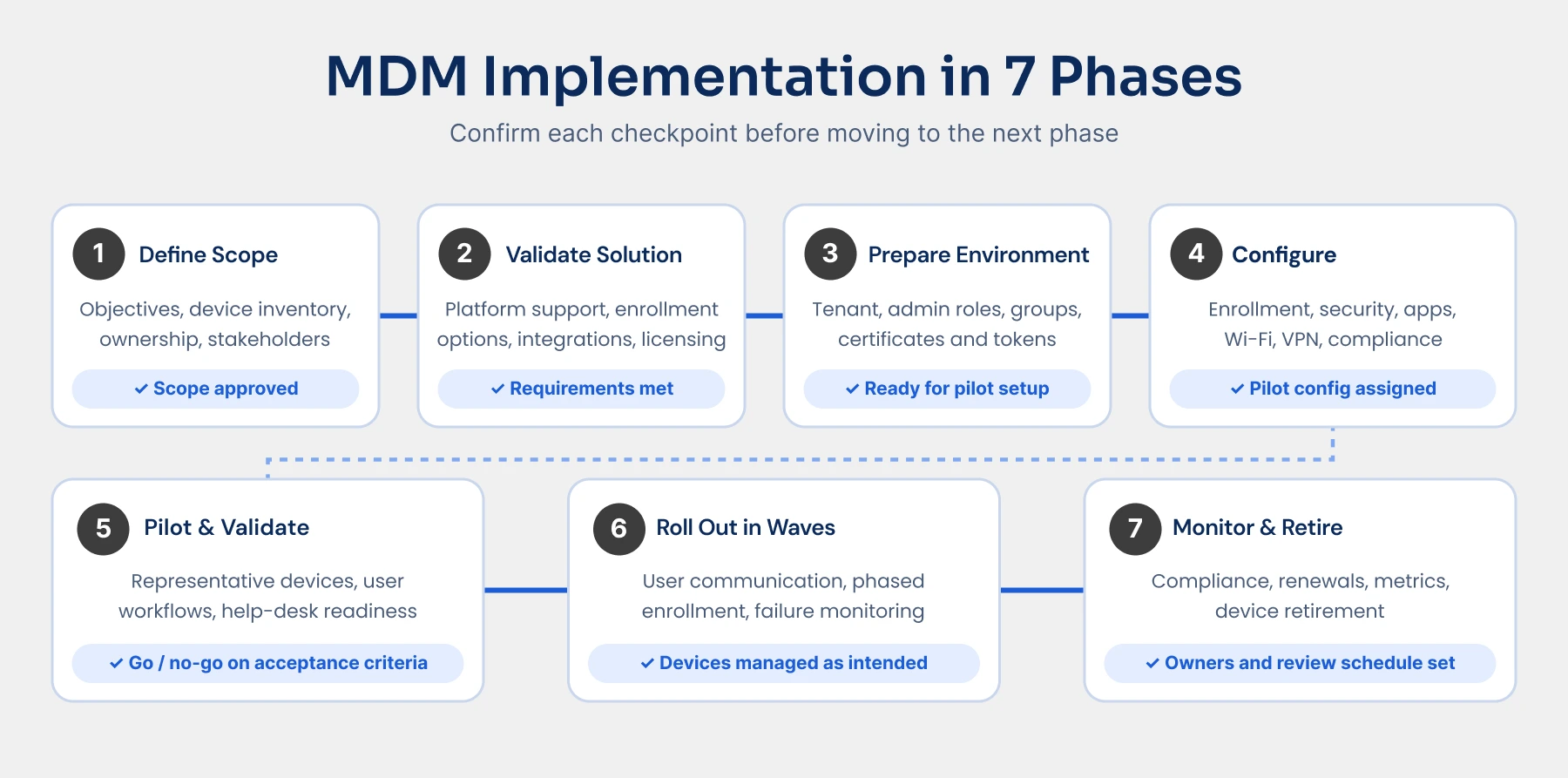
| Phase | Checklist | Completion Checkpoint |
|---|---|---|
| Planning | Define objectives; inventory devices; identify ownership models; assign stakeholders | Scope, responsibilities, and success criteria are approved |
| Solution validation | Check platform support; review enrollment options; validate integrations; confirm licensing | The solution meets documented requirements |
| Environment preparation | Configure the tenant; assign administrator roles; prepare groups; set up platform prerequisites | The environment is ready for configuration and pilot enrollment |
| Policy and enrollment configuration | Prepare enrollment profiles; configure security and compliance; assign apps; configure connectivity | Required configurations are ready for pilot devices |
| Pilot testing | Enroll representative devices; test business workflows; resolve issues; approve rollout | The pilot meets agreed acceptance criteria |
| Deployment | Communicate instructions; enroll devices in waves; monitor failures; provide support | Target devices are enrolled and functioning as intended |
| Ongoing management | Monitor compliance; maintain policies; track renewals; review metrics; retire devices | Operational ownership and lifecycle procedures are established |
The sequence matters. Preparing policies and applications before enrolling pilot devices allows teams to test the intended management experience, rather than enrollment alone.
MDM Implementation Checklist by Phase
A successful MDM rollout starts with clear decisions, not just device enrollment. Follow these seven phases to plan, configure, test, and deploy MDM, with checkpoints to confirm you're ready for the next step.
Phase 1: Define Your Deployment Scope and Success Criteria
Start by deciding what the deployment needs to accomplish. "Manage all devices" is not specific enough to guide policy decisions or measure results.
Document the business requirements, device population, and teams responsible for implementation.
- Define objectives, such as enforcing device requirements, distributing business apps, or reducing manual configuration
- Inventory devices by platform, OS version, ownership, location, and business use
- Distinguish corporate-owned, personally owned, shared, and dedicated devices
- Identify stakeholders across IT, security, HR, legal, and support, as appropriate
- Document BYOD privacy expectations and acceptable-use requirements
- Identify existing identity systems, applications, and network dependencies
- Establish measurable success criteria
Ownership is particularly important. A personally owned phone and a corporate-owned dedicated device should not automatically receive the same enrollment method or management policy. Deployment planning should account for those differences from the outset.
Suggested success measures include enrollment completion, compliance rates, required-app installation success, and enrollment-related support volume.
Before moving on: Confirm which devices are in scope, who owns each workstream, and what constitutes a successful rollout.
Phase 2: Validate Your MDM Solution Against Requirements
Whether you are selecting a new platform or implementing one already purchased, validate its capabilities against your actual environment.
A supported operating system does not necessarily mean every required management feature is available for every ownership or enrollment model.
- Verify support for the platforms and OS versions in your inventory
- Check enrollment options for each device ownership model
- Validate required security, application, and reporting capabilities
- Confirm compatibility with identity providers and business applications
- Review licensing requirements and administrative access
- Evaluate support resources and escalation options
- Identify migration requirements if devices already use another MDM service
These checks help establish whether the planned deployment is feasible.
If migration is involved, assess it separately from a new deployment. Device transition requirements can differ by platform and provider, including whether unenrollment, re-enrollment, or a supported migration workflow is required.
Before moving on: Confirm that every critical requirement has a supported implementation path.
Phase 3: Prepare Your MDM Environment and Platform Prerequisites
Next, prepare the management environment and the services it depends on.
This phase should establish administrative control, user targeting, and platform connectivity before devices are enrolled.
- Configure the tenant and required licenses
- Set up administrator roles with access appropriate to each responsibility
- Integrate the identity provider where required
- Prepare user and device groups for policy and application assignments
- Verify required network endpoints, ports, and proxy settings
- Configure platform-specific enrollment services, certificates, and tokens
- Document expiration dates and renewal responsibilities
- Verify that administrators can access the required consoles and services
Prerequisites vary. Apple deployments can involve Apple Push Notification service certificates and organization-linked enrollment services. Other platforms have their own setup requirements.
Assign an owner to each certificate, token, and integration. Recording an expiration date without assigning renewal responsibility leaves an avoidable operational gap.
Before moving on: Verify that the environment can authenticate the intended users and support the selected enrollment methods.
Phase 4: Configure Enrollment, Security, Apps, and Connectivity
Prepare the configuration that devices should receive before beginning the pilot.
Group policies by platform, ownership, and business use. Avoid applying a single configuration to the entire fleet simply because it is easier to administer.
Enrollment Configuration
- Select the enrollment method for each device group
- Create and assign enrollment profiles
- Define supported platform and ownership restrictions
- Prepare user enrollment instructions
- Document how existing managed devices will transition, if applicable
Security and Compliance
- Configure supported passcode and screen-lock requirements
- Configure or verify encryption requirements where supported
- Set minimum OS requirements and update policies
- Apply device restrictions appropriate to business use
- Define compliance rules, remediation actions, and exception handling
- Document who can perform remote lock, retirement, or wipe actions
Configuration and compliance serve different purposes. Configuration policies apply settings; compliance policies evaluate whether devices meet defined requirements. Where integrated access controls are available, compliance status can inform access decisions, but that enforcement must also be configured.
Applications and Connectivity
- Assign required and optional applications
- Configure managed app settings and supported protection policies
- Define app update and removal behavior
- Prepare Wi-Fi, VPN, and certificate profiles
- Configure email access where applicable
- Review assignments for conflicting or overlapping settings
Controls vary by platform, enrollment method, and ownership. Do not assume that a restriction or remote action available on a corporate-owned device is also available on a personally owned device.
Before moving on: Confirm that each pilot group has the correct enrollment profile, policies, applications, and connectivity settings assigned.
Phase 5: Pilot the Deployment and Validate User Workflows
A successful enrollment does not prove that the deployment is ready.
The pilot needs to verify that devices receive their configurations and that users can complete their everyday work.
- Select representative devices across platforms, ownership models, and business functions
- Test enrollment and provisioning
- Verify policy delivery and compliance evaluation
- Confirm that required apps install and function correctly
- Test access to business resources
- Validate Wi-Fi, VPN, and certificate-based connectivity
- Test non-compliance notifications and remediation
- Review enrollment instructions with users
- Confirm that the help desk can resolve common issues
- Document defects, fixes, and outstanding risks
Microsoft recommends using pilot feedback to improve configuration, documentation, and notifications before broader deployment.
Set acceptance criteria before testing starts. For example, pilot users should be able to enroll, receive required apps, and access approved resources without unresolved critical issues.
Validate disruptive remote actions only on designated test devices with authorization.
Before moving on: Obtain a go/no-go decision based on the agreed acceptance criteria, not simply the number of enrolled devices.
Phase 6: Roll Out MDM in Controlled Deployment Waves
Use the pilot findings to refine the rollout plan, instructions, and support procedures.
Deploy in manageable waves so the team can identify problems before they affect the wider organization.
- Notify users about the purpose of MDM and the enrollment process
- Explain what IT can manage and what remains private, especially for BYOD
- Provide platform-specific instructions and support contacts
- Group deployment waves by department, location, or device type
- Monitor enrollment failures, policy delivery, and app installation
- Keep support staff available during enrollment windows
- Define criteria for pausing a wave
- Validate each wave before expanding deployment
Track more than enrollment completion. A device may appear in the console while still missing a required app or experiencing connectivity problems.
Before moving on: Confirm that deployed devices are managed as intended and that unresolved issues have clear owners.
Phase 7: Monitor, Maintain, and Retire Managed Devices
MDM implementation should end with a handoff to ongoing operations, not an unattended dashboard.
Device management continues as employees change roles, devices age, applications change, and policies evolve. Retirement is also part of that lifecycle.
- Monitor device check-ins and compliance trends
- Investigate app installation and policy-delivery failures
- Review OS versions and update requirements
- Track certificate and token renewals
- Review administrator access and policy exceptions
- Maintain enrollment instructions and support documentation
- Define procedures for lost, replaced, and retired devices
- Connect device offboarding to employee offboarding
- Review implementation metrics on an agreed schedule
For device retirement, choose the appropriate supported action based on ownership and business requirements. Removing organizational management or data from a personal device is not the same as wiping a corporate-owned device.
Completion checkpoint: Ongoing tasks have named owners, documented procedures, and a review schedule.
Common MDM Implementation Mistakes to Avoid
The most preventable problems occur when teams skip dependencies or assume that one approach fits the entire fleet.
| Mistake | Better Approach |
|---|---|
| Using one enrollment method for every device | Match enrollment to platform, ownership, and business use |
| Enrolling before required configurations are ready | Prepare policies and app assignments before the pilot |
| Testing only one device type | Include representative platforms, ownership models, and workflows |
| Communicating only when enrollment begins | Explain expectations, privacy boundaries, and support options in advance |
| Measuring success only by enrollment count | Also validate compliance, application delivery, and resource access |
| Treating migration like a new deployment | Assess transition requirements and continuity of protection |
| Ending the project without an operational handoff | Assign responsibility for monitoring, renewals, exceptions, and retirement |
These practices reflect the importance of pre-enrollment configuration, representative pilots, user communication, and lifecycle management in deployment guidance.
Migration deserves particular attention. Intune documents scenarios requiring devices to leave their current MDM before enrollment, while Apple supports migration workflows for eligible managed devices. Neither process should be assumed to apply universally.
How Long Does MDM Implementation Take?
There is no reliable universal timeline for MDM implementation. The schedule depends on how much work is required to prepare the environment, configure policies, validate workflows, and transition devices.
Device count matters, but so do platform diversity, existing infrastructure, integrations, ownership models, and migration requirements. Deployment guidance emphasizes assessing these dependencies before rollout.
| Deployment Scenario | Factors to Account for |
|---|---|
| Small organization | Available IT resources, enrollment readiness, and the number of platforms and integrations |
| Mid-size organization | Department-specific policies, application requirements, user communication, and deployment waves |
| Enterprise | Multiple locations, stakeholder approvals, delegated administration, and broader integration requirements |
| Complex or multi-platform environment | Different enrollment workflows, platform-specific controls, and more extensive validation |
| Migration from another MDM | Device transition requirements, policy recreation, user coordination, and protection continuity |
These categories overlap. An enterprise may also have a multi-platform environment and be migrating from another MDM.
Build the schedule around milestones: requirements approved, prerequisites completed, configurations prepared, pilot accepted, and deployment waves validated. That produces a more defensible estimate than assigning a fixed duration based on organization size alone.
Turn Your MDM Checklist Into a Deployment Plan
A successful MDM implementation is not just about getting devices enrolled. It is about confirming that policies work, required apps are available, and employees can access business resources without unnecessary friction.
Use this MDM implementation checklist to assign responsibilities, track progress, and validate each phase before expanding the rollout. Start with a representative pilot, resolve issues early, and make ongoing management part of the plan, not an afterthought.
Connect with the miniOrange MDM experts to learn more.
FAQs
1. What should organizations prepare before implementing MDM?
Prepare a device inventory, ownership classifications, business requirements, stakeholder responsibilities, and success criteria. Then verify platform support, licensing, identity dependencies, network access, and enrollment prerequisites before configuration begins.
2. What is the difference between MDM enrollment and device configuration?
Enrollment establishes the device's relationship with the management service. Device configuration applies settings such as restrictions, connectivity profiles, and application assignments. Enrollment enables management, but successful configuration still needs to be verified.
3. Do devices need to be factory reset before MDM enrollment?
Not always. Reset requirements depend on the platform, enrollment method, ownership model, and current device state. Check the requirements for the selected workflow before asking users to reset devices or planning a migration.
4. Can organizations migrate from one MDM solution to another?
Yes, but the process varies. Some transitions require unenrollment and re-enrollment, while supported platform-specific workflows may provide another path for eligible devices. Assess policy transfer, application behavior, user involvement, and continuity of management before proceeding.
5. How can organizations measure MDM implementation success?
Measure whether the deployment meets its original objectives. Useful indicators include enrollment completion, compliance rates, required-app installation success, resource-access issues, and support requests. Review these results after each deployment wave so that problems can be addressed before rollout expands.
Leave a Comment