
Not too long ago, MCP and MCP Servers barely came up in AI conversations. Today, they're hard to miss. Whether you're reading about AI, exploring developer tools, or following the latest WordPress updates, chances are you've come across them.
So, what's changed? Organizations now integrate AI into CMSes, websites, enterprise platforms, and business applications. Developers need a standard way to let AI discover, access, and interact with these systems securely.
That's exactly what MCP solves. In this guide, you'll learn what MCP and MCP Servers are, how they work, why they matter, and how WordPress supports them.
What Is an MCP?
Think of the Model Context Protocol (MCP) as the USB-C port for AI. A USB-C port lets different devices use the same connector, so you don't need a different cable for each one.
MCP follows the same idea. It gives AI assistants and applications a shared language, so developers build an integration once and use it across multiple AI tools.
An MCP Server puts that standard into practice for a specific application. It exposes the application's tools, data, and resources, allowing MCP-compatible clients to understand what's available and use those functions.
Now, WordPress supports MCP as well. A WordPress MCP Server exposes approved abilities from WordPress core and installed plugins, so MCP-compatible clients like ChatGPT, Claude, and Cursor can work with your website without custom integrations.
Depending on the abilities available on your site, an MCP-compatible client can:
- Create, edit, and publish posts or pages
- Search and retrieve WordPress content
- Upload and organize media files
- Manage WooCommerce products and orders
- Trigger custom plugin workflows
The exact abilities depend on your WordPress setup and the plugins installed on your site.
Why Was MCP Created?
Before Anthropic introduced the Model Context Protocol (MCP), connecting AI assistants to external tools was a frustrating process. Every AI model had its own way of communicating, so developers ended up building separate connections for websites, databases, APIs, and business applications.
This often meant:
- Rebuilding the same integration for every AI assistant
- Spending more time maintaining connections than creating new AI features
- Vendor lock-in, where switching to a different AI provider meant rebuilding integrations
Anthropic created MCP to simplify this process. Developers can build a connection once and use it with any MCP-compatible client. The result is less maintenance, more flexibility, and more time to focus on building useful AI experiences.
MCP vs. Traditional APIs
Both MCP and REST APIs connect applications, but they're built for different use cases. REST APIs are designed for developers to integrate software through code. MCP is designed for AI assistants, helping them discover available tools and interact with applications without custom integrations for each AI client.
| Feature | Traditional REST API | MCP |
|---|---|---|
| Primary User | Human developers and traditional software applications. | AI models and autonomous agents. |
| Feature Discovery | Developers must manually read documentation to know what the API can do. | The AI dynamically asks the server what tools are available at runtime. |
| Integration Method | Requires custom code to be written for every single endpoint. | Uses a universal standard so one connection works across multiple AI tools. |
| Memory & Context | Usually, "stateless," meaning each request is independent, with no memory of past requests. | Built to be "stateful," actively maintaining the context of an ongoing conversation. |
| Response Format | Returns raw data structures designed for traditional software to process. | Returns compact, transformed data specifically optimized to reduce AI token costs. |
| Adaptability | If a feature changes, a developer must manually rewrite the code to fix the connection. | If a new feature is added, the AI instantly detects and uses it without code updates. |
What Problems Does an MCP Server Solve?
An MCP Server makes AI applications more practical, reliable, and secure. It helps developers work with multiple AI assistants, gives AI access to current information, protects sensitive systems, and allows AI to complete approved tasks.
1. The Integration Nightmare
Building a separate integration for every AI assistant doesn't scale. MCP Servers provide one connection that works with multiple compatible AI clients, so developers don't have to rebuild the same integration for ChatGPT, Claude, Cursor, and others.
2. The Context Disconnect
AI only knows what it was trained on. MCP Servers give it access to live information, such as WordPress posts, customer records, inventory, or support tickets, so responses stay accurate and up to date.
3. Security and Data Control
AI shouldn't have unrestricted access to your systems. Some MCP Servers allow you to enforce permissions and policies, so an AI assistant can update a blog post, for example, without gaining access to user accounts or billing data.
4. Moving Beyond Read-Only AI
AI becomes far more useful when it can complete work for you. MCP Servers let AI publish WordPress articles, update WooCommerce products, create Jira tickets, search internal documentation, or retrieve CRM records without switching between applications.
5. Better Control and Visibility
Organizations need to know what AI is doing behind the scenes. MCP Servers log every request and support approval workflows, making it easy to review actions, investigate issues, and meet compliance requirements.
MCP vs. MCP Server: What's the Difference?
MCP and an MCP Server are closely related, but they are not the same. Here's how they differ.
| Feature | MCP (Model Context Protocol) | MCP Server |
|---|---|---|
| What it is | An open communication standard | Software that implements the MCP standard |
| Purpose | Defines how AI assistants and applications communicate | Connects AI assistants to applications through MCP |
| Role | Sets the communication rules | Receives requests, processes them, and returns responses |
| Connection | Defines how a connection should work | Creates the actual connection between AI and an application |
| Data Access | Defines how data can be requested | Retrieves data from the connected application |
| Applications | Works with any MCP-compatible application | Connects to a specific application, such as WordPress, GitHub, Slack, or a database |
| Example | The MCP specification | A WordPress MCP Server, GitHub MCP Server, or Slack MCP Server |
How Does an MCP Server Work?
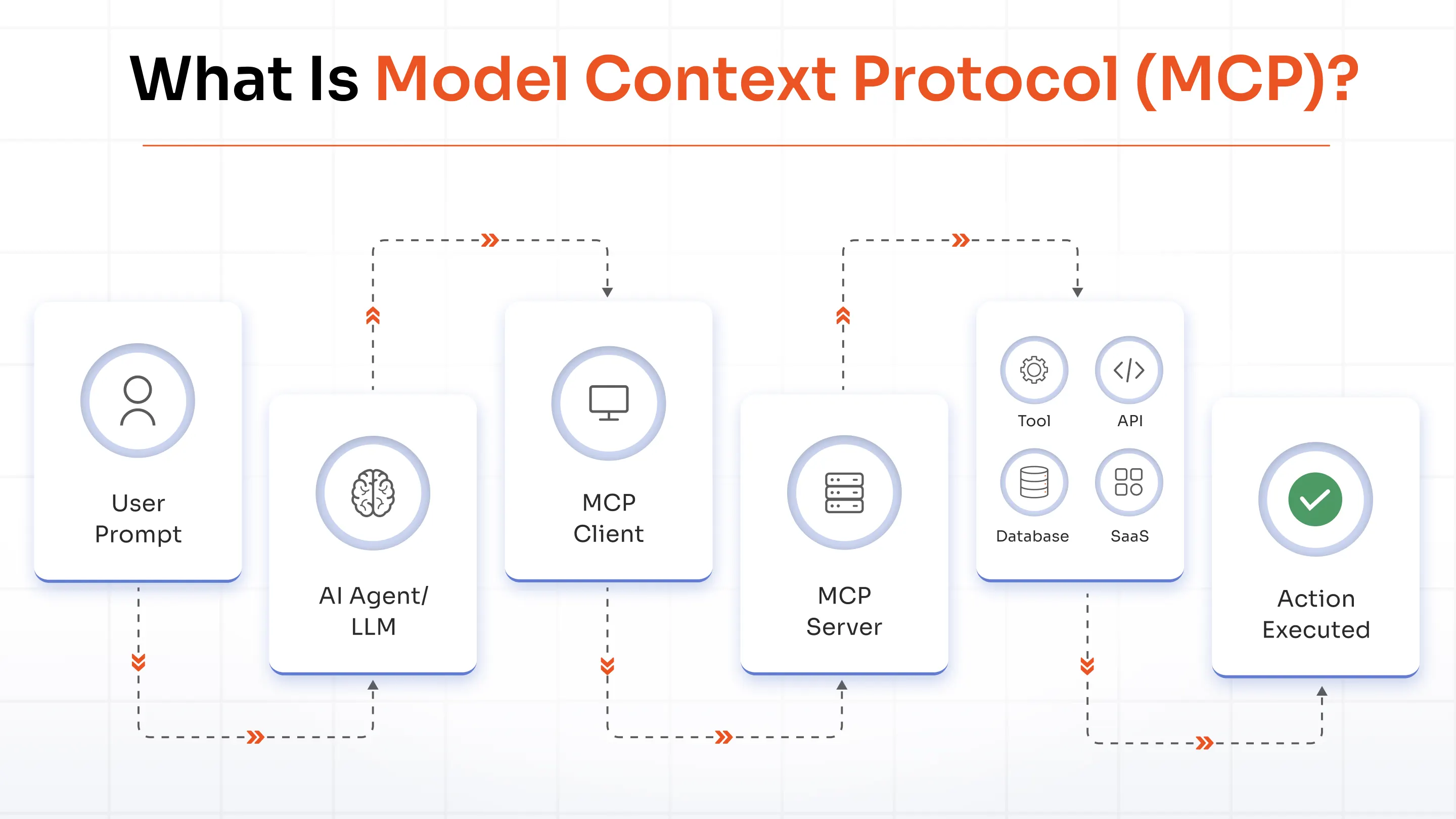
Every MCP request follows the same process. The client sends a request, the MCP Server executes the appropriate action, and returns the result.
Here's how it works, step by step.
1. MCP Architecture
Every MCP setup includes three core components that work together:
- MCP Host: The AI application users interact with, such as ChatGPT, Claude, or Cursor.
- MCP Client: Sends requests from the host to the MCP Server using the Model Context Protocol.
- MCP Server: Connects AI to external systems like WordPress, GitHub, databases, or business applications and executes approved requests.
2. Handshake
The process starts with a handshake. The client identifies itself, and the server verifies its identity using credentials like OAuth or an API key. Once verified, the connection is established.
3. Capability Discovery
Next, the client asks what the server supports. The server responds with its available capabilities, such as tools, resources, prompts, and supported protocol features. This discovery happens automatically, so developers don't need to configure each integration manually.
4. Tool Discovery
The client then retrieves the available tools along with their inputs and expected outputs. For example, a WordPress MCP Server might expose tools to publish posts, update WooCommerce products, search content, or retrieve site settings.
5. JSON-RPC Communication
Once the right tool is selected, the client sends the request using JSON-RPC 2.0. The server processes the request and returns the result or an error if the request can't be completed.
6. Response Handling
Finally, the server sends the response back to the client, which passes it to the host application. The user receives the requested information or confirmation that the action was completed successfully.
Step-by-Step: Connect Claude Desktop to Your WordPress MCP Server
Connecting Claude Desktop to your WordPress site takes just a few steps. Once the connection is complete, Claude can securely interact with your site based on the permissions you define.
Note: We are using Claude Desktop as an example, but you can connect any MCP-compatible AI client, such as ChatGPT or Cursor, by following the dedicated setup guides available on our website.
Step 1: Install the Secure MCP Server Plugin
- Log in to your WordPress admin dashboard
- Go to Plugins → Add New
- Search for miniOrange Secure MCP Server
- Click Install Now, then Activate
Step 2: Configure AI Access
- Navigate to Tools → Secure MCP Server
- Open the Abilities tab to view the available WordPress Abilities
- Disable any abilities you don't want AI to discover or use
- Open the Connect to AI tab and copy your MCP endpoint URL
Example:
https://your-site.com/wp-json/mosmcp/v1/mcp
Step 3: Connect Claude Desktop
- Open Claude Desktop
- Go to Settings → Developer → Edit Config to open the
claude_desktop_config.jsonfile - Add your WordPress MCP Server configuration inside the
mcpServerssection
{
  "mcpServers": {
    "wordpress-site": {
      "command": "npx",
      "args": ["-y", "@automattic/mcp-wordpress-remote@latest"],
      "env": {
        "WP_API_URL": "https://your-site.com/wp-json/mosmcp/v1/mcp"
      }
    }
  }
}
- Save the file and restart Claude Desktop
Step 4: Authorize the Connection
- Start a new chat in Claude Desktop
- Claude will open a one-time OAuth authorization flow in your browser
- Sign in to WordPress and approve the access request
Step 5: Test the Connection
Try a simple prompt, such as:
Draft a blog post titled "Introduction to WordPress AI Security" and save it as a draft
If everything is configured correctly, Claude will create the draft in your WordPress site. Open Posts in your WordPress dashboard to verify that the draft was created successfully.
Benefits of MCP Servers
Here are some of the biggest advantages of using an MCP Server.
1. Feed AI with Live Data
Give AI access to current information from your website, business applications, and databases. This helps it provide answers and complete tasks using the latest available data.
2. Connect AI Through One Standard
One MCP Server works with multiple MCP-compatible AI assistants. Your team can adopt new AI tools without building separate integrations each time.
3. Reduce Development and Maintenance Effort
Managing one connection is much easier than maintaining several custom integrations. That means less time spent on updates and more time building new features.
4. Expand AI Capabilities Without Rebuilding Integrations
Adding new tools doesn't mean starting from scratch. Once they're exposed through the MCP Server, compatible AI assistants can discover and use them automatically.
5. Keep AI Access Under Control
Decide what AI can access and what it can do. Permissions, authentication, approval workflows, and audit logs help keep sensitive systems protected.
6. Prepare for Future AI Applications
New AI assistants will continue to appear. Since MCP is an open standard, your existing integrations are ready to work with future MCP-compatible clients.
Real-World MCP Server Use Cases
Here are some practical ways an MCP server helps AI agents interact with business applications and automate everyday workflows.
1. AI Software Development
Development teams connect AI agents to GitHub, GitLab, Jira, Linear, and CI/CD platforms to accelerate coding, debugging, code reviews, and deployments.
Example: A developer can ask Claude Desktop to investigate a failed deployment. Claude reviews the GitHub repository through the GitHub MCP server, identifies the faulty commit, and prepares a pull request linked to the related Jira issue.
2. Enterprise Knowledge Retrieval
MCP Servers let AI search approved knowledge sources such as Confluence, SharePoint, or internal documentation.
Example: A new employee might use ChatGPT to find the latest VPN setup guide. ChatGPT retrieves the documentation from Confluence through the MCP server and returns the most recent instructions.
3. Sales Operations and Customer Support
MCP Servers give AI secure access to customer, order, and CRM data so support teams have the full picture.
Example: A customer asks about a delayed order. An AI agent connected to the WooCommerce MCP server checks the order status, verifies the shipping details, and drafts a response for the support representative.
4. Hyper-Personalized Marketing Campaigns
MCP Servers connect AI agents with marketing and analytics platforms to create campaigns based on real customer behavior.
Example: A marketer may use Gemini to identify customers who abandoned checkout. Gemini analyzes data from Google Analytics 4, HubSpot, and Mailchimp, segments high-intent customers, and prepares a personalized follow-up email campaign.
MCP Server for WordPress
A WordPress MCP server allows AI assistants such as Claude, ChatGPT, Cursor, and other MCP-compatible clients to interact with WordPress and WooCommerce using the Model Context Protocol (MCP). Instead of giving AI agents direct administrator access or unrestricted REST API access, it provides a standardized interface to WordPress. AI assistants discover the available WordPress Abilities and use only the actions your site exposes.
How to Connect an MCP Server to WordPress
Setting up an MCP server for WordPress takes three simple steps:
- Install a WordPress MCP server plugin on your website.
- Connect your MCP client using OAuth 2.1 to establish a secure connection.
- Allow the AI agent to discover your WordPress Abilities and use the approved actions.
After the setup is complete, the AI assistant interacts with your WordPress site based on the permissions you define. Refer to the product documentation for detailed setup instructions.
The Three WordPress Entry Points That Need Governance
AI agents can access WordPress through more than one interface. To secure AI access, governance must cover all three entry points.
WordPress Abilities These define the actions an AI agent discovers and performs through MCP. They determine what the AI assistant is allowed to do.
WordPress REST API AI assistants use the REST API to read and update WordPress and WooCommerce data, including posts, pages, products, users, and orders.
WP-CLI Some AI workflows use WP-CLI to execute administrative commands directly on the WordPress site. If you secure only one of these entry points, the others remain exposed. Effective AI governance must apply the same security policies across WordPress Abilities, the REST API, and WP-CLI.
Why Governance Matters More on WordPress
A WordPress site stores valuable business data, including customer PII, WooCommerce orders, website content, user accounts, and site settings. An AI agent with administrator-level access can read sensitive information, modify content, change site settings, or perform other high-impact actions.
As AI becomes part of everyday WordPress workflows, organizations need governance to verify every AI request, enforce permissions, and ensure AI agents access only the resources they are authorized to use.
Bring Secure AI to Your WordPress Site
If you're planning to integrate AI agents like ChatGPT, Claude, or Cursor with your WordPress site, the miniOrange MCP Server for WordPress provides a secure, policy-driven way to do it. It enables AI agents to interact with your WordPress site and WooCommerce store through the Model Context Protocol (MCP), while giving you complete control over what they can access and the actions they can perform. With built-in governance, policy enforcement, human approval workflows, and audit logs, you stay in control of every AI action.
To learn more about the miniOrange Secure MCP Server for WordPress, visit our website or directly install it from the WordPress marketplace.
Frequently Asked Questions
Is there an MCP Server for WordPress?
Yes, the miniOrange Secure MCP Server for WordPress is one such solution. It allows MCP-compatible applications to securely connect to your WordPress site through the Model Context Protocol, retrieve information, and perform approved actions while giving administrators control over authentication, permissions, and AI access.
What is the purpose of an MCP Server?
An MCP Server acts as a bridge between client applications and external systems. It gives AI access to data, tools, and services through a standard communication protocol, making integrations easier to build, manage, and scale.
How do I enable MCP in WordPress?
To enable MCP in WordPress, install an MCP Server plugin, connect an MCP-compatible client, configure authentication, and grant access to the WordPress capabilities you want the client to use.
Does ChatGPT support MCP?
Yes, ChatGPT supports MCP in supported environments, allowing it to connect to compatible MCP Servers and access external tools, live data, and services exposed through the Model Context Protocol.
Does Claude support MCP?
Yes, Claude was one of the first AI applications to support the Model Context Protocol. It can connect to compatible MCP Servers to access tools, resources, and other supported capabilities.
Does MCP use OAuth?
Not always. MCP doesn't require a specific authentication method, but many MCP Server implementations use OAuth 2.1 to securely authenticate client applications. Other methods, such as API keys, may also be supported.
Can multiple AI agents use one MCP Server?
Yes, multiple MCP-compatible applications can connect to the same MCP Server, provided each client is authenticated and has the required permissions to access its resources and tools.
Is an MCP Server secure?
Yes, an MCP Server can provide a secure way to connect AI applications with external systems when it is configured correctly. Features such as authentication, access controls, permissions, audit logging, and governance policies help ensure that only authorized clients can access data and perform approved actions.
About the Author

Content Writer
Alankrita Shrivastava is a B2B technical content writer specializing in SaaS, cybersecurity, and WordPress security. She translates complex security concepts into clear, practical insights that support both technical decision-making and business outcomes. At miniOrange, she develops content on IAM, including SSO, MFA, and User Lifecycle Management, along with WordPress Plugin Security. She also covers broader security areas such as UEM, MDM, CASB, and DLP. Her work focuses on real-world use cases, security best practices, and solution-driven guidance that helps organizations assess risks, improve access control, and strengthen their overall IT security posture.
Leave a Comment