
Are you trying to reduce Atlassian Cloud costs? Runaway software expenses are usually driven by three specific factors: dormant user licenses, slow manual provisioning, and paying for full access seats for temporary external collaborators.
To optimize Atlassian Cloud costs, you need to address these root cost drivers directly rather than paying for seats nobody uses. You can lower costs by automating user lifecycles, deploying SCIM to auto-offboard users, and utilizing secure external sharing links instead of buying extra licenses.
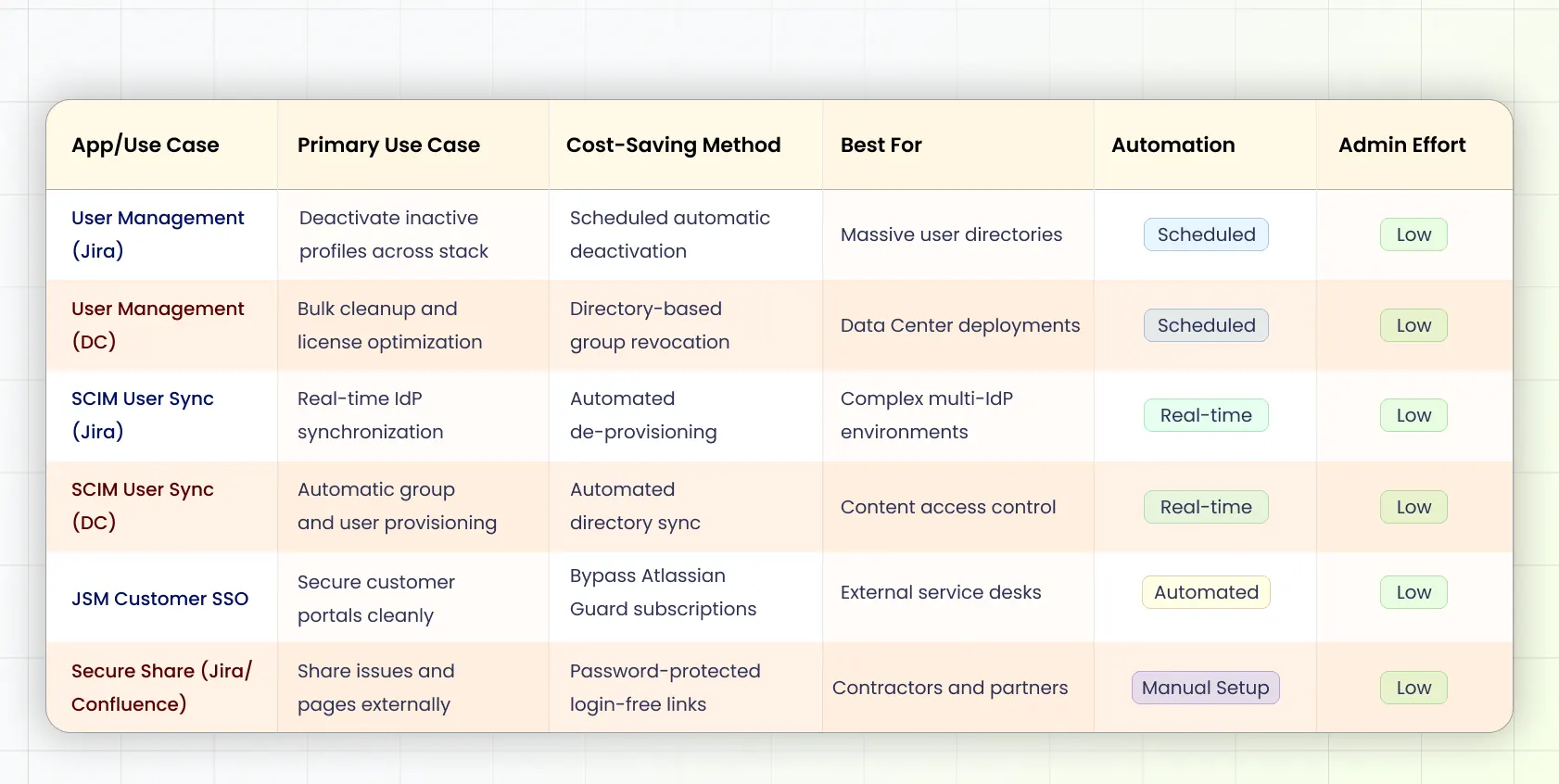
How to Eliminate Inactive and Unused Licenses
Dormant accounts can increase your Jira Cloud license costs without you realizing it. Employees switch roles or leave your company, yet their seats stay active within licensed groups. Manually reviewing user activity takes hours, which leads to delayed cleanups.
The User Management for Jira & Auto-deactivation (inactive user) app addresses this through automated user lifecycle management. You can configure inactive-user deactivation based on last login activity and stop paying for unused seats.
The app also provides bulk user operations, visual inactivity dashboards, email notifications before deactivation, and automatic access restoration for returning users through Slack, Email, or the Jira Service Management (JSM) portal.
Instead of reviewing thousands of accounts every quarter, you automate the process while also keeping your license usage optimized.
How to Automate Onboarding and Offboarding With SCIM
Manual lifecycle governance causes administrative bloat and often leaves paid orphan accounts behind. When an IT admin has to copy directory updates from an external Identity Provider (IdP) into Jira or Confluence manually, delays happen. If a terminated employee is not offboarded from Atlassian instantly, you keep paying for their seat.
The manual work often becomes expensive long before licensing does.
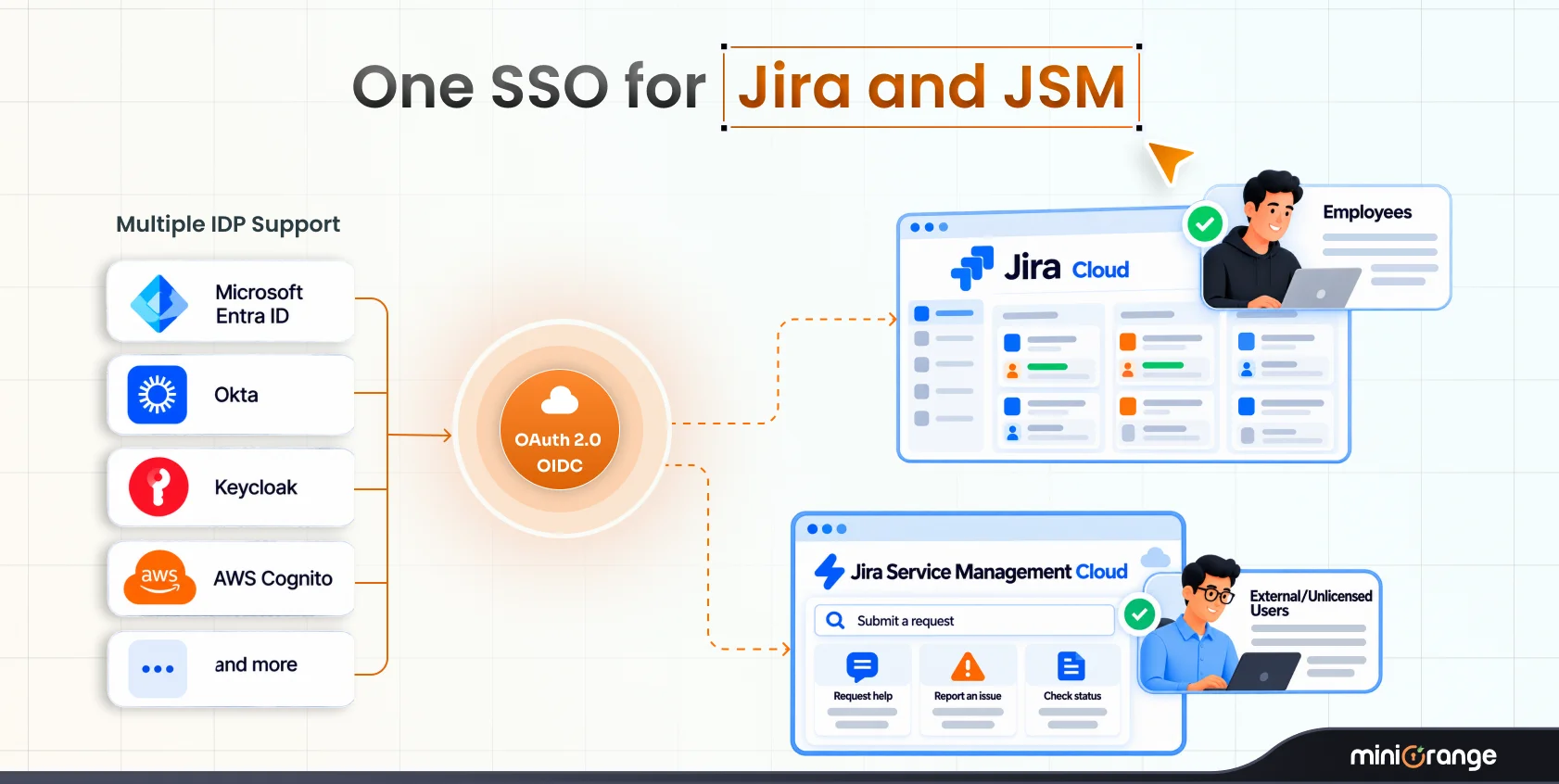
The SCIM Provisioning, User Sync & Group Sync app automates much of that repetitive work, making it one of the best Atlassian apps to reduce Cloud costs. It synchronizes users and groups from enterprise IdPs, including:
and other SCIM-compliant providers.
The moment an account is modified or disabled in your central identity directory, the change triggers real-time de-provisioning inside Jira or Confluence Cloud.
You can run provisioning manually, schedule synchronization at regular intervals, or configure real-time provisioning. The app also supports configurable provisioning options, user and group filtering, attribute transformation, and username matching through regular expressions.
How to Let External Users Collaborate Without Buying Extra Licenses
Sharing progress updates with external contractors or partners often creates an expensive licensing trap. Native collaboration options often require purchasing additional Jira or Confluence licenses for someone to look at a single page or ticket. Opening your entire platform to anonymous users creates severe data security risks.
Secure Share solves this problem by allowing you to create secure access links for Jira issues and Confluence pages. External users can view shared content without requiring Jira or Confluence licenses.
You can protect access with passwords, expiration dates, IP restrictions, and identity-provider-based permissions. Administrators can also control whether external users can comment, upload attachments, or simply view shared content.
This lets you collaborate externally while keeping license costs under control.
Which App Should You Choose?
Choosing from the best Atlassian apps to reduce Cloud costs depends on what is driving your Atlassian Cloud spend. Start by identifying where your Atlassian Cloud spend is coming from.
- Your licenses keep increasing because inactive users remain active: Choose User Management.
- Your IT team spends too much time creating and removing user accounts: Choose SCIM Provisioning, User Sync & Group Sync.
- Employee offboarding is slow and manual: Choose SCIM Provisioning, User Sync & Group Sync.
- Contractors or vendors only need access to a few Jira issues or Confluence pages: Choose Secure Share.
- You frequently collaborate with external customers and partners: Choose Secure Share.
User Management for Jira & Auto-Deactivation (Inactive User) miniOrange
Best For: Organizations struggling with inactive users and unnecessary license consumption.
What It Does: The User Management app is designed to automate license optimization by identifying inactive users and taking action before they continue consuming paid licenses. You can schedule an automatic cleanup of inactive users based on last login activity across Jira.
Problem Solved: Inactive users drive up licensing costs. Long-invited users who never actually accessed the platform also occupy paid seats. Manually finding and deleting them is incredibly time-consuming.
Cost Reduction: You save on extra license consumption due to dormant accounts.
Key Features:
- Bulk deactivate, delete, and restore users
- CSV import and export
- Email notifications before deactivation
- Group exclusions for administrators and critical teams
- Audit logs for compliance
- Auto-restore access for returning users through Slack, Email, or the JSM portal
- Cleanup of users who never logged in after being invited
Choose this app if:
- You want ongoing Atlassian license cost optimization.
- You regularly discover inactive users consuming paid licenses.
- You want to automate user cleanup instead of performing manual audits.
SCIM Provisioning, User Sync & Group Sync for Jira by miniOrange
Best For: Organizations using an enterprise IdP for Jira user lifecycle management.
What It Does: The SCIM Provisioning, User Sync & Group Sync for Jira app automatically synchronizes users, groups, portal-only customers, and directories between your IdP and your entire Atlassian stack through SCIM and REST APIs.
Problem Solved: Manual user provisioning and offboarding processes lead to substantial administrative overhead. User deprovisioning is often delayed or forgotten, leading to inactive accounts that consume license costs.
Cost Reduction: You save on the effort and time spent on manually provisioning and deprovisioning users in Jira Cloud.
Key Features:
- Scheduled provisioning
- Real-time provisioning
- Manual synchronization
- User provisioning and deprovisioning
- Group provisioning
- User filtering
- Attribute transformation
- Username transformation using regular expressions
- User updates after successful authentication
Choose this app if:
- You already use a centralized IdP.
- You want to automate onboarding and offboarding.
- You want to reduce manual administration while improving identity governance.
Secure Share - Share issues for Jira (External Users) by miniOrange
Best For: Organizations sharing Jira issues with customers, vendors, auditors, and contractors.
What It Does: Secure share app lets you share Jira issues with any unlicensed user by creating secure external access links that bypass the standard login screen. External users can view details, add comments, and place attachments onto shared issues without consuming a license seat.
Problem Solved: Sharing real-time ticket updates with external contractors or clients often forces you to buy additional Atlassian licenses. You can also open your instance to public access, but that’s not ideal from a security perspective.
Cost Reductions: You save on buying extra licenses for external users who just want to view a Jira ticket.
Key Features:
- Share securely and collaborate
- Flexible visibility
- Admin and access control
- Disable shared links instantly
- Password-protect links
- Set auto-expiry dates
Choose this app if:
- External users only need access to specific Jira issues.
- You want to reduce license costs while maintaining secure collaboration.
Secure Share - Share pages for Confluence (External Users) by miniOrange
Best For: Organizations frequently sharing Confluence pages with customers, vendors, auditors, and contractors.
What It Does: Secure share for confluence allows you to give anyone secure access to your Confluence pages without buying additional licenses. It generates secure access links that do not require a login, allowing external users to view content, add comments, add inline comments, and upload attachments.
Problem Solved: Sharing essential project documentation with external stakeholders pushes you to purchase full seats for casual reviewers. Confluence natively only supports sharing pages with every anonymous user globally. There’s no protection for your files here.
Cost Reductions: You save on buying full seats for external users who just want to have a look at a Confluence page.
Key Features:
- Set granular permissions for external users
- Password-protect shared link
- Set validity for shared link
- Auto link deletion after 7 days of link expiry
- Deactivate shared link at any time
Choose this app if:
- You want to provide limited access to Confluence pages to external users.
- You want to collaborate while saving on license costs.
What is Better Between Manual vs. Automated User Management?
When you rely on Atlassian’s default features, your IT team has to audit login sheets and click through profiles individually. Automated user management replaces this process with an active scheduler that continuously tracks activity across Jira and Confluence. This system ensures you don’t spend on unused seats.
Check out our comprehensive comparison between miniOrange automated user management and Atlassian native user management for a detailed overview.
Native Atlassian Guard vs Marketplace Apps
Atlassian Guard offers native identity management, but it enforces an all-or-nothing licensing cost model and restricts your flexibility.
For instance, its native SCIM engine and SSO configurations struggle to handle multi-IdP environments or to secure customer portals without premium-plan cost updates.
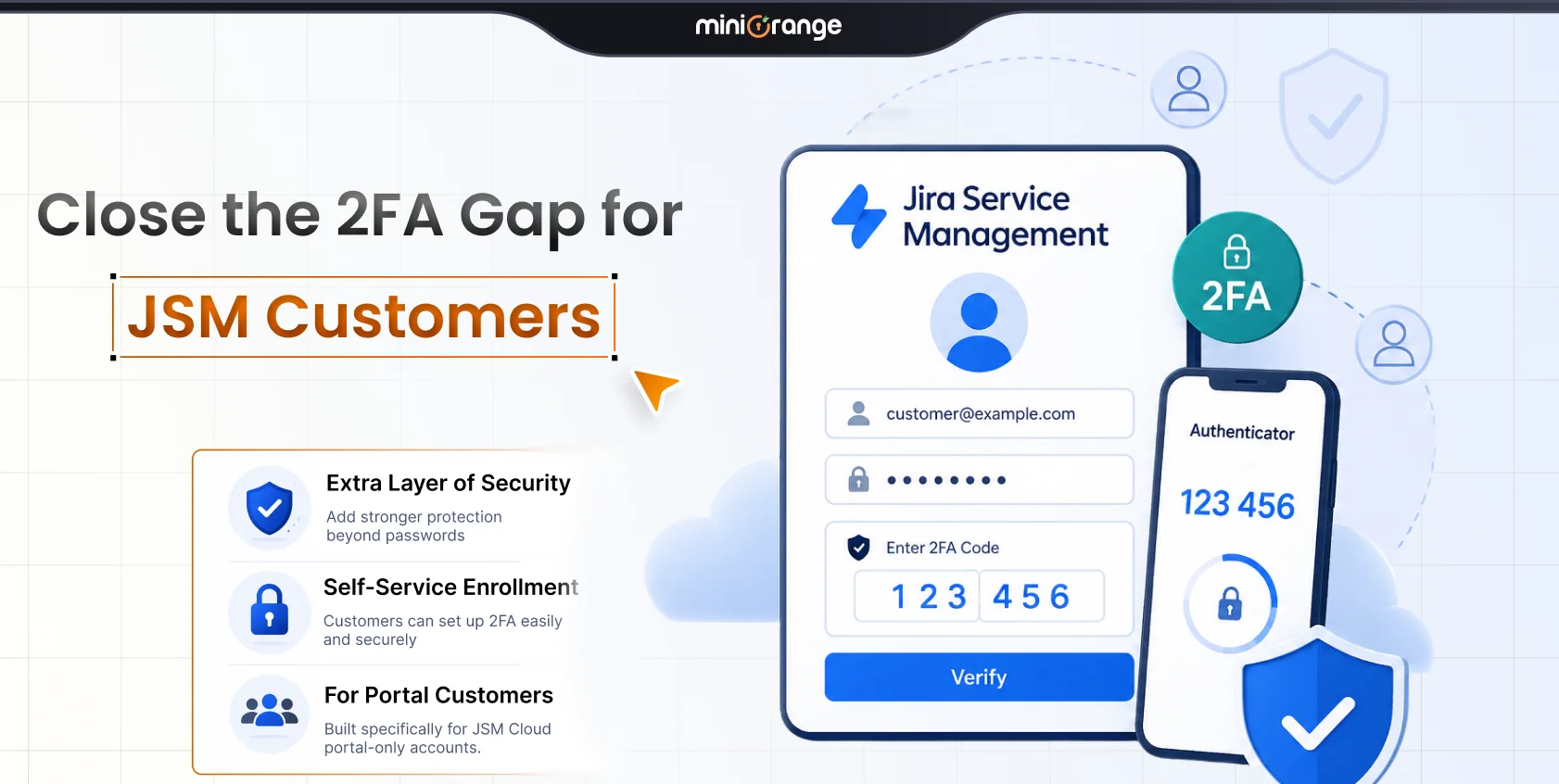
Dedicated marketplace apps provide highly granular directory syncing, in-house MFA, and login-free sharing tools without forcing you onto expensive enterprise tiers.
For a more in-depth understanding, take a look at our miniOrange vs. Atlassian Guard comparison.
SCIM vs Manual Provisioning
Manual provisioning relies entirely on human intervention. It’s slow and highly vulnerable to offboarding delays. This leaves expensive dormant seats active long after an employee departs. SCIM provisioning eliminates this by instantly synchronizing your user directory with Atlassian Cloud. It enforces least-privilege access and automates your identity governance smoothly.
SCIM provisioning offers many other advantages over manual provisioning, which you can find in our detailed comparison between miniOrange SCIM provisioning and Atlassian Guard.
Internal Collaboration vs Secure External Sharing
Internal collaboration tools are structured around a per-user billing model, creating a natural mismatch when dealing with external stakeholders. Paying for a full Cloud Atlassian license tier for casual vendors isn’t good for your margins. Secure external sharing apps solve this licensing mismatch by keeping internal project structures intact while providing temporary, safe, and cost-free access windows for external partners.
Top 5 Mistakes to Avoid to Reduce Atlassian Cloud Costs
- Not checking which invited users have never logged in and are consuming seats.
- Forgetting to deprovision Atlassian access manually after an employee is disabled in your primary IdP.
- Upgrading to costly enterprise tiers just to handle simple multi-IdP customer portal authentication.
- Purchasing full seats for external contractors who only need to view a single page or issue.
- Waiting until renewal time to review license usage instead of scheduling regular cleanup.
FAQs
Q. How can I reduce my Atlassian Cloud costs without changing plans?
You can reduce your Atlassian Cloud costs by automatically deactivating inactive accounts, syncing your offboarding workflows with SCIM, and using secure share links for external stakeholders instead of buying extra licenses.
Q. Can SCIM provisioning reduce Atlassian licensing costs?
SCIM provisioning reduces Atlassian licensing costs by triggering real-time deprovisioning the exact moment an employee is deactivated in your IdP. This automatically removes orphan paid accounts the second an employee leaves.
Q. Do external users consume a full Atlassian Cloud license?
External users consume a full paid-tier seat when you add them to your directory. You can bypass this expense entirely by using Secure Share to generate protected external links.
Q. How do I automate Atlassian user management end-to-end?
You can automate Atlassian user management by combining an automated user management app to clean up idle profiles based on schedules with a SCIM provisioning app to handle real-time directory synchronization.
Q. What causes Atlassian Cloud costs to increase over time?
Atlassian Cloud costs increase over time due to dormant user accounts remaining in active groups, unmonitored "never-logged-in" invites, and purchasing premium access seats for temporary external partners.
Q. Does Atlassian Guard's native SCIM cover multi-IdP organizations?
No. Natively, the standard Atlassian Guard configuration enforces strict identity boundaries and limits multiple provider mapping, whereas dedicated marketplace apps support complex multi-IdP environments smoothly.
Q. Do I need Atlassian Access to secure my JSM customer portal?
No. You can secure your portal and deploy Single Sign-On using a dedicated JSM customer SSO app, which eliminates the need for domain verification or Access subscriptions.
Q. Can I set an expiry date on a shared Jira ticket or Confluence page?
Yes. Secure Share allows you to set explicit link validity periods and will automatically delete the shared link seven days after its expiration date.
Q. How long does it take to see Atlassian Cloud cost savings from automation?
You can see Atlassian Cloud cost savings almost instantly. Running a bulk deactivation cleanup or turning on real-time SCIM offboarding immediately unloads unused paid seats from your upcoming billing cycle.
Q. Should I automate user management before or after connecting SCIM?
You can implement user management and SCIM together. Use user management apps to instantly clean up existing active directories and schedule rule-based cleanups, and use SCIM to handle ongoing real-time identity syncs.
About the Author

Senior Content Writer
Chinmay has extensive experience in writing thought leadership and marketing content for B2B IT companies. He specializes in cybersecurity, AI, ERP, CRM, and custom software development, creating content that not just informs, but sells.
Leave a Comment