
Teams are connecting Claude to Jira to summarize issues, draft tickets, and answer sprint questions in seconds. The productivity gains are real, but so is the security risk.
The problem is simple: a direct connection gives Claude the same permissions as the person who set it up. If that user can view confidential projects or delete issues, so can Claude. There's no business logic in between deciding what AI should and shouldn't touch.
Most organizations don't want to ban AI. In fact, 78% of organizations now use AI in at least one business function, up from 55% a year earlier. What they actually want is control: over what AI can access, what it can change, and a record of every action it performs.
This guide explains how to connect Claude to Jira securely: why native Jira permissions aren't enough for AI governance, and how a policy layer checks every request before it reaches Jira.
Quick Answer
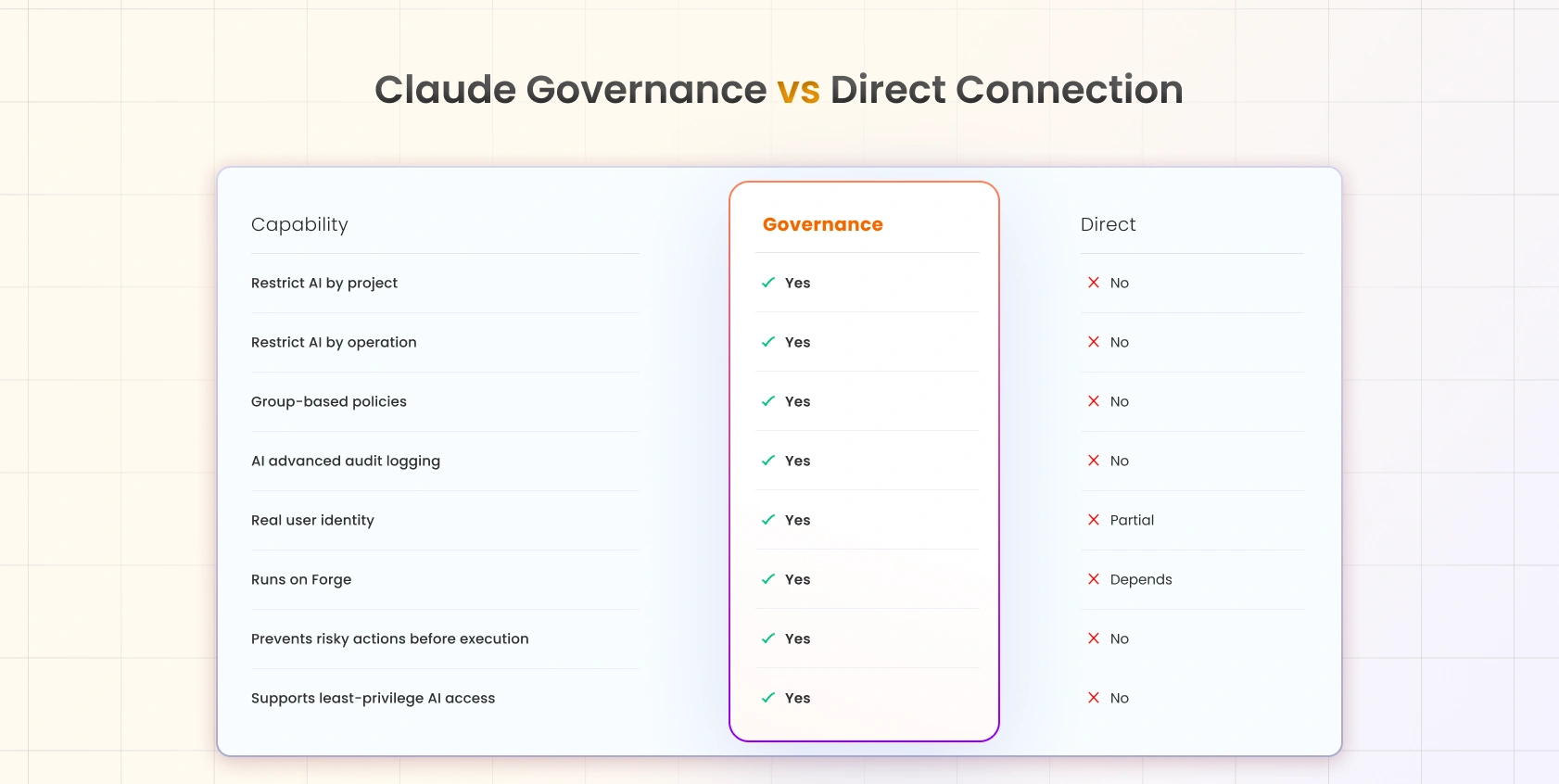
Yes, you can connect Claude to Jira securely. A direct connection works, but it grants Claude the full permissions of whoever authorized it, creating governance and audit gaps. The fix is an AI governance layer that sits between Claude and Jira and enforces policy on every request. With it, you can:
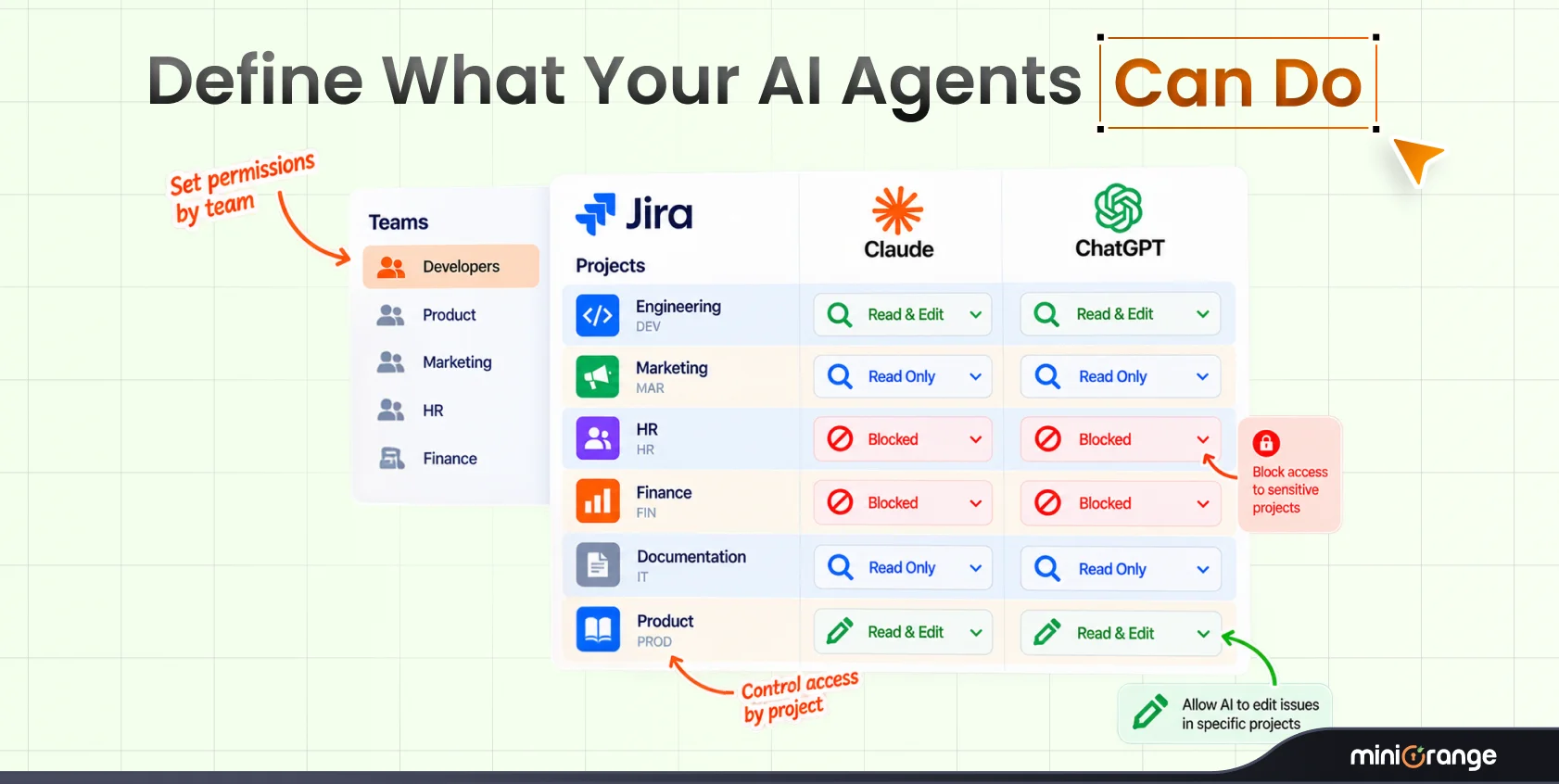
- Restrict Claude's access to specific Jira projects
- Allow or block individual Jira operations (read, create, edit, delete)
- Apply different policies to different user groups
- Log every AI action for auditing and compliance
- Stop unauthorized requests before they reach Jira
Secure AI adoption isn't about limiting productivity. It's about controlling access.
What Does It Mean to Connect Claude to Jira?
When you "connect Claude to Jira," you're giving Claude a doorway into your Jira instance so it can read and act on your issues, projects, and workflows on your behalf.
What Claude is doing
Instead of you clicking through Jira, you ask Claude in plain language, "summarize the open bugs in the Payments project" or "create a ticket for this bug report", and Claude carries out that request against your Jira data.
Why Jira is useful
Jira holds the work: tickets, sprints, statuses, comments, and history. That structured data is exactly what makes Claude helpful. The richer the access, the more Claude can do, which is precisely why access needs boundaries.
How the connection works
Claude connects to Jira through an MCP (Model Context Protocol). It's a standardized "plug" that lets an AI assistant call Jira's actions, view an issue, add a comment, transition a status, in a way Jira understands. You don't need to know the protocol internals. You just need to know that once that plug is connected, Claude can do things in Jira.
Why permissions matter
By default, that plug carries the permissions of the person who set it up. Jira has no concept of "this request came from an AI, apply stricter rules." To Jira, it's just an authenticated user making an API call. That's the gap governance closes.
Why a Direct Claude-to-Jira Connection Can Become Risky
A direct connection isn't broken; it's just blunt. It trusts your existing Jira permissions to do a job they were never designed for: governing an AI that can act at machine speed across your entire instance.
No control over individual AI actions
Jira permissions are coarse. A user who can edit issues can edit all issues they have access to; Claude can too. You can't say "Claude may read tickets but never delete them" using native permissions alone. It's all or nothing.
Sensitive Jira projects stay exposed
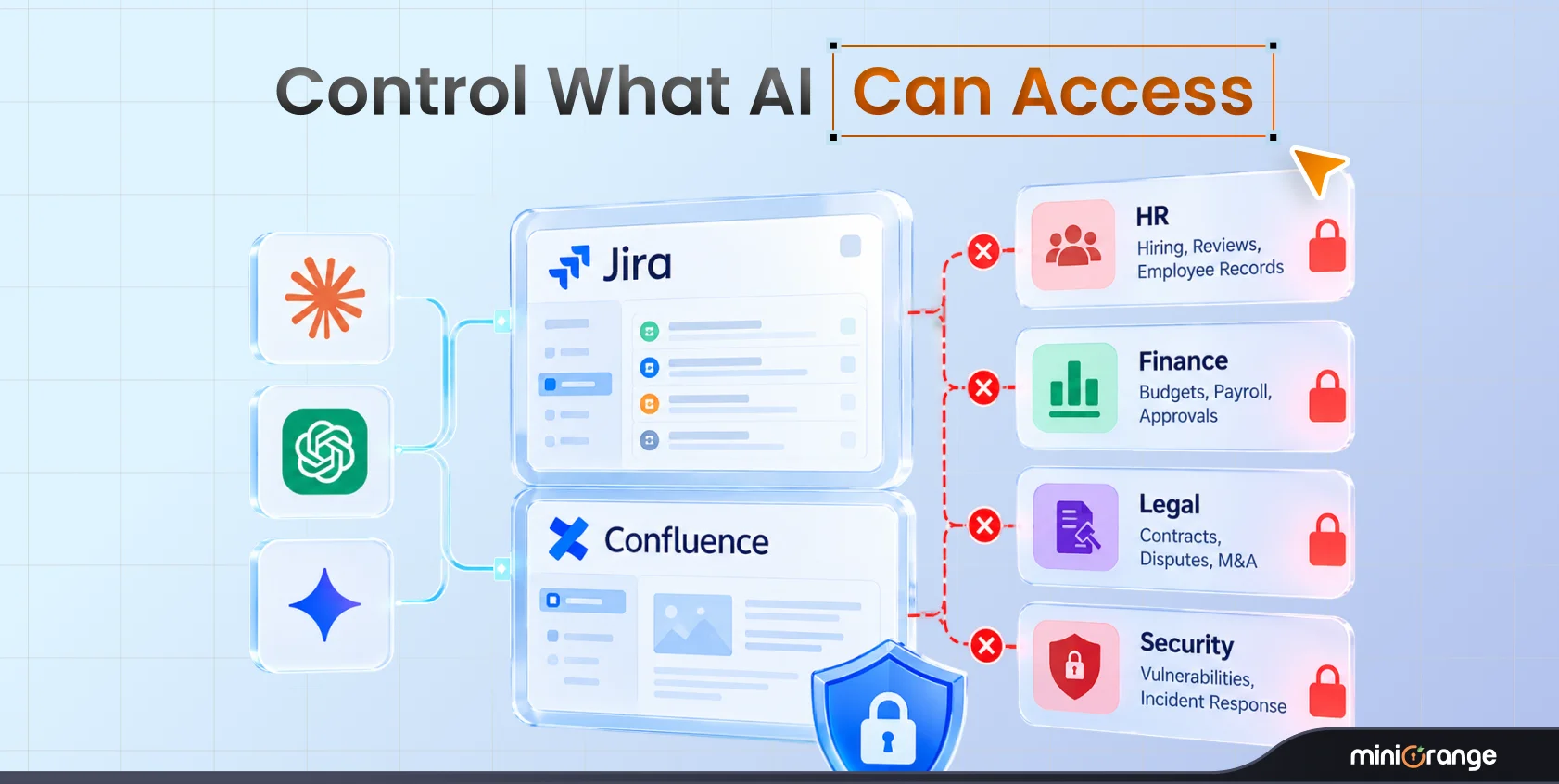
If the connecting user has access to legal, security, HR, or M&A projects, Claude inherits that reach. A well-meaning prompt like "summarize everything assigned to me this week" can surface confidential issues into an AI conversation that was never scoped for them.
No dedicated AI audit trail
Jira's audit log records that a user acted. It doesn't distinguish "the human did this" from "the AI did this on the human's behalf." When a security reviewer asks "what has Claude actually done in our instance?", a direct connection can't cleanly answer.
AI follows user permissions, not business policies
This is the core problem. Permissions describe what a person is allowed to do. Governance describes what your organization wants AI to do. Those are different questions, and native Jira only answers the first one.
Key takeaway: A direct connection trusts existing Jira permissions. An AI governance layer adds business rules on top of them.
When Do You Need AI Governance?
If any of these describe you, native permissions have already stopped being enough:
| Scenario | Why governance matters |
|---|---|
| Rolling out Claude company-wide | Hundreds of users means hundreds of permission inheritances. Policy centralizes control. |
| Security teams reviewing AI usage | Reviewers need a clear, AI-specific record of what was accessed and changed. |
| Contractors or vendors using AI | External users should get the tightest possible scope, read-only, one project, no deletes. |
| Protecting HR, legal, or finance projects | Sensitive projects must be walled off from AI regardless of who connects it. |
| Meeting audit or compliance requirements | SOC 2, ISO 27001, and internal audits increasingly ask about AI access controls. |
| Preventing accidental issue changes | One ambiguous prompt shouldn't be able to bulk-close a sprint. |
The common thread: when more than one person uses AI on shared data, "trust the connector's permissions" becomes a liability.
What Is Claude Governance & Access Control for Jira?
Claude Governance & Access Control for Jira is an Atlassian Marketplace app that inspects every request Claude sends before it reaches Jira. Instead of relying on Jira's built-in permissions only, administrators define policies that decide what Claude is allowed to access, and what it should never be able to do.
In practice, it turns vague trust ("Claude can do whatever this user can do") into explicit, reviewable rules ("Claude may read and comment on the Support project, and nothing else").
How AI Requests Are Evaluated
The difference is structural. A direct connection is a straight line. Governance inserts a checkpoint.
Without Governance
Claude → Jira
Every request Claude makes hits Jira directly, limited only by the connecting user's permissions.
With Governance
Claude → Governance Layer → Policy Evaluation → Jira
Each request is intercepted, checked against your policies, and either allowed through or blocked. Denied requests stop before reaching Jira, nothing sensitive is touched, no unwanted change is made, and the attempt is logged.
This "evaluate before execute" model is what separates governance from monitoring. Monitoring tells you what went wrong after the fact. Governance prevents it in the first place.
Key Features of Claude Governance & Access Control
1. Group-Based Policies
What it is: Policies mapped to Jira/Atlassian groups rather than individuals. Why it matters: Admins, developers, and contractors need different levels of AI access. Managing that per-person doesn't scale; managing it per-group does. Example: The contractors group gets read-only access to a single project; the platform-admins group gets broader access with deletes still blocked.
2. Operation-Level Permissions
What it is: Granular control over specific Jira operations: read, create, edit, transition, delete. Why it matters: Most risk lives in a handful of destructive actions. You can enable the safe 90% and block the dangerous 10%. Example: Allow "create issue" and "add comment" org-wide, but block "delete issue" everywhere except for one admin group.
3. Project Restrictions
What it is: Explicit allow/deny lists of which Jira projects Claude may touch. Why it matters: Sensitive projects should be invisible to AI by default, not by accident. Example: HR and Legal projects are on the deny list, so no prompt, however it's phrased, can pull their issues into Claude.
4. Prevents Unauthorized Actions Before Execution
What it is: Policy evaluation happens before the request reaches Jira. Why it matters: Blocking after the fact isn't security. Stopping the request is. Example: A prompt that would bulk-transition 200 issues is denied at the governance layer; Jira never receives the call.
5. Every AI Action Runs as the Real User
What it is: Actions are attributed to the actual human behind the request, not a shared bot account. Why it matters: Accountability. You always know who asked Claude to do something. Example: An issue Claude comments on shows the real user as the actor, preserving a truthful history.
6. Complete AI Audit Logs
What it is: A dedicated, AI-specific record of every request, allowed and denied. Why it matters: Auditors and security teams get a single source of truth for AI activity. Example: During a SOC 2 review, you export a log showing every AI-initiated action, who triggered it, and which policy applied.
7. Built on Atlassian Forge
What it is: The app runs entirely on Atlassian's Forge platform. Why it matters: Forge apps run inside Atlassian's own hosted, security-reviewed environment; data stays within Atlassian's trust boundary rather than routing through third-party servers. Example: Your security team can approve the app knowing there's no external data egress to vet.
Best Practices for Connecting Claude to Jira Securely
- Follow least privilege. Start with the minimum access and expand only when a real need appears. It's far easier to grant than to claw back.
- Keep sensitive projects isolated. Put HR, legal, finance, and security projects on a deny list from day one.
- Block delete operations unless required. Deletes are the highest-consequence, lowest-frequency action. Default them off.
- Review audit logs regularly. Governance is only as good as the attention you pay to what it records.
- Test policies before organization-wide rollout. Validate rules with a pilot group so you catch gaps before scale.
- Create separate rules for admins and contractors. Different trust levels deserve different policies.
How to Connect Claude to Jira Securely (Step-by-Step)
Step 1: Install the governance app from the Atlassian Marketplace.
Why: It establishes the policy checkpoint between Claude and Jira. Outcome: A governance layer is now active in your Jira instance, ready to evaluate requests.
Step 2: Map your user groups.
Why: Group-based policies are how you scale control without micromanaging individuals. Outcome: Admins, developers, and contractors are organized into distinct policy targets.
Step 3: Define project access (allow/deny lists).
Why: This walls off sensitive work before anyone connects Claude. Outcome: Claude can only ever reach the projects you've explicitly permitted.
Step 4: Set operation-level permissions.
Why: This is where you separate safe reads from destructive writes and deletes. Outcome: Risky operations are blocked while everyday actions flow freely.
Step 5: Connect Claude to Jira.
Why: With policies in place first, the connection is scoped from the very first request. Outcome: Claude is live, but bounded by your rules, not the connector's raw permissions.
Step 6: Test with a pilot group and review the audit log.
Why: Validation catches misconfigured rules before they matter at scale. Outcome: Confirmed policies and a working audit trail, ready for company-wide rollout.
Which Teams Benefit Most?
Jira Admins
You own the instance and the blast radius. Governance lets you grant AI productivity without hand-editing permission schemes or lying awake about what a prompt might delete.
Security Teams
You need to answer "what can the AI do, and what has it done?" Governance gives you enforceable policy plus an AI-specific audit trail, evidence, not assumptions.
IT Teams
You're rolling AI out to the whole company. Group-based policies mean you configure once and apply everywhere, instead of managing access user by user.
Compliance Teams
You map controls to frameworks like SOC 2 and ISO 27001. Governance turns "we trust our people" into documented, reviewable AI access controls you can put in front of an auditor.
FAQ
Q. Can Claude edit Jira issues and tickets?
Yes, if permitted. With governance, you decide whether editing is allowed at all, and in which projects. You can enable comments and edits while blocking deletes entirely.
Q. Does Claude have access to every Jira project?
In a direct connection, Claude can reach any project the connecting user can. With governance, access is limited to the projects on your allow list; everything else is denied.
Q. Can I limit Claude to one project?
Yes. Project restrictions let you scope Claude to a single project, which is ideal for contractors or pilot rollouts.
Q. Can contractors use Claude safely?
Yes. Assign contractors to a group with read-only access to a single project and no destructive operations. They get AI assistance; you keep the guardrails.
Q. Does Claude require an MCP server?
Claude connects to Jira through MCP. The governance app sits on that path and evaluates requests before they reach Jira, so you get the MCP connection and policy control together.
Q. Will this work with enterprise Jira?
Yes. Because it's built on Atlassian Forge, it runs inside Atlassian's hosted environment and is designed to operate at enterprise scale within your existing instance.
Final Thoughts
Claude becomes dramatically more useful the moment it can work directly with Jira. But giving an AI assistant unrestricted access isn't a security strategy; it's a bet that no prompt will ever go wrong, made against a tool that acts at machine speed.
The better approach is to pair productivity with governance. When you control what Claude can access, define what actions it can perform, and record every interaction, you get the upside of AI without trading away security or compliance. You stop asking your team to trust that AI will behave, and start enforcing that it does.
That's not a limit on productivity. It's what makes confident, company-wide AI adoption possible.
Try Claude Governance & Access Control for Jira free on the Atlassian Marketplace.
About the Author

Content Writer
Pallavi Narang is a content writer with more than 4 years of experience. She specializes in driving brand awareness and lead generation through compelling storytelling and strategic marketing campaigns. With a background in SaaS, cybersecurity, and data analytics, Pallavi excels in translating complex concepts into engaging narratives. Outside of work, she is either learning new languages or reading.
Leave a Comment