
Jira makes it easy to move work forward. That same ease can create data protection risks.
Sensitive data can land in a Jira ticket in seconds. It does not always happen because someone ignored security rules. Sometimes, a user is simply trying to solve an issue quickly.
Someone pastes a customer email address to clarify a ticket. A developer drops an API key into a bug report. A support agent attaches a screenshot with a credit card number.
Once sensitive information is saved, it can become available to everyone who can access the issue. It can also appear in notifications, search results, backups, or connected systems. The longer it remains exposed, the more opportunities there are for it to spread.
That is why you need to prevent PII in Jira tickets before sensitive data has time to spread. You need a layered approach.
First, reduce the chances of users entering sensitive data. Then detect what gets through. Notify the admin and the user who entered it. Next, remediate it quickly. Finally, keep a clear record of what you found and what you did.
Here is how to build that approach.
The Moment PII Lands in Jira, the Risk Starts
In most cases, your team members do not deliberately leak data. For instance, a customer reports an account problem. The support agent needs to investigate it. The customer sends an email address, account number, or screenshot. The agent adds the information to the Jira ticket so the rest of the team can see it.
While this makes things easier to work on, it may also contain data that should not be there.
PII can include names, email addresses, government identifiers, payment-card numbers, and target-oriented data, such as Protected Health Information (PHI), biometric records, and authentication credentials.
The risk is not that every piece of PII in Jira automatically creates a regulatory violation. Requirements vary by the data involved, your organization, how you use the data, and the regulations that apply to you. The important point is that sensitive data needs to be handled appropriately.
If sensitive data is not detected quickly, the exposure window grows, increasing the risk. The shorter you can make that window, the better.
Keep PII Out at the Door
Prevention comes first. To prevent PII in Jira tickets, start by reducing the chances of users entering sensitive information in the first place.
- Use structured fields: Replace wide-open free-text boxes with dropdowns, radio buttons, and picklists wherever possible. Restricted choices leave no room for accidental PII entry.
- Add explicit form reminders: Place direct warning labels right above input boxes. Explicitly remind users: "Do not enter passwords, credit card numbers, SSNs, or personal IDs in this field."
- Standardize team onboarding: Teach new hires what data belongs in Jira and what data belongs in secure password managers or encrypted storage.
These controls can reduce human error, but they are only the first line of defense. Users can still paste sensitive details into main description boxes or comment threads.
The PII You Cannot See: Attachments and Images
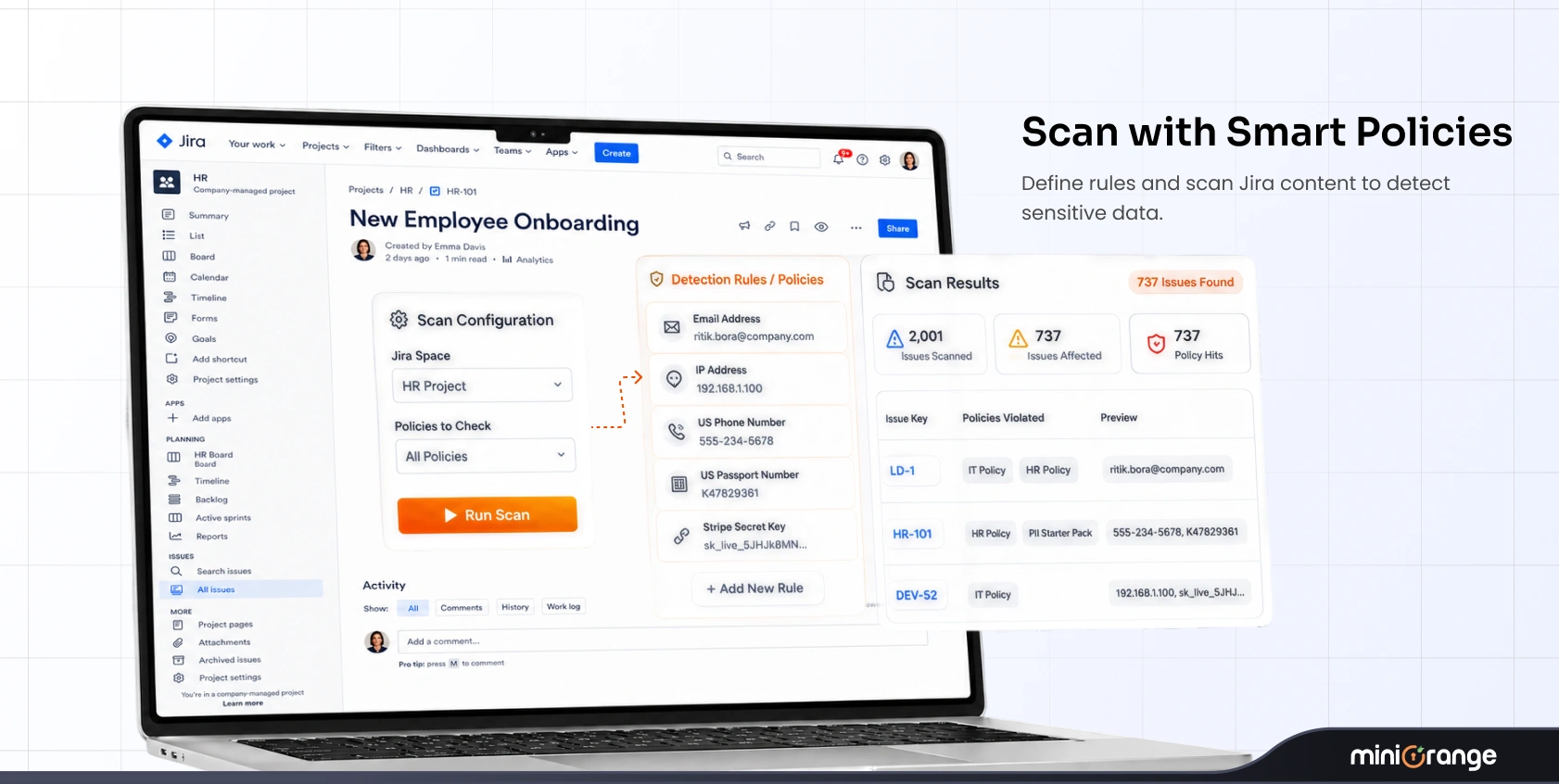
Standard text searches miss hidden data. PII can leak through PDFs, Word documents, spreadsheets, and screenshots.
A support agent might attach a screenshot of a user portal. The ticket description looks completely clean, but the image contains a full account number or SSN. A plain database query will not flag that image.
To address this, your scanning process needs Optical Character Recognition (OCR). OCR extracts text from image files and scanned PDFs, allowing your scanner to inspect image contents just like plain comment text.
Treat attachments as part of the ticket's data, not separate.
Find PII That Is Already in Jira
Form controls and new policies only protect incoming data. They do not address sensitive information that is already in your Jira environment.
That is why you need both immediate detection and scheduled scanning.
| Scan Type | Trigger Event | Primary Purpose | Key Benefit |
|---|---|---|---|
| Real-Time Scanning | Runs the moment a ticket, comment, or attachment is created or edited. | Detects newly added sensitive data immediately. | Shrinks the exposure window. |
| Scheduled Scanning | Runs on a set schedule (daily or weekly). | Sweeps historical ticket backlogs and legacy projects. | Uncovers sensitive data that was already present before DLP was enabled. |
Fix PII Automatically When It Is Found
Detection without automated remediation creates alert fatigue. If your security team must manually review every single notification, sensitive data may remain exposed while your team reviews the alert.
You need automated actions that respond the moment a rule triggers to prevent PII in Jira tickets from remaining exposed:
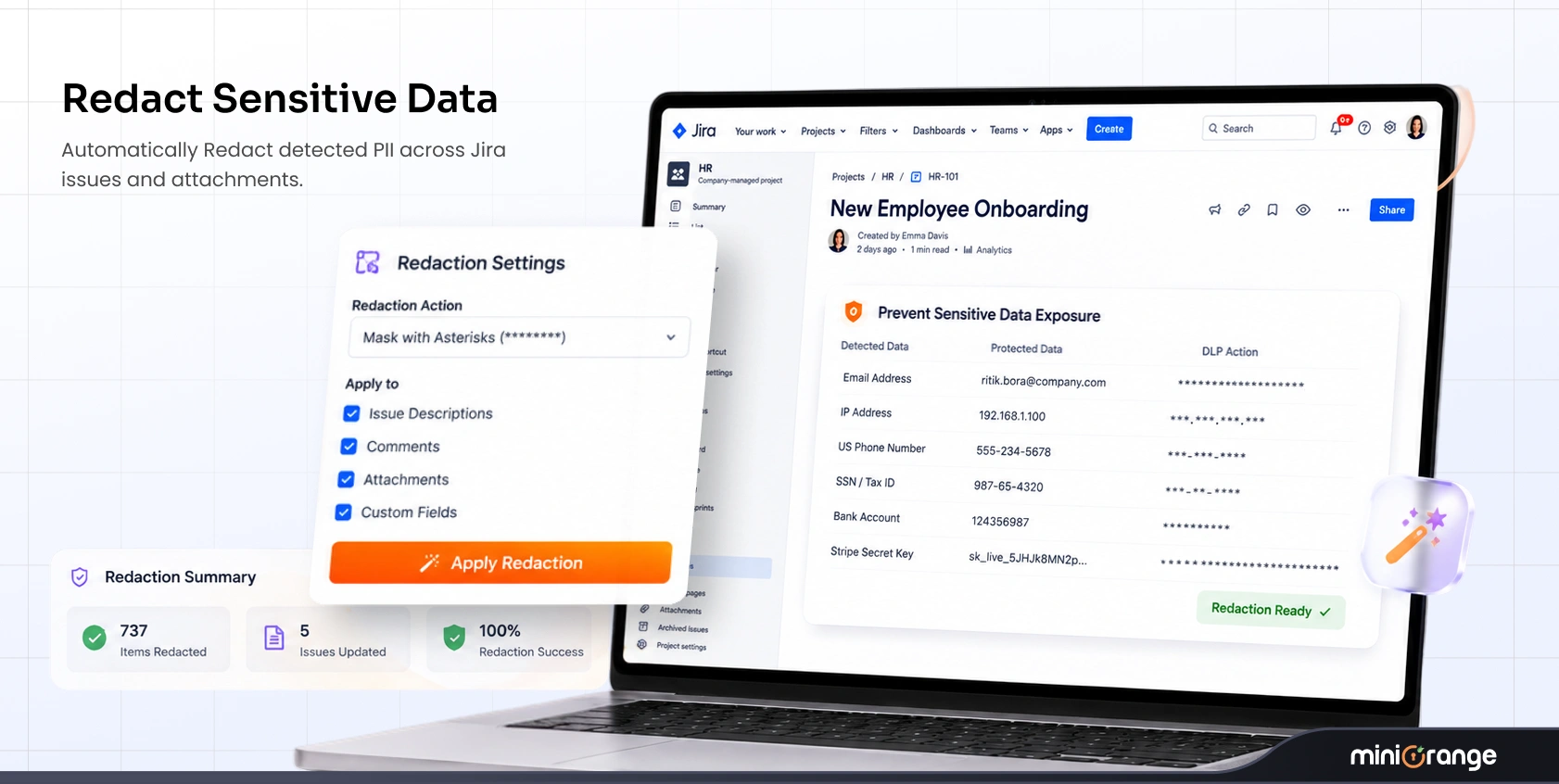
- Mask: Replaces parts of the sensitive string with placeholder characters.
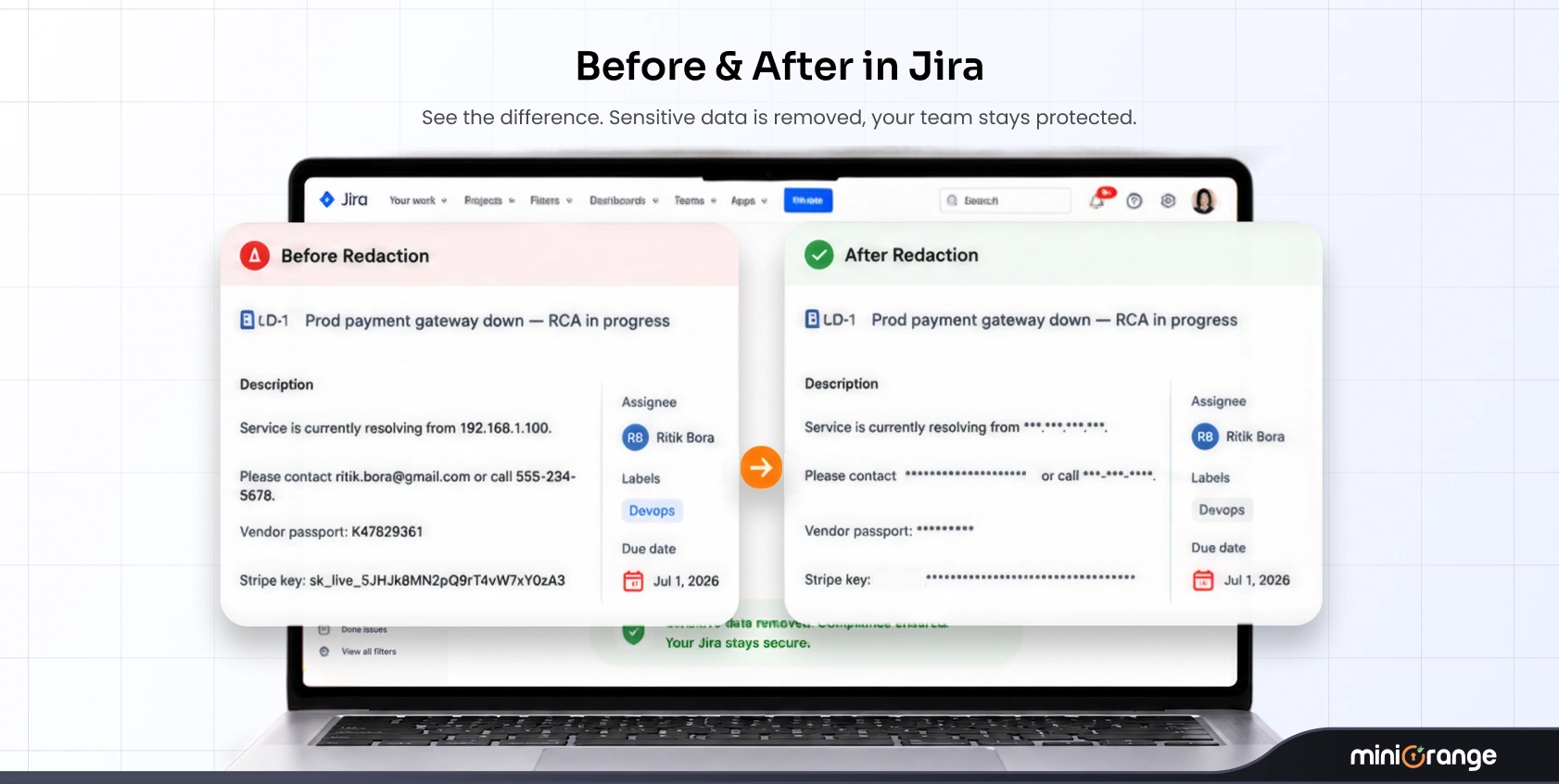
- Redact: Permanently removes or blackouts the sensitive text string across the issue body or comment (e.g., Instead of 9832-3283-8952-1234, it’ll display XXXX-XXXX-XXXX-1234).
- Encrypt: Encrypts sensitive data directly in place. Authorized users can decrypt and view the content on demand, while unauthorized users see only ciphertext.
- Remove: Remove the flagged content entirely.
Automation stops downstream distribution. When you redact or encrypt sensitive data instantly, you prevent that PII from syncing out to email digests, mobile notifications, or external team integrations.
Match Detection Rules to Your Data
There is no universal definition of sensitive data.
Your organization might have sensitive data in unique formats. An effective DLP strategy matches detection patterns to your exact data profile.
Start with pre-built detectors for common sensitive data types:
- Names and personal email addresses
- Government identification numbers (SSNs, passport numbers)
- Credit card numbers and financial identifiers
- Passwords, API tokens, and secret keys
- Protected Health Information (PHI)
Next, build custom regex rules for your proprietary data formats. If your business uses internal employee IDs (e.g., EMP-99482), custom account numbers, or special license keys, create regex patterns specifically for those strings.
Organize these rules into classifications, such as "HR Data," "Customer Financials," or "Engineering Credentials." You can then apply targeted policies across your Jira environment.
Prove What You Found and Fixed
You need records that show how sensitive-data findings were detected and handled. You should keep a record of:
- What data was detected?
- Where was it found?
- When was it detected?
- Which rule detected it?
- What action was taken?
- When was the remediation completed?
Keep in mind that software tools facilitate compliance workflows, but no single scanner guarantees full statutory compliance on its own.
Also, remember that deleting text inside Jira does not automatically purge external backups created before the scan occurred. Copies may exist elsewhere. This is why minimizing the initial exposure window remains your highest security priority.
Is the Built-In Atlassian Option Enough?
If you already use Atlassian Guard Premium, you get native content-scanning capabilities. It supports built-in and custom detections, real-time scanning of new or updated content, and full-site content scans. Atlassian also provides remediation capabilities such as redacting sensitive content from Jira and Confluence.
But do those capabilities cover your specific requirements?
Scope of Scanning
For example, Atlassian's current content-scanning documentation says it scans Jira issue summaries, descriptions, and other free-text fields. It does not scan the name or content of files attached to Jira work items or Confluence pages and blog posts.
That matters if your users regularly attach PDFs, Word documents, spreadsheets, or other files containing sensitive information.
Remediation Options
If your workflow requires more than redaction, check whether the tool supports the action you need.
In this case, a dedicated solution like miniOrange DLP is the better option. It can scan supported attachments and provides more remediation options like redaction, deletion, and encryption. It also supports decrypting protected Jira content for authorized users, with encryption and decryption actions logged.
Licensing
Atlassian Guard Premium is an organization-wide subscription and is billed based on users with access to supported Jira or Confluence apps.
The pricing for miniOrange DLP is based on the number of users in your instance. There’s also a free trial option available.
Compare current capabilities against your actual requirements to make the right decision.
| Evaluation Area | Native Atlassian Guard Premium | Dedicated miniOrange DLP Approach |
|---|---|---|
| Content Coverage | Scans text fields across supported cloud products. | Scans tickets, custom fields, comments, attachments, and images. |
| Scanning Triggers | Surfaces security detection alerts across managed environments. | Delivers instant real-time scanning on creation plus scheduled scans. |
| Attachment & OCR | Basic document inspection depending on current subscription tier. | Full deep-file inspection and OCR scanning for uploaded images. |
| Remediation Actions | Flags exposures and alerts administrators to review. | Automatically redacts, masks, deletes, or encrypts in-place. |
| Data Encryption | Standard platform-level data encryption at rest/in transit. | Encrypts sensitive Jira content in place and supports decryption for authorized users. |
| Pricing Model | Per-user organization-wide add-on licensing model. | Per-user licensing model with a free trial. |
What This Approach Does Not Do
Implementing a DLP strategy improves your security posture, but you must keep realistic limitations in mind:
- Form controls cannot eliminate 100% of mistakes. Users can still work around structured fields or ignore inline warning text.
- Scanners cannot recall external copies. If a user emails a ticket export or downloads an unredacted file before the scanner acts, Jira DLP cannot alter those external local files.
- Regex rules need ongoing maintenance. Standard detectors catch standard patterns, but unique company formats require custom regular expressions.
- Tools support compliance. They do not replace it. Automated tools streamline security management, but achieving full compliance requires broader organizational policies and training.
- Notify the user who added PII and the manager via email to reduce the likelihood of future occurrences.
Use Cases
Healthcare: Protect PHI in Support Tickets
Healthcare support desks face continuous risk from accidental exposure to Protected Health Information (PHI). Patients and clinical staff frequently upload medical charts, intake forms, or insurance cards directly into support tickets.
Real-world scenario:
- A clinic staff member attaches a scanned intake PDF containing a patient's Name, Date of Birth, and Medical Record Number (MRN) to a ticket.
- Pre-configured PHI rules detect the medical identifier format.
- The system automatically encrypts the specific text.
- Only authorized users can decrypt and view the document.
- The audit log records the exact event for HIPAA governance reviews.
Finance: Protect Payment and Financial Data
Financial institutions and billing teams process thousands of Jira tickets containing account details, wire instructions, and invoices. Even a single pasted credit card number can be risky.
Real-world scenario:
- A customer pastes an unredacted payment card number into a JSM support ticket comment to resolve a billing issue.
- Real-time scanning identifies the 16-digit card pattern the second the comment submits.
- The automated policy immediately redacts the entire number.
- Unauthorized agents never see the raw credit card number.
- The audit trail logs the policy trigger, proving your environment maintains proactive financial data controls.
Reduce the Time PII Stays Exposed
To prevent PII in Jira tickets effectively, you need both preventive controls and continuous scanning.
With miniOrange Data Loss Prevention & PII Scanner for Jira & Confluence Cloud and data center, you can scan Jira and Confluence content and supported attachments, detect more than 80 sensitive data types, create custom regex rules, apply remediation policies, encrypt sensitive content when removal is not appropriate, and maintain audit records of detection and remediation activity.
FAQs
Q. What is considered PII in Jira?
PII is information that can identify or relate to an individual, such as names, email addresses, government IDs, and other personal identifiers. The exact data you need to protect depends on your organization and use case.
Q. Does scanning Jira for PII make you compliant?
No. A DLP scanner is one part of a broader compliance program. Your actual obligations depend on the applicable regulation, your organization, and how you collect, use, store, and protect personal data.
Q. Where should sensitive data be stored instead of Jira?
Store sensitive data in a system designed and approved for that type of information, based on your organization's security and retention policies. Jira tickets should contain only the information teams need to resolve the issue.
Q. How can you reduce accidental PII exposure in Jira?
Start with clear data-handling rules, user training, and well-designed forms that limit unnecessary free-text input. Then use ongoing detection to catch information that users still enter accidentally.
Q. How often should you review sensitive data in Jira?
There is no single schedule that fits every organization. Your review frequency should reflect the volume and sensitivity of the data you handle, how quickly it changes, and your internal security and retention requirements.
About the Author

Senior Content Writer
Chinmay has extensive experience in writing thought leadership and marketing content for B2B IT companies. He specializes in cybersecurity, AI, ERP, CRM, and custom software development, creating content that not just informs, but sells.
Leave a Comment