

A password alone isn't enough to ensure that there will be no unauthorized access to your systems. Someone could enter the correct credentials from another country, from an unknown device, at 3 AM, through a suspicious proxy network - and traditional login systems would still let them in. That’s the problem with static authentication.
Modern Drupal websites, especially in healthcare and government sectors, need login security that can evaluate context, behavior, and risk before granting access. This is where Drupal Risk-Based Access Control becomes important.
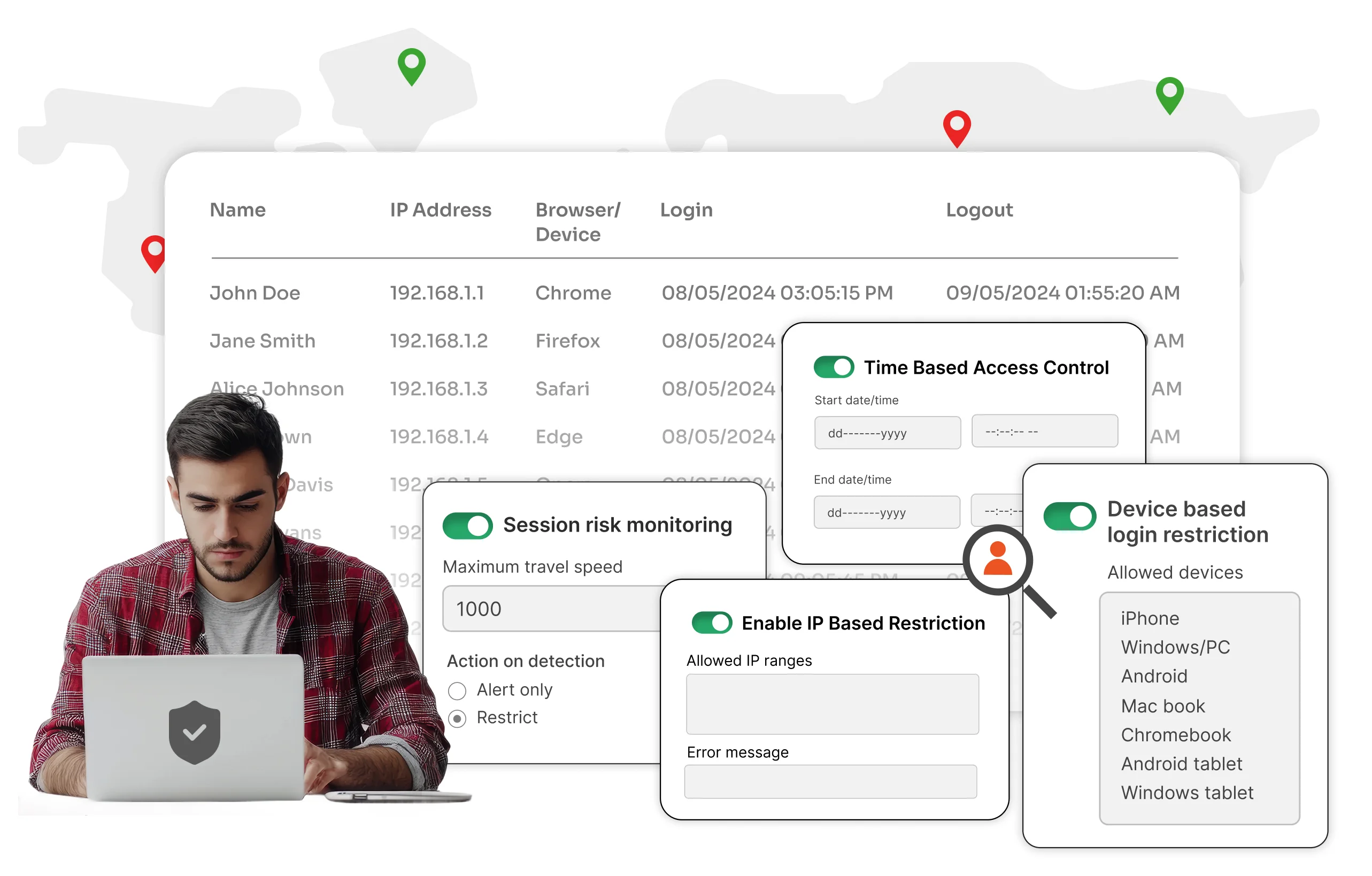
Instead of treating every login the same, Risk-Based Access Control analyzes multiple security signals like - IP address, geographic location, login timing, device identity & network fingerprint. The system then decides whether the login attempt looks safe, suspicious, or high-risk.
It’s a security guard that does more than just check the ID. It checks where the user came from, when they arrived, and whether their behavior matches normal activity. That’s what makes adaptive authentication significantly more effective than traditional login protection.
What is Risk-Based Access Control in Drupal?
Risk-Based Access Control is a security approach where access decisions are based on the risk factors associated with a login attempt. In addition to the standard authentication flow applicable to every user, the RBAC system continuously evaluates context before allowing access.
For example:
A healthcare worker logging into Drupal from the hospital network during working hours using their registered workstation would be considered a minimal risk and wouldn’t set off any alarm bells. However, if the same account suddenly attempts login from another country, through a new IP address, late at night, using an unknown device - the system will immediately flag the attempt as suspicious.
Once suspicious behavior is detected, the module evaluates legitimacy of the login attempt and determines the appropriate response, as per the configured risk policies. This can range from generating an administrative alert to enforcing additional authentication checks or blocking the login attempt altogether - more on this later.
What factors into the Risk associated with Login?
Traditional username-password authentication is often insufficient when we’re dealing with cases of user impersonation. A hack - despite what we see on TV, is never an unknown account accessing a resource. It is almost always a valid account operating within its limits for the longest duration - until it isn’t.
That’s why we need advanced - behavioural - dynamic - security measures to protect our systems against intrusion attempts.
Organizations in this cyber-era ideally be should focusing on four major signals that serve as security threat flags:
Location
If your organization operates only within specific countries, why should logins from unrelated regions be allowed? Location-based access control - often known as Geofencing - helps reduce unnecessary exposure and limits attack surfaces significantly. It helps organizations enforce regional security policies, support data residency requirements, and strengthen compliance efforts for regulations such as GDPR, where tighter control over access locations may be necessary.
For government and healthcare organizations handling regulated information, restricting international login attempts is often one of the simplest ways to reduce risk immediately while maintaining better control over where sensitive systems are being accessed from.
IP Address
IP addresses help identify where traffic is coming from and whether the network itself is trusted. An employee accessing a Drupal portal from the organization’s office network is far less suspicious than someone connecting from an unknown public IP.
IP restriction also helps prevent brute force attacks, block malicious traffic, restrict proxy networks, and prevent suspicious session changes. For example, if repeated failed login attempts are detected from a suspicious IP address or within a specific IP range, administrators can automatically block that source before attackers are able to continue credential-stuffing attack or brute force their way into the Drupal site.
If a user’s IP suddenly changes mid-session, the system can automatically terminate access before the session is hijacked. To explore this feature in more detail, you can give this blog a read.
Time based Access
Not every user requires 24/7 access to critical systems. For sensitive Drupal environments, login attempts outside approved working hours can be a potential security concern.
With Drupal Time-Based Access Control, organizations can allow access only during approved hours, grant temporary access for contractors, and automatically revoke permissions once the allowed duration expires.
For example, a government department may provide external vendors temporary access to a Drupal portal only during the duration of an active project and restrict access outside official working hours. Similarly, a hospital can ensure that administrative dashboards containing sensitive patient information are accessible only during authorized staff shifts, reducing the risk of unauthorized after-hours access.
Device-Based Validation
Passwords authenticate users. Devices help authenticate trust. If a login suddenly appears from an unknown or unmanaged device, it creates an additional layer of risk. Trusted device policies help organizations ensure that only approved systems can access sensitive Drupal environments.
For example, a government organization may allow access to internal Drupal portals only from officially managed office systems. If an employee attempts to log in using a personal or unrecognized device, the system can flag the attempt as risky and trigger additional verification, such as Two-Factor Authentication, before granting access. This helps prevent unauthorized access from unmanaged or potentially compromised devices.
Risk Policies
Not every suspicious login attempt needs to be treated the same way.
Not every out-of-the-ordinary activity requires a full SWAT response. A login from a slightly unusual location may indicate a remote employee, and might just warrant additional verification, while a login attempt from an unknown device, or unknown IP, and restricted country will be high-risk and may need to be blocked immediately.
This is where configurable risk policies become important.
Administrators can define how the system should respond based on different risk conditions, such as login attempts from blocked countries, unknown devices, unusual login timings, suspicious IP addresses, or sudden behavioral changes.
Depending on the severity level configured in the risk policies, the module can respond differently to suspicious login attempts.
- Low-risk activity may simply generate alerts for administrators, while medium-risk scenarios can trigger additional verification checks or enforce Multi-Factor Authentication (MFA).
- If the login attempt is identified as highly suspicious or severe, the system can completely block access before the user is able to log in successfully.
How Risk-Based Access Control Combines All These Layers
Individually, IP restriction, geofencing, device trust, and time-based access are all strong - albeit STATIC - security mechanisms.
But when combined together, they create a far more intelligent authentication system. A dynamic system.
This is what makes Risk-Based Access Control different from standalone security features. Instead of looking at just one condition, the system evaluates multiple signals simultaneously before making an access decision.
Use Case / Example
Let’s talk about a healthcare organization using drupal for patient management and internal staff portals. The good samaritans working over there, handle sensitive patient information on a daily basis - though the staff is trained in HIPAA compliance, we would need to ensure the systems are HIPAA Compliant as well. One major part of that is blocking unauthorized access to patient information.
Without RBAC - stolen credentials could immediately expose sensitive patient records. This can stem from social engineering attacks or attacks, or simply human oversight, but nonetheless the impact would be sensitive PII being leaked and impacting the patient’s life and damaging the hospital’s reputation. Not to mention the hefty fines and legal costs.
With adaptive login protection enabled - access is granted to only predefined desktops, significantly reducing the risk of unauthorized login attempts. Staff logins can be limited to approved working hours or active shift timings, helping prevent unusual after-hours access to sensitive systems.
If a user attempts to log in from an unknown / unmanaged device, the system can trigger additional verification checks before granting access
Similarly, If suspicious IP changes or unusual login behaviour are detected admins can configure policies to alert teams, enforce additional / repeat authentication, or block the login attempt entirely.
Where does that leave us?
Even if passwords are compromised, attackers still face multiple layers of verification before reaching sensitive data.
Additional context-based protection is exactly what modern Drupal security needs. This broader security perspective is exactly why organizations are moving toward adaptive authentication and Zero Trust access models.
Instead of deploying multiple disconnected tools, organizations can manage intelligent access policies from a single security framework designed specifically for Drupal environments.
Drupal login security measures can be further emboldened, by employing SSO, MFA, and Automated User Lifecycle Management - all the solutions that work in tandem with the RBAC system.

Leave a Comment