

Identity Governance and Administration (IGA) sounds straightforward on paper: control who has access to what, prove it to auditors, and automate the boring parts.
In practice, most organizations underestimate how many moving parts an IGA rollout actually has. This checklist breaks down the exact steps, decisions, and evaluation criteria you need to move from planning to a stable, audit-ready deployment.
Why an IGA Implementation Checklist Matters
An IGA solution touches nearly every application, team, and compliance requirement in the business, which is exactly why unstructured rollouts tend to fall apart. Without a clear checklist, teams commonly run into three recurring problems:
- Integration complexity when connecting dozens of applications with inconsistent data formats
- Weak change management that leaves managers and employees confused about new approval workflows
- Role designs that swing between two extremes — either so granular they become unmanageable or so broad they fail an audit the moment a reviewer looks closely.
These issues are not edge cases tied to one vendor or one industry. They show up across IGA programs of every size, which is why a phased, checklist-driven approach consistently outperforms attempting full scope on day one.
Timelines vary depending on scope. A single-use-case deployment, such as onboarding one critical application, can move in a matter of weeks. While a multi-system enterprise rollout covering HR, Active Directory, and dozens of SaaS apps typically takes several months.
Furthermore, before publishing any timeframe in your project plan, validate it against your actual application count and integration complexity, rather than relying on generic estimates.
IGA Implementation Checklist: 9 Steps to Get it Right
Treat this as a working document, not a one-time reference. Each step below builds on the one before it, and skipping ahead is where most IGA projects lose momentum.
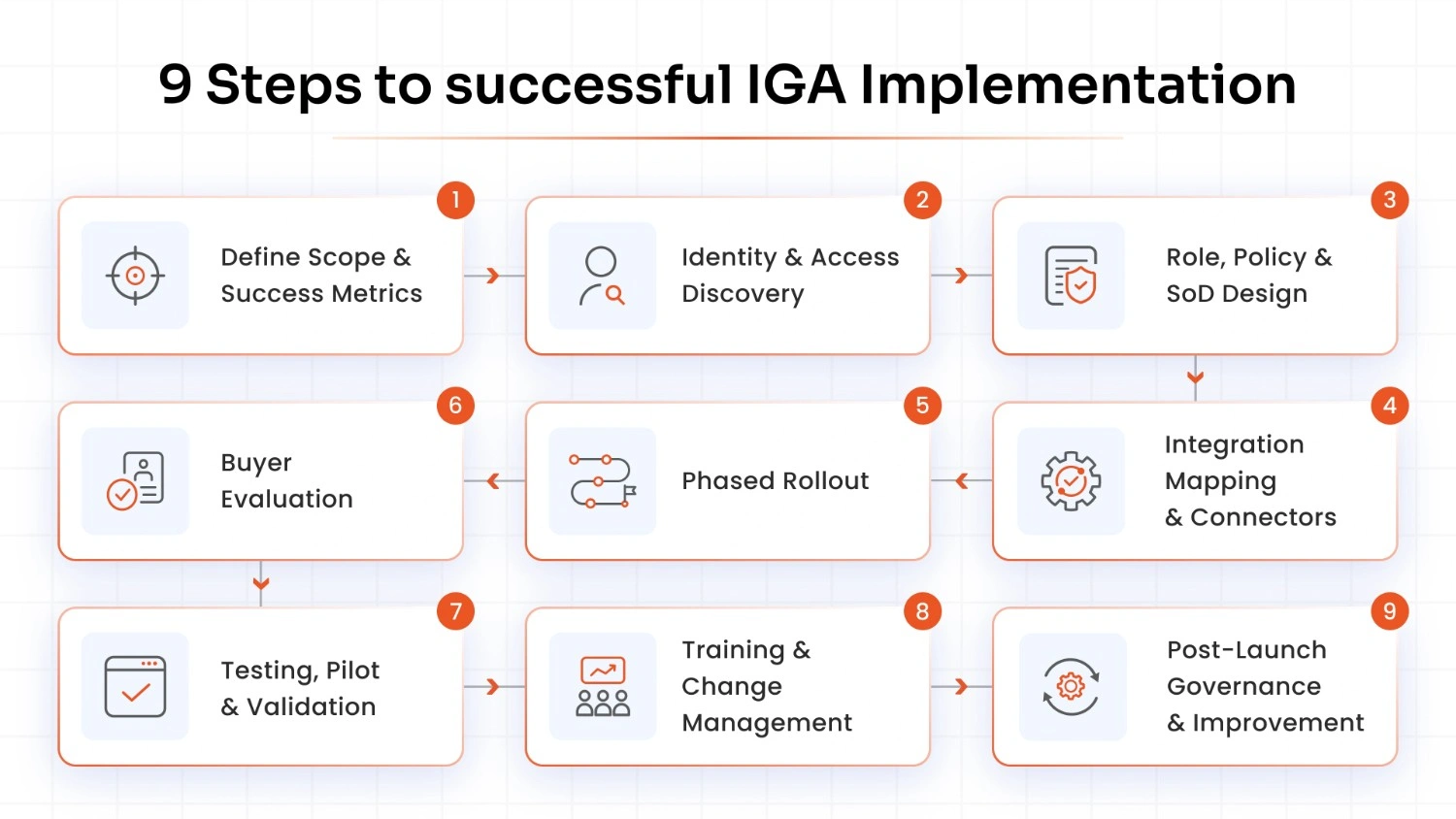
1. Define Scope, Sponsorship, and Success Metrics
Every successful IGA implementation starts with a narrow, well-defined scope rather than an attempt to govern every system on day one. Identify the applications, user populations, and compliance drivers you are addressing first. Also, get executive-level sponsorship locked in early, since IGA projects touch HR, IT, and business unit leaders who all need to buy in.
Additionally, set measurable success metrics up front, such as reduced time-to-provision, fewer audit findings, or faster certification cycles.
2. Run a Current-State Identity and Access Discovery
You cannot govern access you have not found. The first real task is cataloging every identity source, including your HRMS, Active Directory, and any application that manages its own accounts.
This discovery phase almost always surfaces surprises: orphaned accounts, mismatched job titles, and entitlements that no longer map to anyone's actual role. Document everything before moving forward, because bad data here contaminates every later step, from role design to access certifications.
3. Design Roles, Policies, and SoD Rules
Role design is where most IGA projects either succeed or quietly start to fail. Build roles around how the business actually operates, not around what an outdated policy document says. And avoid the two failure modes of over-granular roles that require constant maintenance or overly broad roles that cannot survive an audit.
Layer in Separation of Duties (SoD) rules at this stage to prevent conflicting access combinations, such as a single user who can both create and approve financial transactions, and treat role mining as an ongoing discipline rather than a one-time exercise.
4. Map Integrations and Connector Requirements
List every system that needs to talk to your IGA platform, then confirm connector availability for each one, whether that means SCIM 2.0, LDAP, REST APIs, or flat-file imports for legacy applications.
A well-known pattern that reduces integration risk is onboarding your HR system first as the single source of truth. This can be followed by Active Directory or Azure AD, and only then bringing in individual business applications one at a time.
Document data mapping requirements for each connector, since inconsistent attribute names across systems are one of the most common causes of failed provisioning.
5. Plan a Phased Rollout, Not a Big Bang
Attempting to onboard every application simultaneously is one of the most frequent mistakes in IGA projects, and it almost always backfires. Instead, pick one department or one critical application as your pilot group. Work through the data issues and approval friction at a small scale, and use those lessons to accelerate the rest of the rollout.
Phased delivery also gives your team a working reference implementation they can point to when convincing skeptical stakeholders in later phases.
6. Build the Buyer Evaluation Checklist
If you have not yet selected a platform, build your evaluation criteria before you start scheduling vendor demos. At minimum, assess connector breadth for your specific application stack, support for automated provisioning and deprovisioning, built-in SoD and role mining capabilities, and how the platform handles access certification campaigns.
Ask each vendor for a reference architecture that matches your integration order: HR, directory, then business applications, since this reveals whether their implementation methodology aligns with proven rollout patterns.
7. Test, Validate, and Run a Pilot
Before any production go-live, run System Integration Testing (SIT) and User Acceptance Testing (UAT) against real scenarios, not just synthetic test cases. Validate that provisioning and deprovisioning actions fire correctly, that SoD rules catch the conflicts they are supposed to catch, and that approval workflows route to the right managers.
Treat the pilot as a controlled experiment: measure how long onboarding actually takes, how many exceptions come up, and how reviewers respond to the new certification process before scaling further.
8. Plan Training and Change Management
Change management is frequently the hardest part of an IGA rollout, harder than the technology itself in many cases. People resist new access workflows because they initially feel slower, and managers often approve certification requests without fully understanding what they are signing off on.
Build recurring training into your rollout plan rather than a single kickoff session, and make sure reviewers understand why each access decision matters, not just how to click through the interface.
9. Define Post-Launch Governance and Continuous Improvement
IGA is not a project you finish and walk away from; it is an operating rhythm you maintain. Schedule regular access certifications, typically quarterly, review SoD rule effectiveness as roles evolve, and use analytics to flag unusual access patterns before they become audit findings.
Build a cadence for reconciling identity data between HR, IT, and compliance teams so the governance model stays accurate as the business changes.
Checklist at a Glance
Use this table as a quick reference once you have worked through the detailed steps above, or as a starting point for building your own project tracker.
| Checklist Item | Key Action | Common Pitfall to Avoid |
|---|---|---|
| Scope and Sponsorship | Define applications, users, and success metrics upfront | Trying to govern everything on day one |
| Discovery | Catalog all identity sources across HRMS, AD, and apps | Skipping data cleanup before role design |
| Role and Policy Design | Build roles around real job functions with SoD rules | Roles that are too granular or too broad |
| Integration Mapping | Confirm connectors and integration order (HR to AD to apps) | Inconsistent attribute mapping across systems |
| Phased Rollout | Pilot one department or application first | Big bang deployment across all systems at once |
| Vendor Evaluation | Score platforms on connectors, automation, and SoD | Choosing a vendor before scope is defined |
| Testing and Pilot | Run SIT and UAT with real scenarios | Skipping validation before go-live |
| Training | Recurring sessions for reviewers and managers | Treating training as a one-time kickoff |
| Post-Launch Governance | Quarterly certifications and continuous monitoring | Assuming the project ends at go-live |
Getting IGA Implementation Right the First Time
An IGA rollout succeeds or stalls based on discipline, not luck. Following a structured checklist, starting small, validating before scaling, and treating governance as an ongoing practice will keep your implementation on track and audit-ready long after go-live.
If you're ready to move past planning and see how a structured IGA deployment actually works, schedule a personalized demo with miniOrange's identity governance team today and get a walkthrough tailored to your application stack and compliance requirements.
FAQs
How long does an IGA implementation take?
Timelines depend heavily on scope. A single-use-case deployment can take a few weeks, while a multi-system enterprise rollout covering HR, directories, and multiple SaaS applications typically takes several months. Always validate your own estimate against your actual application count rather than relying on general industry figures.
What is the first step in implementing IGA?
The first step is a current-state discovery of all identity and access data across your HRMS, Active Directory, and connected applications. This discovery phase reveals data quality issues and orphaned accounts that must be cleaned up before role design or integration work begins.
Do we need to select a vendor before starting an IGA implementation checklist?
No, define your scope, success metrics, and evaluation criteria first, then use those criteria to score vendors during selection. Starting with vendor selection before scope leads to platforms that are misaligned with your actual integration and governance needs.
What is the most common reason IGA implementations stall?
Weak change management is one of the most frequent causes, since managers and employees often resist new access workflows that feel slower at first, especially once SoD rules add complexity to approvals. Integration complexity from onboarding too many applications simultaneously is a close second reason.
How do you prevent role sprawl during IGA rollout?
Design roles around actual job functions rather than individual user requests, and review role definitions periodically as the business changes. Treat role mining as a continuous discipline tied to regular access certifications rather than a one-time setup task during implementation.
Can IGA implementation be phased by use case?
Yes, and it is generally the recommended approach. Starting with one department or one critical application as a pilot lets you resolve data and workflow issues at a small scale before expanding across the rest of the organization.
Leave a Comment