

A ten-person team can review access on a spreadsheet. A company with thousands of ERP roles, cloud entitlements, and privileged accounts cannot, at least not reliably.
As financial systems multiply, so does the surface area SOX access certification has to cover. What starts as a manageable quarterly task can quickly outgrow manual tracking, reviewer follow-ups, and after-the-fact evidence gathering.
Identity governance and administration (IGA) was built for exactly this scale. It keeps access data accurate, routes decisions to the right owner, and preserves evidence as the review happens, not after.
What Is SOX Access Certification?
SOX access certification is a regular review of user access in systems that support financial reporting. A manager, app owner, or control owner checks whether a person still needs a role or permission. They can approve the access, ask for it to be removed, or flag it for more review.
These reviews support Section 404 of the Sarbanes-Oxley Act. Section 404 is linked to Internal Control over Financial Reporting, also called ICFR. ICFR means the checks a company uses to make sure its financial records and reports are correct, complete, and reliable.
For example, ICFR can help make sure that:
- Financial transactions are recorded correctly
- Payments follow approval rules
- Only approved people can change important financial data
- Financial reports are based on complete information
- Errors or unusual activity are found and addressed
Access controls are one part of ICFR. The wrong access can allow someone to change vendor information, approve payments, post journal entries, edit reports, or make other changes that affect financial data.
This is why access reviews matter. They help companies check that people have only the access they need for their job. They can lower the risk of mistakes, misuse, and changes made without proper approval.
Why Manual Access Reviews Start to Break Down
Manual reviews often depend on spreadsheets, emails, and separate tickets. As systems and access grow, teams struggle to keep data current, give reviewers enough context, remove revoked access, and maintain audit evidence.
Access Data Becomes Outdated
Access changes between review cycles. New hires, job changes, role updates, and exits can leave reviewers with outdated information.
A reliable review needs:
- Current access data
- Clear review scope
- Defined account and permission types
- A way to capture changes during the review
Reviewers Lack Useful Context
Technical role names rarely tell the full story. Reviewers need to know what access allows, who owns it, its business purpose, and any related risks.
Useful context includes:
- Business role and access level
- Financial impact
- Access owner
- SoD conflicts
- Recent access changes
Revocation Gets Separated
Selecting “revoke” does not remove access. Manual handoffs through emails or tickets create gaps between the review decision and the actual access state.
Teams need visibility into:
- What needs removal
- Who owns the task
- When access was removed
- Any approved exceptions
Evidence Requires Extra Work
Evidence often sits across spreadsheets, emails, tickets, screenshots, and system exports. Teams then spend time piecing these records together for audit testing.
EY’s global SOX survey also highlights data quality and timely information as important considerations for technology-enabled SOX programs.
Cloud Environments Expand the Scope
Financial access now spans ERP systems, cloud platforms, data warehouses, SaaS applications, and integration tools. Each system brings different roles, account types, and ownership models, making consistent reviews harder to manage.
Protiviti’s 2025 SOX poll found that 68% of respondents prioritized more technology and automation, while 28% reported using SoD or access-management tools. This highlights the gap between the need for stronger access governance and current tool adoption.
What Makes a SOX Access Review Reliable?
A reliable SOX access review starts with clear scope, current access data, and the right reviewers. Reviewers also need enough context to understand what access allows, why it matters, and where risk exists.
Access also changes between review cycles. Joiners, movers, and leavers can change permissions before the next review. Strong certification processes account for these changes.
A reliable review includes:
- Clear system and account scope
- Current access data
- Defined reviewer rules
- Risk context for sensitive access
- A consistent review schedule
- Reminders and escalations
- Access removal for unwanted permissions
- Centralized review evidence
What A Strong IGA Solution Should Deliver For SOX Access Certification
An IGA platform should support the full access certification process. It should help teams define the review population, assign accountability, guide reviewers, act on revoke decisions, and retain evidence for audit.
1. Automated Certification Campaigns
SOX access reviews need to happen on time. Yet many teams still depend on spreadsheets, email reminders, and manual follow-ups to complete each campaign.
IGA supports quarterly, annual, and event-based certification campaigns. Teams can set the review schedule in advance and define who should review each access item. Review tasks can go to a user’s manager, an application owner, a business owner, a control owner, or a reviewer selected through role-based rules.
Automated reminders notify reviewers before the deadline. Escalation rules inform the right manager or control owner when tasks remain incomplete. Delegation also allows the assigned reviewer to send a task to someone with better knowledge of the access.
2. JML Automation
Access to financial systems does not stay the same between SOX certification campaigns. People join finance teams, move into new roles, change departments, or leave the company, and each of these events can leave old access behind long before the next scheduled review.
IGA connects SOX certification to Joiner, Mover, and Leaver (JML) events. It grants approved access when someone joins, removes old access and adds new access through the right approval path when someone changes roles, and removes accounts across ERP, CRM, and cloud systems when someone leaves.
These changes show up directly in the next certification campaign, so reviewers can see exactly what access is new, removed, or unchanged.
3. SOX 404 and ITGC Control Mapping
Access reviews are part of a company’s wider SOX control environment. SOX Section 404 focuses on Internal Control over Financial Reporting (ICFR). IT General Controls (ITGCs) support the systems and processes used to prepare financial reports.
Access-related ITGCs often cover access requests, approvals, provisioning, role changes, access removal, privileged access, and regular access reviews. IGA links campaigns, policies, review decisions, and remediation records to the related SOX 404 access controls and ITGC requirements.
4. Risk-Based and Delta Reviews
Not every permission carries the same risk. A standard employee role needs less review than a role that can change financial settings, approve payments, update vendor data, or manage users. IGA highlights higher-risk access so reviewers can focus on the items that need more attention.
Risk indicators may point to:
- Privileged and admin access
- Access to sensitive financial data
- Roles that can change financial records
- New or recently changed permissions
- Segregation-of-duties conflicts
- Contractor and temporary-worker access
- Shared, service, and break-glass accounts
Delta reviews focus on what changed since the last campaign. Imagine an employee who keeps nine existing permissions and receives one new payment-related role after changing teams. A delta review highlights the new role, so the reviewer can focus on the access that changed. This reduces review fatigue and makes bulk approval less likely.
5. Segregation of Duties (SoDs) Enforcement
Some access risk comes from combinations of permissions. This is called segregation of duties (SoD). One employee may be able to create a vendor and approve payments to that vendor. Another may be able to create a purchase order and approve the related invoice. These combinations can create a risk of error or misuse if there are no other checks.
IGA identifies toxic access combinations across financial systems. It flags possible conflicts when a user requests access and during certification campaigns.
At times, a conflict must remain because of a business need. In that case, the company can record a compensating control. A compensating control is an extra check that lowers risk when access cannot be removed.
6. Privileged and Break-Glass Account Review
Privileged accounts have more power than standard user accounts. An admin may create users, change roles, reset passwords, edit system settings, or access sensitive data.
Break-glass accounts are emergency accounts. They are used when normal access is not available, and urgent action is needed. These accounts are important during an outage or serious incident. They also need close oversight because they often have broad access.
IGA can place privileged, emergency, and shared accounts into separate review cycles. These accounts can be reviewed more often than standard employee access. This gives companies better oversight of the accounts auditors often examine most closely.
7. ERP, Cloud, and Financial System Coverage
Financial reporting often depends on many connected systems. A company may use SAP, Oracle, NetSuite, Workday, cloud IAM platforms, data warehouses, payment tools, payroll systems, and SaaS apps.
Each system can have different roles, account types, access owners, and access data. Separate spreadsheet reviews for every system create gaps.
IGA can manage access reviews across ERP systems, cloud roles, financial applications, data platforms, and connected SaaS tools through one campaign process.
The review scope may include:
- SAP and Oracle roles
- NetSuite permissions
- Workday access
- Cloud IAM roles
- Data warehouse access
- Financial reporting tools
- Payment and procurement systems
- SaaS applications linked to financial processes
This gives control owners a clearer view of access across the systems that support financial reporting.
8. Closed-Loop Remediation
A revoke decision is not the same as removing access. In many manual reviews, a manager selects “revoke” in a spreadsheet. Someone must then open a ticket, email an admin, or contact an application owner. Access could remain active while the request moves between teams.
IGA can turn a revoke decision into an automatic deprovisioning action or a tracked remediation task. The workflow records the request, assigns it to the right person or system, tracks progress, and captures confirmation when access is removed.
The record can show:
- The access marked for removal
- The reviewer who made the decision
- The person or team responsible for the change
- The date the task began
- The date access was removed
- The final status in the target system
- Any approved reason for a delay
This keeps the review decision connected to the actual access change.
9. Audit-Ready Evidence and Reporting
A SOX access review should create evidence while the campaign runs, not weeks later when an auditor asks for it. IGA can record the campaign population, reviewer assignments, decisions, comments, sign-offs, reminders, escalations, revocation actions, and final status. Each record includes a date and time.
This supports testing of Information Produced by the Entity (IPE) and Information Used in Controls (IUC). These terms refer to the reports and data used as part of a control. Auditors often test whether this information is complete and accurate.
An evidence package often includes:
- The in-scope systems and review population
- Roles, permissions, and account details
- Reviewer and control-owner assignments
- Approval, revocation, delegation, and exception decisions
- Decision dates and sign-offs
- Reminder and escalation history
- SoD conflict records
- Remediation tasks and completion status
When auditors request proof, compliance teams can export campaign evidence instead of collecting files from spreadsheets, inboxes, and ticketing tools.
How IGA Works
IGA makes access certification a simple, connected process from review to audit evidence.
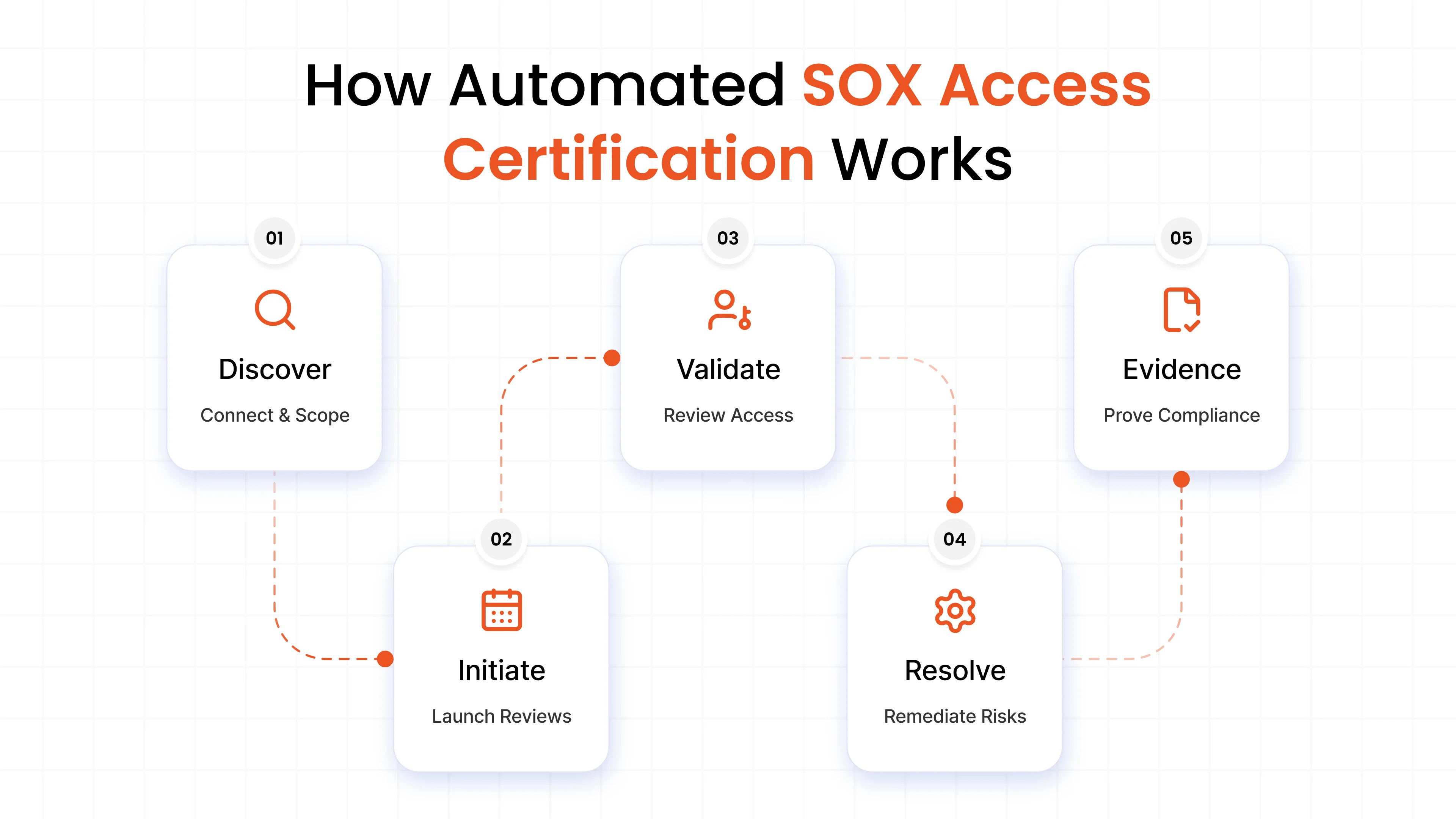
Discover
Bring your ERP, financial, cloud, and SaaS systems into scope. Define the users, accounts, roles, and permissions to review.
Initiate
Start a scheduled, event-based, or risk-based review. Assign tasks to the right managers or application owners. Reminders and escalations keep reviews moving.
Validate
Give reviewers the context they need. Show access details, ownership, and risk signals such as privileged access, new permissions, and SoD conflicts.
Resolve
Reviewers approve, revoke, or flag access. Revoked access moves to the right team or system for removal. The workflow tracks it through completion.
Evidence
Keep decisions, approvals, exceptions, remediation status, and timestamps in one record. Export the evidence auditors need for SOX, ICFR, and ITGC reviews.
Use Cases for Automated SOX Access Certification
Automated SOX access certification supports several important business and compliance needs.
Automated SOX access certification helps organizations handle complex access governance needs across financial systems.
1. Quarterly Reviews Across Financial Systems
Review access across ERP, payment, reporting, data warehouse, cloud, and SaaS environments within one governance process.
2. Reduce Review Fatigue
Focus reviewer attention on high-risk or changed access instead of asking them to examine every permission with the same level of scrutiny.
3. Strengthen Segregation of Duties
Identify conflicting access across critical financial processes and support documented exceptions or compensating controls.
4. Govern Privileged and Non-Human Accounts
Extend SOX controls to admin, service, API, integration, shared, and break-glass accounts that often fall outside standard employee reviews.
5. Support Audit Remediation
Strengthen access controls after audit findings and maintain consistent governance as financial systems, roles, and users change.
6. Prepare for an IPO
Establish repeatable access controls and governance before an IPO, with clear ownership and consistent oversight across financial systems.
Compliance Requirements Supported By IGA
IGA supports access controls linked to SOX and other common assurance frameworks. It records access decisions, tracks remediation, and retains evidence that can support control testing.
SOX Section 404 And ICFR
SOX Section 404 requires management to assess Internal Control over Financial Reporting (ICFR). Access certification supports this work by showing that access to financial systems is reviewed, approved, removed, and recorded. SEC rules require annual reports to include management’s assessment of ICFR effectiveness.
SOX Section 302
SOX Section 302 requires senior officers to certify company disclosures and take responsibility for disclosure controls. Access review records and remediation evidence support the wider control environment behind those certifications.sec
IT General Controls (ITGC)
Access-related ITGCs cover how access is requested, approved, granted, changed, removed, and reviewed. IGA supports these controls through access requests, Joiner, Mover, and Leaver (JML) automation, certification campaigns, and remediation tracking.
Segregation of Duties and Privileged Access
IGA can identify SoD conflicts, flag high-risk access, document compensating controls, and review privileged, shared, service, and emergency accounts with clear ownership and evidence.
Related Frameworks
The same access-governance process can also support J-SOX, COSO, COBIT, PCAOB audit evidence expectations, SOC 1, SOC 2, and ISO 27001. PCAOB AS 2201 requires auditors to obtain sufficient appropriate evidence and test selected controls directly when auditing ICFR.
Why Choose miniOrange IGA for SOX Access Certification
SOX access certification often sits at the end of the access lifecycle. By the time a quarterly review starts, teams have to piece together who has access, why they have it, what changed, and whether previous revoke decisions were completed. miniOrange IGA changes this model by bringing certification into the wider identity governance process.
The difference is context. JML events explain why access changed. Risk signals show where reviewers need to look closer. Remediation connects a revoke decision with the actual permission change. Audit records capture the full trail. Instead of treating certification as a periodic compliance task, miniOrange IGA makes it part of how access is governed every day.
Key advantages include:
- One Governance Layer: Bring ERP, financial applications, cloud platforms, data warehouses, and SaaS systems into one governance process.
- Lifecycle Context: Connect Joiner, Mover, and Leaver (JML) events with access decisions.
- Risk-Aware Reviews: Give reviewers relevant risk and SoD context before they decide.
- Human and Non-Identity Coverage: Govern employees, service accounts, API identities, integration accounts, and break-glass accounts with dedicated identity governance for AI agents and humans.
- Connected Remediation: Follow revoked permissions through removal and confirmation in the target system.
- Audit-Ready Records: Maintain certification history, exceptions, decisions, and remediation evidence throughout the process.
- Flexible Deployment: Fit your existing cloud, on-premises, or hybrid environment.
With miniOrange IGA, certification becomes part of continuous identity governance rather than a quarterly scramble to prepare for an audit.
Have questions about SOX access certification or your financial systems? Contact the miniOrange team to discuss your requirements.
Frequently Asked Questions
What is SOX access certification?
SOX access certification is a recurring review of permissions in systems that support financial reporting. Authorized reviewers assess whether assigned access remains appropriate and approve, revoke, or flag permissions for further action.
How often should SOX access reviews run?
Organizations determine review frequency based on risk, system importance, control requirements, and internal policy. Quarterly reviews are common, while higher-risk accounts or systems might follow different schedules.
Which accounts should a SOX review include?
The scope might include employees, privileged users, service accounts, shared accounts, break-glass accounts, and other non-human identities when they have relevant access to financially significant systems.
How does automation reduce review fatigue?
Automation helps route tasks, highlight access changes, identify higher-risk permissions, and manage reminders. These functions reduce administrative work and help reviewers focus on decisions that need closer attention.
What evidence should organizations keep?
Evidence often includes the review population, reviewer assignments, decisions, sign-offs, timestamps, and remediation records. Specific requirements depend on the organization's controls and discussions with external auditors.
Leave a Comment