

Passwords are no longer enough to protect Drupal accounts. From credential stuffing and phishing to password reuse and stolen credentials, attackers have multiple ways to compromise a user's login. This makes Multi-Factor Authentication (MFA) an important part of securing Drupal websites.
But there is another challenge: not every user wants to authenticate the same way. A single mandatory method — say, SMS OTP for everyone — sounds simple on paper, but in practice it locks out travelling employees, frustrates users without reliable phone signal, and gives your helpdesk a permanent stream of "I didn't get my code" tickets.
This is where multiple MFA methods for Drupal can make a difference.
Instead of restricting users to a single authentication method, organizations can make multiple MFA methods available. Users can configure one, multiple, or all of the methods available to them and choose an enrolled method when they log in.
This blog covers how multiple MFA methods work in Drupal, the authentication options organizations can provide, how users can choose an MFA method during login, and the best practices for implementing a flexible Drupal MFA strategy.
What Are Multiple MFA Methods in Drupal?
Traditional Drupal 2FA typically requires a user to complete one additional authentication step after entering their username and password. The second factor could be a TOTP code, OTP, security key, or another supported method.
Multiple MFA methods extend this approach by allowing users to configure more than one authentication method.
For example, an organization may make the following methods available:
- TOTP authenticator apps
- Email OTP
- SMS OTP
- WebAuthn or security keys
- Passkeys
- Recovery methods A user can then configure the methods that work best for them.
For example, User A may configure only TOTP, while User B may configure TOTP and WebAuthn. User C may configure TOTP, SMS OTP, and a security key.
When these users log in, they can select an authentication method they have already configured.
The key point is that configuring multiple MFA methods does not mean users must complete every method during a single login. Instead, multiple methods give users flexibility in how they complete their MFA verification.
MFA Methods Available for Drupal
Before you can build a sensible Drupal MFA policy, it helps to know what's actually on the table. Different Drupal environments have different security and usability requirements. Providing multiple authentication options allows organizations to build an MFA policy that works for different users and roles.
- TOTP Authenticator Apps: Time-based One-Time Password (TOTP) authentication generates a temporary verification code through an authenticator apps like Google Authenticator, Microsoft Authenticator, or Authy are the workhorse of modern MFA. The user scans a QR code once during enrollment, and from then on the app spits out a fresh six-digit code every 30 seconds. It works offline, doesn't depend on carrier networks, and is cheap to support at scale — which is why it's usually the default recommendation for internal teams and developers.
- Email OTP: Email OTP sends a one-time verification code to the user's registered email address. It's not the strongest method out there since it depends on the security of the inbox itself, but it's frictionless to set up, requires no app installation, and works well as a fallback method or for lower-risk user roles like content contributors and external reviewers.
- SMS OTP: SMS OTP sends a temporary verification code to a user's registered mobile number. It's familiar to almost everyone, which makes adoption easy. However, organizations with stricter security requirements may want to prioritize stronger authentication methods for privileged accounts.
- WebAuthn, FIDO2, Passkeys, and Security Keys: This is where drupal multi-factor authentication gets genuinely strong. WebAuthn and FIDO2-based authentication provide stronger, modern authentication options through security keys, platform authenticators, biometrics, and passkeys. These methods can reduce reliance on manually entered OTPs and are particularly useful for administrators, privileged users, and organizations looking to adopt phishing-resistant authentication.
- Backup and Recovery Authentication: No MFA rollout is complete without a plan for what happens when a user loses their phone, their security key, or access to their email. Backup codes — a set of single-use codes generated at enrollment and stored somewhere safe — are the standard answer. Without them, "I lost my authenticator app" turns into an emergency support ticket instead of a two-minute self-service recovery.
How Multiple MFA Works During Drupal Login
The biggest advantage of multiple MFA methods is the flexibility they provide at the point of authentication.
With a single MFA method, the login flow is straightforward:
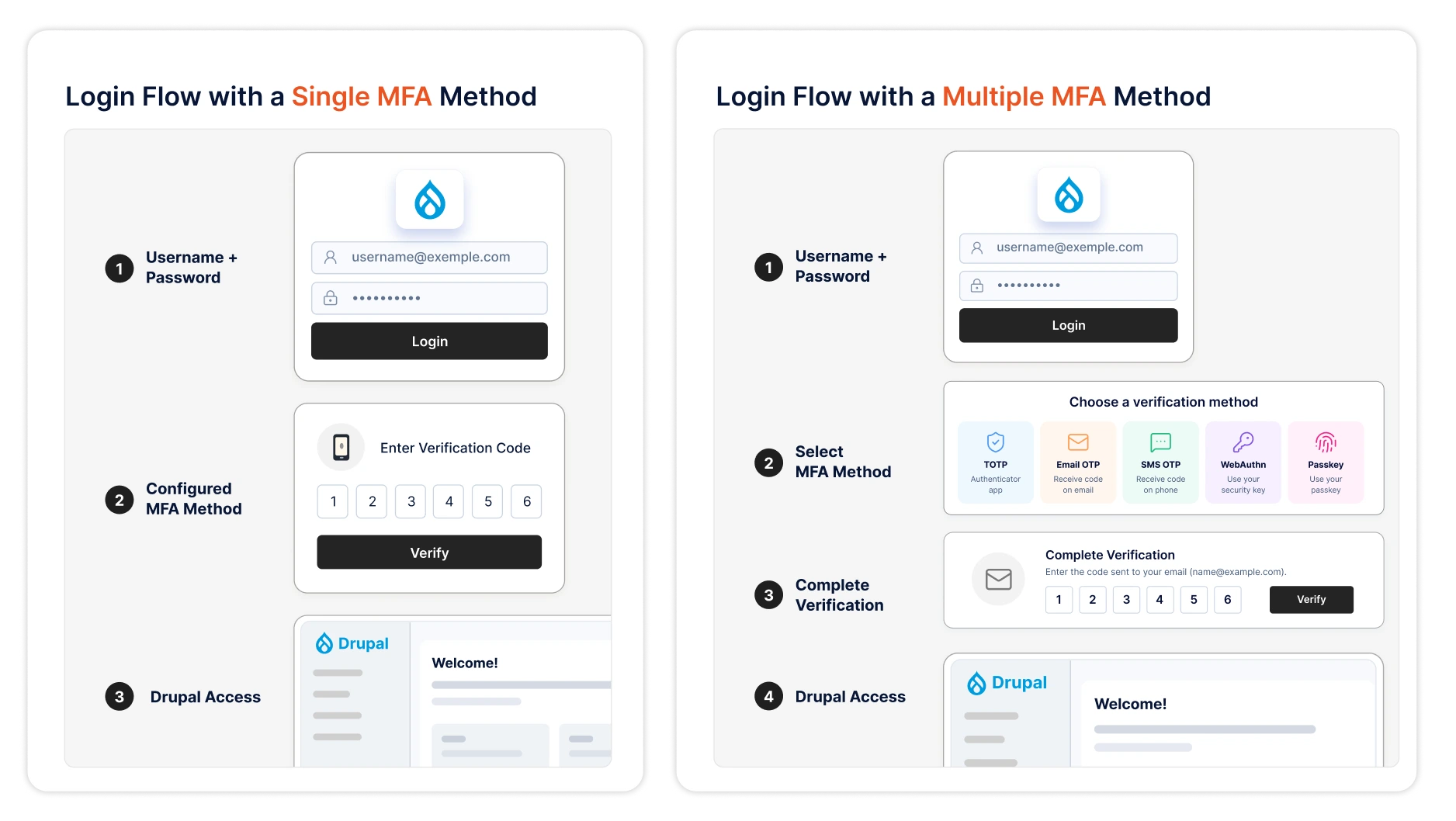
For example, a user who has configured both TOTP and WebAuthn can choose whichever method is more convenient for that login.
This becomes especially useful when users access Drupal from different devices or environments. A user may normally authenticate with a passkey but choose TOTP when accessing the site from a device where the passkey is not available.
The result is a more flexible Drupal multi-factor authentication experience without removing the MFA requirement.
Comparing Drupal MFA Methods by Security and Usability
Not every MFA method for Drupal decision comes down to "which is most secure." Security and usability often pull in opposite directions. The right approach depends on factors such as the sensitivity of the Drupal site, the roles being protected, the devices users have access to, and the organization's security requirements. For example, a public-facing membership portal may prioritize convenience, while an internal Drupal administration portal may prioritize phishing-resistant authentication for privileged users.
| MFA Method | Security | Convenience | Suitable For |
|---|---|---|---|
| TOTP | High | High | General users and employees |
| Email OTP | Moderate | High | Users with reliable email access |
| SMS OTP | Moderate | High | Mobile-based authentication |
| WebAuthn/FIDO2 | Very High | High | Privileged users |
| Passkeys | Very High | Very High | Modern passwordless authentication |
| Security Keys | Very High | Moderate–High | Administrators and high-value accounts |
| Recovery Codes | Recovery mechanism | Moderate | Account recovery |
Drupal MFA Implementation Checklist for Security Teams
Enabling multiple MFA methods is only one part of building a secure authentication strategy. Security teams should also establish policies around enrollment, authentication, recovery, and ongoing monitoring.
- Define MFA Policies by User Role: Not every account carries the same risk. Admins and anyone who can install modules, edit permissions, or touch the database deserve the strongest methods available and should be required to enroll before they get access. Editors and contributors can usually work with a lighter-weight policy.Define which users or roles must use MFA and determine which authentication methods should be available to them.
- Select Strong and Compatible Authentication Methods: When choosing MFA methods for Drupal, consider both security and usability. A distributed team of developers will adopt TOTP and security keys without complaint. A customer-facing portal with occasional login volunteers might need email OTP as the default, with stronger methods offered as an upgrade path. Compatibility with existing SSO or identity providers matters here too — if you're already running SAML or OAuth for Drupal login, your MFA layer should plug into that flow rather than sit awkwardly beside it.
- Secure Enrollment, Recovery, and Fallback Methods: Enrollment is the weak point attackers look for — if it's too easy to register a new MFA device on someone else's account, the whole system is only as strong as that gap. Require re-authentication before allowing a user to add or change an MFA method, and put limits on how backup codes are generated, viewed, and used. Recovery flows deserve the same scrutiny as login flows themselves.
- Monitor, Audit, and Review MFA Activity: MFA isn't "set and forget." Keep logs of enrollment events, failed MFA attempts, and method changes, and review them periodically for patterns — a spike in failed TOTP attempts on one account, or a user who suddenly re-enrolls a new device from an unfamiliar location, are exactly the kind of signals that catch account takeovers before they escalate. Pair this with a periodic access review to catch stale accounts that still have MFA methods registered but haven't logged in for months.
Which MFA Method Should Drupal Organizations Prioritize?
The answer depends on the organization's users and security requirements.
If you can only roll out one method well before expanding the list, TOTP authenticator apps are the pragmatic starting point for most Drupal sites — strong enough for the majority of use cases, cheap to run, and familiar to most users already. From there, add WebAuthn/passkeys for admin and privileged roles where phishing resistance actually matters, and keep email or SMS OTP available as a fallback rather than a primary method.
However, organizations do not necessarily have to choose only one.
A more flexible approach is to make multiple MFA methods available and allow users to configure the methods that work for them.
For example: A Drupal administrator can configure both a passkey and TOTP. During a normal login, they can use their passkey. If the passkey is unavailable, they can select TOTP instead.
This gives security teams control over the available authentication methods while giving end users flexibility in how they authenticate.
Why Choose miniOrange MFA for Drupal?
miniOrange MFA for Drupal helps organizations secure user accounts by providing flexible multi-factor authentication options and centralized control over MFA policies. It supports TOTP authenticator apps, email and SMS OTP, WebAuthn/FIDO2 security keys, passkeys, and push notification-based approval — all configurable per user role, so admins can enforce phishing-resistant methods for privileged accounts while keeping onboarding light for everyone else.
Enrollment and recovery flows are built with the same governance mindset: re-authentication before method changes, admin-controlled backup code policies, and detailed audit logs of every MFA event across the site.
Administrators can configure the authentication methods they want to make available to users and apply MFA requirements according to their security policies.
Users can then configure the available authentication methods that work for them. Instead of being tied to a single authentication method, users with multiple methods configured can select an enrolled method when authenticating.
This provides a flexible experience for both administrators and end users: Admin Configures MFA Methods → User Enrolls Available Methods → User Logs in to Drupal → Chooses an Enrolled MFA Method → Verification → Drupal Access
It also integrates cleanly with existing Drupal authentication setups — whether that's native Drupal login, SSO via SAML or OAuth, or a broader identity management stack — so MFA becomes one more configurable layer rather than a rip-and-replace project.
Conclusion
MFA works best when it fits the way people actually log in, not the other way around. Offering multiple MFA methods for Drupal — TOTP, OTP, WebAuthn, passkeys, and solid recovery options — lets security teams enforce strong policies for high-risk roles without forcing a one-size-fits-all method on everyone else. Start with a role-based policy, prioritize phishing-resistant methods where it matters most, and keep a dependable fallback in place. That's the combination that keeps a Drupal site both secure and usable.
With miniOrange MFA for Drupal, organizations can configure the authentication methods available to their users and build a flexible MFA experience designed around their security requirements.
Secure your Drupal site with flexible, user-friendly MFA.
Leave a Comment