- Home
- SAML/OAuth SSO for JSM Customers
- JSM SSO Documentation
- JSM SSO Feature Guide

miniOrange JSM SSO Feature Guide
This document outlines the miniOrange SAML/OAuth SSO for JSM Customers use cases and a complete guide of each tab like Organization Mapping, Portal Access Mapping, Custom Field Mapping and related capabilities available in the app for Jira Service Management. These features enable automated organization assignment, access control, and seamless customer portal SSO directly from your Identity Provider (IDP).
 Try it for free
Organization Mapping
The Organization Mapping feature lets you automatically assign customers to the correct JSM organization during SSO — based on email domains, IDP groups, bulk CSV imports, or dynamic IDP attributes (On-the-Fly mapping).
 1.1 Domain-Based Organization Mapping
You can map customers from specific customer domains to a corresponding JSM organization using the Organization Mapping> feature, specifically via domain-based mapping under the Manual Configuration tab.
This allows automatic assignment of customers to the appropriate JSM organization based on their email domain, streamlining the onboarding and segmentation process.
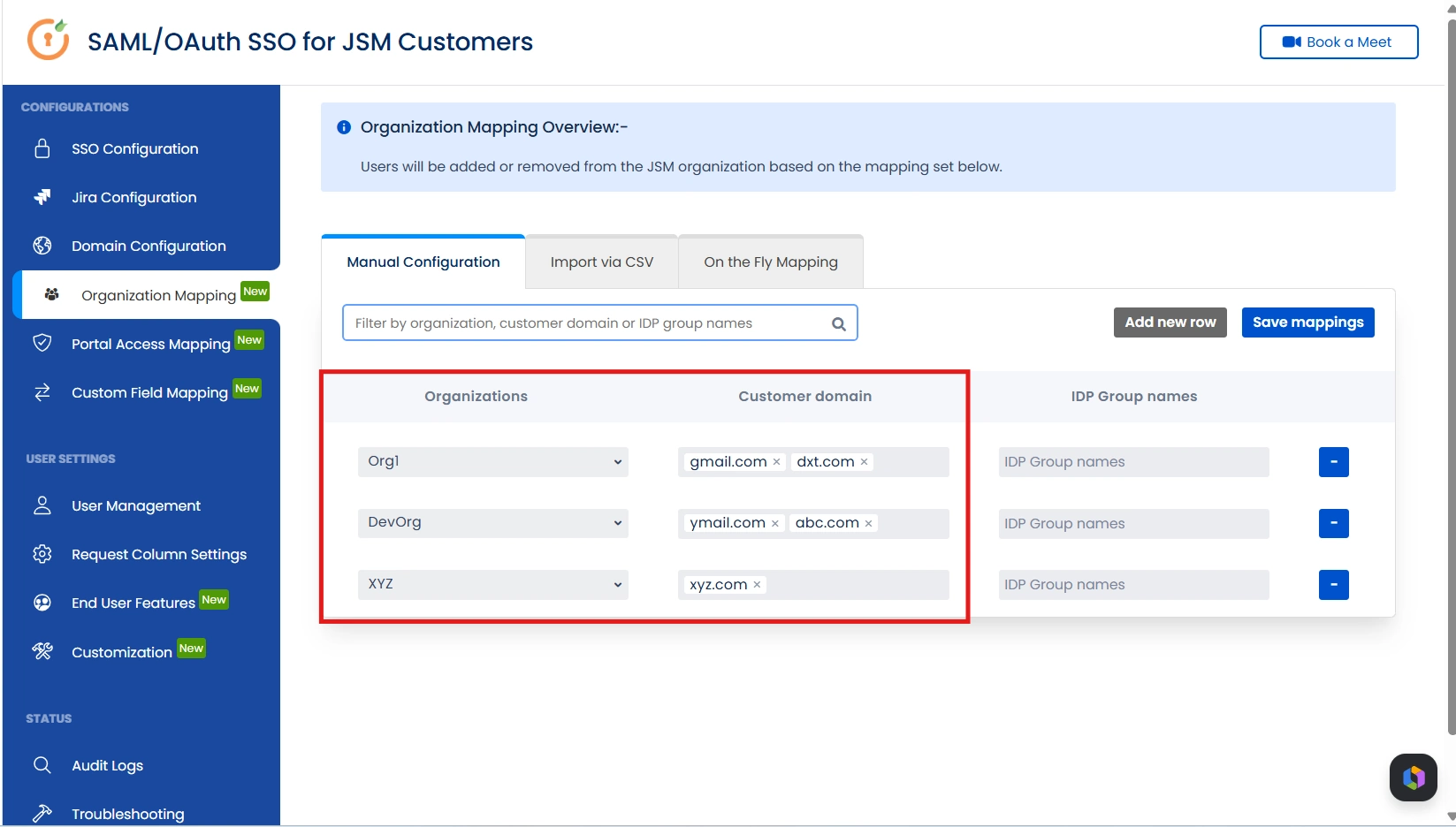
To configure this, simply define the customer domain and link it to the required JSM organization as shown below.
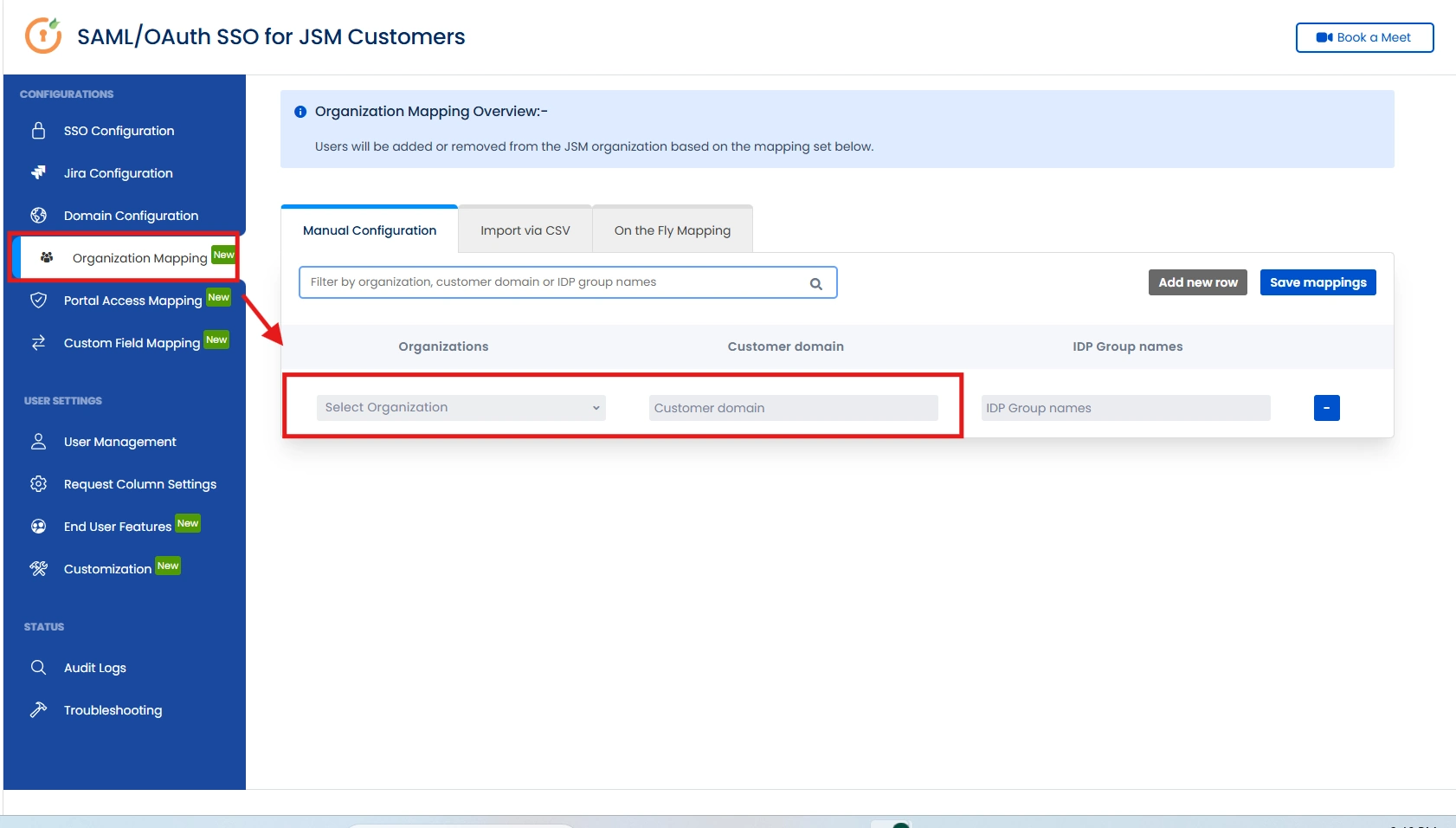
For Example:
A user with xyz.com email trying to login to the customer portal via SSO. If xyz.com is mapped to the XYZ organization, the user will be automatically added to the XYZ JSM organization after successful SSO. You can also assign multiple email domains to 1 JSM Organization. For eg. The ymail.com and abc.com domain will be assigned to DevOrg JSM Organization.
If another user with abc.com (who was previously in XYZ organization) logs in, they will be removed from the XYZ organization, ensuring accurate mapping.
This ensures users from a specific domain are always associated with the correct Jira organization.
1.2 IDP Group-Based Organization Mapping
External customers can be assigned to JSM organizations based on their Identity Provider (IDP) groups.
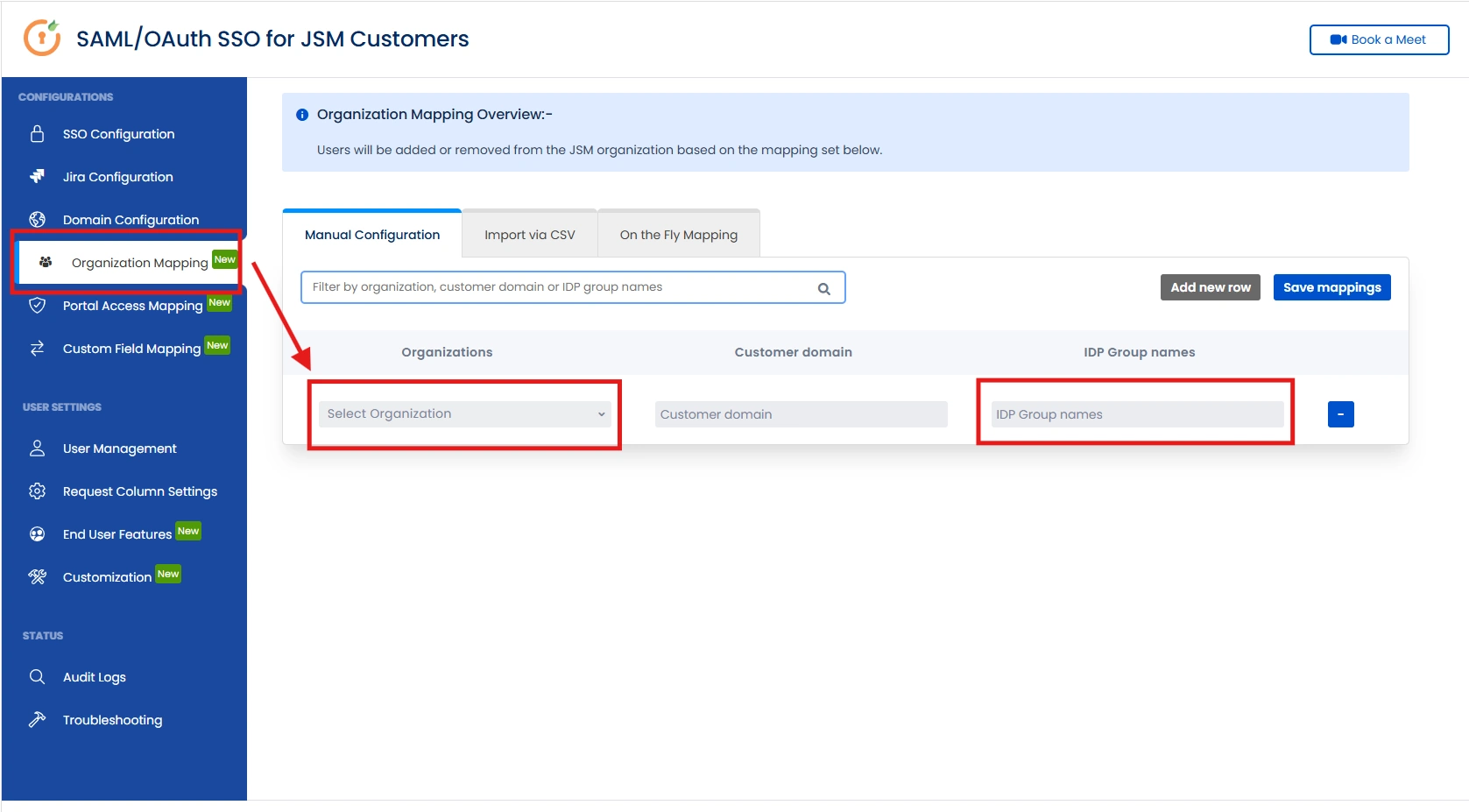
This can be configured using the Organization Mapping feature. You simply specify the relevant IDP group and link it to the desired JSM organization, enabling automatic synchronization of customers into the appropriate organization based on their group membership.
You can refer the screenshot below.
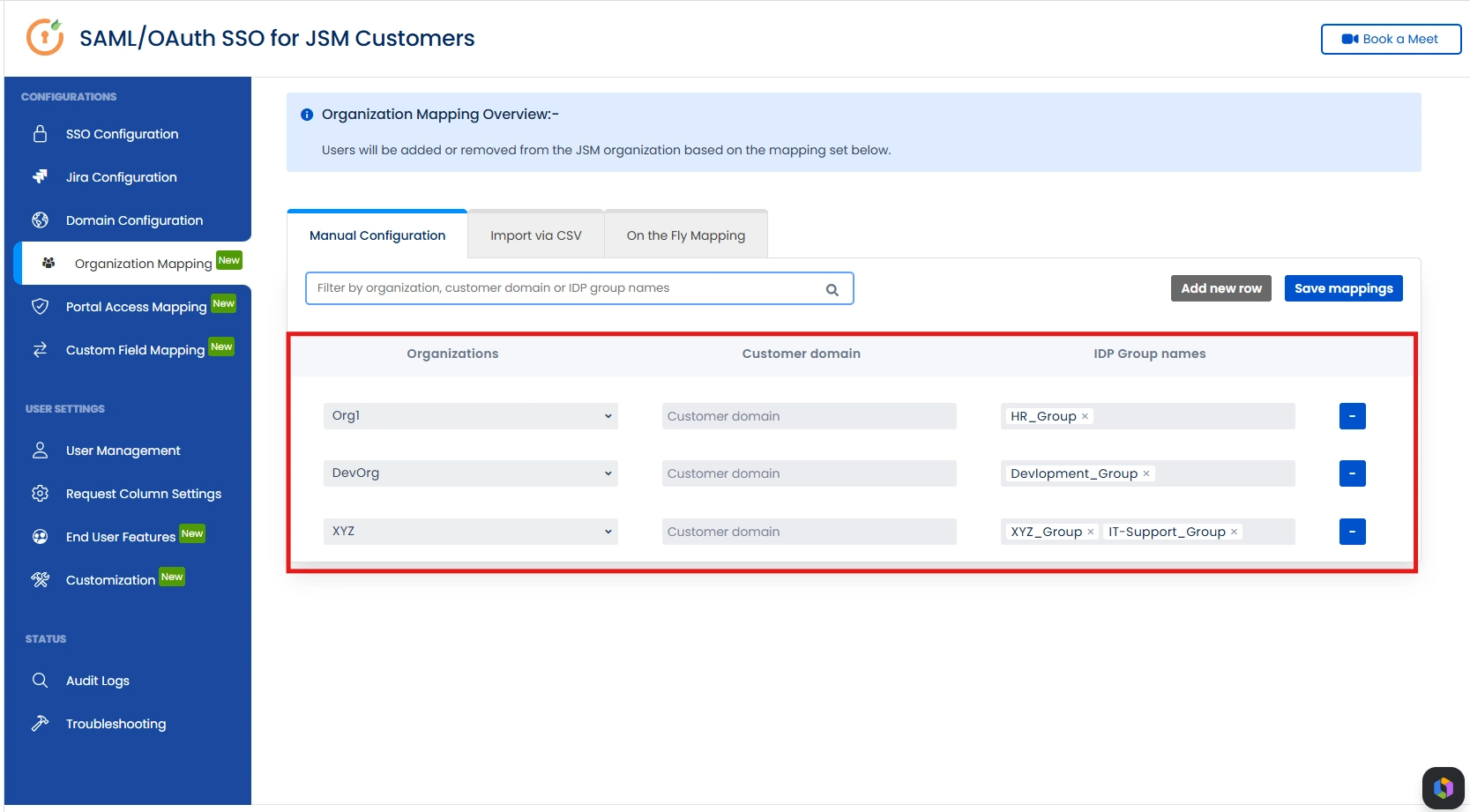
For Example:
The Development_Group will be mapped to DevOrg JSM Organization as shown in the screenshot below.
1.3 CSV Import for Bulk Organization Mapping
If you would like to bulk import configurations or mapping, then you can import it via CSV file instead of manually setting them up.
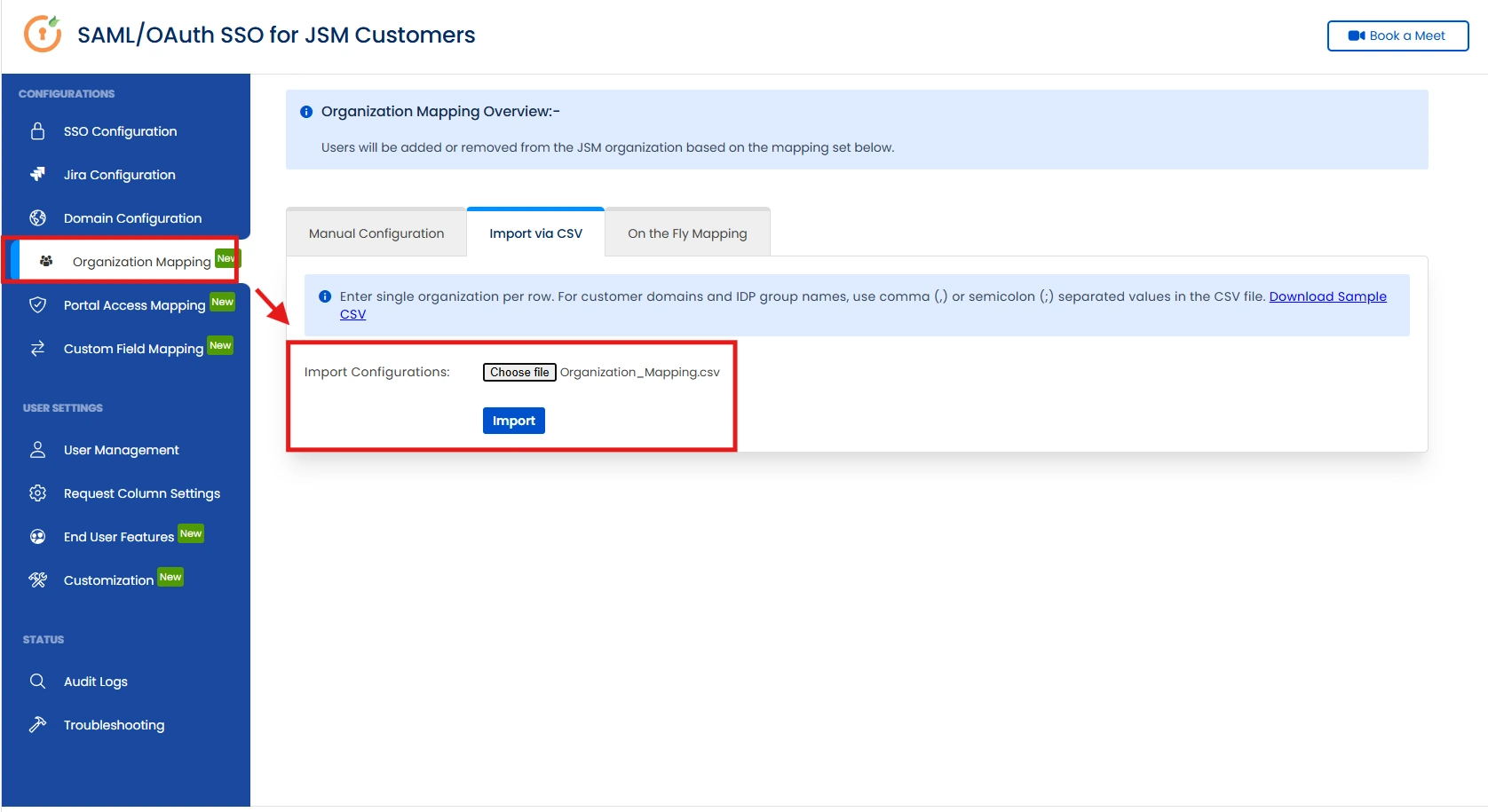
1.4 Dynamic Organization Creation Based on IDP
Attributes (On-the-Fly Mapping)
Create JSM Organizations based on IDP Attributes. If you do not have predefined mappings to JSM organizations and want to create JSM organizations dynamically based on the customer's Organization IDP attributes then you can do so with the help of On the Fly mapping tab in the Organization Mapping section.
To retrieve the Organization Attribute name, go to SSO Configuration, click Test Connection for the selected IdP, and review the attributes returned in the response. There, you will find the Organization attribute name and its corresponding value like in the image shown below.
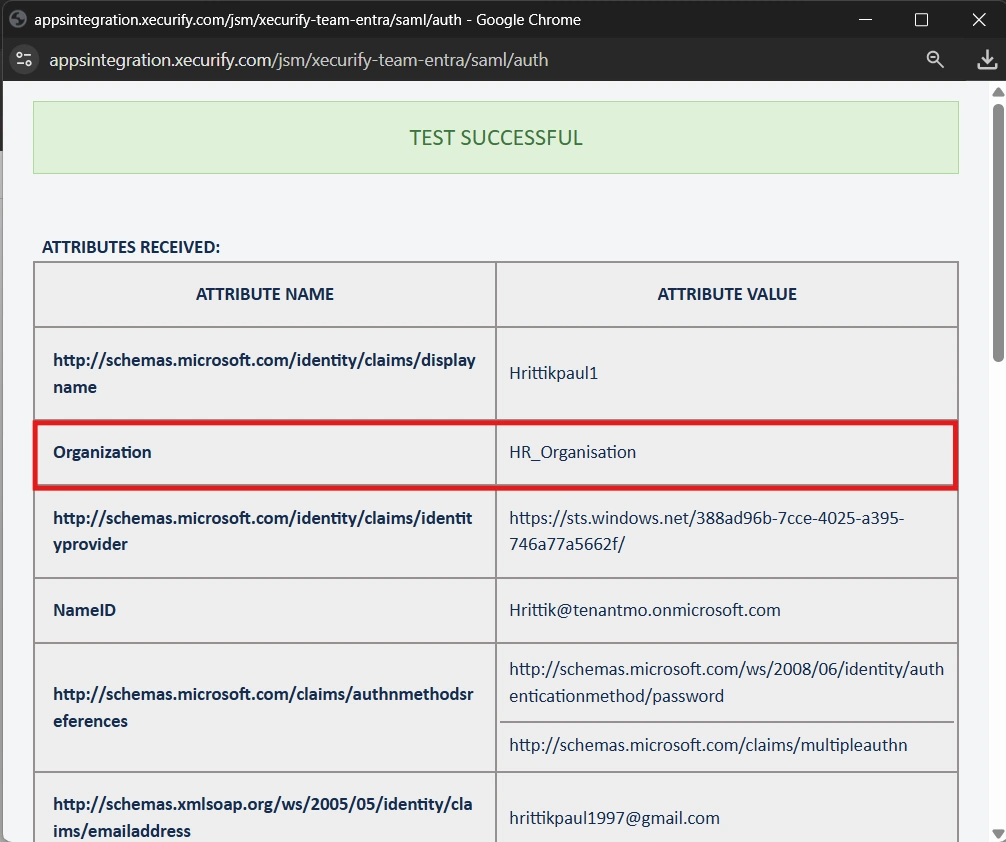
Based on the IDP Attribute Name (Organization) you then need to map it to the Organization Attributes field and then accordingly decide which projects you want them to give access to.
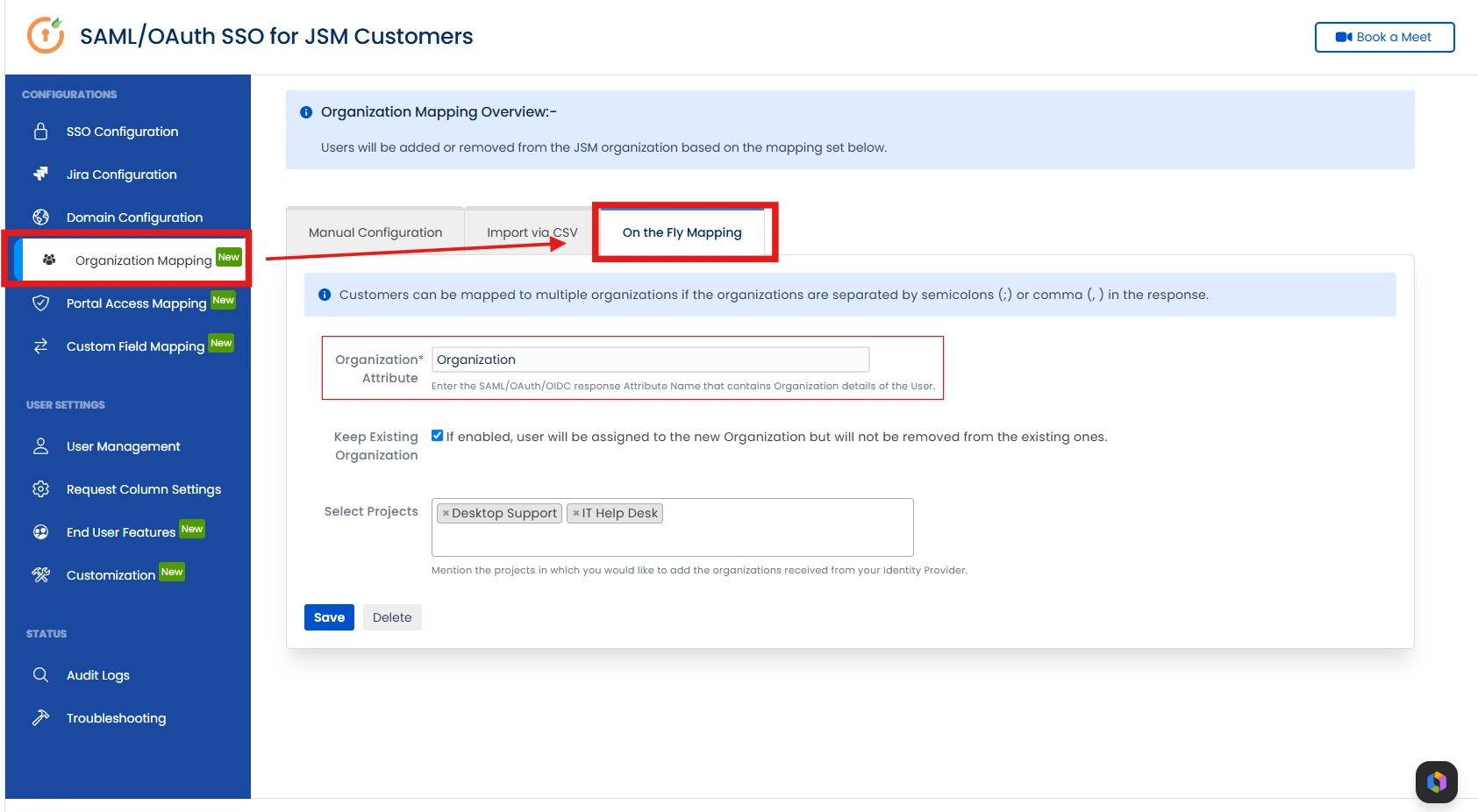
The check box ensures that the existing customers will not be removed from the existing JSM organizations and will also be included in the new organizations based on the organization attribute set.
Portal Access Mapping
The Portal Access Mapping feature takes precedence over Jira’s default Customer Access Permissions when configured by the project admin, ensuring that access control follows the rules defined in our add-on.
2.1 Configure Portal Access
Admins can configure portal access in three different ways:
-
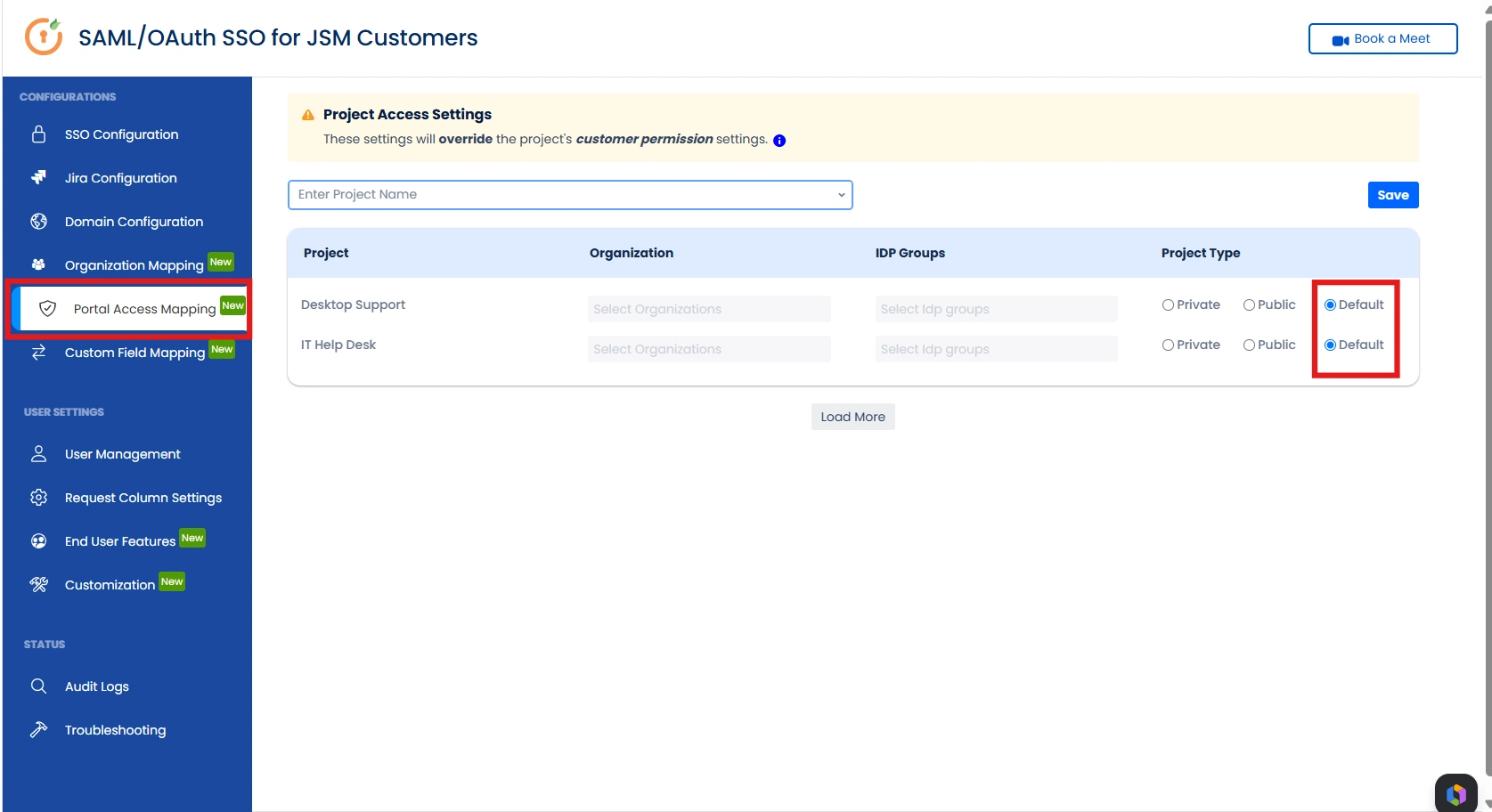
Default (Jira-Based Access Control) — This setting
respects the default Jira “Customer Access Permissions”
and does not override any existing permissions. All
projects have this setting enabled by default.
-
Public (Unrestricted Access) — Allows all users to
access the portal without any restrictions.
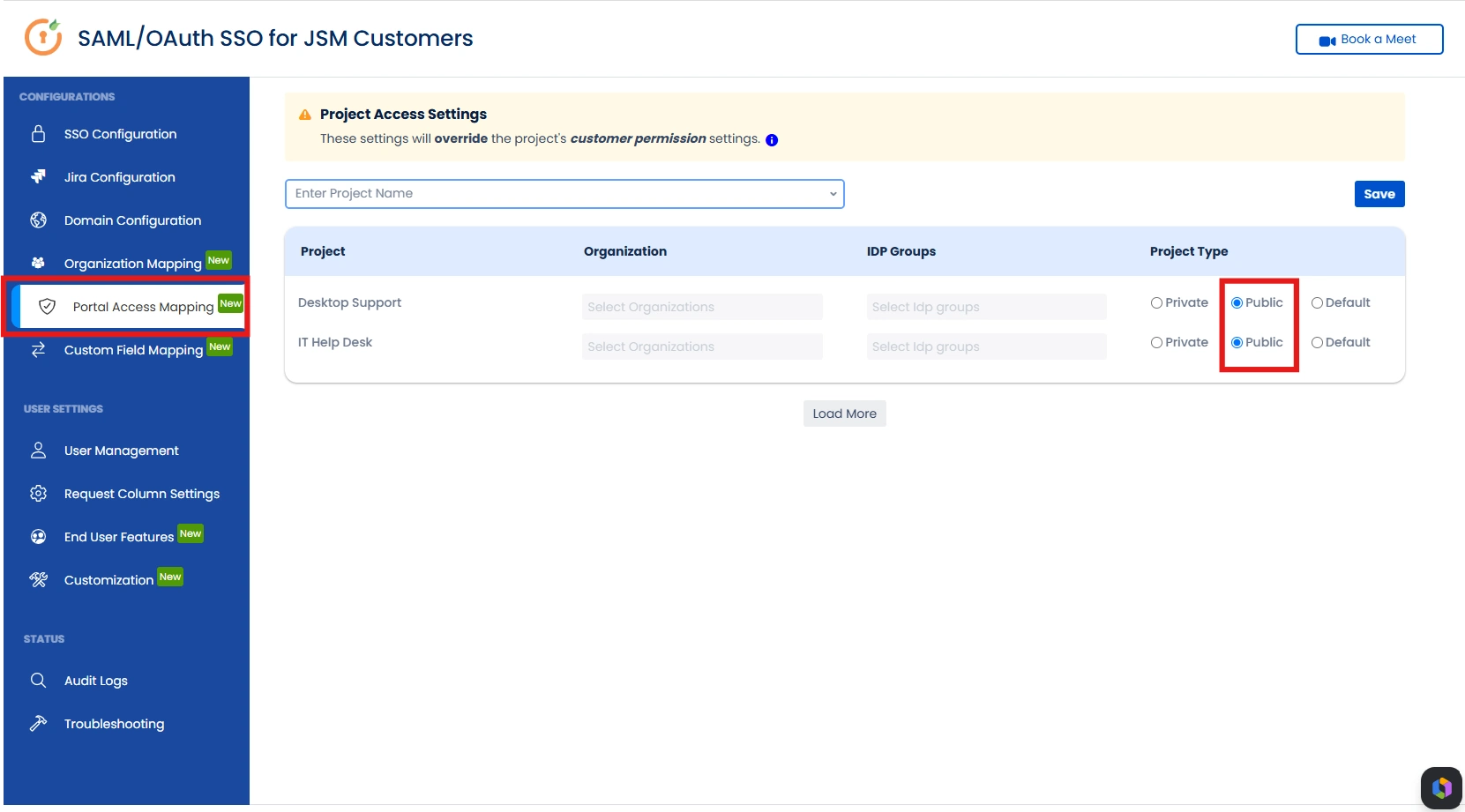
-
Private (Restricted Access Based on Mapping) —
Only users mapped via IDP Groups or Jira Organizations
will have portal access.
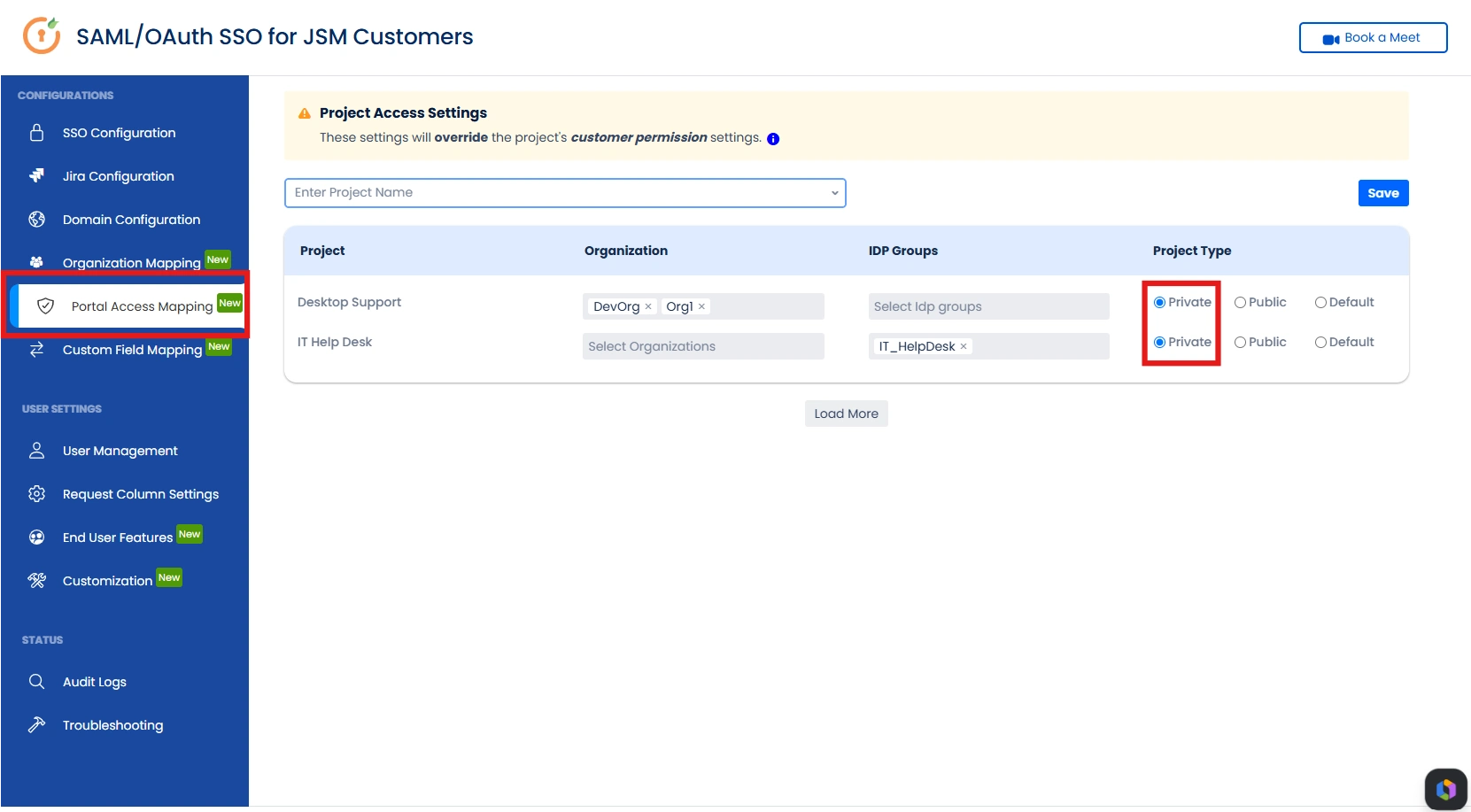
Based on the screenshot, users belonging to the JSM organizations DevOrg and Org1 will only be able to access the Desktop Support portal, while users who are members of the IT_HelpDesk IdP group will only be able to access the IT Help Desk portal after successful authentication.
By setting the project type to Private, you can restrict JSM portal access based on JSM organizations or IdP groups. Only customers belonging to the specified IdP groups or JSM organizations are permitted to access that particular JSM project or customer portal — effectively enforcing customer portal restrictions based on JSM organizations and IdP group membership.
2.2 Centralized Portal Access Control
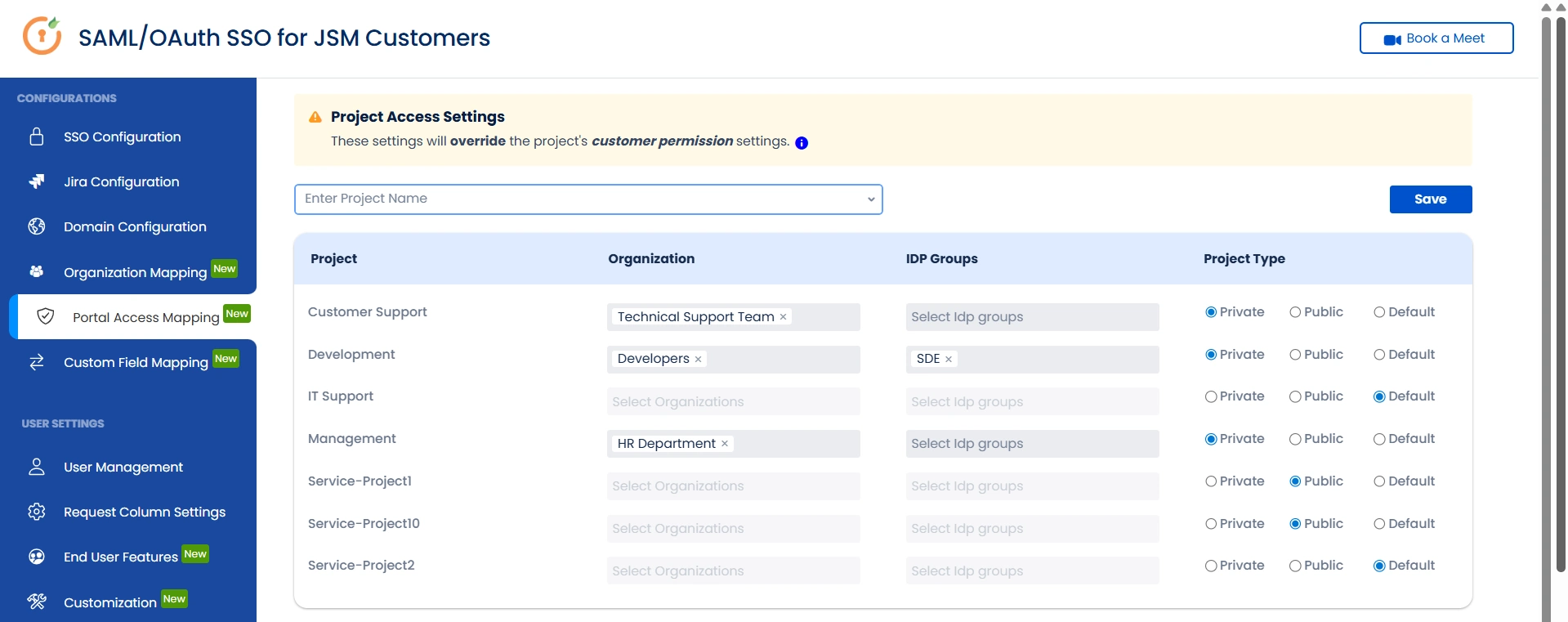
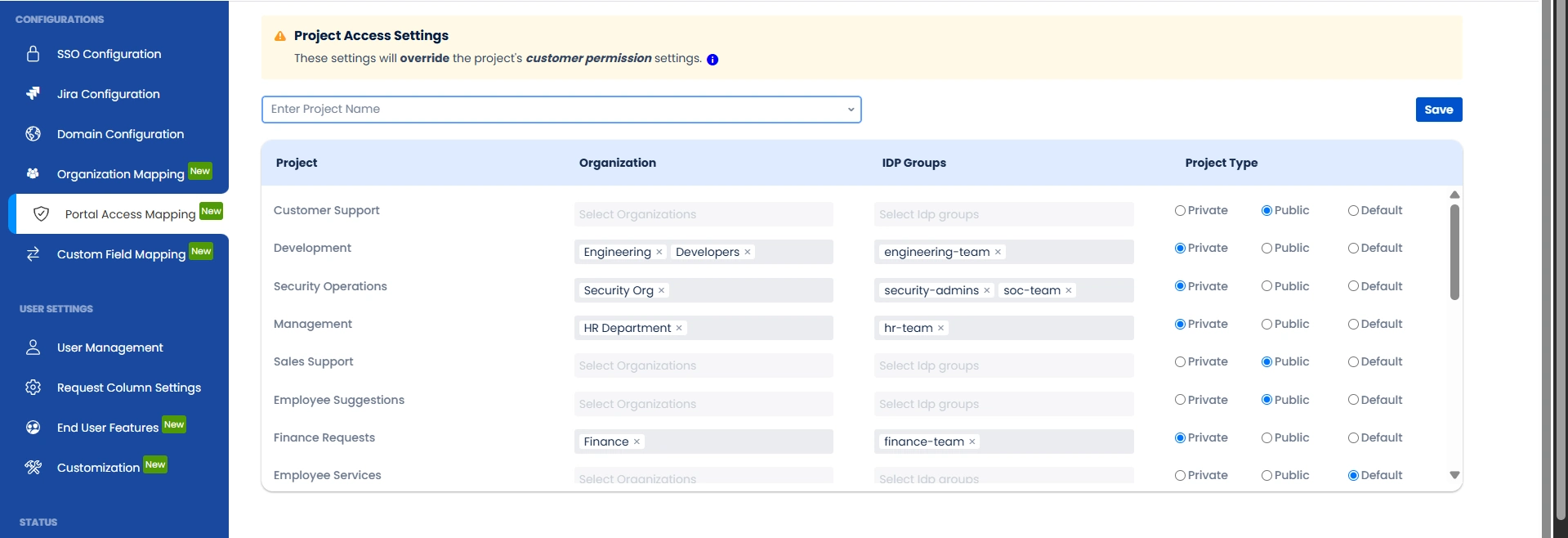
Portal Access Mapping lets you control which customers can access which JSM projects — overriding the project's default customer permission settings.
As per the configuration shown below:
- Customer Support → Restricted to the Technical Support Team JSM Organization
- Development → Accessible to customers in the Developers JSM Organization or the SDE IDP Group
- Management → Restricted to the HR Department JSM Organization
- Remaining projects → Configure as needed using Organization, IDP Group, or Project Type
Project Type options:
| Option | Description |
|---|---|
| Private | Only explicitly mapped customers can access the portal |
| Public | Open to all customers |
| Default | Falls back to JSM's native customer permission settings |
All access rules are managed from a single centralized view — no need to configure each project individually within Jira.
The plugin is designed specifically for restricted portals and uniquely provides the capability to map customer domains and IDP groups directly to JSM projects or portals. This ensures customers can only access the portals relevant to them, delivering enhanced security and stronger governance controls.
2.3 Use Case — Keycloak Role-Based Portal Access
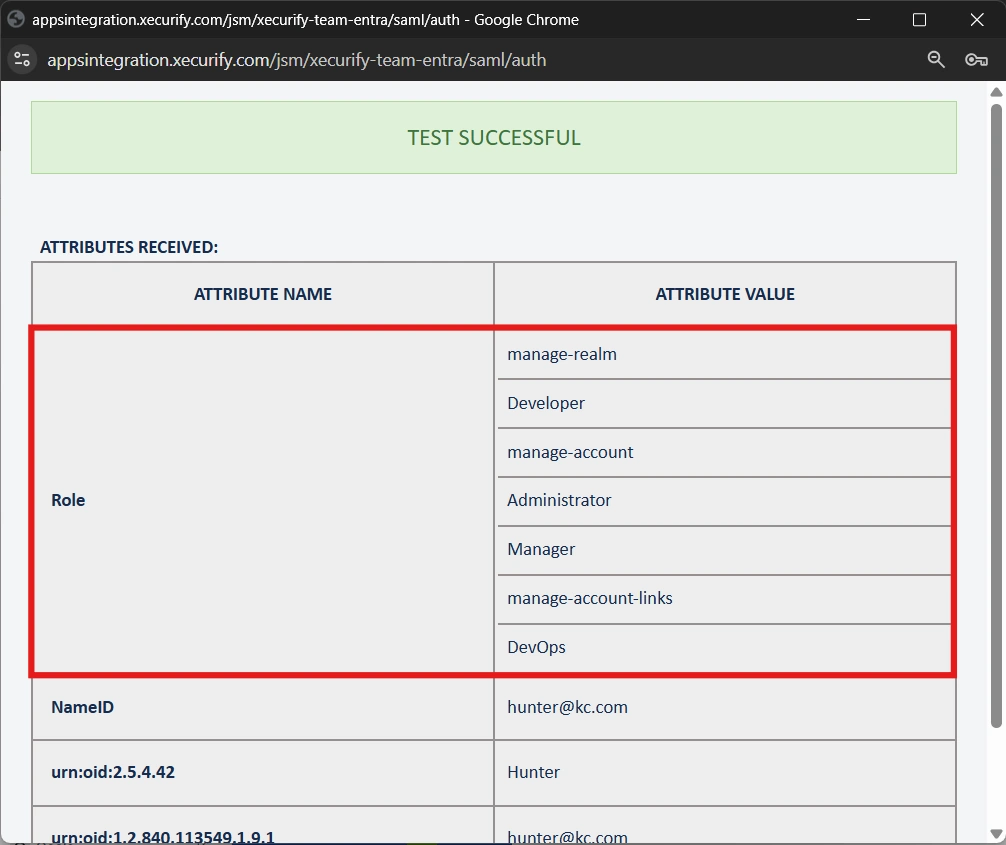
To restrict customer access to specific Jira Service Management (JSM) portals based on Keycloak roles, roles can be fetched from Keycloak by configuring the group attribute in the SSO setup.
To retrieve the Role Attribute name, go to SSO Configuration, click Test Connection for the selected IdP, and review the attributes returned in the response. There, you will find the Role attribute name and its corresponding value like in the image shown below.
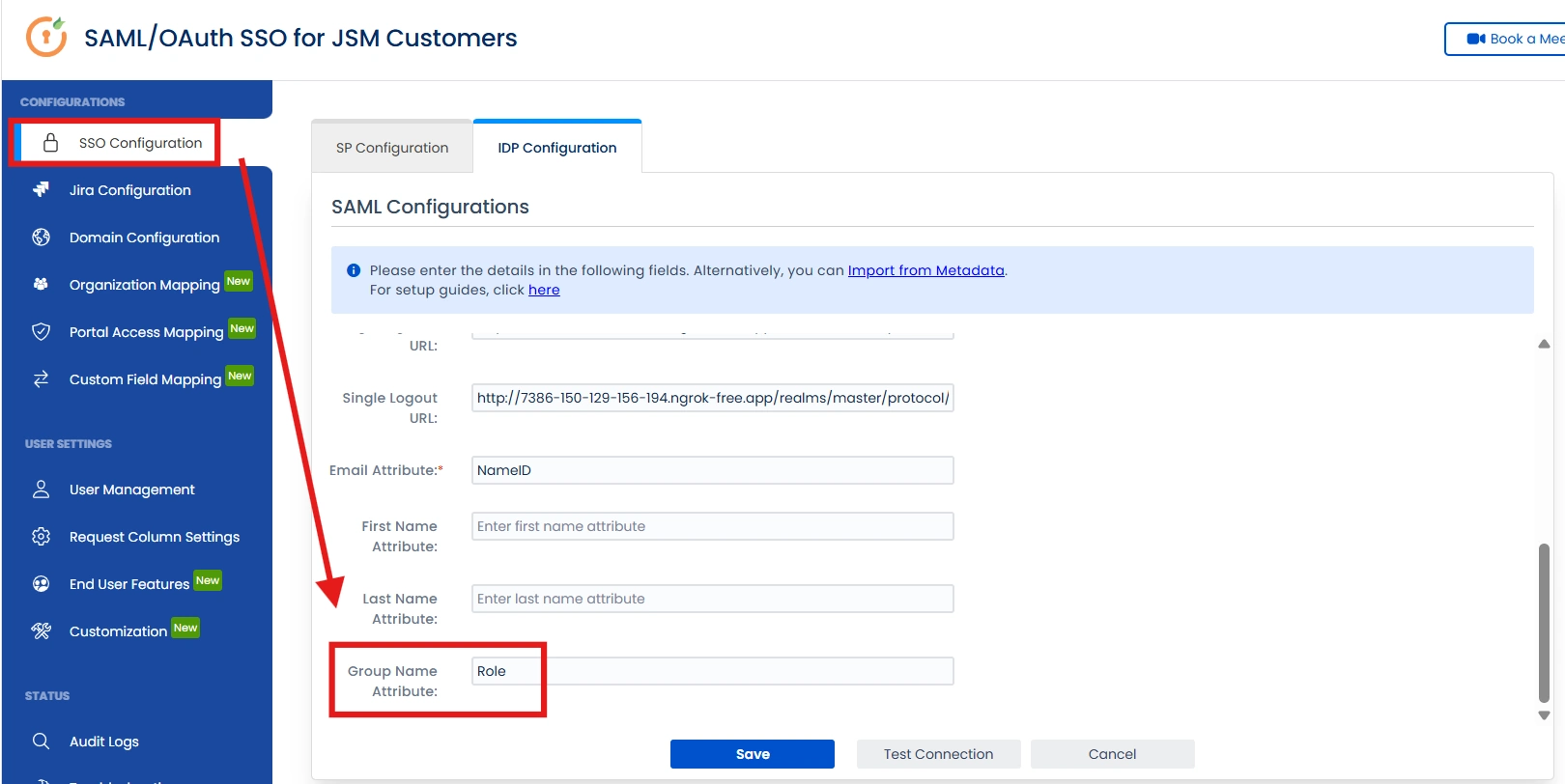
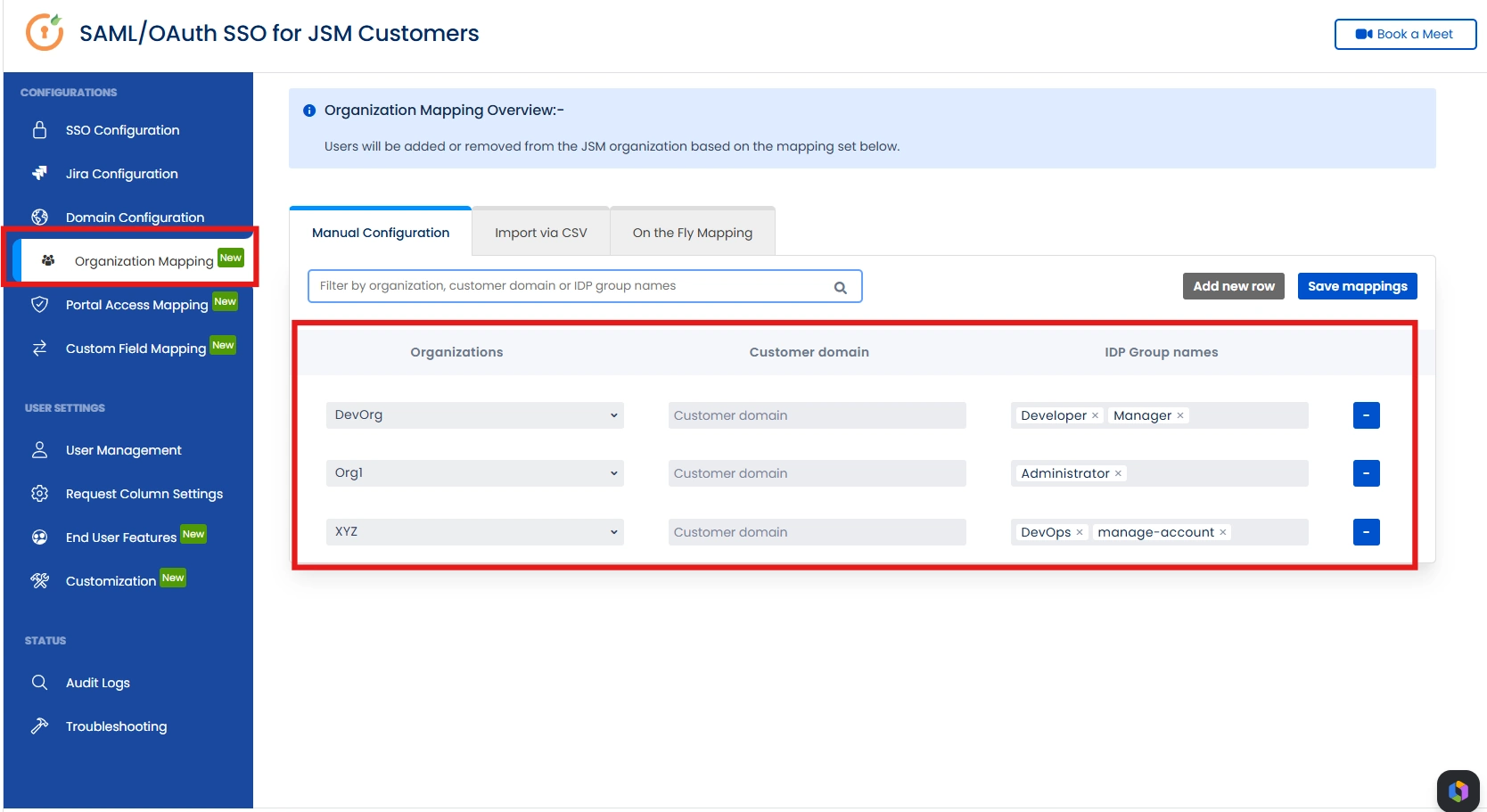
In the Organization Mapping configuration, these Keycloak roles can be treated as IDP groups and mapped to the relevant JSM organizations.
Subsequently, in Portal Access Mapping, the corresponding JSM organization or IDP group (Keycloak role) can be linked to specific JSM portals. This ensures that only authenticated customers with the defined Keycloak roles can access the designated portals, effectively preventing unauthorized portal access.
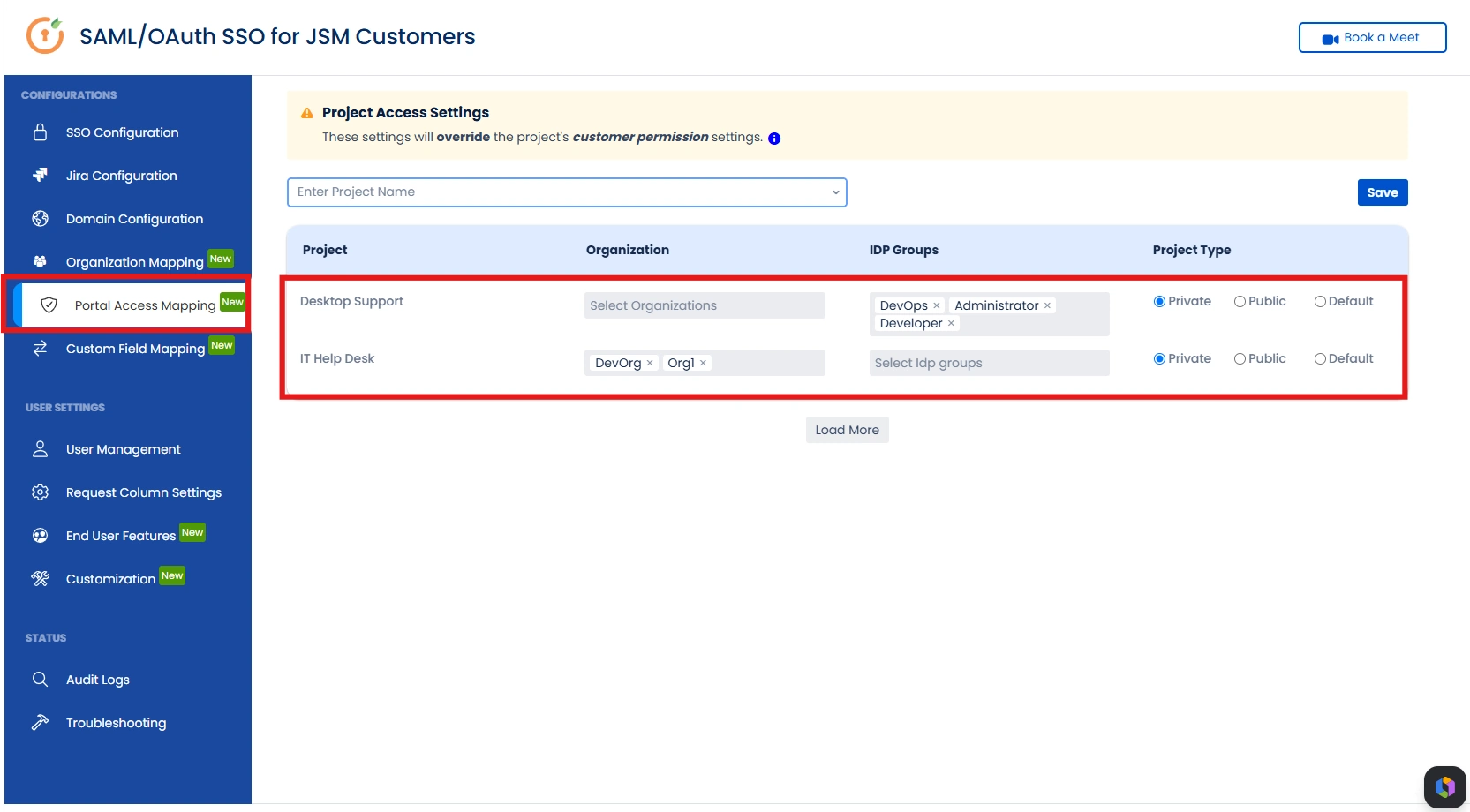
As a result, access is strictly governed by role-based mappings, ensuring customers are routed only to the JSM organizations and portals assigned to their Keycloak roles.
Custom Field Mapping
3.1 Custom Field Attribute Mapping
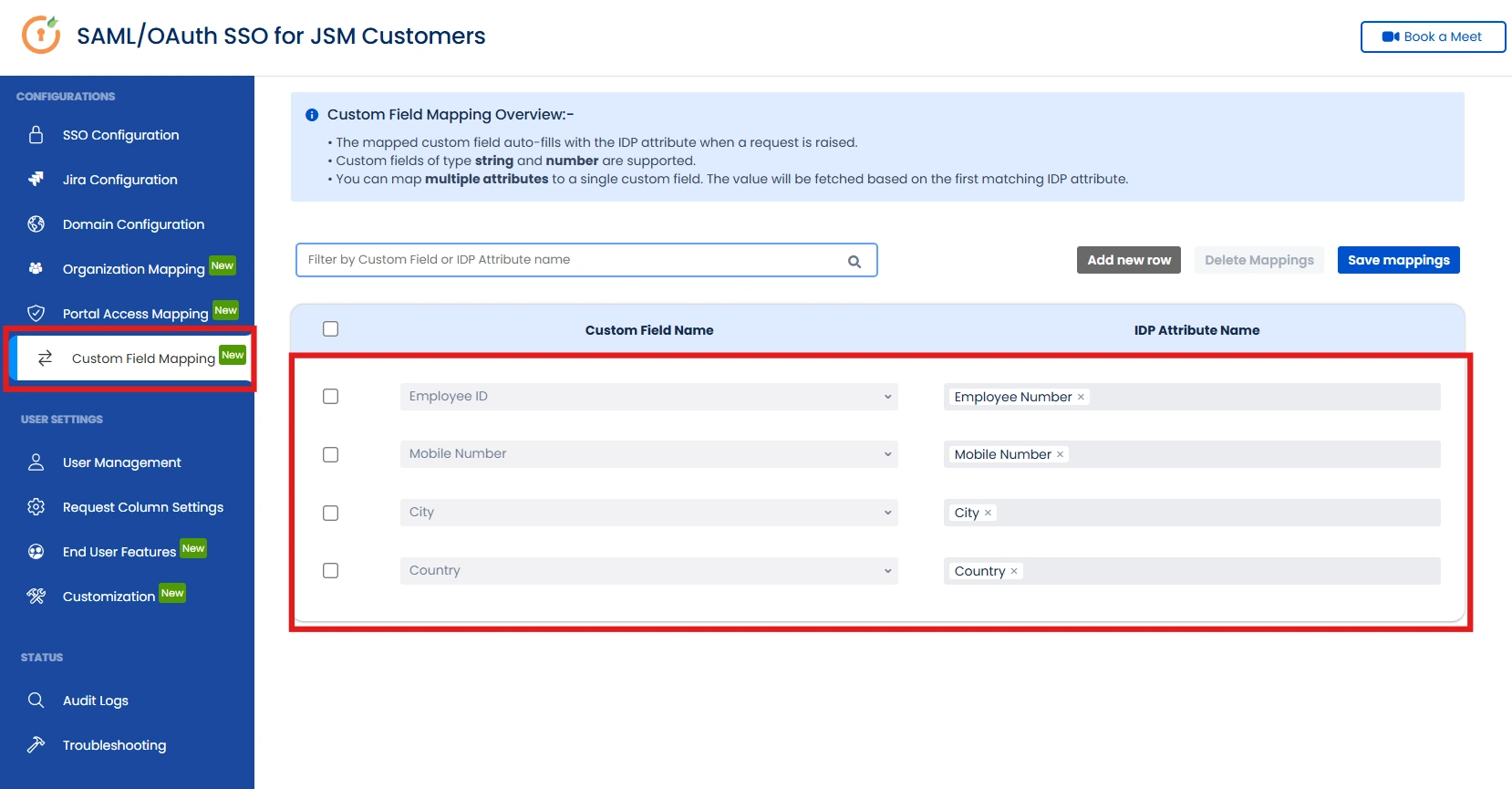
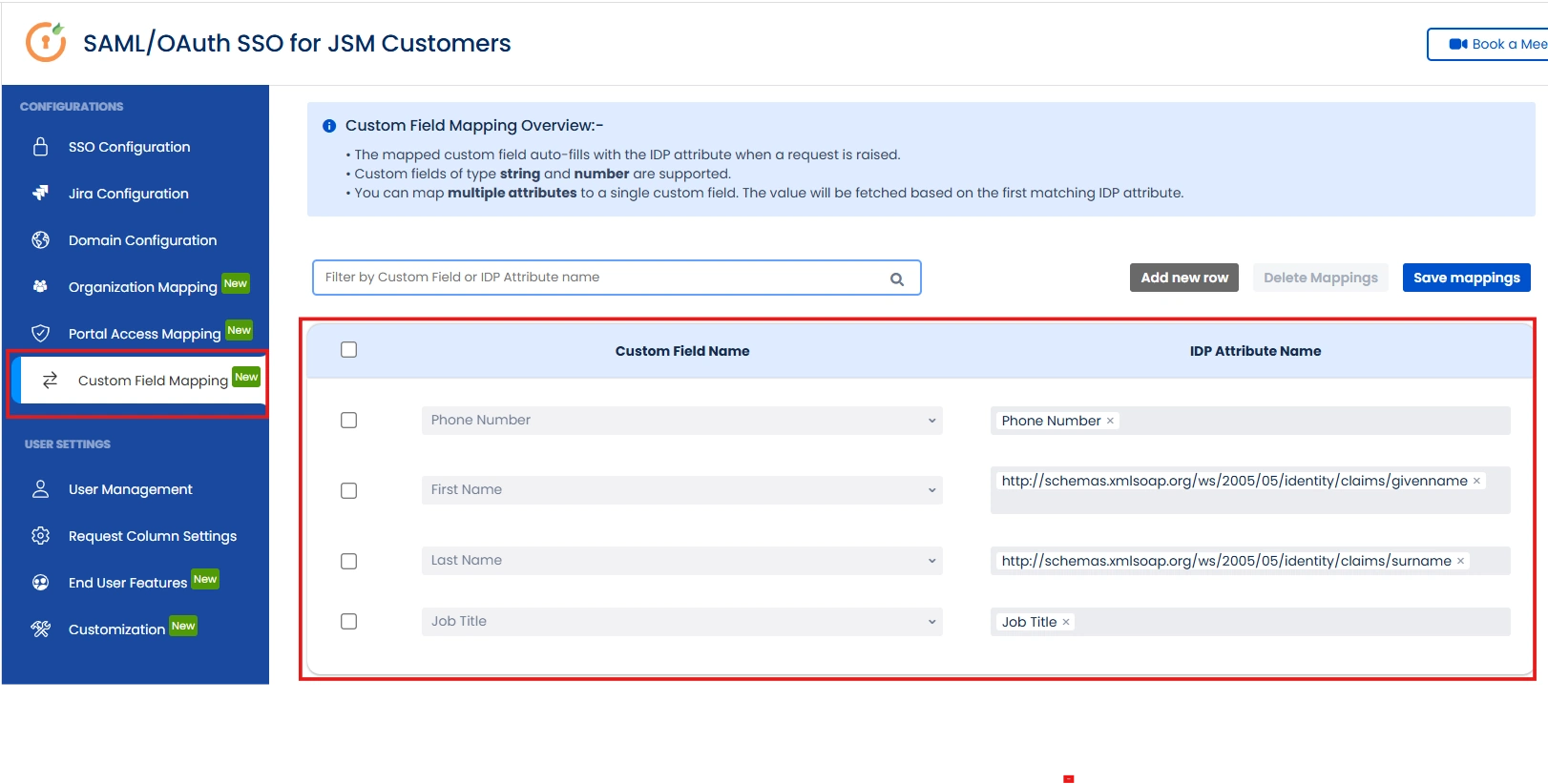
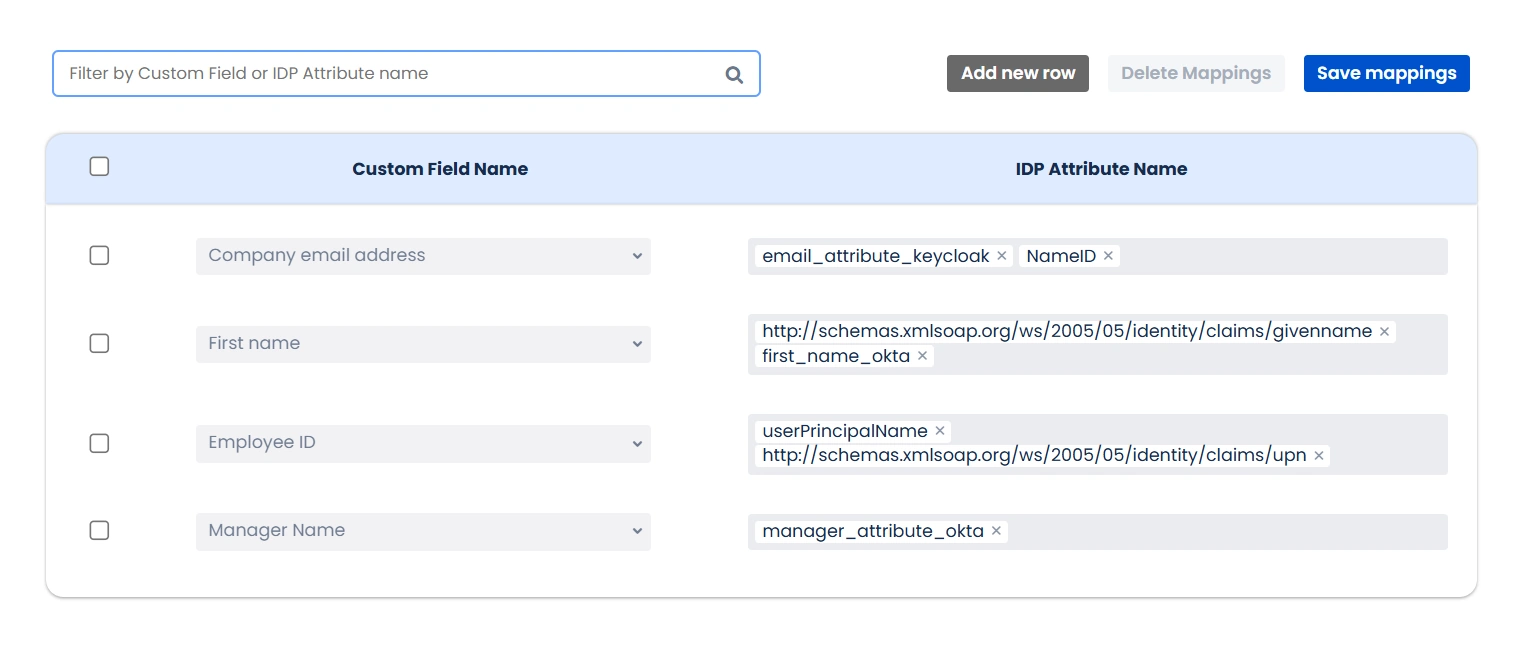
The Custom Field Attribute Mapping feature allows Jira admins to map JSM custom fields with IDP attributes via an easy-to-use configuration panel.
Here’s how it works:
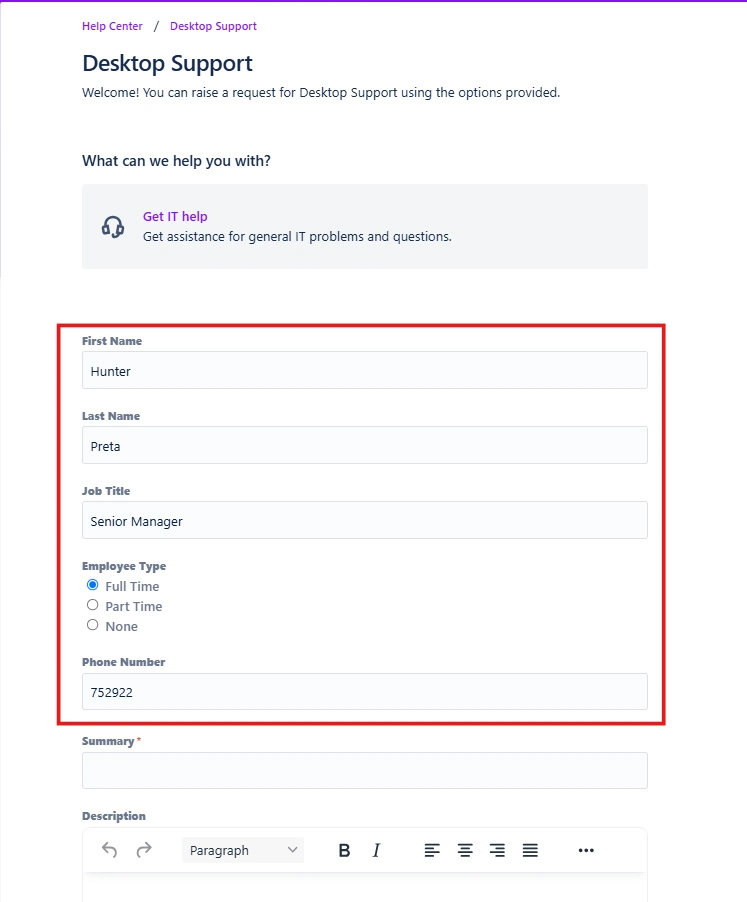
- When a customer logs into the JSM customer portal via SSO and initiates a request, all mapped custom fields will be automatically pre-filled with values retrieved from the customer’s IDP profile.
- This automation improves the speed, accuracy, and user experience of the request-raising process.
- Admins gain deeper visibility into request metadata without requiring manual input from the user.
3.2 Support for Multiple IDPs and Attributes
In environments, an admin or JSM Agents may want to ensure that a custom field (e.g., Organization) is filled regardless of which IDP the user authenticated with.
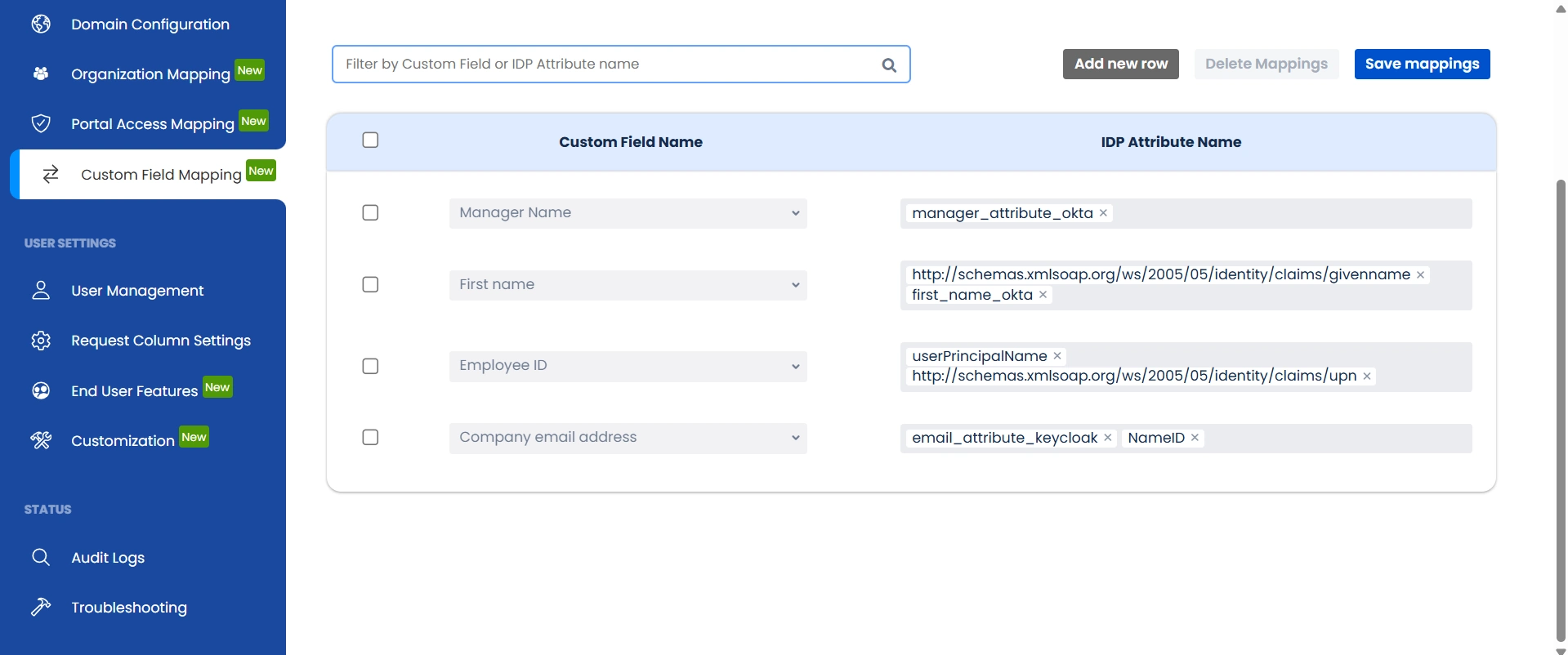
To support this, the feature allows admins to set multiple IDP attributes to a single custom field. The add-on will sequentially evaluate the configured attributes and populate the field using the first matching attribute. This ensures flexible configuration for organizations with diverse IDP setups.
This feature empowers teams to:
- Eliminate redundancy
- Improve data accuracy
- Enrich request context with minimal effort
- Enhance user satisfaction and request processing efficiency
3.3 Use Case — Eliminating Redundant Data Entry
Scenario:
A customer raises a support request through the Jira Service Management portal. The request form asks for the customer's name, email, and organization, fields that are already stored in the user's IDP profile.
How it Helps:
With the mapping feature enabled, the custom fields are automatically populated with values from the IDP attributes set in the custom field mapping tab, saving time and reducing the chance of errors.
3.4 Use Case — Providing Additional Context to
Admins
Scenario:
An enterprise offers different subscription models (Basic, Premium, Enterprise). Admins want to know the subscription level of the requester to prioritize and route the ticket accordingly.
How it Helps:
A custom field like Subscription Level can be mapped to an IDP attribute (e.g., idp_subscription_tier). When the request is raised, this field is auto-filled, giving the admin immediate visibility.
3.5 Use Case — Role-Based Ticket Routing
Scenario:
Organizations often assign roles (e.g., Developer, Manager, Sales) to users in the IDP. Support requests might need to be routed or processed differently depending on the requester’s role.
How it Helps:
A custom field User Role is mapped to the idp_role attribute. Automation rules or workflows in Jira can categorize or assign tickets automatically based on the value of the field.
3.6 Use Case — Instant Request Context for Support
Agents
Scenario:
When a ticket is raised, agents often waste time tracking down basic requester information — switching between Jira and a separate HR system or directory just to identify who the person is, who their manager is, or which team they belong to.
How it Helps:
Custom fields like First Name, Employee ID, Manager, and Company Email are mapped directly to their corresponding IDP attributes. The moment a ticket is created, these fields are automatically populated with the requester's profile data — giving the agent full context on the ticket itself without any additional lookup.
3.7 Use Case — Automated Manager-Based Approval
Routing
Scenario:
Organizations require that certain requests — access requests, expense approvals, IT provisioning — are reviewed and approved by the requester's direct manager. Without IDP-to-Jira mapping, managers either have to be manually assigned on every ticket or hardcoded into workflows, which breaks the moment an org chart changes.
How it Helps:
The Manager custom field is mapped to the manager attribute in the IDP. Jira automation rules read this field at ticket creation and dynamically route the ticket to the correct approver — no manual assignment, no hardcoding. When the manager changes in the IDP, the routing updates automatically on the next sync without any workflow reconfiguration.
Did this page help you?