

The single most common mistake in Atlassian cloud migration projects is treating migration as a straightforward technical exercise, exporting configurations, importing data, and switching environments. In practice, an unprepared migration transfers not just your data, but years of accumulated debt: inactive accounts, overstated license needs, and sensitive information that was never designed to exist in a shared cloud environment.
This guide focuses on the two issues that most directly determine the outcome of a migration: user and license hygiene, and pre-migration data compliance.
For the full EOL timeline and strategic context, refer to The Atlassian Data Center End of Life: Your Complete Cloud Migration Guide.
The Financial and Compliance Cost of Migrating Without Cleanup
Unlike Data Center's server-based licensing, Atlassian Cloud operates on a per-user, per-month subscription model. This is a fundamental pricing shift, and one that directly penalizes organizations that migrate without first rationalizing their user base.
Instances that have been in production for five or more years routinely contain:
- Dormant user accounts belonging to employees or contractors who have since departed
- Duplicate profiles generated during directory synchronization errors
- Empty or misconfigured groups that retain permission assignments but serve no active purpose
- Orphaned projects and spaces with no active ownership
- Sensitive information embedded in ticket descriptions, comment histories, and page version records
Migrating without addressing these issues results in two distinct categories of cost.
Beyond licensing, sensitive data migrated to Cloud without review introduces regulatory exposure under frameworks such as GDPR, HIPAA, PCI-DSS, and India's DPDP Act, with remediation costs that typically far exceed what a thorough pre-migration cleanup would have required.
The Two Most Common Migration Failures and How to Prevent Them
Across migration projects of varying scale and complexity, two failure patterns emerge consistently.
Failure1: User and License Bloat
Long-running Atlassian environments tend to accumulate what might be called "identity debt", a growing backlog of user accounts, group assignments, and permission schemes that no one actively maintains, but few administrators feel confident removing.
Root cause: As employees depart, contractors complete engagements, and project teams reorganize, their associated accounts frequently remain active. Without a formal offboarding process tied to identity management, these records persist, often with licenses attached.
Consequence: A lift-and-shift migration without user cleanup effectively locks the organization into a Cloud subscription sized for a user base that no longer reflects current headcount. Additionally, over-permissioned accounts increase the attack surface in an environment that operates without the perimeter controls of an on-premises deployment.
Recommended approach: Conduct a structured user audit prior to migration. Identify dormant accounts, revoke unnecessary licenses, and rationalize group structures before any data transfer begins.
Failure 2: Sensitive Data Exposure in Cloud
This risk is consistently underestimated, and the consequences are disproportionate to what adequate preparation would have cost.
Data Center environments operated behind corporate firewalls, which created a degree of ambient security tolerance. Over years of operation, Jira tickets and Confluence pages accumulated sensitive content that would never have been recorded there in a more security-conscious context: API credentials, employee records, customer personally identifiable information (PII), financial data, and internal system passwords.
The environment change is significant. Atlassian Cloud operates within a shared infrastructure model, and any data migrated into it becomes subject to the full scope of applicable data protection regulations. Content that posed limited risk inside a firewall-protected instance may constitute a compliance violation once it resides in Cloud.
The exposure is both regulatory and reputational. A post-migration data incident is substantially more difficult and costly to remediate than a pre-migration scan.
What Teams Should Own Internally vs. What Should Be Automated
A clear division of responsibility helps teams allocate effort appropriately and avoid the bottleneck of attempting to manually execute tasks that are better suited to automated tooling.
Tasks Appropriate for Internal Ownership
| Task | Rationale |
|---|---|
| Stakeholder communication and migration planning | Requires organizational context and leadership alignment |
| Defining project scope and timelines | Dependent on team capacity and business priorities |
| Cloud app compatibility review | Well-supported by Atlassian documentation |
| Cloud organization setup and configuration | Standard process with available vendor guidance |
| Post-migration user training | Best led by teams with existing workflow knowledge |
| Access policy definition | Requires business context that cannot be automated |
Tasks That Should Be Delegated or Automated
| Task | Why Manual Execution Is Insufficient |
|---|---|
| Reviewing large user bases for inactivity | Time-intensive and error-prone at scale |
| Detecting PII within ticket comment histories | Not feasible manually across years of records |
| Identifying sensitive data in page version histories | Standard scanning tools do not reach historical versions |
| Bulk license cleanup across user groups | High risk of unintended access disruption without automation |
| Regex-based data pattern scanning across spaces | Requires specialized tooling for accuracy and coverage |
| Pre- and post-migration compliance reporting | Requires structured documentation and audit trail capabilities |
The instinct to handle everything in-house is understandable, particularly among experienced technical teams. However, at the scale of a multi-year Atlassian environment, manual review introduces both risk and cost that structured automation eliminates.
Pre-Migration Checklist: User Hygiene and Data Compliance
Scope note: This checklist addresses user hygiene and data compliance specifically, the two areas where migration cost overruns and post-migration security incidents most frequently originate. For environment audit steps, application compatibility verification, sandbox testing, and identity mapping, refer to the complete 5-step migration framework.
User and License Hygiene
- Export complete user list with last-login timestamps
- Identify accounts with no activity in the past 90 days
- Cross-reference active user records against current HR data
- Catalog all groups and validate the relevance of current membership
- Identify empty groups and orphaned permission schemes
- Deactivate dormant accounts prior to the migration window
- Confirm that the final active user count aligns with the target Cloud license tier
Data Security and Compliance Review
- Scan Jira ticket descriptions and comment histories for PII and credentials
- Scan Confluence pages and, critically, page version histories for sensitive content
- Review attachments for documents containing sensitive information
- Identify content requiring redaction, anonymization, or exclusion from migration
- Map applicable regulatory frameworks (GDPR, HIPAA, PCI-DSS, DPDP)
- Maintain documentation of all remediation actions for audit purposes
- Conduct a post-remediation re-scan before the migration date is confirmed
How to Audit and Clean Up Users, Groups, and Licenses
A structured approach to user cleanup, carried out before migration, prevents the most avoidable source of Cloud subscription overspend.
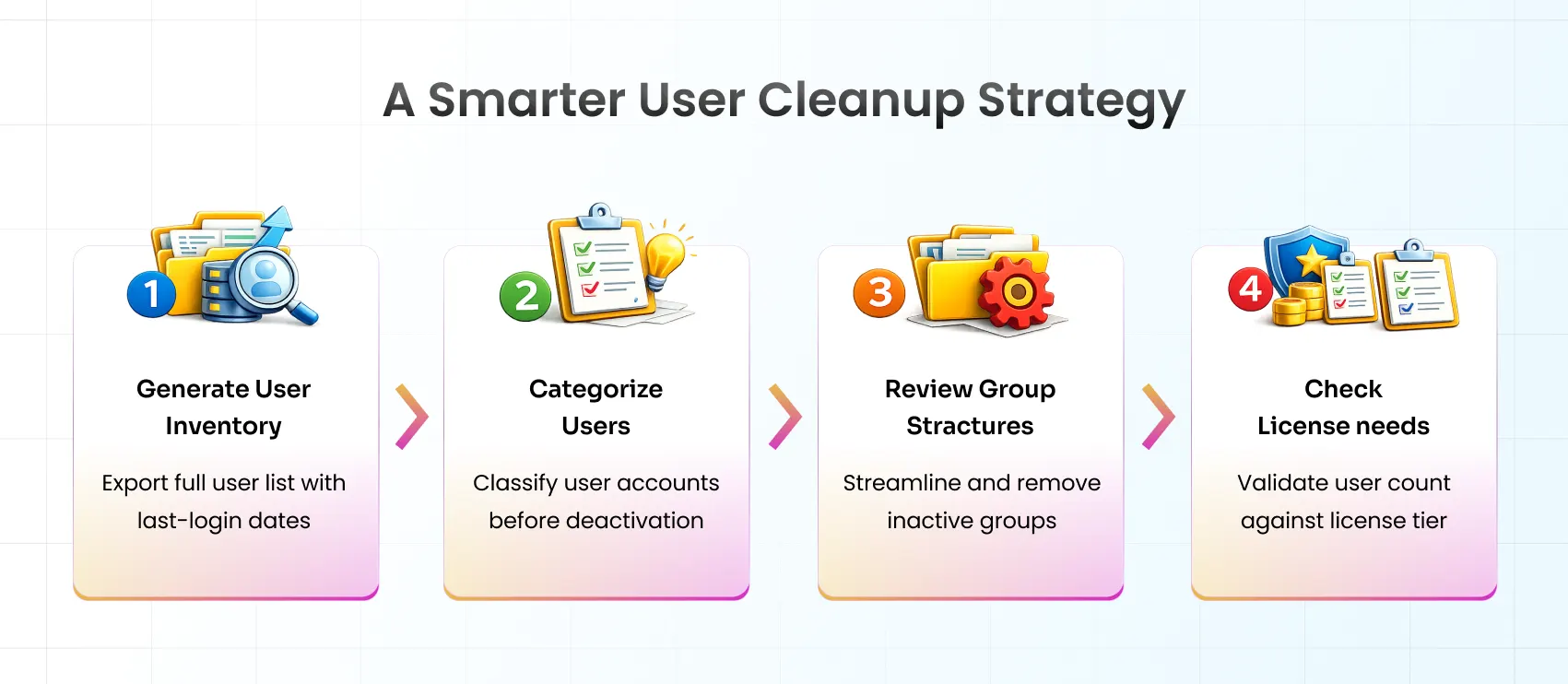
Step 1: Generate a Complete User Inventory
Export the full user list with last-login dates. In most Data Center environments, this requires a direct database query or an administrative report. The focus should be on identifying:
- Users with no recorded activity in the last 90, 180, or 365 days (define the threshold based on organizational norms)
- Accounts with no current group memberships
- Duplicate accounts associated with the same email domain
Step 2: Classify Before Taking Action
Bulk deactivation without prior classification carries significant risk. A structured categorization step ensures that legitimate accounts, including service accounts and infrequently active users, are not inadvertently removed.
| Category | Recommended Action |
|---|---|
| Active users (login within 90 days) | Migrate as-is |
| Dormant users (90–365 days inactive) | Verify with the relevant manager or HR; deactivate if confirmed inactive |
| Long-term inactive (1+ year) | Deactivate prior to migration |
| Contractors and external users | Confirm active engagement status before inclusion |
| Service accounts | Document purpose and retain only those with confirmed operational requirements |
Step 3: Rationalize Group Structures
Permission bloat frequently originates at the group level. For each group, three questions should be answered before migration:
- Who is the current owner of this group? An unowned group is a candidate for removal.
- What access does this group grant? Map the group to the specific resources and projects it controls.
- Are all current members still relevant? Reconcile membership against the completed user audit.
Groups with no active members, no documented owner, and no clear operational purpose should be removed prior to migration rather than carried forward.
Step 4: Reconcile Against License Tier Before Signing
The active user count after cleanup should be validated against the anticipated Cloud license tier before any subscription commitment is made. A significant discrepancy at this stage typically indicates that additional cleanup is required.
Sensitive Data and Compliance: Understanding the Risk
Sensitive data exposure is the most consequential risk associated with an unprepared migration, and the one most likely to create long-term organizational liability.
Categories of Sensitive Data Commonly Found in Atlassian Instances
| Data Type | Common Location | Applicable Compliance Framework |
|---|---|---|
| Employee PII (names, identifiers, compensation data) | HR-adjacent Jira projects, Confluence HR spaces | GDPR, DPDP |
| API keys and access tokens | Developer tickets, Confluence runbooks and guides | Security incident risk |
| Database credentials and system passwords | DevOps tickets, deployment documentation | Critical security risk |
| Customer PII | Support project ticket descriptions and comments | GDPR, HIPAA |
| Financial and payment data | Finance spaces, billing-related tickets | PCI-DSS |
| Medical or health-related information | HR spaces, internal wellness documentation | HIPAA |
The Version History Gap
A critical and frequently overlooked aspect of data risk in Atlassian environments is the platform's preservation of version histories. When a Confluence page is edited to remove sensitive content, the original version, including the removed information, remains accessible through the page history.
Standard content scanning tools operate on current page states and do not examine historical versions. This means that a surface-level scan may return a clean result while years of sensitive content remain discoverable within version records. Effective pre-migration scanning must extend to historical content, not only current page states.
Recommended Approach to Sensitive Data Remediation
- Conduct a complete scan before beginning any remediation. Understanding the full scope of exposure is necessary before decisions about redaction, anonymization, or deletion are made.
- Apply proportionate remediation by data classification. Not all sensitive data warrants the same response. Establish clear categories and define the appropriate action for each.
- Leverage pre-built compliance templates. Constructing regex rules from scratch is time-consuming and error-prone. Templates aligned to GDPR, HIPAA, and PCI-DSS provide an accurate and auditable starting point.
- Maintain a complete remediation audit trail. Regulatory compliance requires not only that issues are resolved, but that the resolution is documented in a format suitable for audit review.
- Perform a verification scan after remediation. No migration date should be confirmed until a post-remediation scan has validated that sensitive content has been fully addressed.
Automating Pre-Migration Cleanup: What Good Tooling Looks Like
Manual review at the scale of a mature Atlassian environment is neither practical nor reliable. The volume of content, spanning years of ticket histories, page versions, and user records, exceeds what human review can cover without significant time investment and meaningful error risk.
Effective migration cleanup tooling should address three requirements: comprehensive discovery, accurate remediation, and documented proof.
The miniOrange Data Scanner and Migration Assistant
The miniOrange Data Scanner and Migration Assistant was developed specifically for Atlassian Data Center to Cloud migration scenarios. It addresses both primary risk categories, user and license bloat, and sensitive data exposure, within a single integrated workflow.
Differentiating capabilities:
- Migration-Ready Dashboard: Provides a consolidated view of what requires migration, what requires remediation, and what should be excluded, before any transfer begins
- Historical Content Scanning: Extends scanning into version histories and comment threads, addressing the gap that surface-level tools leave exposed
- Targeted Discovery: Scans can be scoped to specific Jira Projects or Confluence Spaces, reducing processing time and focusing effort where risk is highest
- Single-Action Remediation: Sensitive findings can be encrypted, redacted, or deleted without requiring manual item-by-item intervention
- Pre-built Compliance Templates: GDPR, HIPAA, and PCI-DSS patterns are available immediately, without the need to construct custom rule sets from scratch
- Bulk Account Management: Inactive and dormant user accounts can be identified and deactivated in bulk prior to migration
Organizations that complete this cleanup process arrive in Atlassian Cloud with an environment that is sized accurately, compliant with applicable regulations, and optimized for ongoing governance from the outset.
View the miniOrange Data Scanner and Migration Assistant on the Atlassian Marketplace
Conclusion: A Migration Done Right Is a Foundation, Not Just a Finish Line
Atlassian Data Center to Cloud migration is a significant undertaking, but its long-term value depends entirely on the quality of preparation that precedes it. Organizations that approach migration as a lift-and-shift operation inherit the accumulated inefficiencies of years of ungoverned growth. Those that treat it as an opportunity to rationalize their environment, right-sizing their user base, eliminating unnecessary cost, and ensuring data compliance before moving a single record, arrive in Cloud with a foundation they can build on.
The miniOrange Data Scanner and Migration Assistant provides the tooling required to execute that preparation at scale.
Frequently Asked Questions
Q: Is it possible to migrate selectively rather than moving the entire environment at once?
Selective migration is not only possible but often advisable for large or complex environments. A phased approach, migrating active projects and spaces first, then bringing over archival content in subsequent phases.
Q: What happens to Data Center applications when migrating to Cloud?
Not all Data Center applications have Cloud equivalents, and those that do may differ in functionality or pricing structure. Prior to migration, a complete audit of installed applications should be conducted to identify Cloud availability, functional gaps, and any workflow adjustments that may be required.
Q: Does sensitive data actually accumulate in Jira comment histories and version records?
This is one of the more frequently underestimated aspects of Atlassian migrations. Database credentials, API keys, customer contact data, and HR-related information are routinely discovered in comment threads and ticket histories during pre-migration audits.
Q: How long does an Atlassian Data Center to Cloud migration typically take?
Duration varies considerably based on instance size, data complexity, and the extent of pre-migration cleanup required.
Leave a Comment