
Declarative device management is Apple's way to manage devices. It simply does this by telling the devices what their settings must be, instead of sending a separate command for each action. The device, therefore, works to reach and maintain that state, plus reports changes to the management server.
You can think of it like a to-do list. The devices follow it and tell you in case something goes wrong. However, the important part is autonomy. Devices are allowed to respond to changes without waiting for the server to tell them what to do next. To note that DDM works within Apple's existing mobile device management system, and not as a replacement for Mobile Device Management (MDM).
How Does Apple Declarative Device Management Work?
Declarative MDM allows IT teams to determine the device setup and the conditions under which they would apply. Apple devices checks these conditions, enforces supported settings, and reports the status.
The process spans across six steps:
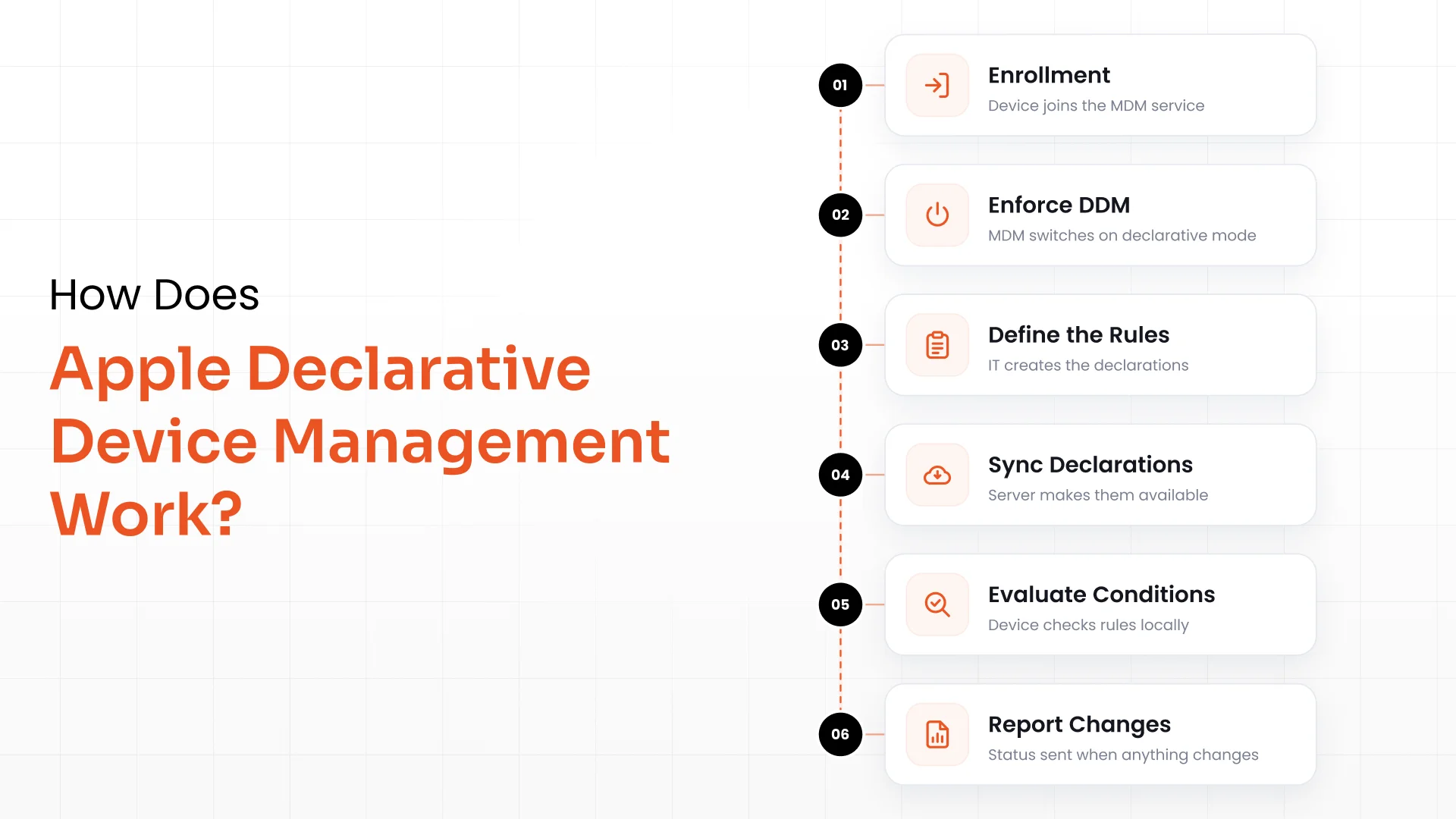
Enrollment: First, enroll the device in MDM to form a relationship with the management service.
Enforce Declarative Management: The MDM solution gives a special command that enforces DDM on Apple devices.
Define the Rules: Here, the IT team generates declarations that describe conditions, settings, and other supported information for applying configurations. These are a set of instructions on the device's checklist.
Sync the Declarations: The declarations are made available to the device by the management service.
Evaluate Conditions: Some rules may be applicable only to iPads or after an OS update. The device checks the supported conditions locally and doesn't wait for a new server decision all the time.
Report Relevant Changes: The device shares status reports when any information changes. This helps IT teams check whether the declarations are valid, active, or experiencing errors.
For instance, the IT team can prepare a configuration that is activated only after a device reaches a specific OS version.
What Are the 3 Core Components of Apple DDM?
The three components of Apple DDM are declarations, the status channel, and extensibility. Together, they tell what a device must do, how to report changes, and how to recognize supported features.
1. Declarations
Declarations are a set of well-structured instructions that represent a company's management policies and related information. There are four types of declarations, as defined by Apple:
Configurations: Defines the settings that a device must enforce. These comprise account settings, software update policies, and restrictions.
Assets: Offer supporting information that configurations need, such as identity, credentials, or authentication information. One asset can have multiple configurations.
Activations: Identifies which configurations should be enforced; can also include conditions called predicates.
Management: This type of declarations define the management service, organization, and other management information.
2. Status Channel
Instead of making your server constantly ping devices to ask if anything has changed, the status channel flips the script. Devices take the initiative and report relevant changes on their own.
Apple's official documentation notes that full status reports go out every 24 hours, but devices will also send an instant alert the moment a tracked status item shifts. Plus, your server can subscribe to specific data points rather than getting buried under a mountain of useless updates.
Think of it like a delivery service sending a text when your package moves, you don't have to sit there hitting refresh on a tracking page all day.
3. Extensibility
Extensibility is all about communication. It allows both devices and management services to clearly advertise exactly which features they support.
This is a massive win if you are managing a mixed fleet running different operating system versions. As you update your server or your hardware, they can dynamically identify their shared capabilities. You no longer have to upgrade your entire fleet and server simultaneously just to unlock a specific feature level.
The Scaling Issue With the Traditional MDM
Legacy MDM relies heavily on a server-driven command loop. The server sends a command, waits for the response, checks the data, and then decides what to do next. Apple DDM shifts that entire decision-making process straight to the device hardware.
The difference becomes glaringly obvious the moment your fleet starts to grow.
Imagine an everyday scenario with a fleet of 5,000 devices. If your IT team requests a basic status check from every machine, that immediately creates 5,000 separate requests, and that's before counting the replies or follow-up tasks.
DDM cuts out this repetitive polling by letting devices raise their hands proactively when changes happen. They handle activation conditions right on the hardware. Apple highlights this approach as a major victory for overall performance and scalability.
To be clear, traditional MDM isn't going away entirely. The goal isn't to kill off every server command; it's to stop forcing the server to micromanage every single step when the device is smart enough to handle the work itself.
Declarative Device Management vs. Traditional MDM
At its core, the main differentiator is who coordinates the heavy lifting. Traditional MDM is largely server-driven, while declarative device management hands the responsibility over to the devices to apply policies and report status. Luckily, they work perfectly side-by-side.
| Capability | Traditional MDM | Apple Declarative Device Management (DDM) |
|---|---|---|
| Management Model | Command-based and server-driven. | Declarative and focused on the desired state. |
| Instructions | Fires off individual commands and configuration profiles. | Syncs declarations that outline the target environment. |
| Decision-Making | Server micromanages and coordinates actions. | Device evaluates supported conditions right on the hardware. |
| Status Reporting | Relies on server-initiated queries and pings. | Proactively reports changes to subscribed status items. |
| Targeting Logic | The server handles all the conditional targeting logic. | Activations use live device status and management properties. |
| Offline Behavior | New actions stall without active server communication. | Cached declarations allow local behavior without constant pings. |
| Software Updates | Relies on legacy commands and profiles where supported. | Utilizes modern update declarations and proactive status reporting. |
| Deployment Mode | Traditional bedrock of Apple's framework. | Seamlessly adopted alongside your existing MDM setup. |
Note: These architectural differences depend heavily on your specific MDM provider's implementation and the operating system version of the target device.
How Apple Declarative Device Management Helps IT Teams
By rebalancing the workload between the server and the hardware, DDM delivers clear advantages: less network noise, smart local policy enforcement, and troubleshooting data that actually makes sense.
1. Slashed Server Chatter
Because devices take charge of reporting changes, your server stops wasting bandwidth asking repetitive questions. For a distributed company, this means your network isn't choked by endless, identical checks across multiple global offices.
2. Bulletproof Configuration Management
Devices can independently fire up supported configurations the second local conditions are met, even if they temporarily lose internet access.
Furthermore, Apple separates assets from the actual configurations. If a user credential or token changes, you can update just that asset without tearing down the entire configuration and disrupting the user's data.
3. Proactive, Honest Troubleshooting
DDM doesn't just track whether a policy was sent; it reports back whether the declaration is valid, active, or failing with specific error codes. This helps IT draw a clear line between "we assigned the policy" and "the device actually activated it."
When a deployment goes sideways, your helpdesk can use this data to pinpoint the root cause immediately instead of guessing based on assignment records.
4. Painless Software Updates
On modern operating systems, IT can set firm update deadlines using declarative configurations. Apple introduced these native capabilities starting with iOS 17, iPadOS 17, and macOS 14.
A classic use case is forcing an OS update on all employee laptops a week before an internal security audit. The device takes care of the enforcement logic locally, while IT simply monitors progress via the status channel.
Just keep in mind that a declaration won't magically update into existence if the file hasn't been downloaded or if the device lacks internet access.
5. Effortless Fleet Scaling
DDM spreads the computational workload across thousands of devices instead of bottlenecking your server.
Schools, retail chains, and massive enterprises can easily reuse modular configurations and assets across completely different activations. This keeps policy design clean and drastically reduces backend clutter.
Which Apple Devices Support DDM?
Framework compatibility comes down to a few variables: the device platform, OS version, enrollment type, and the specific declaration you want to deploy.
Just because a device supports the overarching DDM framework doesn't mean it handles every single new feature. Your MDM vendor must also build out support for these features, so always cross-check their documentation first.
Supported Apple Hardware
iPhone: DDM launched with iOS 15 (restricted to User Enrollments) and opened up to all enrollment types with iOS 16. Specific advanced features require newer versions.
iPad: Initial support rolled out with iPadOS 15, expanding to Shared iPads and broader enrollments in the next release cycle.
Mac: DDM support kicks in at macOS 13 Ventura (not macOS 12 Monterey). If you want to enforce declarative software updates, you'll need macOS 14 or later.
Apple TV: Support arrived with tvOS 16, though available declarations differ slightly from the mobile and desktop frameworks.
Apple Vision Pro: The framework is accessible starting with visionOS 1.1 or later.
Apple Watch: Apple introduced its declarative management interface with watchOS 10 or later. Make sure to verify enrollment compatibility with your MDM provider before pushing policies to watches.
How DDM Support Has Evolved
iOS 15 / iPadOS 15: Apple introduces DDM, but strictly limits it to User Enrollment setups.
iOS 16 / iPadOS 16 / macOS 13 / tvOS 16: The big expansion. Broader enrollment support rolls out alongside Shared iPad capability and Mac compatibility via macOS Ventura.
iOS 17 / iPadOS 17 / macOS 14: Declarative software update enforcement officially goes live, changing how IT handles patches.
iOS 18 / iPadOS 18 / macOS 15: Further expansion of declarative options; feature-specific configurations require matching OS versions.
iOS 26 / iPadOS 26 / macOS 26: A major milestone where Apple deprecates legacy software update mechanisms entirely, routing update management fully through the declarative framework.
Crucial takeaway: While Mac DDM support started with macOS 13, true declarative update enforcement requires macOS 14 or later. Remember that deprecation doesn't mean features vanish instantly. Apple simply marks legacy pathways as deprecated to signal the transition.
What Does Apple MDM Manage Anyway?
Traditional Apple MDM serves as the baseline framework for fleet management. Depending on your platform, enrollment type, and choice of software, it typically handles:
Device enrollment and initial out-of-box setup.
Deploying Wi-Fi, VPN, and corporate account settings.
Enforcing passcode rules and security restrictions.
Distributing and configuring business apps.
Pushing software updates.
Tracking hardware inventory and management status.
Executing remote commands like device locks or wipes.
DDM doesn't replace these core functions. Instead, it changes the way your devices execute and maintain them.
What Should IT Teams Know Before Adopting Apple DDM?
Switching to Apple DDM isn't an all-or-nothing, flip-the-switch upgrade. A successful rollout depends on matching the right declarations to the right devices and confirming what your MDM vendor can actually handle.
Keep these real-world limitations in mind:
Granular Requirements: A device might support basic DDM but lack support for a specific configuration. Always check your minimum OS versions and enrollment requirements first.
Vendor Variances: Just because an MDM solution claims general Apple compatibility doesn't mean it supports every new DDM capability.
Connectivity Realities: Smart local evaluation doesn't mean your devices can go entirely off the grid. They still need a connection to fetch new declarations, download update payloads, and push logs back home.
Overlapping Settings: Existing configuration profiles and new declarations can conflict. Apple handles this with built-in precedence rules—for instance, declarative software updates and app configurations will automatically override legacy profiles.
Migration Work: You will still need to audit your policies, test your configurations on a sandbox group, and monitor status reports before going global. Fortunately, Apple provides migration tools to keep things relatively painless.
The best path forward? Pick one specific workflow, like forcing an update on a small test group, and validate those results before rolling it out across your entire organization.
Does miniOrange MDM Support Apple DDM?
miniOrange handles core fleet management for iPhones, iPads, and Macs. Their features cover enrollment, app deployment, policy enforcement, Wi-Fi/VPN profiles, and remote security actions like wiping lost hardware.
Before assuming miniOrange can run a DDM setup, it's worth checking with their product team to confirm:
Exactly which Apple platforms and OS versions they support for DDM.
Which configuration declarations are live in their dashboard.
Whether they support native declarative software update enforcement.
What status reporting metrics you can track.
What their migration pipeline looks like for moving old profiles to declarations.
Connect with a macOS MDM expert today!
FAQs
1. What is Apple declarative device management?
Apple DDM is an upgrade to Apple's classic management framework. Instead of a server micromanaging a device with constant commands, IT defines an intended "target state," and the device independently applies those settings and reports back if anything changes.
2. Is Apple DDM the same as MDM?
No, MDM is the broader framework used to enroll and track hardware. DDM is a modern management workflow operating inside that framework. They aren't mutually exclusive, they work perfectly alongside legacy commands and configuration profiles.
3. Which Apple devices support DDM?
Apple builds DDM framework support into iPhone, iPad, Mac, Apple TV, Apple Vision Pro, and Apple Watch. However, the minimum OS versions vary, and individual advanced features have their own unique platform or enrollment requirements.
4. Can an MDM solution use Apple DDM?
Yes, provided the vendor has built DDM capabilities into their platform. Rather than trusting a generic "DDM supported" marketing badge, always verify whether they support specific declaration types, live status reporting, and modern update management.
About the Author

Content Writer
With a background in Journalism and extensive experience in SaaS and cybersecurity content writing, Chaitali Avadhani has contributed to creating various forms of impactful content pieces across multiple verticals. At miniOrange, her role is to craft SEO-friendly and lead-generating content around Identity and Access Management (IAM) products and cybersecurity as a whole.
Leave a Comment