

Building a DLP strategy has two failure modes. The first is skipping the planning and going straight to deploying a tool. The second is over-planning and never actually deploying anything.
These 10 Data Loss Prevention Best Practices cover the full arc. From picking the right DLP tool, setting up your program properly, and keeping it from drifting once it's live. Teams that get DLP right tend to follow roughly the same best practices.
Whether you're evaluating DLP for the first time or trying to fix a strategy that's generating more noise than signal, start from wherever you actually are.
Top 10 Data Loss Prevention (DLP) Best Practices
1. Choose a DLP Solution That Fits Your Environment
While choosing your DLP solution, first look at the channel coverage. A solution that covers endpoints but not all email is a solution that would work only in certain scenarios. But you need coverage across email and endpoints. That's the baseline in 2026.
Then look at how the tool handles data discovery and classification. Can it scan and identify sensitive data across endpoints, cloud apps, storage, and databases, or does it rely entirely on manual input? Good tools do both, automated discovery to surface what exists, and manual tagging to validate and label it accurately.
Then see how it fits into your existing security setup, too. You don't need your DLP and IAM tools to be from the same vendor, but they need to be able to work alongside each other without creating gaps in visibility.
2. Define Your Goals Before You Touch a Single Tool
Before you set a policy or buy a product, ask yourself two questions: what data are you protecting, and which specific data leaving your environment would cause the most damage, legally, operationally, or competitively?
This data loss prevention best practice sounds obvious, but most teams skip it anyway. They deploy the tool, start blocking things, and end up with the IT team buried in alerts with no business context and frustrated stakeholders who weren't looped in from the start.
Your information risk profile should map which data categories matter most (customer PII, financial records, source code), which compliance obligations apply (GDPR, HIPAA, PCI-DSS), and which channels are in scope. Get IT, legal, compliance, HR, and finance in the loop before you configure anything.
The biggest DLP failures happen when the security/IT team works in isolation and then tries to respond to every incident alone. Stakeholders who didn't help build the program won't defend it when it causes friction.
3. Prioritize Your Most Sensitive Data First
You can't watch everything equally. Try it, and you'll be drowning in alerts within a month.
Start with your highest-value, highest-exposure assets: M&A plans, clinical trial data, product roadmaps, salary databases. Identify the 10-15 data sets that would cause the most damage if they left the building, and put your strictest controls there first.
Everything else gets a lighter touch until you've proven your program can handle the priority tier cleanly. Good DLP programs grow from a small, well-tuned core outward. They don't start by monitoring everything and tuning later.
4. Build an Incident Response Plan Before You Go Live
A DLP alert is only as good as what happens next.
Map your workflows before you're dealing with a live incident. Who gets notified when a policy fires? Who has the authority to escalate, and how fast? Which incidents require regulatory reporting, and within what timeframe under GDPR or applicable laws? What's the backup and recovery path if systems go down?
When ransomware hits or hardware fails, the organizations that recover cleanly are the ones with tested, air-gapped backups already in place.
So, document the plan. Test it at least once a year against a realistic scenario, not a theoretical one.
5. Train Your Employees
Most DLP breaches are not malicious. For example, an employee gets blocked, the alert says nothing useful, and there's no alternative in sight, so they find a workaround. That's a real gap that needs to be closed. That's training your employees to understand what blocked action looks like, why it happens, and what they're supposed to do instead.
Training that actually works is scenario-based. Show someone what happens when they try to email a file marked as "restricted" to a personal address. Show them the notification they'll see, and the approved path for sharing that file externally if they have a legitimate reason to.
That's a 10-minute session that sticks and not a 30-slide deck full of theory.
A note on framing: DLP works better when employees understand it's protecting them too, not just the company. Make that case in training, and you'll see less bypassing.
6. Classify and Tag Data at Creation
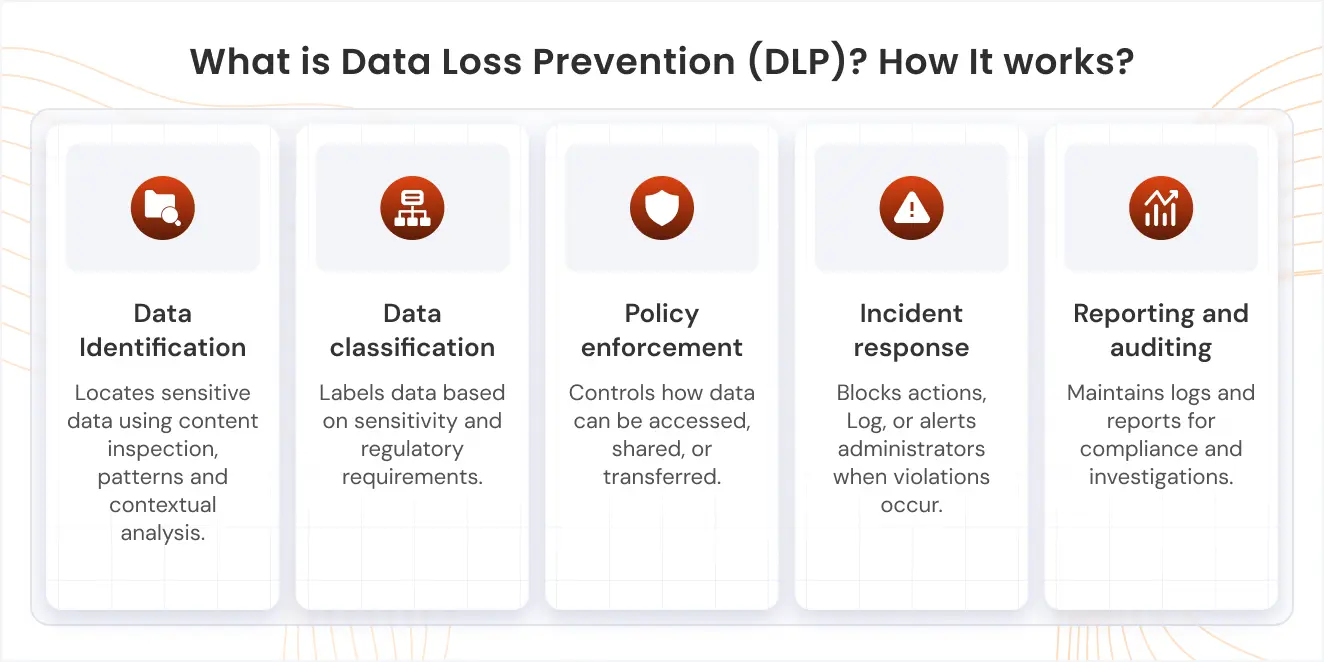
This is where your DLP tool earns its first real value. Data discovery scans your environment to surface sensitive data that's sitting at rest across file servers, databases, and cloud storage. That discovery output becomes the foundation for your classification work.
From there, classification is a two-step process. Automated rules for structured identifiers like SSNs (where regex patterns are reliable) Manual tagging for everything else. This is slower, but it is also more accurate for unstructured content where context matters.
The goal is to reach a high-confidence tagging accuracy, ideally around 95%, before you connect classification enforcement policies. This is because low- accuracy labels can undermine controls and generate excessive false positives.
Most teams go wrong in trying to classify data after the fact. When you label a document as "restricted" the moment it's created, every control downstream (who can share it, where it can go, what triggers an alert) applies automatically from day one. Going back to tag years of existing files is a different problem entirely.
If you're starting fresh, build the tagging habit into creation. If you're dealing with legacy data, treat that as a separate cleanup project with its own timeline.
7. Cover All Your Channels
Email is the channel everyone monitors. It's also the least creative exfiltration route.
A file blocked from leaving through email can go out via a personal Google Drive upload, a Slack message to an unmanaged device, or a paste into ChatGPT. Any program that only watches email has gaps wide enough to miss most of what's actually happening.
Your DLP tool needs to cover endpoints, cloud apps, SaaS platforms, browsers, and generative AI tools. By 2026, 78% of companies will actively use GenAI tools internally. If you haven't mapped your sensitive data's exposure to Copilot, ChatGPT, and Gemini, that's a real gap worth filling now.
8. Manage Access Across Every Channel
The Principle of Least Privilege (PoLP) is the foundation. Nobody should have standing access to sensitive data they don't routinely use.
Beyond role-based controls, this means defining device policies (USB restrictions, removable media rules) and controlling cloud app access. BYOD deserves its own policy thread. An employee can't exfiltrate data to a device they can't connect to.
The question worth asking your team: do your access policies follow the data, or do they stop at the network perimeter? If the answer is the latter, you have work to do.
9. Integrate DLP into Your Broader Security Stack
DLP running in isolation is DLP that half-works.
The most effective programs work together with Identity Access Management (IAM), so that when a user is flagged as high-risk (say, logging in from an unusual location or escalating their own privileges), DLP automatically tightens what that specific user can move or export, without changing the rules for everyone else.
They also plug into Zero Trust Architecture (ZTA), so access decisions account for device posture and user behavior, not just credentials. And they use Cloud Access Security Brokers (CASB) solution to extend visibility into sanctioned and unsanctioned cloud apps.
This connection also makes the business case cleaner. If you're already spending on IAM, showing how DLP multiplies the ROI of that investment lands better with senior executives than pitching it as a standalone purchase.
10. Monitor Continuously and in Real-Time
Your DLP program on day 1 won't be the right program for day 180.
Real-time monitoring is what catches incidents as they happen. Incidents like policy fires, critical announcements, etc. That's day-to-day function. But auditing is what keeps the program working for the future as well. Data flows change, new tools get adopted, regulations update, and employees find ways around friction. Without scheduled reviews, your policies will quietly drift out of alignment. Review on a fixed schedule, at least once a quarter. Track false positive rates. Track incidents by channel to see where data is actually moving. Update your classification taxonomy when new data types enter your environment.
There are two numbers worth tracking: Your false positive rate - how often the tool fires on legitimate activity Your alert-to-resolution time - how long it takes from a policy match to a closed one If either one is trending in the wrong direction, something in your rules or your process has slipped.
Why do these DLP best practices matter?
A breach/threat doesn't have to be massive to be fatal. More than half of small‑to‑medium businesses that suffer a major cyberattack report severe financial or operational damage, and many are forced to shut down or permanently downsize within a year.
The threats come from 3 directions. External attackers (ransomware being the most common method). Insider incidents: an employee taking a customer list when they resign, accidentally attaching the wrong spreadsheet to an email, and pasting confidential specs into a public AI tool. And plain hardware failure, which is unglamorous and still real.
The business case rests on avoiding breach costs, maintaining compliance (GDPR, HIPAA, and others carry real fines for inadequate controls), and protecting the intellectual property that your company's valuation actually depends on.
For startups, especially growing teams, that framing matters. Get a DLP program in place before you need it, because by the time you need it, the window to build one properly has already closed.
When you frame it that way to executives, DLP stops looking like an IT expense and starts looking like insurance with a clear premium-to-coverage ratio.
Stay Secure with miniOrange
miniOrange DLP is built to scale with your organization, whether you're starting with data discovery and classification or connecting DLP into a broader Zero Trust framework.
It's part of miniOrange's Unified Endpoint Management suite. And because miniOrange DLP sits inside the same umbrella as their IAM, SSO, MFA, MDM, and BYOD tools, the user risk context that the ‘best practice No. 10’ describes (flagging high-risk users and tightening their data access automatically) works easily, rather than requiring a separate integration project.
Talk to a miniOrange expert to plan your phased DLP rollout.

Leave a Comment