

Data breaches are no longer rare events.
Almost every week, there’s news about companies losing customer data, exposing internal files, or facing penalties due to compliance failures. While most of these incidents highlight large enterprises, small businesses are just as vulnerable, and in many cases, even more exposed.
Small businesses handle customer data, financial records, and business-critical information, but often lack dedicated security teams or advanced controls to protect it. When something goes wrong, the impact can be severe.
A single data leak can lead to financial loss, legal penalties, and long-term reputational damage. In some industries, non-compliance can even result in license cancellation or operational shutdown. One of the biggest misconceptions is that small businesses are “too small” to be targeted. In reality, attackers prefer easier targets, and organizations without strong data protection measures often fall into that category.
This is where a Data Loss Prevention (DLP) solution comes in. DLP is not just about stopping external threats, it focuses on preventing data leaks before they happen, whether caused by human error or intentional misuse.
In this blog, we’ll break down what DLP is, how it works for small businesses, why it matters, and how to choose the right solution.
What is Data Loss Prevention?
Data Loss Prevention (DLP) is a security approach that helps organizations monitor, detect, and prevent sensitive data from being exposed, shared, or misused.
In simple terms, a DLP ensures that important data stays where it should. Instead of reacting after a breach happens, DLP works proactively. It tracks how data moves across devices, email, cloud apps, and networks, and applies rules to control that movement.
For example:
- Blocking a file containing customer data from being emailed externally
- Preventing uploads of confidential documents to personal cloud storage
- Restricting data transfer through USB devices
DLP for small businesses acts like a safety layer that ensures sensitive data is not accidentally or intentionally leaked.
Why Do Small Businesses Need a DLP?
Many small businesses assume data protection is something only large enterprises need to worry about. In reality, they handle the same types of sensitive data, such as customer information, financial records, and internal documents, but often without the same level of protection or resources.
Here are the key reasons why small businesses need data loss prevention tools:
- Increased risk of data breaches: Small businesses are often easier targets because they may lack strong security controls. Attackers exploit known gaps, and unprotected data becomes an easy entry point. DLP helps reduce this risk by controlling how sensitive data is accessed and shared.
- Lack of dedicated security teams: Most small businesses don’t have dedicated cybersecurity teams monitoring data activity. This makes it difficult to track risks or respond quickly. A DLP solution provides continuous monitoring without adding extra workload.
- Human errors are common: Many data leaks happen due to simple mistakes like sending files to the wrong person or using unsafe tools. DLP tools help prevent these errors by detecting and blocking risky actions in real time.
- Growing compliance requirements: Small businesses still need to meet regulations like GDPR, HIPAA, or DPDPA. Without proper controls, compliance becomes difficult and risky. DLP helps enforce policies that align with these requirements.
- Expansion of remote work and BYOD: With remote work and personal devices, data is accessed from multiple locations. This increases the chances of exposure. A DLP solution ensures data stays protected across devices and environments.
- Limited visibility into data usage: Without proper tools, it’s hard to track how data is accessed or shared. DLP provides visibility into data activity, helping businesses identify risks and maintain control.
How Does Data Loss Prevention for Small Business Work?
Data loss prevention (DLP) for small businesses may seem complex at first, but the process follows a clear and structured flow. It focuses on understanding what data needs protection, tracking how it moves, and controlling how it is used. Once set up, most of this runs in the background, helping prevent data leaks without interrupting daily work.
Here’s how DLP for small businesses works:
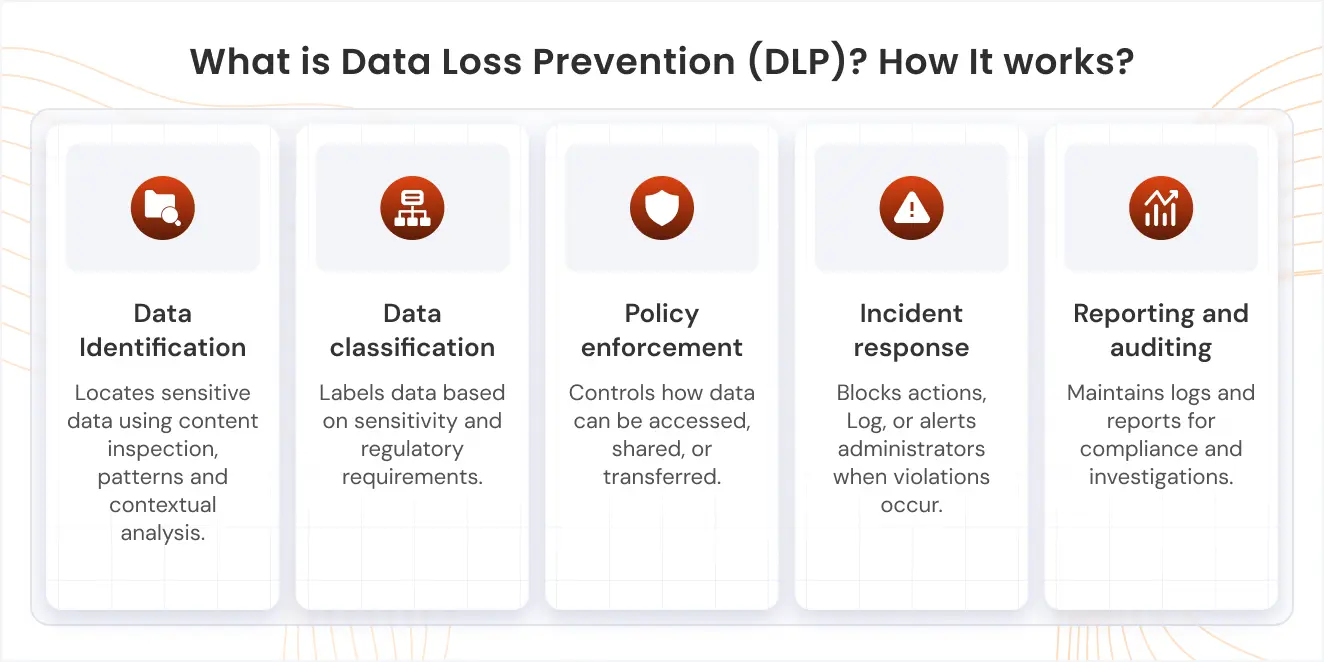
1. Identify Sensitive Data
The first step is identifying what data actually needs protection. This typically includes customer information, financial records, internal business documents, and intellectual property. For small businesses, this step is critical because not all data carries the same level of risk. Without knowing what is sensitive, it becomes difficult to apply meaningful policies. This step lays the foundation for everything that follows.
2. Classify Data
Once sensitive data is identified, it needs to be categorized based on its importance. Labels like Confidential, Internal, and Public help define how each type of data should be handled. This classification allows the DLP system to apply different levels of protection depending on sensitivity. For example, confidential data may be restricted from external sharing, while internal data may have fewer limitations. Clear classification ensures that security measures are applied accurately without over-restricting users.
3. Monitor Data Movement
Data loss prevention continuously tracks how data moves across systems and devices. This includes monitoring emails, file transfers, cloud applications, and endpoint activity. The goal is to understand where data is going, how it is being shared, and who is accessing it. This visibility helps identify risky behavior that might otherwise go unnoticed. Over time, it also helps businesses understand normal usage patterns and detect anomalies.
4. Apply Policies
Policies define what users can and cannot do with sensitive data. These rules are based on how data is classified and where it is being used. For example, a policy might block sending confidential files outside the organization or restrict uploads to unauthorized platforms. Policies can also trigger alerts when suspicious actions are detected. These controls act as guardrails, ensuring data is handled securely without relying only on user judgment.
5. Detect and Respond in Real Time
When a policy is violated, the DLP system blocks the action, notifies administrators depending on the severity of the activity. This real-time response is what makes DLP effective, as it prevents data loss before it actually happens. Instead of discovering issues after the fact, businesses can stop them as they occur. This reduces risk significantly, especially in cases of accidental data exposure.
6. Generate Reports and Insights
DLP tools also provide detailed visibility into how data is being used across the organization. IT teams can track who accessed data, where it was shared, and which policies were triggered. These insights help identify patterns, risks, and areas that need stronger controls. Over time, this data can be used to refine policies and improve security strategies. It also helps support compliance and audit requirements.
Benefits of DLP for Small Businesses
DLP is not just about security. It directly impacts how confidently a business can operate in a digital environment. For small businesses, it provides protection without adding unnecessary complexity.
Here are the key benefits of DLP for small businesses:
- Protects sensitive data: DLP solutions are designed to work in the background without disrupting daily operations. They provide protection without requiring constant manual intervention.
- Prevents costly data breaches: A single data breach can be expensive and damaging for a small business. DLP reduces this risk by stopping data leaks before they happen.
- Reduces human errors: Most data leaks aren’t hacks, they are mistakes. Employees may accidentally share files or use unsafe tools. DLP acts as a safety net by detecting and preventing these actions in real time.
- Secures remote work: With remote work and personal devices becoming common, data is no longer limited to office networks. DLP ensures data remains protected across devices and locations.
- Helps to stay compliant: Regulations like HIPAA, GDPR, & DPDPA require businesses to protect sensitive data. DLP helps enforce policies that align with compliance requirements, reducing the risk of penalties.
- Gives visibility into data usage: DLP provides insights into how data is accessed and shared. This visibility helps businesses understand risks and improve security decisions.
Best Practices to Implement DLP for Small Business
Implementing DLP for small business doesn’t require a heavy or complex setup, but it does need a clear and structured approach. Starting simple and improving gradually helps avoid unnecessary friction while still building strong data protection.
Here are some of the best practices to implement DLP for small business:
1. Choose the Right Solution
Start by selecting a solution that fits your business size, workflows, and infrastructure. Some businesses rely more on endpoints, while others operate mostly on cloud applications, so the choice between Endpoint DLP and cloud DLP matters.
2. Identify and Classify Sensitive Data
Before applying any controls, you need to clearly define what data needs protection. This usually includes customer information, financial records, internal documents, and any business-critical data. Once identified, classify the data using simple labels like Confidential, Internal, and Public. This helps apply the right level of protection without making policies too complex or restrictive.
3. Map Data Flow and Storage
Understanding where your data lives and how it moves is essential for effective DLP. Data may be stored on devices, shared through email, or accessed via cloud platforms. Mapping this flow helps you identify high-risk areas and ensures that DLP controls are applied where they are actually needed. Without this step, important gaps can easily be missed.
4. Create Simple, High-Impact Policies
Start with a few clear policies instead of trying to cover everything at once. For example, you can restrict external sharing of sensitive files or block uploads to unauthorized platforms. Keeping policies simple in the beginning helps reduce confusion and improve adoption. As you gain more visibility, you can gradually refine and expand these rules.
5. Start with Monitoring Mode
Instead of enforcing strict controls from day one, begin by monitoring data activity. This allows you to understand how data is being used and where potential risks exist. Monitoring also helps reduce false positives before policies are enforced. It gives you a clearer picture of real-world behavior without disrupting workflows.
6. Focus on High-Risk Channels
Not all data channels carry the same level of risk. Email, file sharing tools, endpoints, and collaboration platforms are often the most common sources of data leaks. Prioritizing these areas helps you address the biggest risks first. This ensures that your DLP implementation delivers immediate value without spreading efforts too thin.
7. Educate Employees
Technology alone cannot prevent data loss. Employees need to understand what sensitive data is and how it should be handled. Simple training on common mistakes and safe practices can significantly reduce accidental data leaks. Awareness plays a key role in making DLP effective.
8. Review and Improve Continuously
DLP is not a one-time setup. As your business grows and new tools are introduced, data risks also evolve. Regularly reviewing alerts, updating policies, and adapting to new scenarios ensures your DLP strategy remains effective over time. Continuous improvement keeps your data protection aligned with real-world usage.
Endpoint DLP vs Cloud DLP: How to Choose the Right DLP Tool for Your Small Business?
Choosing between endpoint and cloud DLP depends on where your data lives and how your team works. Most small businesses today operate across both devices and cloud tools, so understanding this difference helps you avoid gaps in protection.
Endpoint DLP focuses on protecting data on devices like laptops and desktops. It controls file transfers, USB usage, and how data is accessed or stored locally.
Cloud DLP focuses on data stored and shared through platforms like Google Workspace or Microsoft 365. It monitors how data is used across email, cloud apps, and collaboration tools.
When to Choose Endpoint DLP?
Choose endpoint DLP if most of your work happens on devices and data is frequently stored or transferred locally. It gives you control over actions like copying files to USB drives, saving data on local storage, or accessing sensitive documents offline. This approach is useful when employees work with files outside cloud environments. It helps prevent data leaks that happen through physical devices or unmanaged endpoints.
When to Choose Cloud DLP?
Choose cloud DLP if your business relies on SaaS tools for communication and collaboration. It helps monitor how data is shared through email, cloud storage, and collaboration platforms. This ensures sensitive information is not exposed through external sharing, misconfigured permissions, or unsafe integrations. It is ideal for teams that primarily work online.
When to Choose Both?
If your business uses both devices and cloud platforms, relying on just one type of DLP can create gaps. Data often moves between local systems and cloud applications, especially in hybrid work setups. A combined approach ensures consistent protection across environments. It allows you to control data wherever it exists, without leaving weak points in your security.
How to Choose the Right Solution for Your Small Business?
Choosing a DLP solution is not just about picking a popular tool. It’s about finding features that actually solve your business problems without adding complexity.
Here are the top features to look for in a DLP tool for small business:
- Multi-OS support: Your DLP solution should work across Windows, Android, and iOS devices. Small businesses rarely operate on a single OS, and without cross-platform support, you’ll end up with security gaps.
- 360° Data protection coverage: Look for a solution that covers endpoint, email, and cloud DLP. Data moves across multiple channels, so protection should follow it everywhere, not just in one place.
- Compliance-ready architecture: The solution should support regulations like GDPR, HIPAA, and other industry standards. This makes audits easier and reduces compliance risks without needing separate tools.
- Granular policy enforcement: You need control over how data is used, not just broad restrictions. Features like role-based access and context-aware policies help enforce security without disrupting workflows.
- Real-time alerts & analytics: DLP should respond instantly when risky behavior is detected. Real-time alerts and detailed logs help IT teams act quickly and understand how data is being used.
- File upload controls: A strong DLP tool should prevent sensitive data from being uploaded to unauthorized apps or websites. This ensures protection even when employees work outside the corporate network.
- Content-aware protection: Your DLP software should understand the data itself, not just track movement. It should detect patterns like PII or financial data and automatically block actions that violate policies.
- Device & Peripheral control: Control how data moves through USB drives and external devices. This helps prevent easy data exfiltration through physical means.
- Integration with existing tools: DLP should integrate with email platforms, identity systems, and endpoint management tools. This creates a unified security environment instead of isolated controls.
- Scalability & Ease of use: For small businesses, simplicity matters. The solution should be easy to deploy and manage, while still being able to scale as the business grows.
Strengthen Your Data Security Posture with miniOrange DLP for Small Businesses
Data protection is no longer optional for small businesses. As cyber threats continue to rise and compliance requirements become stricter, even a single data leak can lead to financial loss, penalties, and long-term reputational damage.
This is why choosing the right DLP tool matters. Not every tool is built for small business needs, so it’s important to evaluate options carefully, try free demos, and ensure the solution fits your environment, team size, and workflows.
miniOrange DLP stands out by combining strong security with ease of use. It supports multiple operating systems, offers real-time monitoring to catch risky actions instantly, and provides granular policy controls so you can define exactly how data should be handled. At the same time, it delivers compliance-ready reporting, helping you stay aligned with regulations without adding extra complexity.
For small businesses that need effective protection without a complicated setup, miniOrange DLP offers a practical and scalable approach to securing sensitive data.
FAQs
1. How does DLP for small business help protect your data and stay compliant?
DLP for small business monitors how sensitive data is accessed, shared, and stored across your systems. It helps prevent unauthorized actions and provides visibility needed to meet compliance requirements like GDPR or HIPAA.
2. Encryption vs DLP: Which is better to prevent data theft?
Encryption protects data by making it unreadable, while DLP prevents it from being shared or leaked in the first place. For complete protection, small businesses should use both together.
3. Can DLP for e-commerce prevent customer data leaks?
Yes, DLP for small business helps prevent accidental sharing or exposure of customer data in e-commerce environments. It monitors data movement and blocks unsafe uploads or transfers in real time.
4. Is DLP better than other security solutions like antivirus?
DLP and antivirus serve different purposes. Antivirus protects against malware, while DLP protects sensitive data from leaks and misuse. Both are essential for a complete security strategy.
5. How does DLP bring control to shadow IT?
DLP for small business detects when data is being shared through unauthorized apps or tools. It helps block risky actions and gives visibility into how data is being used outside approved systems.
6. Can DLP prevent data leaks via Generative AI and Machine Learning tools?
Yes, DLP can monitor and control data shared with AI and ML tools like ChatGPT or Google Gemini. They can block or restrict sensitive data from being entered into such tools and prevent unauthorized uploads or sharing.
Contact us at uemsupport@xecurify.com to learn more and get started with a DLP solution that fits your organization’s needs!

Leave a Comment