

Every year, thousands of organizations discover their sensitive data is somewhere it shouldn't be. Sometimes it's a misconfigured cloud bucket. Sometimes it's an employee forwarding files to a personal email. Sometimes it's a contractor who had more access than they needed.
Most of these weren't breaches in the dramatic sense. There was no ransomware, no external hacker. Just data that quietly slipped out because no one was watching closely enough.
That's a data leak. And the damage, financial, regulatory, and reputational, is real regardless of how it happened.
This guide breaks down what data leaks are, what causes them, and exactly how to prevent data leaks before they cost you.
What is a Data Leak?
A data leak is the unauthorized exposure of sensitive information to an outside party, through accidental or intentional means, without necessarily involving an external attack. PII, financial records, intellectual property, credentials: if it leaves your controlled environment without authorization, it's a leak.
The definition of data leakage matters here. A leak doesn't require a breach. It doesn't require malicious intent. An employee who emails a customer list to the wrong person has just caused a data leak. So has a developer who commits an API key to a public GitHub repo.
What does Data Leak Mean for Businesses?
The short answer: liability. The longer answer involves fines under regulatory compliances like GDPR, HIPAA, or CCPA; customer trust that takes years to rebuild; and the kind of media coverage no PR team wants to manage.
IBM's 2025 Cost of a Data Breach report put the average cost of a breach at $4.44 million. A good chunk of that comes from incidents that started as leaks, not attacks. Knowing how to prevent data leaks before they reach that scale is what separates a costly incident from a manageable one.
Common Types of Data Leaks
They tend to cluster around a few patterns:
- Email data leaks
Email data leakage examples are misdirected email, a forwarded attachment to a personal inbox, or a phishing attack that hands an attacker legitimate email access.
- Endpoint data leaks
Every unmanaged or unpatched device is a risk. Personal laptops under BYOD policies, remote machines with synced work files: each one is an endpoint exposure point that IT often can't see.
- Cloud data leaks
Misconfigured storage buckets, overly permissive sharing settings, accidental public repositories. Most cloud leaks are caused accidentally by authorized users, not attackers.
- USB and removable media leaks
USB transfers leave no trail unless endpoint monitoring is active. When unmonitored, a departing employee can easily copy data to their personal drive.
- Web upload data leaks
Employees upload files to unreviewed third-party sites: free PDF converters, AI tools, etc. This is Shadow IT. It’s when data lands on a server that your security team has zero visibility into.
- Collaboration tool data leaks
Slack, Teams, Notion: where work happens is also where data leaks happen. For example, files shared in the wrong channel. Shadow IT accelerates this when teams adopt tools without IT sign-off.
What Causes Data Leaks?
The root causes of data leaks usually come down to 4 things: poor visibility, excessive access, weak endpoint controls, and human error.
- Poor Visibility
This means your team doesn't know where sensitive data lives. You can't protect what you can't see. If finance documents are scattered across three cloud platforms and a shared drive, that's a leak waiting to happen.
- Excessive Access
When too many people have access to too much data, the blast radius of any mistake or misuse grows significantly. The principle of least privilege exists precisely because overprivileged accounts are consistently among the most exploited vectors in data security incidents.
- Weak Endpoint Controls
Remote work expanded the number of devices touching corporate data. BYOD policies, personal laptops, home Wi-Fi networks: each one is a potential exit point for data. Without endpoint monitoring and management, you're relying on employees to self-enforce security policies.
- Human Error
Human error accounts for roughly 26% of all breaches, according to IBM’s 2025 report. Misdirected emails, accidental file shares, weak passwords reused across accounts. Training helps, but it doesn't eliminate the problem.
Understanding what causes data leaks is the first step. Knowing how to prevent data leaks for each of these causes is what you and your IT team need to perfect.
Why is Data Leak Prevention Important?
The financial case is obvious, but the compliance angle often drives urgency faster.
- Under GDPR, a single data leak involving EU resident PII can result in fines up to €20 million or 4% of annual global turnover, whichever is higher.
- HIPAA violations carry penalties up to $2.19 million per violation category per year.
- California's CCPA gives consumers the right to sue over data exposures with statutory damages.
- SEC rules now require publicly traded companies to disclose material incidents within 4 business days.
Regulatory expectations have tightened considerably. The idea that a company could quietly absorb a leak without public disclosure is largely gone.
Beyond compliance, there's the operational impact. Here are a few data leakage examples that show what that looks like in practice:
- Intellectual property leaks can surface in a competitor's product 6 months later. Leaked credentials get weaponized.
- Customer data sold on dark web forums shows up in fraud claims months after the fact.
Data leak prevention is also where visibility and control intersect with data security broadly. Especially now, when the attack surface has expanded beyond human users. AI agents, LLM integrations, and non-human identities (NHIs)like service accounts and API keys now access, process, and move sensitive data at scale, often without the same oversight applied to human accounts.
A misconfigured AI agent with access to customer records is a data leak risk, the same way an overprivileged employee is. Data leak prevention strategies increasingly need to account for their machine identities along with humans and devices.
How to Prevent Data Leaks?
Data leak prevention isn't a product you install. It's a strategy you build across people, processes, and tools. These are the 7 most practical tips to prevent data leakage in a company, be it a 40-person startup or a distributed enterprise.
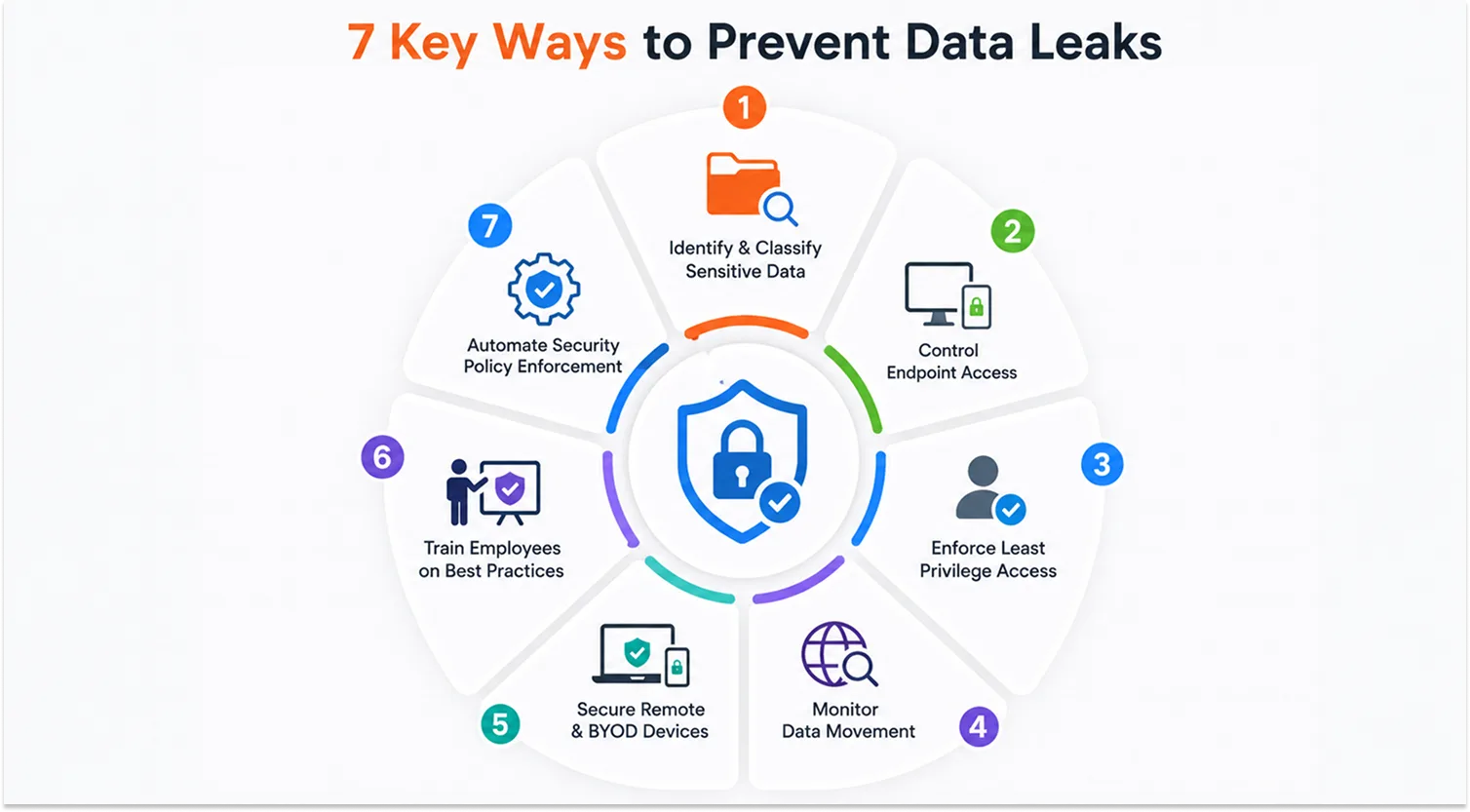
1. Identify and Classify Sensitive Data
You can't protect data you don't know you have.
So the first thing you must do to prevent data leaks is to start with a data discovery exercise: where does PII live? Where are financial records stored? Which files contain intellectual property? Once you know, classify everything by sensitivity level. Data that isn't classified gets treated as everything, which usually means nothing is truly protected.
2. Control Endpoint Access
Every device that touches your network is a potential exit point. Endpoint monitoring tools give you visibility into what's happening on those devices: which files are being copied, which apps are being used, which USB drives are being plugged in.
For remote teams and company-owned devices, this visibility is even more critical because the IT team can't always physically walk the floor.
3. Enforce Least Privilege Access
Give employees access to exactly what they need to do their jobs, and nothing more. An account manager doesn't need access to engineering IP. A customer support rep doesn't need the full customer database. Regularly audit permissions and revoke access when roles change or employees leave.
4. Monitor Data Movement
Effective data leak prevention monitors data across 3 surfaces: what's happening at endpoints (file transfers, USB activity, email attachments), what's moving across the network (traffic to unauthorized destinations, large transfers to cloud apps), and what's sitting in storage (misconfigured repositories, public-facing files).
5. Secure Remote and BYOD Devices
Remote work created millions of new endpoints outside the corporate perimeter. BYOD policies, while operationally convenient, put sensitive data on devices that IT teams often can't see or manage.
A Unified Endpoint Management (UEM) solution lets you enforce security policies, push patches, and remotely wipe devices even when they're off-network, so the security boundary travels with the device.
6. Train Employees on Data Security Best Practices
Security awareness training won't stop every mistake, but it raises the floor. Employees who know how to spot a phishing email, why they shouldn't use personal cloud storage for work files, and what to do when they accidentally send something to the wrong person are less likely to cause a leak.
Run simulated phishing exercises, not just annual compliance videos. It’s one of the most underused ways to teach employees how to stop data leaks before they start.
7. Automate Security Policy Enforcement
Manual enforcement doesn't scale. As your organization grows, the number of devices, users, and data access points grows faster than any IT team can manually track.
Automated policies do what manual review can’t: block classified file transfers, flag unusual access patterns, and enforce encryption on sensitive documents. But encryption cannot stop an authorized person from decrypting and forwarding data to the wrong place. Pair it with access control and monitoring.
That’s what turns a data leak prevention strategy from a policy document to something that actually runs.
Difference Between Data Leak Prevention & Data Loss Prevention (DLP)
These two terms get used interchangeably, which causes real confusion when organizations try to build their security programs.
Are data leak prevention and DLP the same? No. Their strategic intent is different. But both of them are equally critical.
Most enterprise DLP products today handle both. The question of how to prevent data leaks narrows its focus to internal systems, asking, "Who is sending what to where, and should they be?" Whereas the question, how to prevent data loss, asks, "Do we have this data, and can we recover it if something goes wrong?"
| Dimension | Data leak prevention | Data loss prevention (DLP) |
|---|---|---|
| Focus | Stops sensitive data from leaving to unauthorized external parties | Broadly protects data from being lost, stolen, or misused |
| Scope | Internal systems, outbound data flows | Data at rest, in motion, and in use |
| Threat type | Unintentional or intentional exposure via email, file sharing, or cloud misuse | Accidental deletion, malicious theft, or external attacks |
| Tooling emphasis | Content inspection, user behaviour monitoring, and endpoint control | Backup encryption, access control, and incident response |
| Common triggers | Unauthorized file transfer, shadow IT, and insider misuse | Ransomware, hardware failure, and accidental deletion |
Data Leak Prevention Tools
The strategies above cover how to prevent data leaks operationally. But no single tool prevents data leaks on its own. The most effective approach is to build a definite data loss prevention suite where each tool watches a different surface.
DLP software
Inspects content in motion and at rest. Can block emails with sensitive attachments, prevent uploads to unauthorized cloud apps, and alert on policy violations. Examples: Microsoft Purview, Symantec DLP, Forcepoint.
UEM Solution (Unified Endpoint Management)
Manages and monitors every endpoint touching your network: laptops, phones, tablets, and remote devices. Enforces security policies, pushes patches, enables remote wipe, and provides visibility under one dashboard.
CASB (Cloud Access Security Broker)
Sits between your users and cloud services. Monitors what data is being uploaded where, blocks access to unsanctioned apps (shadow IT), and enforces policies on cloud-based data movement.
IAM (Identity and Access Management)
Controls who can access what. MFA, SSO, role-based access controls, and regular access reviews are all IAM functions. Poor IAM is one of the most direct paths to a data leak.
PAM (Privileged Access Management)
A focused layer specifically for high-privilege accounts: administrators, DevOps, executives. PAM adds session recording, JIT, and tighter monitoring for privileged accounts.
SIEM / user behavior analytics
SIEM aggregates logs and security events, then applies rules or machine learning to flag anomalous behavior.
The right combination of these data leak prevention tools specific to your business is ultimately how you can prevent data leaks at scale, across every surface where sensitive data moves.
How DLP Helps to Prevent Data Leaks
Across the above strategies on how to prevent data leaks, one gap shows up consistently: data moving across too many surfaces without consistent visibility. Endpoints, email, cloud apps, each one is a separate place where sensitive data can exit your environment quietly.
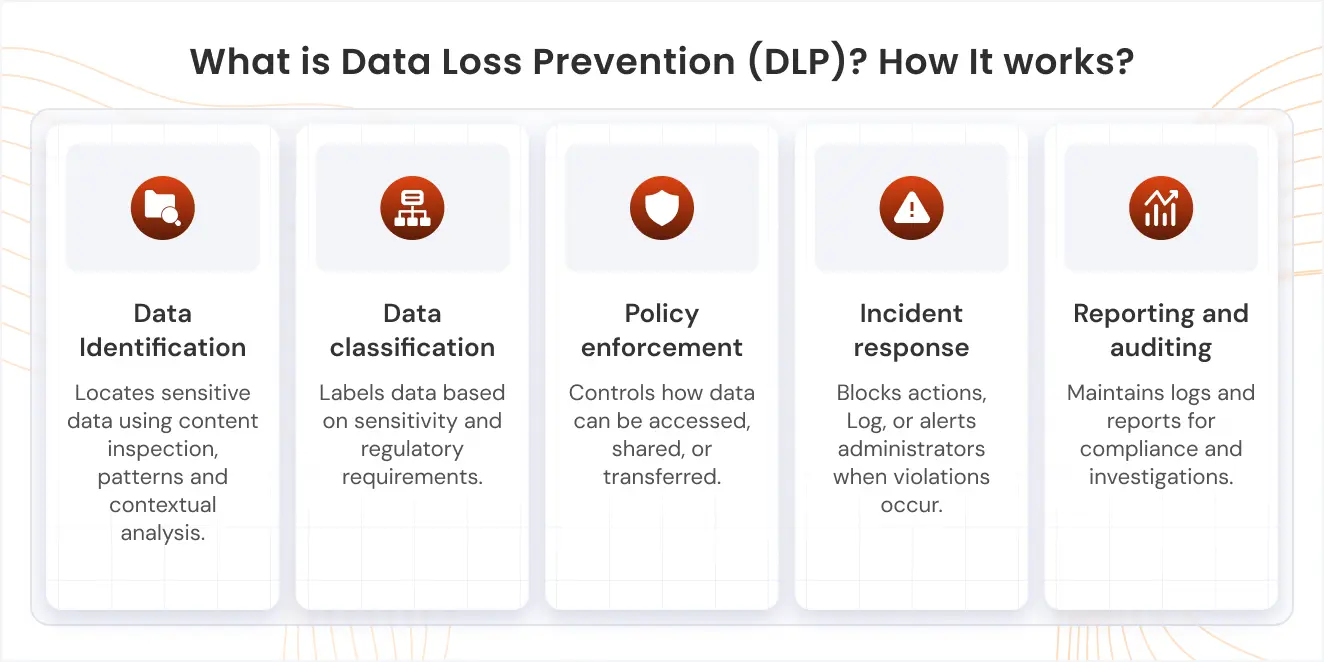
A dedicated DLP solution addresses this directly. It scans content across all 3 surfaces, endpoints, email, and cloud, applies classification policies automatically, and blocks or flags transfers that violate those policies in real time.
The other thing DLP does well is compliance support. Policies can be built around specific regulatory frameworks, such as GDPR, HIPAA, and PCI DSS, so the system flags the violations that actually carry regulatory weight rather than generating noise.
For remote and distributed teams, DLP works alongside UEM to cover both what's on the device and what's leaving it. UEM manages the device; DLP watches the data. Together, they're what allow data leak prevention policies to hold outside the office perimeter.
Conclusion
Deploying data leak prevention policies on paper is meaningless if your IT team lacks the visibility to execute them. The gap between what your security policy says and what's actually happening on your endpoints, email, and cloud is where most leaks originate.
The organizations that know how to prevent data leaks aren’t necessarily the ones with the biggest security budget.
They bridge the gap between compliance protocols and security and data leakage with consistent visibility, enforced policies, and patch & monitor devices from a single centralized dashboard. miniOrange DLP gives your IT and security teams that visibility and control across endpoints, email, and cloud from day one.
Stop data leaks before they happen, with miniOrange DLP.
FAQs
What is data leakage protection?
Data leakage protection is the set of tools, policies, and monitoring practices you can use to stop sensitive data from being exposed to unauthorized parties. It involves content inspection, endpoint monitoring, and access controls.
What is the difference between a data leak and a data breach?
A data breach involves an external attacker who deliberately targets your systems to steal data. A data leak can happen without any external attack: a misconfigured database, or a departing employee copying files. In practice, a leak can become the entry point for a breach.
Which tools help prevent data leaks?
The core stack is DLP (content inspection and policy enforcement), UEM (endpoint visibility and control), CASB (cloud app monitoring), IAM (access control), and PAM (privileged account management). Most organizations start with 2 or 3 of these and expand as their security program matures.
How do companies prevent data leaks?
The most effective approach to preventing data leaks combines data discovery and classification, least privilege access controls, endpoint monitoring, and automated policy enforcement. Plus regular audits & employee training.
How can organizations prevent data leaks in remote or BYOD environments?
Remote and BYOD environments need endpoint-level controls because the network perimeter no longer holds. UEM enforces policies, pushes patches, and enables remote wipe on off-network devices. Pairing it with CASB covers the cloud apps employees use on those same devices.
What is the most common cause of data leaks?
Malicious attacks, human error, and IT failure are the major causes of data leaks in 2025. Human error & IT failure are preventable with security awareness training and proactive data leak prevention measures.

Leave a Comment