

Managing SEO for one website is challenging enough. Managing it for a dozen client websites at once, each with its own goals, content calendar, and technical quirks, is a different problem altogether. This is the reality most digital agencies live in every day, and it's why SEO for agencies has become less about individual tactics and more about building a system that scales.
In 2026, agencies that win new business and retain clients longer are the ones that have replaced scattered spreadsheets and one-off audits with a consistent, repeatable process. This article looks at the common roadblocks agencies run into when managing SEO across multiple client accounts, and how the miniOrange SEO plugin helps agencies centralize audits, monitoring, and optimization from a single place, so client work stays consistent, efficient, and easier to report on.
Common SEO Challenges Agencies Face
Agencies rarely struggle with SEO knowledge. They struggle with SEO at scale. A few client websites are manageable by hand, but once an agency crosses ten, twenty, or fifty accounts, the same manual processes start to break down.
Some of the most common challenges include:
- Juggling multiple client websites. Each site has its own login, hosting environment, plugin stack, and reporting cadence, which makes it easy for smaller but important issues to slip through the cracks.
- Inconsistent audits. Without a standard checklist, one team member may check different things than another, leading to gaps in coverage and inconsistent client experiences.
- Time-consuming reporting. Pulling data from multiple tools and turning it into a client-ready report can eat up hours every week.
- Redirect and indexing issues. Broken links, orphaned pages, and unnoticed no-index tags can quietly hurt a client's rankings for months before anyone notices.
- Ongoing maintenance. SEO is not a one-time project. Sitemaps need updates, new pages need optimization, and old redirects need to be reviewed as sites evolve.
Left unaddressed, these issues cost agencies time, hurt client trust, and put a ceiling on how many accounts a team can realistically manage.
Why Agencies Need an SEO Plugin
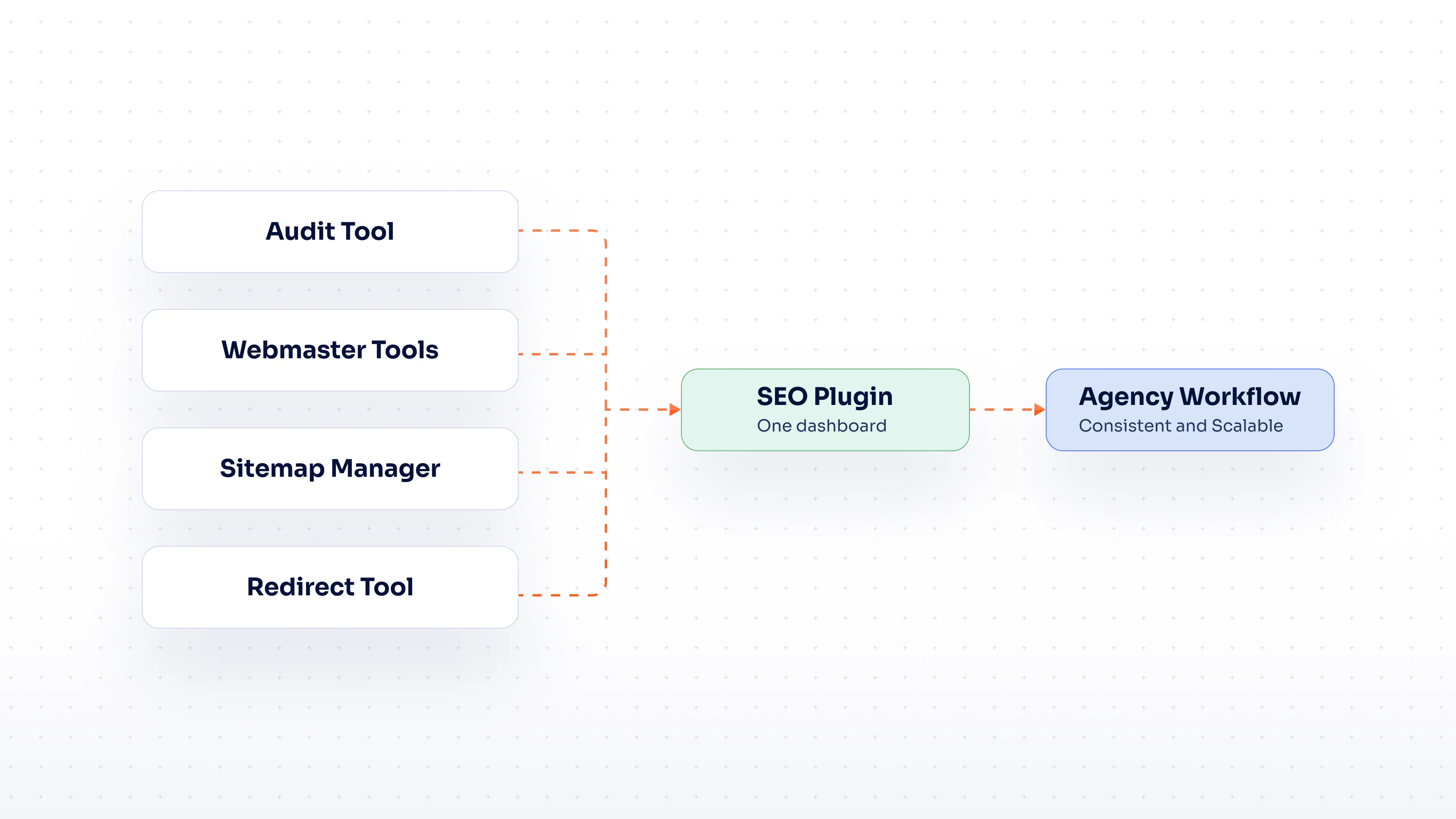
When SEO tasks are handled manually across many client sites, small inefficiencies add up quickly. A technical audit that takes twenty minutes on one site becomes several hours once it is repeated across a full client roster. Add in the back-and-forth of collecting login credentials, checking each site's webmaster tools separately, and manually updating sitemaps or redirects, and it becomes clear why manual SEO management doesn't scale.
An SEO plugin built for agency use changes this equation. Instead of treating every client website as a separate, disconnected task, it gives teams one place to run audits, monitor performance, and apply fixes, cutting out repetitive manual work and reducing the chance of something being missed.
How miniOrange SEO Plugin Helps Agencies
The miniOrange SEO plugin is designed with agency workflows in mind. Rather than requiring teams to manage each client site as its own isolated project, it brings auditing, monitoring, and optimization features together so agencies can support more clients without adding more manual overhead.
Create Repeatable SEO Workflows
One of the biggest advantages of using a dedicated plugin is the ability to build a repeatable workflow that can be applied to every client project. Instead of reinventing the process each time a new client comes on board, agencies can define a standard SEO checklist, audit sequence, and optimization routine once, and reuse it consistently across accounts. This not only saves time but also ensures every client receives the same level of thoroughness, regardless of who on the team is handling the account.
Run SEO Audits Across Client Websites
Regular SEO audits are the foundation of any healthy SEO program, but running them manually across many sites is tedious. With a centralized approach to audits, agencies can quickly identify technical issues, missed optimization opportunities, and content gaps across client websites without logging into each site separately. This makes it easier to catch problems early and prioritize fixes based on impact, rather than discovering issues only when a client asks why their rankings dropped.
Manage Webmaster Tools from One Dashboard
Keeping track of indexing status, crawl errors, and site performance usually means checking webmaster tools for each client individually. Consolidating this into a single dashboard lets agency teams monitor how search engines are interacting with every client site at a glance, spot crawl issues before they escalate, and respond faster when a page suddenly stops appearing in search results.
Control XML Sitemaps Across Websites
An accurate, up-to-date sitemap plays a direct role in how efficiently search engines discover and index a website's pages. With sitemap control built into the plugin, agencies can manage and update XML sitemaps for multiple client websites without digging through each site's backend separately, helping ensure new pages get indexed and outdated ones are properly removed.
Manage Redirects and SEO Fixes Efficiently
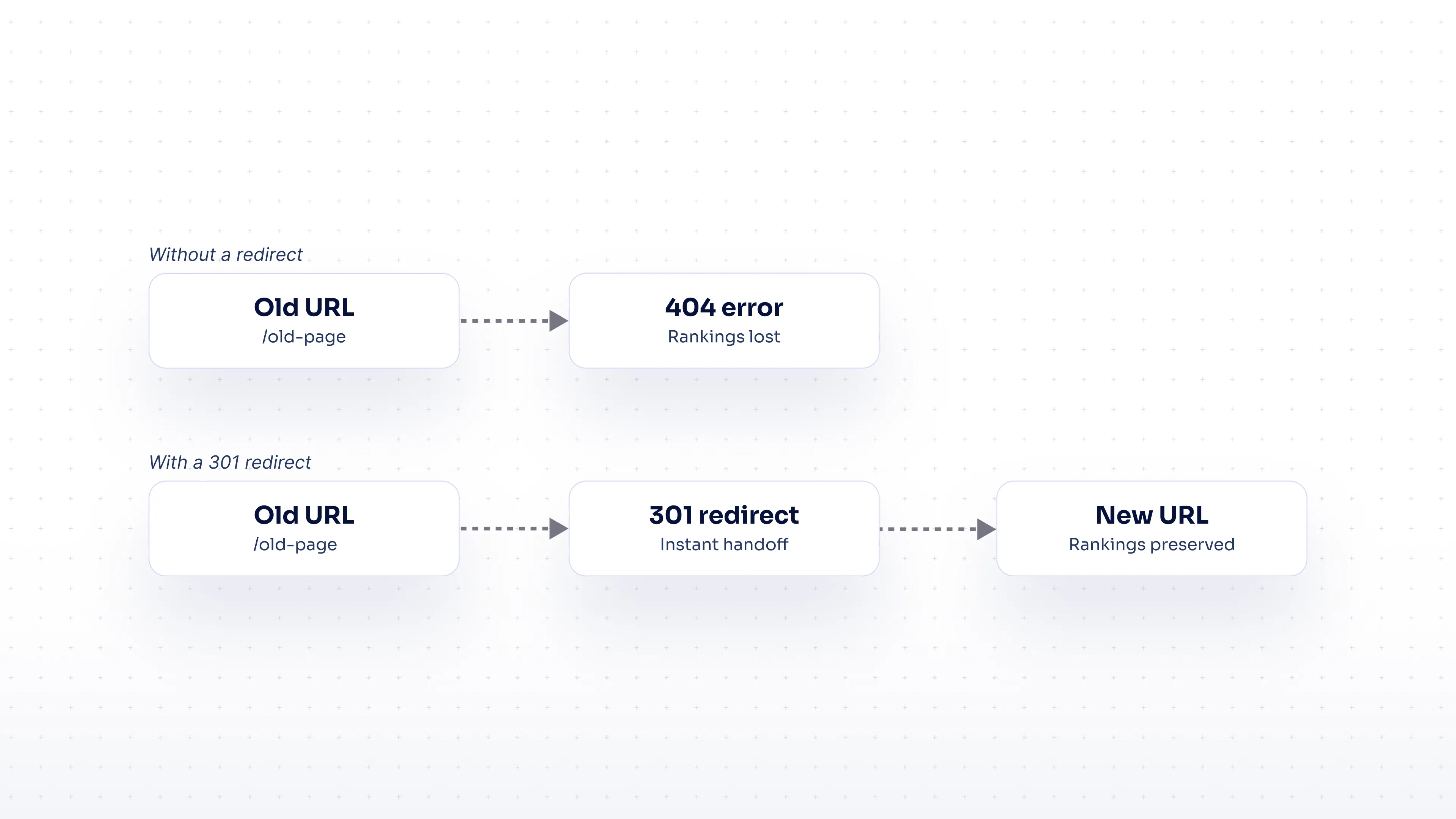
Client websites change constantly: pages get renamed, URLs get restructured, and old content gets retired. Without proper redirects, these changes can quietly erode rankings and send visitors to broken pages. A centralized approach to redirect management lets agencies apply and track redirects across client sites in one place, helping preserve link equity and rankings whenever a client's site structure changes.
Optimize Individual Pages for Better Performance
Site-wide SEO health matters, but rankings are ultimately won or lost page by page. Page-level optimization tools help agency teams fine-tune titles, meta descriptions, headings, and on-page content for individual pages across every client account, making it easier to improve visibility for the specific keywords each client cares about most.
Manage SEO Across Multiple Client Websites
Bringing audits, webmaster tools, sitemaps, redirects, and page-level optimization into one workflow does more than save time. It gives agencies a consistent way to manage SEO quality across every client, regardless of how many accounts they're handling. Teams can spend less time switching between tools and logins and more time on strategy and client communication. As an agency's client roster grows, this kind of centralized client website management approach becomes the difference between scaling smoothly and scaling painfully.
Agency SEO Best Practices for 2026
As search continues to evolve, a few best practices stand out for agencies looking to stay competitive in 2026:
- Lean on automation for repetitive tasks. Audits, sitemap updates, and redirect checks are ideal candidates for automation, freeing up team time for strategic work.
- Prepare for AI-driven search experiences. As AI-powered search results become more common, clear content structure, accurate metadata, and strong technical SEO fundamentals matter more than ever.
- Audit consistently, not occasionally. Frequent, standardized audits catch issues earlier than periodic deep dives.
- Stay on top of indexing health. Regularly reviewing how search engines are crawling and indexing client sites helps prevent avoidable ranking drops.
- Build for scale from day one. Choose tools and workflows that will still work when the client list doubles or triples, not just what's convenient for a handful of accounts.
Agencies that build these habits into their day-to-day operations are better positioned for agency growth, since they can take on more clients without a proportional increase in manual effort.
Conclusion
SEO for agencies isn't just about applying best practices to individual websites, it's about building a workflow that holds up across dozens of client accounts without burning out the team behind it. By centralizing audits, webmaster tools, sitemap management, redirects, and page-level optimization, the miniOrange SEO plugin helps agencies simplify agency SEO management, improve agency productivity, and deliver more consistent results for every client on their roster.
FAQ
What is SEO for agencies and why is it important?
SEO for agencies refers to the processes and tools agencies use to manage search engine optimization across multiple client websites at once. It's important because agencies need consistency and efficiency to deliver reliable results for every client, not just the ones getting the most attention.
How can agencies manage SEO across multiple client websites efficiently?
Efficient multi-client SEO management typically involves standardizing workflows, centralizing audits and monitoring tools, and using a single dashboard to track performance across all client sites, rather than handling each site as a separate manual process.
How do SEO audits help agencies improve client website performance?
Regular SEO audits help agencies catch technical issues, indexing problems, and missed optimization opportunities before they affect rankings. Consistent audits across client sites also make it easier to spot patterns and prioritize fixes that will have the biggest impact.
How can agencies scale SEO services across multiple client websites?
Scaling SEO services comes down to building repeatable processes and using tools that consolidate tasks like audits, sitemaps, and redirects, so adding new clients doesn't require a proportional increase in manual work.
How does the miniOrange SEO Plugin help agencies streamline SEO workflows?
The miniOrange SEO plugin brings auditing, webmaster tools monitoring, sitemap control, redirect management, and page-level optimization into one place, helping agencies apply the same reliable SEO process across all client websites from a single dashboard.
Leave a Comment