

Publishing great content is the hard part. Getting it in front of readers is the fun part, and that's exactly what SEO is built to do: it's the technical and structural work that helps search engines find your content, understand it, and put it in front of the people searching for it.
For bloggers running WordPress, there's a real opportunity here. This guide covers what drives organic traffic to a blog, how the right habits keep paying off as your content library grows, and how the miniOrange SEO Plugin brings the whole process into one WordPress dashboard, from your first title tag to your XML sitemap.
Why SEO Matters for Bloggers
Every post you publish has a shot at reaching readers who've never heard of your blog before. SEO is what makes that possible, connecting your content with the exact searches it deserves to answer.
Three things make it worth doing well. It earns traffic from readers actively searching for what you write about, expanding your reach well beyond your existing subscribers or social following. It keeps working long after publish day, since a well-optimized post can drive traffic for years, growing quietly in the background. And it opens the door to entirely new readers, because a properly optimized post can be found by anyone searching for that topic, anywhere.
Good writing deserves an equally good shot at being found. SEO is what gives it that chance.
What Drives Organic Traffic to a Blog?
Organic traffic grows from a handful of things working together, each one reinforcing the others.
Keywords tell search engines what a post is about and which searches it should show up for. Working your target keyword naturally into the title, headings, and body builds relevance readers and search engines both respond to.
Content optimization covers the on-page fundamentals: title tags, meta descriptions, heading structure, and image alt text. Getting these right makes every post easier to understand and more inviting to click.
Internal linking connects your posts to one another, giving readers more of your best content to explore and helping search engines see the full picture of what your blog covers.
Site structure: clean URLs, logical categories, easy navigation like breadcrumbs makes your blog a pleasure to move through, for visitors and search engines alike.
Indexing brings it all together, and a current, submitted XML sitemap is what gets new posts discovered and ranking faster.
Each of these is simple on its own. Bring them together consistently, and they compound into real, lasting traffic growth.
Why Bloggers Need an SEO Plugin
Managing SEO by hand works well for a handful of posts, and plenty of bloggers do it happily writing thoughtful title tags, checking heading structure, and adding alt text as they go. As your blog grows, though, there's an easier way to keep that same level of care consistent across every single post.
A growing archive means more meta descriptions to write, more links to keep healthy, more sitemaps to keep current, and more older posts worth revisiting. None of it is difficult, and with the right system in place, it doesn't have to take much extra time either.
That's exactly what an SEO plugin is built for: surfacing what needs attention automatically, right inside the dashboard you're already using to write.
Why Choose a miniOrange SEO Plugin for Blogging?
Instead of juggling several tools for several tasks, the miniOrange WP SEO plugin brings on-page optimization, sitemap generation, schema markup, and redirect handling into one WordPress dashboard. Title tags, meta descriptions, headings, internal links, and indexing status are all visible and easy to adjust from a single screen.
It also reviews a post while you're writing it, giving you helpful feedback before you hit publish rather than after the fact. And whether you're running a personal blog or managing content across several sites, the same setup grows comfortably alongside you, from your first few posts to your next few hundred.
Blog Post Optimization Workflow with miniOrange
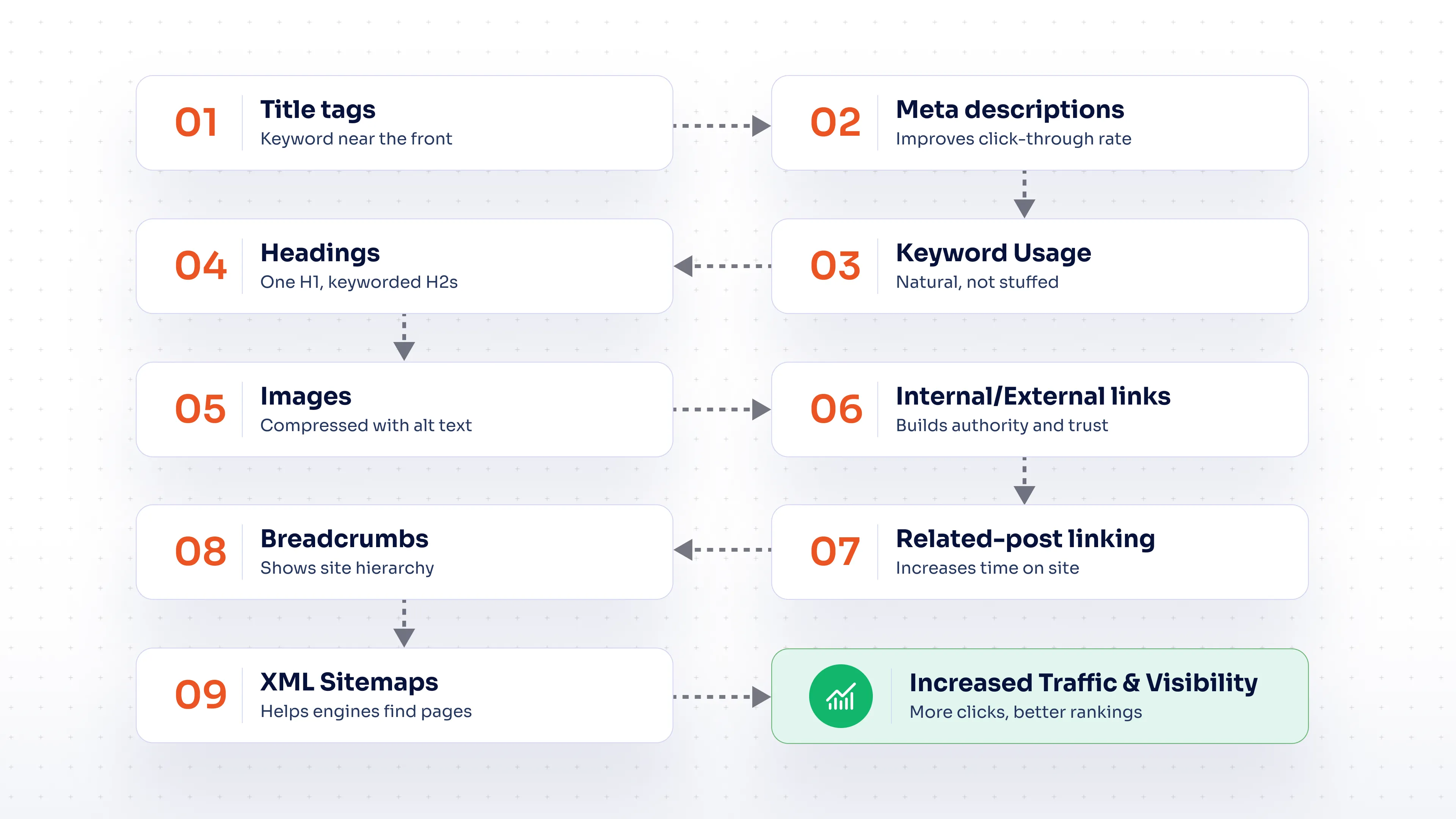
Here's the nine-step workflow the miniOrange SEO plugin is built to support, start to finish, from the first title tag you write to the sitemap update that gets a post discovered.
Optimize Title Tags for Better Rankings
Your title tag is a post's first impression on both search engines and readers, and a strong one goes a long way toward earning the click. Keep it in the 50–60 character range so it displays in full, and lead with your primary keyword near the front.
The miniOrange SEO plugin shows a live preview as you type, with the character count changing color once you've gone past the ideal length a simple, helpful nudge that makes it easy to land a great title on the first try.
Create Effective Meta Descriptions
Your meta description is your chance to make a compelling case in just a couple of lines the pitch that turns a search result into a click. Aim for 150–160 characters, work in your keyword naturally, and make the value of clicking through easy to see. Give every post its own thoughtful description, and you'll consistently win more clicks at the same ranking position.
Improve Keyword Usage Across Blog Posts
Great keyword usage is about relevance, and it comes together naturally once you're writing for your reader first. Your primary keyword belongs in the title, the opening paragraph, at least one heading, and the body, supported by related terms that round out the topic. The miniOrange SEO plugin checks keyword density during a site audit, so you always know exactly where a post stands.
Structure Blog Content with Proper Headings
A clear H1–H2–H3 hierarchy does double duty: it helps readers scan straight to what they need, and it helps search engines understand exactly what each section covers. Write headings that describe their section well, work in a keyword where it fits, and you've set the post up nicely to land in a featured snippet too.
Optimize Images and Media Content
Compress your images before uploading, give files descriptive names, and write alt text that genuinely describes what's in the picture. It's a small habit that pays off twice over: better accessibility for every reader, and better visibility in image search.
Manage Internal and External Links Effectively
Internal links guide readers deeper into your blog and help spread authority across your site. External links to credible, respected sources add weight to your claims and build trust with readers. Use descriptive anchor text instead of "click here," and give your links an occasional check-up to keep them working well. The miniOrange plugin's SEO analysis reviews internal and external links across your whole site, so you always know where things stand.
Connect Related Blog Posts with Internal Linking
Every new post is a great opportunity to link to two or three related older posts, and to loop back and add a link from those posts to the new one. This builds topic clusters that show search engines real depth on a subject, while helping new posts get discovered and indexed faster by connecting them to pages that already rank well. Over time, a well-linked group of posts consistently outperforms the same content published on its own.
Improve Blog Navigation with Breadcrumbs
Breadcrumbs show readers exactly how they got to a page, making a growing blog easy and pleasant to navigate while giving search engines a clear read on your site structure. The miniOrange SEO plugin includes breadcrumb support built right in, so you get this benefit without adding a separate tool.
Generate XML Sitemaps for Faster Content Discovery
An XML sitemap gives search engines a direct, up-to-date list of your content, helping new posts get discovered well before they've had time to earn links on their own. That's especially valuable in the days right after publishing. The miniOrange SEO plugin keeps this file current automatically, so every new post gets that fast start without any extra effort on your part.
See how the full workflow comes together — install the miniOrange SEO Plugin and run your first audit directly from your WordPress dashboard.
Keep Older Blog Posts Optimized Over Time
Your older posts are one of your best growth opportunities. Many of them already have some search visibility, and a little attention can help them climb further. Refreshing a keyword that's lost some relevance, updating an internal link, or polishing an older meta description can bring a post right back into strong form.
A periodic content refresh updating a statistic, fixing a link, sharpening a meta description, filling in a thin section tells search engines a post is actively cared for, which helps it hold or even improve its position. Build this into your regular routine, and prioritize the posts already earning solid traffic or sitting just outside the top results that's often where a refresh pays off fastest.
SEO Best Practices for Bloggers Using miniOrange SEO Plugin
A few simple habits reliably drive steady, compounding traffic growth:
- Run a site audit on a regular schedule to stay ahead of issues, not just when something new is published.
- Treat title tags and meta descriptions as living elements you can keep refining over time.
- Add internal links every time you publish something new.
- Let your sitemap update automatically so new posts always get discovered quickly.
- Set a recurring date to revisit and refresh your best older posts.
With the plugin reviewing each post as you write it, following these habits becomes remarkably easy. Most of the work is simply acting on what it flags, which makes consistent SEO genuinely achievable alongside everything else on your plate.
Ready to put these practices into action? Set up the miniOrange SEO Plugin on your WordPress blog and start your first SEO audit today.
Conclusion
Blog SEO comes down to a handful of good habits, repeated consistently: a strong title tag, a meta description that earns the click, thoughtful keyword use, clear headings, well-optimized images, deliberate internal linking, easy navigation, and a sitemap that's always current. Build these into your routine, and they compound beautifully turning a blog with great content into one that consistently reaches the readers it deserves.
The miniOrange SEO Plugin brings all of this together in a single WordPress dashboard, so you can spend more time writing and let the technical side of SEO take care of itself.
FAQ
1. What is SEO for bloggers and why is it important?
It's optimizing content titles, structure, keywords, links, and technical elements so search engines can crawl, index, and rank it. Without it, even great writing may never reach new readers.
2. How can bloggers improve SEO on WordPress?
Optimize title tags and meta descriptions, use keywords naturally, structure content with proper headings, add alt text, link internally, and keep an XML sitemap current all manageable from one WordPress SEO plugin.
3. How can SEO help increase blog traffic?
It makes posts easier for search engines to find and rank for relevant queries, capturing organic traffic that compounds over time as posts gain rankings and internal links.
4. Why is internal linking important for bloggers?
It keeps readers engaged with more of a site and helps search engines understand how posts relate while helping new posts get indexed faster.
5. What is the best SEO plugin for bloggers using WordPress?
The strongest options combine on-page optimization, technical SEO, sitemap generation, and internal link management in one dashboard, the approach the miniOrange SEO Plugin takes.

Leave a Comment