

For most WordPress teams, SEO is treated as a content problem. But a large share of what actually moves rankings, whether search engines can crawl a site correctly, whether structured data validates, whether AI crawlers can read a page, sits squarely on the developer's desk. SEO for developers in 2026 is less about writing meta descriptions and more about configuring the technical layer correctly, and doing it repeatably across every site a team manages.
This is where automation changes the equation. Instead of manually editing configuration files or chasing down crawl errors after they've already hurt rankings, developers can rely on purpose-built tools to handle technical SEO configuration as part of the standard build process. This article walks through why that matters, and how the miniOrange SEO Plugin helps developers manage Robots.txt, .htaccess, LLMs.txt, breadcrumbs, schema, and sitemaps without slowing down development work.
Why SEO Matters for WordPress Developers
Marketing teams typically own content strategy, but developers are the ones who control the infrastructure that determines whether that content is ever discovered. Crawl directives, redirect rules, structured data, and sitemap accuracy are all developer-level decisions, and a single misconfiguration, like an incorrect Robots.txt rule or a broken redirect, can quietly block search engines from indexing an entire site.
As search behavior shifts toward AI-driven discovery in addition to traditional search engines, this responsibility has only grown. Developers now need to think about crawl access for both search engine bots and AI crawlers, validate structured data so it renders correctly in rich results, and make sure every technical signal on a page is consistent. Getting this right at the infrastructure level is what separates a site that ranks reliably from one that depends on guesswork.
Why Developers Need an SEO Plugin
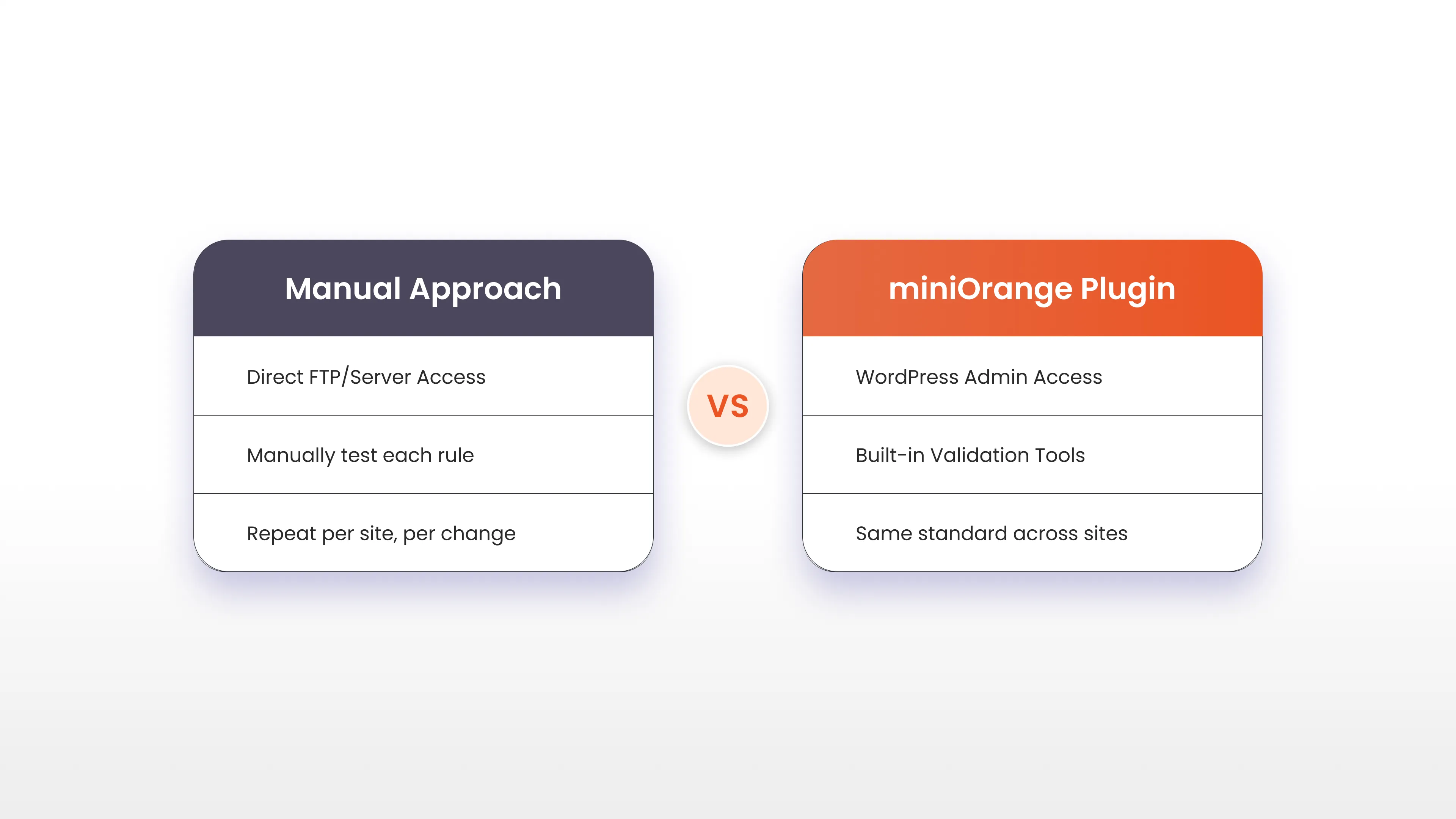
Manually managing technical SEO across multiple WordPress sites doesn't scale. Editing Robots.txt or .htaccess files directly means working through server access, testing changes in a staging environment, and re-checking syntax every time a rule needs to change. Schema markup has to be manually validated against evolving search engine requirements. Sitemaps need to stay in sync with site structure as pages are added or removed.
An SEO plugin built for developers turns these one-off, manual tasks into a repeatable, testable part of the WordPress admin. The miniOrange SEO Plugin is built around this idea: it gives developers direct control over the technical configurations that matter most for search visibility, without requiring them to touch raw server files or maintain separate scripts for every site.
How miniOrange SEO Plugin Helps Developers
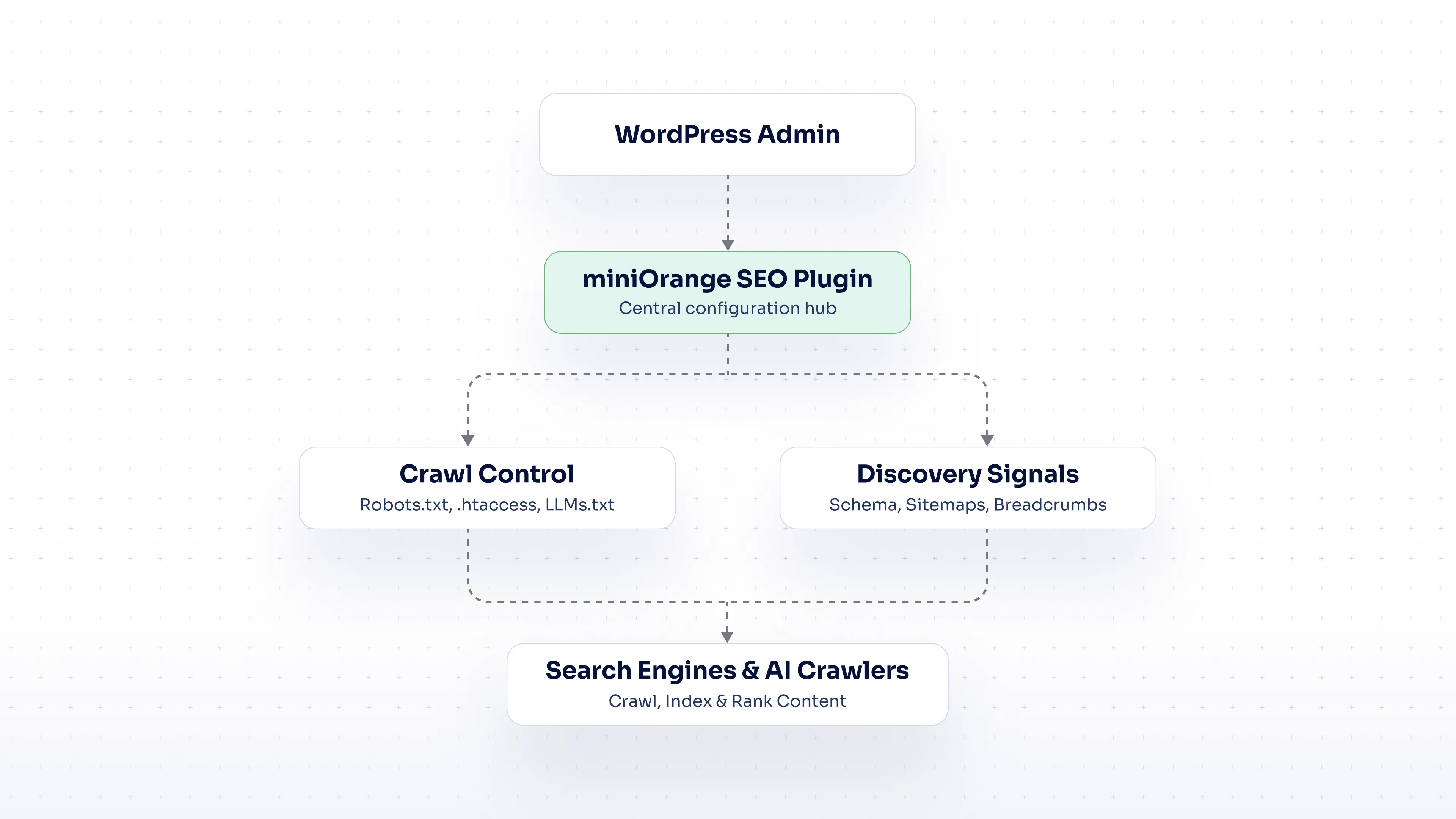
The core value of the plugin is that it consolidates the technical SEO tasks developers already handle, crawl control, redirects, structured data, sitemaps, into a single, version-friendly interface inside WordPress. That means fewer manual edits, fewer opportunities for configuration errors, and more time available for actual development work rather than repetitive SEO upkeep.
Below is how each of the core technical SEO components is handled.
Manage Robots.txt Configuration
Robots.txt controls which parts of a site search engine crawlers are allowed to access. Getting this file wrong, even a single misplaced disallow rule, can prevent important pages from being indexed at all. With the miniOrange SEO Plugin, developers can edit and manage the Robots.txt file directly from the WordPress dashboard, test rules before they go live, and keep crawler access consistent as the site evolves, without needing direct server or FTP access.
Configure .htaccess Settings
The .htaccess file handles server-level configurations that directly affect SEO, including URL rewrites, redirects, and access rules. Errors here can cause broken links, duplicate content issues, or server errors that hurt both user experience and rankings. The plugin allows developers to manage .htaccess settings through the WordPress admin, making it easier to set up redirects and URL handling rules correctly the first time, and to audit them later without digging through server files.
Generate and Manage LLMs.txt
LLMs.txt is an emerging standard that gives site owners a way to communicate directly with AI crawlers and large language models about how their content should be accessed and used. As AI-driven search and answer engines become a larger source of traffic, having a properly configured LLMs.txt file is becoming a standard part of technical SEO. The miniOrange SEO Plugin lets developers generate and manage this file alongside their existing SEO configuration, keeping AI crawler access under the same level of control as traditional search engine crawling.
Implement Breadcrumb Navigation
Breadcrumbs improve both site structure and user navigation by showing visitors, and search engines, exactly where a page sits within the overall site hierarchy. They also frequently appear in search result snippets, which can improve click-through rates. The plugin supports breadcrumb implementation without requiring custom theme code, so developers can add clear navigational structure across a site consistently.
Validate Schema Markup
Structured data tells search engines exactly what a page contains, whether that's a product, an article, an FAQ, or a local business listing, and it's what powers many rich results in search. Schema markup that's implemented incorrectly won't generate errors visible to users, but it will fail validation and miss out on rich result eligibility. The miniOrange SEO Plugin includes schema validation tools that let developers confirm structured data is correctly formatted before it goes live, reducing the back-and-forth of manual testing against search engine guidelines.
Configure XML Sitemaps
Sitemaps give search engines a direct map of which pages exist and should be crawled. As sites grow or change, sitemaps that aren't kept up to date can lead to outdated or missing pages in search results. The plugin automates sitemap generation and keeps it synced with the site's actual structure, so developers don't have to manually rebuild or resubmit sitemaps every time content changes.
Automate Repetitive Technical SEO Tasks
Every configuration covered above, crawl rules, redirects, schema, sitemaps, follows the same pattern: it needs to be set up correctly once, and then maintained consistently as the site changes. Handling this manually across multiple projects means repeating the same work over and over, with a real risk of inconsistency between sites.
By centralizing these tasks inside a single plugin, developers can apply the same technical SEO standards across every WordPress site they manage, catch configuration issues before they go live, and reduce the amount of time spent on maintenance tasks that don't require custom development work. This frees up bandwidth for the parts of a project that actually need a developer's attention: custom functionality, performance, and architecture.
Technical SEO Monitoring and Best Practices for 2026
Technical SEO in 2026 extends beyond the fundamentals of crawlability and structured data. A few practices are becoming standard for developers who want sites to perform well across both traditional search and AI-driven discovery:
- Plan for AI crawler access from the start. Configuring LLMs.txt alongside Robots.txt ensures AI systems and search engines are treated consistently, rather than as an afterthought.
- Treat schema as a maintenance item, not a one-time task. Search engines periodically update structured data requirements, so validation should be part of ongoing site maintenance, not just the initial launch.
- Keep sitemaps automated, not manual. Sites that publish or update content frequently need sitemap generation tied directly to content changes.
- Audit redirects and crawl rules regularly. As sites are restructured, old .htaccess and Robots.txt rules can quietly become outdated, blocking pages that should be indexed.
- Centralize technical SEO configuration. Managing these settings from one place makes it easier to apply consistent standards and catch errors before they affect rankings.
Conclusion
Technical SEO is fundamentally a developer's responsibility, and the sites that perform best in 2026 are the ones where crawl access, structured data, and sitemap accuracy are treated as part of the standard build process rather than an afterthought. Manually managing Robots.txt, .htaccess, schema, and sitemaps across multiple WordPress sites is time-consuming and error-prone.
The miniOrange SEO Plugin gives developers a single, centralized way to manage all of these technical SEO components, including newer requirements like LLMs.txt for AI crawler access, without needing direct server access or custom scripts for every site. That means fewer configuration errors, more consistent SEO standards across projects, and more time to spend on actual development work.
FAQ
Why is SEO important for WordPress developers?
Developers control the technical infrastructure, crawl access, redirects, structured data, and sitemaps, that determines whether search engines can properly index a site. A strong grasp of SEO for developers helps prevent configuration issues that can quietly block a site from ranking, regardless of how good its content is.
How does Robots.txt help manage search engine crawling?
The robots.txt file tells search engine crawlers which parts of a site they're allowed to access and which they should skip. Correctly configuring it prevents crawlers from wasting resources on irrelevant pages while ensuring important content stays fully indexable.
What is LLMs.txt and why is it important for AI search?
LLMs.txt is a file that communicates how AI crawlers and large language models should access and use a site's content. As AI-driven search and answer engines grow, having this configured correctly is becoming as important as traditional Robots.txt management.
What technical SEO tasks can developers automate in WordPress?
Developers can automate crawl rule management, redirect configuration, schema validation, sitemap generation, and breadcrumb implementation, reducing manual upkeep across sites and helping teams develop automated workflows that stay consistent as sites grow.
How does the miniOrange SEO Plugin help automate SEO tasks for developers?
The miniOrange SEO plugin centralizes Robots.txt, .htaccess, LLMs.txt, schema validation, sitemap configuration, and breadcrumb setup into a single WordPress interface, letting developers manage technical SEO consistently across sites without manual file edits or custom scripts.

Leave a Comment