

Most beginners do not fail at SEO because they lack effort. They fail because they start in the wrong place, chasing keywords before the site underneath them can even be crawled properly.
A new WordPress site does not need ten different tools to rank well in 2026. It needs the right fundamentals, handled in the right order: a site that search engines can reach, understand, and trust enough to rank. That is what SEO for beginners comes down to, and it is far more manageable than the endless plugin lists suggest. This piece walks through what WordPress SEO basics mean, where beginners typically get stuck, and how the miniOrange SEO Plugin turns that process into one repeatable workflow inside the WordPress dashboard.
What Is SEO for WordPress?
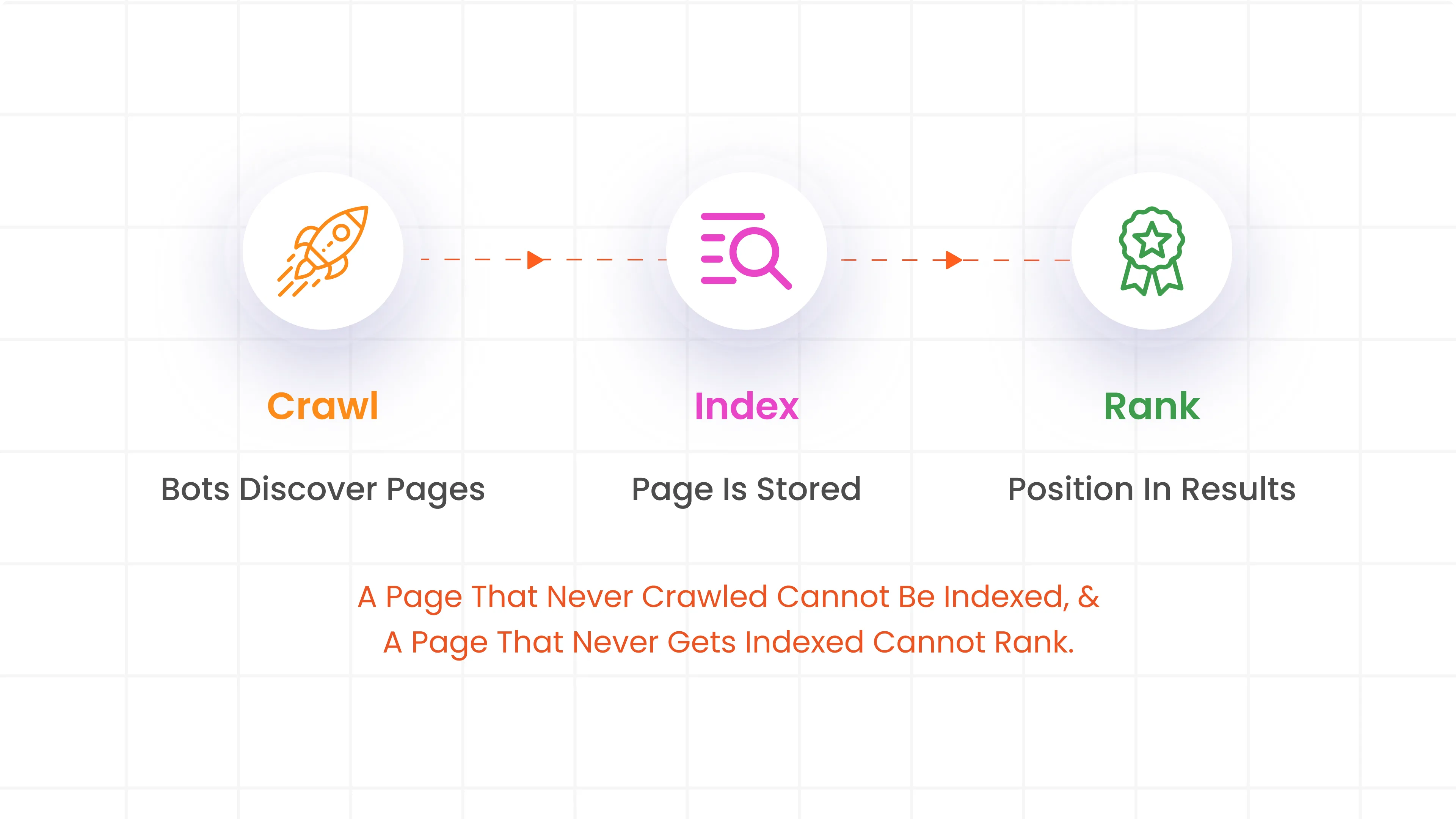
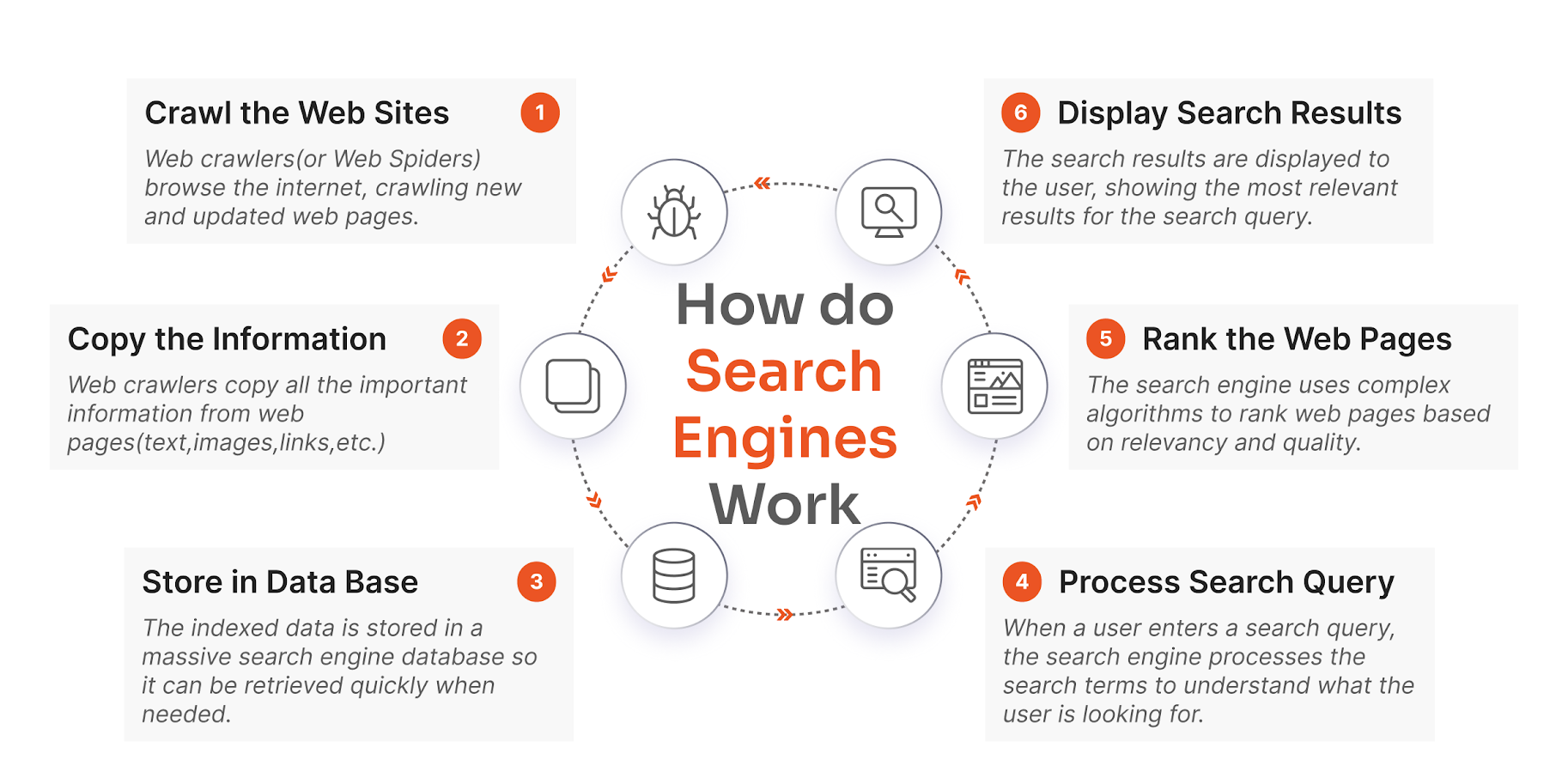
Search engine optimization is, at its core, the process of making a website easy for search engines to find, understand, and rank. Strip away the jargon, and it comes down to a simple chain: Google crawls the site, indexes eligible pages, ranks relevant content, and users discover it through search results. Each link depends entirely on the one before it, which is why a technical problem early on can undo good content later.
- Crawling is how search engine bots discover pages, usually by following links from one page to the next.
- Indexing happens once a page is crawled and analyzed closely enough that the search engine decides it is worth storing and eligible to appear in results.
- Ranking is the ordering process: indexed pages are weighed against relevance, quality, and hundreds of other signals to decide where they land.
A page that never gets crawled cannot be indexed, and a page that never gets indexed cannot rank, no matter how well it is written. This is why WordPress SEO basics need to start at the technical layer, not the content layer, and why so many beginner SEO mistakes trace back to a step in this chain that quietly broke months earlier. An all-in-one SEO plugin like the miniOrange SEO Plugin helps simplify these technical tasks by managing XML sitemaps, schema markup, redirects, and on-page SEO from a single dashboard.
Common SEO Challenges for Beginners
Ask any group of new WordPress site owners what is holding their SEO back, and the answers tend to cluster around the same handful of issues.
Indexing issues often go unnoticed, even when they significantly impact performance. For example, while a missing sitemap does not strictly prevent indexing as Google can still discover pages through internal links, backlinks, navigation, and external references it remains a vital tool for efficient, reliable discovery. Concurrently, broken links damage both site authority and user trust by directing visitors and bots to 404 error pages.
Missing schema markup limits a page's potential to capture rich results, such as FAQ snippets and breadcrumb trails, which are essential for competitive visibility. Additionally, weak metadata including improperly sized title tags or descriptions that omit target keywords often causes high-quality content to underperform. Finally, unoptimized images present a dual challenge: large file sizes impede page speed, while missing alt text reduces accessibility and denies search engines necessary context for ranking.
None of these problems are hard to fix individually. What makes them frustrating for beginners is that each one traditionally needed a different plugin and a different learning curve. A dedicated SEO plugin for WordPress that checks for all of these issues from one dashboard removes most of that friction.
Why Use One Plugin Instead of Multiple SEO Tools
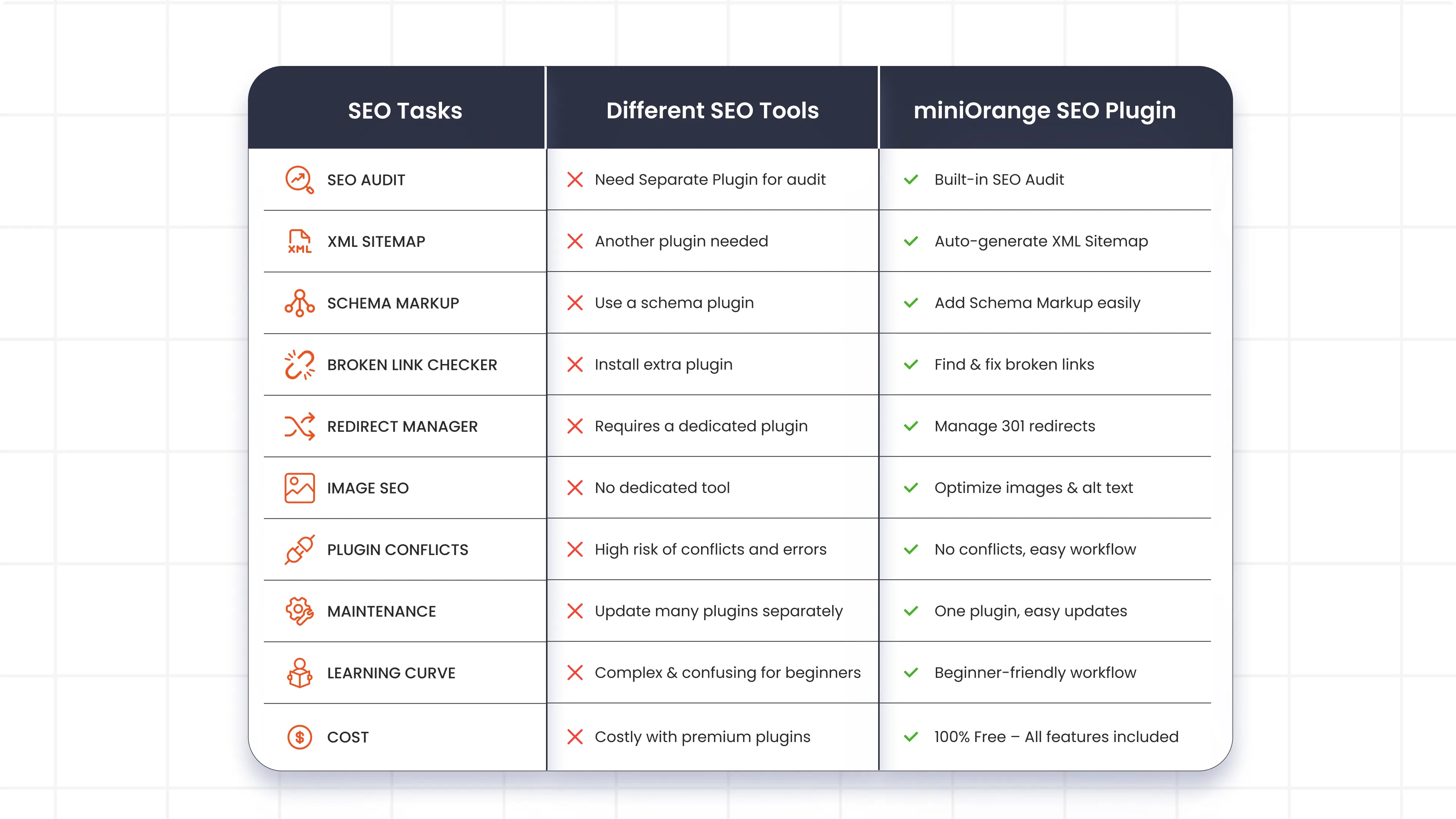
Many believe that installing more SEO plugins equals better results. In reality, effective SEO isn’t about the number of tools you use, it's about following best practices consistently. Relying on multiple plugins for the same tasks often adds unnecessary complexity and can slow down your site. In practice, it tends to work the opposite way. A site running one plugin for audits, another for sitemaps, a third for schema, and a fourth for redirects usually ends up with a scattered stack of beginner SEO tools rather than one coherent system.
Plugins with overlapping SEO features often try to control the same settings, which can lead to conflicts, duplicate metadata, or broken functionality. High maintenance follows close behind, since every additional plugin comes with its own updates, settings, and compatibility checks. Inconsistent workflow is the third pain point, as jumping between different dashboards for what is essentially one job gets confusing fast. And cost and effort tend to climb together, since several of these plugins layer their own paid add-ons on top of the base tool.
A single, all-in-one SEO plugin closes that gap without adding more moving parts. Instead of separate tools for on-page analysis, sitemaps, schema, and broken link detection, the miniOrange SEO Plugin handles all of it from one dashboard: site audits, sitemap generation, schema markup, broken link checks, 301 and 302 redirects, robots.txt editing, and webmaster tool verification for Google, Bing, Yandex, and Pinterest. For a business, that means fewer vendor relationships, fewer conflicting settings, and one place to check when something needs attention.
The benefits show up quickly: fewer plugin conflicts and site errors, real time saved through centralized management, an easier setup with a genuinely user-friendly dashboard, every essential SEO tool in one place, and a workflow built for beginners rather than SEO specialists. For teams new to search optimization, that combination turns SEO from overwhelming into approachable.
Why Use an SEO Plugin for WordPress?
WordPress does not ship with built-in tools for sitemaps, schema markup, or on-page analysis. That gap has to be filled by something, and a dedicated SEO plugin for WordPress is the fastest way to fill it. The miniOrange SEO Plugin was built as an all-in-one SEO solution that covers on-page optimization, technical SEO, and AI-search readiness, including llms.txt support, inside a single WordPress dashboard. Beginners do not need to learn several separate interfaces just to get a site search-ready; they need one.
Step-by-Step SEO Workflow with miniOrange
Once the plugin is installed, the path from a brand-new WordPress site to a properly optimized one follows a fairly predictable sequence.
1. Install miniOrange SEO Plugin
Start by downloading the miniOrange SEO Plugin, installing it, and activating it. As soon as it is active, the plugin opens directly into its Site Audit dashboard, the starting point for every task in this workflow.
2. Run Single Page SEO Audit
From the Site Audit dashboard, clicking "Scan" runs a full SEO audit of the page, checking elements such as meta title length (50 to 60 characters), meta description length (150 to 160 characters), URL slug length, keyword density (around 1 to 2 percent), internal and external link counts, H1 tag usage, and image alt text length (100 to 125 characters). Results come back grouped into critical issues, warnings, and items already in good shape.
3. Generate XML Sitemap
Next, open the plugin's Sitemap Settings and enable the XML sitemap. A preview option confirms it is live, and from there it is possible to configure which post types and taxonomies get included, or exclude specific posts and pages. An XML sitemap hands search engines a direct map of every important page on the site, speeding up crawling and indexing far more reliably than internal links alone.
4. Add Schema Markup
From the schema section of the plugin, selecting a schema type, blog posts, pages, or FAQs, and filling in the required fields generates the markup automatically, with no code required. Schema markup gives search engines a clearer read on a page's content, and often determines whether a listing is eligible for rich results like FAQ dropdowns or breadcrumb trails.
5. Configure Redirects
Whenever a page gets deleted or moved, the plugin's Redirect URL feature sets up a 301 (permanent) or 302 (temporary) redirect from the old URL to the new one. Skipping this step sends visitors and search engines to a broken "404 Not Found" page, quietly erasing the rankings that page had already earned.
6. Optimize Images with Alt Text
Finally, the plugin's on-page checker reviews alt text on every image and flags anything outside the recommended 100 to 125 character range. Handled this way, image SEO does double duty: it improves accessibility for screen reader users, and gives search engines context that can help pages surface in image search as well as standard organic search.
SEO Best Practices Using miniOrange SEO Plugin
Getting through the initial setup is only half the job. Keeping a WordPress site aligned with current SEO best practices takes a few ongoing habits.
Running audits regularly matters more than most beginners assume: a weekly scan catches issues on new pages, while a monthly deep scan gives a clearer picture of overall site health. When issues turn up, fix anything flagged as critical before chasing warnings. Technical SEO also drifts over time, so review the robots.txt file and no-index settings periodically, since these can change during development or a theme update. Search is changing shape too, and the plugin's built-in llms.txt support helps position content for AI-driven search experiences such as AI Overviews. Verifying ownership through the plugin's webmaster tools for Google Search Console, Bing, Yandex, and Pinterest keeps monitoring active across every platform that sends traffic, and adding breadcrumb navigation, available through a shortcode or PHP snippet, gives users and search engines a clearer sense of where a page sits within the site.
Treating this as a beginner SEO checklist that gets revisited regularly, rather than a one-time task, is what separates sites that hold their rankings from sites that slowly lose visibility without anyone noticing why.
Conclusion
Strip away the jargon, and SEO for WordPress comes down to a manageable set of fundamentals: a site that can be crawled and indexed, links and metadata that stay clean, structured data, and images that are optimized rather than ignored. Rather than juggling a separate tool for each task, the miniOrange SEO Plugin brings site audits, XML sitemaps, schema markup, redirects, broken link checks, and image optimization into one beginner-friendly dashboard.
Build toward that, one step at a time, and a brand-new WordPress site can hold its own against sites that have been optimizing for years. Get a free trial and see for yourself.
FAQs
1. What is SEO and why is it important?
SEO is the process of optimizing a website so search engines can crawl, index, and rank it effectively. It matters because higher rankings mean more organic visibility, clicks, and traffic without paying for ads.
2. How does the miniOrange SEO Plugin help WordPress users?
The miniOrange SEO Plugin combines on-page analysis, technical SEO, XML sitemaps, schema markup, redirects, and broken link checks into one dashboard, so WordPress users can manage SEO without switching between tools.
3. How does the XML Sitemap Generator improve SEO?
An XML sitemap generator lists every important page on a site in one file, giving search engines a direct path to discover and index content faster than crawled links alone.
4. What is Schema Markup and how does it help rankings?
Schema markup is structured data added to a page's code that helps search engines understand its content more precisely. It can make pages eligible for rich results, such as FAQ snippets or breadcrumb trails, improving both visibility and click-through rates.
5. How can the miniOrange SEO Plugin help increase organic traffic?
By fixing on-page issues, generating sitemaps, adding schema, resolving broken links, and optimizing images, the plugin addresses the technical and content factors that determine how well a site can improve website traffic through organic search.
6. What is the best SEO plugin for beginners in WordPress?
The best SEO plugin for beginners consolidates the essentials, site audits, sitemaps, schema, and redirects, into a single dashboard rather than scattering them across several tools. The miniOrange SEO Plugin was built specifically for this, reducing the learning curve without cutting corners on functionality.
Leave a Comment