

Most inbound B2B journeys on Shopify start the same way.
A prospective wholesale customer discovers your Shopify store, emails your sales team asking for wholesale pricing, and is ready to place their first order. Instead of gaining immediate access to wholesale pricing, they wait while your team:
- Reviews their application and verifies the business.
- Creates a Company Account and assigns catalogs and payment terms.
- Adds buyers as customers/contacts and assigns them to one or more company locations before they can place B2B orders.
For a business onboarding just a few wholesale customers each month, this may not seem like a problem. But as registrations increase, what starts as a simple workflow gradually turns into an operational bottleneck, slowing customer acquisition, delaying orders, and consuming valuable time that sales and support teams could spend on revenue work.
Shopify's native B2B capabilities provide the foundation for managing wholesale customers through companies, customer-specific catalogs, and flexible purchasing rules.
However, supporting company onboarding is different from automating it.
The building blocks are there, yet merchants are still responsible for reviewing registrations, creating company records, assigning buyers, and configuring access manually.
So, when is Shopify's native onboarding enough, and when does automation become the smarter choice?
In this guide, we'll compare native Shopify B2B vs app-based company onboarding workflows, examine where each approach works well and where it falls short, and help you determine when automation becomes the better long-term investment.
What is Shopify B2B Company Onboarding?
Shopify B2B company onboarding is the process of turning a prospective wholesale buyer into an active Company Account with store access, pricing, and payment terms configured correctly from day one.
A Company Account is built on Shopify's Customer Accounts framework and serves as the central record for a wholesale business. It can include multiple company locations (for example, separate warehouses or retail branches), each with its own shipping address, tax settings, and assigned catalog. Every company also has one or more "contacts", i.e. individual buyers authorized to place orders on the company's behalf.
The Shopify B2B company onboarding workflow typically covers four stages:
- Capturing buyer information
- Verifying the business is legitimate
- Creating company and company-location records with the right pricing and terms
- Granting login access so buyers can start ordering
Native Shopify and app-based approaches cover the same four stages. Where they diverge is how much of the process requires human intervention.
How Native Shopify B2B Company Onboarding Works
Native Shopify B2B company onboarding follows a structured, manual workflow. Here's what the process looks like end to end:
- Create the company record. In Shopify admin, a store owner or staff member manually creates a new company under Customers → Companies, entering the business name and primary contact.
- Add company locations. Each location gets its own billing address, pricing, payment terms, checkout settings, tax exemption status, and default catalog assignment. Merchants serving customers with multiple branches must add each location individually.
- Assign a catalog and payment terms. The merchant selects which of the store's active B2B catalogs applies to the company, then sets payment terms such as Net 30, Net 60, or Net 90.
- Invite buyer contacts. Shopify sends an account invitation to each authorized buyer, who sets up login credentials for the self-serve storefront.
- Buyer goes live. Depending on the store configuration, the buyer can view B2B pricing, place orders, review order history, and access account information.
For merchants creating a handful of wholesale accounts a month, this workflow is manageable inside the Shopify admin. The friction shows up as volume increases; every one of these steps has to be repeated, by hand, for every new business that wants to buy wholesale.
Shopify Flow can help after a company exists - by automatically assigning a catalog or sending a welcome email once a company record is created.
However, it doesn't replace the front-end work: Shopify Flow may not provide the complete storefront registration, validation, and approval experience required by every merchant.
Challenges of Manual Company Onboarding
The native workflow works, but it leaves several operational gaps that become more expensive as your wholesale business grows. These are the Shopify B2B onboarding limitations merchants run into most often:
- Manual creation of Shopify B2B company & location records: Every company account, location, and contact has to be entered by the admin. There's no self-serve path for a buyer to submit their own request and land directly in a review queue.
- No native storefront application approval workflow: Shopify has no built-in way to route registration requests for review based on predefined criteria. Every application is reviewed and processed manually.
- No domain-based approval workflow for applicants: Shopify doesn't provide built-in domain validation to verify business email domains or automatically approve trusted organizations. Every request gets the same manual scrutiny, whether it's a known partner or a first-time inquiry.
- Limited registration form customization: The standard onboarding flow doesn't include a B2B registration form that collects custom fields (tax ID, trade license, expected order volume) before a company is created.
- No business email domain verification: Shopify doesn't validate that a signup is using a legitimate company email rather than a free consumer address, which makes it harder to filter out low-quality or fraudulent applications early.
On their own, these gaps are just minor friction. Together, they add up to hours of manual work for every new company and company-location record you create.
Native Shopify vs App-Based Company Onboarding
| Capability | Native Shopify Onboarding | App-Based Onboarding |
|---|---|---|
| Company registration | Registration requests require manual review before processing | Registration requests can trigger automated onboarding workflows |
| Company creation | Company Accounts and Locations have to be created manually by admins | Company Accounts and Locations are created automatically after approval |
| Business domain validation | No built-in validation of business email domains | Validates multiple parameters, including business email domains, to verify legitimate companies |
| Customer approval workflow | Applications are reviewed and approved manually | Supports configurable approval workflows based on predefined rules |
| Registration forms | Limited support for collecting business-specific information | Fully customizable B2B registration forms with custom fields |
| Company assignment | Companies and buyers are assigned manually | Automatically assigns buyers to the appropriate company |
The comparison highlights where app-based automation adds value, but that doesn't necessarily mean every merchant needs it. The right option depends on how your wholesale business operates today and how you expect it to grow.
When Manual Onboarding Is Enough - And When Automation Makes Sense
Not every wholesale business needs automated onboarding.
If you're onboarding only a few companies each month, your sales team may prefer reviewing every application personally. Manual onboarding offers complete control and allows merchants to build relationships before granting wholesale access.
The equation changes as your customer base grows.
When applications begin arriving daily instead of weekly, administrative loads can quickly become overwhelming. Teams spend more time creating Company Accounts than engaging customers, and buyers wait longer before they can place their first order. What once felt like a manageable process becomes increasingly difficult to scale without additional resources.
The tipping point is usually volume, application complexity, review time, staffing, and order value; many teams begin evaluating automation when requests arrive daily or approval queues start delaying sales.
How an App Automates Shopify B2B Company Onboarding
Automation builds on Shopify's native B2B functionality rather than replacing it.
Instead of asking admins to complete every onboarding task manually, it connects those steps into a single workflow:
A B2B customer submits a registration form → their business information is validated → approval rules are evaluated → company & location records are created → contacts are assigned to companies → catalogs, payment terms, and permissions are configured automatically.
...All with minimal admin intervention.
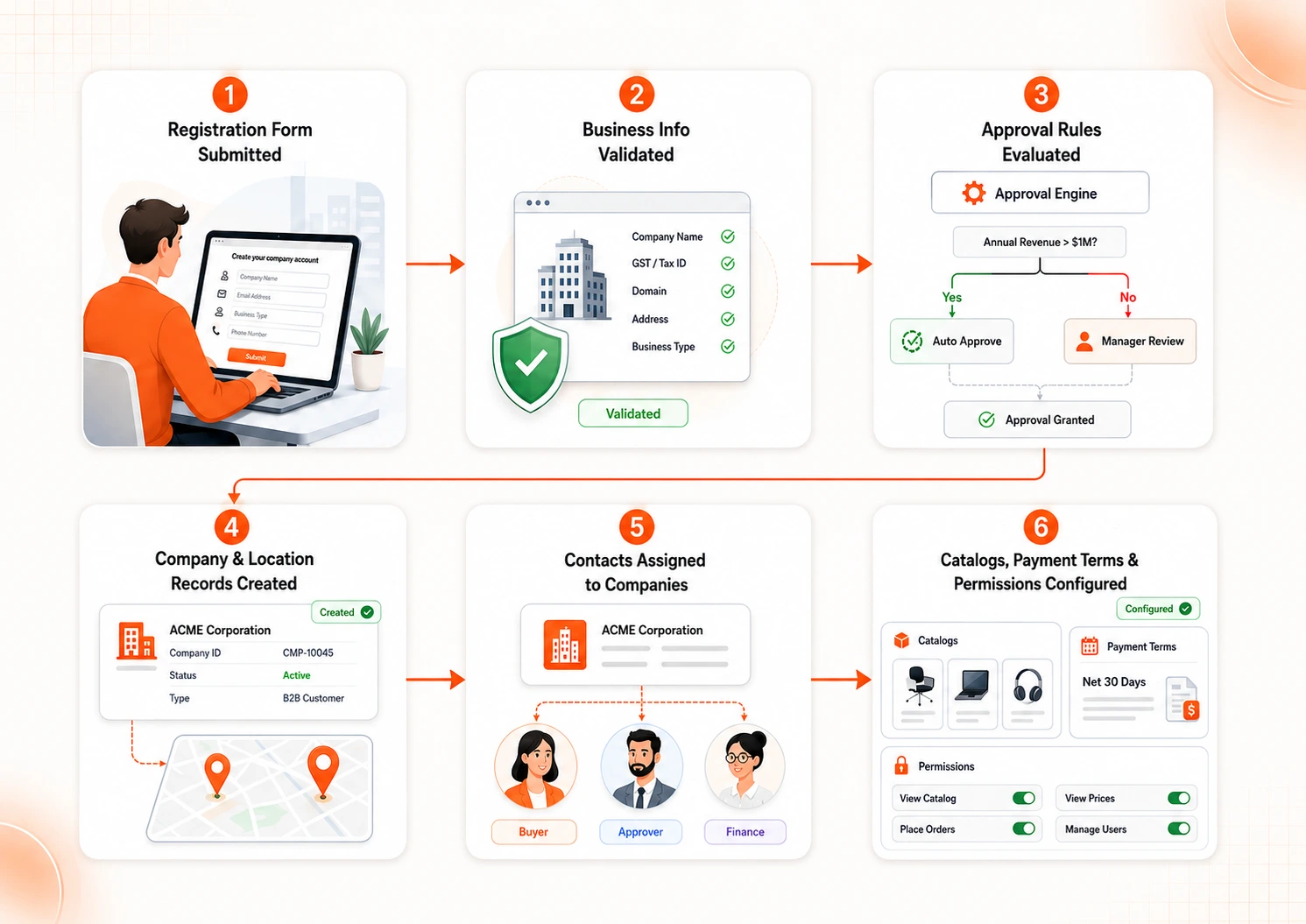
This is the workflow miniOrange's B2B Login & Onboarding app is built around, using Shopify's native Company, Location, and Contact structures. Here's what that looks like in practice:
Centralize the Company Onboarding Process
Instead of relying on disconnected emails, spreadsheets, and manual company creation, buyers can submit a registration request directly from your storefront. Administrators review applications from a centralized dashboard, creating a structured onboarding workflow that's easier to manage as registration volumes grow.
Collect the Right Information Upfront
A customizable B2B registration form lets you collect the information your verification process actually depends on, whether that's company details, tax information, business classifications, or other custom attributes. Gathering this information during registration reduces follow-up communication and helps administrators make approval decisions faster.
Keep Registration Requests Accurate Before Approval
Applicants can update their company information while their request is still pending, ensuring administrators always review the latest business details. This cuts down on duplicate registrations and reduces unnecessary back-and-forth during the approval process.
Automate Company Approval Based on Your Business Rules
Rather than reviewing every application individually, merchants can define approval criteria that match their onboarding policies. Registration requests meeting those predefined conditions can be approved automatically, while applications requiring additional verification continue through the manual review process.
Control Access Beyond Company Approval
Onboarding is only the first step. Once companies are approved, merchants can control which products, collections, and pages are visible to B2B customers, ensuring wholesale-only content remains accessible only to authorized buyers.
Frequently Asked Questions
Can Shopify B2B company onboarding be automated without custom development?
Yes. While Shopify's native B2B functionality requires several manual onboarding steps, B2B onboarding apps can streamline company registration, approvals, company creation, buyer assignment, and B2B catalog visibility controls without custom development.
Does Shopify Flow automate B2B company onboarding?
Shopify Flow can automate certain administrative tasks and notifications, but it does not provide a complete B2B onboarding solution. Features such as domain validation, automated company creation, configurable approval workflows, and advanced registration forms typically require a dedicated app.
Can multiple buyers be added to the same Shopify company account?
Yes. Shopify Company Accounts support multiple buyers within the same organization. Each customer/contact must be associated with the relevant company location, where catalogs, payment terms, checkout settings, and permissions are configured.
Can I restrict B2B registration to business email addresses only?
Natively, Shopify does not validate business email domains during registration through a native storefront B2B application form. App-based B2B onboarding solutions can restrict registrations to approved corporate domains and block applications from personal email providers.
Can I customize approval workflows for different B2B customers?
Shopify has no built-in approval routing, every application is reviewed manually in the admin. Automated onboarding flows, on the other hand, allow merchants to configure approval workflows based on factors such as customer type, email domain, distributor status, geographic region, or other business-specific criteria.
Conclusion
There's no universal answer to the native Shopify B2B vs app-based company onboarding debate because every wholesale business grows differently.
If your onboarding process is still manageable, Shopify's built-in capabilities may be all you need. But if registrations are increasing, approval queues are growing, or your team is spending more time on administrative work than customer engagement, automation can help you scale without changing the buying experience your customers expect.
The goal isn't simply to onboard companies faster. It's to build an onboarding process that remains efficient as your wholesale business continues to grow.
Leave a Comment