

Every Shopify store that connects to an external identity system eventually encounters the same question: should authentication run through Shopify's own single sign-on mechanism, or through a dedicated SSO app built for broader identity requirements? In practice, that choice is often forced by the store's plan, not its preference.
That is the core of the Shopify native SSO vs app decision, and the right call depends on what your store, your identity provider, and your access policies actually need.
Both routes let customers or staff sign in with credentials from an external identity system instead of creating a separate Shopify login. Where they diverge is in plan availability, protocol support, identity provider flexibility, administrative control, and how much the login experience can be shaped to match your brand.
Shopify's native option is a lean, purpose-built mechanism exclusive to Plus stores running a single OIDC identity provider. A dedicated Single Sign-On (SSO) application takes a different route, adding protocol variety, multiple IdP support, provisioning, and granular access control, making it a practical Shopify SSO alternative for stores that fall outside Shopify's native requirements.
Shopify Native SSO: What It Supports
Shopify's native single sign-on connects a store directly to an external identity provider using OpenID Connect. It was introduced as the recommended replacement for Multipass and is built specifically for stores that already run a third-party IdP.
What it is: Native SSO lets a customer who is already signed into your website continue into your Shopify storefront, cart, checkout, or customer account pages without entering credentials again. Shopify redirects the request to a connected identity provider and completes the sign-in silently if that provider session is still active.
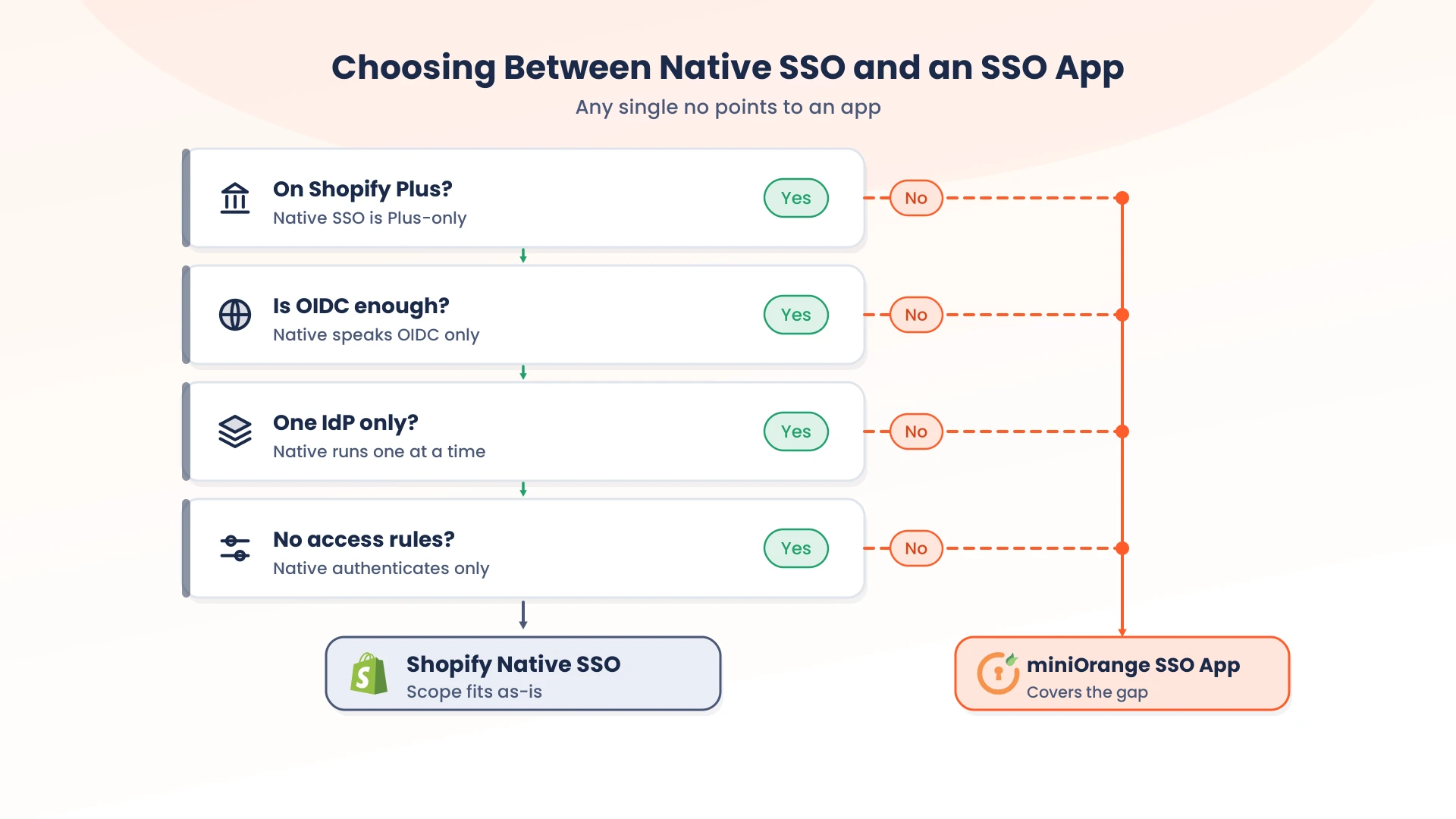
Who can use it: This capability is limited to stores on the Shopify Plus plan, and it requires a third-party identity provider to already be configured for the store. Non-Plus stores have no native equivalent.
How authentication works: When a customer hits the /customer_authentication/login endpoint, Shopify starts an OIDC authorization request against the connected provider using the prompt=none parameter along with a login_hint containing the customer's email. If the customer already has an active session with the identity provider, the provider returns an ID token silently and Shopify signs them in. If there's no active session, Shopify falls back to the provider's own sign-in screen, then continues the customer to the return_to path once they authenticate.
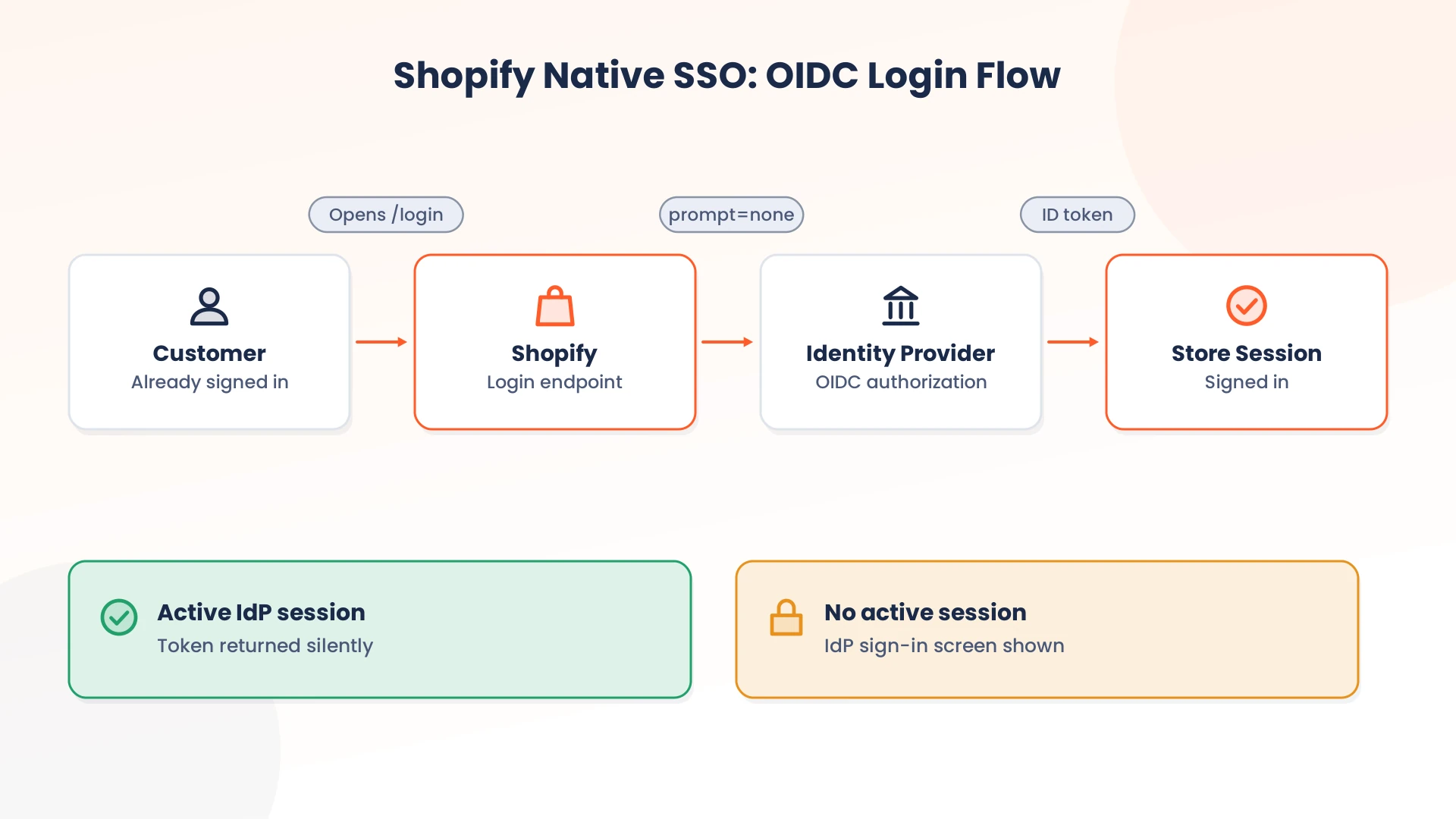
What Shopify manages after authentication: Once the identity provider returns an ID token, Shopify reads the claims to identify the customer, then creates or resumes their session. Shopify also supports limited claim import for customer data such as name, phone number, address, and tags, which can be populated from the token at sign-in.
Shopify Single Sign-On (Native)
Where it works well:
- It's included with Shopify Plus, so there's no separate subscription for the core login flow.
- It's built directly into checkout and customer account pages, since Shopify owns the whole flow.
- It's the path Shopify actively recommends over Multipass going forward.
Where it falls short:
- It only speaks OpenID Connect, so a SAML-only identity provider needs a bridge.
- It's Plus-only, leaving non-Plus merchants without a native equivalent.
- Only one identity provider can be active on the store at a time, even if more are connected.
- It doesn't document built-in access restriction, MFA, or single logout control within the native SSO flow.
miniOrange Single Sign-On App: What It Supports
The miniOrange Single Sign-On app is built to extend identity management well past what Shopify's native mechanism covers, and it works across both Plus and non-Plus stores, making it a practical Shopify SSO alternative.
Protocol coverage: The app supports Shopify SAML SSO, as well as OAuth 2.0, OIDC, and JWT, so stores are not locked into a single authentication standard. This matters for organizations that already run SAML or other protocols for internal systems and do not want to rebuild that setup around one protocol.
Multiple identity providers: It works with widely used providers such as Okta, Microsoft Entra ID, ADFS, Auth0, AWS Cognito, Google Workspace, Salesforce, and OneLogin, as well as any custom SAML, OAuth, or OIDC-compliant provider. Unlike Shopify's native setup, it supports multiple identity providers running at the same time, which matters for stores serving more than one type of user under a single domain.
Provisioning and attribute sync: The app handles Shopify user provisioning by auto-creating customer records on first login and syncing attributes such as name, tags, and address from the IdP on every sign-in, rather than importing only a limited set of claim fields.
Access control and authentication policy: miniOrange applies Shopify access control based on IdP groups or profile attributes, which lets a store restrict specific sections, such as a wholesale catalog, an employee swag store, or the Admin Dashboard, to the appropriate users. B2B and B2C login flows can also be configured separately within the same store.
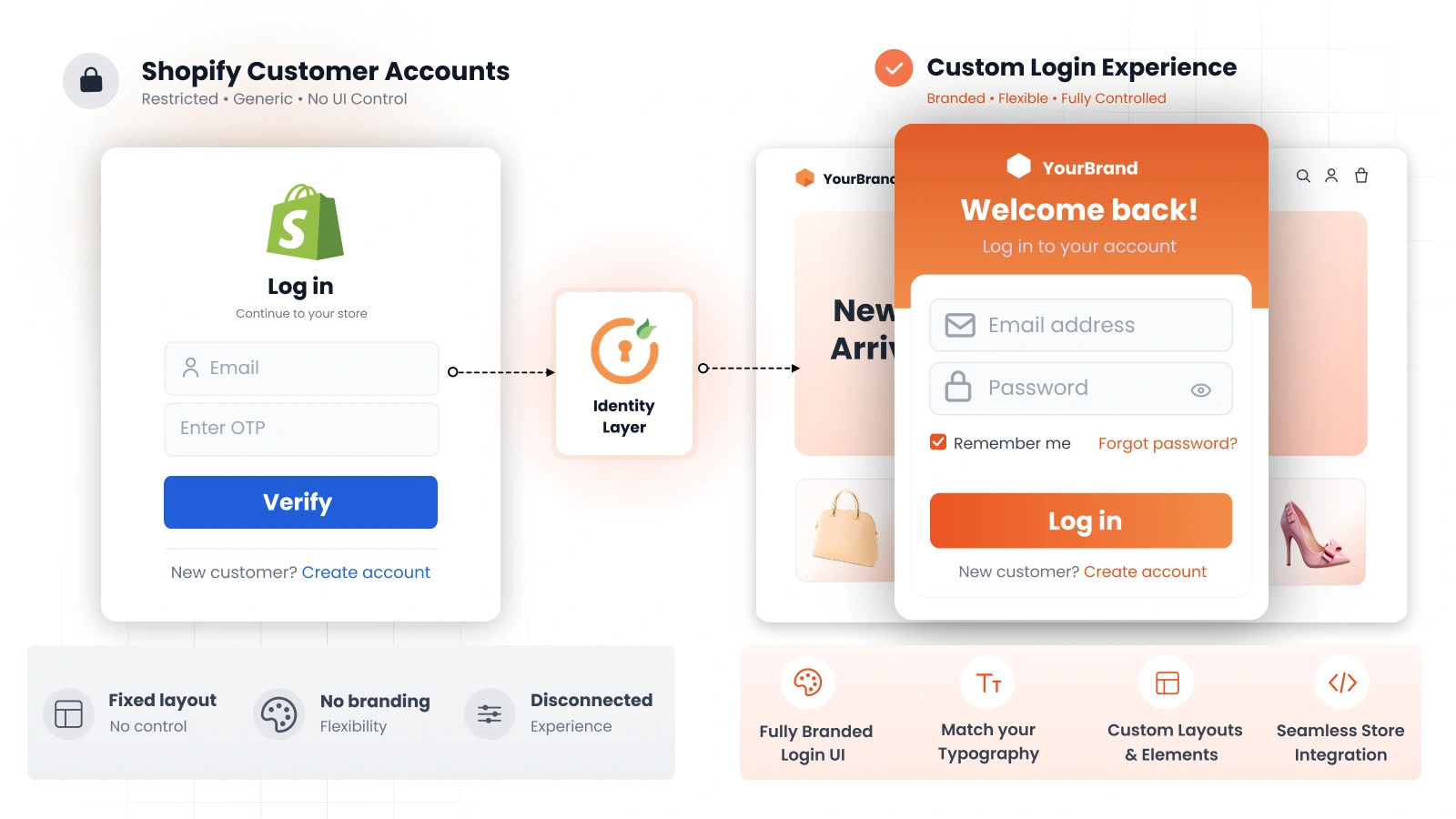
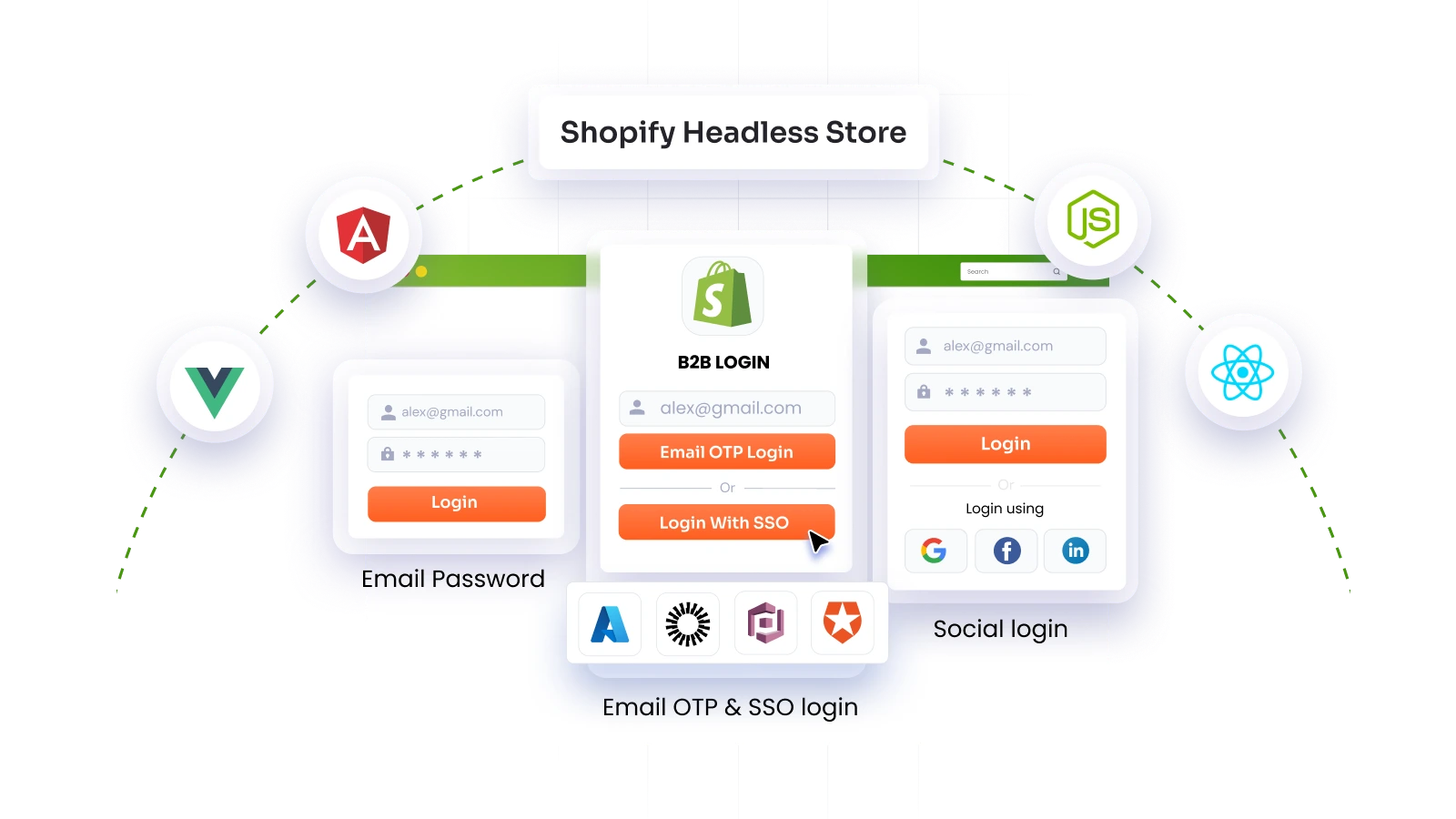
Configurable authentication and customization: For Shopify Plus customer accounts, the app supports Shopify login customization with corporate SSO, email or phone OTP, username-password login, and social login options presented alongside Shopify's default login. It also supports Single Logout (SLO), post-login redirects, and integration across checkout, customer accounts, and the Admin Dashboard.
miniOrange Single Sign-On (SSO) for Shopify
Where it works well:
- It works on non-Plus stores, closing the gap native SSO leaves open.
- It supports several protocols and IdPs at once, not just one active OIDC connection.
- It adds provisioning, attribute sync, access restriction, MFA, and SLO out of the box.
Where it falls short:
- It's a paid subscription on top of your Shopify plan.
- It introduces another vendor and configuration layer to maintain.
- Stores fully served by native SSO's simpler feature set may not need the extra surface area.
Shopify Native SSO vs miniOrange: Feature Comparison
The table below presents the Shopify SSO and app comparison side by side, with a look at what each difference means operationally for a store.
| Capability | Shopify Native SSO | miniOrange SSO App | Why It Matters |
|---|---|---|---|
| Plan requirement | Shopify Plus only | Shopify Plus and non-Plus | Non-Plus merchants can only get IdP-based SSO through an app |
| Protocols supported | OpenID Connect (OIDC) only | SAML 2.0, OAuth 2.0, OIDC, JWT | Determines whether your existing IdP can connect without a bridge |
| Identity provider compatibility | Any OIDC-compliant IdP | Azure/Entra ID, Okta, Auth0, Keycloak, Cognito, Salesforce, Shopify, custom IdP, and more | Wider compatibility means fewer changes on the IdP side |
| Multiple IdPs on one store | Single IdP at a time | Multiple IdPs active simultaneously | Needed for multi-brand or multi-subsidiary setups |
| User provisioning | Creates a customer at first sign-in, no ongoing lifecycle management | Auto-creates and updates customer records on login | Cuts down on manual account cleanup for support teams |
| Attribute mapping | Limited claim import (name, phone numbers, tags, addresses) | Full attribute sync (customer fields, tags, metafields, and custom attributes) | Determines how complete a customer profile is after login |
| Access control | Authentication only, no restriction logic | Role and group-based restriction by section | Required for wholesale portals, staff logins, gated content |
| Single Logout (SLO) | No documented SLO control within the native flow | Supported | Ends sessions everywhere at once, useful on shared devices |
| Customization | Fixed redirect flow tied to Shopify's login and checkout | Configurable redirects, login screens, and post-login routing | Affects brand consistency across the buying journey |
Key Takeaway: Native Shopify SSO handles the single-IdP, Plus-only case well because that is exactly what it was scoped to do. Once a store needs a second protocol, a second IdP, or any access restriction beyond "logged in or not," that scope becomes the limiting factor.
Shopify Native SSO vs App: Core Differences
The practical difference between Shopify native SSO vs third-party SSO comes down to how much identity infrastructure the store needs to accommodate. Most of the core differences are summarized in the comparison table above. Two distinctions worth examining separately include:
User Provisioning and Attribute Mapping
Native SSO can create a Shopify customer when a successfully authenticated email does not already match a customer profile. Shopify can also sync supported OIDC claims such as name, phone number, address, and tags during sign-in.
That covers authentication-time customer creation and profile synchronization. It does not extend to ongoing lifecycle changes in the external directory. For example, if an employee leaves the company and their identity provider account is disabled, the corresponding Shopify customer record is not automatically deactivated through the native SSO flow.
A broader lifecycle process, on the other hand, can create, update, or deactivate users in Shopify as their status changes in the external directory. miniOrange provides attribute mapping and automatic account registration within the SSO solution. For ongoing lifecycle management, its Shopify user synchronization and SCIM capabilities can automate user creation, updates, and deprovisioning.
Multipass and Existing Authentication Setups
Multipass is tied to Shopify Plus and legacy customer accounts. Shopify does not support Multipass with the new customer accounts experience and recommends moving stores that use a third-party identity provider toward the OIDC-based customer authentication model.
For a merchant evaluating a Shopify Multipass alternative, the important question is what the target authentication architecture needs to support. A migration may involve moving to new customer accounts, changing the protocol used by the identity provider, and reviewing existing integrations.
A third-party app can be relevant when the required authentication architecture includes protocols, IdPs, or authentication methods beyond Shopify's native OIDC path. miniOrange also provides configuration options for Multipass-based legacy setups.
Which Approach Fits Different Shopify Use Cases?
The right SSO setup depends on the store's plan, identity architecture, and customer authentication requirements. The following scenarios illustrate where Shopify native SSO or a third-party SSO app can fit.
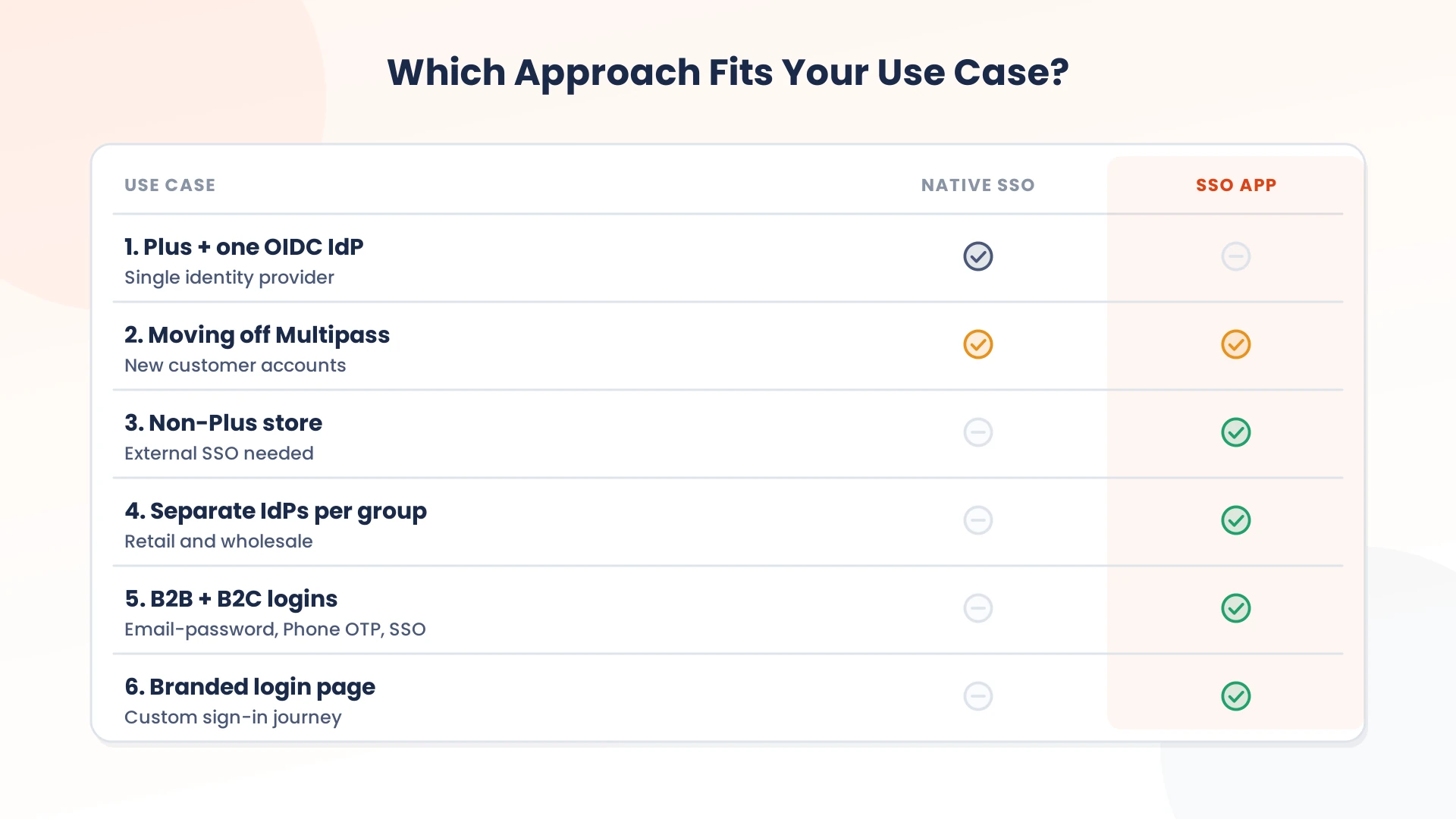
Use Case 1: A Shopify Plus Store With One OIDC Identity Provider
Scenario: The store runs on Shopify Plus, uses a single OIDC-compliant identity provider, and needs a straightforward SSO experience for its customers.
Suitable approach: Shopify native SSO
The native OIDC flow is designed for this setup. Shopify handles the connection and customer session, while the existing identity provider remains responsible for authentication.
Use Case 2: A Non-Plus Store That Needs External SSO
Scenario: The store is on a Shopify plan other than Plus, but the business wants customers to sign in using credentials managed by an external identity provider.
Suitable approach: Shopify SSO app
Shopify's native customer-accounts SSO is limited to Shopify Plus. An app-based approach can connect the existing identity provider to a non-Plus store, allowing the merchant to introduce SSO without changing the Shopify plan.
Use Case 3: Different Customer Groups Use Different Identity Providers
Scenario: The store serves customer populations that authenticate through separate identity systems, such as different corporate directories for retail and wholesale customers.
Suitable approach: Shopify SSO app
When multiple identity providers need to be available concurrently, an app that supports multiple IdPs can accommodate those authentication environments within the same store.
Use Case 4: B2B Customers Need More Than One Login Method
Scenario: A store serves B2B and B2C customers and needs corporate SSO for some users while offering options such as OTP or username-password for others.
Suitable approach: Shopify SSO app
The miniOrange app supports multiple authentication methods and can be configured for different login journeys, making this approach suitable for stores with varied customer authentication requirements.
Use Case 5: The Store Is Moving Away From Multipass
Scenario: A Shopify Plus store uses Multipass with legacy customer accounts and is planning a move to the new customer account experience.
Suitable approach: Shopify native SSO or a Shopify SSO app, depending on requirements
Shopify recommends its OIDC-based customer authentication flow for stores moving to new customer accounts and using an external identity provider. An app can also be considered when the target setup requires additional protocols, multiple IdPs, or authentication methods beyond the native OIDC flow.
Use Case 6: The Store Requires a Branded, Configurable Login Experience
Scenario: The merchant has a Shopify Plus store and needs to customize the sign-in page, control how login options are presented, or offer several authentication methods from the same customer entry point.
Suitable approach: Shopify SSO app
The miniOrange app provides controls for sign-in page branding and presentation, along with authentication options such as SSO, OTP, username-password, and social login.
How to Choose Between Native SSO and a Shopify SSO App
The choice between Shopify native SSO and an SSO app should start with the identity architecture already in place rather than with the SSO product itself.
First, check the Shopify plan. Native third-party IdP SSO requires Shopify Plus. Next, identify the protocol your identity provider supports. If OIDC is already available and sufficient, Shopify's native route may cover the core authentication requirement. If the identity environment requires SAML, JWT, or multiple protocols, an app may provide a more suitable integration layer.
Then consider how customers need to authenticate and how much identity information Shopify needs to consume.
| Requirement | Questions to evaluate |
|---|---|
| Shopify plan | Is the store on Shopify Plus, or does the solution need to work on a non-Plus plan? |
| Identity provider | Which IdP is already in use, and does it support the required protocol? |
| Protocol | Is OIDC sufficient, or is SAML, OAuth, or JWT required? |
| Number of IdPs | Is one IdP enough, or must multiple identity providers be available concurrently? |
| Customer data | Which claims or customer attributes need to reach Shopify? |
| Provisioning | Is account creation during login sufficient, or is ongoing provisioning and deprovisioning required? |
| Access policies | Does authentication need to consider groups, attributes, domains, or other conditions? |
| Login experience | Is the standard Shopify authentication flow sufficient, or are additional login methods and routing needed? |
| Existing setup | Is the store using Multipass or another legacy authentication architecture that needs to be addressed? |
Implementation Questions to Ask Your IdP Team
- Which protocol does our IdP actually require: SAML, OAuth, OIDC, or more than one?
- Are user groups or roles passed as claims, and can they be mapped to Shopify access rules?
- Does this integration need SCIM-based provisioning, or is claim-based attribute sync enough?
- Who owns MFA enforcement: the identity provider, or the Shopify-side login?
- Will customers or staff need to authenticate through more than one IdP at the same time?
Frequently Asked Questions (FAQs)
Can Shopify native SSO connect to multiple identity providers?
Yes, you can connect multiple identity providers, but only one can be active for customer authentication at a time. If multiple IdPs need to be available concurrently, the miniOrange app supports multiple identity providers for the same Shopify store.
Can Shopify SSO restrict access by user or group?
Native SSO relies on the configured identity provider for authentication and does not provide native group- or attribute-based access restrictions within the SSO flow. miniOrange adds controls for restricting access based on identity-provider or customer attributes, along with options such as post-login redirects and Single Logout (SLO).
Is Shopify native SSO available on every Shopify plan?
No. Shopify's native customer-account SSO with an external identity provider is available only on Shopify Plus. A dedicated SSO application like miniOrange supports SSO for both Shopify Plus and non-Plus stores.
Does Shopify native SSO support SAML?
No. Shopify's native SSO is built on OpenID Connect only. Stores that need SAML 2.0 support require a Shopify SSO app like miniOrange, which supports SAML alongside OAuth, OIDC, and JWT.

Leave a Comment