
6 Best WordPress Membership Plugins with SSO Integration
The subscription economy is reshaping how businesses generate revenue. Juniper Research predicts it will surpass $722 billion by 2025, with a 68% increase expected between 2025 and 2030.
This model is no longer limited to streaming services like Netflix or Spotify. Companies across industries are launching exclusive subscriptions or memberships that provide stable revenue, predictable cash flow, and stronger customer relationships.
WordPress membership plugins make managing these subscriptions simple. They help businesses simplify the day-to-day management of memberships.
As subscriptions multiply, multiple logins can frustrate members and increase customer churn. To address password fatigue, many WordPress businesses are implementing Single Sign On (SSO).
With SSO, members log in securely with a single credential, experience less friction, and are more likely to stay subscribed, keeping memberships profitable and sustainable.
What Are WordPress Membership Plugins?
WordPress Membership Plugins act as access managers for subscription websites. They decide who can view content, ensure payment status is verified, and deliver tailored experiences based on membership levels.
These plugins go beyond simply restricting content. They allow businesses to create multiple membership tiers, handle upgrades or downgrades, and automate renewals, all while keeping the user experience smooth and consistent.
When someone visits a page, the plugin verifies their membership. Non-subscribers see sign-up options, while active members access their content immediately, reinforcing the value of joining and staying subscribed.
In this way, WordPress Membership Plugins help businesses turn sections of their WordPress websites into structured membership platforms that generate recurring revenue and deliver consistent value to their audiences.
Features of WordPress Membership Plugins
WordPress Membership Plugins offer a range of built-in capabilities that make managing memberships easier and more rewarding for businesses and members. Some of these include:
Content Protection: WordPress Membership Plugins secure posts, pages, downloads, and even specific content sections. Businesses can decide exactly what to make free and what to reserve for paying members, creating a clear value distinction.
Payment and Subscription Management: These plugins integrate with major gateways, handling recurring billing, one-time payments, and free trials. They also support upgrades, downgrades, or pro-rated charges, making payments smooth for both businesses and members.
Member Dashboards and Communication: Subscribers can access personalized dashboards to manage profiles, billing, and content. Automated emails handle welcomes, confirmations, reminders, and updates, ensuring members stay informed and engaged throughout their journey.
Content Scheduling: WordPress Membership Plugins let businesses release material gradually, such as weekly lessons or seasonal resources. This avoids overwhelming new members while encouraging longer retention through steady, structured engagement.
Analytics and Insights: Reporting tools track signups, renewals, revenue, and content engagement. These insights help businesses refine pricing, improve member retention, and identify the most valuable content for their audience.
Smart Ways to Use WordPress Membership Plugins
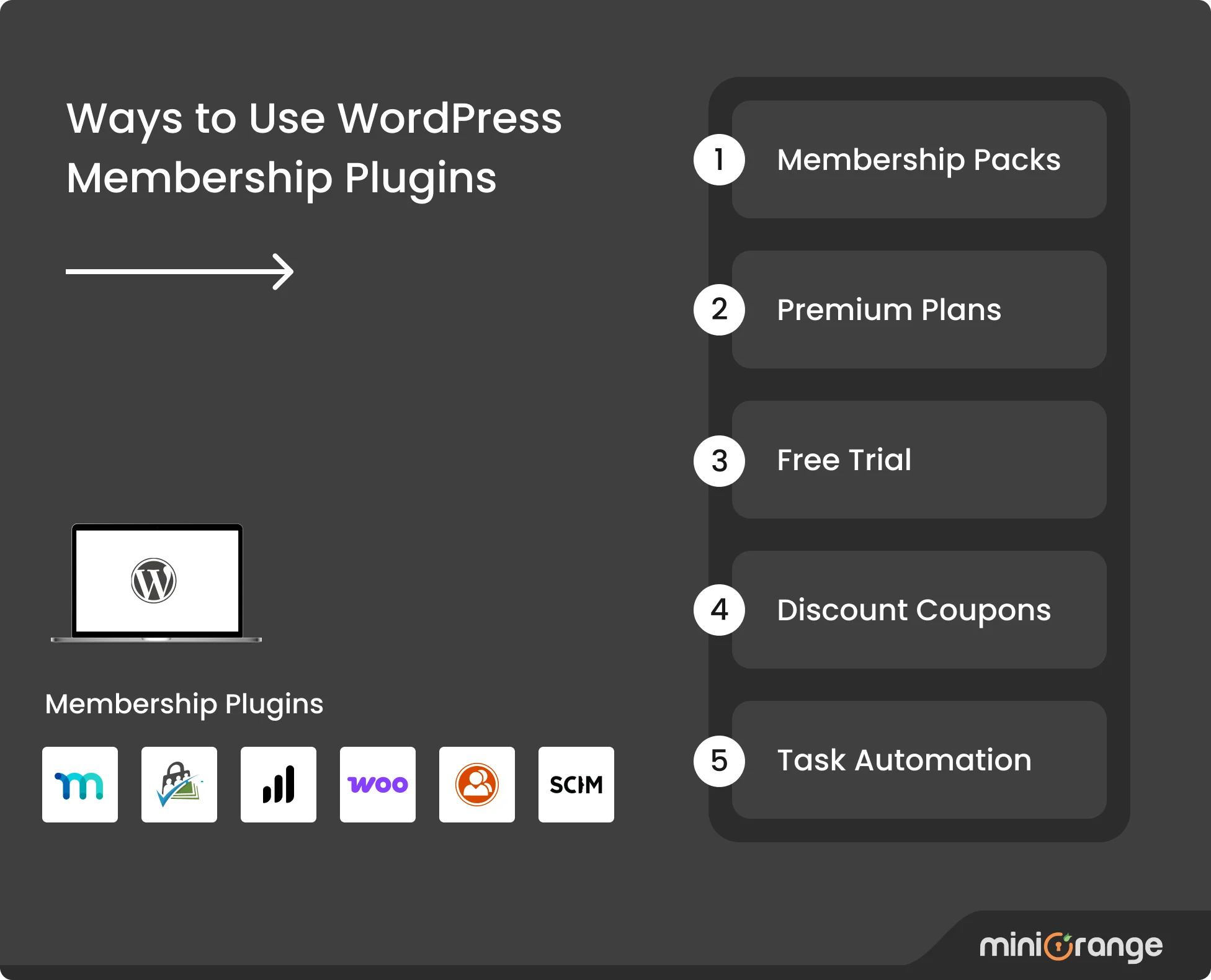
Membership Packs: WordPress Membership Plugins let businesses create different membership levels with tailored benefits. This flexibility allows members to choose plans that match their needs while ensuring businesses capture value across a wider audience.
Premium Plans: Exclusive content and advanced features can be reserved for paying members. Free tiers work as entry points, encouraging upgrades once users see the benefits. Over time, this creates reliable recurring revenue and member loyalty.
Free Trials: Trial periods allow new users to explore premium features before committing. By reducing hesitation and building trust, trials make it easier for first-time members to transition into long-term paid subscribers.
Discount Coupons: Custom coupons help drive new sign-ups and renewals. Businesses can set expiry dates, usage limits, or targeted offers, making promotions more effective while re-engaging inactive members with timely discounts.
Task Automation: Routine processes such as renewals, reminders, and subscription updates are automated. This reduces administrative workload, ensures smoother member experiences, and allows businesses to scale without being slowed by repetitive manual tasks.
How to Choose the Right WordPress Membership Plugin
The right WordPress Membership Plugin shapes everything from member satisfaction to revenue growth. Careful evaluation is essential. Let’s look at the most important factors to consider before committing to one.
Business Model and Audience: Define objectives and member expectations upfront. The right plugin should support how memberships are structured, whether through tiered access, exclusive content libraries, or recurring service-based subscriptions.
Technical Skills and Resources: Evaluate the expertise you can rely on. Some plugins offer guided configuration, while others demand coding or developer support. Premium versions usually include stronger documentation, customer support, and built-in troubleshooting.
Payment and Geography: Confirm the plugin matches your transaction needs. Look for multiple currency options, regional gateways, automated tax handling, and reliable recurring billing that minimizes downtime and payment failures at scale.
User Experience and Access: Focus on seamless experiences. Plugins should provide frictionless logins, intuitive dashboards, and immediate content access so members stay engaged without delays or complicated entry points.
Growth and Performance: Plan for rising demand. Select plugins proven to handle high traffic, large content archives, and increasing memberships while maintaining site speed, stable performance, and consistent reliability.
Integration and Compatibility: Ensure compatibility with key platforms you already use. Reliable integrations with email tools, analytics, or CRM systems streamline operations and prevent disruptions as your membership offering expands.
6 Best WordPress Membership Plugins
1. MemberPress
MemberPress is an all-in-one WordPress membership solution that helps website owners monetize their content through subscriptions, online courses, and coaching programs. It automatically handles member registration, payment processing, content protection, and course delivery.
Core Features
- Creates unlimited membership levels with flexible pricing options
- Includes built-in course creation tools with lessons, quizzes, and certificates
- Features CoachKit™ functionality for coaching programs
- Supports corporate accounts for business subscriptions
- Enables gift memberships for referral programs
- Provides detailed reporting and business analytics
Pricing: Premium plugin starts at $179/year for the Basic plan.
2. Paid Memberships Pro
Paid Memberships Pro (PMPro) is an open-source WordPress membership plugin licensed under the GNU General Public License (GPL). It offers a free core with 60+ addons, unlimited membership levels, six integrated payment gateways, and developer-friendly hooks and filters for complete customization.
Core Features
- Free core plugin includes essential membership features
- WordPress multisite compatibility for complex setups
- Extensive customization options for unique business models
- Active community shares solutions and code examples
- Supports multiple payment gateways, including Stripe, PayPal, Braintree, and more
- Includes affiliate tracking and promotional tools
Pricing: The Free core plugin is available, and paid plans start from $347/year.
3. LearnDash
LearnDash is WordPress's leading learning management system (LMS), designed specifically for creating and selling online courses. The plugin serves educational institutions, corporate training departments, and individual course creators who prioritize student engagement and learning outcomes.
Core Features
- Drag-and-drop course builder makes content organization simple
- AI-powered outline generation helps jumpstart course creation
- The advanced quiz system supports multiple question types and automatic grading
- Group management handles corporate training and educational cohorts
- Focus mode eliminates distractions during learning sessions
- Assignment submission and instructor feedback systems streamline education workflows
Pricing Plans: Paid plans start from $199/year.
4. BuddyPress
BuddyPress transforms WordPress websites into interactive social communities and networking platforms. It adds user profiles, private messaging, groups, friend connections, and member directories to create a Facebook-like experience functionality within WordPress.
Core Features
- Rich user profiles let members express themselves fully
- Activity streams keep the communities engaged and informed about member interactions
- Private messaging enables direct member-to-member communication
- Group creation tools let members organize around shared interests
- bbPress forum integration adds structured discussion areas
- Mobile-responsive design works perfectly across all devices
Pricing: It is completely free and open-source.
5. WooCommerce Memberships
WooCommerce Memberships extends existing WooCommerce stores with membership capabilities, allowing businesses to sell memberships alongside physical products. It restricts content based on product purchases, offers member-exclusive discounts, supports team memberships for corporate customers, and includes content dripping over time.
Core Features
- Native WooCommerce integration ensures a consistent user experience
- Memberships work like regular products in your existing store
- Members receive exclusive discounts and special pricing
- Content access based on purchase history and subscription status
- WooCommerce Subscriptions handles recurring billing automatically
- Unified customer experience across products and memberships
Pricing: Paid plans start from $199/year.
6. WP-Members
WP-Members provides essential membership functionality through a lightweight, performance-focused approach. It restricts WordPress content to registered users, offers customizable registration forms, includes email verification to prevent spam, and supports multiple membership levels.
Core Features
- Lightweight code ensures fast site performance
- Customizable registration forms collect member information effectively
- Straightforward content restriction protects posts and pages
- Email verification prevents spam registrations
- Multiple membership levels support different access requirements
- Custom fields adapt to various business needs
- Long-term support ensures continued functionality
Pricing: Free core plugin and paid premium extensions start at $59/year.
Why You Need Single Sign On (SSO) for Your Membership Site
Single Sign On (SSO) is an authentication method that allows members to access multiple WordPress sites with a single set of credentials. Instead of managing separate accounts, members authenticate once and continue securely across the membership site.
Our WordPress SAML Single Sign On (SSO) plugin makes this possible by connecting your membership site (where you have applied the membership plugin) with a SAML 2.0-compliant Identity Provider (IDP) such as Microsoft Azure AD (Entra ID), Okta, AWS Cognito, Google Workspace, etc.
In this configuration, the membership site operates as a Service Provider (SP). The IDP verifies the user’s identity and sends a secure SAML assertion (a digitally signed message confirming the user’s identity and access rights) to the SP, which then grants access without requiring the member to log in again.
Our WordPress SAML Single Sign On (SSO) plugin provides your membership site with the following benefits:
Stronger Protection for User Data: Credentials remain stored with the IDP and never on the WordPress membership site. Even if the site is compromised, user passwords remain protected at the provider level.
Automatic Role and Access Control: User attributes sent by the IDP are mapped to roles or groups. Members automatically receive the correct level of access to courses, communities, premium content, and other protected areas.
Seamless Member Experience: A single login through the IDP grants immediate access to the membership site. Members avoid repeated logins and navigate smoothly across e-learning forms, training portals, discussion forums, and premium content.
Enterprise-Grade Membership Management: Organizations can onboard and offboard users centrally through the IDP. This makes the plugin ideal for enterprises, schools, training providers, and similar setups where large groups need secure, scalable access.
Simplified Compliance: The plugin leverages authentication logs and audit trails from the IDP. WordPress membership sites inherit these records, making it easier to meet regulatory requirements in industries such as healthcare, finance, and government.
Scalable Growth Without Complexity: As memberships grow, the IDP manages authentication while the plugin enforces access levels. This allows WordPress sites to support thousands of members without adding administrative strain.
How Does Single Sign On (SSO) Work in Membership Sites? (#sso-working-in-membership-sites)
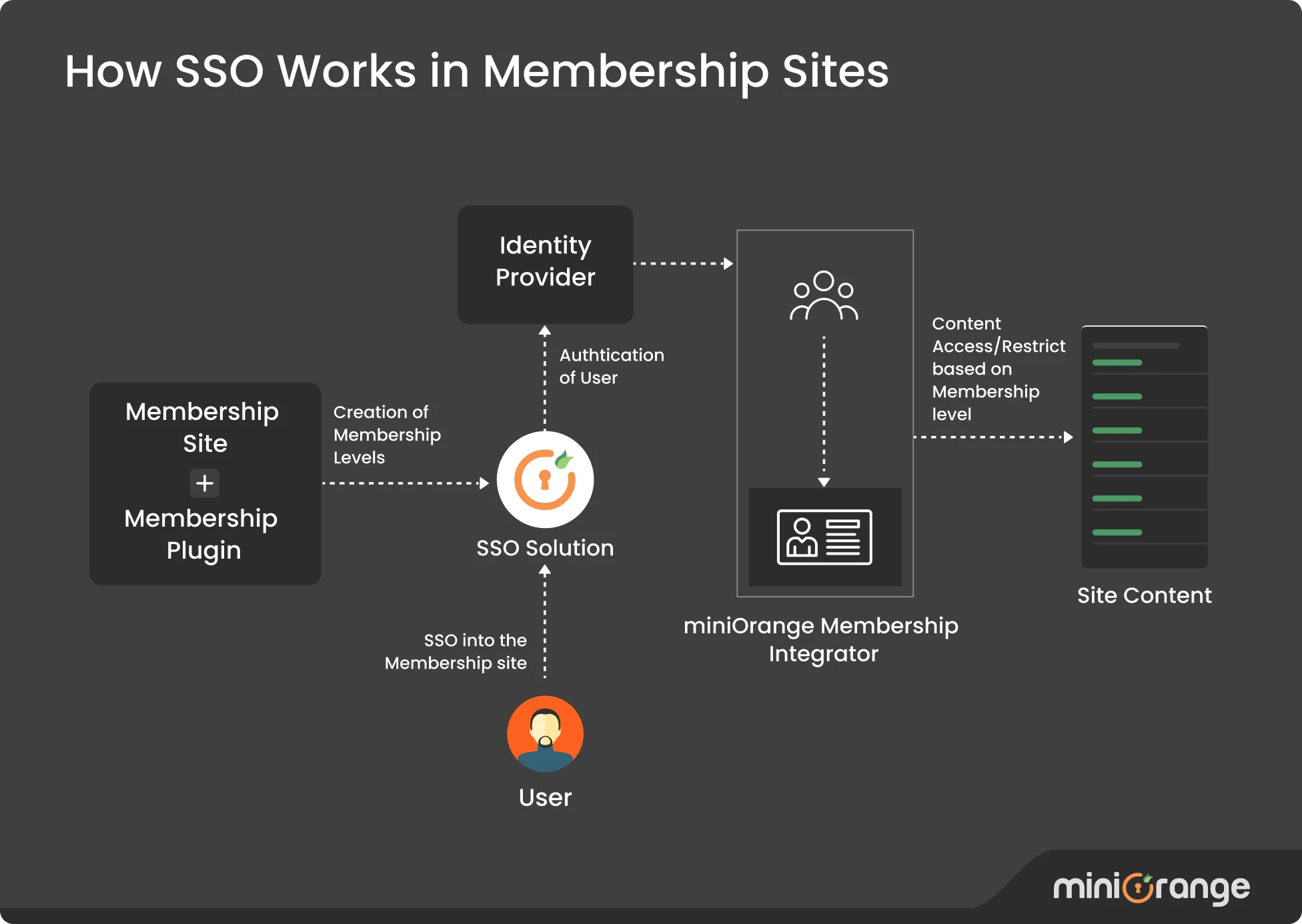
With our WordPress SAML SSO plugin and its membership plugin integrators, the SSO process works as follows:
Step 1: Access Request A member tries to open restricted content on the WordPress membership site. Our WordPress SAML SSO plugin detects those who are not logged in and redirects them to the configured IDP instead of showing a WordPress login form.
Step 2: Identity Verification The IDP verifies the member's credentials against its database. Sometimes, security measures such as Multi-Factor Authentication (MFA), password policies, and activity monitoring are applied to confirm identity securely.
Step 3: Secure Token Creation Once authenticated, the IDP generates a SAML assertion and sends it back to the membership site via our WordPress SAML SSO plugin.
Step 4: Role or Membership Assignment Our WordPress SAML SSO plugin processes the SAML assertion and authenticates the user into WordPress. Then, the membership plugin integrator (separate addon plugin) reads the user attributes from the SAML assertion and maps the member to the correct role or membership level based on those attributes.
Step 5: Member Access The member is logged in automatically and can use the site according to their assigned role. The session remains valid until they log out of the IDP, at which point site access also ends.
SSO Integrations with Top WordPress Membership Plugins
Our WordPress SAML Single Sign On (SSO) plugin connects easily with the six leading WordPress Membership plugins we discussed earlier.
| Capibility | MemberPress | LearnDash | BuddyPress | Paid Memberships Pro | WooCommerce Memberships | WP-Members |
|---|---|---|---|---|---|---|
| Content Restriction | Unlimited restriction levels with powerful access rules | Restrict by group type or member type | Restrict by post, page, block, shortcode, etc. | Restriction by post, page, block, shortcode, etc | Multi-level restrictions on posts, products, etc. | Restrict or hide content and menus for logged-in members only |
| Role / Attribute Mapping | Map SSO users to membership levels via IDP attributes | Map IDP groups to LearnDash groups | Assign IDP attributes to user profiles | Map users to membership levels based on IDP groups | Pre-populate checkout fields with IDP attributes | Map IDP attributes to WP-Members profile fields |
| Default Memberships / Roles | Auto-assign default membership levels to unmapped users | Assign default groups to unmapped users | Assign MemberType based on IDP attributes | Default membership level assignment for unmapped users | Assign default WooCommerce roles to unassigned users | Assign default roles based on IDP groups |
Conclusion
WordPress membership plugins have become central to how businesses build communities, monetize expertise, and scale digital experiences. As these platforms expand, security and access management become just as critical as the content itself.
Single Sign On (SSO) ensures that membership sites remain secure, scalable, and easy to use. By centralizing authentication and automating role assignments, they deliver the seamless experience modern users expect while reducing administrative effort.
If you have any questions about implementing SSO for your WordPress membership site, contact us at samlsupport@xecurify.com.
Frequently Asked Questions (FAQs)
1. Can I use more than one WordPress Membership Plugin at the same time?
It is not recommended. Running multiple membership plugins often causes conflicts and makes site management harder. It is better to choose one plugin that meets your needs.
2. Which membership plugins work best for online courses or e-learning?
MemberPress and LearnDash are popular choices for courses. They include features such as quizzes, progress tracking, and content restrictions to create structured learning experiences.
3. What technical requirements should I keep in mind?
Most WordPress Membership Plugins need a modern hosting setup with PHP 7.3 or higher, SSL enabled, and good server resources. Always check the plugin documentation for recommended hosting details.
Leave a Comment