
Most organizations don’t struggle with managing devices in the beginning. A few laptops, some smartphones and tablets, everything feels under control.
The problem starts when things scale. More devices get added. Teams start working remotely. Different operating systems and use cases come into play. Over time, it becomes harder to track what’s connected, what’s updated, and what’s secure.
That’s when endpoint management stops being optional. Before getting into what endpoint management is and how it works, it helps to first understand what these “endpoints” actually are.
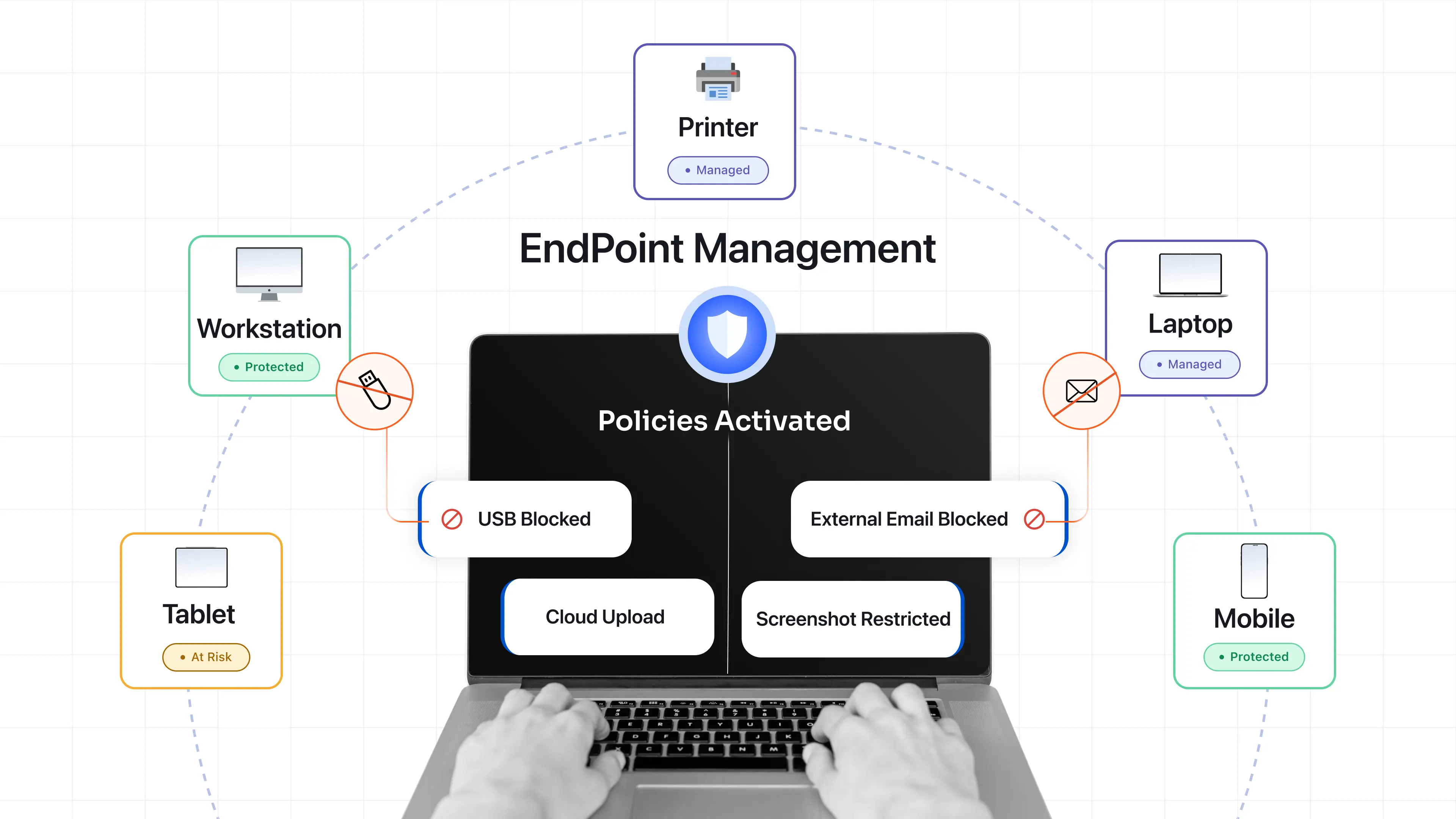
What are Endpoints?
An endpoint is any device that belongs to or is used by an organization and can access its systems or data. This includes laptops, desktops, smartphones, tablets, as well as devices like printers and IoT hardware. If a device is capable of interacting with organizational resources, it is considered an endpoint.
What often gets overlooked is that every endpoint also acts as a potential entry point. Whether it’s a company-issued laptop or an employee’s personal device, any device associated with the organization needs to be properly managed and secured.
What is Endpoint Management?
Endpoint management is the process of monitoring, managing, and securing all devices in an organization through a centralized platform. In practice, it allows IT teams to control how devices are configured, what they can access, and how they behave across the organization.
Instead of managing devices individually, endpoint management brings everything under one system. This makes it easier to enforce security policies, deploy updates, monitor activity, and resolve issues remotely. It also ensures consistency. Whether a device is used in the office or remotely, it follows the same rules and security standards.
Key Components of Endpoint Management
Endpoint management isn’t a single feature. It’s a combination of capabilities that work together behind the scenes.
1. Inventory and Monitoring
You can’t manage what you can’t see.
Inventory gives you a real-time view of every device that belongs to or is used by your organization. Monitoring adds another layer to asset management by showing how those devices are behaving.
This is where visibility turns into awareness. You start spotting devices that shouldn’t be there, systems that are outdated, or usage patterns that don’t look right. It also becomes easier to see which networks devices are connected to, helping you catch risky or unauthorized connections early.
2. Policy Enforcement
Policies are where things move from intention to action.
It is easy to define rules but it is much harder to enforce them consistently across hundreds or thousands of devices.
Endpoint management applies these rules automatically. Whether it’s password requirements, encryption, or app restrictions, everything stays aligned without manual effort.
3. Patching and Updates
Most breaches don’t happen because of something new. They happen because something old wasn’t fixed.
Unpatched systems are one of the easiest ways in. Endpoint management removes the dependency on users to update their devices. Patches are pushed automatically, closing gaps before they become problems.
4. Access Control
Not every user should have the same level of access.
Endpoint management helps define who can access what, based on roles, device health, or even location. This becomes especially important in Zero Trust setups, where access is continuously evaluated rather than assumed.
5. Remote Management
Devices are no longer tied to office networks. They move with employees, across locations and time zones. Remote management ensures that IT teams can still troubleshoot issues, lock devices, or wipe data without needing physical access.
What are Endpoint Management Policies?
Endpoint management policies are predefined rules that define how devices should operate within an organization’s environment.
These policies help standardize configurations, enforce security controls, and ensure that all devices meet organizational and regulatory requirements.
They are typically created by IT teams and applied automatically across managed devices. Once enforced, they ensure that devices remain compliant without relying on manual checks.
Common types of endpoint management policies include:
- Bring Your Own Device (BYOD) Policy: Defines how personal devices can be used for work and what level of control the organization has over them.
- Zero Trust and Access Control Policy: Ensures that access is granted based on identity, device condition, and context rather than assumed trust.
- Privileged Access Management (PAM) Policy: Limits and controls access to critical systems, reducing the risk of misuse or insider threats.
- Device Security and Compliance Policy: Enforces rules such as encryption, antivirus usage, and configuration standards to maintain device security.
- Application Management Policy: Controls which applications can be installed, accessed, or restricted on devices.
How Does Endpoint Management Work?
Endpoint management works by combining device enrollment, policy enforcement, and continuous monitoring through a centralized system.
First, devices are enrolled into the endpoint management platform. This can happen during initial setup or after the device is already in use, depending on how the organization deploys its systems. Once enrolled, IT teams configure and apply policies. These policies define how devices should behave, including security settings, access controls, and application usage. They are enforced automatically across all managed endpoints.
After that, the system continuously monitors devices in real time. It checks whether devices are compliant with defined policies and whether they are up to date. If a device falls out of compliance, such as missing a critical update or violating a policy, the system can respond automatically. This may include pushing updates, restricting access, or flagging the device for further action.
This approach reduces manual effort and ensures that devices remain secure, consistent, and controlled at all times.
Why is Endpoint Management Important?
As organizations grow, endpoints grow with them. Without a structured approach, this creates blind spots. Here are the key factors why endpoint management is important for every organization:
- Visibility and Control : Endpoint management gives you a clear picture of your environment. You know what devices exist, how they are configured, and whether they are compliant.
- Policy Enforcement : Security policies are only effective if they are applied consistently. Endpoint management ensures that rules are enforced across all devices without exceptions.
- Threat Reduction : Outdated or misconfigured devices are easy targets. By keeping devices updated and aligned with policies, endpoint management reduces exposure to security threats like malware and ransomware.
- Improved Productivity : When IT teams can fix issues remotely and deploy resources quickly, employees spend less time waiting and more time working.
- Compliance : For organizations operating under regulations like GDPR or HIPAA, endpoint management helps maintain required controls and audit trails.
How is Endpoint Management Different from Endpoint Security?
Endpoint management and endpoint security are often used together, but they solve different problems. However, many people still get confused between these two concepts. Here is a quick comparison to make the distinction clear.
| Aspect | Endpoint Management | Endpoint Security |
|---|---|---|
| Primary Focus | Device control and administration | Threat detection and protection |
| Goal | Ensure devices are configured, updated, and compliant | Protect devices from cyber threats |
| Key Functions | Device configuration, patching, app management, monitoring | Antivirus, anti-malware, threat detection, response |
| Approach | Operational control | Security defense |
| Outcome | Organized and well-managed devices | Secure and protected devices |
Endpoint management focuses on control. It ensures devices are configured properly, updated on time, and aligned with organizational policies.
Endpoint security focuses on protection. It deals with threats like malware, phishing, ransomware, and unauthorized access attempts. The two are closely connected, but they serve different purposes.
Endpoint management tools keeps your devices organized and compliant. Endpoint security solutions protect those devices from being compromised.
You need both working together to maintain a secure and well-managed IT setup.
Endpoint Management Best Practices
Managing endpoints at scale doesn’t have to be complicated. With the right approach, IT teams can bring structure, consistency, and control across all devices. Here are some practical best practices that help IT admins manage endpoints more effectively and avoid common gaps.
1. Build a Complete Device Inventory : Before anything else, you need a clear picture of what exists. Not just how many devices, but who’s using them, what they are running, and whether they’re compliant. This visibility becomes the foundation for everything else, from applying policies to identifying risks. Without it, devices can easily go unmanaged or fall outside control without anyone noticing.
2. Invest in an Endpoint Management Solution : Once you know what you are managing, the next step is to bring everything under a unified system. Managing devices manually or through disconnected tools quickly becomes difficult. This is where endpoint management tools like Unified Endpoint Management (UEM), Mobile Device Management (MDM), and Enterprise Mobility Management (EMM) help centralize control, enforce policies, and simplify operations.
3. Standardize Policies Across Devices : With a system in place, the focus shifts to consistency. When every device is configured differently, management becomes messy and error-prone. Defining and applying standardized policies ensures all devices follow the same rules, making security and control more predictable.
4. Implement Role-Based Access Control : Once policies are defined, access needs to be controlled. Not every user should have the same level of access across devices and applications. Assigning permissions based on roles ensures users only get what they need, reducing unnecessary exposure and simplifying access management.
5. Automate Patching and Updates : After policies and access controls are in place, maintaining devices becomes the priority. Manual updates don’t scale and often get missed. Automating patching ensures devices stay updated with the latest fixes and security updates without constant manual effort.
6. Enable Remote Management Capabilities : As devices spread across locations, physical access becomes less practical. Managing devices remotely becomes essential for maintaining control. Remote capabilities allow IT teams to troubleshoot, update, and secure devices instantly, regardless of where they are.
7. Align Endpoint Management with Security Strategy : Finally, endpoint management should not operate in isolation. It needs to align with the overall security approach of the organization. When both IT teams and security teams are connected, policies are enforced more consistently, risks are managed better, and visibility improves across the entire system.
How to Choose the Right Endpoint Management Software?
Not all endpoint management platforms are built the same. The right choice depends on your current setup, future growth, and how much control and automation you need. Here are the key factors to evaluate before making a decision:
- Assess Your Organizational Needs : Start by understanding what you actually need to manage. Consider the number of devices, types of endpoints, user roles, and security requirements. A clear understanding of your use case helps you avoid overcomplicating things or choosing a solution that falls short later.
- Deployment Preference (Cloud vs On-Premise) : Decide whether you need a cloud-based or on-premise solution. Cloud deployment offers faster setup and lower maintenance, while on-premises gives more control over data and compliance. The right choice depends on your regulatory requirements and internal IT capabilities.
- Request a Demo and Evaluate Usability : Before committing, test how the platform actually works. A clean interface and easy workflows make a big difference in day-to-day operations. If a tool feels complicated during the demo, it will only get harder to manage at scale.
- Evaluate Vendor Support and Documentation : Strong support can save a lot of time during setup and troubleshooting. Look for vendors that offer responsive support, onboarding assistance, and detailed documentation. This becomes especially important as your deployment grows and gets more complex.
- Comprehensive Device Support : Choose a platform that can manage all device types from a single console, including laptops, desktops, Android, iOS, and even IoT devices. Managing everything in one place reduces complexity, avoids tool sprawl, and makes it easier to maintain consistency across devices.
- Automation and Patch Management : Look for features that reduce manual work, such as automated patching, software deployment, and scripting capabilities. Automation not only saves time but also ensures consistency and reduces the risk of missed updates.
- Security and Compliance Features : Security should be built into the platform, not added later. Look for capabilities like encryption, endpoint protection, and compliance reporting for standards such as ISO or HIPAA. This helps ensure devices stay secure while meeting regulatory requirements.
- Scalability for Future Growth : What works for 100 devices should still work for 10,000. Make sure the platform can handle growth without performance issues or added complexity. Scalability ensures you won’t need to switch tools as your organization expands.
- Integration with Existing Systems : The platform should fit into your current setup without friction. Look for integrations with tools like Active Directory, ITSM platforms, and security systems. Smooth integration reduces deployment time and helps maintain a connected IT ecosystem.
Simplify Endpoint Management with miniOrange UEM
As the number of devices grows and teams become more distributed, keeping everything under control becomes increasingly difficult. This is where a unified approach becomes important.
Instead of relying on multiple tools for different tasks, solutions like miniOrange UEM bring everything into a single platform. From device onboarding to policy enforcement and monitoring, everything can be managed from one place without adding operational complexity. Here’s how miniOrange UEM helps streamline endpoint management:
- Unified Device Management : Manage laptops, desktops, Android, iOS, and other endpoints from a single dashboard without switching between tools.
- Automated Device Enrollment : Quickly onboard devices using methods like QR code, zero-touch or bulk enrollment, reducing manual setup effort.
- Policy Enforcement and Configuration Management : Define and apply security policies, restrictions, and configurations across devices to ensure consistency and compliance.
- Application Management : Remotely install, update, or remove applications to ensure only approved apps are used across all endpoints.
- Remote Monitoring and Real-Time Visibility : Track device health, usage, and compliance status in real time to quickly identify and address issues.
- Remote Troubleshooting and Support : Access and resolve device issues remotely without requiring physical access, reducing downtime and support delays.
- Security Management and Compliance Controls : Enforce encryption, access controls, and security policies to protect sensitive business data across devices.
- Patch Management and OS Updates : Automate operating system and software updates to keep devices secure and up to date.
- Kiosk Mode and Device Lockdown : Restrict devices to specific apps or use cases, ensuring they are used only for their intended purpose.
- Role-Based Access and User Management : Assign permissions based on roles to control access and reduce the risk of misuse or over-privileged users.
Together, these capabilities simplify day-to-day endpoint management. IT teams get the visibility, automation, and control they need, while users can continue working without unnecessary interruptions.
As device ecosystems grow, endpoint management needs to stay simple and scalable without adding complexity.
See how miniOrange UEM simplifies endpoint management. Book a demo today.
FAQs
1. Is endpoint management part of cybersecurity?
Yes, endpoint management is a key part of cybersecurity. It focuses on controlling, configuring, and monitoring devices, while security layers protect those devices from threats like malware, phishing, and unauthorized access.
2. Does an endpoint management system help in network security and network access restrictions?
Yes, endpoint management plays an important role in network security by enforcing policies, controlling device behavior, and restricting unsafe actions. When combined with endpoint security platforms, it helps prevent unauthorized access, reduce risks, and maintain a secure network posture.
3. What are the common types of endpoints?
Common endpoint devices include laptops, desktops, smartphones, tablets, servers, and IoT devices. Any device that belongs to or is used by an organization and can access business data or systems is considered an endpoint.
4. What are the benefits of endpoint management?
Endpoint management improves visibility, strengthens security, automates device updates, and simplifies IT operations. It also helps organizations maintain compliance and ensures devices are consistently configured and monitored.
5. What is the difference between Unified Endpoint Management and Mobile Device Management?
Mobile Device Management (MDM) focuses mainly on managing mobile devices like smartphones and tablets. Unified Endpoint Management (UEM) extends this by managing all types of devices, including desktops, laptops, and more, from a single platform.
6. Is Enterprise Mobility Management a part of endpoint management?
Yes, Enterprise Mobility Management (EMM) is a part of endpoint management. It focuses specifically on managing mobile devices, applications, and data, and is often considered a step between MDM and full UEM solutions.
Additional Resources
- Unified Endpoint Management (UEM)
- What is Unified Endpoint Management (UEM)?
- What is Mobile Device Management (MDM)?
- What is Android Device Management?
- What is Data Loss Prevention (DLP)?
- How to Manage Multiple Android Devices Remotely
- Remote Device Management Software
- Enterprise Mobility Management (EMM)
Leave a Comment