

Remote learning has become a regular part of how education works today.
Students attend classes, submit assignments, and access study material through devices like laptops and tablets. While this makes learning more flexible, it also creates a new set of challenges.
The same device used for learning can just as easily become a source of distraction. Switching between apps, browsing unrelated content, or accessing unsafe websites can quickly break focus. At the same time, schools need to ensure that student data remains secure and that every device follows the same standards.
This is where device management plays an important role.
It helps educational institutions create a controlled and consistent learning setup where devices support education instead of interrupting it. Teachers can focus on teaching, students can stay engaged, and IT teams can manage everything without constant manual effort.
In this blog, we will explore what device management in remote learning is, why it matters, the challenges involved, and how to manage devices effectively to improve the overall learning experience.
What is Device Management in Remote Learning?
Remote learning device management is the process of monitoring, controlling, and securing student devices used for online education. It ensures that devices are set up with the right configurations, restricted to approved learning activities, and protected against misuse or security risks.
In a remote setup, devices become the primary way students access classes, assignments, and learning platforms. Without proper management, these devices can easily turn into sources of distraction or vulnerability.
In simple terms, it helps schools and educational institutions manage student devices remotely so they stay focused on learning, remain secure, and deliver a consistent experience for both students and teachers.
Why is it important to manage devices in remote learning settings?
Remote learning relies heavily on devices, but without proper control, those same devices can quickly become a source of distraction and risk.
Students can switch between learning apps and non-educational content like games or social media within seconds. At the same time, devices that are not properly secured can expose sensitive student data and create vulnerabilities that are difficult to detect.
Managing devices helps schools maintain a structured and secure learning setup. It ensures that devices are used for the right purpose and that students stay focused during class.
It also helps to:
- Keep students focused on learning
- Ensure safe and controlled access to educational content
- Protect student data from misuse or unauthorized access
- Maintain consistency across all devices
- Reduce technical issues and disruptions during classes
Without proper device management, remote learning becomes harder to control, less effective, and difficult to scale across larger groups of students.
Common Challenges of Managing Devices in Remote Learning
Managing devices in a remote learning setup is not as simple as handing them out. Schools and educational institutions face several challenges when trying to maintain control, security, and consistency.
Here are some of the common challenges educational institutions face while managing devices in remote learning:
1. Lack of Control Over Student Activity
Students can easily switch between apps, browse unrelated websites, or engage with distractions during class. Without proper control, it becomes difficult for teachers to ensure that students stay focused. This directly impacts learning outcomes and classroom engagement.
2. Device Misuse and Distractions
Devices used for learning are often the same devices used for entertainment. Games, social media, and streaming platforms can quickly take over a student’s attention. Managing this balance without restricting learning is a major challenge.
3. Security Risks and Data Exposure
Student data is sensitive and must be protected. Without proper security controls, devices can become vulnerable to unauthorized access, malware, or data leaks. This creates risks for both students and institutions.
4. Inconsistent Device Configuration
Not all devices are set up the same way. Some may have required apps installed, while others may not. This inconsistency creates gaps in the learning experience and makes it harder for teachers to manage classes effectively.
5. Limited IT Visibility
IT teams often struggle to track what is happening on remote devices. Without visibility, it becomes difficult to identify issues, enforce policies, or provide support when needed.
How to manage devices for a secure remote learning experience?
Managing devices in remote learning is not just about restricting usage. It requires the right balance between control, usability, and security so that students can learn without unnecessary limitations while still staying focused and protected.
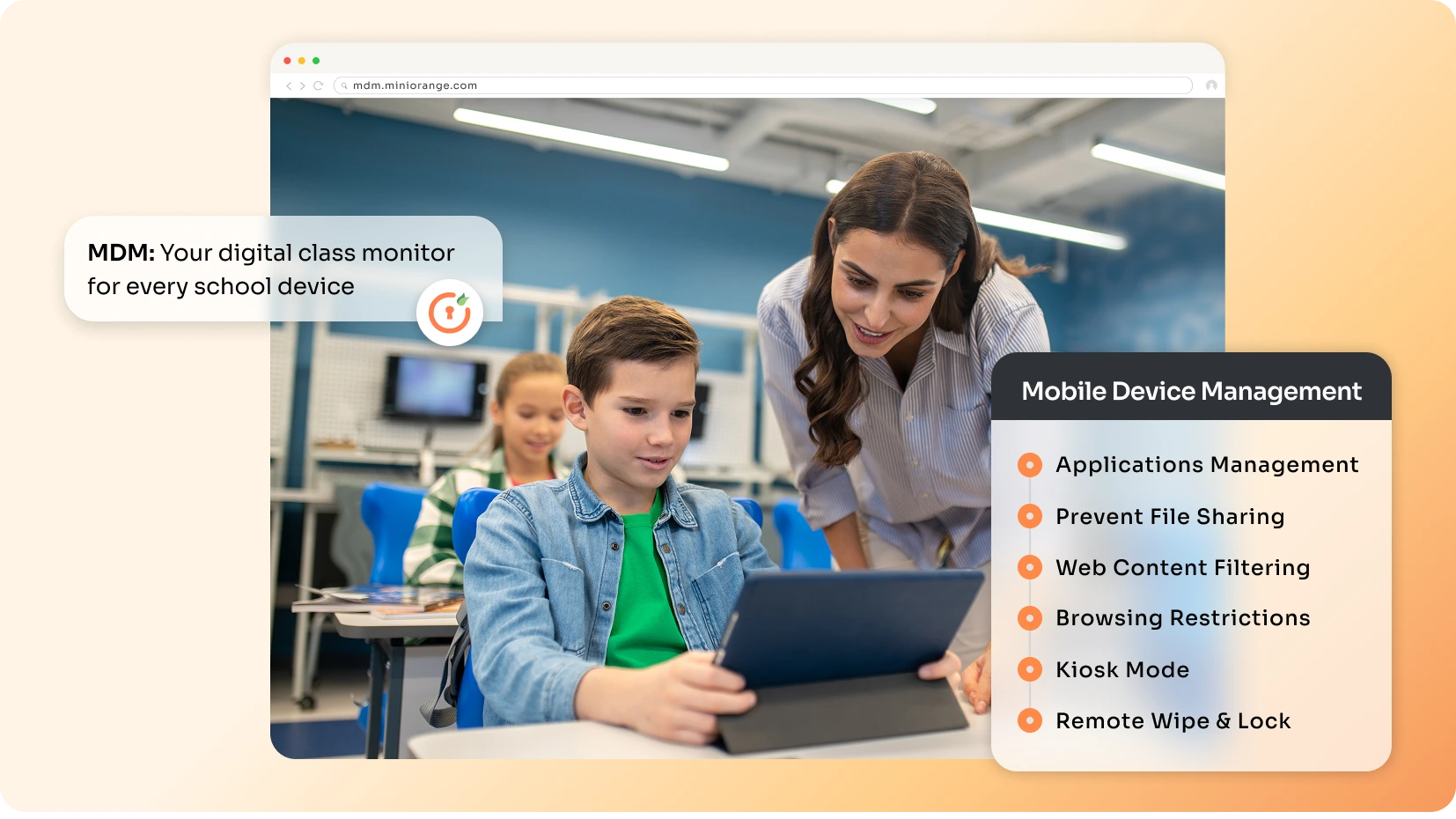
Different approaches offer different levels of control and scalability. Here are three ways to manage devices in remote learning:
1. Native Device Settings
Most devices come with built-in controls that allow basic management. Features like Guided Access, Screen Pinning, parental controls, and usage limits can help restrict how devices are used during learning sessions.
These settings can be useful for small setups or individual use. However, they are limited in scope and can often be bypassed by students. They also lack centralized control, which makes it difficult for schools to manage multiple devices across different locations.
2. Third-Party Apps
Some institutions rely on third-party apps to add more control over device usage. Tools like screen monitoring apps, app lockers, and content filtering solutions can help track activity and restrict access to certain apps or websites.
While these apps provide more features than native settings, they are often fragmented and work independently of each other. Managing multiple tools can become complex, and they are not designed for complete device control at scale.
3. MDM Solution
A Mobile Device Management (MDM) solution offers a centralized and structured way to manage all devices. Schools can control apps, restrict content, enforce policies, and monitor device usage from a single dashboard.
MDM solutions are built for large-scale environments and provide stronger control compared to other methods. Features like kiosk mode, remote management, and policy enforcement ensure that devices are secure, consistent, and aligned with learning objectives.
Which is the best way to manage devices for enhancing remote learning experience?
Managing devices in remote learning needs more than basic controls. It requires a structured and scalable approach that ensures consistency, security, and focus across all devices.
Native device settings like Guided Access or Screen Pinning offer only limited control and are designed for individual use. They can be easily bypassed and do not provide centralized visibility, making them difficult to manage at scale.
Third-party apps add features like screen monitoring and app locking, but they often work in isolation. Using multiple tools can lead to fragmented control and increased complexity, especially when managing many devices.
An MDM solution is the most effective approach.
MDM for education provides centralized control, allowing schools to manage apps, enforce policies, and monitor devices from a single platform. Features like kiosk mode help lock devices into specific apps, ensuring students stay focused and cannot easily bypass restrictions.
It also enables consistent configurations and real-time management across all devices, making it ideal for both small and large-scale remote learning setups.
Key Features of Mobile Device Management for Remote Learning
An MDM solution brings together multiple capabilities that help schools manage devices in a structured and secure way. Instead of handling devices individually, it allows centralized control across all student devices.
Here are some of the key features of MDM for remote learning:
- Device Enrollment and Provisioning: MDM allows institutions to enroll devices quickly and configure them with predefined settings. Devices can be delivered with required apps and policies already in place, reducing setup time for students and IT teams.
- App Management: Schools can remotely install required apps, remove unauthorized ones, and control updates. This ensures students only use approved learning applications during classes.
- Content Filtering and Web Restrictions: MDM helps block distracting or unsafe websites that are not relevant to learning. This keeps students focused and ensures a safe browsing experience.
- Kiosk Mode: Devices can be locked into a single app or a set of apps during lessons or exams. This prevents students from switching apps and reduces distractions.
- Group and Profile-Based Management: Devices can be organized by class, grade, or subject for easier management. Policies and apps can then be applied to entire groups instead of individual devices.
- Security and Data Protection: MDM enforces security measures such as passcodes, encryption, and device restrictions. Lost or stolen devices can also be locked or wiped remotely to protect data.
- Remote Troubleshooting: IT teams can access devices remotely to diagnose and fix issues. This reduces downtime and ensures that learning is not interrupted.
Benefits of Using MDM in Remote Learning
Managing devices effectively is key to creating a smooth and secure remote learning experience. An MDM solution helps schools maintain control, reduce disruptions, and ensure that devices support learning rather than hinder it.
Here are some of the key benefits of using MDM in remote learning:
- Support for Remote and Hybrid Learning: MDM allows schools to manage devices without needing physical access. IT teams can push updates, install apps, and apply policies from anywhere, making it ideal for remote and hybrid learning setups.
- Improved Classroom Focus: Devices can be restricted to approved learning apps and websites during class hours. This reduces distractions and helps students stay engaged throughout lessons.
- Consistent Learning Experience: MDM ensures that all devices are configured with the same apps, settings, and access rules. This creates a uniform experience for every student, regardless of location.
- Stronger Data Security: MDM enforces security measures like passcodes, encryption, and restricted access. This helps protect sensitive student data and reduces the risk of unauthorized access.
- Simplified IT Operations: All devices can be managed from a single dashboard, eliminating the need for manual intervention. This saves time and allows IT teams to focus on more critical tasks.
- Reduced Downtime and Faster Troubleshooting: Remote troubleshooting tools allow IT teams to quickly identify and fix issues. This minimizes disruptions and ensures that learning continues without delays.
Best Practices for Effective Management of Remote Learning Devices using MDM Solution
Managing devices with an MDM solution is not just about applying controls. It requires a structured approach to ensure devices remain secure, consistent, and aligned with learning goals over time.
When used correctly, MDM can significantly improve both classroom focus and operational efficiency. Here are some of the key best practices for educational institutions to effectively manage devices in remote learning:
Define Clear Usage Policies
Schools should establish clear guidelines on how devices are expected to be used during and outside class hours. These policies should cover app usage, internet access, and acceptable behavior. When students understand these expectations, misuse is reduced and compliance becomes easier to enforce. It also helps create a more disciplined and focused learning setup.
Use Kiosk Mode Strategically
Kiosk mode should be used to restrict devices to specific apps or learning environments during class sessions. This prevents students from switching to unrelated apps or websites. It is especially useful during lessons, tests, or assessments where focus is critical. When applied correctly, it creates a distraction-free learning experience.
Group Devices Effectively
Devices should be organized based on classes, grades, or subjects to simplify management. This allows schools to apply apps, restrictions, and policies to entire groups instead of individual devices. It reduces manual effort and ensures consistency across similar user groups. Group-based management also makes scaling easier as the number of devices grows.
Monitor Device Usage Regularly
Regular monitoring helps schools understand how devices are being used and identify any unusual activity. It also ensures that policies are being followed and that devices remain compliant. Early detection of issues allows IT teams to take corrective action quickly. This helps maintain both security and performance.
Keep Devices Updated
Keeping devices updated is essential for both security and performance. Updates ensure that devices are protected against vulnerabilities and run smoothly during classes. With MDM, updates can be pushed remotely without disrupting students. This reduces downtime and keeps devices ready for continuous use.
How to Choose the Right MDM Solution for Remote Learning?
Selecting the right MDM solution is an important decision for educational institutions. The right platform should not only manage devices but also support the unique needs of remote and hybrid learning environments.
A well-chosen MDM solution can simplify operations, improve security, and enhance the overall learning experience. Here are some of the key factors to consider while choosing an MDM solution for remote learning:
Built for Learning Environments
The MDM solution should be designed with education use cases in mind. It should support classroom-specific needs such as app restrictions, kiosk mode, and content control. A solution built for general device management may not fully address the challenges of remote learning. Education-focused features make implementation more effective.
Cloud-Based Availability
Cloud-based MDM solutions are easier to deploy and manage without heavy infrastructure. They allow IT teams to access and control devices from anywhere through a web-based dashboard. This is especially important for remote and hybrid learning setups. Cloud solutions also scale more easily as device usage grows.
Ease of Use
Educational institutions often have limited IT resources, so the MDM solution should be simple to use. A clean interface, minimal learning curve, and built-in automation make device management easier. Complex tools can slow down adoption and increase operational effort. Ease of use ensures faster implementation and smoother operations.
Group-Level Management
Managing devices individually is not practical in a classroom setting. The MDM solution should support grouping devices by class, grade, or subject. This allows policies and apps to be applied at scale, saving time and effort. Group-based management is essential for efficiency and scalability.
Cost Effectiveness
The solution should offer the right balance between features and cost. Schools need a platform that delivers strong functionality without adding unnecessary expenses. Flexible pricing and education-specific plans can make adoption easier. A cost-effective solution ensures long-term sustainability.
Enhance Remote Learning Experience with miniOrange MDM
Managing devices in remote learning is no longer optional. It has become a critical part of delivering a secure and distraction-free learning experience.
miniOrange MDM helps educational institutions take full control of student devices while keeping the learning process smooth and consistent. It enables schools to onboard devices quickly, manage applications, restrict unwanted content, and enforce policies from a single platform. Features like kiosk mode help create a focused learning setup, while remote troubleshooting ensures that technical issues are resolved without disrupting classes.
Beyond device management, miniOrange also offers seamless integration with Identity and Access Management (IAM) and Data Loss Prevention (DLP) solutions. This allows institutions to build a complete security framework that protects both devices and sensitive student data.
With miniOrange, schools can simplify device management, strengthen security, and create a more structured remote learning environment.
Additional Resources
- What is Mobile Device Management (MDM)? | Securing Mobiles for Office Work
- How to enroll iOS Device in miniOrange MDM Solution
- How to enroll Android devices into miniOrange MDM
- Top 10 Benefits of Mobile Device Management (MDM) for Businesses
- Bring Your Own Device (BYOD): Pros & Cons for Businesses in 2025
- MDM Containerization: How it Protects BYOD Devices at Work
Leave a Comment