

SAML, which stands for Security Assertion Markup Language, is an XML-based open standard that allows secure web domains to exchange user authentication and authorization data. Using SAML 2.0, an online service provider (SP) can contact a separate online identity provider to authenticate users who are trying to access secure content.
SAML is used to facilitate Single Sign-On (SSO). A user can access multiple applications and/or websites by using only a single set of login credentials (such as username and password). This prevents the need for the user to log in separately to the different applications.
Before SAML, SSO relied on cookies, which were less effective as they worked only within the same domain. SAML addressed this limitation by enabling trusted identity providers (IdPs) and SPs to securely exchange authentication information across domains.
For example, an employee signs in once to their organization's IdP, such as Microsoft Entra ID or Okta, using their corporate credentials. Later, when they click the Oracle NetSuite application from the company dashboard, NetSuite (the SP) doesn't ask them to log in again. Instead, it sends a SAML authentication request to the IdP. Since the employee has already been authenticated, the IdP verifies their identity and sends a signed SAML assertion back to NetSuite. NetSuite trusts this assertion and grants access instantly.
How SAML Authentication Works
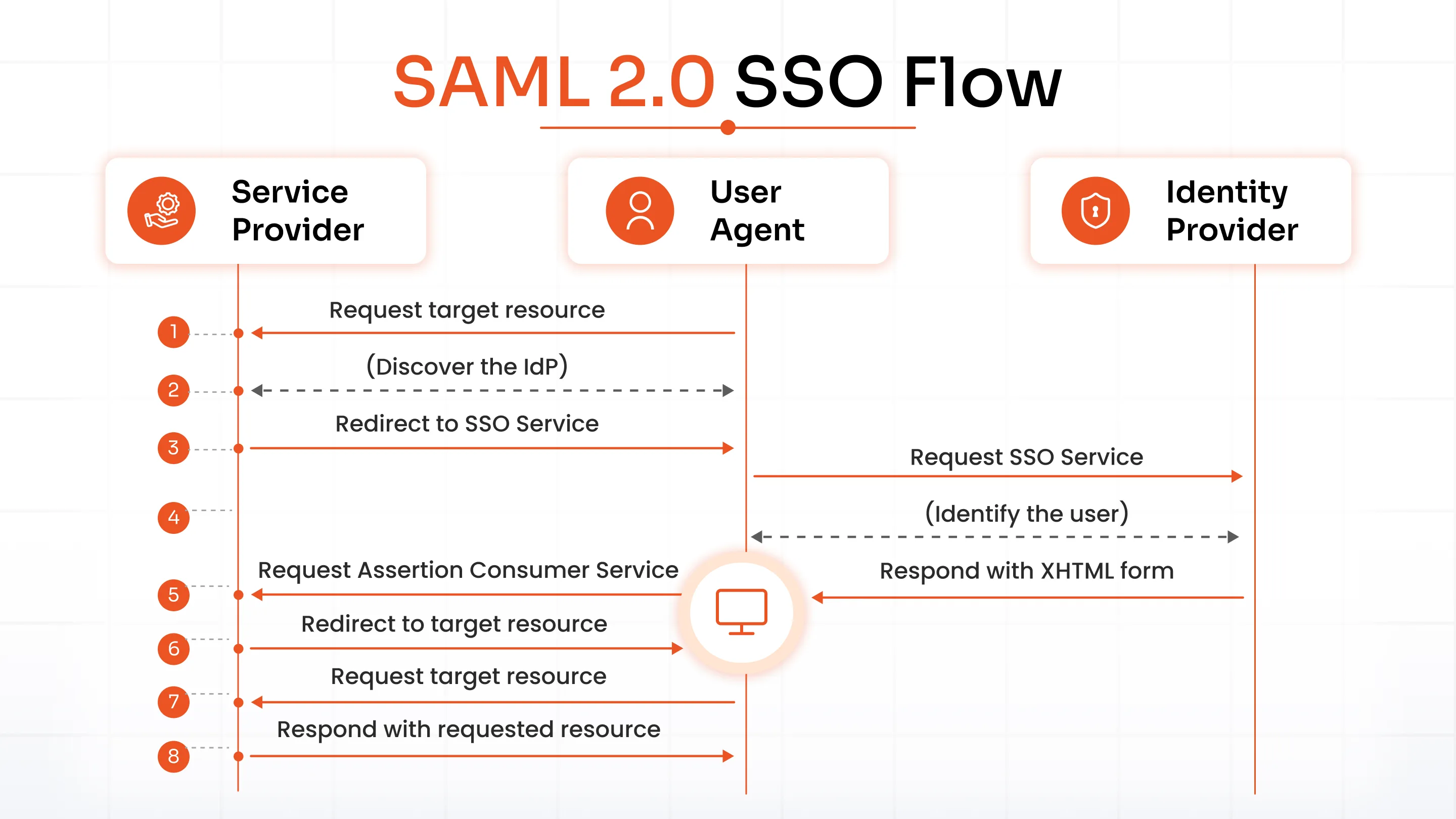
SAML SSO works by transferring the user’s identity from the IdP to the SP. This is done through an exchange of digitally signed XML documents. Let’s say a user is logged into a system that acts as an IdP. The user wants to log in to a remote application, i.e., the SP. Here's how the authentication flow works:
- The user requests a resource from their desired application/website (SP)
- The IdP verifies the user.
- The SP identifies the IdP and redirects the user back to the IdP with an authentication request.
- The IdP returns an HTML form containing the SAML Response.
- The IdP sends a signed SAML assertion to the SP containing the user's authentication details and any required attributes.
SAML 2.0 SSO Flow
SAML Components & Terminology
1. SAML Assertion: A SAML assertion is a digitally signed XML document generated by the IdP to confirm a user's identity. It securely carries information to the SP, including authentication details, user attributes, and authorization decisions. The three types of SAML assertions are authentication, attribute, and authorization decision assertions.
2. SAML Request: A SAML Request, also called an Authentication Request (AuthnRequest), is generated by the SP to request user authentication from the IdP.
3. SAML Response: A SAML Response is generated by the IdP. It contains one or more SAML assertions about the authenticated user. In addition, a SAML Response may contain additional information about the user, such as user profile information, group/role information, etc.
4. SAML Identity Provider (IdP): A SAML IdP is a system entity that issues authentication assertions in conjunction with an SSO profile of the SAML. An identity provider performs the authentication that the end user is who they say they are and sends that data to the SP along with the user’s access rights for the service.
5. SAML Service Provider (SP): A SAML SP is a system entity that receives and accepts authentication assertions in conjunction with an SSO profile of the SAML.
6. SAML Bindings: SAML bindings define how SAML requests and responses are transported between the IdP and the SP. The most commonly used binding is HTTP-POST, while HTTP-Redirect, SOAP, and artifact bindings are used for specific authentication and communication scenarios.
SAML vs OAuth vs OpenID Connect
SAML, OAuth 2.0, and OpenID Connect (OIDC) are all used to simplify user access, but they solve different problems.
SAML is primarily used for enterprise SSO, OAuth 2.0 enables secure authorization between applications, and OIDC extends OAuth 2.0 by adding user authentication. While SAML uses XML and is common in enterprise environments, OAuth and OIDC use JSON, making them better suited for modern web, mobile, and API-driven applications.
| Feature | SAML 2.0 | OAuth 2.0 | OIDC |
|---|---|---|---|
| Purpose | SAML is an authentication standard. | OAuth is an authorization framework. | OpenID Connect is an authentication layer built on OAuth 2.0. |
| Usage Scenario | Used for enterprise SSO, identity federation, and allowing users to access multiple business applications with one login. | Used to grant third-party applications limited access to a user's resources without sharing passwords. | Used to authenticate users and provide SSO for modern web and mobile applications. |
| Suitable Application | Popular for browser-based enterprise applications. | Suitable for web, mobile, and API-based applications. | Suitable for web, mobile, cloud, and consumer-facing applications. |
| Commonly Used By | Widely used for enterprise applications such as Salesforce, Workday, and Oracle NetSuite. | Widely used for API access and delegated permissions, such as allowing an app to access Google Drive. | Widely used for consumer identity and social login, such as Sign in with Google or Sign in with Microsoft. |
| Data Format | Uses XML to exchange authentication messages. | Uses JSON to exchange authorization data. | Uses JSON Web Tokens (JWTs) and JSON to exchange identity information. |
When Should You Use SAML, OAuth, or OpenID Connect?
Choosing between SAML vs. OAuth 2.0 vs. OIDC depends on what you're trying to accomplish. While these standards are often compared, they address different identity and access management requirements. Use the following guide to determine which one best fits your use case.
| If You Need To | Use | Why |
|---|---|---|
| Enable Single Sign-On (SSO) across enterprise applications | SAML | Designed for enterprise identity federation and browser-based SSO using XML assertions. |
| Allow an application to access another application's APIs on a user's behalf | OAuth 2.0 | Provides secure delegated authorization without sharing user credentials. |
| Let users sign in to modern web or mobile applications | OIDC | Adds authentication and user identity to OAuth 2.0 using JSON Web Tokens (JWTs). |
| Integrate with enterprise platforms like Microsoft Entra ID, Okta, Salesforce, or Oracle NetSuite | SAML | The industry standard for enterprise SSO and identity federation. |
| Build mobile-first, cloud-native, or consumer applications | OIDC | Lightweight, API-friendly, and optimized for modern application architectures. |
| Secure APIs and enable third-party integrations | OAuth 2.0 | The standard choice for API authorization and delegated access. |
Quick Decision Guide
- Choose SAML if your primary goal is enterprise SSO across business applications.
- Choose OAuth 2.0 if you need secure API authorization or want to let one application access another on a user's behalf.
- Choose OIDC if you're building modern web or mobile applications and need both authentication and seamless user sign-in.
If you're comparing SAML vs. OAuth, remember that SAML is primarily for authentication, while OAuth is for authorization. If you're evaluating SAML vs. OIDC, both support authentication, but SAML is best suited for enterprise SSO, whereas OIDC is designed for modern, consumer-facing applications and cloud-native architectures.
What Are the Benefits of SAML Authentication
SAML is not just about simplifying login. It strengthens security and reduces admin workload. Here are the key benefits you gain by implementing SAML.
1. SAML 2.0 SSO: SAML provides the fastest and most efficient access to multiple applications through an assertion, which helps to connect the SAML-supported SP to IdP. SAML 2.0 provides a better user experience using an assertion that communicates between the SP and the Identity Server IdP.
2. Increased Security: SAML authentication eliminates the need for users to enter passwords into every application. Credentials are entered only at the IdP. SAML 2.0 also uses the Public Key Infrastructure (PKI) to protect identities from attacks. SSO using SAML provides a single point of authentication, which happens at a secure IdP. Then, SAML transfers the identity information to the SP. This form of authentication ensures that credentials are only sent to the IdP directly.
3. Reduce Password Resets Time: SAML SSO will eliminate password issues, such as reset and recovery, which will reduce the time to recover old passwords.
4. Reduced IT Costs: SSO using SAML reduces admin overhead by centralizing user authentication. IT teams spend less time managing passwords, onboarding new users, and removing access for departing employees, resulting in fewer helpdesk tickets and lower operational costs.
5. Centralized Access Management: SAML centralizes authentication through the IdP, allowing admins to manage user access from a single dashboard. They can easily grant or revoke access instantly across all connected applications.
6. Reduced costs for the SP: With SSO via SAML, you don't have to maintain an account for multiple services. The SP no longer needs to manage user authentication directly because the IdP handles authentication.
7. Improved User Experience: After authenticating once, users can access multiple SPs without signing in again. This enables a faster and better experience at each SP.
8. Interoperability: SAML 2.0 interoperates with any system, independent of implementation, because of its standardized format.
9. Loose Coupling of Directories: SAML reduces the need to synchronize user identities across multiple applications because authentication is centralized.
10. Scalability: SAML makes it easy to add new users and integrate additional applications without building separate authentication systems for each one. As organizations grow, SAML provides a scalable way to extend secure SSO across their entire application ecosystem.
What Are SAML Use Cases
SAML is used where you need to access multiple systems but don’t want the hassle of managing multiple credentials. Let’s explore a few real-world use cases:
1. Enterprise SSO
SAML has been the standard for enterprise SSO for quite some time. After authenticating through an IdP like Microsoft Entra ID or Okta, users can seamlessly access applications such as Salesforce, Slack, Workday, and Oracle NetSuite without signing in again.
2. Education and Campus SSO
Educational institutions use SAML to provide students and faculty with secure access to campus resources. A single set of university credentials can be used to sign in to learning management systems (LMS), library portals, student information systems, email, and other academic applications.
3. B2B SaaS Apps
Many SaaS providers support SAML authentication to meet the security and identity management requirements of enterprise customers. This enables organizations to integrate the SaaS application with their existing IdP, enforce corporate access policies, and deliver a seamless SSO experience for employees.
4. Healthcare and Regulatory Compliance
Healthcare organizations rely on SAML to secure access to electronic health records (EHRs), patient portals, and clinical applications. SAML helps organizations meet compliance requirements such as HIPAA while ensuring that only authorized users can access sensitive patient data by centralizing authentication and supporting federated identity.
What Are the Limitations of SAML
SAML is widely adopted and considered the default for enterprise SSO. But it also has some drawbacks that you should be aware of.
Not Mobile-Native: SAML was designed for browser-based applications and isn't ideal for native mobile apps or Single Page Applications (SPAs). Modern mobile applications typically use OIDC instead.
XML Complexity: SAML relies on XML, which is more verbose than JSON. This results in larger payloads and makes integrations and troubleshooting more complex.
No Native API Authorization: SAML authenticates users but doesn't support delegated API authorization. If your applications need secure API access, you'll need OAuth 2.0 alongside SAML.
Configuration Overhead: Setting up SAML requires careful configuration of certificates, endpoints, and attribute mappings. It is secure. But deployments can be more complex than modern authentication protocols.
How to Implement SAML SSO
Here’s how you can configure a relationship between your IdP and SP to implement SAML SSO. While the exact steps vary by platform, the overall SAML configuration process follows the same sequence.
1. Choose an IdP
Select an IdP such as miniOrange, Microsoft Entra ID, Okta, Google Workspace, or Ping Identity to authenticate users and issue SAML assertions.
2. Exchange Metadata
Exchange SAML metadata between the IdP and SP. This metadata contains important configuration details, including entity IDs, endpoints, and signing certificates.
3. Configure the SP
Configure the SP with the IdP's metadata and specify the Assertion Consumer Service (ACS) URL, Entity ID, and other required SAML settings.
4. Map User Attributes
Map user attributes such as email address, username, first name, last name, and group memberships so the SP can correctly identify and authorize users.
5. Test and Deploy
Test the SAML login flow to verify authentication, attribute mapping, and certificate validation. Once everything works as expected, enable SAML SSO for all users in your production environment.
Conclusion
SAML remains the foundation of enterprise SSO, enabling organizations to authenticate users securely across multiple applications with a single set of credentials. By centralizing authentication through a trusted IdP, SAML strengthens security, improves the user experience, reduces IT overhead, and simplifies access management at scale.
Although newer standards like OIDC are better suited for modern web and mobile applications, SAML continues to be the preferred choice for enterprise identity federation. If your organization needs secure, standards-based SSO for business applications, implementing SAML is a proven way to streamline access while maintaining strong security and compliance.
miniOrange has made it very easy to implement and manage SAML SSO. We support multiple IdPs and business apps. You can deploy secure enterprise authentication at scale while simplifying identity and access management.
FAQs
What does SAML stand for?
SAML stands for Security Assertion Markup Language. It is an XML-based open standard that enables secure authentication and Single Sign-On (SSO) by allowing Identity Providers (IdPs) and Service Providers (SPs) to exchange user authentication data.
What is the difference between SAML and SSO?
SAML is an authentication standard, while Single Sign-On (SSO) is the user experience it enables. SAML is one of the most widely used protocols for implementing SSO across enterprise applications.
Is SAML still used in 2026?
Yes. SAML remains the leading authentication standard for enterprise Single Sign-On and identity federation. While OpenID Connect (OIDC) is popular for modern web and mobile apps, SAML continues to dominate enterprise environments.
What is a SAML assertion?
A SAML assertion is a digitally signed XML document issued by the Identity Provider (IdP). It confirms a user's identity and securely shares authentication and user information with the Service Provider (SP).
Is SAML the same as OAuth?
No. SAML is used for user authentication and enterprise SSO, while OAuth 2.0 is an authorization framework that allows applications to securely access APIs and resources on a user's behalf.
What are examples of SAML identity providers?
Common SAML identity providers include miniOrange, Microsoft Entra ID, Okta, Google Workspace, Ping Identity, and OneLogin.
Leave a Comment