- Home
- SCIM Provisioning
- SCIM Provisioning Documentation
- User and Group Provisioning Feature Guide

Automate User & Group Provisioning with SCIM Cloud: Feature Guide
This document outlines the miniOrange SCIM Cloud use cases and a complete guide of each tab like User Operations, Group Mapping and Portal Customer Sync capabilities available in the miniOrange SCIM Cloud app for Jira. These features enable automated, scalable user provisioning and access control directly from your Identity Provider (IDP).
 Try it for free
User Operations
 1.1 Import Users
The Import Users feature allows you to bulk-sync all users from your Identity Provider directly into Atlassian's user directory with a single toggle, eliminating the need for manual user creation or CSV imports. You can sync the users either via SCIM or REST API based approach.
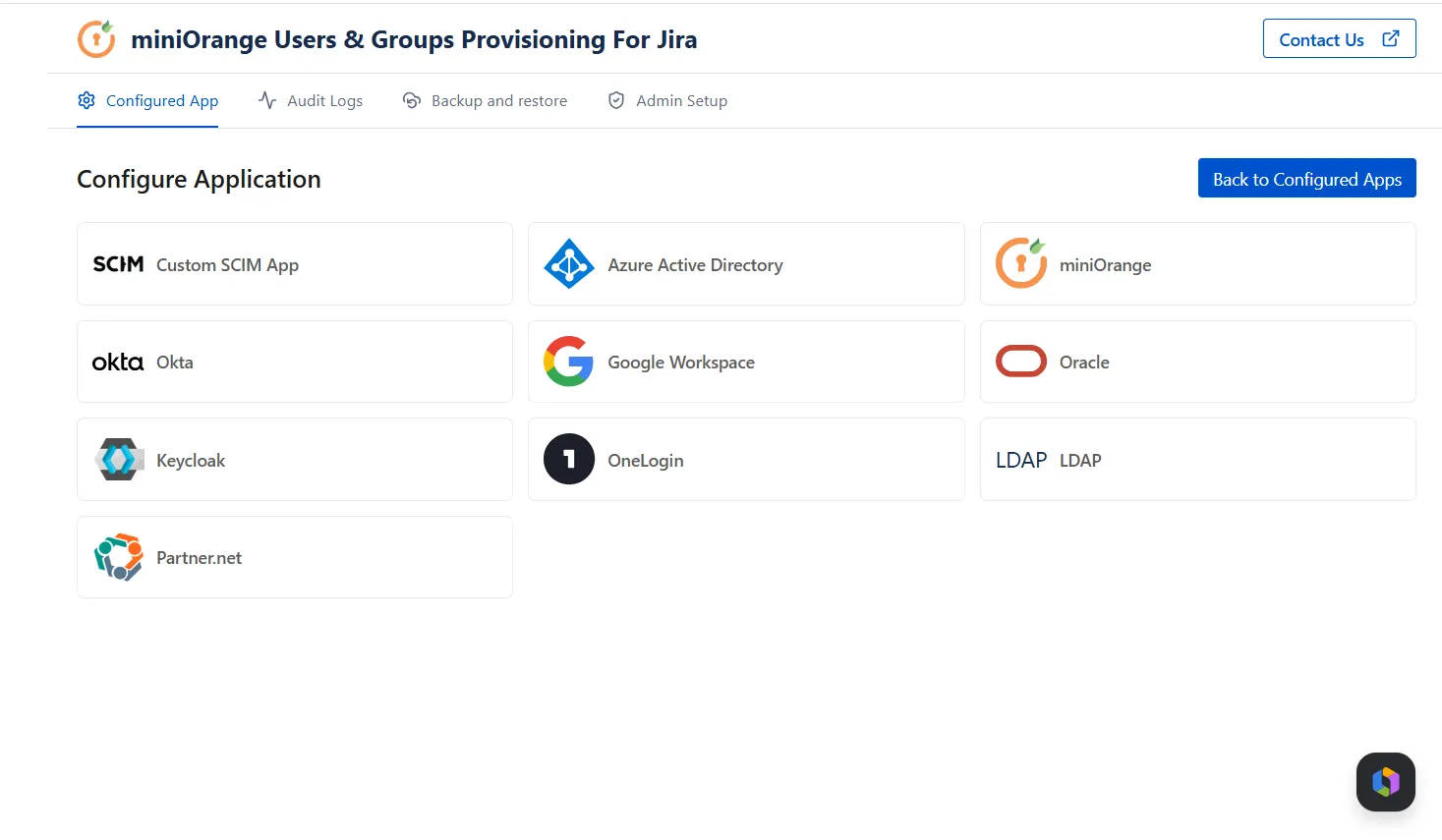
Sync Approaches: SCIM vs REST API
| Feature | Description |
|---|---|
| SCIM-Based Sync | For IDPs that natively support the SCIM protocol (e.g., Okta, Azure AD, OneLogin). Enable the Import Users toggle and users are pushed from the IDP to Atlassian's directory automatically in real time. |
| REST API-Based Sync (Keycloak) | For IDPs that do not support SCIM like Keycloak — miniOrange connects to the IDP via its REST API, pulls user and group data, and syncs it into Atlassian's directory on a scheduled or on-demand basis. |
Why This Matters — The Atlassian Guard Gap
Atlassian Guard (formerly Atlassian Access) supports user and group sync only for IDPs that implement the SCIM protocol. If your Identity Provider does not support SCIM natively, Guard cannot sync your users or groups — leaving you with no automated provisioning option.
This is where miniOrange’s Users and Groups Provisioning app bridges the gap. Using our REST API-based sync approach, we connect directly to your IDP's API — even if it doesn't support SCIM — and sync users and groups into Atlassian seamlessly. You get the same automated provisioning experience regardless of your IDP's protocol limitations.
Atlassian Guard: Supports SCIM-compatible IDPs only. No SCIM support in your IDP = no automated sync.
miniOrange’s Users and Groups Provisioning app: Supports both SCIM and non-SCIM IDPs via REST API. Any IDP. Any protocol. Full user and group sync.
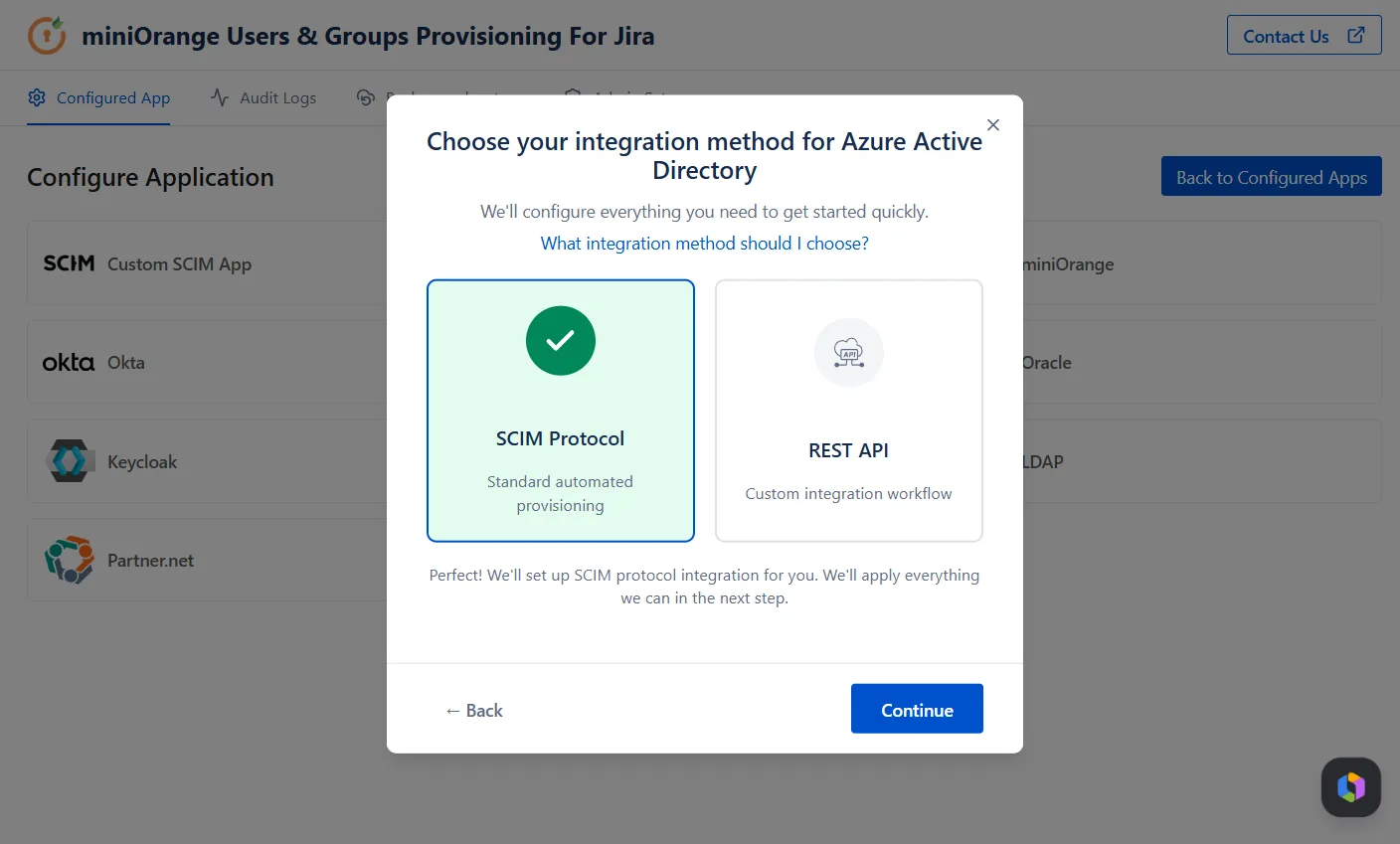
How It Works
- Configure the respective Identity Provider from where you have to sync the users to Jira.
- Enable the Import Users toggle in the miniOrange’s Users and Groups Provisioning configuration.
- Once toggled on, all users present in your connected IDP are automatically imported into Atlassian's directory.
- User profiles, attributes, and group memberships are synced as part of the import.
- Any subsequent changes in the IDP (new users, profile updates) are reflected in Atlassian automatically on the next sync.
Use Case
Scenario: A company onboards 200 new employees at once. Manually creating each user in Atlassian would take hours and is error-prone.
With Import Users enabled, simply ensure all employees
exist in the IDP.
On the next SCIM sync, all 200 users are provisioned in
Atlassian's directory automatically — with correct
profiles and group memberships intact.
1.2 Deactivate User Action
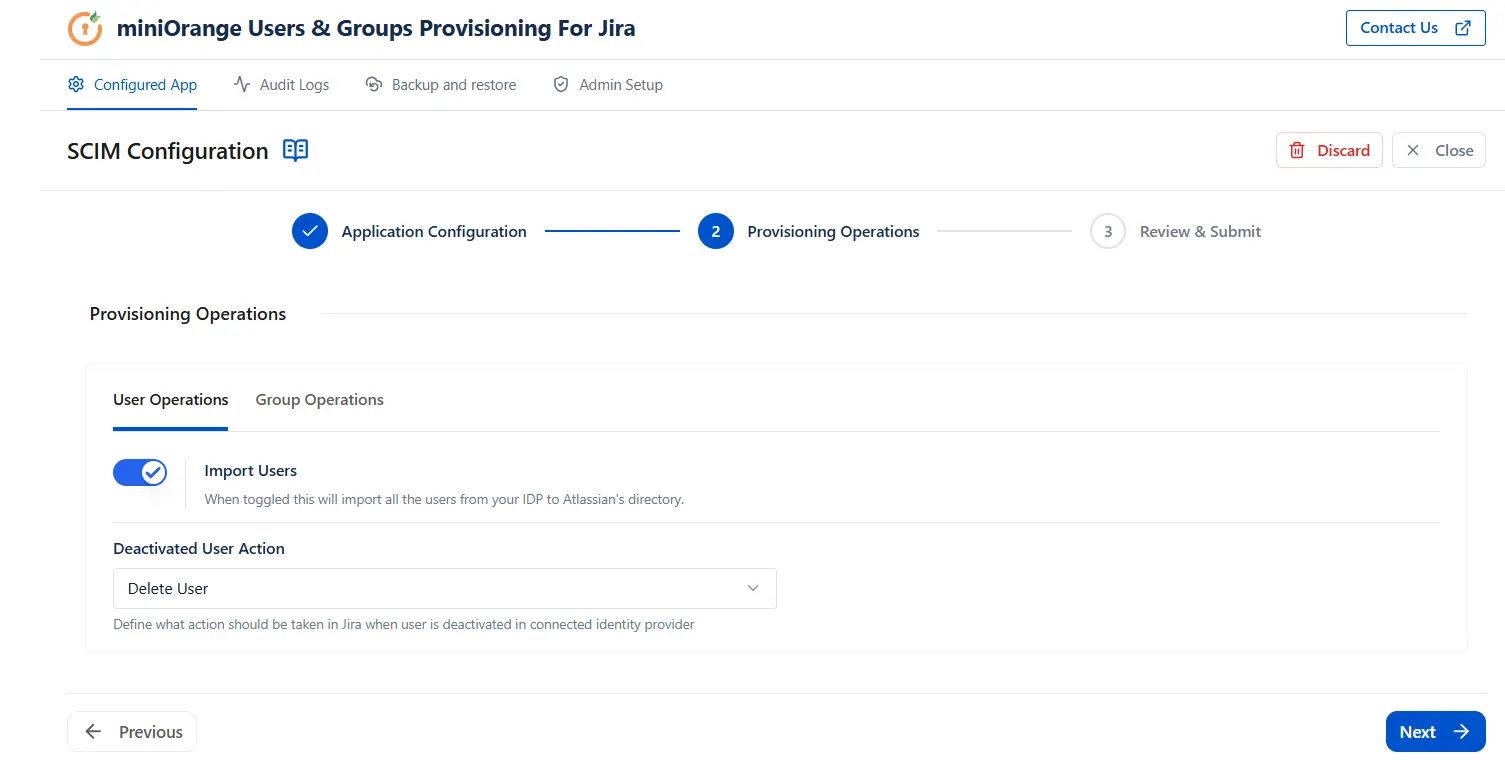
The Deactivate User Action feature gives administrators control over what happens in Atlassian when a user is deactivated or removed in the connected Identity Provider. Rather than leaving orphaned accounts, you can enforce automated offboarding actions.
Supported Actions
| Feature | Description |
|---|---|
| Disable User | The user's Atlassian account is deactivated — they can no longer log in, but their data, tickets, and history are preserved. |
| Delete User | The user's Atlassian account is permanently deleted when they are deactivated in the IDP. Use with caution in environments where audit trails are important.(Note: the account of the user needs to be of verified domain. Else the user is simply removed from the group.) |
How It Works
- Configure the desired deactivation action (Disable or Delete) in the - miniOrange’s Users and Groups Provisioning settings.
- When a user is deactivated or removed in your IDP, the SCIM sync detects the change.
- The corresponding action is automatically applied to the user's Atlassian account — no manual intervention required.
Use Case
Scenario: An employee leaves the organization and
is deactivated in Okta.
Without automated offboarding, their Atlassian account
remains active — a security and compliance risk.
With Deactivate User Action set to "Disable", the
moment the IDP account is deactivated, their Atlassian
access is revoked instantly.
Choose "Delete" for full account removal in line
with your data retention policies.
Portal-Only Customer Sync via SCIM
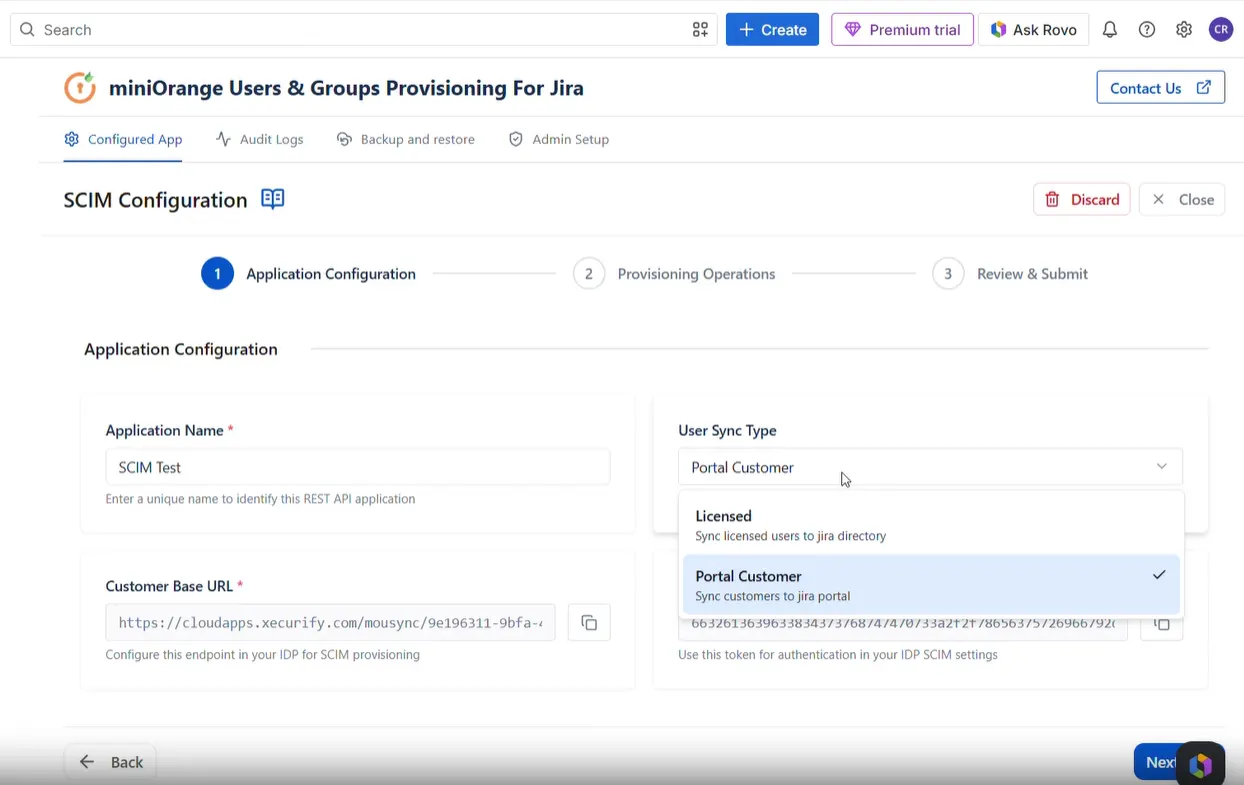
miniOrange’s Users and Groups Provisioning extends its provisioning capabilities beyond standard Jira users to include portal-only customers — external users who interact solely through JSM Customer Portals and do not hold a Jira license.
What Is Portal-Only Sync?
Portal-only customers are external stakeholders (e.g., clients, vendors, end users) who submit and track requests through JSM portals. Traditionally, these users had to be added and managed manually. With our plugin’s Customer-SCIM, this process is fully automated.
How It Works
- Configure your IDP to provision a specific set of users as portal-only customers.
- On SCIM push, these users are automatically created as JSM portal customers — no Jira license consumed.
Use Case
Scenario: A managed services provider has 500+ external clients who raise support tickets through JSM portals. Adding each client manually is not scalable.
With SCIM Portal Sync, clients from the IDP are automatically provisioned as portal-only customers, placed in the correct JSM Organization, and granted access to only the portals relevant to them — all without consuming a single Jira license.
Note: Portal-only customer sync via SCIM is exclusively available through the miniOrange SCIM Cloud app. This capability is not supported natively by Atlassian.
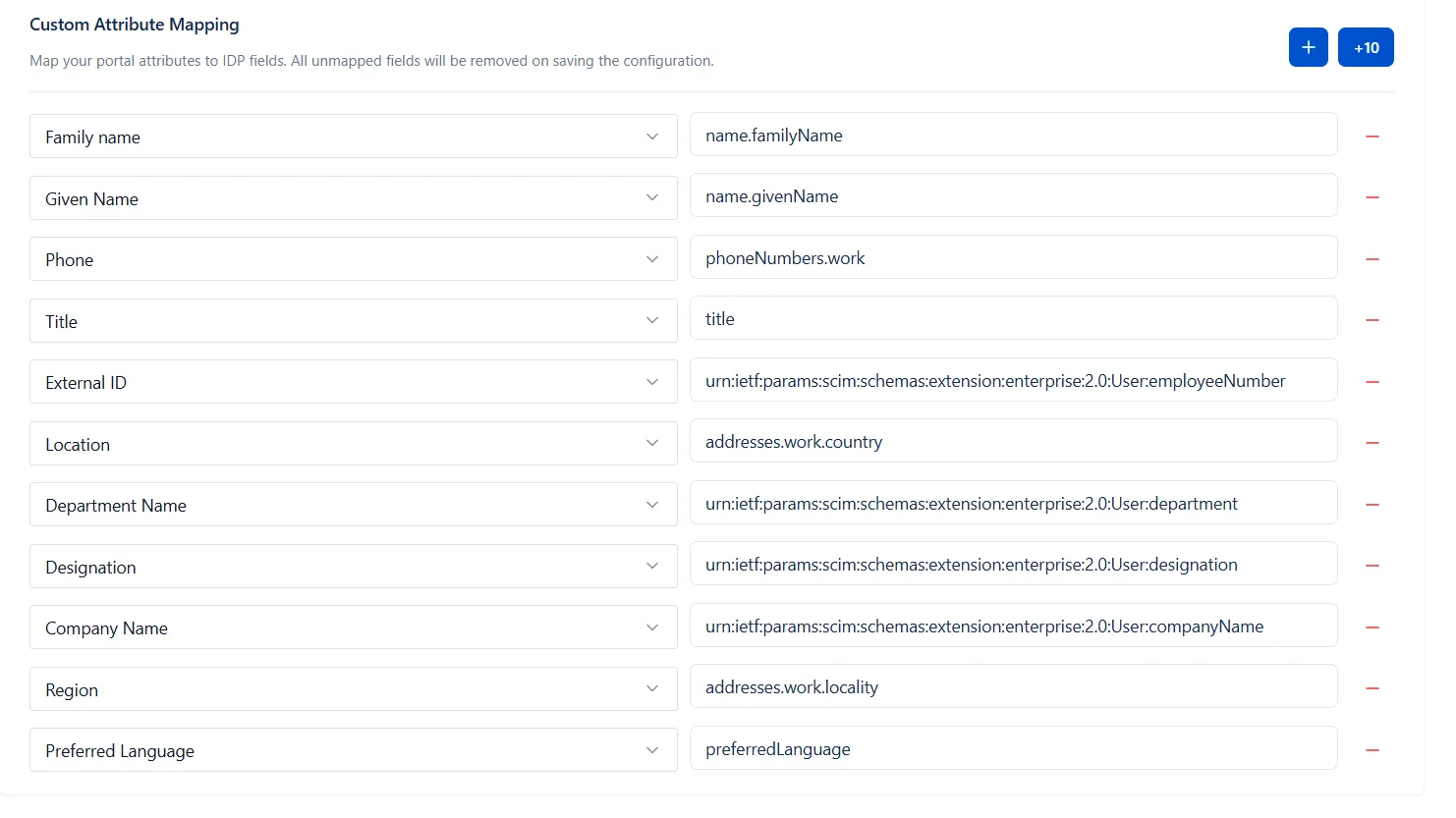
Custom Attribute Mapping for Portal Customers
Beyond provisioning portal customers, miniOrange’s Customer-SCIM flow allows you to sync custom attributes stored in your IDP directly to corresponding fields on the JSM portal customer profile. This ensures customer data in Jira always reflects what's in your identity provider — with no manual data entry.
How It Works
- Navigate to the Custom Attribute Mapping configuration within the Portal-Only Sync settings.
- Map each IDP attribute (e.g., department, phone number, account tier, custom fields) to the corresponding JSM portal customer field.
- On every SCIM sync, the mapped attributes are automatically written to the customer's JSM profile.
- Any portal fields that are left unmapped will remain untouched/empty— ensuring only intentionally mapped data is retained.
Use Case
Scenario: A B2B software company stores customer-specific attributes in their IDP — such as "Contract Tier", "Account Manager", and "Region" — and wants these details visible on the customer's JSM profile for support agents.
With Custom Attribute Mapping, these IDP fields are mapped once to the corresponding JSM portal fields. Every time a customer logs in or the SCIM sync runs, their profile is automatically updated — support agents always have accurate, up-to-date customer context without any manual effort.
Feature Summary
| Feature | Description |
|---|---|
| Manual Group Mapping | Explicitly map IDP groups to Jira groups; unmapped groups are excluded |
| On-the-Fly Mapping | Auto-match or auto-create Jira groups based on IDP group names at sync |
| Retain Existing Groups | Preserve existing Jira group memberships not covered by current IDP sync |
| Regex Filtering | Filter and transform group names using Starts With, Contains, or full Regex patterns |
| Import Users | Toggle to bulk-import all IDP users into Atlassian's directory automatically |
| Deactivate User Action | Disable or delete Atlassian accounts automatically when users are deactivated in IDP |
| Portal-Only Sync | Provision external JSM portal customers via SCIM — no Jira license required |
| Custom Attribute Mapping | Sync IDP attributes to JSM portal customer fields automatically on every sync |
| Org Auto-Assignment | Map synced portal customers to JSM Organizations based on IDP group or email domain |
Group Mapping
Group Mapping allows you to control how groups from your Identity Provider (IDP) are mapped to groups in Jira. miniOrange’s Users and Groups Provisioning offers two modes of group mapping — Manual and On-the-Fly — giving administrators the flexibility to choose the level of automation and control that suits their environment.
2.1 Manual Group Mapping
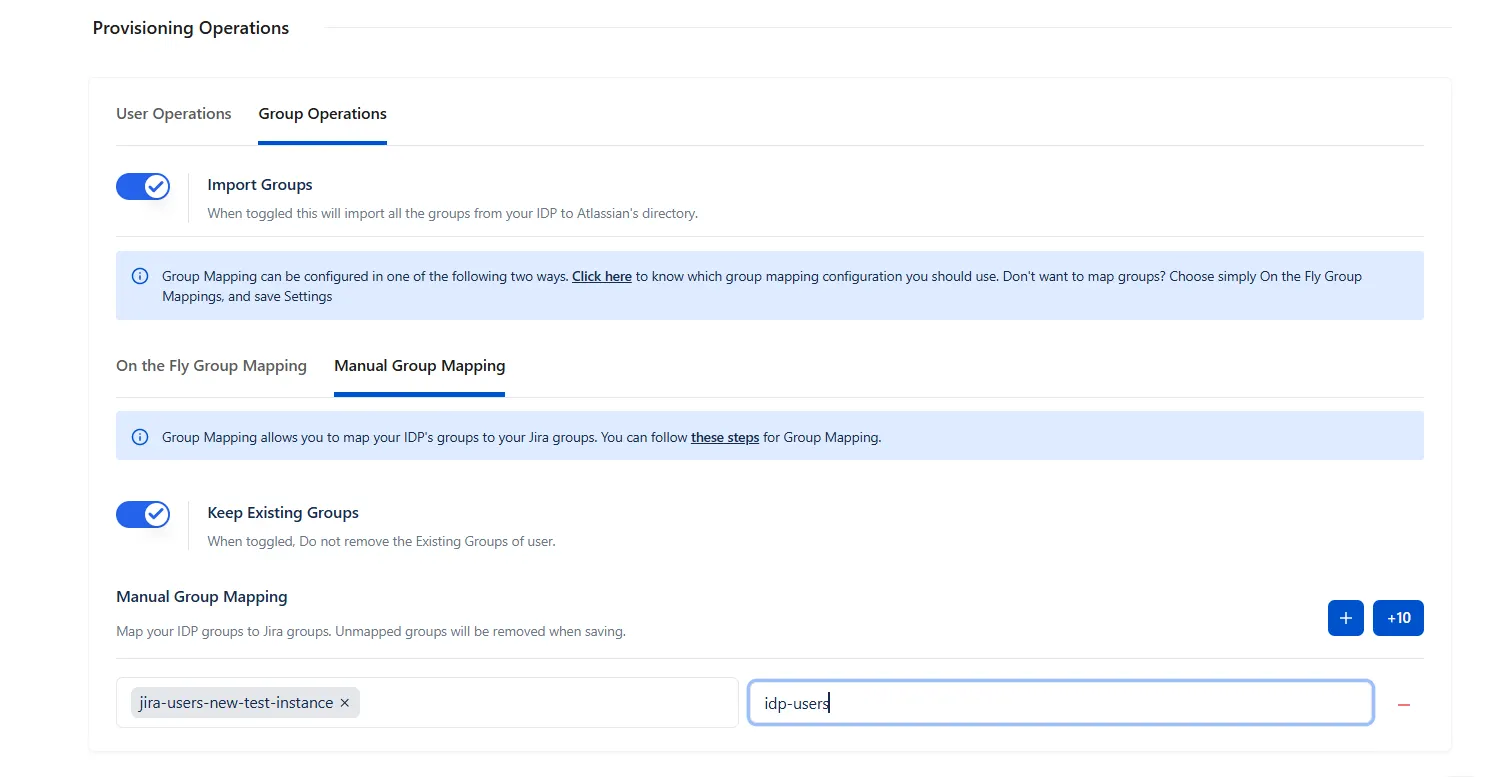
Manual Group Mapping gives administrators full, explicit control over how IDP groups are linked to Jira groups. You define exactly which IDP group maps to which Jira group — nothing is assumed or automated.
How It Works
- Navigate to Group Operations in miniOrange’s Users and Groups Provisioning and enable the Import Group toggle.
- Select the Manual Group Mapping tab.
- Select a Jira group and map it to the corresponding IdP group. Save the configuration.
- If “Keep Existing Groups” toggle is enabled, existing mapping between users and Groups will remain untouched. If this is disabled, any IDP group that is not explicitly mapped and is not mentioned under “Exclude IDP Groups” in the configuration will be removed from the user's Jira group assignment upon saving.
- User syncing will be assigned only to the Jira groups that have an active mapping.
Use Case 1
Scenario: An enterprise has IDP groups such as "Finance-Team" and "HR-Team" that must correspond to specific Jira groups with different names, e.g., "jira-finance" and "jira-hr".
With Manual Group Mapping, the admin explicitly maps:
Finance-Team → jira-finance
HR-Team → jira-hr
Any IDP group without a mapping is ignored, ensuring users only land in intentionally assigned Jira groups. Ideal for organizations requiring strict access governance.
Use Case 2 — Excluding Groups from IDP-Driven Removal
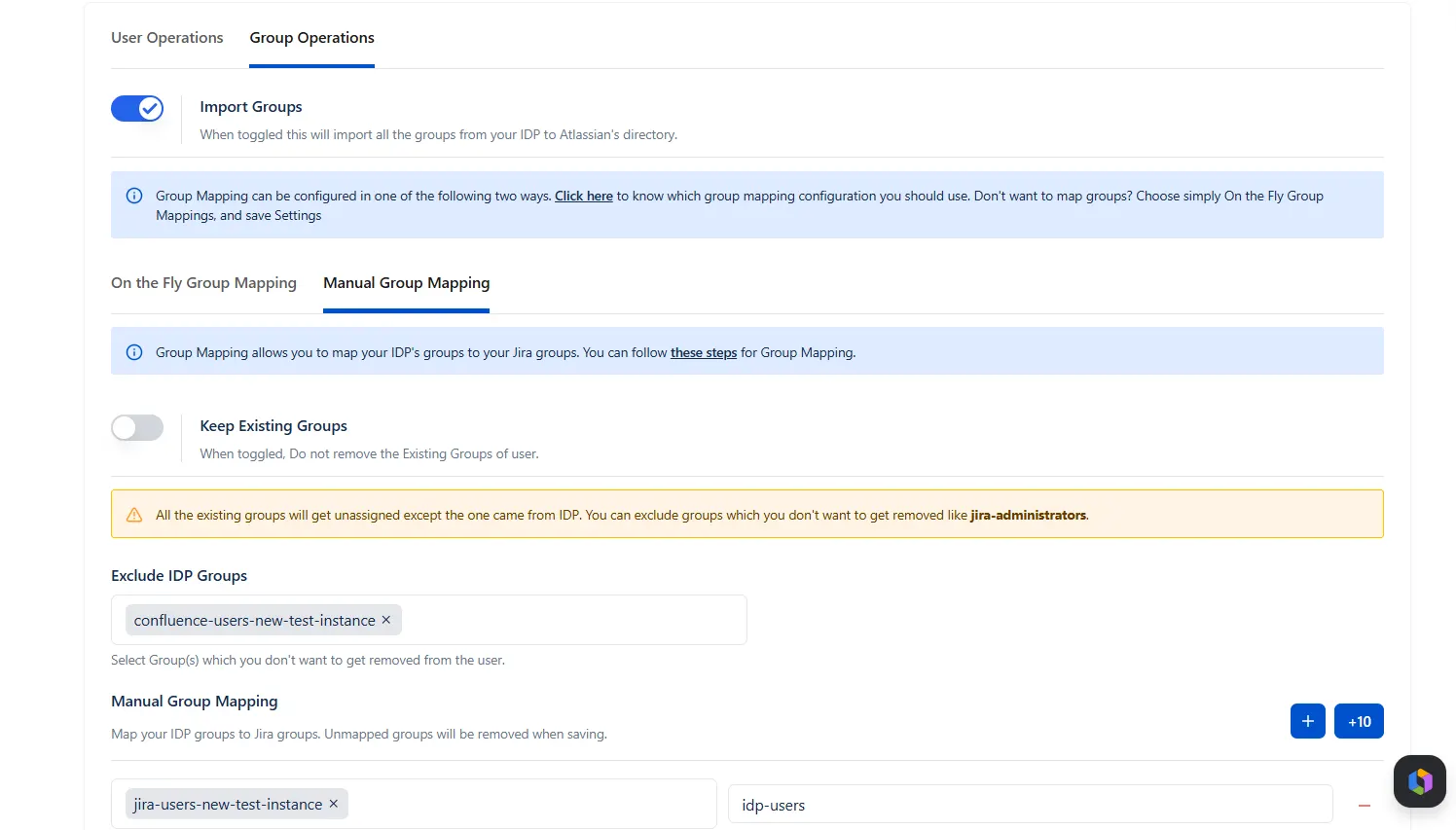
Manual Group Mapping also supports an exclusion model — certain Atlassian groups can be marked so that even if a user is removed from the corresponding group on the IDP side, they are not removed from that group in the Atlassian directory. This is particularly valuable for protecting privileged or critical group memberships from being inadvertently wiped by IDP changes.
How It Works
- If “Keep Existing Groups” toggle is enabled, existing mapping between users and Groups will remain untouched. If this is disabled, any IDP group that is not explicitly mapped and is not mentioned under “Exclude IDP Groups” in the configurations will be removed from the user's Jira group assignment upon saving
Scenario: Your organization has a Jira group called "confluence-users-new-test-instance" that is also mapped in the IDP. An admin accidentally removes a Jira Administrator from this group on the IDP side.
Without exclusion, the next SCIM sync would remove that admin from the group in Atlassian as well — potentially locking them out of critical access.
By marking "confluence-users-new-test-instance" as an excluded group in the Manual Mapping configuration, the group membership on the Atlassian side is preserved regardless of what happens in the IDP.
This is ideal for protecting Jira Administrators, site admins, or any users who must retain specific group memberships as a safety net — even if their IDP group assignment is changed or removed.
2.2 On-the-Fly Group Mapping
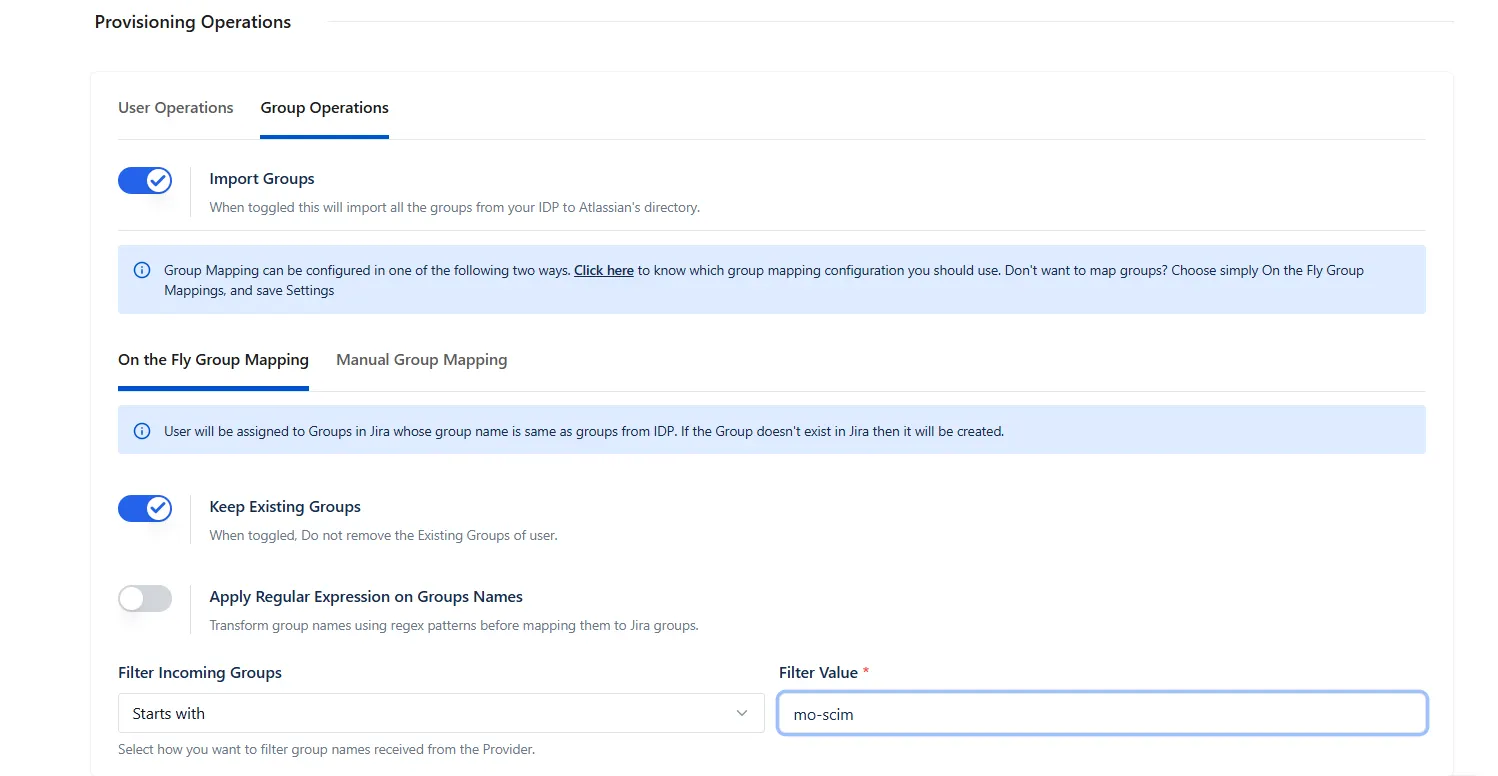
On-the-Fly Group Mapping automates the group assignment process by matching Jira group names directly to IDP group names. This is particularly powerful for large, dynamic environments where group structures change frequently.
How It Works
- When a user is synced via SCIM provisioning, their IDP groups are read automatically.
- If a Jira group with the same name exists, the user is assigned to it instantly.
- If no matching Jira group exists, one is created automatically using the IDP group name.
- You have the option to retain existing Jira groups with the “Keep Existing Groups” toggle — users already in Jira groups that aren't part of the current IDP sync will not be removed.
Use Case
Scenario: A fast-growing SaaS company adds new teams frequently in their IDP (e.g., Okta). Creating corresponding Jira groups manually for every new team is time-consuming.
With On-the-Fly Mapping, when a new employee from the "product-design" IDP group logs in, Jira automatically creates the "product-design" group and assigns the user — zero admin intervention required. Existing groups and memberships are preserved.
2.3 Group Name Filtering with Regex
Transformation
Not all IDP group names will match your Jira group naming conventions. The Regex Transformation feature lets you filter, transform, or normalize group names before they are mapped to Jira — giving you precise control over what gets synced and how.
Supported Regex Modes
| Feature | Description |
|---|---|
| Starts With | Filter groups whose names begin with a specific prefix. E.g., only sync groups starting with "jira-" and strip the prefix before mapping. |
| Contains | Match groups whose names include a specific substring. E.g., sync only groups that contain "prod" in their name. |
| Matches Pattern | Apply a full regular expression to match and transform group names using capture groups and substitution patterns. |
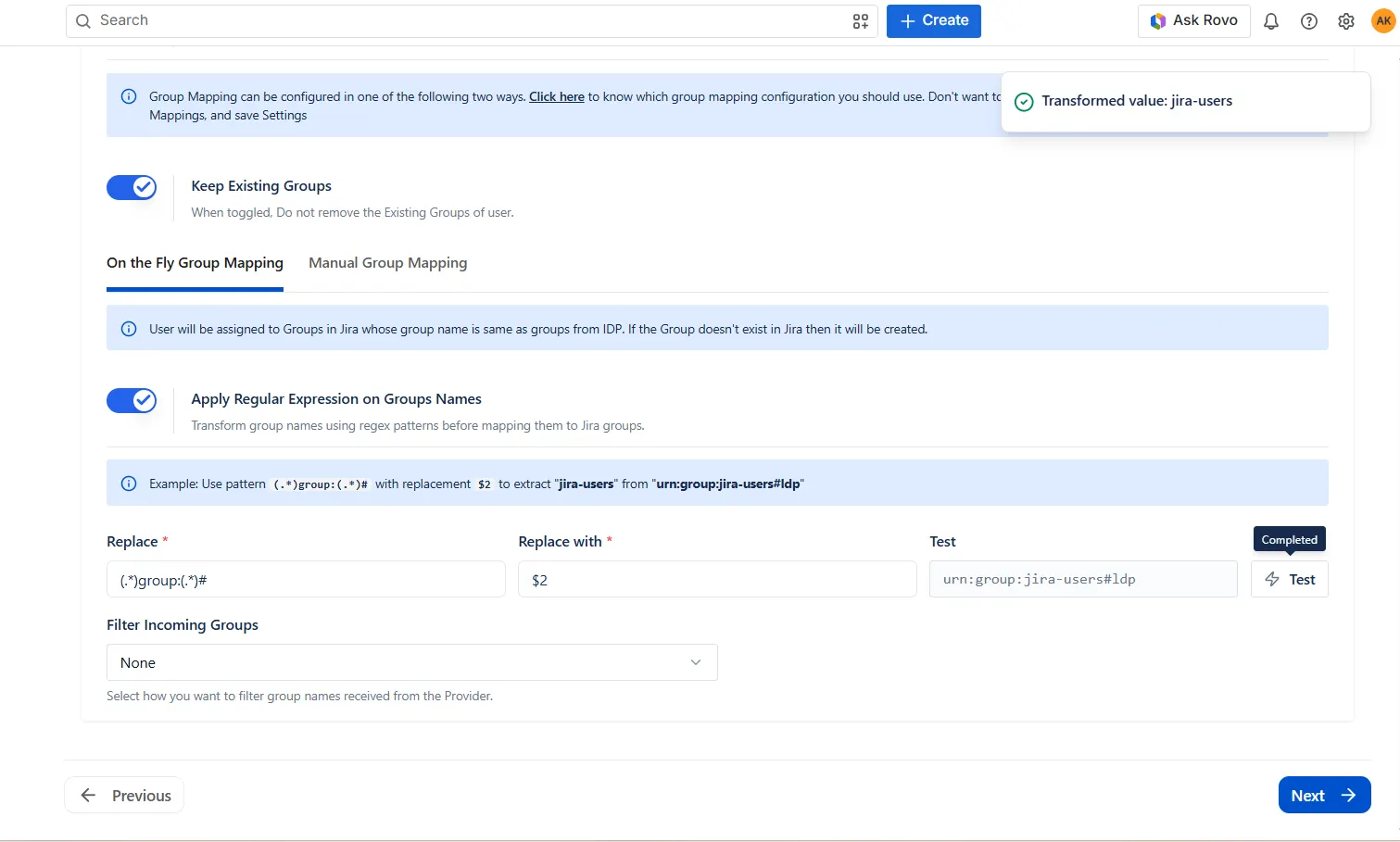
Use Case
Scenario: Your IDP contains groups like "APP_JIRA_developers", "APP_JIRA_admins", and "APP_CONFLUENCE_writers". You only want to sync Jira-relevant groups.
Using a "Starts With" filter on "APP_JIRA_" and a regex transformation to strip the prefix, the resulting Jira groups become "developers" and "admins" — clean, consistent, and exactly matching your Jira group naming convention.
Portal Mapping for Portal-only Customers
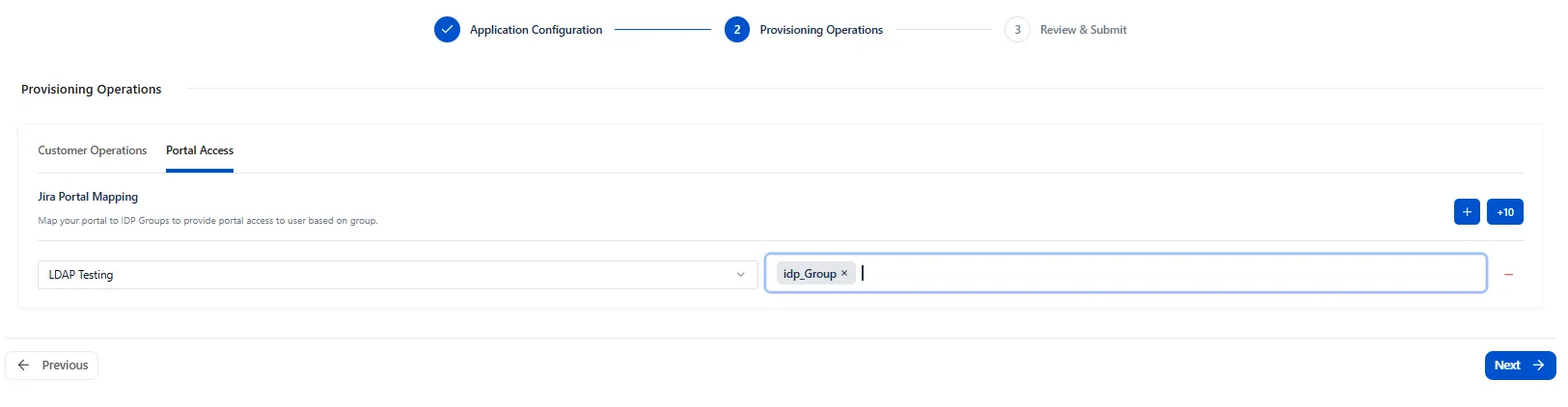
Map the customer entries from IdP to respective Portal based on configured groups.
Portal-Only Customer Sync via SCIM
miniOrange’s Users and Groups Provisioning extends its provisioning capabilities beyond standard Jira users to include portal-only customers — external users who interact solely through JSM Customer Portals and do not hold a Jira license.
What Is Portal-Only Sync?
Portal-only customers are external stakeholders (e.g., clients, vendors, end users) who submit and track requests through JSM portals. Traditionally, these users had to be added and managed manually. With miniOrange’s Customer-SCIM, this process is fully automated.
How It Works
- Configure your IDP to provision a specific set of users as portal-only customers.
- On SCIM push, these users are automatically created as JSM portal customers — no Jira license consumed.
- Users are mapped to the correct JSM Organization based on IDP group as configured under the Portal Access tab.
- This is currently the only supported method for syncing portal-only customers via SCIM.
Use Case
Scenario: A managed services provider has 500+ external clients who raise support tickets through JSM portals. Adding each client manually is not scalable.
With SCIM Portal Sync, clients from the IDP are automatically provisioned as portal-only customers, placed in the correct JSM Organization, and granted access to only the portals relevant to them — all without consuming a single Jira license.
Note: Portal-only customer sync via SCIM is exclusively available through the miniOrange SCIM Cloud app. This capability is not supported natively by Atlassian.
3.1 Custom Attribute Mapping for Portal Customers
Beyond provisioning portal customers, miniOrange’s Users and Groups Provisioning allows you to sync custom attributes stored in your IDP directly to corresponding fields on the JSM portal customer profile. This ensures customer data in Jira always reflects what's in your identity provider — with no manual data entry.
How It Works
- Under “Customer Operations”, navigate to the Custom Attribute Mapping configuration within the Portal-Only Sync settings.
- Map each IDP attribute (e.g., department, phone number, account tier, custom fields) to the corresponding JSM portal customer field.
- On every SCIM sync, the mapped attributes are automatically written to the customer's JSM profile.
- Any portal fields that are left unmapped will remain untouched/blank — ensuring only intentionally mapped data is retained.
Use Case
Scenario: A B2B software company stores customer-specific attributes in their IDP — such as "Contract Tier", "Account Manager", and "Region" — and wants these details visible on the customer's JSM profile for support agents.
With Custom Attribute Mapping, these IDP fields are mapped once to the corresponding JSM portal fields. Every time a customer logs in or the SCIM sync runs, their profile is automatically updated — support agents always have accurate, up-to-date customer context without any manual effort.
3.2 IDP Group to JSM Portal Mapping for Portal-Only
Customers
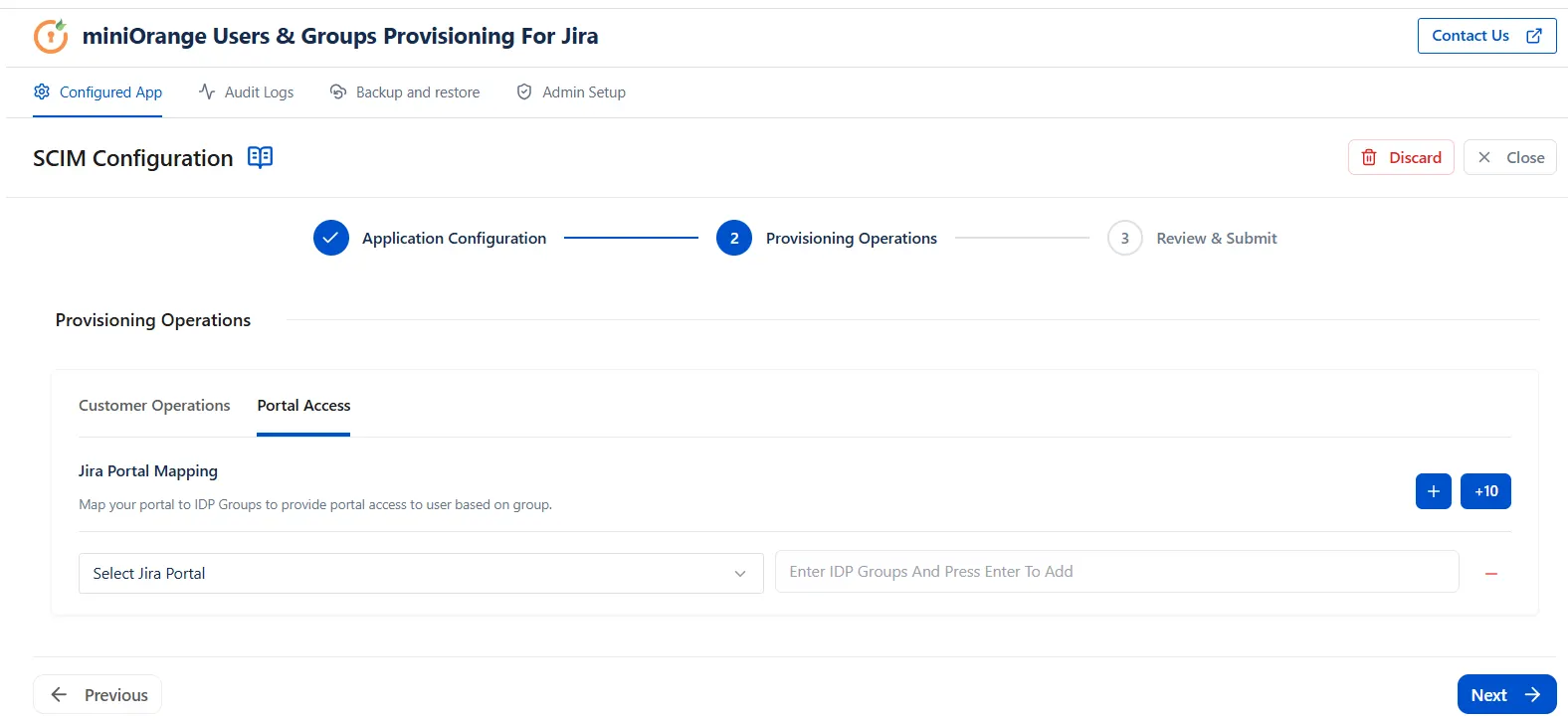
miniOrange's Customer sync extends its provisioning capabilities beyond standard user and organization mapping to include granular portal access control allowing administrators to map IDP groups of portal-only customers directly to specific JSM organizations, ensuring every external customer lands on only the portal relevant to them.
What Is IDP Group to JSM Portal Mapping?
When an organization runs multiple JSM Customer Portals, controlling which portal-only customer can access which portal becomes a critical operational and security requirement. IDP Group to JSM Portal Mapping automates this entirely by reading a customer's IDP group membership at the time of provisioning or sync and granting access to only the mapped JSM portal, without any manual assignment by administrators.
How It Works
- Configure your IDP groups corresponding to each JSM portal (e.g., IT-Customers, HR-Customers, Finance-Customers).
- Under the Portal Access tab, map each IDP group to its corresponding JSM Customer Portal.
- On SCIM push or login, the customer's IDP group is read automatically and access is granted to the mapped portal only.
- Customers belonging to unmapped groups are denied portal access entirely, preventing unauthorized entry before a ticket can be raised.
- If a customer's IDP group changes, their portal access is updated automatically on the next sync — no manual intervention required.
Use Case
A mid-sized enterprise manages three JSM Customer Portals — IT Support, HR Services, and Finance Helpdesk — each intended for a distinct set of external customers. With hundreds of portal-only customers across these portals, manually assigning each customer to the correct portal and JSM Organization is not scalable and is highly error-prone.
With IDP Group to JSM Portal Mapping, the administrator configures the mapping once:
- IDP Group IT-Customers → IT Support Portal
- IDP Group HR-Customers → HR Services Portal
- IDP Group Finance-Customers → Finance Helpdesk Portal
From that point, every portal-only customer provisioned via SCIM is automatically placed in the correct portal based on their IDP group — no tickets raised on the wrong portal, no unauthorized access, and no admin overhead at scale.
Note: IDP Group to JSM Portal Mapping for portal-only customers is available exclusively through the miniOrange Customer-SCIM app. This capability is not supported natively by Atlassian.
Did this page help you?