

Atlassian has ended new Data Center (DC) license sales and continues to prioritize Cloud for new customers. If you’re already using a data center, you have to plan your migration to the Cloud. And if you’re buying your first license, Atlassian Cloud is the only option.
That shift comes with multiple benefits, like agility, scalability, and lower cost overhead. However, your DC environment, being on-premise, gave you more direct control over security.
When you move to Atlassian Cloud, that responsibility shifts to a shared cloud model. You still need strong controls around user access, sensitive data, external sharing, and API activity to protect your environment.
That is where miniOrange marketplace apps come in.
As a trusted Atlassian Marketplace vendor, we build security-first solutions designed to extend Atlassian Cloud with enterprise-ready identity and access management.
Here’s a deep dive into our apps and where they fit into your stack.
Identity Security
Your Atlassian Cloud environment needs strong identity controls for all users, be it employees or portal customers. These apps help you centralize authentication, reduce password risk, and apply access policies across Jira, Confluence, and Jira Service Management (JSM).
1. SAML Single Sign On (SSO)
Supported Apps: Jira and Confluence
Multiple applications should not create fragmented authentication experiences. Our app lets you securely log in to your Atlassian Cloud suite with a single credential to access everything. We support multiple IdPs, including Auth0, Entra ID, Keycloak, Okta, OneLogin, Ping Identity, and any SAML 2.0-compliant providers. This gives you a single identity control plane across your SaaS ecosystem.
Who It’s For: Enterprises with SAML-based infrastructure that want to enforce strict access policies across a global workforce without incurring the high cost of premium Atlassian tiers for every single user.
Key Capabilities:
- Multi-IdP support for hybrid environments
- Just-in-Time (JIT) provisioning
- Custom login and logout URLs
- Domain and group-based redirection rules
- Custom SSO look and feel
Benefits:
- Reduced password fatigue for employees
- Lower risk of unauthorized access
- Consistent security policies
- Faster and frictionless login experiences
How To Get Started: Install the app from the Atlassian Marketplace and establish a handshake between your IdP and SP. You can read our documentation for a step-by-step guide.
2. OAuth/OpenID SSO
Supported Apps: Jira and Confluence
Enable SSO across multiple Atlassian Cloud apps using the modern OpenID Connect protocol. Allow users to use their existing social or corporate IDs to access Atlassian tools. We support AWS Cognito, Entra ID, Keycloak, Okta, and any custom OAuth/OIDC providers. Enable secure access for guests and external partners without adding identity complexity.
Who It’s For: Organizations that work with developers, agencies, or external partners who already utilize modern authentication standards.
Key Capabilities:
- OAuth 2.0 and OpenID Connect support
- Secure token-based authentication
- PKCE support for extra security
- Support for multiple IdPs
- Custom configuration
Benefits:
- Faster guest and partner onboarding
- Reduce password-based risk in Cloud environments
- Reduced IT burden for password resets
- Simplified access for distributed teams
How To Get Started: Install the app from the Atlassian Marketplace. Configure your client secret and redirect URLs to begin. Our documentation covers everything you need on your way.
3. SAML/OAuth SSO for JSM Customers
Supported Apps: Jira Service Management
Don’t burden your Service Desk customers with remembering passwords. Our app provides them with a seamless SSO experience. Customers and agents follow distinct authentication flows customized to their roles. We allow them to stay authenticated without needing an official Atlassian Cloud license.
Who It’s For: Support leaders who manage high-volume customer portals.
Key Capabilities:
- Access restriction to customer portals based on IdP groups and organizations
- Multiple IdP support, SSO, and MFA
- Automated organization mapping
- Dynamic form support
- Custom Field Attribute mapping
Benefits:
- Increase CSAT scores
- Maintain security for external identities
- Reduce costs on additional licenses for external users
How To Get Started: Add the JSM SSO app to Jira. Configure your customer-facing directory and enable the portal-specific login. Explore our documentation for a comprehensive setup guide.
Data Security
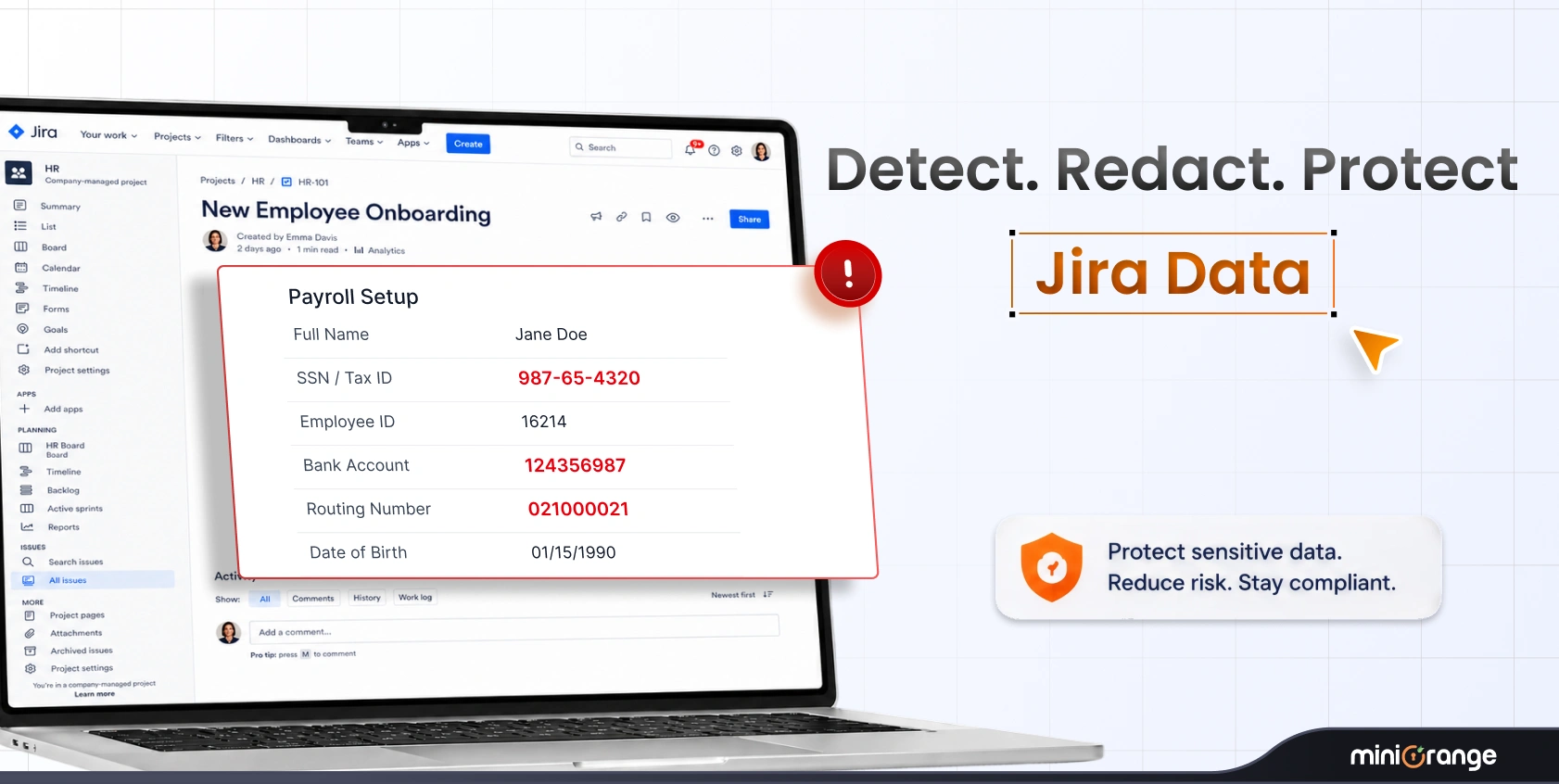
Sensitive data can appear in Jira issues, comments, Confluence pages, and attachments at any time, knowingly or unknowingly. You need visibility and controls that help prevent exposure before it becomes a security incident.
1. DLP Sensitive Data Scanner
Supported Apps: Jira and Confluence
Did an employee paste an AWS key into a Jira comment? Our app monitors and prevents such sensitive data loss across the Cloud content. It scans your Cloud content in real-time and identifies PII/PHI, passwords, API keys, and other sensitive data. It also helps identify inactive users and unused licenses, allowing you to clean up your environment before migration.
Who It’s For: Decision-makers overseeing a move to the Cloud who cannot afford downtime or broken user access.
Key Capabilities:
- Sensitive data detection across content
- Custom regex rules to detect sensitive data
- Clear and detailed PII violation reports
- Real-time monitoring and alerts
- Automatic redaction by leveraging Atlassian Forge
Benefits:
- Reduced risk of expensive data breaches
- Maintain your organization’s reputation
- Minimize business disruption
- Prepare your environment for a secure Cloud migration
How To Get Started: Install the DLP app. Define custom regex rules for specific data types if needed. Read our documentation for a step-by-step setup guide.
2. Enhanced API Authentication
Supported Apps: Jira
Secure how external services and scripts interact with Jira Cloud APIs and leverage its full potential. Ensure enterprise-grade security by authenticating with OAuth/OIDC or API keys/tokens instead of vulnerable passwords.
Who It’s For: Security teams who need to protect their API layer from unauthorized access and token abuse.
Key Capabilities:
- API authentication using OAuth 2.0 and API tokens
- Granular API access control by endpoints
- Group-based restrictions
- Audit logging
Benefits:
- Strengthen Jira Cloud REST API security
- Gain control over how integrations access Jira
How To Get Started: Install the app and configure OAuth or API token authentication. Go through our documentation for a deep dive.
3. Secure Share
Supported Apps: Jira and Confluence
Many organizations purchase additional licenses for external stakeholders who only need limited access. This is no longer necessary. Our app allows you to share Jira issues or Confluence pages with external stakeholders via secure, unique links without buying extra licenses or exposing your entire instance. You can implement expiry, passwords, SSO, and IP limits for additional security for Cloud collaboration.
Who It’s For: Project leads and CXOs who need to collaborate with clients or vendors without the high cost of extra licenses.
Key Capabilities:
- Create password-protected links for issues and pages
- Granular permission management based on IdPs
- Custom domain and design options
- Full control over permissions that can be assigned
- External users can add comments and attachments
Benefits:
- Save on additional license costs
- Maintain strict control over data shared
- Enable external collaboration while ensuring security
How To Get Started: Click the Secure Share icon on any Jira issue or Confluence page. Generate a link, set a password, and send it to your partner. Read our documentation for a detailed overview of all features and functionalities.
User Lifecycle Management and Access Management
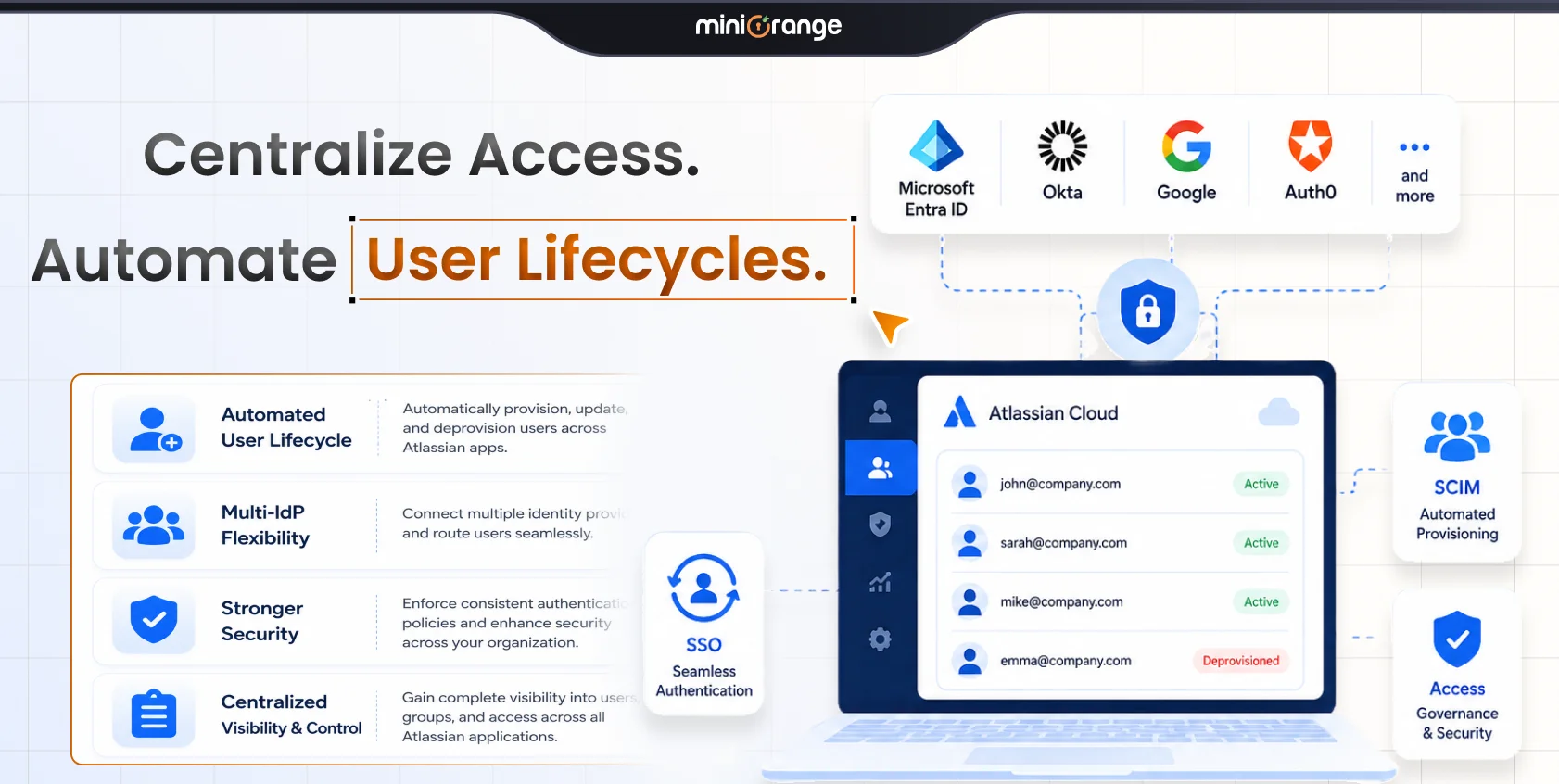
User access should reflect your corporate directory, onboarding process, offboarding process, and licensing needs. These apps help you provision users automatically and remove inactive accounts.
1. Automated User Management
Supported Apps: Jira
Most organizations waste 25-30% of their SaaS licenses on users who aren’t even using them. Our app finds those inactive Jira users, deactivates them, and reduces your licensing costs. You can manage everything from a single dashboard and deactivate, delete, or restore access in bulk in just a few clicks.
Who It’s For: Organizations that manage large user bases with frequent onboarding and offboarding.
Key Capabilities:
- Auto-deactivation of inactive users based on last login or activity
- License optimization by removing inactive users from licensed groups
- Preview changes in a safe mode before applying
- Bulk user operations, including activation, deactivation, and deletion
- Visual dashboards with activity insights and audit logs
Benefits:
- Reduce Jira Cloud licensing costs
- Free up seats for users
- Eliminate inactive accounts that create security risks
How To Get Started: Install the app, and it will begin monitoring and managing your user list immediately. Explore our documentation for the setup guide.
2. SCIM Provisioning, User Sync and Group Sync
Supported Apps: Jira and Confluence
Sync users, portal-only customers, groups, and directories with SCIM and REST APIs from multiple IdPs for Jira Cloud automatically and in real time. We support Azure AD, Okta, Google Workspace, OneLogin, Oracle IDCS, Keycloak, AWS and SCIM-compliant IdPs for the Cloud.
Who It’s For: Enterprises that require instant provisioning for new hires and automated group management for security.
Key Capabilities:
- Automatic user and group provisioning and deprovisioning
- Configurable provisioning options
- Update users upon successful authentication
- Streamlined setup aligned with Cloud environments
- IdP App-specific provisioning
Benefits:
- Centralize identities across Atlassian apps
- Eliminate errors associated with manual provisioning
- Ensure security with immediate deprovisioning when users leave
- Ensure your Atlassian directory always matches your corporate directory
How To Get Started: Install the app and connect your IdP to run your first synchronization. You can explore our documentation for a deeper understanding of all features.
Governance
As your Cloud environment expands, you need governance controls for both human users and AI assistants. These apps help you manage who can access resources. This includes both humans and AI agents.
1. Access Governance
Supported Apps: Jira Service Management
Automate the user access lifecycle while maintaining audit-ready governance via JSM. Turn JSM into a centralized access portal where employees can request access to applications, groups, and cloud resources.
Who It’s For: Organizations that need to automate access requests, approval workflows, periodic reviews, and compliance reporting.
Key Capabilities:
- Centralize access request management through a unified JSM portal
- Route access requests to the right approver instantly
- Auto-provision users to Okta, Entra ID, AWS, GitHub, and other IAM platforms upon approval
- Grant temporary elevated access to sensitive resources
- Automatically revoke access once the specified time window expires
- Enforce multi-tier approval paths for high-risk resources
- Track all actions from request to revocation in Jira
Benefits:
- Replace manual access requests with automated workflows
- Reduce long-term privileged access exposure
- Automate onboarding, offboarding, and access revocation
- Generate detailed reports for external security audits
- Support SOC 2, ISO 27001, and GDPR compliance requirements
How To Get Started: Install the app in Jira Service Management, configure your approval workflows, and connect your IAM platforms to automate provisioning and access reviews.
2. AI Governance
Supported Apps: Jira and Confluence
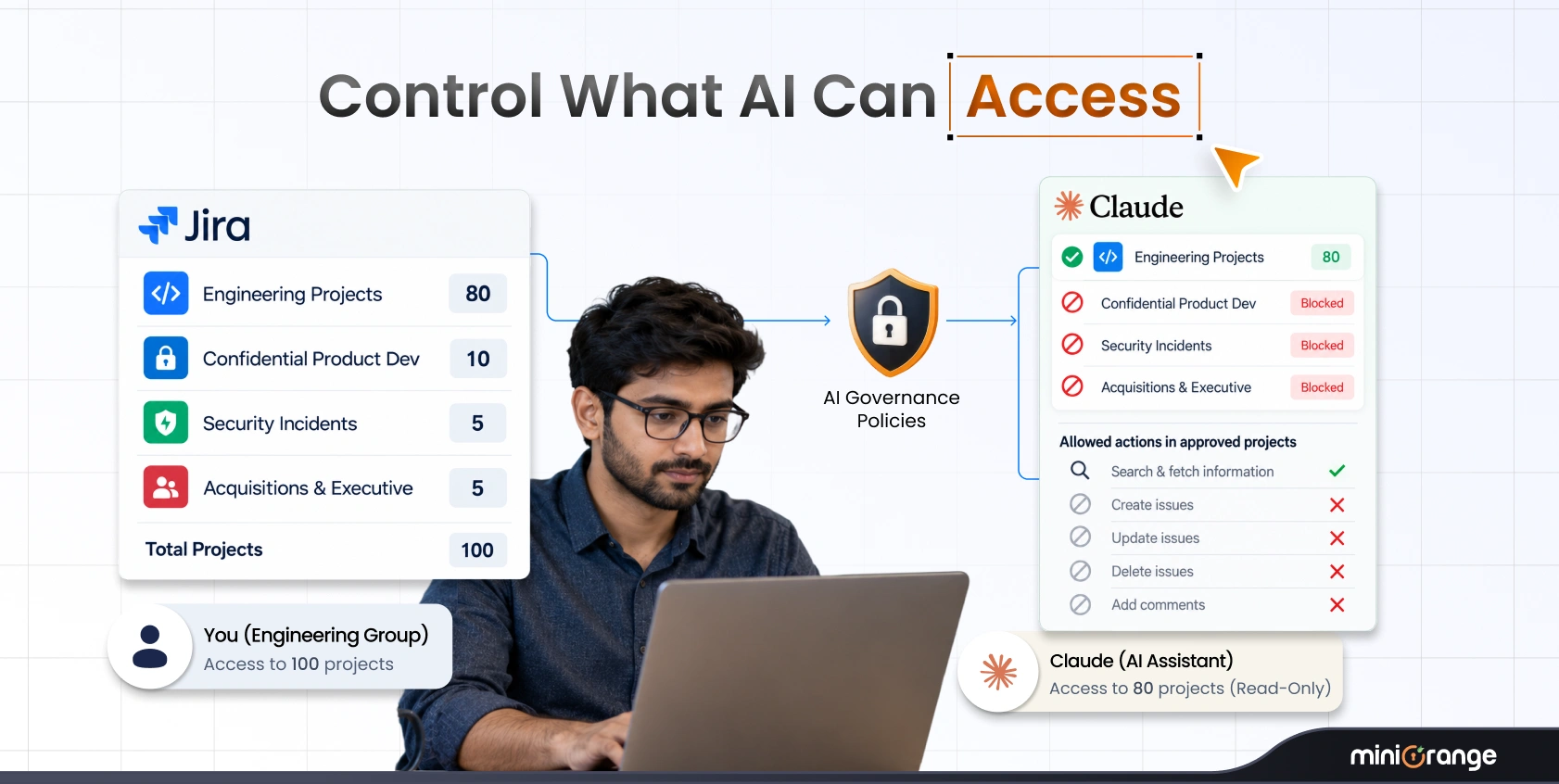
AI assistants like Claude can now read and change things in Jira and Confluence for you. That’s powerful, but it raises two questions: who decides what the AI is allowed to touch, and how do you know what it actually did?
AI Governance sits in the middle. Claude connects to AI Governance instead of connecting to Atlassian directly. Every request the AI makes passes through two checks before anything happens: your rules decide what each AI, person, or group may do, and every action is recorded.
Who It’s For: Teams that use AI assistants with Jira and Confluence and need control, visibility, and accountability for AI actions.
Key Capabilities:
- Allow or block actions by AI, user group, or type of action
- Apply policies that prevent risky actions, such as deleting Jira issues or Confluence pages
- Route AI assistants through a governed MCP endpoint instead of a direct Atlassian connection
- Require users to sign in individually so every AI action is tied to a real person
- Record allowed and blocked AI actions in a searchable Activity Log
- View the user, AI source, operation, decision, request arguments, response size, and latency for each action
- Review dashboards for request totals, block rate, top tools, and allowed versus blocked activity
Benefits:
- Control what AI assistants can access and do
- Stop risky actions before they happen
- Maintain a complete record of every AI action
- Apply different AI permissions by user group
- Improve accountability for AI activity across Jira and Confluence
How To Get Started: Install AI Governance from the Atlassian Marketplace. Allow the governed callback URL in Rovo, copy your MCP server URL, and add it as a custom connector in Claude. Then configure your Access Policy and review activity in the Activity Log.
Summary
As your organization grows, so does the need for tighter security and identity control and better visibility into the data you share.
That’s exactly where miniOrange adds value. Our Atlassian Cloud apps provide you with security and automation features that are must-haves in 2026. You gain greater control over identity, access, and data while retaining the flexibility of the Cloud.
Contact our team if you have any questions or need assistance in getting started with any of the apps.
Frequently Asked Questions
1. Why are these apps critical for Atlassian Cloud specifically?
Cloud environments require additional layers of identity, API security, and data protection as they scale. These apps fill those gaps.
2. Can you integrate miniOrange with existing identity providers?
Yes. You can integrate with Azure AD, Okta, Google Workspace, and more.
3. How does miniOrange help with license optimization?
Apps like Automated User Management and Secure Share reduce your seat count. You only pay for active users and avoid buying licenses for external stakeholders.
Leave a Comment