

Keeping your business safe isn't just about blocking threats anymore. It's also about controlling what can run on your devices in the first place.
Every day, employees download applications, install browser extensions, use productivity tools, and access software that may never have been reviewed or approved by IT. While some of these applications are harmless, others can introduce security risks, create compliance issues, or become entry points for malware and ransomware.
This is a growing challenge for organizations managing hundreds or thousands of endpoints.
Application allowlisting helps solve this problem by taking a different approach to security. Instead of trying to identify and block every potentially harmful application, it only allows approved applications to run. Any application that is not explicitly approved is blocked by default.
It is a simple idea, but a powerful one.
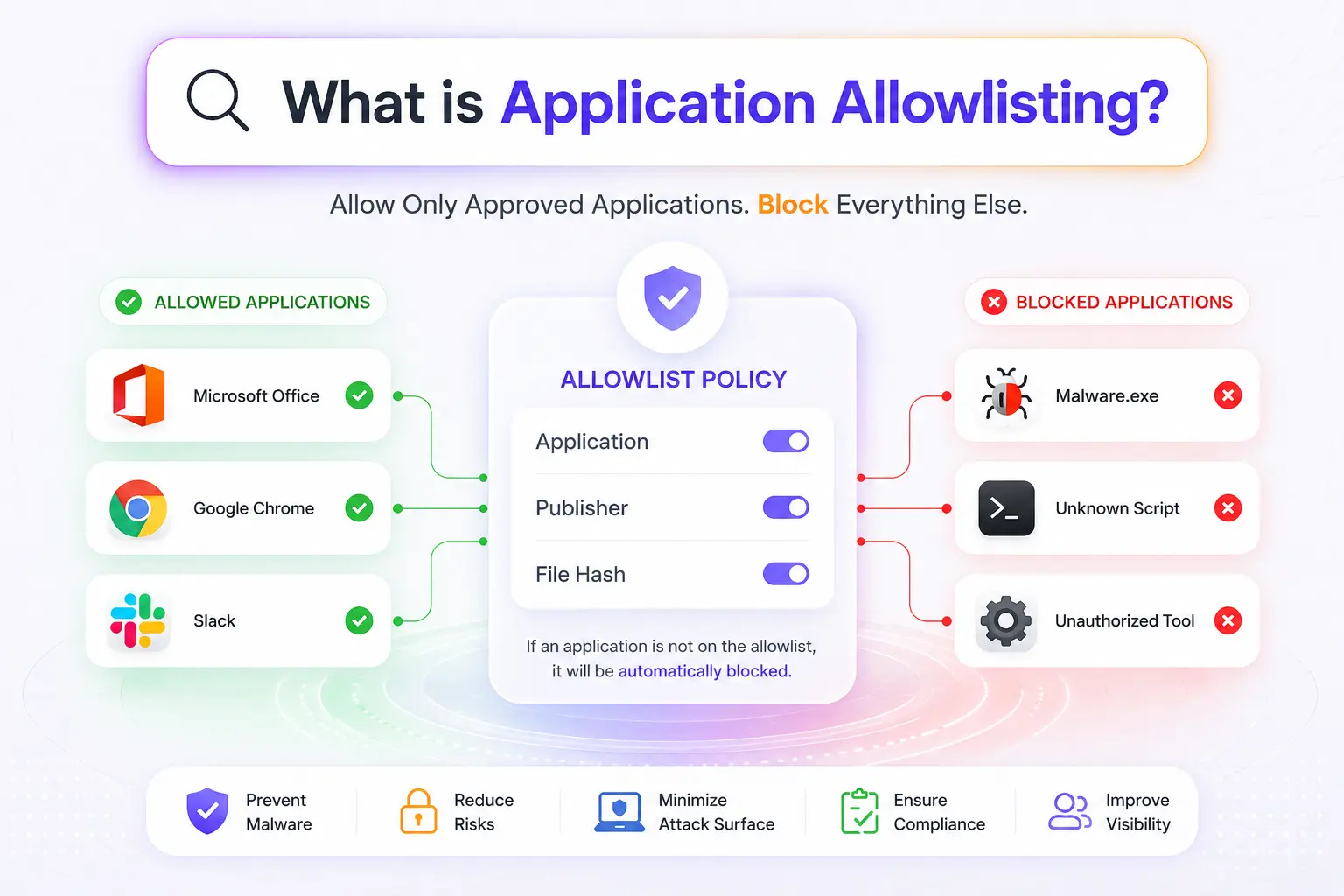
By limiting devices to trusted software, organizations can significantly reduce their attack surface, prevent unauthorized applications from running, and strengthen their overall security posture.
In this blog, we'll explain what application allowlisting is, how it works, why it matters, and how organizations can implement it effectively using a Unified Endpoint Management (UEM) solution.
What is Application Allowlisting?
Application allowlisting is a security control that permits only approved applications to run on a device or system. Any application that is not explicitly approved is automatically blocked, helping organizations prevent unauthorized software, malware, and potentially harmful programs from executing.
Think of it like a guest list for an event. If your name is on the list, you get in. If it isn't, you're denied entry.
Application allowlisting works the same way. IT administrators create a list of trusted applications that are allowed to run on company devices. Everything else is blocked unless specifically approved.
For example, a company may approve: Microsoft Office, Google Chrome, Zoom, Slack, and some business-specific applications.
If an employee attempts to install an unapproved application, the allowlisting policy can prevent it from running.
This approach differs from traditional security tools such as antivirus software.
Antivirus solutions primarily focus on identifying and blocking known threats. Application allowlisting takes a proactive approach by preventing unknown, unauthorized, or unapproved applications from running in the first place.
As a result, organizations gain greater control over the software environment across their devices.
Why is Application Allowlisting Important?
Every device in an organization runs dozens of applications. Some are approved by IT, while others are installed by users looking for a quick solution to a problem. The challenge is that not every application meets your organization's security standards.
This creates a significant security risk. In fact, more than 75% of business security breaches involve employees running applications or software that were never approved by the IT department. The software itself may not always be malicious, but unapproved applications can introduce vulnerabilities, expose sensitive data, create compliance issues, and increase the overall attack surface.
Application allowlisting helps organizations regain control. Instead of allowing any application to run by default, IT teams define which applications are trusted and permitted on company devices. Everything else is blocked unless explicitly approved. This creates a more secure and predictable application environment while reducing the risk associated with unauthorized software.
How Does Application Allowlisting Work?
Application allowlisting works by creating a list of trusted applications and preventing all other applications from running. Instead of continuously identifying and blocking new threats, the system follows a default-deny approach. If an application is not included in the approved list, it is automatically blocked.
The process typically involves five key steps:
1. Identify Approved Applications
The first step in application allowlisting is deciding which applications are allowed to run within the organization. Not every application used by employees should automatically be trusted. IT teams typically review the software employees need for their day-to-day work and create a list of approved applications.
This may include productivity tools, communication platforms, business-specific software, browsers, security applications, and other essential utilities. The goal is to create a trusted software baseline that supports business operations while reducing unnecessary security risks
2. Create Allowlisting Rules
Once approved applications have been identified, the next step is defining how the system will recognize them. This is done through allowlisting rules.
Depending on the organization's requirements, applications can be approved based on characteristics such as their file path, file name, digital signature, cryptographic hash, or trusted publisher. These rules act as verification checks that help distinguish approved software from unauthorized applications.
By establishing clear allowlisting rules, organizations can ensure that only trusted applications are permitted to run on managed devices.
3. Deploy Policies to Devices
After the allowlist has been created, the policy is deployed across devices within the organization.
Whenever a user attempts to launch an application, the system automatically checks whether it matches the approved allowlist criteria. If the application is recognized as trusted, it is allowed to run normally. If it does not meet the defined criteria, execution is blocked.
This enforcement occurs in real time, helping prevent unauthorized software from running before it can create security or compliance issues.
4. Monitor and Enforce Application Usage
Application allowlisting is not a set-it-and-forget-it security control. Applications are continuously installed, updated, and requested by users, which means policies require ongoing oversight.
IT teams regularly monitor application activity, review blocked applications, and investigate unusual behavior. This helps them determine whether a blocked application should be approved, permanently restricted, or examined further for potential security concerns.
Continuous monitoring ensures that allowlisting policies remain effective without unnecessarily disrupting users.
5. Update and Maintain the Allowlist
Business requirements change over time. New applications are introduced, existing software receives updates, and departments adopt new tools to support their work.
To remain effective, allowlists must evolve alongside these changes. IT teams should regularly review approved applications, remove software that is no longer needed, and add newly approved tools when required.
Keeping the allowlist up to date helps organizations maintain strong security while ensuring employees continue to have access to the applications they need.
Types of Application Allowlisting Methods
Not all application allowlisting policies work the same way. Organizations can choose different methods to identify and approve trusted applications based on their security requirements and operational needs.
The most common application allowlisting methods include:
1. File Path Allowlisting
File path allowlisting approves applications based on their installation location. For example, an organization may allow applications to run only if they are installed within specific directories such as:
- Program Files
- Windows System folders
- Approved application directories
If an application attempts to run from an unapproved location, it is blocked. While this method is easy to implement, it can be less secure because attackers may attempt to place malicious files within approved locations.
2. Filename Allowlisting
This method allows applications based on their file names. For example, if "Application.exe" is approved, any file with that name may be allowed to run. Although simple to configure, filename-based allowlisting is generally considered less secure because attackers can rename malicious files to match approved file names. As a result, it is often used alongside other allowlisting methods.
3. File Size Allowlisting
File size allowlisting uses the size of an application file as part of the approval criteria. The system compares the file size against approved values before allowing execution. While this can provide an additional validation layer, file size alone is not typically sufficient for strong security because malicious applications can sometimes mimic expected file sizes.
4. Cryptographic Hash Allowlisting
Cryptographic hash allowlisting is one of the most secure methods available. Each approved application is assigned a unique hash value generated from its contents. When a user attempts to run the application, the system compares the application's hash against the approved hash list. If the hash matches, the application is allowed to run.
If the application has been modified in any way, the hash changes and execution is blocked. This method provides strong security but may require more maintenance because application updates often generate new hash values.
5. Digital Signature and Publisher Allowlisting
This method approves applications based on the identity of the software publisher. Applications signed by trusted vendors can automatically be allowed to run. For example, an organization may choose to trust software signed by:
- Microsoft
- Adobe
- Other approved software vendors
This approach offers a balance between security and manageability because application updates from trusted publishers can continue to work without requiring frequent policy changes.
For many organizations, digital signature-based allowlisting provides the most practical combination of security and administrative simplicity.
What is the Difference Between Allowlisting and Blocklisting?
Application allowlisting and application blocklisting are both application control strategies, but they operate very differently. Allowlisting follows a "default deny" approach, while blocklisting follows a "default allow" approach.
With allowlisting, only approved applications can run. Everything else is blocked. With blocklisting, all applications are allowed to run unless they appear on a predefined list of blocked applications.
The differences become more significant as organizations grow and security requirements increase.
| Feature | Application Allowlisting | Application Blocklisting |
|---|---|---|
| Approach | Allow approved applications only | Block known unwanted applications |
| Default Action | Deny by default | Allow by default |
| Security Level | Higher | Lower |
| Protection Against Unknown Threats | Strong | Limited |
| Risk of Unauthorized Software | Low | Higher |
| Administrative Effort | Higher | Lower |
| Best For | Security-focused environments | Basic application control |
Application blocklisting can help prevent known unwanted software from running, but it has limitations. If a new application is introduced and it is not yet on the blocklist, users may still be able to run it.
Application allowlisting takes the opposite approach. New or unknown applications are automatically blocked unless explicitly approved.
For organizations handling sensitive data, regulated workloads, or large endpoint environments, allowlisting often provides a stronger cybersecurity posture because it reduces the likelihood of unauthorized software executing on managed devices.
Key Benefits of Application Allowlisting
Application allowlisting is often viewed as a security control, but its benefits extend beyond simply blocking unauthorized software. When implemented correctly, it helps organizations reduce risk, improve compliance, and maintain greater control over their endpoint environment.
Here are some of the biggest benefits of application allowlisting:
- Prevents Unauthorized Applications : Application allowlisting gives organizations control over which applications can run on managed devices. By allowing only approved software, IT teams can reduce the risk of unapproved tools introducing security or compliance issues.
- Reduces Malware and Ransomware Risk : Many malware and ransomware attacks begin when malicious or unauthorized software is executed on a device. Application allowlisting helps prevent this by blocking software that has not been explicitly approved, reducing the risk of malware infections and ransomware outbreaks.
- Improves Regulatory Compliance : Application allowlisting supports compliance efforts by restricting software execution to approved applications. This helps organizations strengthen controls around data protection, access management, and endpoint security.
- Limits Insider Threats : Employees can intentionally or unintentionally introduce risky software into the environment. Application allowlisting helps reduce this risk by ensuring only approved applications are allowed to run on company devices.
- Reduces Shadow IT : Employees often adopt applications without IT approval, creating security and compliance challenges. Application allowlisting helps reduce shadow IT by restricting devices to authorized software only.
- Minimizes the Attack Surface : Every application installed on a device increases potential cyber security risks. By limiting endpoints to trusted applications, organizations can reduce the number of opportunities attackers have to exploit vulnerabilities.
- Strengthens Zero Trust Security : Application allowlisting supports a Zero Trust approach by requiring applications to be explicitly approved before they can run. This default-deny model helps organizations maintain tighter control over endpoint activity and software usage.
Common Challenges of Application Allowlisting
Despite its security benefits, application allowlisting is not without challenges. Organizations that implement allowlisting for the first time often discover that maintaining an effective allowlist requires planning, visibility, and ongoing management.
Understanding these challenges can help organizations build a more sustainable application control strategy.
1. Maintaining Approved Application Lists
Business environments constantly change. New applications are introduced, existing applications are retired, and employees regularly request new tools. As a result, approved application lists must be reviewed and updated frequently. If allowlists are not maintained properly, employees may be unable to access the applications they need to perform their work.
2. Manually Creating and Managing Allowlists
Building an application allowlist manually can be time-consuming. IT teams must identify approved applications, verify software sources, determine appropriate allowlisting methods, and continuously update policies as applications change. For organizations managing hundreds or thousands of devices, maintaining allowlists manually quickly becomes difficult and increases administrative overhead. This is one of the biggest reasons organizations turn to application management solutions for centralized application management.
3. User Resistance and Productivity Concerns
Employees often expect the flexibility to install software when needed. Application allowlisting can sometimes create friction if users are unable to access new tools immediately. Without a clear approval process, allowlisting may be perceived as restrictive rather than protective. Organizations must strike a balance between security requirements and user productivity.
4. Handling Application Updates
Applications receive updates frequently. Depending on the allowlisting method being used, software updates may change file hashes, digital signatures, or other identifying characteristics. If policies are not updated accordingly, legitimate applications may be blocked after an update. This makes ongoing maintenance an important part of any allowlisting strategy.
5. Managing Multiple Operating Systems
Many organizations support a mix of Windows, macOS, Android, and other operating systems. Each platform may handle application management differently, creating additional complexity for IT teams. Managing allowlisting policies separately across multiple operating systems can become difficult without a centralized management platform.
6. Balancing Security and Flexibility
The most restrictive allowlist is not always the most practical. Organizations need to balance strong security controls with the flexibility employees need to perform their jobs effectively. Overly restrictive policies can lead to productivity issues, while overly permissive policies may weaken security. Finding the right balance requires continuous monitoring and policy refinement.
Application Allowlisting Best Practices
Application allowlisting is most effective when implemented as part of a broader endpoint security strategy. The following best practices can help organizations maximize security while minimizing operational challenges.
1. Start with an Application Inventory
Before implementing application allowlisting, it's important to understand which applications are already being used across the organization. This includes business-critical software, productivity tools, security applications, and department-specific programs. Creating an inventory helps IT teams identify trusted applications, eliminate redundant software, and build a more accurate allowlist. It also reduces the risk of accidentally blocking applications employees rely on for their daily work.
2. Use Trusted Software Sources
Applications should only be approved if they come from trusted vendors and verified sources. Downloading software from unofficial websites or unknown publishers can introduce security risks, even if the application appears legitimate. Whenever possible, organizations should validate software publishers, verify digital signatures, and use approved application repositories. This helps ensure that only trusted software is added to the allowlist.
3. Review and Update Allowlists Regularly
Application allowlisting is not a one-time project. New applications are introduced, existing software receives updates, and business requirements change over time. Regular reviews help ensure the allowlist remains accurate and relevant. Organizations should periodically remove outdated applications, approve newly required software, and update policies to reflect changes in the application environment.
4. Apply the Principle of Least Privilege
Users should only have access to the applications necessary for their roles and responsibilities. Allowing access to unnecessary software increases security risks and creates additional management complexity. By limiting application access to what users genuinely need, organizations can reduce their attack surface and maintain tighter control over endpoint activity.
5. Monitor Application Activity
Continuous monitoring is essential for maintaining an effective application allowlisting strategy. IT teams should track blocked applications, policy violations, software usage trends, and unusual application activity. These insights can help identify potential security risks, uncover shadow IT, and highlight applications that may need to be reviewed or added to the allowlist.
6. Establish a Formal Application Approval Process
Employees will inevitably need access to new applications as business requirements evolve. Having a clear and documented approval process ensures these requests are reviewed before software is deployed. A structured approval workflow helps reduce shadow IT, improves security oversight, and ensures new applications meet organizational security and compliance requirements before they are added to the allowlist.
7. Use a UEM Solution for Centralized Management
Managing application allowlisting manually becomes increasingly difficult as device counts grow. A Unified Endpoint Management (UEM) solution allows organizations to create, deploy, enforce, and update allowlisting policies from a centralized dashboard. This simplifies administration, improves visibility, and helps ensure consistent policy enforcement across all managed devices.
Why is UEM the Best Way to Implement Application Allowlisting?
Application allowlisting can be implemented using native operating system controls, scripts, or standalone security tools. While these approaches may work for small environments, they quickly become difficult to manage as the number of devices, users, and applications grows.
Imagine manually creating and maintaining allowlists across hundreds of Windows laptops, Android devices, Macs, and tablets. Every software update, application request, or policy change would require additional administrative effort.
This is where a Unified Endpoint Management (UEM) solution becomes invaluable.
A UEM platform centralizes application management and allows IT teams to enforce application allowlisting policies across all managed devices from a single console.
Instead of managing endpoints individually, administrators can:
- Create centralized application allowlists
- Deploy policies remotely
- Approve or block applications at scale
- Monitor compliance across devices
- Manage multiple operating systems from a single dashboard
- Update policies without physically accessing devices
This significantly reduces administrative overhead while ensuring consistent policy enforcement across the organization.
Benefits of Implementing Application Allowlisting Through UEM
Managing application allowlisting manually can become difficult as devices, users, and applications grow. A UEM solution simplifies the process through centralized management and automated policy enforcement.
Some of the key benefits of implementing application allowlisting through a UEM solution include:
- Centralized Policy Management : Administrators can create and manage application allowlisting policies from a single dashboard rather than configuring each device individually.
- Consistent Security Across Devices : Policies can be applied consistently across Windows, macOS, Android, and other supported platforms, reducing security gaps.
- Faster Application Deployment : Approved applications can be deployed and updated remotely, helping employees access the tools they need without delays.
- Simplified Compliance : Centralized reporting and policy enforcement make it easier to demonstrate compliance with organizational and regulatory requirements.
- Reduced Administrative Overhead : Automation helps eliminate much of the manual effort involved in maintaining allowlists, updating policies, and managing application approvals.
- Better Scalability : As organizations grow, UEM solutions allow application allowlisting policies to scale without significantly increasing management complexity.
Simplify Application Allowlisting and Management with miniOrange UEM
Application allowlisting helps organizations control which applications can run on managed devices, reducing the risk of unauthorized software and improving overall security.
However, managing application policies manually can become difficult as device fleets grow and application requirements evolve.
This is where miniOrange UEM helps.
miniOrange UEM provides a centralized platform for managing devices, applications, and security policies across Android, Windows, macOS, iOS, and other supported endpoints. From a single dashboard, administrators can define approved applications, enforce security policies, deploy software remotely, and maintain consistent application control across the organization.
With miniOrange UEM, organizations can:
- Implement application allowlisting at scale.
- Control approved and unauthorized applications.
- Manage devices from a centralized console.
- Enforce security and compliance policies.
- Support BYOD and corporate-owned devices.
- Deploy and manage applications remotely.
- Simplify endpoint security operations.
Whether you are managing a growing business or a large enterprise environment, miniOrange UEM helps streamline application management while maintaining security, compliance, and operational efficiency.
Frequently Asked Questions (FAQs)
1. Is application allowlisting the same as application whitelisting?
Yes. Application allowlisting is the modern term for application whitelisting. Both refer to the practice of allowing only trusted and approved applications to execute on a device.
2. What is the difference between application allowlisting and blocklisting?
Application allowlisting permits only approved applications to run, while application blocklisting prevents specific known applications from running. Allowlisting follows a default-deny approach, whereas blocklisting follows a default-allow approach.
3. How does using application allowlisting solutions help organizations maintain compliance?
Using application allowlisting solutions helps organizations maintain compliance by allowing only approved applications to run on managed devices. This supports security policies, protects sensitive data, and helps meet regulatory requirements.
4. What is the difference between application control and application allowlisting?
Application control is a broad security approach that governs which applications can run on a device. Application allowlisting is a type of application control that allows only approved applications to execute while blocking everything else by default.
5. Can application allowlisting tools prevent malware?
Application allowlisting tools can significantly reduce malware risk by preventing unauthorized applications from executing. Even if malicious files reach a device, they cannot run unless they are explicitly approved.
6. What are the most common application allowlisting methods?
Common application allowlisting methods include file path, filename, file size, cryptographic hash, and digital signature or publisher-based allowlisting.
7. Can users bypass application allowlisting software?
Application allowlisting software can be bypassed if policies are poorly configured or not regularly maintained. Using a UEM solution helps prevent this by enforcing policies consistently and simplifying application management across devices.
8. Does application allowlisting improve cybersecurity?
Yes. Application allowlisting improves cybersecurity by preventing unauthorized applications from running on devices. This helps reduce malware risks, limit shadow IT, minimize the attack surface, and strengthen endpoint security.
Leave a Comment