

Managing a fleet of Android devices across multiple locations is no small feat. Whether your IT team is supporting field employees across time zones or a technician is trying to troubleshoot a kiosk locked in a warehouse, one thing is clear: remote control apps for Android aren’t just convenient anymore; they’re mission-critical.
But with dozens of options on the market, choosing the right one can feel overwhelming. Some tools are built for consumer use, while others are designed for enterprise IT with Mobile Device Management (MDM) integration.
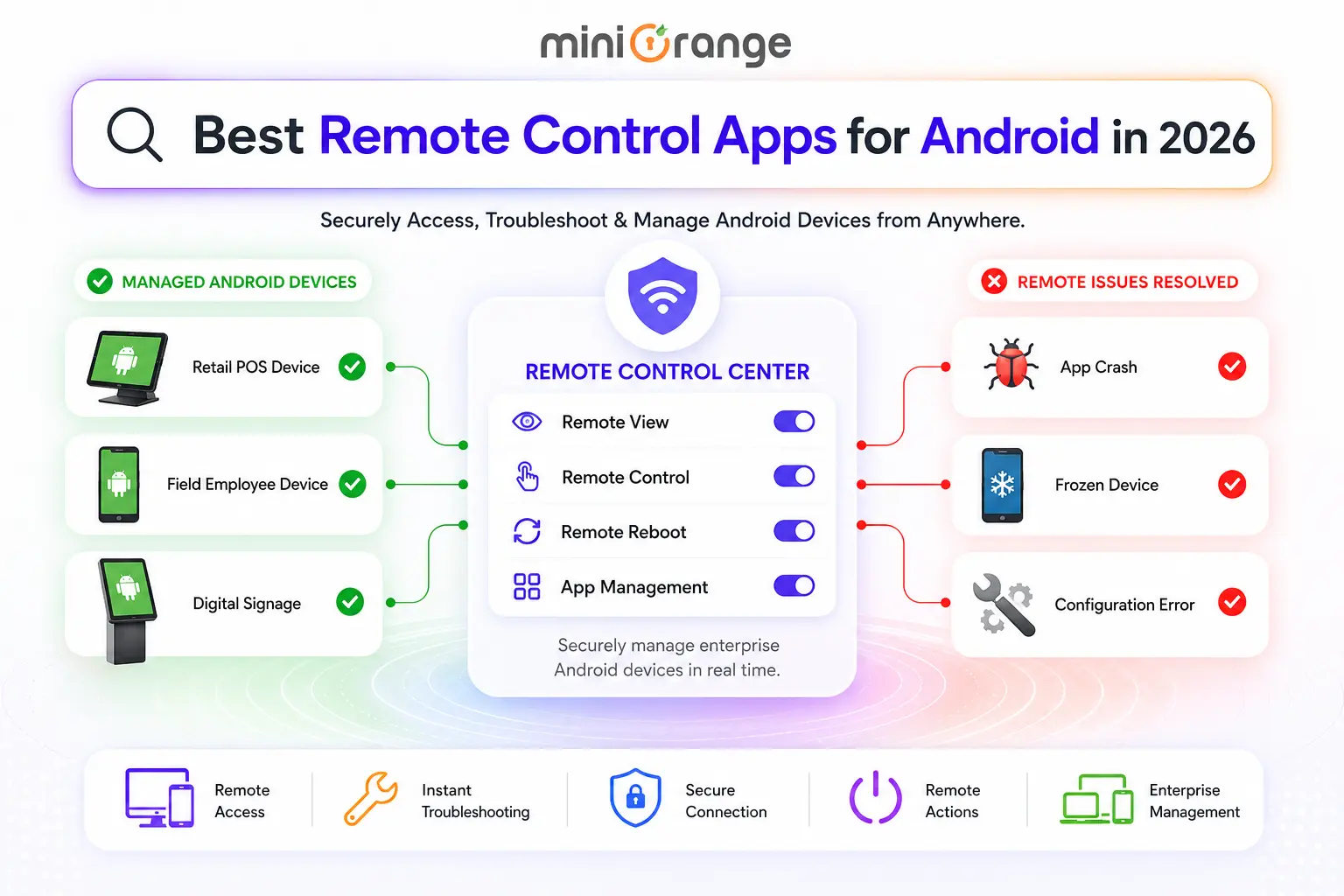
In this article, you’ll find what these tools actually do, what to look for in a solution, and a no-fluff breakdown on “the top seven remote control apps for Android in 2026.” So, you can make the right choice.
What Are Remote Control Apps for Android?
A remote control app for Android is software that lets an authorized user access, view, and interact with an Android device from a separate machine, typically a desktop, laptop, or another mobile device. Think of it as extending your IT team’s hands to any Android device, anywhere in the world, without shipping it back to the headquarters.
The best Android remote control app does more than just mirror a screen. It allows IT admins to execute commands, transfer files, and reboot devices. For enterprises, it manages sessions from a centralized console, without needing end-user involvement.
In MDM environments, remote control is often paired with policies, app deployment, and compliance enforcement, making it a cornerstone of any enterprise mobility strategy.
These apps typically work through a client-agent model: an agent is installed on the Android device, and the technician connects through a management dashboard or desktop client. In kiosk or digital signage deployments, no user action is needed on the device side.
Why Businesses Need Android Remote Control Software
The modern enterprise runs on mobile devices. Retail POS systems, logistics tablets, healthcare devices, and field service tools are all Android-powered. These tools are often deployed in environments where hands-on IT support isn’t feasible.
The remote control software for Android bridges this gap for businesses. When an app crashes on a device running in a store miles away, or a kiosk freezes during peak business hours, remote control lets IT resolve the issue in minutes rather than hours or days.
Beyond reactive troubleshooting, remote control software also supports proactive management: pushing updates, configuring apps, verifying compliance, and auditing device activity, all without touching the physical device.
Note: For organizations subject to regulations such as HIPAA, PCI DSS, or SOC 2, maintaining documented, role-based remote access controls is essential for meeting compliance requirements, not just for operational convenience.
Key Features to Look for in Android Remote Control Software
Not all remote control tools are created equal. When evaluating the best remote control app for Android for your business, these are the feature categories that matter most.
1. Real-Time Screen Mirroring and Interactive Control
This is the core capability of remote control apps. This is the ability to view the device screen in real time and interact with it as if you were holding it. This typically includes touch simulation (tap, swipe, pinch-to-zoom), hardware button emulation (Home, Back, Power), and keyboard input support.
2. Unattended Remote Access
Critical for kiosk, digital signage, and shared device deployments where no end user is present to accept a connection request. The device agent must be pre-enrolled and provisioned as Device Owner via Android Enterprise to allow unattended sessions without requiring user interaction on the device side.
3. Remote Reboot, Shutdown, Lock, and Wipe
Let's look at what each action does:
- Remote Reboot: Restart a frozen or unresponsive device remotely with a single click.
- Remote Shutdown: Power off a device to prevent unauthorized access.
- Remote Lock: Lock the screen of an unattended device to secure it immediately.
- Remote Wipe: Remotely erase data from lost, stolen, or compromised devices.
Note: All remote actions are role-based and require confirmation before execution to help prevent accidental operations.
4.Remote App Management
IT teams can silently deploy, update, or remove corporate apps across the entire fleet without touching personal data or files, keeping work and personal profiles cleanly separated.
App whitelisting and blacklisting policies lock devices to approved software only, while granular permission controls prevent unauthorized access to the camera, microphone, location, or storage.
5. Remote Device Troubleshooting
Android remote control software lets IT teams diagnose issues, deploy patches, and reset configurations directly from a central console: no end-user involvement, no truck rolls, no delay. The result is faster resolution, tighter security, and a measurable drop in IT support costs.
Top 7 Remote Control Apps for Android in 2026
Here is the list of remote control apps for Android worth evaluating in 2026, ranked not by brand size but by enterprise fit and real-world utility.
1. miniOrange
miniOrange offers a Unified Endpoint Management (UEM) platform where remote control is a native feature. IT admins can remotely view and control Android devices, perform remote wipe, shutdown, restart, and app management all from a single dashboard.
It supports unattended access and is particularly well-suited for kiosk deployments, BYOD environments, and MSP use cases requiring multi-tenant management. All sessions are fully encrypted for compliance-grade security.
- Best for: Enterprises and Managed Service Providers (MSPs) needing fully integrated MDM with remote control capability.
- Key Features: Screen mirroring and control, remote wipe/lock/reboot, kiosk mode, RBAC, app deployment, etc.
- G2 Rating: 4.6/5
- Pricing: Custom pricing based on device count; 14-day free trial available.
2. TeamViewer
TeamViewer delivers enterprise-grade remote connectivity software built for organizations of every size.
From SMBs to global enterprises, its platform helps IT and operations teams streamline workflows, cut resolution times, and drive digital transformation across industries, all from a single, secure remote access solution. It offers solutions like TeamViewer Tensor and TeamViewer Remote.
- Best for: Large enterprises needing cross-platform remote support at scale
- Key Features: Remote wipe, app management, remote control, cross-platform access, etc.
- G2 Rating: 4.5/5
- Pricing: Remote Access starting at $24.90
3. Splashtop
Splashtop Remote Support is built for IT teams and helpdesks. It allows them to safely monitor, manage, and control a fleet of company devices from anywhere.
- Best for: IT teams and MSPs wanting low-latency remote support at an affordable price point
- Key Features: Unattended access, screen sharing, file transfer, remote reboot and reconnect, session recording, etc.
- G2 Rating: 4.7/5
- Pricing: Splashtop Remote Support starting at $22.
4. AnyDesk
AnyDesk is a remote desktop software provider known for delivering fast, lightweight, and secure connectivity across a wide range of use cases. It offers solutions for Remote Support, Remote Access, and Remote Work.
Its client base spans large enterprises, government agencies, research institutions, and small businesses, making it one of the more broadly adopted remote access tools across industries and geographies.
- Best for: Teams needing a lightweight, fast remote access client on a budget
- Key Features: File transfer mode, session recording, interactive whiteboard, unattended access, cross-platform access, etc.
- G2 Rating: 4.5/5
- Pricing: Solo ($22.90) and Standard ($35.90)
5. RustDesk
RustDesk is the go-to solution for IT and DevOps teams that want full control over their remote access infrastructure. Being open-source and self-hostable means your session data never touches a third-party server, which is a meaningful advantage for organizations with strict data residency requirements or security policies.
Its client base spans large enterprises, government agencies, research institutions, and small businesses, making it one of the more broadly adopted remote access tools across industries and geographies.
- Best for: Security-conscious organizations that want self-hosted, open-source remote control.
- Key Features: End-to-end encryption, cross-platform support, built-in file transfer, etc.
- G2 Rating: Doesn’t have a presence on the G2 platform, but can be found on Trustpilot and SourceForge.
- Pricing: Free self-hosting plan; an individual plan ($11.88/month); a basic plan ($23.88/month)
6. RealVNC
RealVNC Connect brings remote access back to its roots, built by the team that invented VNC technology. It lets IT teams securely connect to any remote device, anywhere in the world, with a live desktop view and full interactive control that feels like sitting right in front of the machine.
- Best for: Network-level device streaming in controlled enterprise environments
- Key Features: Code connect, on-demand support, multi-monitor management, hybrid connectivity, etc.
- G2 Rating: 4.7/5
- Pricing: Essentials ($8.25) and Plus starting at $16.50
7. AirDroid
AirDroid Remote Support is built for customer service, IT support, and help desk teams that need to resolve device issues fast, without being in the same room.
Technicians can remotely connect to both attended and unattended Android devices, walk users through problems, run diagnostics, and execute fixes directly on the device. It removes the back-and-forth of ticket-based support and puts hands-on control exactly where it's needed.
- Best for: SMBs and mid-market teams managing Android devices
- Key Features: Remote unattended access, group management, black screen mode, remote input method, voice call, etc.
- G2 Rating: 4.5/5
- Pricing: Basic ($199) and Standard ($599)
How to Choose the Best Android Remote Control App
Selecting the right Android remote access tool comes down to matching the tool’s strengths with your specific operational context. Here are the key decision criteria to work through:
- Fleet size and complexity: If you're managing 500+ devices across multiple geographies, you need a solution with centralized console management, API access, and scalable licensing. miniOrange MDM and TeamViewer are built for this. For smaller teams, Splashtop or AirDroid offer great value without the enterprise overhead.
- Attended vs. unattended access: If your devices are unmanned (running kiosk software, digital signage, shared terminals), unattended remote control is non-negotiable. Not every tool supports this out of the box. Confirm before you commit.
- Data sovereignty requirements: If your industry or region requires that session data stay on-premises or within a specific jurisdiction, self-hosted options like RustDesk or on-prem deployments of VNC are your most defensible choice.
- MDM integration depth: If you already have an MDM platform in place, check whether the remote control tool integrates natively or requires a separate agent. Redundant agents create device performance overhead and complicate your device management stack.
- Security and compliance posture: Review session encryption standards, audit logging granularity, and whether the vendor has undergone third-party security audits. For HIPAA or FedRAMP-adjacent environments, this is the first filter, not the last.
- Budget model: Per-user, per-device, and per-concurrent-technician pricing all favor different use cases. Calculate your total cost of ownership across your actual fleet size, not just the advertised starting price.
- Support and SLA: Enterprise IT doesn't sleep, and neither do device issues. Verify that your vendor offers the level of support your team actually needs, whether that's 24/7 phone support or a dedicated account manager for faster escalations.
FAQs
What Is the best remote control app for Android?
There is no single universal answer, and frankly, any vendor that claims otherwise is oversimplifying. The best app depends on your fleet size, security requirements, and whether you need MDM integration. For enterprises managing hundreds of devices, miniOrange MDM leads the pack.
Can Android remote control apps support kiosk devices?
Yes, and this is actually one of the most valuable use cases. Most solutions support unattended remote control for devices running in kiosk mode.
Can Android devices be remotely managed?
Yes. IT admins can remotely push configurations, deploy and manage apps, enforce security policies, view device telemetry, lock or wipe devices, and, with the right software, take full remote control of the screen.
Leave a Comment