
Somewhere in your IT team, there's probably a PowerShell script that only one person understands. It creates accounts for new hires, assigns groups, and maybe disables users when someone leaves. And everyone's afraid to touch it.
Alongside it, there is usually a spreadsheet of who needs what, a service-desk queue full of access requests, and a transfer request waiting in a manager’s inbox.
Joiner-mover-leaver automation (JML automation) replaces that patchwork with a single, policy-driven workflow. When HR records a hire, a transfer, or a resignation, it becomes an event, and your IAM platform responds by changing access across every connected app, without custom code.
You don't need to rebuild your identity processes as scripts. All you need is a clear map of your lifecycle events, an HR system you can trust as the source of truth, and an identity lifecycle management platform with a visual workflow builder.
What are Joiner-Mover-Leaver (JML) Workflows?
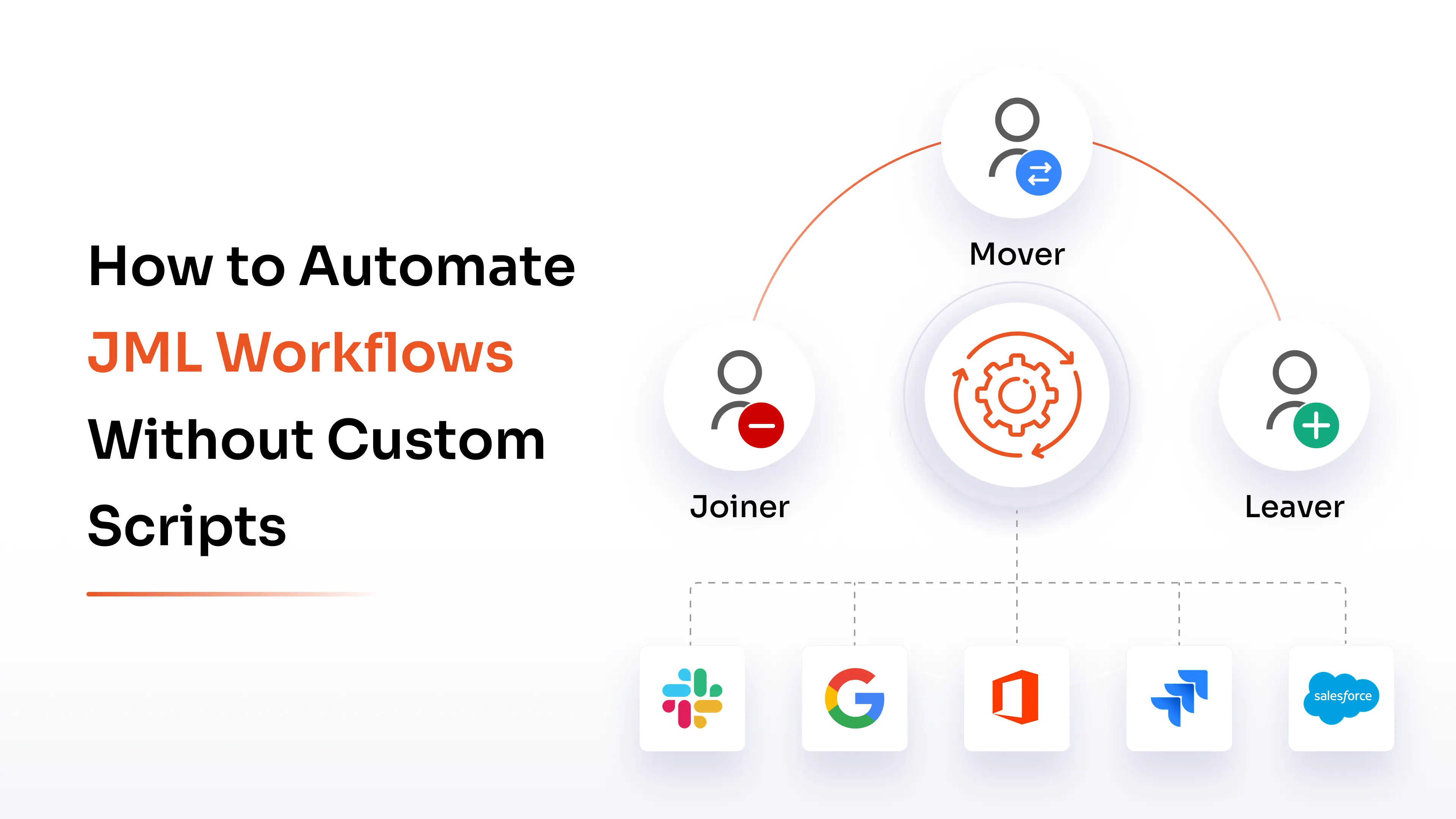
Joiner-mover-leaver automation workflows manage a person's identity and access from their first day to their last. They decide what someone gets when they join, what changes when their job changes, and what gets pulled when they leave. (Our guide to the JML process in IAM covers the concepts in more depth.)
Joiner Workflow
A joiner workflow starts when HR adds a new employee, contractor, or partner. The IAM platform creates the identity, adds the right groups, assigns licenses, provisions applications, and tells the manager and IT it's done.
The baseline access a person gets automatically, based on role and attributes, is called birthright access.
Mover Workflow
A mover workflow fires when a title, department, manager, location, or employment type changes. It grants what the new role needs and removes what the old one doesn't, as one coordinated change. Skip the removal half, and people carry old access around indefinitely.
Leaver Workflow
A leaver workflow starts when HR marks someone terminated, inactive, or past a contract end date. The platform disables sign-in, revokes active sessions where the app supports it, removes application assignments, reclaims licenses, and notifies the right teams.
Why Automate JML Workflows Without Custom Scripts?
Custom scripts handle single tasks fine. They get painful as you add applications, change HR fields, or bolt on a new approval step, because every change means code, testing, and a deployment.
Let’s look at what a no-code approach with JML automation helps resolve.
Reduce Manual Provisioning Tasks
Account creation, group assignment, license requests, and welcome emails are the same steps every time. When HR data triggers them, user provisioning automation takes over, and no one opens a ticket.
Minimize Access Errors
When access rules live in one place, the same role gets the same baseline every time. Forgotten revocations and orphaned accounts shrink.
The gap is easy to see in the numbers. A 2026 Sagiss survey of 1,000 US respondents found that 64% of former employees could still reach sensitive company data after leaving, and 79% said at least one work account stayed active past their last day. Another 33% said no one at their former employer clearly owned shutting off access.
Automated deprovisioning gives that job an owner: the termination event in HR.
Simplify Workflow Maintenance
Adding an app or an approval step shouldn't need a code change, a test cycle, and a deployment. In a visual builder, an admin edits the trigger, condition, or action and saves. The person who knows the policy can make the change.
Improve Access Visibility
Every run can log the HR event that triggered it, what was granted or removed, who approved it, what failed, and the final result. When an auditor asks who had access to the finance system in March and why, you export a report and skip the digging through old emails.
Before You Automate: Map Your JML Events and Access Policies
JML automation starts with design. If you configure the tool before you've decided which HR events matter and what access each one should produce, you automate your confusion.
List the lifecycle events first:
- New employee onboarding
- Contractor start and renewal
- Promotion, transfer, or manager change
- Leave of absence and return from leave
- Contract expiration
- Resignation or termination
- Long inactivity (dormant accounts)
Next, define an access profile for each job function. A sales rep might get CRM, email, collaboration tools, and one security group. A finance analyst gets the ERP and reporting tools. Build profiles from role, department, location, and employment type, and name an owner for each application and entitlement so approvals land with a named person.
Finally, set deprovisioning timelines. Most teams disable access on the termination date. Deletion, archival, and data retention follow a separate policy that HR and legal usually own.
How to Automate JML Workflows Without Custom Scripts
It takes nine steps to automate the joiner-mover-leaver process, in order. Steps 1 and 2 are setup, steps 3 to 5 are the core lifecycle workflows, and steps 6 to 9 keep the whole thing from breaking.
Step 1: Connect Your HR System as the Authoritative Source
Make HR the source of truth for employment status, department, title, manager, location, employment type, and start and end dates. When a record changes, the IAM platform receives the event and runs the matching workflow. That removes the conflicting data that piles up when HR, IT, and individual apps each keep their own version.
Step 2: Choose a No-Code IAM Workflow Platform
Look for a visual workflow builder, prebuilt connectors, event-based triggers, conditional logic, approvals, and provisioning actions. The goal for identity workflow automation is if-this-then-that logic that an admin can read and edit.
Step 3: Configure Joiner Automation
Set rules that create or enable the identity, assign the primary account, add role-based groups, provision approved applications, assign licenses, and send onboarding notifications. Base birthright access on attributes (role, department, location, employment type) so no one files a request for access they obviously need.
Step 4: Configure Mover Automation
Configure the workflow to recalculate access whenever an employee's attributes change. It should add the new entitlements, remove outdated ones, update groups and licenses, and route exceptions for approval.
Treat the removal and the grant as one event. Split them, and you get partial moves, which is where excess access piles up.
Step 5: Configure Leaver Automation
Disable the account, revoke sessions where the app supports it, remove entitlements, reclaim licenses, and notify the relevant teams. Where legal, HR, or compliance needs the data kept, disable and archive on a schedule and delete later.
Step 6: Handle Contractors, Temporary Access, and Exceptions
JML covers more than full-time staff. Tie contractor, intern, and partner access to contract start and end dates. Give temporary elevated access, project access, and handover permissions an expiry date, or they quietly become permanent.
Service accounts and workload identities need an owner and a review date too, since they're a common source of orphaned access.
Step 7: Set Approval Rules and Segregation-Of-Duties Checks
Some access shouldn't be automatic. Decide which birthright access flows straight through and which entitlements need a manager, application owner, or security team approval. Add policy checks that block risky combinations (someone who can both create and approve payments, say) and enforce separation of duties where you need it.
Step 8: Test With a Pilot Group
Run the workflows on one department, one location, or a small set of low-risk apps first. Check that joiners get the right access, movers lose the old and gain the new, and leavers are fully deprovisioned. A pilot surfaces missing attributes, bad entitlement mappings, and integration gaps before they reach everyone.
Step 9: Monitor, Reconcile, and Remediate Failures
A workflow can succeed in the IAM platform and still fail in the target application. Reconcile: confirm the app actually reflects the change.
Watch execution logs, failed tasks, and skipped actions. Set up alerts, retries, and an exception queue so failures get fixed this week, long before an audit finds them.
Essential Features to Look for in a No-Code JML Automation Solution
Use this list when you're comparing platforms. Each item maps back to a step above.
Prebuilt HR and Application Connectors
Native integrations with HR systems, directories, SaaS apps, cloud platforms, and on-premises systems cut down custom API work. Ask for the connector list for your actual stack, because coverage decides how much of the lifecycle you can automate.
Visual Workflow Builder
Admins should configure triggers, conditions, branches, delays, approvals, and actions through drag-and-drop or forms. If a policy change needs a developer, the tool isn't no-code.
Automated User Provisioning and Deprovisioning
The platform should create, update, enable, disable, and remove accounts, change entitlements, and assign or reclaim licenses wherever the target app supports it.
Role-Based Access, Approvals, and Time-Bound Access
Role-based or attribute-based policies assign access by job function. Policy-driven approvals handle the exceptions, and expiry dates keep temporary access temporary.
Reconciliation, Error Handling, and Audit Logs
Look for a record of every workflow action, alerts and retries for failed tasks, and reports you can hand to an auditor. Reconciliation matters most for apps where provisioning fails silently or only half completes.
Common Challenges When Automating JML Workflows
IAM automation breaks in predictable places.
- Missing application connectors: Legacy, custom, or niche apps may not support automated user provisioning. Plan a manual task, an API integration, or a separate workflow for them.
- Incorrect HR data: A wrong title, department, manager, or status triggers the wrong access change, and automation does it faster than a person would. Clean up the HR fields before go-live.
- Complex mover scenarios: Promotions, transfers, and project changes can mean removing some access, keeping limited handover access, and granting new entitlements, all in one event.
- Workflow failures: A connector outage, an invalid attribute, or an app error leaves someone half provisioned. You need alerts, retries, and a remediation path.
- Over-automation: Admin rights, financial systems, and other high-risk entitlements need validation, approvals, and expiry dates.
Most of these get cheaper to fix when you catch them in the pilot.
How to Measure JML Automation Success
Track efficiency and security outcomes together. A fast onboarding time looks great until you notice the leaver numbers.
- Average time to provision a new employee
- Average time to remove access after termination
- Percentage of JML tasks completed automatically
- Failed provisioning or deprovisioning rate
- Manual IT tickets related to employee access
- Orphaned, dormant, or unnecessary accounts found
- Percentage of movers whose old access was removed
- Temporary access exceptions that expired on schedule
Take a baseline before you automate, so the first quarterly comparison means something.
Automate JML Workflows with miniOrange
miniOrange runs the full lifecycle from one identity platform. HR-driven provisioning creates identities and assigns role-based access from the HR record, so day-one access doesn't wait on a ticket. Role changes update access across connected apps, and real-time user deprovisioning removes it when an exit is recorded.
Time-based access control handles contractor end dates. 6000+ pre-built integrations cover HRMS, payroll, directories, and business applications, and every workflow action is logged for audits.
FAQs
Can JML workflows be automated without coding?
Yes. Modern IAM automation and identity lifecycle management platforms use HR events, prebuilt connectors, visual workflow builders, and configurable policies to create accounts, update access, and deprovision users without custom scripts.
How does HR-driven provisioning automate employee onboarding?
When HR creates or updates an employee record, the IAM platform receives the event and applies predefined rules. It creates accounts, assigns groups and licenses, provisions applications, and notifies stakeholders based on the person's role and attributes.
How can IAM automate access changes when an employee changes roles?
The platform watches for attribute changes such as title, department, manager, or location. When one changes, it recalculates required access, grants new entitlements, removes outdated ones, and triggers approvals for sensitive access.
How does automated deprovisioning improve security?
It shrinks the window in which former employees and contractors keep access. The termination event drives disabling accounts, revoking sessions, removing entitlements, and reclaiming licenses, and it leaves an audit record.
Do all applications support no-code JML workflow automation?
No. Apps with SCIM, REST APIs, or prebuilt connectors are the easiest to automate. Legacy and custom apps may need a custom connector, an API integration, or a controlled manual task inside the workflow.
How should organizations handle contractors and temporary access?
Treat contractors as managed identities with start and end dates. Give project, elevated, and handover access an expiry so removal happens automatically and no one has to remember.
About the Author

Content Writer
Stutee writes about cybersecurity and identity security, covering technologies such as MFA, IAM, PAM, and endpoint management. Her work focuses on translating what products do into why audiences should care, ensuring technical depth does not come at the cost of readers clarity.
Leave a Comment