

Imagine asking ChatGPT, 'Which of my products are missing descriptions?' and getting the answer in seconds.
AI is changing how eCommerce businesses manage everyday operations. Shopify merchants can now use AI assistants such as ChatGPT, Claude, Claude Code, Codex, VS Code or even custom connectors to retrieve store information, review business data, and perform supported tasks through simple natural-language prompts.
AI Adoption in eCommerce: Industry Statistics
The growing adoption of AI across the eCommerce industry reflects its increasing role in business operations and customer shopping experiences.
- 51% of eCommerce businesses have adopted AI to improve the online shopping experience.
- 89% of surveyed retail and consumer packaged goods businesses are actively using or evaluating AI projects, including trials and pilot programs.
- 53% of consumers across 11 markets have used AI for at least one shopping-related task in the preceding three months.
- 71% of consumers want generative AI integrated into their shopping experiences.
A ChatGPT Shopify integration connects your Shopify store with ChatGPT, allowing the AI assistant to access permitted store information and interact with available store-management tools. Instead of navigating multiple sections of Shopify Admin, merchants can ask ChatGPT to find products, check order details, review customer information, or perform authorized updates.
There are two ways to establish this connection:
- Shopify's official ChatGPT integration: Merchants can connect their existing Shopify store to ChatGPT using Shopify's supported integration and authorize the required data access.
- Connecting through an MCP server: Merchants can use a Model Context Protocol (MCP) server to connect ChatGPT with Shopify tools. This approach can provide additional control over which tools an AI agent can access and what actions it can perform.
The right connection method depends on the merchant's requirements, available capabilities, permission requirements, and security considerations. This blog explains both integration approaches, practical Shopify store management use cases, how an MCP server works, and how businesses can govern AI agent access to their stores.
What Is ChatGPT Shopify Integration?
Shopify ChatGPT integration is a way to connect the AI agent with Shopify store capabilities, allowing merchants to retrieve information and perform supported store-management tasks using natural-language instructions.
Instead of manually searching through the Shopify admin, merchants can communicate with ChatGPT to find specific records, review store information, or request changes. The AI assistant processes these requests using the tools made available through the connected integration.
The integration generally works through the following process:
- Connect Shopify to ChatGPT: The merchant establishes a connection using an available integration or MCP server.
- Authorize access: The merchant signs in through the Shopify authorization process and approves the requested access. Their Shopify password is not shared with ChatGPT.
- Make store tools available: ChatGPT receives access to the supported tools and store data permitted by the connection.
- Submit a prompt: The merchant describes the information they need or the task they want completed.
- Process the request: ChatGPT identifies and uses the relevant connected tool to retrieve information or perform an authorized operation.
An important consideration: Connecting ChatGPT does not automatically give it unrestricted access to your store. The available information and actions depend on the connection method, the permissions granted, and the tools exposed by the integration. Some operations may also require additional confirmation or manual execution.
For businesses that need more control over AI agent access, a dedicated MCP server can help manage permissions across teams. miniOrange SecureMCP for Claude & ChatGPT, for example, lets Shopify store owners decide which team members can access each agent and define the operations it is allowed to perform.
What Can You Do with ChatGPT and Shopify?
Once connected, merchants can use natural-language prompts to retrieve Shopify information, review store records, and perform supported operations. The available capabilities depend on the connected integration and the permissions assigned to the AI agent.
Here are some common ways to use ChatGPT for Shopify store management.
Product Catalog Management
Product management involves maintaining accurate product information, organizing catalogs, and updating product details. ChatGPT can help merchants retrieve product information, identify missing details, and make supported catalog changes through connected Shopify tools.
Common product management tasks include:
- Searching for products and retrieving their details, descriptions, and prices.
- Identifying incomplete product information, such as missing descriptions or product details.
- Viewing, adding, editing, and deleting products, depending on the assigned permissions.
- Updating product details, including titles, descriptions, prices, and product options.
- Managing product variants, such as size and color.
Example prompt: "Find products that do not have a description."
ChatGPT can retrieve the relevant product records and present the results, helping merchants identify catalog information that needs attention. With write permissions, the agent can also perform supported product updates.
Order Management
ChatGPT can also help merchants retrieve and work with supported order information. This can be useful when reviewing recent purchases, checking order status, or locating specific transactions.
Depending on the integration, merchants may be able to:
- Search for orders using available order details.
- Retrieve order status, payment status, and fulfillment information.
- Review recent orders and their associated details.
- Create and update orders when the connected tools and assigned permissions support these operations.
Example prompt: "Show me the latest orders and their current status."
The connected tools retrieve the relevant order information and return it to ChatGPT, where the merchant can review the results.
Customer Management
Customer-related tasks can involve searching profiles, reviewing previous purchases, and retrieving information needed to answer customer queries. A connected AI assistant can simplify these activities by allowing merchants to request supported customer information conversationally.
Common customer management tasks include:
- Searching for customers using available information.
- Viewing authorized customer details and order history.
- Reviewing customer purchase activity to support customer-related queries.
- Adding, editing, and deleting customer records when the connected tools permit these actions.
Example prompt: "Find the recent order history for Jane Doe"
ChatGPT can retrieve the customer's available order history and summarize relevant details. Access to sensitive customer information depends on the role permissions assigned to the agent and the team members allowed to use it.
Tags and Organization
Shopify tags help merchants categorize products, customers, and other store records. Through connected tag-management tools, ChatGPT can help organize these records by adding or removing tags based on the merchant's instructions.
For example, a merchant managing a B2B store can use tags to distinguish wholesale customers from retail customers. An authorized AI agent can apply the relevant tag to the selected customer record.
Example prompt: "Add the tag 'wholesale' to the customer ‘Jane Doe’."
The agent can locate the customer record and apply the tag when the connected integration supports the operation and the required permissions are available.
What ChatGPT can actually do depends on how it's connected, which is where an MCP server comes in.
How Does a Shopify MCP Server Work with ChatGPT?
A Shopify MCP server connects an AI assistant with Shopify's APIs and makes supported store operations available through a standardized communication protocol.
MCP stands for Model Context Protocol. It is an open standard that enables AI applications to communicate with external systems, access data, and use connected tools. When a merchant connects ChatGPT through an MCP server, the server acts as an intermediary between the AI assistant and the Shopify store.
The MCP server makes relevant Shopify tools available to ChatGPT, allowing it to process merchant instructions and interact with the store through authorized requests.
Shopify MCP Server Architecture
A typical Shopify MCP server architecture consists of the following components:
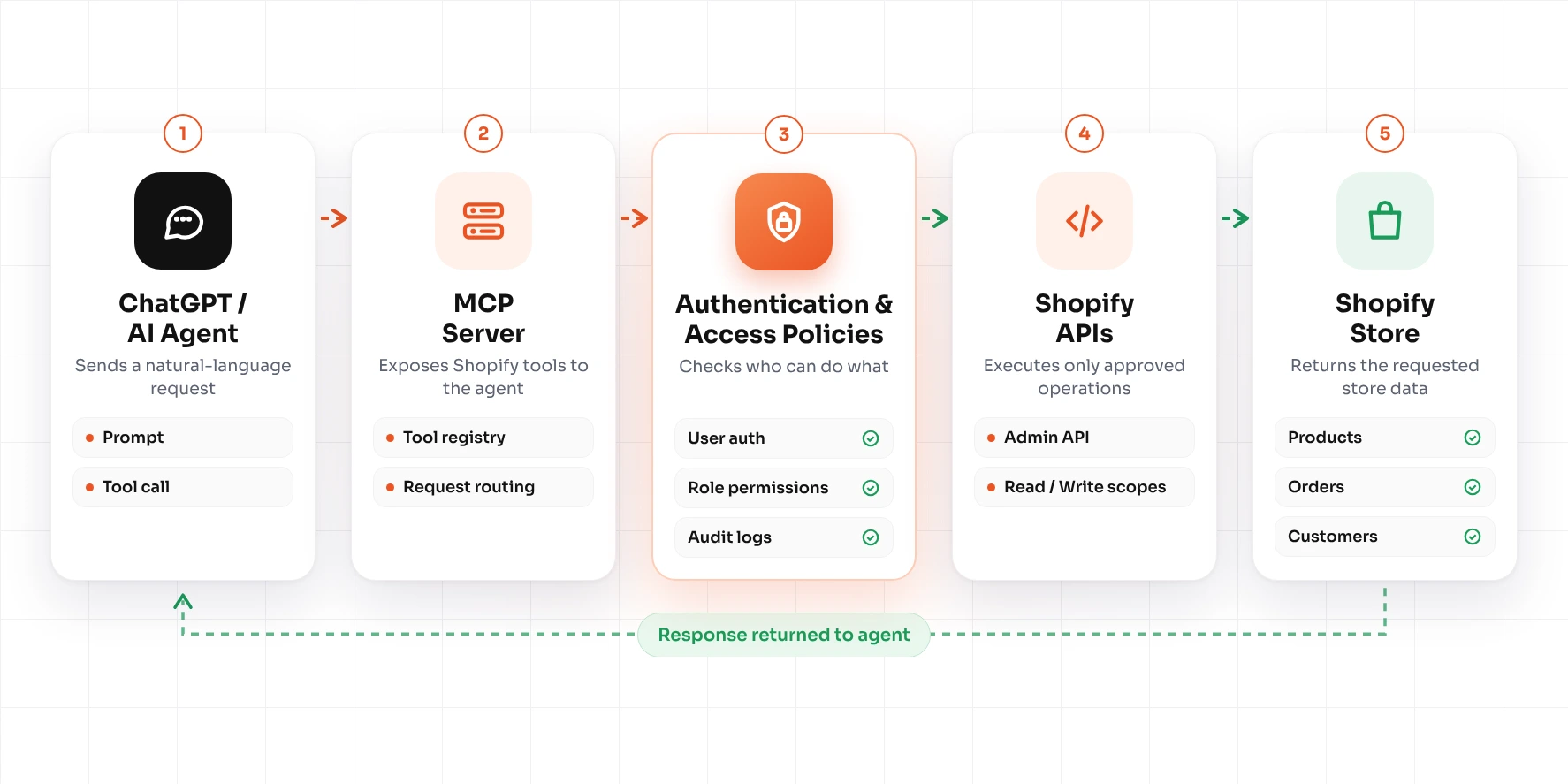
Each component performs a specific function in processing a merchant's request.
- ChatGPT / AI Agent: Understands the merchant's natural-language prompt, identifies the required operation, and selects an appropriate connected tool.
- MCP Server: Exposes supported Shopify tools and operations to the AI agent through the Model Context Protocol. It receives requests from the agent and forwards them for processing.
- Authentication and Access Policies: Verify the identity of the connected agent and evaluate whether the requested operation is permitted. Depending on the implementation, this layer can enforce roles, permissions, and approval requirements.
- Shopify APIs: Receive authorized requests and process operations involving Shopify store data.
- Shopify Store: Provides the requested information or processes the supported changes to store records.
The MCP server implementation determines which Shopify tools are exposed and what security controls are applied before requests reach the store.
How Does a Request Flow Through a Shopify MCP Server?
When a merchant submits a request through ChatGPT, the MCP server facilitates communication between the AI assistant and Shopify. The request generally follows these steps:
- Merchant submits a prompt: The merchant enters a natural-language instruction in ChatGPT, such as asking for recent orders or requesting a product update.
- AI agent identifies the required tool: ChatGPT interprets the instruction and determines which connected Shopify tool is needed.
- Request reaches the MCP server: The AI agent sends the tool request to the connected MCP server.
- Authentication and authorization: The MCP server verifies the agent's identity and checks the configured access policies to determine whether the requested operation is permitted. If the action requires approval, the configured approval process is initiated.
- Shopify processes the request: Once authorized, the MCP server sends the request to the relevant Shopify API, which retrieves the information or applies the change.
- Result returns to ChatGPT: The MCP server returns the API response to ChatGPT, which presents the result to the merchant in a readable format.
For example, when a merchant asks ChatGPT to update a product price, the AI agent identifies the relevant product-management tool and submits the request. The MCP server checks whether the agent has permission to edit products and whether any additional approval is required before the change is processed through Shopify.
Why Use MCP?
MCP provides a standardized way for AI applications to communicate with external tools and systems. Without a standard, every AI application needs its own custom integration. MCP lets developers expose tools through one consistent interface.
For Shopify merchants, an MCP-based connection offers several practical advantages:
- Standardized communication: AI assistants can interact with connected Shopify tools through a common protocol.
- Configurable tool access: MCP server implementations can expose specific tools and operations based on the merchant's requirements.
- Centralized request handling: Requests from connected AI agents can pass through one server, where authentication, access checks, and other configured policies can be applied.
However, MCP does not provide role-based permissions by itself. Whether an AI agent's access can be restricted based on assigned roles depends on the MCP server implementation and the access controls it supports.
ChatGPT Integration: Shopify vs. miniOrange
Shopify's official ChatGPT integration and miniOrange’s SecureMCP solution for Shopify offer two approaches to connecting an AI assistant with a Shopify store.
The official integration provides Shopify-supported capabilities through ChatGPT, with access determined by the permissions merchants approve. An MCP-based connection offers another approach, where merchants can configure agent-specific roles, resource permissions, and additional governance controls.
The following table highlights their key differences.
| Factor | Shopify Official ChatGPT Integration | miniOrange SecureMCP for Claude & ChatGPT |
|---|---|---|
| Connection method | Shopify-supported ChatGPT integration, installed through ChatGPT and authorized through Shopify Admin. | Custom connector link with a step-by-step setup guide. |
| Tool access | Based on Shopify's officially supported capabilities and the access approved by the merchant. Supports product management, inventory, order lookups, customer lookups, and other available operations. | Access to products, customers, orders, and tags, with individual permissions configured for each resource. |
| Authentication | Merchant signs in through Shopify's authorization process and approves the requested access. | Merchant signs in with their Shopify account through the authorization process. The Shopify password is never shared with ChatGPT. |
| Access control | Based on Shopify's available access controls, the connected staff account's permissions, and supported read/write operations. Some actions are read-only by design. | Role-based permissions with separate View, Add, Edit, and Delete controls for products, customers, and orders. Store owners get full access through a built-in Store Admin role. Agents can also be suspended with one click, reactivated at any time, or removed permanently. |
| Activity monitoring | Uses available Shopify and integration records to review store activity. | Logs activity by AI agent and team member, including affected records, outcomes, and success or failure reasons. Supports activity filters and search. |
For businesses that need multiple AI agents with different responsibilities, understanding the additional controls offered by an MCP server can be relevant when deciding how to connect AI assistants to their Shopify store.
How to Connect ChatGPT to Shopify Using miniOrange MCP Server
Merchants can connect ChatGPT to their Shopify store through the miniOrange SecureMCP for Claude & ChatGPT by creating an agent, configuring its permissions, and adding the server as a custom connector in ChatGPT.
The basic setup process involves the following steps:
- Install the miniOrange MCP Server: Install SecureMCP for Claude & ChatGPT on your Shopify store and open the application from Shopify Admin.
- Create roles and configure permissions: Define the operations an AI agent can perform by assigning the required permissions for products, customers, orders, and other supported resources.
- Add team members: Add Shopify staff members who may use the agent. Only existing staff can be added. Assign a role for each agent, and add extra permissions for an individual if needed.
- Create an AI agent: Configure a new agent for ChatGPT and associate it with the relevant roles and authorized team members. Name the agent (e.g., 'Support Team'), add a description, then choose its roles and team members.
- Configure the MCP connection in ChatGPT: Enable Developer Mode, copy the MCP server URL, and add it as a custom MCP server in ChatGPT using the configured OAuth authentication.
- Authorize and test the connection: Sign in with your Shopify account, select the store you want to connect, and test the integration using a supported store-management prompt.
- Suspend, remove or reactivate an agent: Suspend an AI agent with one click whenever you need to temporarily stop its access to your Shopify store. This immediately disconnects everyone using the agent without deleting its configuration. You can reactivate it at any time or remove it permanently if it is no longer needed.
- Monitor agent activity: Review the Activity section in the miniOrange application to see the actions performed by connected agents, the team members involved, and the operation outcomes.
Once the connection is established, ChatGPT can interact with Shopify using the tools and permissions configured for the agent.
When Should You Consider miniOrange MCP Server for Shopify?
An MCP server like SecureMCP for Claude & ChatGPT can be useful when a business needs more control over how AI assistants interact with its Shopify store. The need becomes more relevant as merchants introduce multiple AI agents, give them access to store operations, or involve multiple team members.
Consider an MCP-based approach when:
Multiple AI agents need different permissions
A business may use one AI agent for customer support and another for store administration. These agents may require different levels of access to products, customers, and orders.
With miniOrange, you can set up one agent for your support team on the Read Only role and another for yourself with full access.
Merchants want to restrict what an AI agent can view or change in Shopify
An AI assistant may only need to view customer and order information, while another agent may need permission to update products.
Configurable tool permissions can help businesses limit an agent's access to the operations it actually needs.
Sensitive operations require additional review
Some Shopify operations can have significant business impact, including price changes, discounts, refunds, and bulk updates.
Businesses may want certain actions to be reviewed or confirmed before they are executed. An MCP implementation can provide additional controls around how these operations are handled.
Businesses need visibility into AI agent activity
When AI agents can interact with business systems, teams may need to know which agent performed an action, which team member initiated it, whether it succeeded, and why a request failed.
An activity log can provide this visibility and make it easier to investigate unexpected or unsuccessful operations.
Merchants need configurable governance over AI agent access
As the number of connected AI tools and users grows, access requirements can change. Store owners may need to update roles, modify team access, temporarily disable an agent, or remove an agent entirely.
A managed MCP solution like SecureMCP for Claude & ChatGPT can provide controls for these administrative tasks alongside the connection itself. Suspend an agent with one click, switch it back on later, or remove it permanently. Role and team changes apply from the app.
Conclusion
Ultimately, the right approach to ChatGPT Shopify integration depends on the merchant's operational requirements and the level of control needed over AI access. Shopify's official integration may be sufficient for merchants who need supported capabilities with Shopify-managed authorization. An MCP-based approach can be more suitable for businesses that need configurable tools, agent-level permissions, team access controls, a one-click on/off switch, and a full activity log across ChatGPT, Claude and other AI apps.

Leave a Comment