
Imagine asking an AI assistant to find a product, put together a shopping cart, or help you update your Shopify store. For the assistant to complete these tasks, it needs a way to interact with Shopify. Shopify MCP provides that connection.
What is Shopify MCP?
It is Shopify's collection of Model Context Protocol (MCP) servers and related integrations that let AI clients such as ChatGPT, Gemini, Claude, Perplexity, etc. use approved tools connected to a store.
Shopper-facing tools support product discovery and cart creation, while merchant and developer connections can access store data or work with code. Each connection offers different tools and access levels.
For merchants, understanding these connections is becoming increasingly important. An AI agent that searches a product catalog has very different access requirements from one that modifies prices, creates discounts, or retrieves customer information. Knowing how these connections work helps you take advantage of AI while keeping control of your store.
Shopify MCP at a Glance
- Shopify MCP is an ecosystem of connections, not a single server. It includes Storefront Catalog MCP and other Universal Commerce Protocol (UCP) tools, Customer Accounts MCP, Dev MCP and the AI Toolkit, official Shopify connectors for ChatGPT and Claude, and community-built Admin API servers.
- Shopify Storefront MCP has evolved. Shopify removed catalog and cart tools from Storefront MCP in favor of UCP; only the store policy and FAQ tools remain on /api/mcp.
- Shopify's native store activity log displays up to 250 entries and cannot be exported. These logs provide useful visibility into store activity, but they don't offer a unified record of every AI agent's MCP requests and tool calls across connected systems.
What Is MCP, in Plain English?
The Model Context Protocol (MCP) is an open standard that gives AI applications a common way to communicate with external systems and use their tools.
Think of MCP as a standard plug for AI applications. The AI client supplies the intelligence, while the MCP server exposes approved tools that the client can call.
Example: Imagine you are a customer shopping for running shoes. You might ask an AI assistant to find a lightweight pair under $100, compare available sizes, and prepare a cart. The assistant needs access to product information and cart functions to complete your request.
MCP provides a standard way for compatible AI applications to discover and use those capabilities.
Two components make this possible:
- MCP client: The AI application that interprets a request, identifies a suitable tool, and processes the result. Examples include compatible AI assistants (Claude, ChatGPT, Gemini) and coding environments (Cursor).
- MCP server: The component that exposes tools and communicates with the underlying system. It determines which capabilities are available, checks the request against its tools and permissions, calls the underlying system, and returns the result.
Shopify MCP tools can support product discovery, cart operations, customer-account requests, developer documentation searches, and code validation. Administrative actions depend on the connection and the permissions available to it.
What an assistant understands and what it can do are different things. An AI assistant might understand exactly how to update a product description, but it cannot make that change through a connection that only exposes product-search tools. The available tools, credentials, and applicable policies determine what it can actually do.
The 5 Ways AI Agents Connect to a Shopify Store
An AI agent can interact with Shopify through several different connections. Some support the shopping experience, others help developers build applications, and some allow merchants to manage their stores through an AI conversation.
These connections should not be treated as interchangeable. They offer different capabilities, and not all of them are MCP servers in the strict technical sense.
The comparison below covers the five main ways AI clients and agents can interact with a Shopify store.
| Connection | What It Does | Who Uses It | Can It Change Your Store? | How It Signs In |
|---|---|---|---|---|
| Storefront MCP (policy and FAQ) + UCP tools (Storefront Catalog MCP, Cart MCP, Checkout MCP) | Supports product discovery, cart creation and updates, checkout workflows, and store policy or FAQ queries. Shopify's current catalog, cart, and checkout tools use UCP, while policy and FAQ tools remain on /api/mcp. | Shoppers, AI shopping agents, and developers building commerce experiences. | Can create or update a shopper's cart and support checkout. It does not provide general administrative access to modify the merchant's product catalog or store settings. | No login or token is needed, but every UCP request must identify the agent with a profile URL. Checkout has separate authentication and authorization requirements. |
| Customer Accounts MCP | Exposes customer-specific tools for actions such as retrieving order details, checking order status, and managing account preferences. | Developers building authenticated shopping assistants and customers using connected account experiences. | Can perform customer-scoped operations exposed by the available tools. It does not automatically grant general administrative access to the store. | Uses an OAuth 2.0 access token obtained through an authorization-code flow with PKCE. Customer authentication and Protected Customer Data requirements apply. |
| Dev MCP + AI Toolkit | Gives AI coding agents access to Shopify documentation, API schemas, and code validation. The AI Toolkit also supports store-management workflows through an authenticated Shopify CLI context. | Developers, engineering teams, and technical store operators. | Documentation and schema tools do not directly modify store data. Supported store-management tasks can make changes when executed through an authenticated CLI context with appropriate permissions. | Dev MCP runs locally and does not require authentication to access its developer resources. Store-management operations through Shopify CLI require authentication. |
| Official Shopify connectors for ChatGPT and Claude | Lets users create or manage Shopify stores through an AI conversation. Supported tasks include product and collection management, inventory, orders, customers, discounts, and analytics, depending on the connector. | Store owners, merchants, and authorized staff. | Yes. The connector can perform supported administrative actions within the data access and user permissions granted to it. | Users connect their Shopify store, sign in, and approve the required access. |
| Community Admin API MCP servers | Connects compatible AI clients to Shopify's Admin API to retrieve or modify administrative data through the tools implemented by the server. | Developers and technical teams building custom workflows. | Yes, within the permissions of the configured credentials and the operations exposed by the server. | Typically uses an Admin API access token or another credential supported by the implementation. |
What Changed: The original Storefront MCP catalog and cart tools have been removed in favor of UCP. Shopify now documents Storefront Catalog MCP, Cart MCP, and Checkout MCP separately. The policy and FAQ tools remain available through /api/mcp.
For merchants, the practical takeaway is straightforward: check which connection an AI agent uses before deciding what access it should receive. A shopping assistant, a developer's coding agent, and an AI tool managing product prices should not automatically have the same permissions.
How Shopify MCP Works, Step by Step
Suppose a customer asks an AI assistant to find a particular product, or a developer asks an AI coding tool to validate a Shopify API query. In both cases, the AI needs access to relevant tools and information.
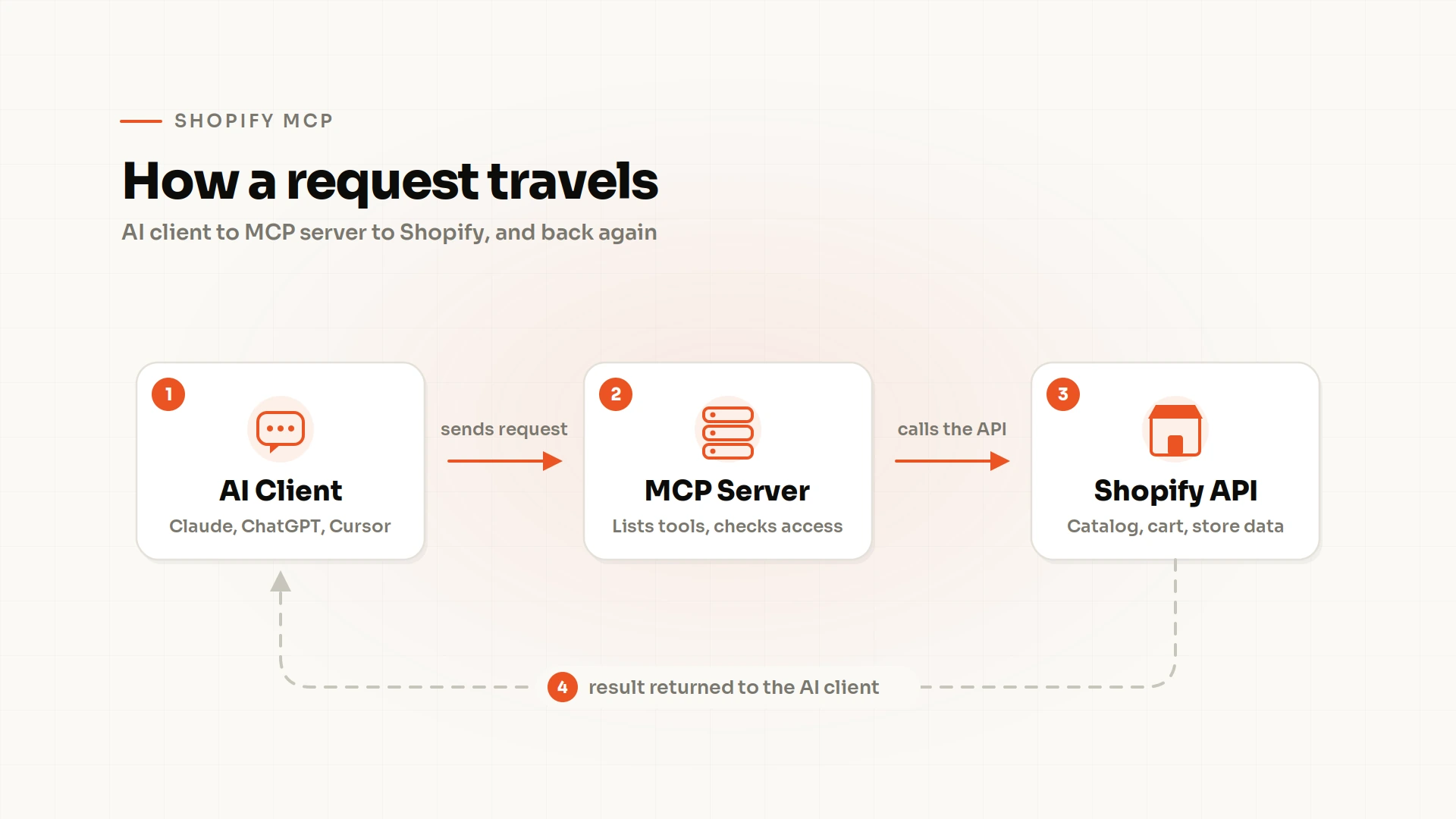
An MCP connection provides the communication path. The client discovers the available tools, selects one for the task, and receives a response after the server processes the request.
Let's revisit the running shoes example to see how these steps work in practice:
1. Your AI Client Connects to an MCP Server
You ask your AI assistant to find running shoes under $100. To search the store, the assistant connects to a compatible MCP server that exposes the required shopping tools.
The server could provide access to Shopify's UCP catalog tools, for example. The connection determines which capabilities the AI assistant can discover and use.
2. The Server Lists the Tools It Offers
Once connected, the server tells the AI client which tools are available and how to use them. For your shopping request, these might include a product-search tool and a cart-update tool.
The assistant can use the product-search tool to find shoes that match your budget. The exact capabilities depend on the tools exposed by the server.
3. The Model Picks a Tool and Sends a Request
The AI model interprets your request and selects a suitable tool. In this case, it chooses product search and sends the criteria, including the product type and maximum price.
The server processes the request according to its implementation and access requirements. The model determines which tool to call, while the server handles the request and any required authorization checks.
4. The Server Calls Shopify and Returns the Result
The store's UCP endpoint receives the request, searches the catalog and returns the results to the AI client. The assistant can then present matching shoes with details such as product names, prices, and available variants.
You can review the options and choose a pair. If the connected tools support cart updates and the request is authorized, the assistant can use another tool to add your selection to the cart.
The security consideration: The assistant can only perform actions supported by its available tools and permitted by the credentials and policies governing the connection. Access to product search does not automatically grant permission to change prices, edit products, or retrieve customer records.
Why Shopify MCP Matters in 2026
AI is becoming a more prominent part of how people discover products and interact with online stores. Shopify's first-quarter 2026 commerce data illustrates the growth:
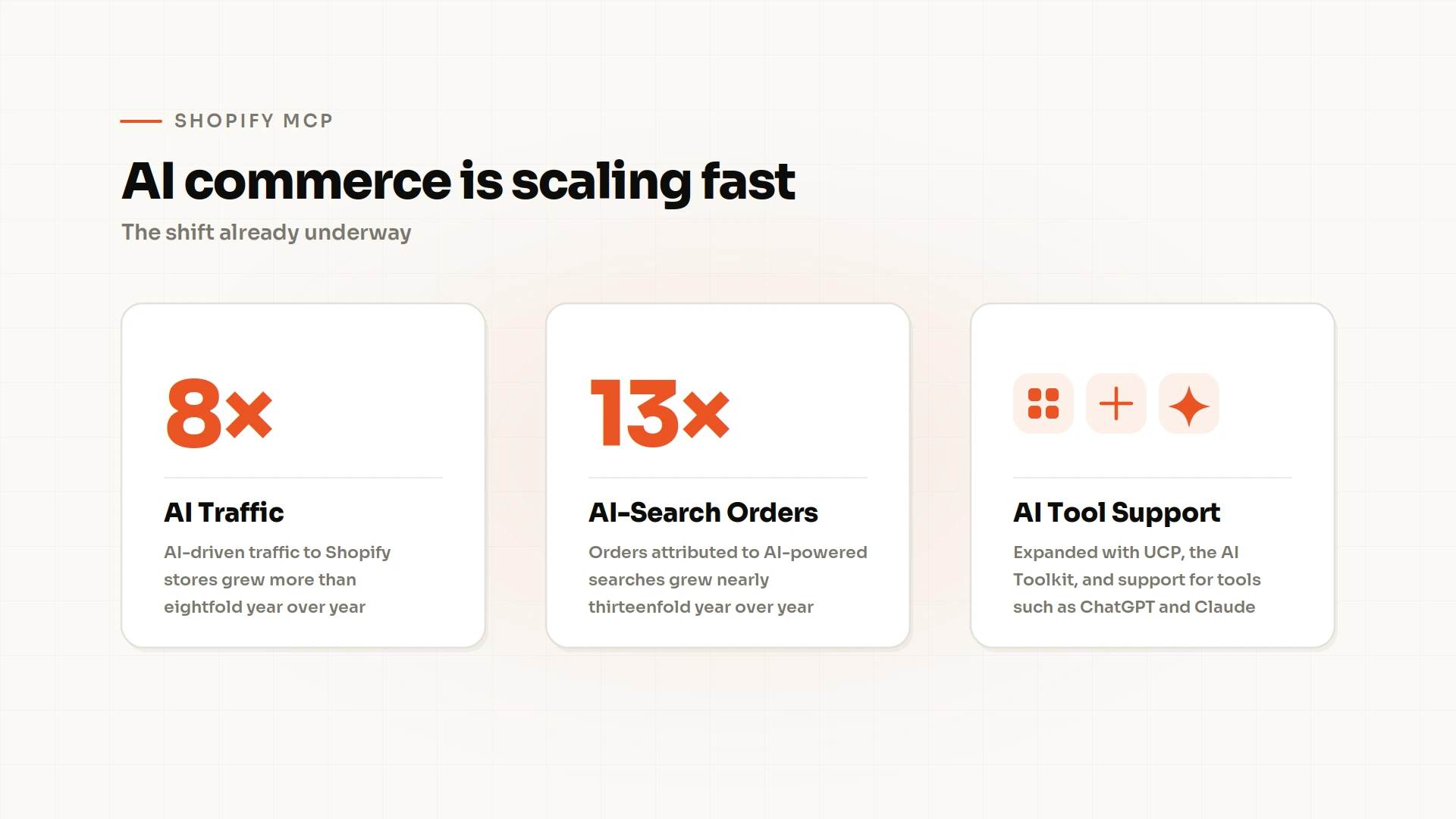
These figures highlight the growing role of AI in commerce. As more shoppers discover products through AI agents, MCP and UCP provide ways for those agents to interact with Shopify's shopping experiences. On the merchant side, connected AI tools can also access store data and perform supported store-management tasks.
Shopify's 2026 updates reflect both sides of this shift: helping shoppers discover and buy products through AI, and giving merchants and developers more ways to work with the platform through AI tools.
What Can Go Wrong When AI Agents Reach Your Store?
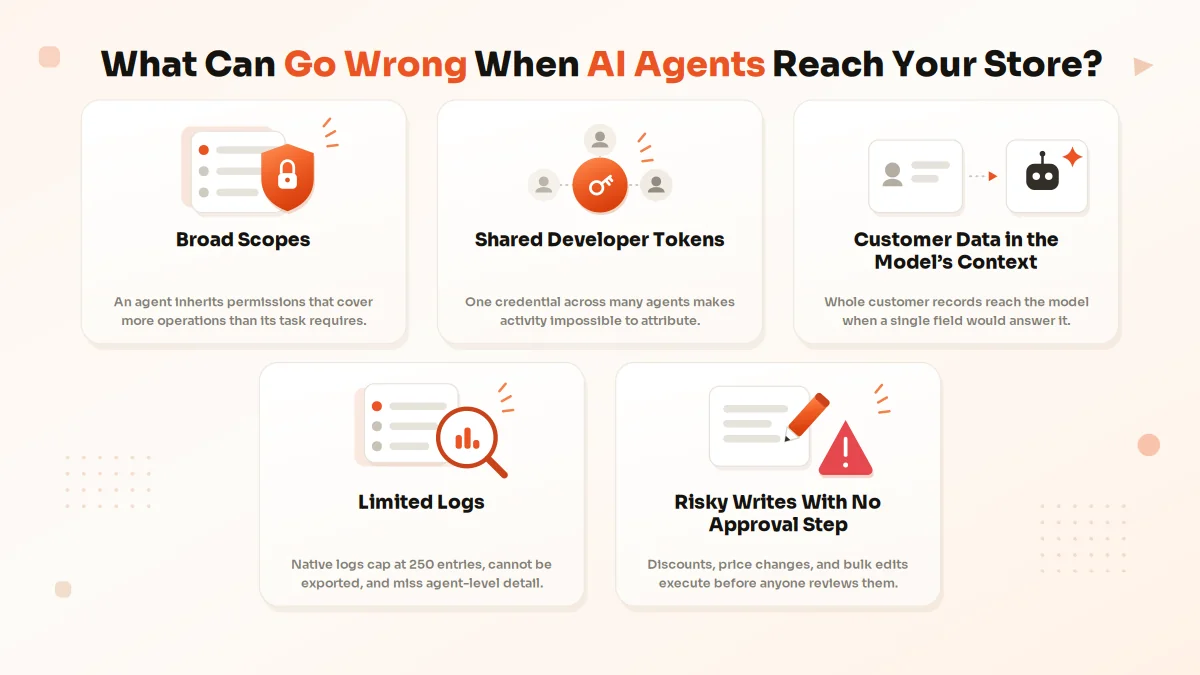
Connecting AI agents to Shopify can save time on product research, development, and routine store operations. The risk emerges when an agent receives more access than it needs, uses credentials shared across multiple workflows, or performs sensitive actions without adequate checks.
Consider an agent that starts out retrieving product information. If its connection also allows it to change prices or access customer records, a mistake in a request could have consequences beyond the original task.
Five areas deserve particular attention.
Broad Scopes
Shopify API scopes determine which resources an application can access. Depending on the connection, an agent may inherit permissions that cover more operations than its assigned task requires.
For example, a tool intended to update product descriptions might operate through an application with broader product-management access. If the workflow is compromised or the request is misinterpreted, the agent could use authority it never needed.
The practical response is to review each connection's scopes and restrict access to the resources and operations required for its purpose. Where a governance layer supports finer-grained tool permissions, those controls can narrow access further.
Shared Developer Tokens
Reusing one token across several agents, applications, or developer workflows makes access harder to manage. If a credential is exposed, every connection that relies on it may be affected.
Shared credentials also make investigations difficult. When several agents use the same token, identifying which agent initiated a particular operation may require additional evidence.
Give each agent or integration its own identity and credential wherever supported. This makes it easier to review access, trace activity, and revoke one connection without disrupting unrelated workflows.
Customer Data in the Model's Context
An AI workflow may retrieve customer names, email addresses, phone numbers, shipping addresses, or order history to answer a question. If that information is sent to an external AI service, its handling is subject to the applicable configuration, provider terms, and privacy practices.
The risk increases when a task needs only a small amount of information but the agent retrieves or sends an entire customer record. For example, checking an order's status might require order details without needing to expose unrelated personal information.
Apply data minimization to AI requests and responses. Limit which customer fields agents can retrieve, and use masking or blocking controls when sensitive information is unnecessary for the task.
Risky Writes With No Approval Step
An AI agent connected to administrative tools may be able to create discounts, change prices, edit products in bulk, or modify orders. An incorrectly interpreted instruction or malicious content in text an agent reads (prompt injection) can lead to unintended changes.
Imagine a bulk-editing request that applies a discount to the wrong collection. If the action executes immediately, the error could affect many products before anyone notices.
Identify high-impact operations and decide which ones require human approval. Preview planned changes, test policies before deployment, and record approvals for sensitive actions. This gives teams an opportunity to catch mistakes before they affect a live store.
Limited Logs
Shopify's store activity log provides visibility into recent administrative activity, including actions associated with users and apps. However, it is view-only, cannot be exported, and displays a maximum of 250 results.
Shopify also provides a separate user activity log that supports CSV exports covering up to six months. These logs are useful, but they do not provide a single, end-to-end record of every request made by every AI agent across all connections.
Without agent-level visibility, an investigation may reveal that a product was modified without clearly showing which AI tool initiated the operation, what request it received, or whether an approval step was applied.
A more complete audit trail should associate requests and actions with individual agent identities and capture relevant policy decisions and approvals.
What Shopify Provides & What Remains Your Responsibility
Shopify already provides important building blocks for managing access, including API scopes, authentication, user permissions, and activity logs. These controls help merchants manage their stores, but they do not automatically establish a unified governance process for every AI agent and tool call.
The distinction becomes clearer when you compare the controls Shopify provides with the additional measures a team may need.
| Need | What Shopify Provides | What's Left to You |
|---|---|---|
| Audit | A store activity log showing up to 250 recent results and a separate user activity log with CSV exports covering up to six months. | Maintain a unified, exportable record of AI identities, tool requests, policy decisions, approvals, and actions across connected surfaces. |
| Least Privilege | API access scopes, user permissions, and access controls for supported integrations. | Review each agent's permissions, restrict available tools and operations to its tasks, and remove unnecessary access regularly. |
| Approvals | Authorization flows that let users approve the access requested by supported integrations. | Establish approval checkpoints for sensitive actions, such as price changes, discount creation, and bulk edits, before execution. |
| Customer Data | Authentication and access controls for customer-account APIs, along with requirements for applications accessing Protected Customer Data. | Apply data-loss prevention rules, mask sensitive fields when appropriate, and prevent unnecessary customer data from reaching AI models. |
| Developer Access | Developer tools, authenticated Shopify CLI workflows, API credentials, and user permission controls. | Track which agent or developer uses each credential, review access over time, and apply consistent governance across Storefront MCP, the Admin API, and Dev MCP. |
Why does this distinction matter?
An agent may have permission to edit product information, but a merchant may still want to approve a price change before it reaches the live store. Similarly, an AI tool may be authorized to retrieve customer data, while a separate policy determines which fields it can send to a model.
Access permissions define what a connection is allowed to do. Operational governance adds controls around how and when that access is used. For AI-connected commerce workflows, both are important.
How to Stay in Control: Put a Gateway in Front of Every Agent
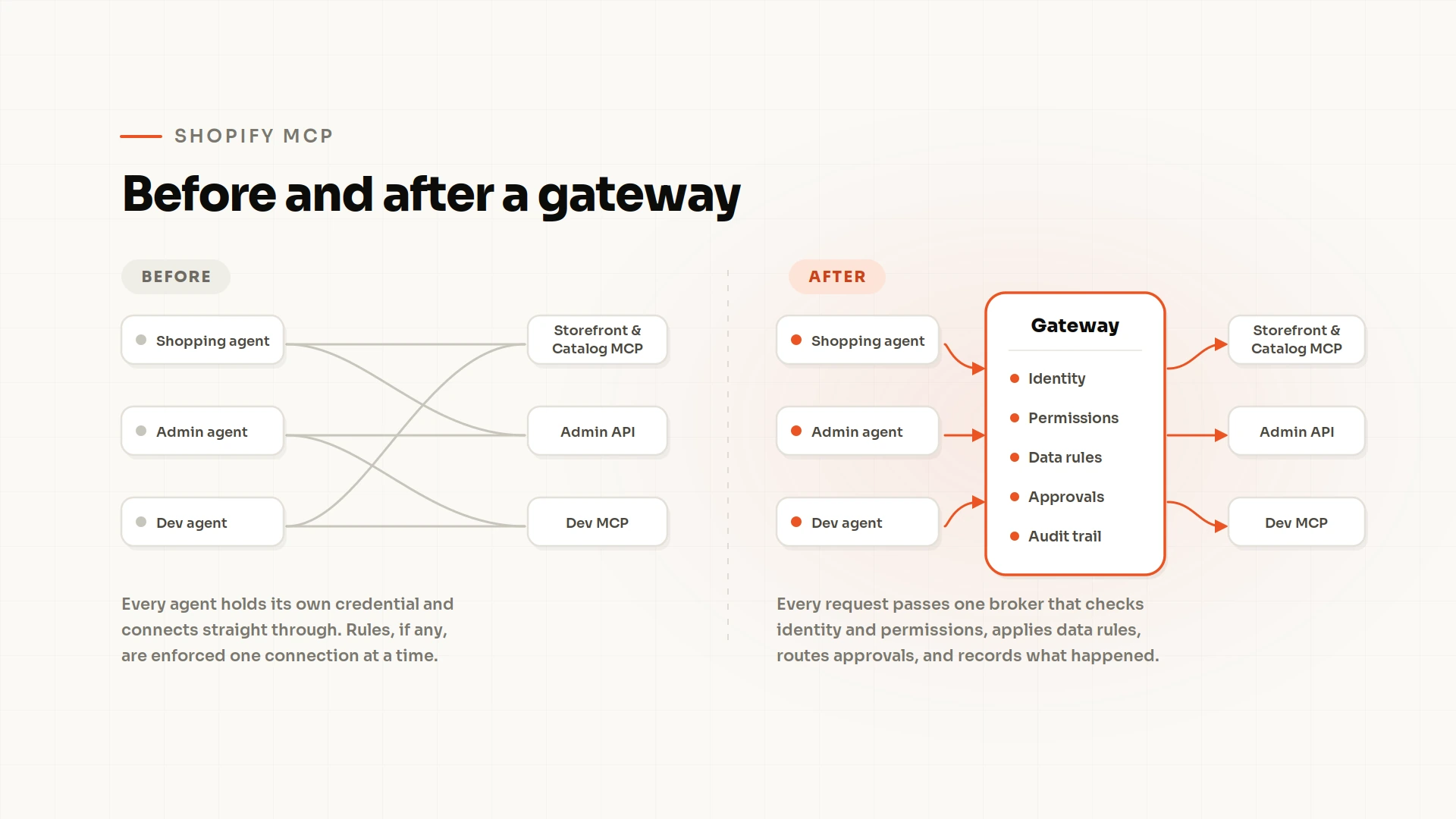
When multiple AI agents connect to the same store, managing each connection independently can make it difficult to enforce consistent rules. One agent might have broad administrative access, another might retrieve customer information, and a third might execute development tasks through an authenticated CLI.
A gateway provides a central point for governing these interactions. It sits between AI clients and the systems they access, checking agent identity, permissions, and applicable policies before requests reach the underlying system.
For Shopify MCP, a gateway can help bring Storefront and Catalog MCP, Admin API operations, and Dev MCP activity under a common governance layer.
The miniOrange MCP Server for Shopify is designed to broker AI agent access and enforce policies across these supported Shopify connections.
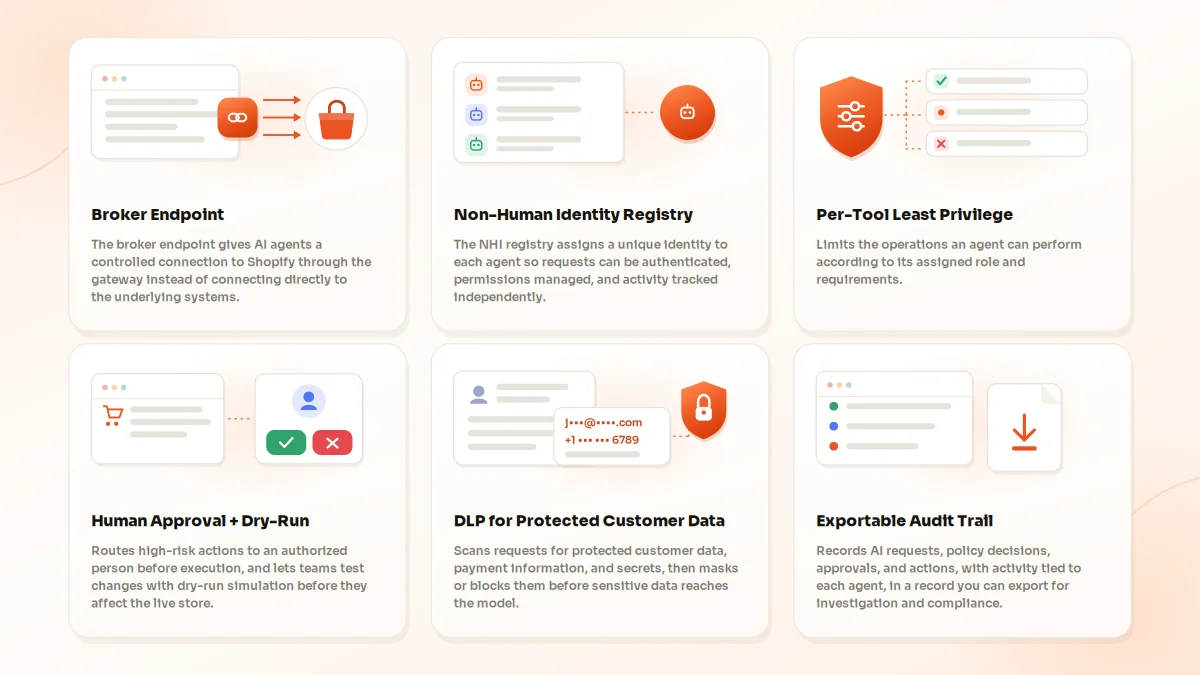
Broker Endpoint
The broker endpoint gives AI agents a controlled connection to Shopify through the gateway instead of having them connect directly to the underlying systems.
Each request passes through this central point before reaching the relevant Shopify surface. This creates a place to evaluate requests and apply configured identity and access policies across supported connections.
Non-Human Identity Registry
An AI agent needs an identifiable, manageable identity of its own. The Non-Human Identity (NHI) registry assigns a unique identity to each agent so requests can be authenticated, permissions can be managed, and activity can be tracked independently.
For example, a product-research agent and an inventory-management agent can have separate identities, even when both work with the same store. If one agent's access needs to be reviewed or revoked, the team can address that identity without automatically affecting the other.
Per-Tool Least Privilege
Different agents have different responsibilities, so they should not automatically receive the same permissions. Per-tool least privilege limits the operations an agent can perform according to its assigned role and requirements.
A product-research agent might need catalog search and product lookup tools. An agent maintaining product information may need specific write operations as well.
The goal is to grant each agent the minimum access required for its tasks. That reduces unnecessary privileges and limits the potential impact of an incorrect request.
Human Approval + Dry-Run
Some actions deserve a second look before they affect a live store. Refunds, discount creation, price changes, bulk product edits, and order modifications can have financial or operational consequences.
Human-in-the-loop approvals route configured high-risk actions to an authorized person before execution. Reviewers can assess the proposed operation and decide whether it should proceed.
Dry-run simulation addresses a different part of the problem. It lets teams test new policies against real AI requests before deployment, helping them identify issues without affecting the live store.
Together, these controls help teams validate their rules and establish approval checkpoints for sensitive operations.
DLP for Protected Customer Data
Shopify Protected Customer Data can include customer names, email addresses, phone numbers, shipping addresses, and order history. An AI agent may need some of these fields to complete a task, but that does not mean every field should be passed to an AI model.
Data loss prevention (DLP) rules scan requests for Protected Customer Data, payment information, and secrets such as API keys and access tokens. The gateway can block or restrict unsafe access and apply configured masking controls before sensitive information reaches the model.
This helps teams enforce data-protection requirements at the point where AI agents interact with store information.
Exportable Audit Trail
When an AI agent performs an action, teams need enough information to understand what happened and why. An exportable audit trail records AI requests, policy decisions, approvals, and actions, with activity associated with the relevant agent.
This extends visibility beyond Shopify's native store activity log, which is limited to 250 results and cannot be exported.
A centralized record makes it easier to investigate unexpected changes, review the decisions applied to a request, and trace actions across supported Shopify surfaces.
A 5-Step Starting Checklist
You don't need to overhaul every AI workflow at once. Start by identifying how agents access your store, reviewing their permissions, and deciding which actions need additional controls.
This five-step checklist gives merchants and development teams a practical starting point.
1. List Every AI Agent, App, and Token That Can Reach Your Store
Start with an inventory of the AI clients, MCP servers, connected apps, API credentials, and developer workflows that can access Shopify.
For each connection, record its purpose, owner, associated store, credentials, and permissions. Include official AI connectors, community-built Admin API servers, Shopify CLI connections, and locally configured developer tools.
You cannot review access effectively until you know which connections exist.
2. Give Each Agent or Developer Its Own Identity Instead of a Shared Token
Where supported, assign a distinct identity and credential to each AI agent or developer. This improves attribution and makes it easier to revoke access when a connection is no longer needed.
Store credentials securely, avoid embedding tokens in prompts or shared source code, and establish a process for reviewing, rotating, and revoking credentials.
3. Start Read-Only, Then Add Write Scopes Per Task
Begin with the minimum access needed to retrieve information or test a workflow. Introduce write permissions only when the task requires them and the associated risks have been reviewed.
For example, an agent that searches the catalog does not need product-editing access. An agent that updates product descriptions may need selected write permissions, but it should not receive unrelated administrative privileges.
Review every additional permission against a specific use case.
4. Require Approval for Refunds, Discounts, Price Changes, and Bulk Edits
Identify operations that could cause financial loss, expose sensitive data, or change large amounts of store information. Decide which actions require an authorized person to review them before execution.
Where supported, use approval workflows for refunds, discount creation, price changes, order modifications, and bulk edits. Test the rules before deploying them to a live store, and record who approved each sensitive operation.
5. Keep an Exportable Log That Goes Beyond 250 Entries
Plan how to retain a searchable, exportable record of AI requests, agent identities, tool calls, policy decisions, approvals, and executed actions.
Shopify's store activity log displays up to 250 results and cannot be exported. Its separate user activity log supports CSV exports covering up to six months, but neither provides a unified audit trail across every AI agent and connection.
Additional logging can help teams investigate unexpected actions, review agent behavior, and maintain visibility across multiple workflows.
Frequently Asked Questions About Shopify MCP
Is Shopify MCP Free?
Shopify's own connections don't carry a separate fee, but costs depend on the connection you use; the built-in policy and FAQ endpoint does not require authentication, and Shopify states that its official connector for Claude has no additional Shopify fee. You still pay the applicable Shopify plan costs and any AI client subscription fees. Third-party MCP applications or services may charge separately.
Do I Need Shopify Plus to Use Shopify MCP?
No Shopify Plus requirement is documented for Storefront Catalog MCP, Dev MCP, or the official ChatGPT and Claude connectors. However, some AI commerce features depend on store eligibility. For example, products must meet Shopify Catalog requirements to appear in agentic storefronts. Check the current requirements for the specific connection or feature you plan to use before implementing it.
What Is the Shopify MCP Server URL?
There is no single endpoint for every Shopify MCP capability. The URL depends on the server and the operation you want to perform.
- UCP catalog, cart, and checkout tools: https://{store-domain}/api/ucp/mcp
- Store policy and FAQ tools: https://{store-domain}/api/mcp
- Customer Accounts MCP: The endpoint is discovered through /.well-known/customer-account-api on the store's domain. Shopify's documented MCP endpoint is typically https://{store-domain}/customer/api/mcp.
- Dev MCP: Runs locally through the @shopify/dev-mcp package rather than using a public storefront URL.
Replace the domain placeholder with the appropriate store domain. For Customer Accounts MCP, use Shopify's discovery process rather than assuming the endpoint is identical for every store. Each connection also has its own authentication and request requirements.
What's the Difference Between Shopify Storefront MCP and Shopify Dev MCP?
The original Shopify Storefront MCP provided tools for product discovery and cart operations. Shopify has since moved catalog, cart, and checkout capabilities to UCP. Store policy and FAQ queries remain available through /api/mcp.
Shopify Dev MCP supports developer workflows by exposing Shopify documentation and technical resources to compatible AI coding tools. It helps developers find the right API references and work with platform-specific information.
The Shopify AI Toolkit extends these workflows with API schema access, code validation, and supported store-management tasks through Shopify CLI. In practice, storefront-side tools let agents shop: search, cart, checkout. Dev MCP and the AI Toolkit help developers write, validate and manage code.
Can an AI Agent Change My Store Through Shopify MCP?
Yes, depending on the connection and its permissions. UCP tools can create or update a shopper's cart and support checkout, but they do not provide general administrative access to edit the merchant's catalog or store settings.
Official Shopify connectors can perform supported administrative actions, while authenticated Shopify CLI workflows and community Admin API MCP servers can also make changes within their granted permissions.
The important question is which connection the agent uses, which tools it exposes, and what access the associated credential provides. Merchants should review these factors before allowing an agent to perform write operations.
How Do I Control What AI Agents Can Do in My Store?
Start by identifying every connection, assigning distinct identities where supported, and granting each agent only the access its tasks require. Begin with read-only operations and add write permissions only when necessary.
Require approval for high-risk operations, apply data-protection rules to sensitive customer information, and retain an audit trail of requests and actions. A gateway such as the miniOrange MCP Server for Shopify sits between agents and your store and applies these controls in one place, making agent activity easier to govern and review.
Does Shopify Log What AI Agents Do?
Partly. Shopify's store activity log shows recent administrative actions, but it is view-only, cannot be exported, and is limited to 250 results. The separate user activity log supports CSV exports covering up to six months.
These logs provide useful operational visibility, but they do not form a unified record of every AI agent's activity across Storefront MCP, the Admin API, Dev MCP, and third-party connections.
Teams that need agent-level attribution, records of policy decisions and approvals, or longer-term visibility across multiple connections may need a centralized audit trail.
Conclusion
Before connecting more AI agents to your Shopify store, ask three questions:
- What can each agent access?
- Which actions can it perform without approval?
- Can you trace what it did afterward?
The answers will reveal whether your existing controls are sufficient for AI-driven workflows.
Start with distinct agent identities, least-privilege access, approval requirements for high-impact actions, and reliable records of agent activity. As your AI ecosystem grows, applying these controls consistently across storefront, administrative, and development connections becomes increasingly important.
The miniOrange MCP Server for Shopify helps bring these controls together through a central gateway for AI agent access and policy enforcement across supported Shopify surfaces.
About the Author

Content Writer
As a seasoned content specialist, Saloni Walimbe specializes in bridging the gap between intricate cybersecurity frameworks and the end-user. With extensive professional experience and a postgraduate degree in Marketing, she has a proven track record of navigating highly technical industries like IT and market research. At miniOrange, she focuses on creating streamlined, strategic narratives that simplify the complexities of the cybersecurity landscape, ensuring mission-critical information is both professional and easy to digest for a global audience.
Leave a Comment