
Biometrics are the unique biological traits and characteristics that set a person apart, used to identify who you are: a fingerprint, your face structure, your voice, and more.
That’s exactly why biometric authentication has become one of the most widely used MFA methods for organizations today. Unlike a password, a fingerprint or a face scan is hard to guess, hard to reuse, and hard to phish, which makes it one of the strongest ways to verify “who you are” at login. This article is about how biometric authentication works, the methods available, and how it fits into a broader MFA and passwordless strategy.
What is Biometric Authentication?
Biometric authentication is a security method used to verify user identities with the help of their unique physical or behavioral characteristics. These include fingerprints, facial features, irises, retinas, voice recognition, and behavior patterns like your mouse movements and how you type or walk.
A user's biometrics act as an "inherence factor," the "something you are" piece of authentication that sits alongside "something you know" (a password) and "something you have" (a device or token). Biometrics secure both physical and digital environments: a person can enter a facility or log into a system online using the same trait.
Biometric traits fall into two buckets. Physical biometrics measure a feature of the body: fingerprints, facial geometry, iris patterns. Behavioral biometrics measure how a person acts: typing rhythm, gait, or how someone holds and swipes their phone.
Biometric Authentication vs. Biometric Identification
It's also worth separating authentication from identification, since the two get used interchangeably.
Authentication answers a yes/no question: does this fingerprint match the one on file for this user? Identification is a broader search: whose fingerprint is this, out of an entire database? Most workplace logins rely on authentication; identification shows up more in law enforcement and border control, where the system is trying to name an unknown person.
Common examples of identification include fingerprint sensors on smartphones, facial recognition to unlock a device, and iris scanning at airport immigration counters.
How Does Biometric Authentication Work?
Specialized sensors, fingerprint scanners, facial recognition cameras, and voice recognition microphones collect distinct physical and behavioral characteristics. The data is cleaned up, then feature extraction turns unique elements, such as fingerprint minutiae or facial landmark distances, into secure digital templates. The system stores those templates in encrypted form and verifies identity through statistical matching against new samples, using liveness detection to prevent spoofing.
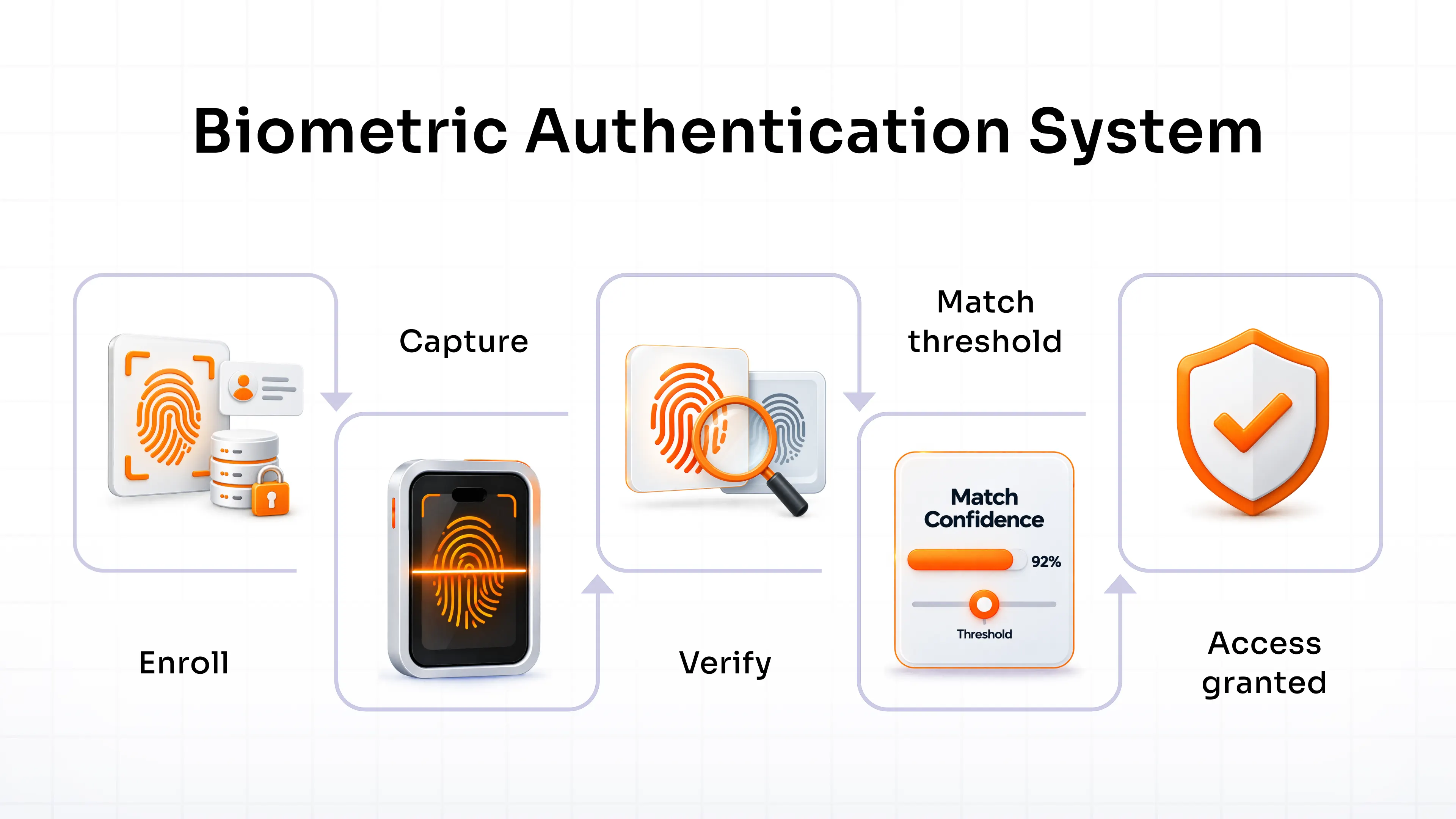
Universal directories integrate with identity and access management (IAM) solution frameworks to store user identities securely through biometric authentication, improving both security and operational efficiency.
WebAuthn standards bring biometric systems into passwordless multi-factor authentication, connecting biometric data with web-based security protocols through real-time template matching, for stronger access security and an easier user experience.
That's the mechanics behind biometric authentication. What varies is the trait being captured, and there are several methods worth knowing.
Types of Biometric Authentication
Biometric authentication relies on distinctive physical and behavioral characteristics to verify identity. The types of biometric authentication commonly used to authenticate a user include fingerprint recognition, facial recognition, iris scanning, voice recognition, and behavioral biometrics.
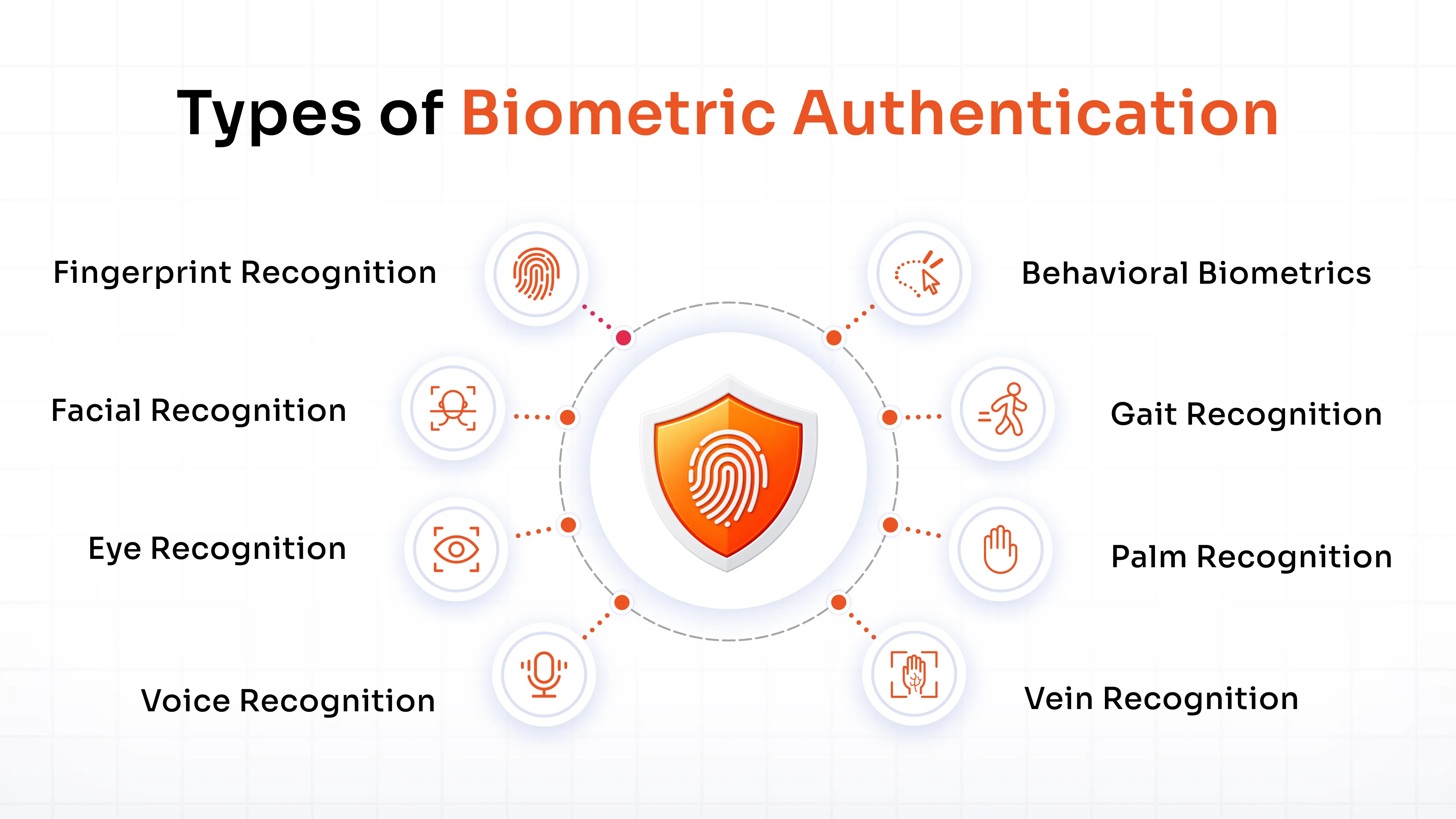
1. Fingerprint Recognition
The system reads distinct finger patterns and minutiae points, refined through decades of forensic practice. Modern implementations pair traditional matching with liveness detection for trusted access control.
2. Facial Recognition
Advanced algorithms examine facial geometry, including eye separation, nose shape, and jaw alignment. Real-time processing enables secure applications from mobile devices to airport surveillance.
3. Eye Recognition
Eye recognition covers two related methods. Iris recognition reads the patterns in the colored ring of the eye, non-invasive and highly accurate, which is why it shows up in national ID programs and border control. Retina recognition maps blood vessel patterns at the back of the eye for an even more precise match, but it needs close proximity to the scanner, so it's used far less often. Both rank among the most secure biometric options available, though cost and convenience usually tip the decision toward iris recognition.
4. Voice Recognition
The system measures vocal characteristics such as pitch, tone, cadence, and speech patterns. Algorithms compensate for background noise to keep it reliable in banking and smart home applications.
5. Vein Recognition
Near-infrared light reveals the hidden vein patterns in a hand or finger, producing a strong, hard-to-forge signature. Because the pattern sits under the skin, it's naturally resistant to spoofing, which suits contactless systems that demand high security.
6. Palm Recognition
The system maps the hand surface, analyzing unique lines, creases, and textures. It's often paired with other identification methods to boost accuracy and security.
7. Gait Recognition
Gait recognition examines walking patterns for continuous, non-intrusive tracking at a distance. It works best alongside another biometric factor, since footwear, injuries, or even a heavy bag can throw off the reading.
8. Behavioral Biometrics
Behavioral biometrics look at how a person interacts with a device: typing rhythm, mouse movement, how they hold and swipe a phone, or typical login times and locations. These patterns run quietly in the background and can flag a session that looks off even when the correct password and device were used, which makes behavioral biometrics a useful layer for continuous authentication rather than a one-time login check.
Benefits of Biometric Authentication
Verifying identity with biometrics makes logins more secure and more efficient than usernames and passwords alone. Here's what biometric security brings to a business:
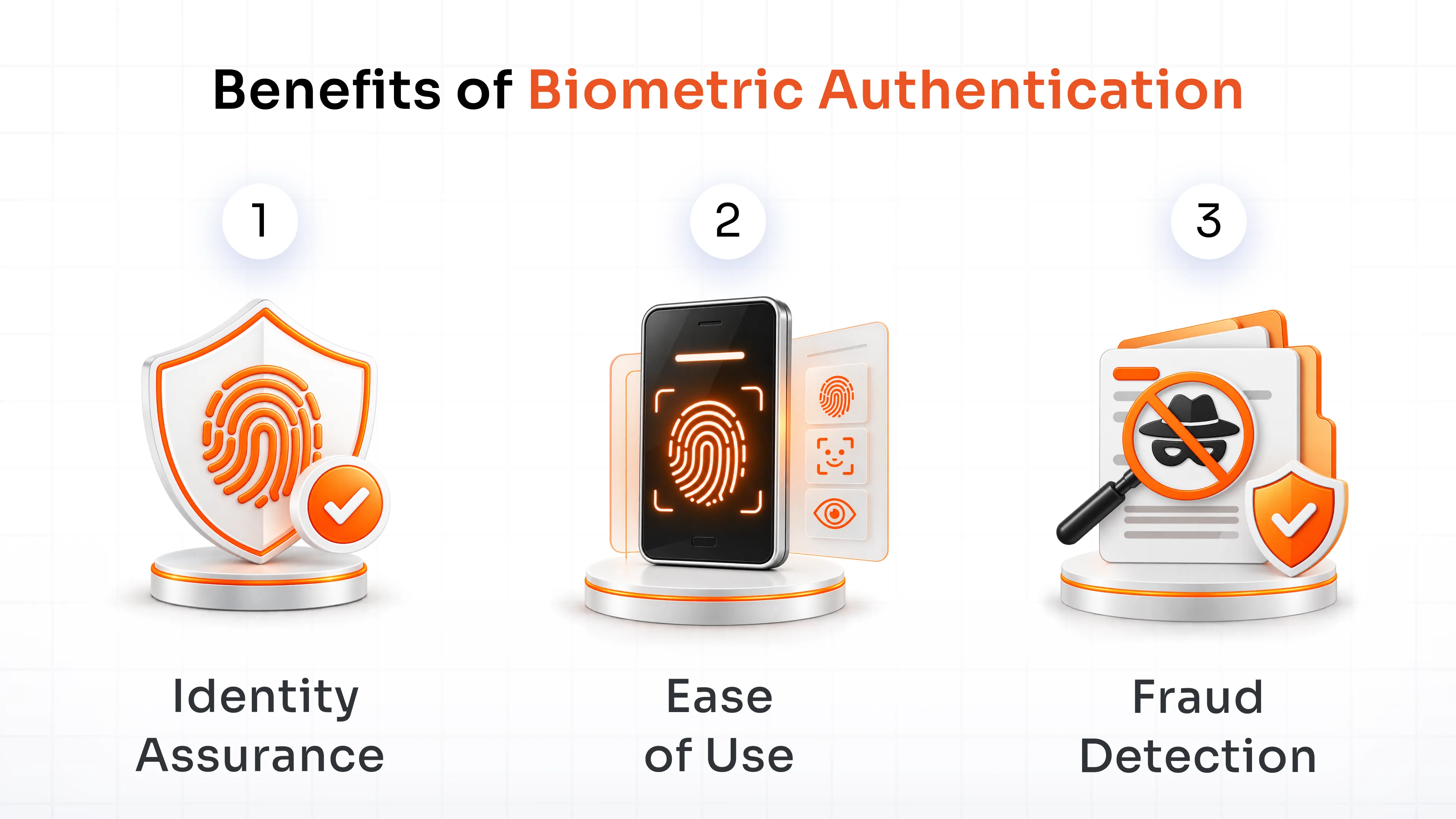
1. Identity Assurance
Biometric logins rely on distinctive characteristics, including fingerprints, facial features, and retinal patterns, traits that are difficult enough to duplicate to provide strong protection against unauthorized access and identity theft.
2. Ease of Use
Biometric systems remove the need for complicated passwords by letting users scan a fingerprint or their face in a second, faster access without giving up security.
3. Fraud Detection
The distinct nature of biometric data creates a real barrier for impostors, even when a password has already been compromised. Liveness detection confirms the data comes from a living person, which helps stop spoofing and impersonation before it succeeds.
Biometrics also open the door to passwordless authentication. Once a device can verify "who you are" directly, there's less reason to depend on a password as the primary gatekeeper at all.
Risks of Biometric Authentication
Biometric authentication brings faster logins by verifying "who you are," but it comes with its own risks: privacy, spoofing, and data that can't be changed once compromised. Here's what to watch for:
1. Partial Matches
Matching algorithms can produce near-but-not-perfect matches, leading to incorrect authentication decisions. Loose matching thresholds can end up granting access to the wrong person.
2. Prone to Hacking
Biometric systems carry real security features, but they're not immune to sophisticated spoofing and bypass attempts. Attackers who find a vulnerability can fabricate fake biometric traits and break through.
3. Data Storage
Biometric systems store personal data that makes them an attractive target. Because biometric traits are permanent, a breach involving poorly encrypted data is effectively irreversible.
4. Failed Recognition
Environmental conditions and hardware limits can cause a system to fail to recognize an authorized user, leading to denied access and real disruption at scale.
5. Privacy Concerns
Biometric data is permanent in a way a password never is, which raises real privacy questions. If it's accessed or misused, there's no way to simply reset it the way you'd reset a password.
Passwords vs. Biometrics vs. FIDO2/Passkeys: Which One is Stronger?
Passwords are cheap and familiar, but weak, reused passwords give attackers an easy way in through brute force and phishing attacks. Biometric traits are far harder to duplicate, though a compromised biometric can't simply be reset the way a password can. FIDO2 and passkeys close that gap by removing the shared secret from the equation entirely. Here's how the three compare:
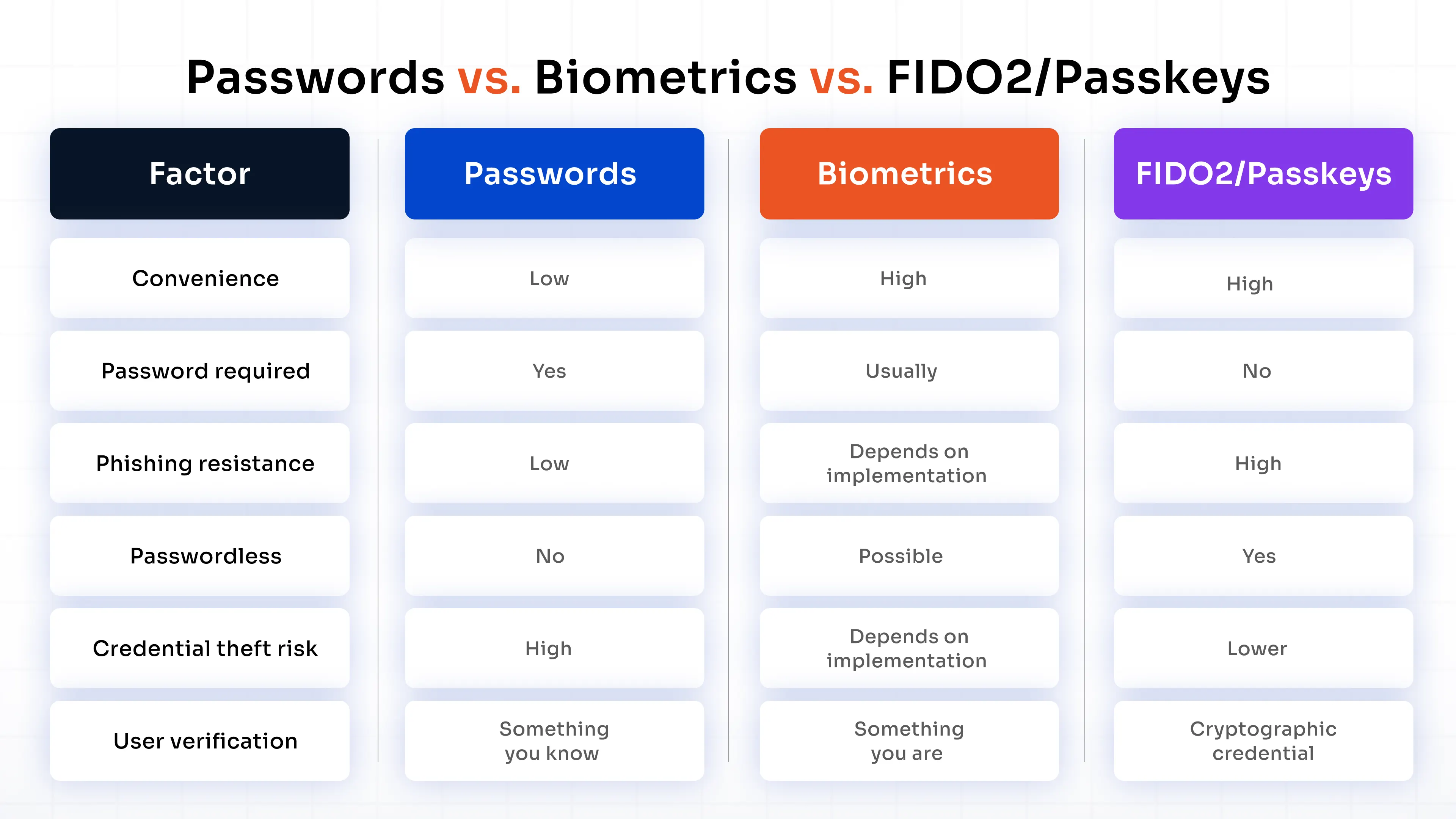
Biometrics and passkeys are related, but not the same thing. A fingerprint or face scan often unlocks a passkey locally; the passkey itself is the cryptographic credential that authenticates the user, and the biometric never leaves the device.
FIDO2 is the open standard behind passkeys, and WebAuthn is what lets that standard work inside a browser, supported across Chrome, Safari, Edge, and Firefox, so a website can request a FIDO2 credential from a security key or a device's built-in biometric sensor without ever touching the raw biometric data.
Pairing biometrics with other factors through MFA software builds a system that's both more secure and easier to live with day to day.
Biometric Authentication Myths Busted
Biometric authentication carries a few misconceptions that people think undermine its capabilities. Here are the myths and the realities:
1. Biometrics are easy to fake
Myth - Some people believe that simple molds or high-resolution images enable easy reproduction of fingerprints and facial features.
Actual - Modern biometric systems employ advanced liveness detection and anti-spoofing technologies, which make it very difficult to duplicate the authentic biological characteristics of a person.
2. Biometric systems are perfect
Myth - Many people believe that biometric systems produce no errors while delivering absolute security through perfect performance.
Actual - Every authentication system contains weaknesses because biometric systems produce quantifiable errors during verification processes, yet function best when paired with multiple security protocols.
3. Biometric data can be stolen easily
Myth - Many people believe that biometric data faces the same easy theft risks as passwords and would result in permanent security breaches.
Actual - Biometric data exists in practice as encrypted templates instead of raw data during storage. The secure management of biometric data minimizes risk because stolen data remains unusable even after a breach occurs.
4. Biometric authentication is expensive
Myth - The common perception exists that biometric authentication requires excessive costs, which restricts its deployment to premium applications.
Actual - The rapid development of technology has made biometric solutions more affordable, so they now appear in everyday devices, including smartphones and laptops, which provides accessibility to various users and applications.
One myth worth a closer look on its own: that biometrics and passkeys are the same thing. They're not, and the difference matters for how phishing-resistant a login actually is.
Biometric Authentication for Windows MFA
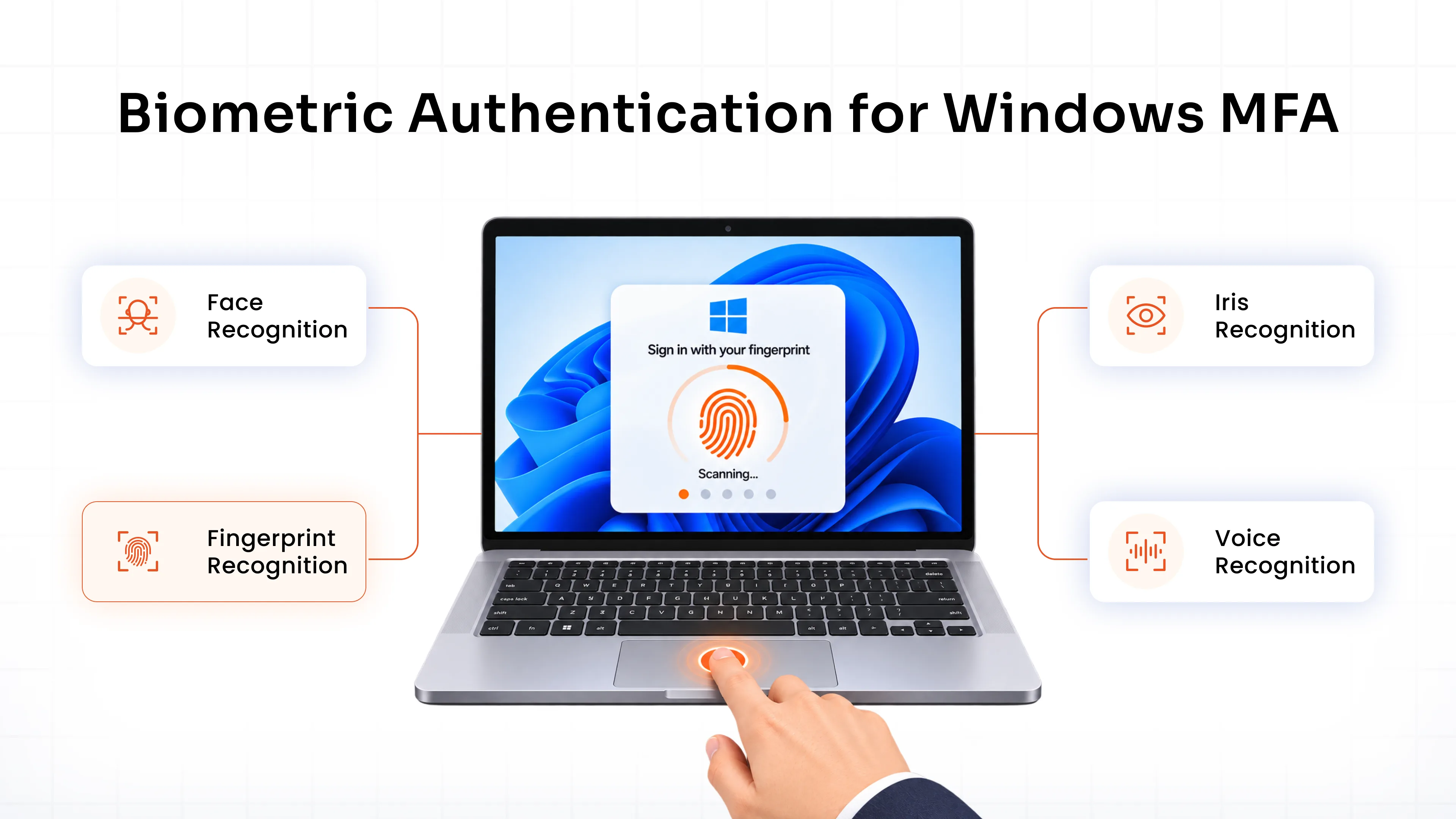
Windows logins are one of the most common places biometrics, MFA, and FIDO2 show up together in practice. A typical flow looks like this:
Windows Login → Primary Authentication → Biometric Verification → MFA Validation → Access Granted
Windows Hello lets users unlock a device or approve a login with a built-in fingerprint reader or facial recognition camera, instead of typing a password every time. A user's Windows AD credentials serve as the first factor, and the fingerprint or face scan completes MFA validation before access is granted.
Common Windows MFA scenarios include:
- Workstation login, where employees unlock a device without typing a domain password on every boot.
- Remote Desktop (RDP), closing one of the most commonly exploited gaps for external attackers.
- Privileged administrator access, where a stolen password alone should never reach a domain controller or critical server.
- Enterprise Windows environments, across local accounts, domain-joined machines, and remote workers.
Biometric verification also cuts down on password resets, one of the biggest sources of help desk tickets in any Windows environment. It pairs well with FIDO2 and passkeys too: a device's fingerprint reader or camera can unlock a FIDO2 credential locally, so the biometric never leaves the device while still delivering phishing-resistant, passwordless authentication. This makes biometrics, FIDO2, and passkeys valuable components of a phishing-resistant MFA solution for organizations looking to strengthen Windows authentication. Explore Windows MFA to see how this fits into your existing Active Directory setup.
Windows is just one environment. The same pattern shows up well beyond the workplace too.
Biometric Authentication Use Cases
Biometric authentication is showing up across digital and physical environments because it's one of the most reliable ways to confirm who's on the other side of a login or a door. Here's where it's making the biggest difference:
1. Enterprise & Workforce Access
- Application and SSO Login: Employees unlock apps and single sign-on sessions with a fingerprint or face scan instead of a password.
- Cross-Platform Coverage: The same biometric policy extends beyond Windows to macOS, Linux, and web applications.
- Help Desk Reduction: Fewer password resets mean fewer tickets for IT to handle.
2. Healthcare
- Patient Identity and Data Protection: Fingerprint, iris, or facial recognition confirms the correct patient receives their records.
- Access Control: Entry to restricted areas, such as operating rooms, is limited to verified staff.
- Remote Monitoring: Wearable data links to the correct patient for accurate telemedicine.
3. Travel
- Streamlined Check-ins and Border Control: Facial or fingerprint authentication speeds up processing at airports.
- E-Passports and Kiosks: Quick, contactless identity verification replaces manual document checks.
- Service Verification: Hotels and car rentals use biometrics to confirm identity at check-in.
4. Law Enforcement
- Identification: Fingerprints, facial recognition, or DNA help identify suspects and missing persons.
- Surveillance: Real-time monitoring flags persons of interest.
- Securing Sensitive Data: Biometric access control protects forensic databases and evidence storage.
Best Practices for Implementing Biometric Authentication
Rolling out biometric authentication well takes more than turning on a fingerprint scanner. A few things worth getting right from the start:
- Protect biometric templates: Store biometric data as encrypted templates, never raw images or recordings, with the same rigor as any other sensitive personal data.
- Use liveness detection: A photo or a mold shouldn't be able to fool the system.
- Combine biometrics with MFA: Biometrics work best as one factor among several, not the only lock on the door.
- Consider FIDO2 and passkeys: Pair biometric unlock with FIDO2-based credentials for phishing-resistant, passwordless authentication that keeps biometric data local to the device.
- Apply appropriate access policies: Adaptive, context-based authentication, policies based on role, device, or location keep security proportional to risk.
- Maintain fallback authentication methods: Hardware fails and sensors misread. Always give users a secondary way to authenticate.
- Monitor authentication activity: Audit logs and reporting help catch unusual login patterns before they turn into an incident.
- Account for privacy and compliance requirements: Biometric data is regulated differently across regions and industries, so build data handling and consent processes around whatever applies to your organization.
Secure Your Organization with Biometric MFA
Biometric authentication is only as strong as the platform enforcing it, and it works best as part of a broader MFA strategy rather than a standalone fix. Here's what miniOrange brings to the table:
- Biometric & Passkey Authentication
- Phishing-Resistant Authentication
- Multiple MFA Methods
- Enterprise Integrations
- Flexible Deployment
Pairing biometrics with adaptive policies, phishing-resistant methods like FIDO2, and reliable fallback options builds an authentication system that holds up against real-world attacks without frustrating users.
Conclusion
Biometric authentication has moved from a novelty feature to a practical layer of everyday security, verifying identity through traits that are difficult to fake and hard to lose. Used alongside MFA and, increasingly, FIDO2/passkeys, it gives organizations a path toward stronger, more convenient access control. See how it fits into a complete access strategy on our MFA solutions.
FAQs
What are the benefits of biometric authentication?
It's harder to fake or steal than a password, faster to use, and supports passwordless authentication.
What are the risks of biometric authentication?
Partial matches, spoofing attempts, permanent exposure if biometric data is breached, failed recognition, and privacy concerns.
Is biometric authentication more secure than passwords?
Generally yes, since biometric traits are far harder to guess or duplicate. It's strongest when combined with other MFA factors.
Can biometric authentication be used for MFA?
Yes. It commonly serves as one factor alongside a password, OTP, or hardware token, particularly for Windows logins, VPNs, and applications.
What is the difference between biometric authentication and passkeys?
Biometric authentication verifies a physical trait; a passkey is a cryptographic credential. A biometric scan often unlocks a passkey locally, but the two aren't interchangeable.
Is biometric authentication phishing-resistant?
Not entirely on its own, since it depends on the underlying system's security. Paired with FIDO2/WebAuthn, it becomes genuinely phishing-resistant.
How can businesses implement biometric MFA?
Choose an MFA platform that supports biometric methods alongside other factors, apply liveness detection, keep fallback options available, and roll deployment out gradually.
About the Author

Content Writer
Stutee writes about cybersecurity and identity security, covering technologies such as MFA, IAM, PAM, and endpoint management. Her work focuses on translating what products do into why audiences should care, ensuring technical depth does not come at the cost of readers clarity.
Leave a Comment