
Identity Governance and Administration (IGA) complements Identity and Access Management (IAM) by adding governance, access reviews, and identity lifecycle controls to everyday access management. Basically, IGA complements IAM by deciding who should have access and proving it stays appropriate.
IAM handles authentication, authorization, and access enforcement, while IGA manages access requests, provisioning, entitlement reviews, and compliance evidence.
Most enterprises buy IAM first. SSO and MFA are urgent, visible, and they work. And they get IGA when an auditor asks who approved a permission and nobody can say.
What Is the Difference Between IAM and IGA?
IAM and IGA address different parts of enterprise identity management. IAM focuses on verifying identities and controlling access to applications and resources. IGA focuses on governing access throughout an identity’s lifecycle, including how permissions are granted, reviewed, changed, and revoked.
Here’s how their responsibilities compare:
| Feature | IAM | IGA |
|---|---|---|
| Authentication | Verifies user identities | Uses identity and access context to support governance decisions |
| Single sign-on (SSO) | Provides access to multiple applications through one sign-in | Helps govern which applications a user should be entitled to access |
| Multi-factor authentication (MFA) | Adds verification steps during sign-in | Can support policies that consider identity risk and access requirements |
| Authorization and enforcement | Enforces access policies in supported systems | Defines, reviews, and governs access entitlements |
| Provisioning | May create accounts and assign access | Coordinates and governs provisioning based on approved policies and requests |
| Access requests | May expose access-related workflows, depending on the platform | Manages requests, approvals, and entitlement decisions |
| Access reviews | May provide access information or logs | Coordinates periodic reviews and records reviewer decisions |
| Identity lifecycle | Supports account and access changes in connected systems | Governs joiner, mover, and leaver processes |
| Compliance evidence | Provides authentication records and access logs | Collects governance decisions, certifications, and remediation records |
The boundary between IAM and IGA varies by vendor. Some IAM platforms include access request or lifecycle features, while some IGA products connect directly to applications and directories to provision accounts. Evaluate capabilities rather than relying on product labels alone.
A thumb rule to remember the difference between IAM and IGA →
- IGA decides and prompts the change.
- IAM-side systems (the directory, SSO, app connectors) carry it out and enforce it.
For a deeper comparison, read miniOrange’s guide to IGA vs. IAM.
Why Enterprises Need IGA Alongside IAM
Enterprises often manage identities across hundreds of applications, cloud services, directories, databases, and business systems. Employees, contractors, partners, and service accounts may each need different permissions, and those permissions change as work responsibilities change.
Veza's 2026 State of Identity and Access report found about 824,000 active identities with no owner in HR systems, roughly 8% of identity provider users. Another 38% had been dormant for 90 days or more. Those accounts still authenticate, and IAM has no reason to stop them.
Why?There’s no IGA.
IAM only helps secure sign-ins and enforce access policies. Governance becomes harder when organizations need to answer questions such as:
- Who approved this user's access?
- Does the user still need these permissions?
- Which accounts belong to a former employee?
- Do any users have conflicting permissions?
- Can the organization prove that access reviews took place?
- Were unnecessary permissions removed after a role change?
IGA is therefore important as access gets accumulated over time. An employee may retain permissions from an earlier department, a contractor's account may remain active after a project ends, or an application owner may grant access without a consistent review process.
But the reverse fails too. IGA without IAM produces rules and decisions with nothing to enforce them is useless.
IAM Controls Access at the Point of Use
IAM typically handles three connected tasks:
1. Authenticate: Verify the user's identity through a password, passkey, MFA, or another supported method.
2. Authorize: Determine whether the identity can access a particular resource or perform an action.
3. Enforce: Apply the access decision through supported applications, directories, gateways, or other enforcement points.
These controls help prevent unauthorized access and protect application sessions. Their effectiveness depends on accurate identity records, well-defined policies, and correct configuration across connected systems.
IGA Governs the Access Decision Over Time
IGA manages the business process behind access. It can route requests to managers or application owners, apply role-based policies, schedule access certifications, and record the outcome of governance decisions.
When a review reveals unnecessary access, IGA can initiate remediation, such as removing an entitlement or sending a task to the responsible application owner. The change may be executed through an automated connector or completed manually, depending on the system.
How IAM and IGA Work Together
IAM and IGA work together by connecting access governance decisions with the systems that create accounts, authenticate users, and enforce permissions. The exact architecture depends on the organization's applications and tools, but a typical arrangement includes a trusted identity source, an IGA platform, an IAM or identity provider, and connected business applications.
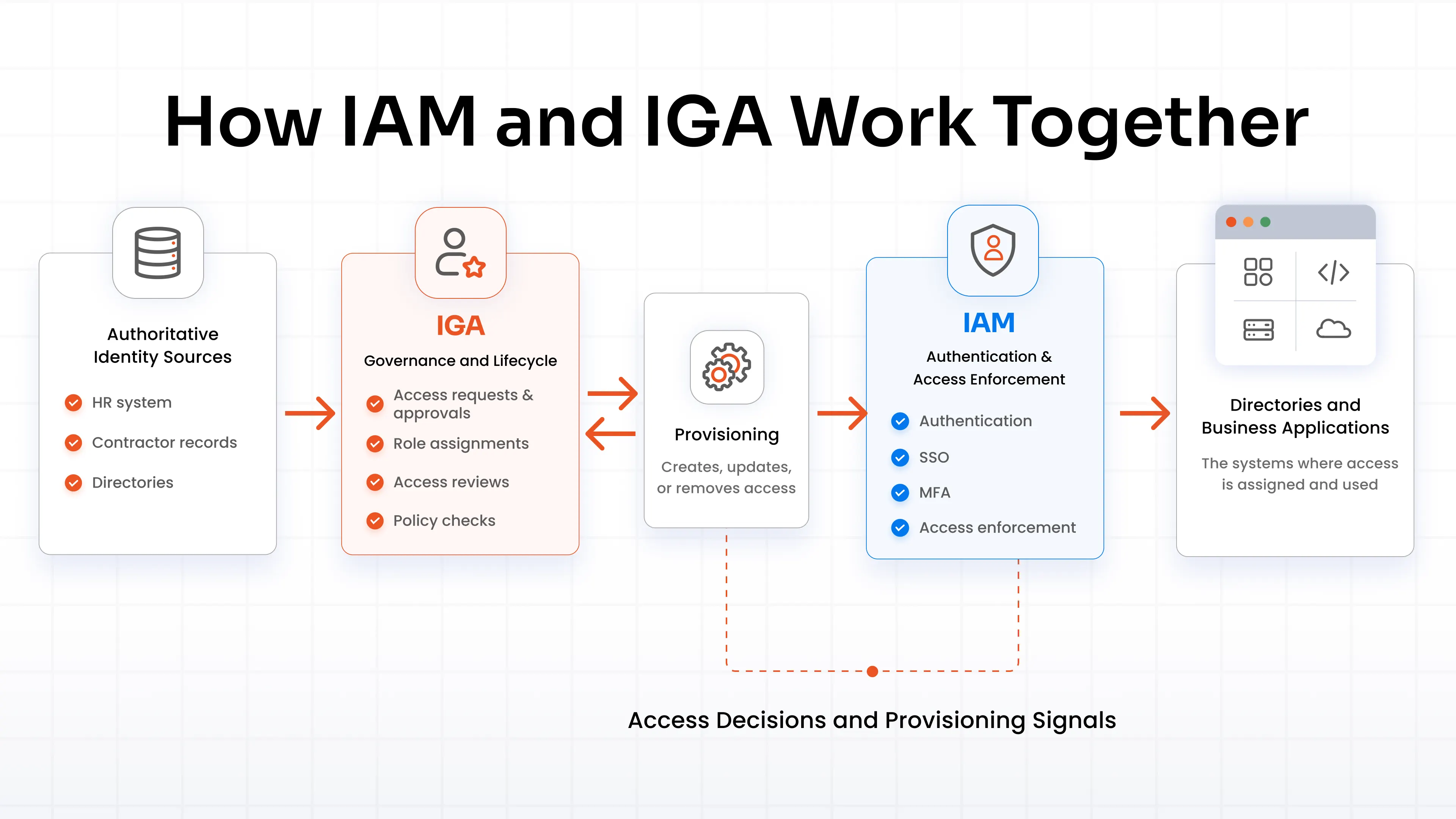
Access information can also flow back from connected systems into governance workflows. IGA can use that information to prepare access reviews, identify mismatches, and trigger remediation.
In some environments, IGA provisions accounts directly to target applications. In others, it works through a directory, identity provider, or separate provisioning service. The architecture should reflect the systems in use rather than assume that every access change passes through a single IAM platform.
How the IGA and IAM Components Cooperate
- Identity creation: When an employee joins, the authoritative identity source supplies relevant attributes, such as department, manager, and employment status. IGA applies lifecycle policies and initiates the required account and access assignments.
- Application access: IAM authenticates the user and enforces supported access policies. The user receives access to applications and resources permitted by their accounts, roles, and entitlements.
- Access requests: When someone needs additional permissions, IGA can route the request for approval, check applicable policies, and initiate provisioning after approval.
- Access reviews: IGA asks managers, application owners, or other designated reviewers to confirm whether existing access remains appropriate. Decisions can trigger removal or further investigation.
- Role changes and departures: When an employee changes jobs or leaves, lifecycle workflows update accounts and permissions. IAM and connected systems enforce the resulting access changes.
The benefit comes from connecting governance decisions to actual access changes. Approval records alone won't reduce risk if permissions remain active after a decision to remove them.
How IGA Complements IAM Across the Identity Lifecycle
The joiner-mover-leaver (JML) model describes 3 common stages in an identity's lifecycle: joining an organization, changing roles, and leaving. IGA governs the access changes associated with each stage, while IAM and connected systems handle the relevant account, authentication, and enforcement tasks.
| Lifecycle Stage | IGA's Role | IAM & Connected Systems' Role |
|---|---|---|
| Joiner | Applies onboarding policies, determines required entitlements, and coordinates approvals or provisioning | Creates or enables accounts and enforces authentication and access policies |
| Mover | Reassesses access when department, manager, location, or job responsibilities change | Updates account attributes and applies changed permissions in connected systems |
| Leaver | Starts offboarding workflows, identifies access to revoke, and tracks completion | Disables accounts, revokes sessions where supported, and removes access from connected systems |
A reliable process needs to account for exceptions. For example, a worker may need temporary access during a transition, or an application may not support automated provisioning. Organizations should define how such cases are approved, tracked, and closed.
The same principle applies to non-human identities, such as service accounts. These identities may not follow an employee's JML process, but they still need an owner, a defined purpose, controlled permissions, and periodic review.
Where IGA Adds Governance to IAM
IGA complements IAM only when it is plugged into IAM. Each capability of IGA answers a different question about who should have access, which permissions they need, and when access should change.
| IGA capability | Question it answers | How IAM acts on it |
|---|---|---|
| Entitlement management | What can each identity do across every app? | A complete permission inventory to enforce against |
| Role management | Can access follow business roles? | The roles IAM enforces at runtime |
| Access certification | Is this access still needed? | Revoke decisions IAM-side systems carry out |
| Segregation of duties | Do any permissions conflict? | Conflicting access requests blocked or flagged for review, depending on the controls in place. |
| Audit and compliance | Can we show how access was requested, approved, reviewed, and revoked? | An evidence trail to sit beside IAM login logs |
Read the table by its third column. Entitlement data tells IAM what exists. Roles tell it what to enforce. Certification and SoD decisions tell it what to remove or refuse. The audit trail proves all of it happened.
Compliance makes this concrete. PCI DSS 4.0 requirement 7.2.4 calls for reviewing all user accounts and access privileges, third-party accounts included, at least once every six months. It was a future-dated requirement, and PCI SSC confirmed those took effect on 31 March 2025. A certification campaign produces the evidence an assessor expects, and SoD controls stop the conflicts that reviews would otherwise find too late.
Example: An Employee Changes Departments
Consider an employee who moves from sales to finance. The employee may need access to finance reporting and accounting applications, while permissions tied to customer relationship management or sales forecasting may no longer be appropriate.
The IGA platform can detect the role change through an authoritative identity source, apply the organization's access policies, and initiate the required approvals or provisioning actions. It can also flag existing entitlements for removal or review.
IAM and connected applications then apply the resulting changes. Depending on the architecture, this may involve updating directory groups, changing application roles, disabling obsolete accounts, or revoking existing sessions where supported.
The organization can retain the relevant approval and remediation records. This helps answer both operational questions, such as whether the employee can reach the finance application, and governance questions, such as who approved the access and whether old permissions were removed.
When Should an Enterprise Use Both IAM and IGA?
IAM and IGA are often complementary in organizations with complex application environments, frequent role changes, sensitive data, or formal access review requirements. Using both may be especially useful when an organization:
- Manages identities across many SaaS, cloud, on-premises, and legacy applications.
- Needs consistent onboarding and offboarding across multiple systems.
- Has employees who regularly change departments or responsibilities.
- Must review access to financial, healthcare, customer, or other sensitive information.
- Needs evidence of approvals, access reviews, and remediation for audits.
- Uses role-based access policies or segregation-of-duties controls.
- Relies on several identity sources and application-specific permission models.
Smaller environments may already cover some governance needs through existing IAM or application features. Start by mapping current capabilities and identifying gaps in lifecycle management, access reviews, entitlement visibility, and evidence collection. Then decide whether a dedicated IGA platform is necessary.
Some IAM vendors now sell governance as an add-on. Other teams pair an IAM product with a separate IGA product. But mixed vendors mean you maintain the connectors, identity record, and policy sync between the two yourself.
In such cases, a single platform works best.
For example, miniOrange covers both layers, with IAM for SSO and MFA. And IGA for lifecycle, access reviews, and SoD.
Best Practices for Combining IAM and IGA
A successful deployment depends on clear ownership and accurate access information. These practices help keep governance policies connected to real application permissions.
1. Choose authoritative identity sources: Define which systems provide trusted employee, contractor, and partner attributes. Resolve duplicate or outdated records before automating lifecycle workflows.
2. Define roles and access policies: Map common job responsibilities to appropriate entitlements. Keep exceptions explicit, with an owner, reason, and review date.
3. Connect high-priority applications first: Start with systems that contain sensitive data or carry significant business risk. Confirm that connectors can read and change the permissions your policies govern.
4. Automate provisioning and deprovisioning: Use approved workflows to create, update, disable, and remove access. Monitor failures and define manual procedures for systems that don't support automation.
5. Set review rules and ownership: Decide which applications require certification, how often reviews run, and who can approve access. Give reviewers enough information to make informed decisions.
6. Track remediation to completion: A rejected entitlement should lead to a verified access change or a documented exception. Assign responsibility for overdue actions.
7. Retain audit records: Keep evidence of requests, approvals, review decisions, policy exceptions, and completed remediation according to organizational and regulatory requirements.
Review the setup regularly as applications, job roles, and business policies change. A governance workflow only works when it reflects the permissions people actually hold.
FAQs
How does IGA complement IAM?
IGA adds governance workflows for identity lifecycle management, access requests, provisioning, access certification, entitlement management, and compliance evidence. IAM handles authentication and access enforcement, while IGA helps determine whether access is appropriate and should continue.
How do IAM and IGA work together?
IGA evaluates identity and access requirements, coordinates approvals, and initiates provisioning or remediation. IAM and connected systems authenticate users and enforce access policies. Information from those systems can feed back into IGA for reviews and governance decisions.
What does IGA add to IAM?
IGA adds structured access approvals, lifecycle governance, entitlement visibility, periodic reviews, role management, segregation-of-duties controls, and records of governance decisions. The available features depend on the products and integrations in use.
Does IGA replace IAM?
No. IGA and IAM commonly perform complementary functions. Some products overlap, but organizations still need mechanisms to authenticate identities and enforce access, alongside processes for governing permissions over time.
Does IAM include identity governance?
Some IAM platforms include governance-related features, such as access requests or lifecycle automation. The depth of those features varies. Assess whether the platform supports your requirements for certifications, entitlement management, policy enforcement, remediation, and audit evidence.
How does IGA support access certification?
IGA schedules or coordinates access reviews, assigns reviewers, presents current entitlements for approval, records decisions, and tracks follow-up actions. Depending on the connected systems, it can automate permission removal or route remediation to an application owner.
About the Author

Content Writer
Stutee writes about cybersecurity and identity security, covering technologies such as MFA, IAM, PAM, and endpoint management. Her work focuses on translating what products do into why audiences should care, ensuring technical depth does not come at the cost of readers clarity.
Leave a Comment