

IAM vs. ITSM might seem like they overlap, and they do to some extent. But they are not interchangeable. IT Service Management (ITSM) helps you manage IT services, support requests, incidents, changes, and the processes around them. Identity and Access Management (IAM) focuses on digital identities and the access those identities receive.
Most organizations need both to simplify the process from access request to approval and then provisioning. We’ll break down exactly what each system does and where it fits. We’ll understand their strengths and limitations and how they complement each other.
What is ITSM?
IT Service Management, or ITSM, is the practice of planning, delivering, managing, and improving IT services so they support business and user needs. It gives your IT team structured processes for delivering services and handling the issues and changes that affect them.
ITSM provides a centralized platform for incident management, change management, and problem management. If a critical server crashes, your ITSM platform creates a ticket, routes it to the right technician, and tracks the fix through resolution.
What is IAM?
Identity and Access Management is the discipline of managing digital identities and controlling which resources those identities can access. NIST describes IAM as a fundamental cybersecurity capability focused on giving the right people and things the right access to the right resources at the right time.
Core components include strong authentication, precise authorization, and automated user provisioning. Whether you manage a small startup or need a massive enterprise IAM solution, this system keeps your data locked down.
Difference Between IAM and ITSM
ITSM manages your services and operational workflows. It covers the entire IT service lifecycle, from hardware requests to software bugs.
IAM manages your user identities and security policies. It focuses on the identity lifecycle, from account creation and authentication to role changes and deprovisioning.
The distinction becomes clearer when you look at common IT operations.
| Function | ITSM | IAM |
|---|---|---|
| User onboarding | Captures requests, approvals, tasks, and fulfillment status | Creates identities and provisions approved access where supported |
| Access management | Provides a request and approval workflow | Authenticates users and enforces access controls |
| Compliance | Helps document and manage service-related processes and controls | Supports identity and access controls relevant to security and regulatory requirements |
| Authentication | May rely on integrated identity services | Core function |
| Incident response | Tracks and manages incidents | Can provide identity context or controls, but is not an incident-management system |
| Change management | Coordinates and records changes | Applies identity or access changes within its scope |
| Offboarding | Coordinates tasks and tracks completion | Disables, removes, or updates identity access where supported |
These systems can support the same workflow without doing the same job.
Scope and Scale
ITSM spans your entire IT service lifecycle. This includes service requests, incidents, changes, problems, assets, and the processes used to deliver IT services.
IAM focuses on the identity lifecycle and access lifecycle. It follows identities from creation and authentication through role changes and eventual deprovisioning. NIST includes registration, credential management, access rights management, provisioning, authentication, access control, and auditing within the broader identity and access management discipline.
User Benefits
From the user's perspective, ITSM helps make IT support and service delivery more consistent. Everything from requests to changes follows a defined process.
IAM improves the access side of that experience. Users can authenticate securely and receive access based on their identity and permissions.
Strengths of ITSM
ITSM is at its best in service delivery and operational consistency.
- Standardized IT processes: You can standardize how your team handles incidents, changes, problems, and service requests instead of relying on individual habits.
- Strong incident management: ITSM helps your team record incidents, assign ownership, set priorities, track progress, and document resolution.
- More disciplined change management: You get a structured process for requesting, reviewing, scheduling, approving, and documenting changes.
- Improved service quality: Standard processes make it easier to spot recurring issues. Over time, that can help you improve service levels and the user experience.
- Better operational visibility: A centralized service workflow gives managers a clearer view of incoming work, unresolved issues, recurring problems, and service performance.
Limitations of ITSM
ITSM is useful, but it’s not an IAM platform.
- Limited identity management: An ITSM platform can manage an access request, but it is not the system that enforces access.
- Weak authentication controls: Authentication is a central IAM function and not the primary role of ITSM.
- Poor access governance: ITSM can track but not automatically create, modify, or revoke the user's access across your applications.
- Limited identity governance: ITSM cannot establish the access policy, enforce least privilege, or guarantee that access gets revoked.
- Password management gaps: An ITSM platform may handle password-related support requests, but it cannot manage authentication, credentials, federation, access policies, and the identity lifecycle.
Strengths of IAM
IAM fills in the gaps of ITSM when it comes to access management and identity governance.
- Stronger identity verification: IAM is built for this, with controls for authenticating users.
- Centralized access control: IAM can provide a central layer for authentication, authorization, and provisioning across supported systems.
- Identity lifecycle management: Provisioning and deprovisioning are key parts of identity management. IAM streamlines the Joiner-Mover-Leaver (JML) process.
- Better compliance management: IAM can help you implement identity-related controls that matter to frameworks and regulations, such as authentication, authorization, and access reviews.
- Better access experience: IAM can reduce repetitive authentication steps through capabilities such as single sign-on where supported.
Limitations of IAM
IAM is not a replacement for ITSM either.
- IAM focuses on identity and access: IAM is not designed to replace your complete IT service management process.
- It does not replace incident management: An IAM system can help with identity-related events, but it is not your general-purpose incident management platform.
- It does not manage the full IT service lifecycle: IAM does not cover service requests, incidents, problems, changes, and other service management processes, which come under the ITSM domain.
- Does not optimize IT costs: IAM can reduce manual identity work. It does not, on its own, provide the broader service-management processes used to optimize IT operations and service costs.
- Limited service delivery focus: Some access decisions require requests, business justification, approvals, exceptions, and records. Those activities may involve an ITSM platform even when an IAM system performs the access action.
IAM ITSM Integration: Why the Combination Works
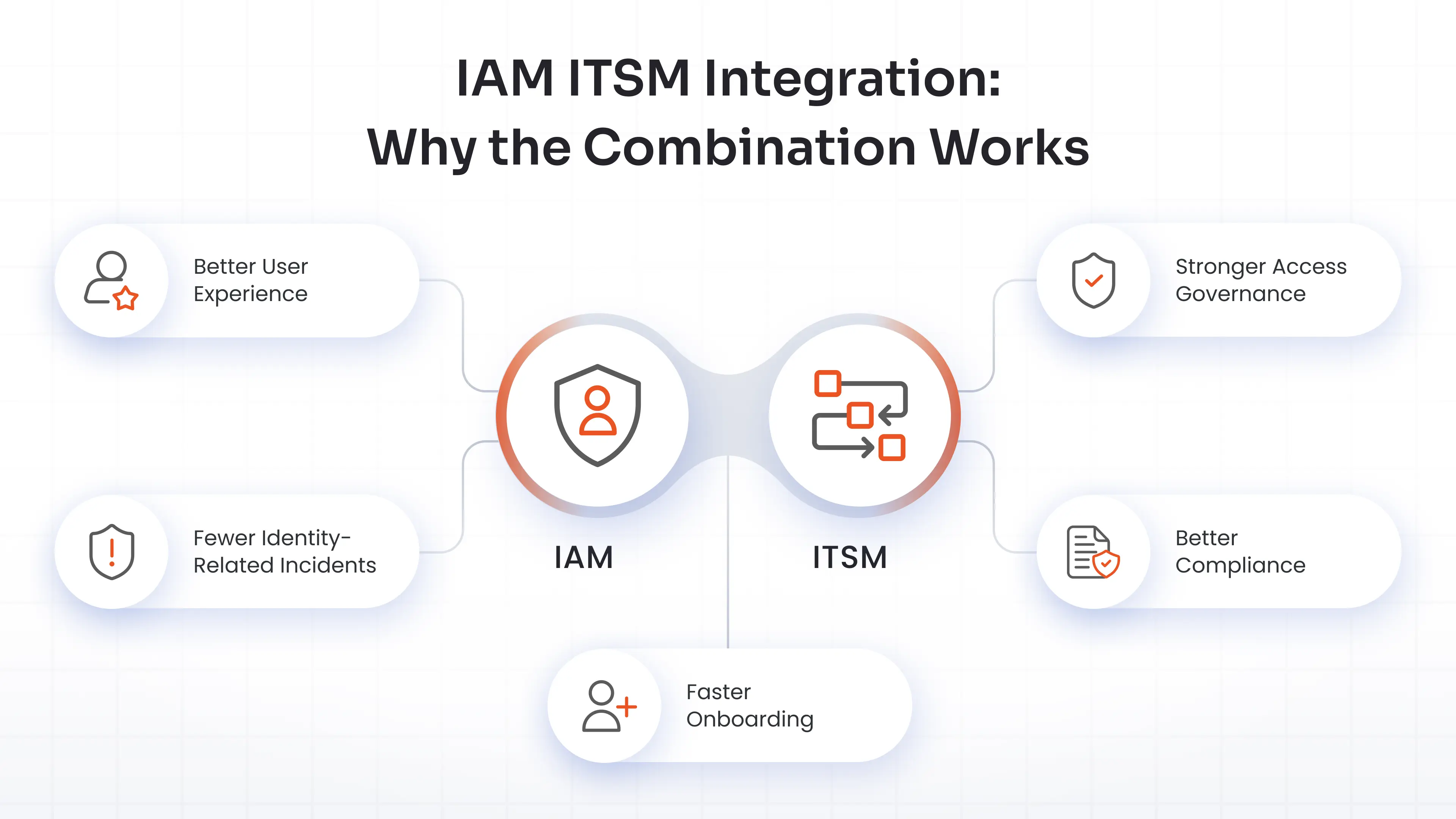
You can connect the service workflow with identity control by integrating the ITSM and IAM platforms. Here are five areas where that connection can help.
1. Stronger Access Governance
Your ITSM platform can provide the front-end workflow for an access request. It can capture the requester, business justification, approval, and status. The IAM system can then apply the relevant identity and access controls.
ITSM manages the workflow. IAM manages the identity action.
2. Better Compliance
ITSM can preserve the service workflow for access requests, including reviewers, approvals, and revocations. IAM can provide identity and access records. Together, they can give you a more complete evidence trail to support GDPR, HIPAA, and SOX.
3. Faster Onboarding
Onboarding can involve HR records, manager approvals, account creation, application access, devices, software, and other tasks. ITSM can coordinate the request and tasks. IAM can handle identity creation and access provisioning for connected systems.
Together, they can automate parts of the onboarding process.
4. Fewer Identity-Related Incidents
IAM helps prevent certain access problems by enforcing authentication and access controls. ITSM helps your team manage incidents when a problem occurs.
5. Better User Experience
Combining IAM and ITSM makes the user journey more connected. The process, from requesting access to receiving approval and access, becomes more streamlined.
IAM and ITSM Best Practices
Connecting the two platforms with clear ownership and controls gives you an effective workflow.
1. Define a Clear Governance Model
Define clear roles for your IAM team and your ITSM team. Establish clear communication protocols. Create a single point of truth for your corporate policies and hold regular sync meetings.
2. Establish a Reliable Identity Source
Keep core identity data consistent across systems. Use a single source of truth for your user data. Both systems must read from this exact same source. This improves your audit trail.
3. Integrate the Workflows
Connect both systems for the full user lifecycle. Route all access requests through both platforms. Synchronize deprovisioning with your employee offboarding process. Ensure your change management includes identity changes.
4. Build Audit Trails
Build a single, shared compliance calendar and unify your reporting. Share audit logs between the two platforms to create a common compliance framework.
5. Select Tools That Can Integrate Cleanly
Look at supported connectors, APIs, event flows, authentication methods, and data formats before you commit to an architecture. Test the integration thoroughly in a sandbox before full deployment. Avoid creating islands of automation.
6. Train Both Teams
Train your ITSM team on core IAM concepts. Train your IAM team on ITSM workflows. Run cross-functional workshops to ensure a smooth, phased rollout across all your teams.
FAQs
Can we implement IAM and ITSM separately and integrate later?
Yes. Many companies start with one system and add the other later. However, plan your future integration architecture early. This prevents expensive data migrations down the road.
Which should we implement first? IAM or ITSM?
Figuring out when to implement IAM vs. ITSM depends entirely on your current pain points. Start with the problem that creates the greatest business risk. If access and identity are the immediate concern, IAM may come first. If service delivery and operational processes are the bigger issue, go with ITSM first.
Which IAM and ITSM tools work best together?
Look for an IAM solution that offers prebuilt connectors for major ITSM platforms like Jira Service Management, ServiceNow, Freshservice, or Zendesk. The best setups support standard protocols like SAML, OAuth, and SCIM. This allows your IAM platform to automatically provision access or trigger security workflows directly inside your ITSM ticketing desk without custom coding.
How long does an IAM and ITSM integration take?
It varies based on complexity. A basic Single Sign-On (SSO) and ticketing integration might take a few weeks. A fully automated, end-to-end lifecycle provisioning integration can take a few months.
Do all organizations need both IAM and ITSM?
Very small startups might only need basic IAM. But as you scale your headcount, managing both user identities and IT services becomes critical. Most growing, modern enterprises need both to scale.
Leave a Comment