
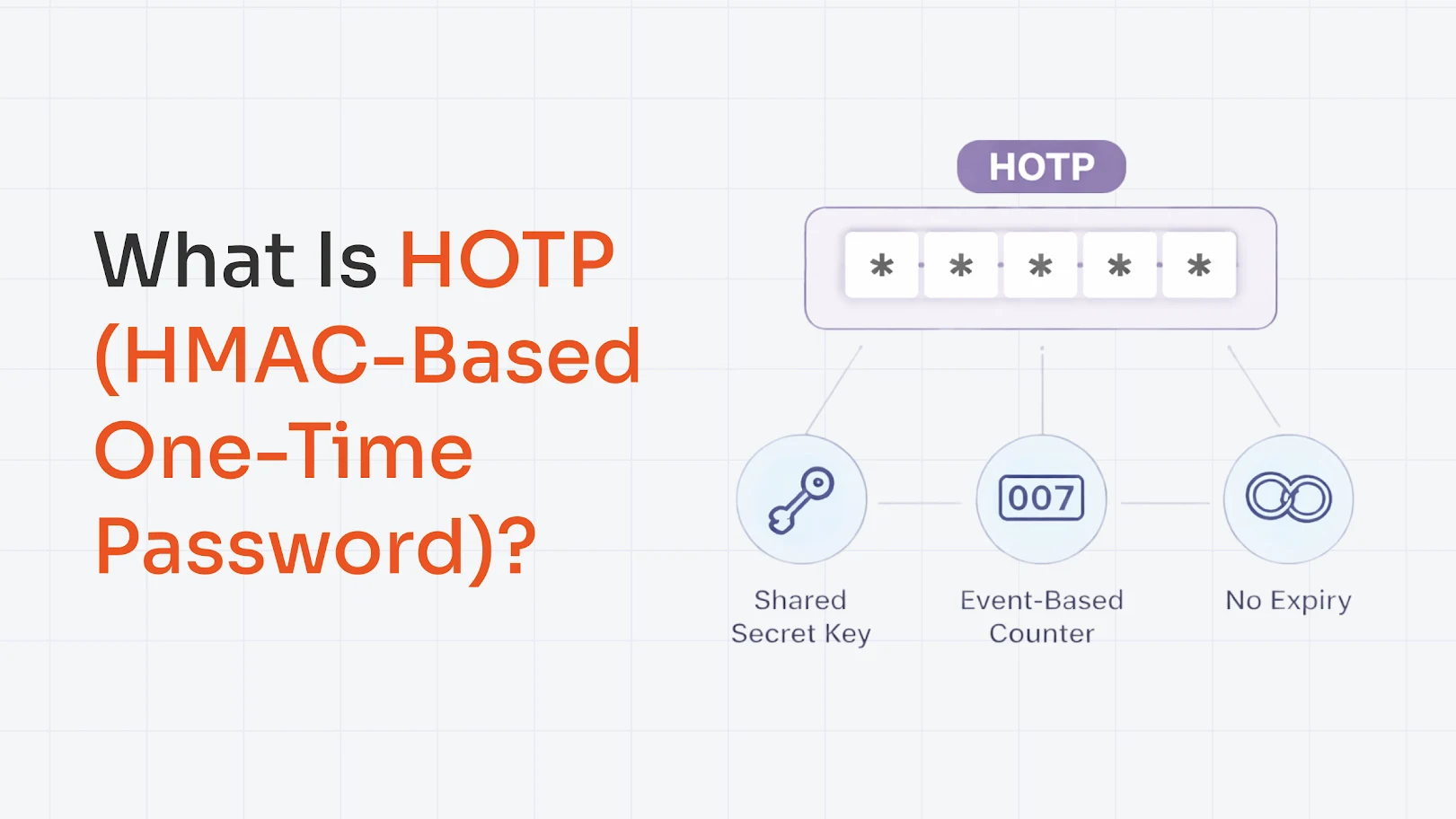
HOTP (HMAC-based One-Time Password) is an algorithm, defined in RFC 4226, that generates a one-time password by combining a shared secret key with an incrementing counter, run through the HMAC-SHA-1 hash function, producing a short numeric code valid for a single login attempt.
Let’s understand it better through this blog. We will unpack what is HOTP, how it works, and its key features. We will also look at the real-life use cases of HOTP, the benefits of HOTP, and HOTP vs. TOTP.
The Logic: How HOTP Actually Works?
The “H” in HOTP stands for Hash-based Message Authentication Code (HMAC). Now, HOTP is like any other Two-Factor Authentication (2FA) method.
Let’s understand it with the basics you’ve used OTPs, which are usually 6-digit codes that expire after a single use or after a certain time period. Well, HOTP was the original way through which the One-Time Password (OTP) method emerged.
To put it technically, HOTP generates OTPs based on a counter. Every time a user requests an OTP, the counter increases, and a new code is generated by running the shared secret key and counter through an HMAC-SHA1 function. It does not expire with time but only changes with each authentication event.
The most important thing to understand is HOTP’s generation process, and it all comes down to just two ingredients: a shared secret and a counter.
- Shared Secret Key (K): A random, unique string exchanged once during setup. It is never transmitted again during authentication.
- Counter (C): A simple number that starts at 0 and increments by 1 every time a new OTP is generated.
Once both the ingredients are ready, HOTP generates a code in simple steps, which are:
- Sharing Secret: During setup, both the device and the server sides agree on a unique secret key that is never transmitted again. It's your mutual trust anchor; if the secret stays safe, the whole system stays safe.
- Moving the Counter: For every new code, the counter increases by one. It starts at 0 and only ever moves forward. Both your device and the server maintain their own copy of this counter, always in step with each other.
- Running the HMAC-SHA1: The secret key and the current counter value are combined using the HMAC-SHA1 cryptographic algorithm. This produces a long 160-bit hash, which is a unique digital fingerprint that's practically impossible to reverse or fake.
- Truncating the Hash: A 160-bit output is far too long to type. So the algorithm applies dynamic truncation, pulling out a small chunk and reducing it to a clean 6–8 digit code you can actually use.
- Sending and Verifying the Code: You enter the code, the server runs the same calculation on its end, and if both codes match, then you're in. The counter then increments by 1 on both sides, making sure that the code can never be reused.
- In short: Secret + Counter → HMAC-SHA1 → Truncate → 6–8 digit OTP → Verified and discarded.
Key Characteristics of HOTP Authentication
Here’s a complete list of the characteristics of HOTP authentication:
- Single-use codes: Each OTP is valid for one login only. Once used, it's gone forever and can never be reused.
- No Expiry Time: Codes don't expire on a clock, so users aren't racing against a 30-second timer.
- Works Offline: No internet or network connection needed to generate a valid code.
- Tamper-Proof: Built on HMAC-SHA1 cryptography, making codes practically impossible to forge or reverse-engineer.
- Device Agnostic: Works on hardware tokens, mobile apps, USB keys, and smart cards.
- Lightweight: Requires minimal computing power, making it deployable on even basic hardware.
- Resync-Capable: Automatically recovers if the client and server counters fall out of step.
- 2FA Ready: Natively designed to layer on top of passwords for two-factor authentication.
HOTP is simple, secure, and flexible, making it a solid choice wherever time-based authentication isn't practical.
Real-World Use Cases of HOTP
Here are the top places where HOPT can be used in real-life:
- Hardware Security Tokens: Small devices such as key fobs, cards, YubiKeys, and more that show a 6-8 digit code use HOTP.
- Offline or Air-Gapped Networks: For places with no reliable network connection or time synchronization, HOTP works best because it doesn’t depend on the current time.
- VPN and Remote Access Tokens: Corporate VPNs often issue hardware tokens/smart cards that use HOTP to add an extra layer of security on top of credentials.
- Legacy Systems: The older solutions that predate today’s app-based authenticators still run on HOTP under the hood and remain in use because they’re stable.
- Fallback When Time-Based OTP Fails: In some setups, if a user’s device time is badly off and TOTP codes don’t work, HOTP-style counters (or HOTP tokens) are used as a backup method.
So, these were some of the possible places where HOTP can be used; the list, however, is not exhaustive.
HOTP vs. TOTP: What’s the Difference?
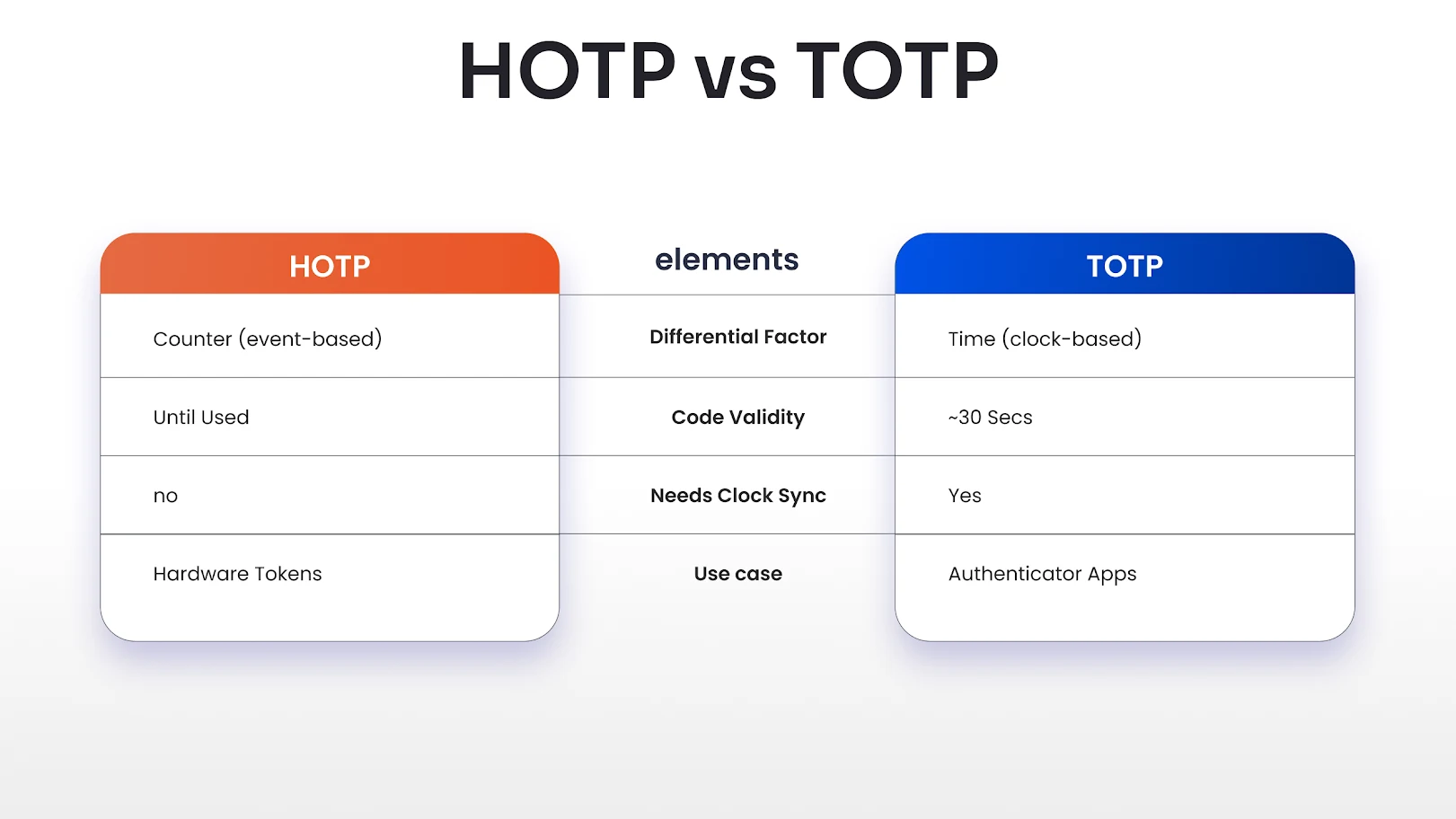
In this section, we will break down the differences between TOTP and HOTP:
Advantages of HOTP Authentication Method
HOTP’s counter-based design gives it some clear strengths in real-world environments, which are listed below:
- Simple Concept, Mature Standard: The algorithm is standardized (RFC 4226), widely understood, and easy to reason about from a security point of view.
- Good for Slow or Delayed Channels: Since codes don’t time out quickly, HOTP can tolerate SMS/email delays or users who read codes from printed lists.
- Unique, One-time Codes: Each new counter value produces a completely new OTP, so codes are not reusable.
HOTP is a solid, battle-tested option when you need offline-friendly, event-based one-time passwords and can handle a bit of extra logic around counters. Its advantages make it a good fit for specific use cases like hardware tokens and delayed channels.
Limitations of HOTP that You Should Know
HOTP comes with trade-offs you should consider before choosing it for your application, and these are as follows:
- Vulnerable to Phishing: If a user is tricked into typing an OTP into a fake site, that code can be used immediately by an attacker (just like TOTP).
- Counter Desynchronization: If the user generates multiple codes without logging in (e.g., presses the token button many times), the device and server counters can get out of sync and cause login failures.
- Codes Stay Valid Longer: Because they’re not time-bound, a stolen but unused HOTP code can be used by an attacker until the legitimate user consumes it.
HOTP’s limitations mean it’s not always the best default choice for modern, large-scale consumer apps.
Evaluating HOTP alongside alternatives like Time-Based One-Time Passcodes (TOTP) or push-based authentication will help you pick the right tool for your security and user experience needs.
Conclusion: Should You Still Use HOTP?
HOTP still makes sense today, but only in the right context. It shines in offline, hardware-token, or constrained environments where keeping accurate time is hard, and you want codes that stay valid until used.
A good rule of thumb: reach for HOTP when you’re dealing with devices or systems that can’t reliably track time, and prefer TOTP (or even stronger options like passkeys/WebAuthn) everywhere else.
Enhance Security with miniOrange MFA Solutions
Protect the accounts of your employees, clients, and vendors, along with third-party SaaS apps, from potential cybercriminal activities with a layered security approach. The Multi-Factor Authentication (MFA) solution by miniOrange is a one-of-a-kind security product built to offer additional protection on top of credential-based login.
With 15+ authentication methods, the miniOrange MFA security solution protects legacy apps, VPNs, Linux, Windows, macOS, web apps, RDP, and more.
Check out these 15+ authentication methods with a 30-day free trial, and you can also schedule a demo with our security experts today!
FAQs
Is HOTP secure?
Yes, it is secure because it uses strong HMAC-based hashing and generates one-time codes that can only be used once, which prevents simple password reuse attacks.
Where is HOTP used?
HOTP is mostly used in more specialized or legacy environments, hardware tokens, VPN/enterprise access systems, air‑gapped or offline systems, and older 2FA deployments.
Can HOTP work without the internet?
Yes, HOTP works completely offline after initial setup.
About the Author

Content Writer
With a background in Journalism and extensive experience in SaaS and cybersecurity content writing, Chaitali Avadhani has contributed to creating various forms of impactful content pieces across multiple verticals. At miniOrange, her role is to craft SEO-friendly and lead-generating content around Identity and Access Management (IAM) products and cybersecurity as a whole.

Leave a Comment