

Businesses worldwide are investing more in the cloud. According to Synergy Research Group, spending on cloud infrastructure reached $143 billion in Q2 2026, up 43% from a year earlier.
As companies move sensitive data to cloud applications, they need to keep track of who has access to it. Access needs to change as employees take on new roles or contractors leave.
However, managing permissions separately across cloud applications makes this difficult. Old accounts can remain active, and people can retain more access than they need. These gaps increase the risk of insider threats, unauthorized access, and identity misuse, putting sensitive business data at risk.
Cloud identity governance and administration (Cloud IGA) helps businesses manage access across applications through a consistent process. It supports access approvals, automates account changes, and helps teams review permissions and maintain audit records.
Here are seven reasons to include identity governance in your cloud transformation plan.
How IGA Supports Cloud Transformation
When a business moves to the cloud, its teams often use different apps and store data in different places. This raises important questions about access ownership and accountability. Who decides what each person can use? Who checks that those decisions follow company rules?
Identity governance and administration (IGA) makes these responsibilities clear. App owners approve requests, while IT and security teams check that everyone follows the same rules.
Here are seven reasons to include identity governance in your cloud transformation plan.
| Reason | What Identity Governance Provides | Cloud Transformation Payoff |
|---|---|---|
| Identity-centered control | Clear view of accounts, access, and owners | Know who accesses cloud resources |
| Automated lifecycle management | Automatic access updates | Simplify onboarding, transfers, and exits |
| Zero Trust and least privilege | Policy checks and conflict alerts | Prevent excess access |
| Compliance and audit readiness | Approval and access records | Maintain evidence for audits |
| Attack surface reduction | Removal of unnecessary or unused privileges | Reduce security risks |
| Non-human Identity (NHI) governance | Tracking and reviews of NHIs | Bring automated workloads under oversight |
| Cost and agility | Self-service requests and license recovery | Reduce delays and avoidable spending |
7 Reasons Your Cloud Transformation Needs Identity Governance
Let’s take a closer look at each reason and what it means for your cloud transformation plan.
1. Identity Becomes the Control Plane for Secure Cloud Adoption
Every employee, application, service account, and AI agent has an identity with specific access needs. Businesses must ensure each identity has access only to the resources it needs. This explains why identity is the new perimeter in cloud security: access depends on who or what requests it, not simply where the resource sits.
Identity governance and administration (IGA) helps businesses manage these permissions based on each identity's role and purpose. Teams can:
- Grant access: Give each identity the permissions it needs
- Review access: Check permissions when roles or responsibilities change
- Remove access: Revoke permissions when they are no longer needed
For example, when a finance analyst moves into a planning role, they might need forecasting tools but no longer need permission to approve payments. IGA helps align their access with their new responsibilities.
Automated Lifecycle (JML) Lets the Cloud Estate Scale
Adding applications should not require rebuilding the onboarding checklist every month. Yet each cloud service introduces another place where accounts need creating, permissions require updating, and departures must trigger removal.
Manual coordination makes these tasks increasingly dependent on reminders, tickets, and individual knowledge. JML automation manages joiners, movers, and leavers by using events from a trusted identity source, often HR, to trigger changes across supported applications. Your team defines the rules, then applies them consistently as employees arrive, transfer, or depart.
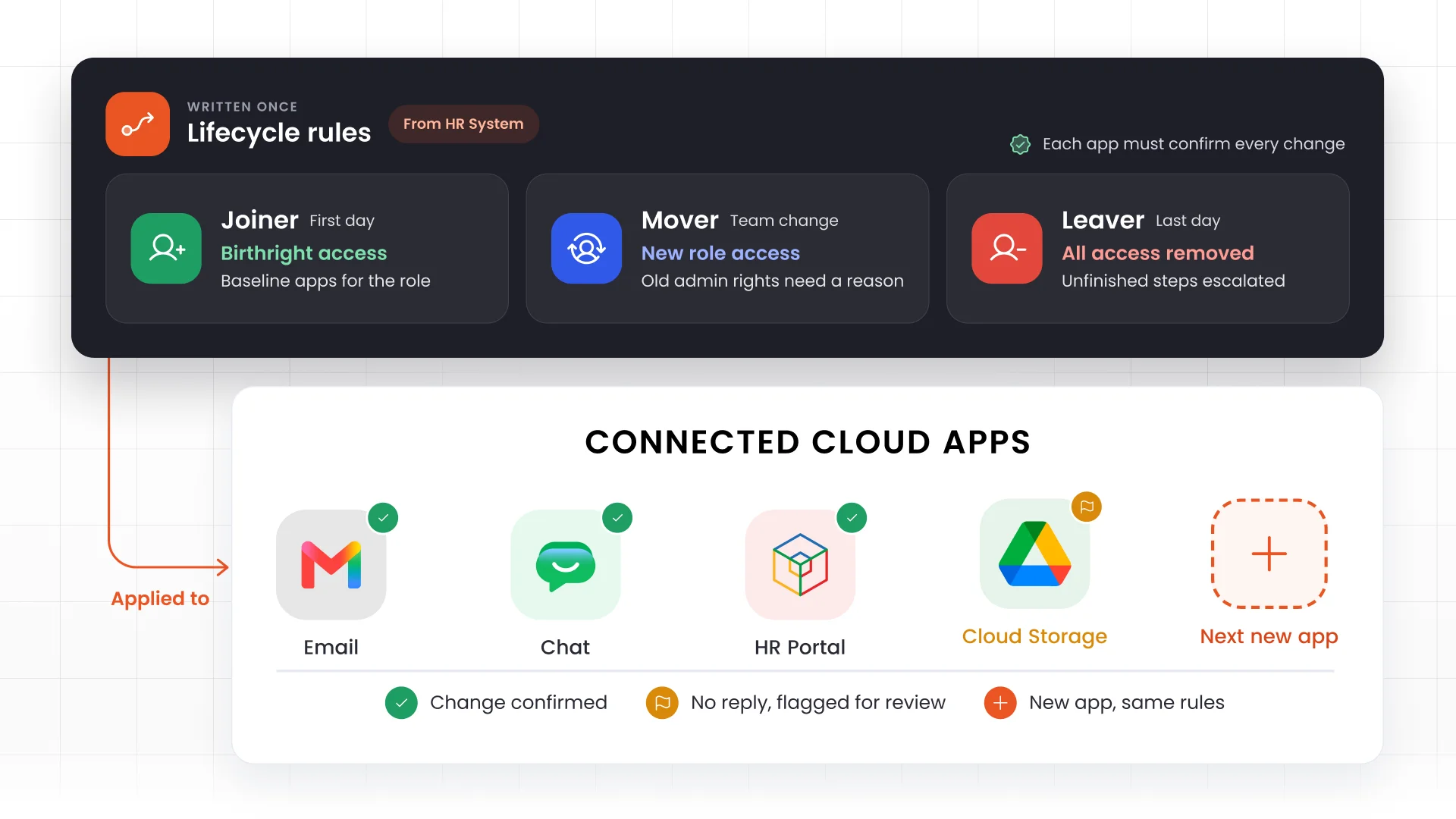
Each stage needs a clear outcome:
- Joiners receive birthright access, the baseline tools approved for their role
- Movers gain relevant permissions while earlier assignments undergo reassessment
- Leavers lose their privileges, with incomplete actions escalated
Transfers deserve particular care. Someone moving from support to sales operations may need reporting tools immediately. Keeping administrative capabilities from their previous position requires a separate business reason.
Identity lifecycle automation makes that check repeatable. Provisioning creates accounts or permissions; deprovisioning removes them.
Teams must also check whether each app completes the requested action. If an app fails to remove access, the system should flag the issue for review.
It Enforces Zero Trust and Least Privilege in the Cloud
Zero Trust treats no user or device as safe by default, so every access request is verified. Least privilege limits each person or software account to the access its tasks need.
These two principles matter in the cloud because change is constant. New users, apps, and service accounts appear daily, and access spreads across many platforms. Without checks, unused permissions pile up, and attackers get more ways in.
IGA brings both principles into daily work. Take a finance team on a cloud ERP. If an employee can create vendors and also approve their payments, one person controls two steps that should stay separate. This segregation of duties (SoD) conflict invites fake vendors, fraudulent payments, and unnoticed errors.
IGA handles it at three points:
- At request: Access policy enforcement compares the request against your rules and flags the conflict before access is granted.
- At approval: Sensitive access, such as payment approval, needs extra sign-off, so no single manager can grant it alone.
- After access is granted: Access governance and access reviews let teams review what people already hold and remove what they no longer need.
Roles change, and old permissions linger, so these checks keep access matched to each person's current job.
It Keeps You Continuously Compliant and Audit-Ready
An auditor asks why a contractor could view financial records last quarter. Today’s account list cannot explain yesterday’s decision.
To answer, your team needs the original approval, the business reason, the review history, and proof of any required removal. Cloud applications often store these details in separate places. Teams then rebuild the story from exports and old messages.
Identity governance connects those records into one trail. Evidence then builds up during daily work instead of the week before an audit.
A useful history captures:
- Who received which permissions
- Who approved them and why
- Exceptions with expiration dates
- Review outcomes and required corrections
- Remediation status with completion details
That trail supports ongoing cloud compliance with frameworks such as GDPR, SOX, NIS2, DORA, and ISO 27001. IGA keeps access aligned with job roles and keeps records ready for audits. It does not guarantee compliance on its own, because each framework asks for different evidence.
Regular access reviews then check whether each person’s access still fits their job. Sensitive permissions deserve the closest look. Payroll access, for example, needs more scrutiny than basic collaboration tools.
Reviewers also need plain descriptions of what each permission allows. A technical role name rarely tells them what a person can do. Finally, teams must track every required change until it is complete and record the result.
It Shrinks the Cloud Attack Surface
Cloud migration often needs temporary access. Project teams get extra privileges, and contractors help move data. Old systems also run next to the new ones.
When the work ends, those accounts rarely disappear on their own. They often stay active long after anyone needs them.
Leftover accounts make the attack surface bigger. The attack surface is every account, permission, and connection point an attacker could misuse. Identity governance finds access that nobody needs and sends each case to the right owner. It then tracks the cleanup until someone finishes it.
Start with areas that combine sensitive information, powerful capabilities, or unclear ownership:
- Orphaned accounts without valid owners
- Administrative rights retained after migration
- Assignments linked to completed projects
- Duplicate privileges across legacy and replacement systems
- Permissions lacking a current business justification
Dormant accounts need their own review. Low activity does not always mean an account is unused. A yearly report, for example, may still depend on it.
Ask whether the original reason for the access still applies. If it does, name one owner who takes responsibility for it. Multicloud and SaaS apps often keep local accounts and connections. A change in the central system may not reach them, so check each app directly.
Finally, confirm the result inside each application. Discovery shows the risk, but only removal lowers it. An approved cleanup report does not prove the work is done. Not every leftover account belongs to a person, though.
It Governs the Non-Human and AI Identities the Cloud Creates
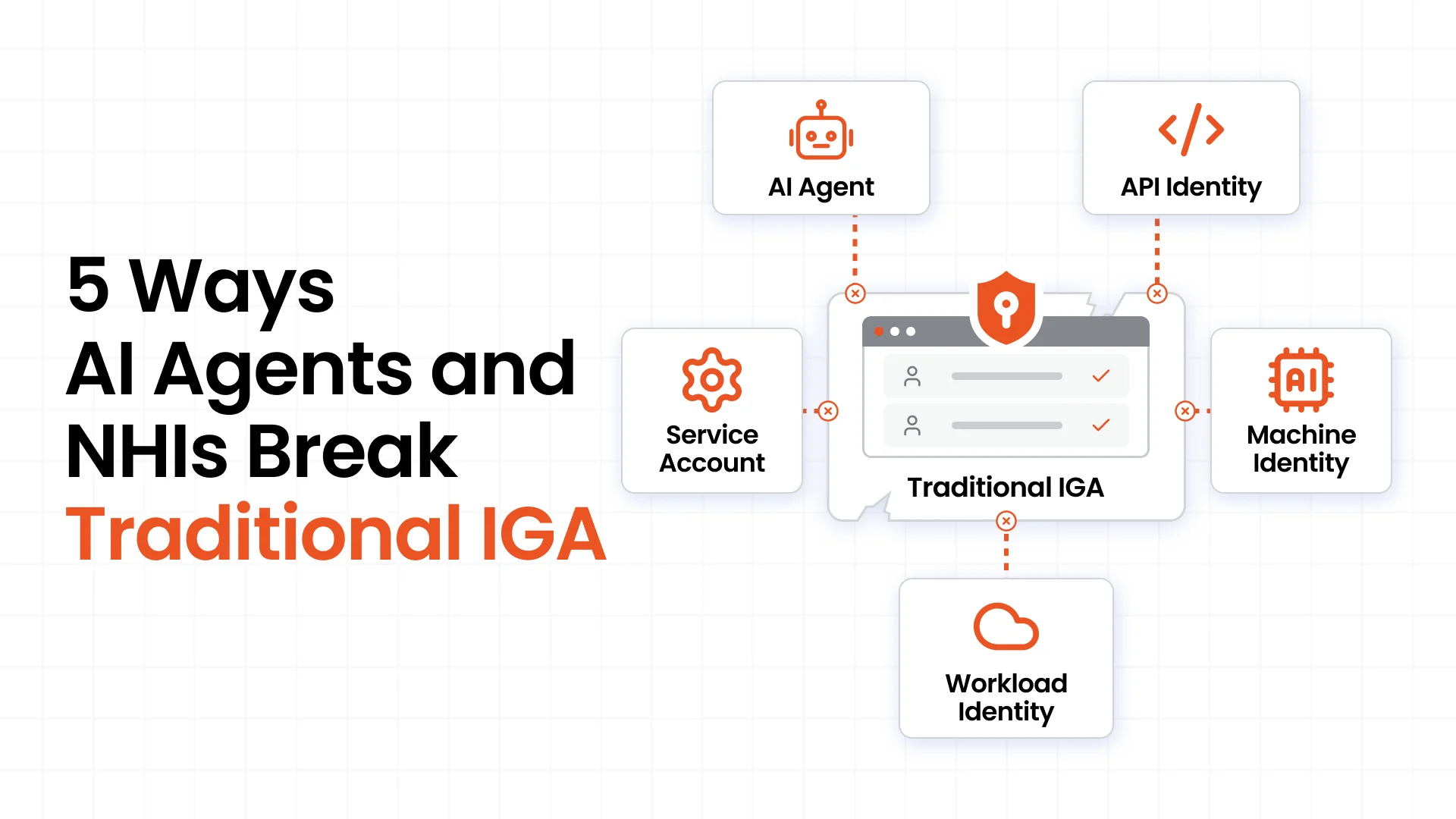
Cloud applications and workloads need identities to access data, connect services, and run automated tasks. These include service accounts, application identities, and workload identities. AI agents also need identities and permissions to access resources, call tools, and perform tasks.
Modern IGA extends identity governance to non-human identities (NHIs). It tracks who owns each identity, what it does, which resources it can access, and when its permissions need review. It also supports removing access or retiring identities when they are no longer needed.
For example, a reporting agent might need to read sales figures but should not be able to edit customer records. Modern IGA supports access reviews to keep its permissions aligned with its task.
Credential security is another part of the process. Secrets management protects passwords, keys, and tokens, while IGA governs access rights and reviews whether they remain necessary.
When evaluating modern IGA, check which non-human identities it can discover, which systems it connects to, and which lifecycle actions it supports. Pair identity governance with security controls that limit what AI agents can do, since access reviews alone cannot control every action an agent takes.
It Accelerates Agility and Controls Cloud Cost
When employees need access to a cloud application, unclear approval processes can delay their work. IGA gives access requests a clear path. Managers review business needs, application owners approve access, and policy checks flag conflicting permissions.
Clear workflows also reduce manual effort without treating every request the same way:
- Routine access follows predefined rules
- Sensitive access requires additional approval
- Temporary access expires on a set date
- Exceptions have a clear owner and documented reason
The identity governance benefits also include better control over application costs. IGA gives teams visibility into unused accounts, duplicate licenses, and access employees no longer need. Teams can then reclaim unused licenses and reduce spending, depending on usage and contract terms.
Measure identity governance ROI through:
- Time required to fulfill approved requests
- Administrative effort spent on employee changes
- Hours needed to prepare review evidence
- Licenses reclaimed and expenditure actually avoided
It is important to separate time savings from direct cost savings. Reclaiming a license frees up capacity, but it does not always reduce spending under a fixed contract.
IGA does not manage cloud infrastructure costs, such as server usage. Its value lies in speeding up access decisions, reducing manual work, and improving control over application access and license spending.
How to Put These Into Practice
Identity governance for cloud environments works best when businesses set clear priorities and build on a reliable process.
- Connect a trusted identity source. Link HR or another reliable system to keep employee records up to date. Define how contractors and other identities will be managed.
- Prioritize high-risk cloud applications. Start with systems that store sensitive data or grant powerful permissions. Confirm what each integration can access and which actions it supports.
- Automate cloud access changes. Set up workflows for new hires, role changes, and departures. Test failed actions and retries to confirm access changes are complete.
- Review cloud access regularly. Give managers clear details about each permission and why it is needed. Track access removals until they are complete.
- Include non-human identities. Assign owners to cloud service accounts and AI agents, review their permissions, and define when to retire them.
- Start small and measure results. Begin with a few cloud applications and a specific goal, such as removing unused access or speeding up approvals. Track the results before expanding to more systems.
Take Control of Cloud Access With miniOrange IGA
Cloud transformation brings more applications, users, and software identities into the picture. miniOrange IGA both human and non-human identities across cloud applications.
With miniOrange IGA, you can:
- Automate cloud access: Update permissions when employees join, change roles, or leave
- Simplify approvals: Manage cloud access requests through clear approval workflows
- Identify access risks: Flag conflicting permissions against company policies
- Review permissions: Check access regularly and keep records of decisions
- Govern non-human identities: Track and review access for cloud service accounts and AI agents
Book a miniOrange IGA demo to see how miniOrange IGA supports your cloud identity governance needs.
FAQs
Why is identity governance important for cloud transformation?
Identity governance for cloud keeps access across cloud applications aligned with job roles and business needs. It sets clear access rules, automates permission changes, and supports regular reviews. This gives teams a clear view of who can access what and helps prevent unnecessary access.
How does identity governance support Zero Trust?
Identity governance sets access rules, limits permissions to what people need, and flags risky combinations of access. Other security tools verify users, check devices, and enforce access decisions. Together, these controls support Zero Trust.
How does identity governance reduce cloud risk?
Identity governance identifies outdated accounts, excessive permissions, and access people no longer need. Teams can review these risks and remove unnecessary access. They must also confirm that the changes take effect in the relevant applications.
Does identity governance slow cloud adoption down?
No, clear workflows can speed up cloud adoption. Self-service requests, set approval rules, and automated checks reduce manual work. Sensitive access still gets extra review, while routine requests follow a simpler process.
What is the difference between identity management and identity governance?
Identity management handles user accounts and access changes. Identity governance checks whether access is appropriate, who approved it, and whether it is still needed. Identity governance and administration (IGA) brings these tasks together.
Does identity governance cover nonhuman and AI identities?
Yes, depending on the product and its integrations. IGA can track software accounts and AI agents, assign owners, review permissions, and support retirement when they are no longer needed. Credential protection and controls on what these identities can do are also important.
Leave a Comment