
When you connect Claude, ChatGPT, or any other AI models to Jira and Confluence, the AI can reach every project and space the signed-in user can open. For most people, that reaches well beyond sprint boards. It can include HR cases, finance approvals, legal reviews, and security incidents.
That reach is now a measurable risk. IBM's 2026 Cost of a Data Breach Report found that 92% of organizations hit by an AI-related breach lacked proper access controls for their AI systems. Among breaches that targeted AI models or applications, the most common cause was compromised APIs, applications, or plug-ins, at 27%.
So, does Claude see all my Jira projects? By default, it can see everything the connected user can see. This guide shows Atlassian admins how to prevent AI access to sensitive Jira data and Confluence spaces, while teams keep using AI everywhere else.
What Counts as Sensitive Data in Jira and Confluence
In your Atlassian instance, sensitive data usually is in three places: Jira projects, Confluence spaces, and individual tickets that hold personal details.
| Where it lives | Common examples | Why AI access is a risk |
|---|---|---|
| Jira projects | HR (hiring, performance reviews, grievances), Finance (budgets, payroll approvals, invoices), Legal (disputes, contract reviews), Security (vulnerabilities, incident response) | One broad prompt can pull these issues into a chat that was never meant to hold them |
| Confluence spaces | Board and leadership notes, contract libraries, M&A planning, runbooks with architecture details | Pages are long and detailed, so a single summary can expose a lot |
| Individual tickets | Support tickets with customer names, emails, and account details; HR tickets with employee records | PII in Jira often sits inside otherwise normal projects |
The first two are easy to protect because you can restrict them as a unit. The third is harder. When personal data is spread across ordinary tickets, project-level rules alone will not catch it. This matters because, according to IBM's 2025 report, breaches involving unsanctioned AI compromised customer PII in 65% of cases, against a 53% global average. Keeping PII out of tickets in the first place is the best fix, and our guide explains how to stop PII from landing in Jira tickets.
For everything else, the goal is simple: list the projects and spaces you need to protect sensitive Confluence spaces and Jira projects from AI, and keep that list current.
Why Native Controls Are Not Enough
Atlassian's native controls decide what kind of action AI can take, but not where it can take it. According to Atlassian's documentation, MCP clients act in Jira, Confluence, and Compass with the user's existing permissions.
Admins get two useful levers. The Permissions tab lets you allow or block Read, Write, and Search for each app. The domain allowlist controls which AI tools can connect. Both are set for the whole organization, as an open Atlassian feature request confirms.
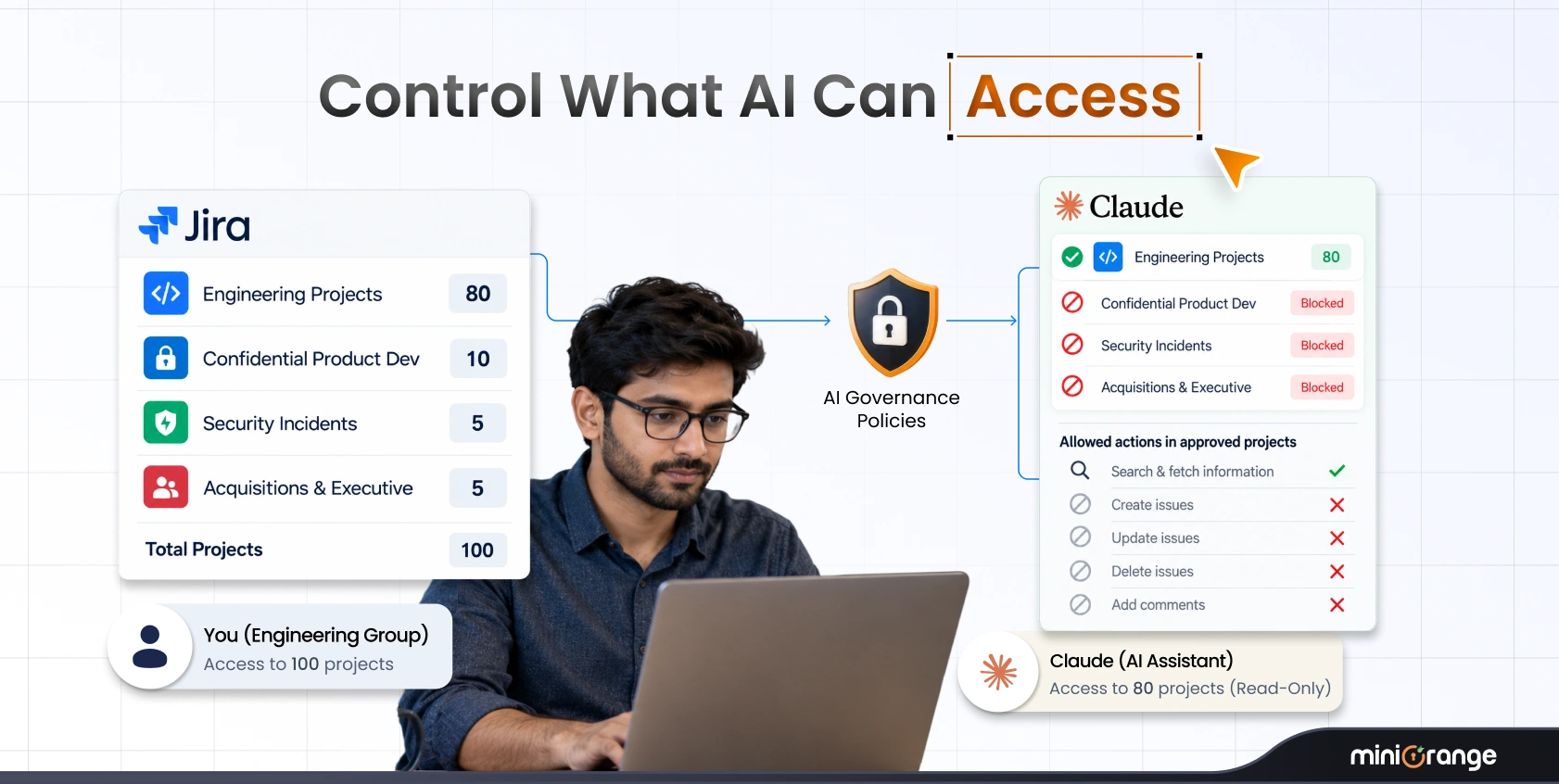
That leaves a clear gap. You can block Write across all of Jira, but you cannot let Claude read the Engineering project while hiding the HR project. If a user can open a project, the Claude Atlassian connector can reach it too.
AI governance in Jira closes that gap by adding project, space, group, and operation rules for the AI alone. To see how this works in practice, read how to connect Claude to Jira securely.
Steps to Keep AI Out of Sensitive Data
The approach is to restrict AI by project and space, without touching anyone's own access. The steps below use Claude & ChatGPT Governance and Access Control for Jira, which sits between the AI assistant and your Atlassian data and checks every request before it runs.
| Step | What to do | What it achieves |
|---|---|---|
| 1. Find where sensitive data lives | List the Jira projects and Confluence spaces that hold HR, finance, legal, and security work | A clear block list to build rules from |
| 2. Put a governance layer in front | Route Claude and ChatGPT through the governed MCP endpoint and turn off native Atlassian-supported domains in Rovo | AI has one path to your data, and every call on that path is checked |
| 3. Require individual sign-in | Ask each person to sign in once through the gateway | Group and space rules can identify who is asking |
| 4. Choose a default decision | Pick Allow to block a short list, or Deny to approve a short list | Sets whether your rules are exceptions or allowances |
| 5. Block the sensitive areas | Add a Deny rule for all operations on the projects and spaces from step 1 | AI cannot retrieve data from them at all |
| 6. Set read-only where write is risky | Deny create* and update* where AI should only read |
AI can summarize and search but cannot change content |
| 7. Check the Activity Log | Review allowed and blocked calls, with the user, tool, and project for each | Proof that the rules work as intended |
Two details make this approach strong for sensitive data. First, Deny always wins. If several rules match a request, a Deny cannot be undone by a broader Allow elsewhere in the list. Second, broad prompts stay safe. When a project or space has a Deny rule, a search that is not scoped to a space is denied rather than returning partial results that might include restricted content.
Denied requests stop at the gateway, so the data is never retrieved from Atlassian and never reaches the AI model.
A Worked Example
An engineer in the developers group can open 100 Jira projects. Twenty of them cover security vulnerabilities, unannounced acquisitions, and confidential product work. The admin sets the default to Allow and adds three rules.
| AI client | Operation | User group | Project or space | Effect |
|---|---|---|---|---|
| Any | update* |
Any user | Any space | Deny |
| Any | * |
developers | The 20 restricted projects | Deny |
| Any | create* |
developers | Any space (optional, for a read-only pilot) | Deny |
The engineer still opens, edits, and works in all 100 projects directly in Jira. When they ask Claude to search their work, the 20 restricted projects are never touched. This is AI data access control in Jira that takes nothing away from the user.
Set It Up
Setup takes a site admin and a few minutes. The app is built on Forge, so miniOrange cannot access or store your Atlassian data.
- Install the app. Find the AI Agent Governance app on the Atlassian Marketplace, install it, and open the Getting Started tab.
- Close the native route. Copy the callback URL, add it under Rovo MCP server, Domains, and turn off "Allow Atlassian supported domains." Without this step, users can still connect directly and skip your rules.
- Connect Claude or ChatGPT. Copy your MCP server URL. In Claude, open Settings, then Connectors, then Add custom connector, and paste it. ChatGPT users also paste the tenant ID shown on the same card.
- Sign in once. Each person approves the Atlassian prompt, which lets group and space rules apply to them.
- Set your policy. Choose a default, add Deny rules to restrict Claude's Jira projects and Confluence spaces, then save. Rules apply on the very next AI request.
- Check the log. Ask Claude to "search my open Jira issues" and confirm the call appears in the Activity Log under your name.
You need site admin rights and a Claude plan that supports custom connectors. For screenshots and details, follow the step-by-step setup guide.
Common Mistakes When You Hide Projects From AI
- Trusting user permissions alone. User permissions decide what a person can do. They were not built to decide what AI should do on that person's behalf.
- Scoping Jira but forgetting Confluence. Board notes, contracts, and runbooks often sit in Confluence. Add those spaces to the same rules.
- Skipping the Rovo domain step. If Atlassian-supported domains stay on, a user can connect directly and bypass every rule.
- Leaving write access on. Reads can be reviewed later, but edits change real records. Deny
update*wherever AI only needs to read. - Never opening the Activity Log. The log records every call, allowed or blocked. Review it weekly during a rollout so you can tune rules early.
FAQs
1. How do I stop AI from seeing sensitive Jira projects?
Route Claude and ChatGPT through a governance layer, then add a Deny rule for all operations on those projects. Denied requests stop before any data is retrieved, so the AI never sees it.
2. Can you block Claude from certain Confluence spaces?
Yes. Add the spaces to a Deny rule in the Access Policy. Confluence uses the same gateway, rules, and Activity Log as Jira, so one policy covers both.
3. Does Claude see all my Jira projects by default?
With a direct connection, Claude can reach every project the signed-in user can open. Atlassian's native settings can block Read, Write, or Search across a whole app, but not for one project.
4. How do I keep HR and finance data away from AI?
List the HR and finance projects and spaces, then deny all AI operations on them for every user. Because Deny always wins, no broader Allow rule can reopen access by mistake.
5. How is this different from Atlassian native controls?
Native controls work across the whole organization by action type. The governance app adds rules by project, space, user group, AI client, and operation, plus a dedicated AI audit log.
6. Can I control which Jira projects and Confluence spaces Claude can access?
Yes. Set a default of Deny and allow only the approved projects and spaces, or set a default of Allow and deny the sensitive ones. Changes apply on the next AI request.
Keep Sensitive Data Out and AI Productive
You do not have to choose between using AI and protecting HR, finance, legal, and security work. Restrict the AI by project and space, keep write access off where it is not needed, and let your teams use Claude and ChatGPT everywhere else.
Every person keeps their existing Jira and Confluence access. Every AI call is checked before it runs and recorded in one log, so you can show your security team exactly what AI touched and what it did not.
Get the AI Agent Governance app on the Atlassian Marketplace to set this up on your site.
About the Author

Content Writer
Pallavi Narang is a content writer with more than 4 years of experience. She specializes in driving brand awareness and lead generation through compelling storytelling and strategic marketing campaigns. With a background in SaaS, cybersecurity, and data analytics, Pallavi excels in translating complex concepts into engaging narratives. Outside of work, she is either learning new languages or reading.
Leave a Comment