

HR closes an employee’s record. IT disables their directory account. The offboarding ticket moves to “done.” A week later, an application owner finds that the employee’s local account in a finance tool is still enabled. The team completed offboarding in the directory, but it didn’t verify what happened in the application.
To prevent orphaned accounts, use Identity Lifecycle Management (ILM) to connect account creation, access changes, and offboarding to reliable identity records. Automate changes where applications support them, assign manual tasks where they don’t, and compare application accounts with current identity and ownership records.
Offboarding is complete when you can verify that access was removed, not just that a request was sent.
What Are Orphaned Accounts?
An orphaned account is an account that no longer has a valid, accountable owner. It might belong to a former employee, a contractor whose engagement ended, or a service that still runs even though the team responsible for it has disbanded.
A dormant account is different: It hasn’t been used within a defined period, but it may still have a legitimate owner and purpose. An account can be orphaned, dormant, or both.
Common causes of orphaned accounts include:
- Incomplete offboarding: IT disables the primary directory account but misses a separate administrator account, an application-local login, or an account outside the provisioning workflow.
- Missing contractor end dates: A vendor or contractor account remains enabled because no one recorded the engagement end date or took responsibility for closing it.
- Account creation outside the standard process: An application administrator creates an account directly, and it never gets linked to a governed identity.
- Ownership changes: A team retires a project or moves responsibility for a service without updating who owns its accounts.
The risk depends on what the account can still do. An enabled application administrator account warrants faster action than an already-disabled account with no owner on record.
Unowned accounts also make it harder to answer basic audit questions:
- Who approved this access?
- Does anyone still need it?
- Who is responsible for removing it?
An account inventory helps, but only if it records ownership, access, and status.
How Identity Lifecycle Management Prevents Orphaned Accounts
Identity lifecycle management gives IT a way to act when someone joins, changes roles, or leaves. It also gives security teams a way to check whether those changes reached the applications where access actually lives.
1. Automated User Provisioning
When HR records an employee’s departure, automated deprovisioning uses the effective termination date and time to trigger access removal.
The workflow can disable the employee’s directory account, remove group memberships, and send deactivation requests to connected applications. This reduces the risk that an application account stays active because someone missed an offboarding task.
The workflow should also verify that each connected application applied the change. If a deactivation request fails or the account still shows as enabled, the workflow should flag the exception rather than mark deprovisioning as complete.
2. Role and Department Change Management
A transfer is an access removal event as well as an access grant. When an employee moves from finance to operations, the workflow should add access required for the new role and remove access tied to the old one. If the employee still owns an integration account for a finance process, transfer ownership before closing the change.
These are two distinct problems. An employee who keeps an unnecessary finance permission has excess access, not necessarily an orphaned account. An integration account left without an accountable owner is orphaned, even if it still runs every day.
3. Centralized Identity and Account Management
A centralized view links an identity to its accounts across systems. One person might have a directory account, several Software-as-a-Service (SaaS) accounts, and a separate administrator account. Treating those as distinct accounts under one identity lets IT verify each one instead of assuming that disabling the primary login handled them all.
Use a stable identifier, such as a worker ID, to connect accounts where possible. Email addresses and names can change. If a match is uncertain, route it to a reviewer rather than guessing or treating every unmatched account as unauthorized.
4. Periodic Access Reviews and Account Reconciliation
Account reconciliation compares what exists in an application with what the identity system expects to find. It can reveal an enabled account linked to a departed worker, a local account missing from the inventory, or a service account without a current owner.
An access review answers a different question: Should this account and its permissions still exist?
Use them together. Reconciliation surfaces mismatches; a review confirms which are legitimate exceptions and which require action.
Steps to Prevent Orphaned Accounts
Start with applications where a missed account would have the greatest impact, such as systems with privileged access or sensitive data. Expand coverage in stages, and record which applications still rely on manual controls.
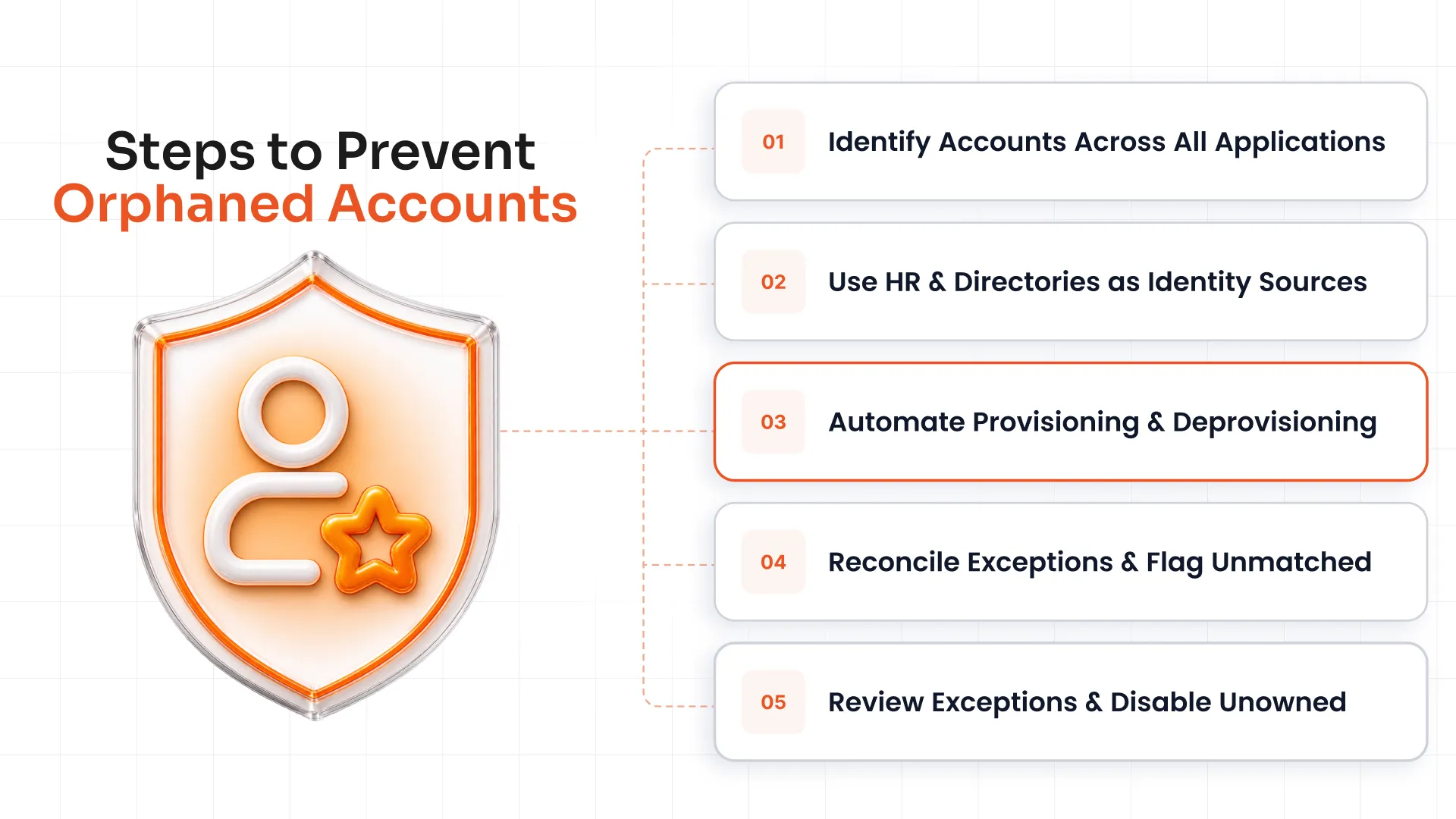
1. Identity accounts across all applications: Inventory accounts in SaaS, on-premises, and legacy apps, including locally created and privileged accounts. Record each account’s owner, status, and access level.
2. Use HR systems and directories as identity sources: Use HR records for employment status and effective dates, and directories for account status and group membership. Track contractor end dates in a designated system.
3. Automate provisioning and deprovisioning: Use identity changes to trigger account creation, updates, and deactivation. Verify changes in each target app and assign a fallback owner for failed or unsupported actions.
4. Reconcile exceptions and disable unowned accounts: Compare a fresh account list from each app with current identity and ownership records. Flag enabled accounts tied to departed workers, unmatched accounts, and service accounts without an owner.
5. Review exceptions and disable unowned accounts: Prioritize enabled accounts with privileged access. Check service account dependencies before disabling them, and give every temporary exception an owner and an expiration date.
Role of SCIM and Directory Integration
SCIM, or System for Cross-domain Identity Management, standardizes how systems exchange and manage user and group records.
A provisioning service can use SCIM to create an application account, update attributes, or send a deactivation request such as active: false. SCIM also defines a DELETE operation, but a deleted resource does not necessarily mean that the application physically erases its underlying record. Confirm how each target handles deactivation, deletion, and session or token revocation.
Directory integration and SCIM solve different parts of the problem. A directory can supply account status and group membership. SCIM can carry provisioning changes to a supported target application. SSO governs sign-in through the identity provider, but disabling that sign-in path does not by itself confirm that an application-local account was disabled.
Best Practices for Orphaned Account Prevention
A good prevention program makes exceptions visible and assigns someone to resolve them. Set expectations for timing, ownership, failure handling, and evidence before you scale automation.
1. Define Offboarding Timelines
Set deadlines by event and risk. For example, your policy might require revoking privileged access at the effective time of a termination and verifying connected application accounts by the end of the business day.
Define who takes over when a workflow misses its deadline and how urgent events are handled outside business hours.
2. Include Contractor and Service Accounts
Give contractors a named sponsor and an end date. Require the sponsor to approve an extension before access expires.
For service accounts, record the responsible team, business purpose, dependencies, and review date. When the owner leaves, route the account for reassignment instead of assuming it’s safe to disable. If it’s no longer needed, retire it and revoke its associated credentials through the appropriate system.
3. Monitor Failed Deprovisioning Workflows
Alert on connector errors, overdue manual tasks, and accounts that remain enabled after a workflow reports success. Assign someone to review repeated failures rather than relying on retries alone.
One useful measure is the percentage of in-scope accounts verified as deprovisioned within policy. Report unsupported applications separately so the metric doesn’t hide gaps in coverage.
4. Maintain Audit Logs and Access Reviews
Keep enough evidence to reconstruct the change: the triggering event, target account, requested action, result, timestamps, and reviewer or approver, where applicable.
Schedule reviews based on the sensitivity of the application and the privileges involved. If a reviewer votes to revoke access, make sure that decision creates a tracked action and that someone verifies the result.
Prevent Orphaned Accounts With miniOrange IGA
miniOrange Identity Governance and Administration (IGA) helps teams find orphaned and stale accounts across connected systems.
It supports:
- Scheduled or manually triggered reconciliation
- Classifies findings using signals such as privileges and last activity
- Routes accounts into review workflows
- Disable or deprovision an account, reassign ownership, or flag it for investigation
- Review decisions and remediation activity can be documented for audits
Walk through a recent departure with a miniOrange IGA specialist. See where you can automate access removal and where you still need to verify it.
FAQs
What causes orphaned accounts?
Orphaned accounts commonly result from incomplete offboarding, missing contractor end dates, accounts created outside standard provisioning, or service accounts whose owners leave without a handoff. The common thread is lost accountability.
How does identity lifecycle management prevent them?
Identity lifecycle management uses employee, contractor, and ownership changes to trigger account updates, access removal, or ownership reassignment. Reconciliation checks whether the expected changes reached the applications and flags accounts the workflow missed.
Can SCIM automatically deprovision user accounts?
Yes, a provisioning service can use SCIM to deactivate or delete an in-scope user account when the target application supports the operation and the workflow is configured to send it.
Leave a Comment