

Every time an employee joins your company, they need access to multiple systems. You can create accounts across 20+ different systems manually, which is time-consuming and error-prone.
Or you can automate the entire user lifecycle with SCIM provisioning solution. Your admin team can save hours every week as accounts will be created, updated, and removed consistently.
In this guide, you’ll understand what SCIM provisioning is, what its benefits are, and how you can implement it.
What Is SCIM Provisioning?
SCIM Provisioning Definition: SCIM (System for Cross-domain Identity Management) is an open standard protocol that enables automatic user provisioning and deprovisioning.
In simple terms, SCIM allows one trusted system, such as Microsoft Entra ID, Okta, Google Workspace, or another Identity Provider (IdP), to automatically create, update, disable, and delete user accounts in connected applications.
To understand the core SCIM provisioning meaning, keep these key points in mind:
- Open standard: It is governed by open specifications (RFC 7643 and RFC 7644).
- REST API-based: It relies on standard web protocols to transmit data.
- User and group management: It handles both individual identities and group permissions.
- Industry-standard: It is an open, cross-vendor standard rather than a proprietary solution.
Think of SCIM provisioning as a universal translator that lets your HR system talk to your multiple SaaS apps in the same language.
How SCIM Provisioning Works
SCIM uses standardized REST APIs to exchange identity data automatically behind the scenes. Here is how the step-by-step process works when managing a user lifecycle:
- User Creation: Your HR team adds a new employee to your core HR management system.
- Trigger: The system detects the new profile and automatically generates a SCIM message.
- Message Format: The provisioning service packages the user's specific details into a standardized JSON payload.
- Delivery: The identity provider sends the request to the application's SCIM endpoint using the appropriate HTTP method.
- Response: The receiving application processes the data and sends back a confirmation that it successfully created the user.
- Logging: The provisioning system records the transaction to maintain an audit trail.
While the above process was for users, you can also sync groups, update attributes, and handle deprovisioning (account disable/delete) the same way. SCIM supports bulk operations and paging for large directories.
Manual Provisioning vs. SCIM Provisioning
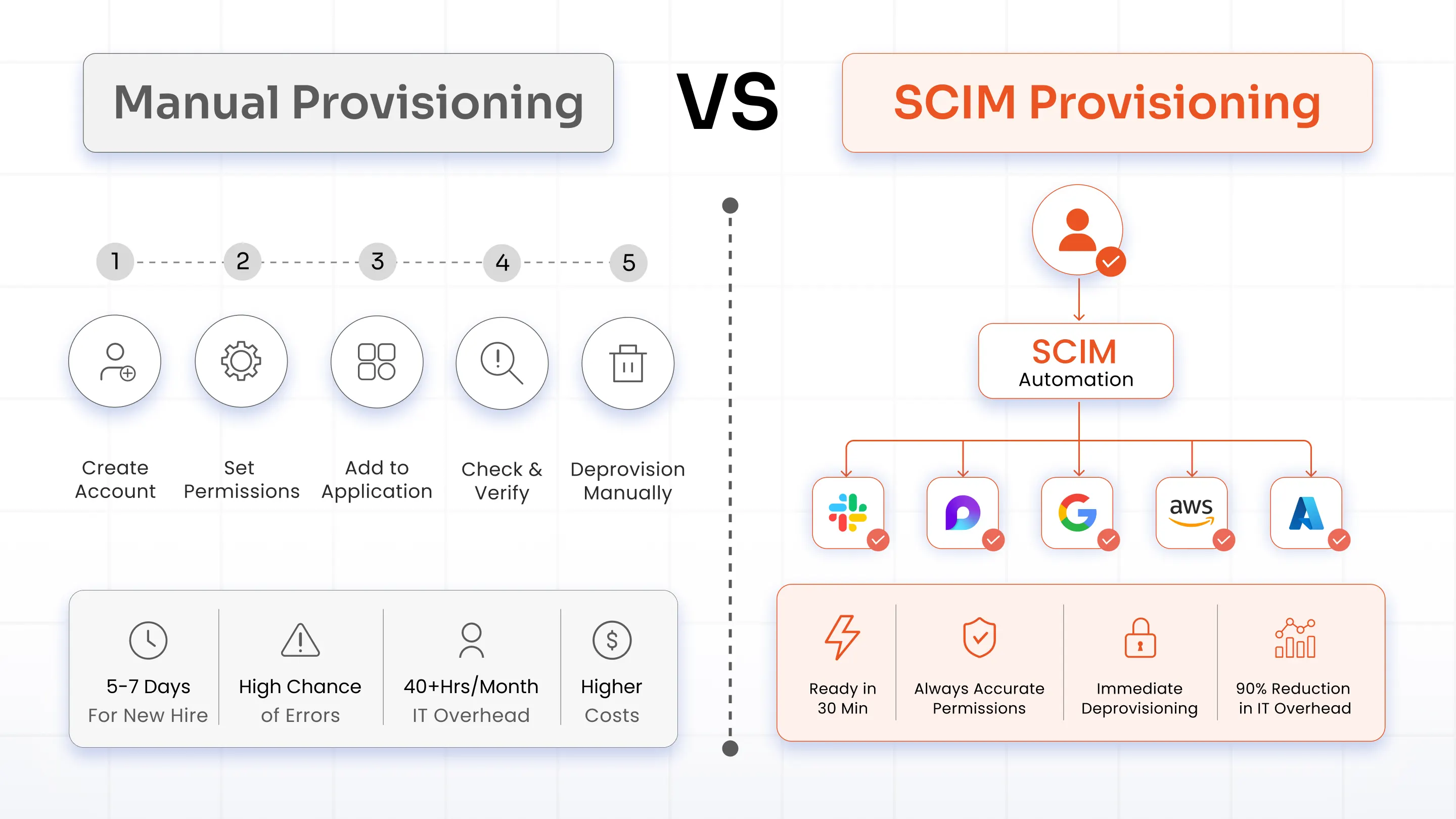
Many IT teams still rely on manual user provisioning SCIM workflows. Let's compare the old way of doing things with modern SCIM auto-provisioning platforms.
| Comparison Criteria | Manual Provisioning | SCIM Provisioning |
|---|---|---|
| Onboarding | IT admin creates each account manually (15 min/user) | Accounts are created automatically across all systems |
| Provisioning Time | 5-7 days for new hire to be productive | Ready to work within minutes |
| Accuracy | Highly error-prone with chances for wrong permissions or missed apps | Highly accurate. Permissions are applied by role. |
| Off-boarding | Accounts are often forgotten and not deleted | Immediate deprovisioning when an employee leaves, increasing security |
| Expense | Very costly. IT team spends 40+ hrs/month | Cost-effective. 90% reduction in IT overhead |
Benefits and Use Cases of SCIM Provisioning
Deploying SCIM provisioning does more than save time. It improves security, simplifies compliance, and helps you scale identity management as you grow. Let’s explore the key benefits and use cases of SCIM provisioning.
What Are the Benefits of SCIM Provisioning
1. Time Savings
Your admin team doesn’t have to manually create each and every account. This’ll save multiple hours at the end of the week, which can be invested somewhere else.
2. Stronger Security
When you offboard an employee, the system revokes access immediately. It maintains consistent permissions across your app ecosystem and tracks changes for compliance frameworks like SOC 2 and HIPAA.
3. Better Employee Experience
New hires arrive on their first day with all systems ready to go. Efficient onboarding helps employees become productive faster.
4. Simplified Compliance
You can easily meet strict industry standards like ISO 27001 and legal privacy requirements like GDPR and CCPA with automated access reviews.
5. Seamless Scalability
The system uses the exact same automated process whether you onboard 10 employees or 1,000. Your operational overhead stays flat as your business grows.
What Are the Use Cases of SCIM Provisioning
Here are the various use cases of SCIM provisioning according to company size and industry.
SaaS Companies
New employees automatically receive accounts and access to the applications they need on their first day. This speeds up onboarding and time to value.
Enterprises
Manage thousands of users across hundreds of business apps with ease. Scale without any hindrance from process breakdowns.
Healthcare
Automate user data transfers while maintaining strict HIPAA-compliant provisioning parameters.
Financial Services
Enforce airtight access controls to protect sensitive transactional data.
Education
Simplify the massive influx of seasonal users and student accounts at the start of terms.
SCIM vs. SSO vs. JIT vs. SAML: What's the Difference?
Identity and access management (IAM) often involves multiple technologies working together. You’ll encounter several overlapping terms. Let’s simplify them:
| Feature | SCIM | SSO | JIT | SAML |
|---|---|---|---|---|
| Purpose | Provision users | Authenticate users | Create users at login | Exchange auth data |
| Creates accounts | Yes | No | Yes | No |
| Real-time sync | Yes | No | Limited | No |
| Offboarding | Automated | No | No | No |
| Group sync | Yes | No | Limited | No |
Key Takeaways
SAML vs. SCIM Provisioning: There is a fundamental difference between SAML auto-provisioning and SCIM provisioning. SAML exchanges authentication assertions during sign-in, whereas SCIM continuously synchronizes user identities and account changes.
JIT Provisioning vs. SCIM: Just-In-Time (JIT) provisioning creates an account the very first time a user logs in, but it cannot delete accounts or handle continuous updates. In contrast, SCIM vs. JIT provisioning comparisons favor SCIM because it provides full lifecycle coverage, including automated deletion.
Implementation Challenges of SCIM Provisioning
While the end goal of SCIM is to simplify user lifecycle management, you might run into some complications during deployment.
1. Legacy Systems
Challenge: You might have an old ERP platform from 2005 that simply does not support modern SCIM protocols.
Solution: You can deploy specialized middleware or software adapters to bridge the compatibility gap.
2. Hybrid Environments
Challenge: Your business might run a mix of both cloud platforms and on-premises infrastructure.
Solution: Modern identity platforms that support SCIM can synchronize identities across cloud and on-premises environments.
3. Custom Attributes
Challenge: Your core HR platform might track unique data across multiple custom metadata fields.
Solution: You can use custom SCIM extension attributes to map and push unique data fields across platforms.
4. Performance Concerns
Challenge: You might worry that thousands of simultaneous API updates will slow down your systems.
Solution: Configure batch operations and asynchronous processing to manage heavy traffic spikes smoothly.
5. Initial Setup Cost
Challenge: Building out a complete automated infrastructure can sound expensive up front.
Reality: By leveraging the right existing identity platform, full setup usually takes only 2 to 4 weeks, depending on the environment.
What Are the Best Practices for SCIM Provisioning
We’ve listed the best practices for SCIM provisioning that will help you improve security and long-term maintenance.
1. Start With Critical Apps
Trying to sync all apps on day one is never a good idea. Pick your 3 to 5 most important applications to start, and expand to others as your team gets comfortable.
For example:
- Microsoft 365
- Google Workspace
- Salesforce
- Jira
- Confluence
- Slack
2. Plan Your Attribute Mapping
Every application expects user data in a specific format. So before you implement, decide how fields from your identity provider map to application attributes.
Also, document these mappings so future administrators can maintain the integration more easily.
3. Set Up Proper Authentication
SCIM provisioning APIs should always use secure authentication methods.
Most modern implementations support OAuth 2.0 and OAuth bearer tokens.
Avoid using basic username-and-password authentication whenever possible. Protect API credentials and rotate them regularly as part of your security policy.
4. Implement Error Handling
What happens if an app endpoint fails? Set up clear retry logic and automated admin alerts so your team knows immediately if a downstream app endpoint goes down.
5. Create Audit Logging
Provisioning logs are valuable for both troubleshooting and compliance. To address this, track every single sync event, noting who made the change, what was altered, and exactly when it happened to stay compliance-ready.
6. Test Thoroughly
Run your entire provisioning workflow in a dedicated staging environment first. Pay extra attention to your deprovisioning flows, as security depends on proper account deletion. Testing every scenario helps ensure provisioning behaves as expected in production.
7. Document Everything
Build a central internal repository containing your configurations, a step-by-step troubleshooting runbook, and technical support contacts for individual application vendors.
Conclusion
Managing user lifecycles manually is inefficient and leaves your organization vulnerable to security risks. Deploying a robust SCIM solution eliminates administrative bottlenecks and keeps your access controls airtight.
While SCIM doesn't replace technologies like SSO software or SAML, it complements them by handling identity provisioning behind the scenes. Together, these technologies create a more secure and efficient identity management strategy.
If you're looking to simplify user lifecycle management across your applications, implementing SCIM provisioning is one of the most effective steps you can take.
The miniOrange SCIM Provisioning Gateway completely automates the Joiner-Mover-Leaver workflow for your IT team. It connects your core identity providers directly to thousands of cloud-based and on-premise apps.
FAQs
Is SCIM the same as SSO?
No. SSO (Single Sign-On) authenticates a user's identity so they can log in using one set of credentials. SCIM creates, updates, and deletes the actual user accounts within those external applications in the background.
Will my legacy systems support SCIM?
Not natively if they predate modern cloud standards. However, you can use technical adapters or middleware solutions to connect older systems to a SCIM directory.
How secure is SCIM?
It is highly secure when configured correctly using OAuth2 tokens for authorization. It protects your organization by ensuring that terminated employees lose access to company systems instantly.
How long does it take to implement?
With an established identity platform, a standard deployment typically takes between 2 and 4 weeks.
Does SCIM work with Active Directory or Microsoft Entra ID (formerly Azure AD)?
Yes. Major corporate directory tools and modern identity providers support SCIM standards to pass user profiles downstream to external apps.
What is SCIM 2.0, and what does it support?
SCIM 2.0 is the current version of the standard defined by RFC 7643 and RFC 7644. It standardizes how identity providers and applications exchange user and group information using REST APIs and JSON.
What is SCIM group provisioning?
This is a feature that synchronizes entire groups and permission levels from your identity provider to target software platforms. Instead of updating individuals one by one, SCIM group provisioning lets you assign app access and specific system roles based on department groups automatically.
Leave a Comment