

An attacker does not have to target your infrastructure directly to do their work. They can get in by stealing a customer’s credentials. Even an automated script that can test thousands of login combinations is enough.
That's an account takeover (ATO) attack. And customer-facing applications are attractive targets because their login and registration pages are open to the public.
Your CIAM solution plays an important role in preventing these attacks by securing customer authentication.
Let’s understand how modern CIAM defends your user base and shuts down automated abuse across every touchpoint.
What Is Account Takeover Protection in CIAM?
CIAM account takeover protection is the set of identity-layer controls that help prevent attackers from gaining unauthorized access to legitimate customer accounts. It protects customer authentication through measures such as brute-force protection, suspicious-IP throttling, CAPTCHA, multi-factor authentication (MFA), new-device recognition, and risk-based authentication.
Account takeover happens when an attacker gains control of a legitimate user's account. The attacker can do this by using stolen credentials, phishing attacks, malware, automated tools, brute-force attacks, and many other methods.
Once inside the account, the attacker can do whatever the customer can.
Why Attackers Target Customer Login and Sign-Up
Customer login and sign-up pages are easy to target because they are public by design. They are not protected behind a corporate network. Attackers can attempt credential stuffing, create fake accounts, probe password-reset flows, and look for weaknesses in authentication.
Recent data highlights the scale of the attacks. For example, 46% of customer registration attempts in 2024 came from bots. Credential stuffing accounted for a median of 19% of daily authentication attempts.
The concern is not just limited to login forms. Attackers can target email verification, MFA, password resets, account recovery, and post-login account changes.
Where Attacks Hit the Customer Identity Journey
Account takeover attacks do not focus only on your login box. They target every step the customer takes inside your app.
For example, an automated registration attempt may create a fake account without compromising an existing one. A credential stuffing attack, on the other hand, targets existing accounts using previously leaked credentials.
This is why you cannot counter customer account takeover protection with simple login solutions. You should map controls for each stage of the customer lifecycle.
| Journey stage | Typical automated attack | Business risk | Protection layer |
|---|---|---|---|
| Sign-up | Bot registrations and fake-account creation | Polluted customer database, promotional abuse | CAPTCHA on supported flows, registration controls, and dedicated bot management |
| Email/phone verification | Verification floods, disposable email addresses, automated requests | Increased verification costs and fake identities | Request throttling, channel verification, and external fraud or email intelligence |
| Login | Credential stuffing, brute-force attacks, password spraying | Unauthorized account access | Brute-force protection, suspicious-IP throttling, CAPTCHA, MFA, and passwordless authentication |
| MFA / OTP | OTP guessing, OTP floods, push fatigue, SMS pumping | Authentication bypass and increased messaging costs | MFA policies, attempt limits, and appropriate controls at the messaging layer |
| Account recovery | Automated recovery attempts and social engineering | Unauthorized account recovery | Verified recovery channels, request throttling, and additional identity verification |
| Password reset | Reset floods and account enumeration | Account disruption, unauthorized password changes, and support costs | Password policies, account unlock, generic responses, and request throttling |
| Profile/account changes | Unauthorized changes to email addresses, phone numbers, and account details | Persistent account compromise | Additional verification for sensitive changes, session controls, and adaptive authentication |
For maximum protection, you need a combination of multiple measures rather than one authentication feature.
What Is Bot Protection in CIAM?
Bot protection in CIAM refers to measures that help identify and limit automated activity targeting customer identity workflows.
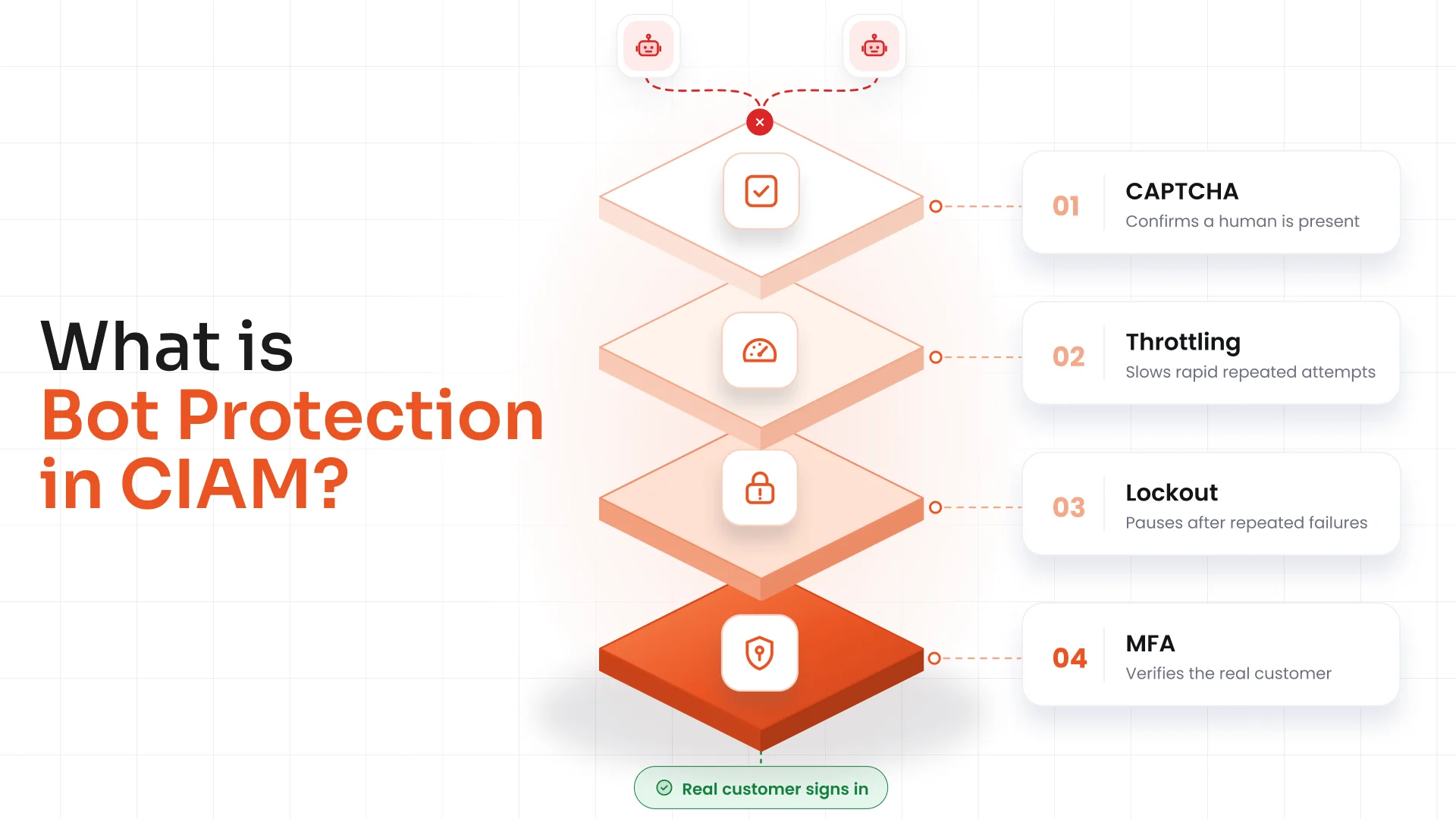
Bots can perform thousands of registration attempts, test stolen passwords, trigger password resets, and probe login endpoints. They can also operate across multiple IP addresses, making simple request-counting rules less effective.
CIAM bot protection addresses this with features such as:
- CAPTCHA: Challenges suspicious visitors to distinguish ordinary human interactions from basic automated attempts.
- Rate limiting: Restricts excessive requests to authentication and registration endpoints.
- IP-based controls: Throttles or restricts suspicious requests based on their source.
- Device signals: Uses device information to help identify unfamiliar or suspicious login activity.
- Adaptive authentication: Applies additional verification when contextual signals indicate higher risk.
Where CAPTCHA Helps and Where It Doesn't
Simply deploying CAPTCHA does not address automated abuse. CAPTCHAs are like speed bumps that stop blunt, low-velocity scrapers and off-the-shelf automated scripts trying to spam forms or perform basic credential stuffing.
However, CAPTCHA falls short when it comes to automated solver APIs and headless browsers with human-like mouse simulation. To genuinely protect your login pages from bots, you need a layered defense stack:
- CAPTCHA: Introduce a challenge for suspicious or automated requests.
- Request throttling: Restrict excessive attempts from suspicious sources.
- MFA: Require additional authentication when a password alone is not enough.
- Adaptive authentication: Apply stronger verification based on contextual risk.
- Session controls: Manage active sessions and allow sessions to be terminated when necessary.
Simple attacks will fail at the perimeter, and advanced attacks trigger step-up challenges before gaining access to sensitive customer data.
Common Account Takeover and Identity Attacks
Understanding how account takeover threats operate helps you implement targeted credential-stuffing protection and brute-force protection.
Credential Stuffing
Credential stuffing uses username-password combinations stolen from other services. Attackers test these credentials across multiple websites, hoping customers have reused the same passwords.
MFA, passwordless authentication, suspicious-IP throttling, and rate limiting can help tackle this attack.
Brute-Force Attacks
Brute-force attacks involve trying multiple password combinations against an account or authentication endpoint. Attackers may use automated scripts to test thousands of combinations until they find valid credentials.
You can counter them with brute-force protection, progressive throttling, CAPTCHA, and MFA.
Password Spraying
Password spraying takes a different approach. Instead of trying many passwords against one account, attackers try a small number of commonly used passwords against multiple accounts. This helps them avoid triggering account-specific security thresholds.
Rate limiting, suspicious-IP controls, and MFA can help protect customer login endpoints against these attempts.
Fake-Account Creation
Attackers use bots to create large numbers of fraudulent or disposable accounts. They may use these accounts to abuse promotions, carry out spam campaigns, or exploit other features of your application.
CAPTCHA and registration controls can help reduce automated account creation. Email and phone verification add another layer of validation. Also, dedicated bot management solutions can help identify more sophisticated automated traffic.
Account Enumeration
Account enumeration occurs when attackers try to determine whether specific usernames, email addresses, or phone numbers are registered with your application.
Use generic authentication and password-reset responses, consistent response behavior, request throttling, and authentication monitoring to reduce this risk.
Password-Reset Abuse
Attackers may automate password-reset requests or exploit weaknesses in account recovery flows. Any vulnerability in recovery verification may allow attackers to gain control of an account.
Request throttling, verified recovery channels, and generic responses can help protect password-reset processes.
OTP and MFA Abuse
Attackers may try to guess one-time passwords, flood verification channels with OTP requests, or exploit push authentication through repeated approval prompts.
These attacks target MFA and verification workflows rather than just the initial login. Attempt limits, channel-level throttling, and stronger authentication methods can help reduce the risk.
Automated API Abuse
Bots can repeatedly call application endpoints to scrape data, validate credentials, or exhaust application resources. These attacks may target public APIs as well as endpoints used during registration and authentication.
API gateways, WAF rules, request quotas, and dedicated bot management solutions can help control automated API abuse.
How CIAM Attack Protection Works
CIAM attack protection combines authentication controls, contextual signals, and access policies to reduce the risk of unauthorized customer access. It applies different security measures based on context.
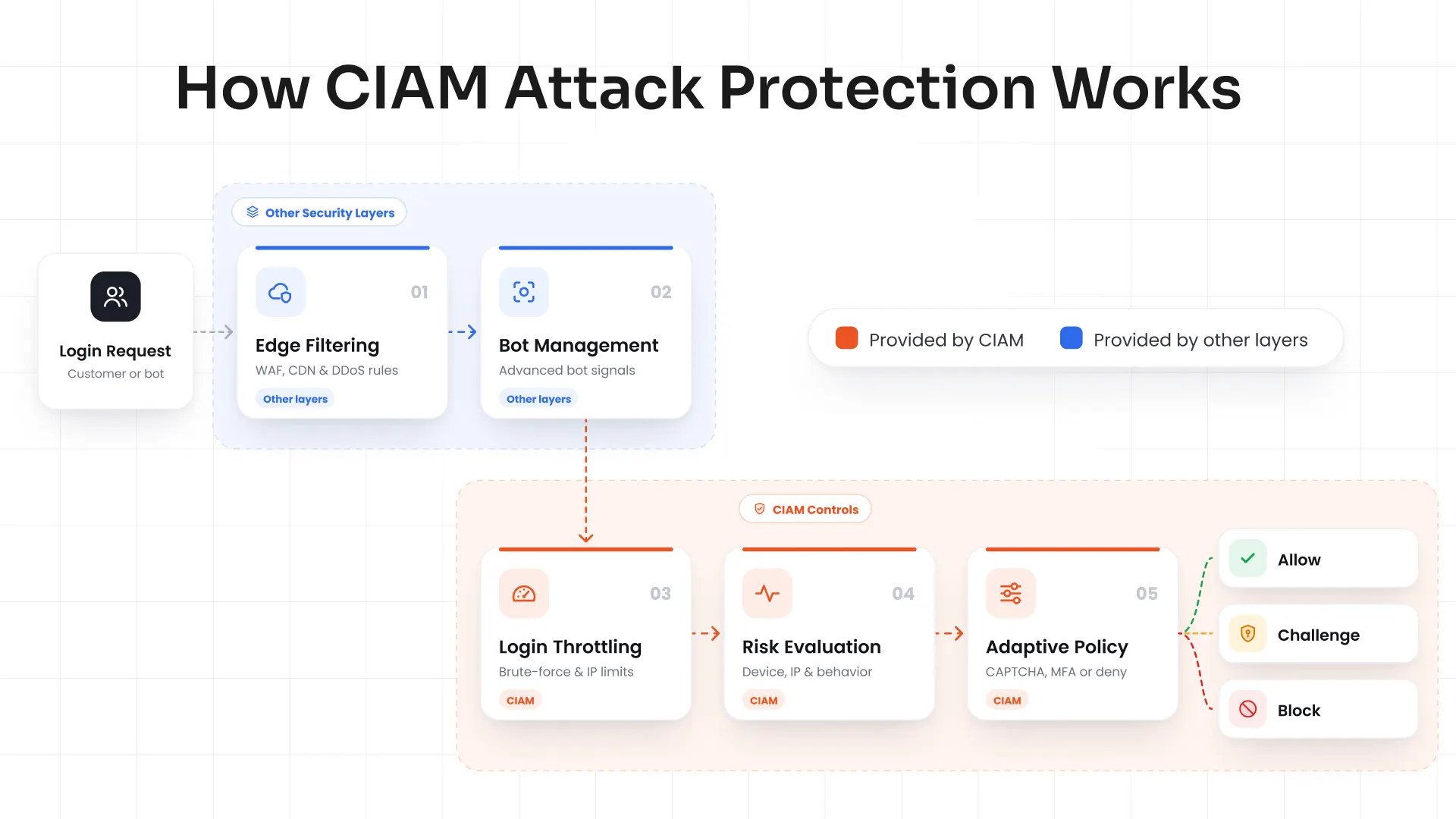
For instance, someone logging in from a different device or location will be asked for additional verification.
Here's how a typical protected customer authentication flow works.
- The customer visits your application and enters their credentials.
- The CIAM engine analyzes the context, such as IP address, location, and device information.
- The identity system evaluates these signals against your security rules.
- The CIAM platform applies configured security controls to the incoming authentication request.
- Low risk: Recognized device, clean IP. The user logs in instantly.
- Medium risk: Correct credentials but unknown device or IP. CIAM demands step-up proof such as biometrics or an authenticator push notification.
- High risk: High-velocity password guessing from a blacklisted proxy network. The request is immediately blocked, and the IP is throttled.
CIAM, Bot Management, and WAF Together
CIAM, bot management, and WAF solutions serve different purposes, but you may need all three to protect a customer-facing application effectively.
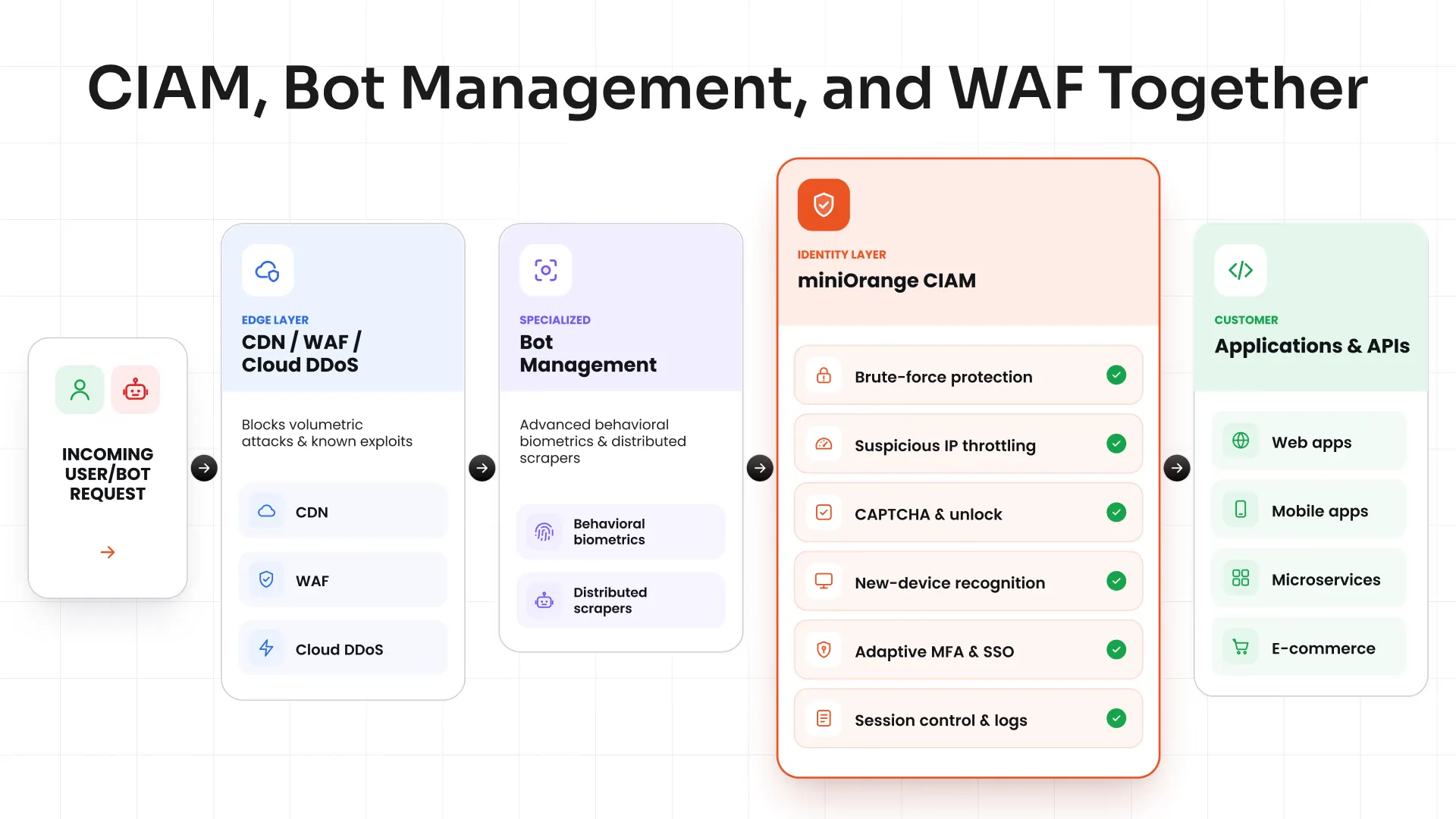
miniOrange CIAM Controls That Protect Customer Accounts
miniOrange CIAM embeds defensive controls directly into your authentication and user-management workflows. Here are the core features protecting your customer accounts:
1. Brute-Force Protection
miniOrange monitors failed login attempts against individual accounts. Once a threshold is crossed, the system enforces progressive delays or locks the account, notifying the user.
2. Suspicious-IP Throttling
The CIAM restricts high-velocity request traffic originating from untrusted or proxy IP addresses. Requests exceeding safety limits get rate-limited or blocked before they impact server performance.
3. CAPTCHA + Self-Service Account Unlock
miniOrange CIAM filters scripted form submissions at sign-up and login. If an account gets locked due to failed attempts, legitimate users can safely verify their identity and log into their account.
4. New-Device Recognition
miniOrange identifies logins originating from previously unseen browsers or devices. miniOrange can trigger security alert emails or step-up authentication before granting access to personal data.
5. MFA and Passwordless Authentication
miniOrange supports 15+ authentication methods, including TOTP apps, SMS/email OTPs, push notifications, and passwordless biometrics via WebAuthn/passkeys, to counter credential-based hijacking attacks.
6. Adaptive SSO and MFA
The CIAM evaluates real-time contextual risk signals. The engine checks user IP, device posture, time of day, and geolocation. Legitimate logins are allowed, while high-risk attempts trigger adaptive MFA.
7. Session Control & Force Logout
miniOrange shuts down hijacked sessions. Administrators and users can view active web sessions, inspect device metadata, and remotely terminate active sessions across devices.
8. Auditing, Reporting & Customer Insights
Maintains detailed logs of every authentication event, failed login, privilege elevation, and password change. Teams can monitor active security trends and export audit trails for regulatory compliance.
| Attack Protection Control | Free Plan | Basic Plan | Professional Plan | Enterprise Plan |
|---|---|---|---|---|
| Brute-Force Protection | ✓ | ✓ | ✓ | ✓ |
| Suspicious IP Throttling | ✓ | ✓ | ✓ | ✓ |
| FAPI Certified Security Profile | ✓ | ✓ | ✓ | ✓ |
| Enhanced Password Protection | - | ✓ | ✓ | ✓ |
| Basic MFA: >> miniOrange Authenticator - Soft Token >> Security Questions >> miniOrange Push Notification | - | - | ✓ | ✓ |
| Enterprise MFA: >> SMS & Email MFA >> Authenticator Apps- Google, Microsoft or, Authy >> TOTP & Hardware Token | - | - | ✓ | ✓ |
| Passwordless Login (MFA) | - | - | ✓ | ✓ |
| Number of MFA Factors Enrolled | 15+ Methods | 15+ Methods | ||
| Password Policies: Change and Forgot Password | - | ✓ | ✓ | ✓ |
| Advanced Security Measures: CAPTCHA, Account Unlock, New Device Recognition | - | ✓ | ✓ | ✓ |
| Role-Based Access Control (RBAC) | - | - | ✓ | ✓ |
| Adaptive SSO & MFA | - | - | - | ✓ |
For full plan details, seat limits, and volume licensing, visit our transparent CIAM pricing page.
What CIAM Bot Protection Can and Cannot Stop
Identity-layer controls eliminate a massive percentage of credential abuse, but they do not replace network-edge defenses.
What CIAM Bot Protection Stops
- Automated credential stuffing: Throttles velocity, flags known bad IPs, and blocks reused stolen passwords using MFA.
- Brute-force attacks: Locks target and adds exponential delays when passwords are systematically guessed.
- Session theft: Revokes tokens, enforces maximum session lifetimes, and kills rogue connections.
- Basic sign-up abuse: Challenges automated script registrations using CAPTCHA and strict email verification.
What CIAM Bot Protection Does Not Stop
- Distributed scraping: Bots scrape public catalog pages across millions of residential IP addresses without interacting with identity endpoints.
- Advanced behavioral botnets at the network layer: Headless browser farms target non-login application pages.
- Downstream transaction fraud: A legitimate user using stolen credit card numbers at checkout, which requires specialized payment fraud screening.
Conclusion
Account takeover protection goes beyond securing the login page. Attackers target sign-ups, password resets, MFA, and account recovery to find ways into customer accounts.
A layered CIAM strategy helps you address these risks with the right combination of brute-force protection, suspicious-IP throttling, CAPTCHA, MFA, and adaptive authentication. With miniOrange CIAM, you can apply these controls to strengthen customer authentication while keeping the login experience manageable for legitimate users.
FAQs
What is account takeover protection in CIAM?
Account takeover protection in CIAM uses identity and authentication controls to prevent unauthorized access to legitimate customer accounts. Common controls include MFA, brute-force protection, suspicious-IP throttling, CAPTCHA, and adaptive authentication.
How does CIAM protect against bots?
CIAM helps secure customer identity workflows through controls such as authentication policies, CAPTCHA, brute-force protection, and contextual authentication. Dedicated bot detection and advanced traffic analysis may require a separate bot management solution.
Can CAPTCHA stop account takeover attacks?
CAPTCHA can slow down basic automated login attempts, but it cannot stop every bot or verify whether a customer owns an account. Use it alongside MFA, throttling, and other authentication controls.
How can CIAM help prevent credential stuffing?
CIAM can reduce credential stuffing risks through brute-force protection, suspicious-IP throttling, MFA, passwordless authentication, and adaptive authentication. These controls make it harder for attackers to use stolen username-password combinations successfully.
How do you detect account takeover?
Look for unusual login activity, repeated authentication failures, unfamiliar devices, suspicious IP addresses, unexpected account changes, and unusual recovery requests. Authentication logs, contextual risk signals, and fraud monitoring can help identify suspicious activity.
Do I need both CIAM and a WAF?
They solve different problems. CIAM manages customer identities and authentication, while a WAF filters malicious application requests. Using both can provide better coverage for customer-facing applications.
How does risk-based authentication help prevent account takeover?
Risk-based authentication evaluates contextual signals such as device, location, IP address, and login context. When an authentication attempt meets configured risk conditions, the policy can require additional verification instead of treating every login identically.
How can I secure a customer login page against bots?
Use a layered approach that combines CAPTCHA, brute-force protection, suspicious-IP throttling, MFA, and adaptive authentication. For sophisticated automated traffic, consider dedicated bot management and WAF protection alongside CIAM.
Leave a Comment