

A Privileged Access Workstation (PAW) is a single-purpose, hardened device designed solely for administrative tasks. It provides a clean, verified operating environment free from standard user software.
PAWs reduce the risk of phishing attacks or compromised tokens by separating high-risk administrative work from everyday computing. This makes it harder for an attacker to move from a compromised endpoint to privileged infrastructure.
Unlike an ordinary workstation, a PAW separates privileged activities from everyday activities such as email, general web browsing, and routine office work. It blocks direct internet browsing, removes local admin rights, and isolates administrative sessions. It can be a dedicated physical computer or a specially configured virtual machine.
In this guide, you will learn what PAWs are, why your organization needs them, how to roll them out step-by-step, and how pairing PAWs with Endpoint Privilege Access Management or Privileged Access Management (PAM) creates an impenetrable defense.
Why Do Organizations Need Privileged Access Workstations?
PAWs secure privileged accounts by making the device used for privileged administration harder to compromise and separating sensitive activities from common attack paths.
Let's look at the risks they help address.
1. Credential Theft and Authentication Token Compromise
Attackers use tools like Mimikatz to dump credentials from memory (LSASS), scrape active browser session cookies, or intercept Kerberos tickets on user laptops.
With PAWs, you can restrict risky activities such as email clients and general browsing, minimize installed software, and limit access to untrusted networks. Attackers cannot harvest administrative credentials that never touch standard endpoints.
2. Malware and Phishing on Everyday Workstations
If an administrator falls for a spear-phishing email or visits an infected website, malware gains a foothold on the device.
PAWs prohibit email clients, personal messaging apps, and general web access. Because the device cannot access external email or unapproved websites, the attack vector is reduced.
3. Lateral Movement Into Critical Systems
Once an attacker gets into a work device, they can search for credentials and scan the network to reach deeper.
A PAW helps break this path by restricting the systems it can communicate with and limiting how administrators reach critical resources. Compromised standard endpoints cannot communicate with PAWs or reach sensitive infrastructure interfaces.
4. Unauthorized Changes to Security Configurations
An attacker who gets access to a privileged account can change security policies, modify permissions, create accounts, or disable protective controls.
PAWs let you configure immutable, tamper-resistant system policies. Administrators log in without local administrator rights for standard use.
A PAW deployment can use centralized configuration management to prevent tampering with security baselines.
5. Exposure of Sensitive Infrastructure and Administrative Interfaces
Administrators leave management consoles, SSH sessions, and RDP ports open to broad corporate subnets. Any device on the network can attempt brute-force logins or exploit protocol flaws.
You can configure network and target-access policies to restrict administrative connections to approved PAWs, using device validation and network restrictions. Your servers drop connection requests coming from any machine other than an authenticated, validated PAW.
How to Implement Privileged Access Workstations in Your Environment
The UK’s National Cyber Security Centre (NCSC) recommends treating PAWs as part of a broader privileged access strategy. Implementing privileged access workstations is more than simply provisioning certain devices.
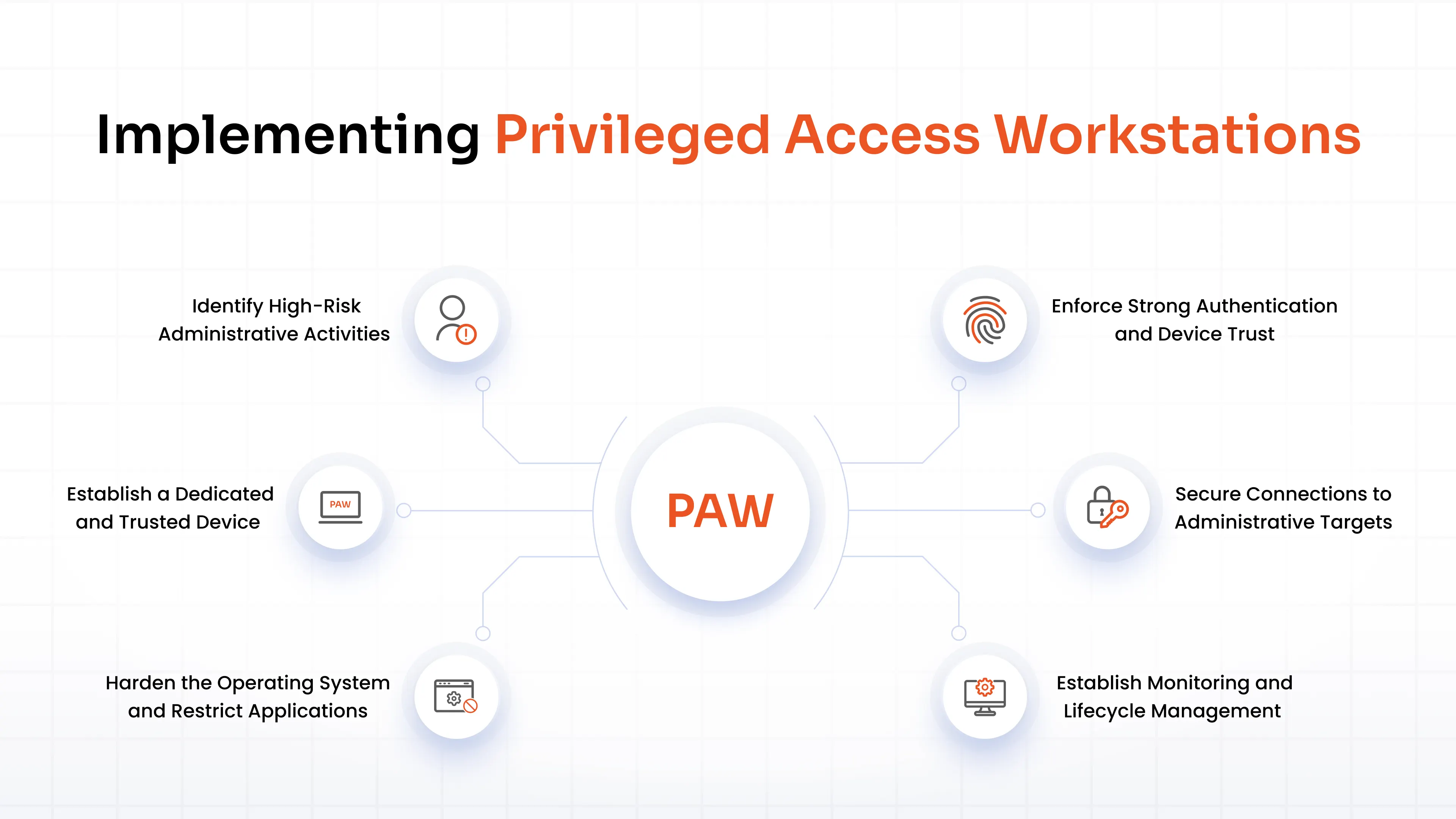
Here's how you can approach the implementation:
1. Identify High-Risk Administrative Activities
To implement PAWs, you need to know what you should protect. Which accounts or activities pose a risk?
List your privileged accounts, including administrator accounts, service accounts, and accounts used by third-party support teams. Identify what they can access and do, and assess the potential damage if those accounts are compromised. Focus on access that allows users to change security controls or bypass existing safeguards.
2. Establish a Dedicated and Trusted Device
Never use existing, repurposed endpoints without a complete wipe. Opt for clean, enterprise-grade physical laptops or desktops equipped with modern Trusted Platform Module (TPM 2.0) chips.
Build OS images from verified, clean media using automated zero-touch deployment pipelines. Apply your organization's security baseline before allowing the device to access privileged systems.
Enable UEFI Secure Boot, protect the BIOS with a strong password, and disable booting from external USB drives.
3. Harden the Operating System and Restrict Applications
A PAW should run only the software and services required for its approved administrative tasks.
Use Windows Defender Application Control (WDAC) or AppLocker. Block all scripts, installers, and executables by default, permitting only digitally signed IT tools. Install zero email clients, office suites, third-party messaging tools, or consumer cloud sync apps.
Ensure that administrators never use a local administrator account for day-to-day work on the PAW. Deploy automated endpoint detection and response (EDR) sensors.
4. Enforce Strong Authentication and Device Trust
Ensure that only authorized users on legitimate PAWs can log in. Authenticate them using FIDO2 hardware security keys or smart cards.
Give admins separate, distinct accounts for everyday work, Tier-1 server tasks, and Tier-0 directory administration.
Use Conditional Access or device health attestation. Block access to administrative management consoles unless the request comes from an authenticated, compliant PAW.
5. Secure Connections to Administrative Targets
Place your PAW and target systems on dedicated administrative VLANs, and isolate the communication channels between them.
Block inbound connections to the PAW entirely. Allow outbound traffic only to approved management ports (e.g., HTTPS, SSH, RDP) on specific target subnets.
Route any required external traffic through a restrictive proxy that permits only vendor-approved software update repositories.
6. Establish Monitoring and Lifecycle Management
Stream OS event logs, authentication attempts, file integrity alerts, and network connections directly to your SIEM. Monitor group policies and device settings to detect and revert unauthorized modifications instantly.
Also, establish secure, offline, multi-person authorization workflows for emergency recovery if access infrastructure fails.
Privileged Access Workstation Best Practices
A strong PAW goes hand in hand with strong operating policies. Follow these privileged access workstation best practices to keep your fleet secure over time.
- Keep privileged activities on PAWs and separate them from everyday computing activities. Never check email, open corporate documents, or browse social media from a PAW.
- Minimize installed applications and peripherals. Block access to unauthorized USB storage, webcams, and Bluetooth peripherals at the hardware policy level.
- Enforce non-bypassable configurations. Lock security settings using centralized MDM or Active Directory GPOs.
- Restrict administrative access to verified devices and users.
- Disable cross-environment copy-pasting and file dragging between administrative and everyday sessions.
- Monitor privileged sessions using session recordings and keystroke logging, and track changes to security baselines.
- Ensure third-party contractors or vendors access critical systems only through monitored, temporary access paths on managed devices.
- Review your security baseline as operating systems, administrative tools, infrastructure, and threats change.
Privileged Access Workstation vs. Jump Server vs. PAM
Privileged Access Workstations, jump servers, and Privileged Access Management (PAM) solutions all help protect administrative access, but in different ways.
A Privileged Access Workstation (PAW) secures the client endpoint, the environment from which an administrator works. It ensures that the operating system used by an administrator remains untainted by malware, keyloggers, or unauthorized web code.
A Jump Server (or bastion host) functions as an intermediate network gateway. It sits between standard user networks and sensitive server subnets, forcing administrators to route their administrative protocols (like RDP or SSH) through a single choke point.
Jump servers reduce open network ports, but they do not protect against a compromised client endpoint. If an attacker owns your laptop, they can hijack your active jump server session or capture your keystrokes as you type them.
A Privileged Access Management (PAM) solution governs privileged credentials and access to critical systems. It vaults administrative passwords, injects them into sessions, issues dynamic session tokens, enforces Just-in-Time (JIT) access, and records administrative sessions on video or text logs.
Here’s a rundown of their distinct roles:
| Security control | Primary purpose | What it helps you control |
|---|---|---|
| Privileged Access Workstation | Secure the administrator's computing environment | Endpoint exposure, software restrictions, and the origin of privileged activity |
| Jump server | Provide a controlled route to protected systems | Network paths and access to internal resources |
| PAM | Manage privileged credentials and activities | Credential access, time-limited privileges, and privileged session visibility |
You can deploy all three technologies together to achieve deep Zero Trust security.
How miniOrange PAM & EPAM Strengthens PAW-Based Administrative Security
A hardened workstation reduces the risk of endpoint compromise. miniOrange PAM and it’s Endpoint Privilege Manager complements your PAW deployment by securing administrative workflows beyond the endpoint. miniOrange PAM:
- Centralizes administrative credentials in an encrypted enterprise vault, injects them into an active session, and rotates them immediately after use.
- Limits standing privileges with Just-in-Time (JIT) access, allowing you to grant temporary privileged access.
- Monitors and logs privileged sessions and provides the ability to terminate them upon detecting suspicious activity.
- Offers agentless privileged access across on-premises servers, cloud control planes, network appliances, and critical databases.
Combined with your PAW strategy, these controls help establish a more consistent approach to administrative access.
FAQs
Can multiple administrators share a PAW?
Yes, depending on your security architecture and operational requirements. Each administrator should authenticate with an individual identity, and access should remain limited to authorized users. Individual identities and appropriate audit records help preserve accountability. For highly sensitive environments, you may prefer dedicated devices or stricter separation by administrative role.
Are PAWs only for system administrators?
No. Any user who performs high-risk privileged tasks may need a PAW. This can include identity administrators, database administrators, network engineers, cloud administrators, security personnel, and third-party support staff. Base the decision on the access involved and the consequences of compromise, rather than job title alone.
How do PAWs support a Zero Trust security strategy?
PAWs support Zero Trust by providing a more trusted environment for privileged operations. However, a PAW alone does not implement Zero Trust. You must also verify user identities, restrict resource access, enforce least privilege, and evaluate device trust where supported. Continue to apply these controls even when a user connects from an approved PAW.
What is the difference between a "Separate Device" PAW and a "Tiered Administrative Model"?
A PAW is the physical or logical client endpoint, while a tiered administrative model (such as Tier 0, Tier 1, and Tier 2) is an identity and architectural strategy. Tiering dictates that accounts used to manage standard servers (Tier 1) cannot touch identity roots (Tier 0). PAWs let you configure and enforce this strategy by ensuring Tier-0 credentials run solely on designated Tier-0 hardware.

Leave a Comment