

Access certification can take more time than the actual review. A manager may need to review access for 50 employees.
Before that happens, someone has to gather the access data, identify the right reviewer, send the requests, and track the responses. If the reviewer revokes access, someone may also need to remove it from the application.
Now repeat that across hundreds of users and several applications.
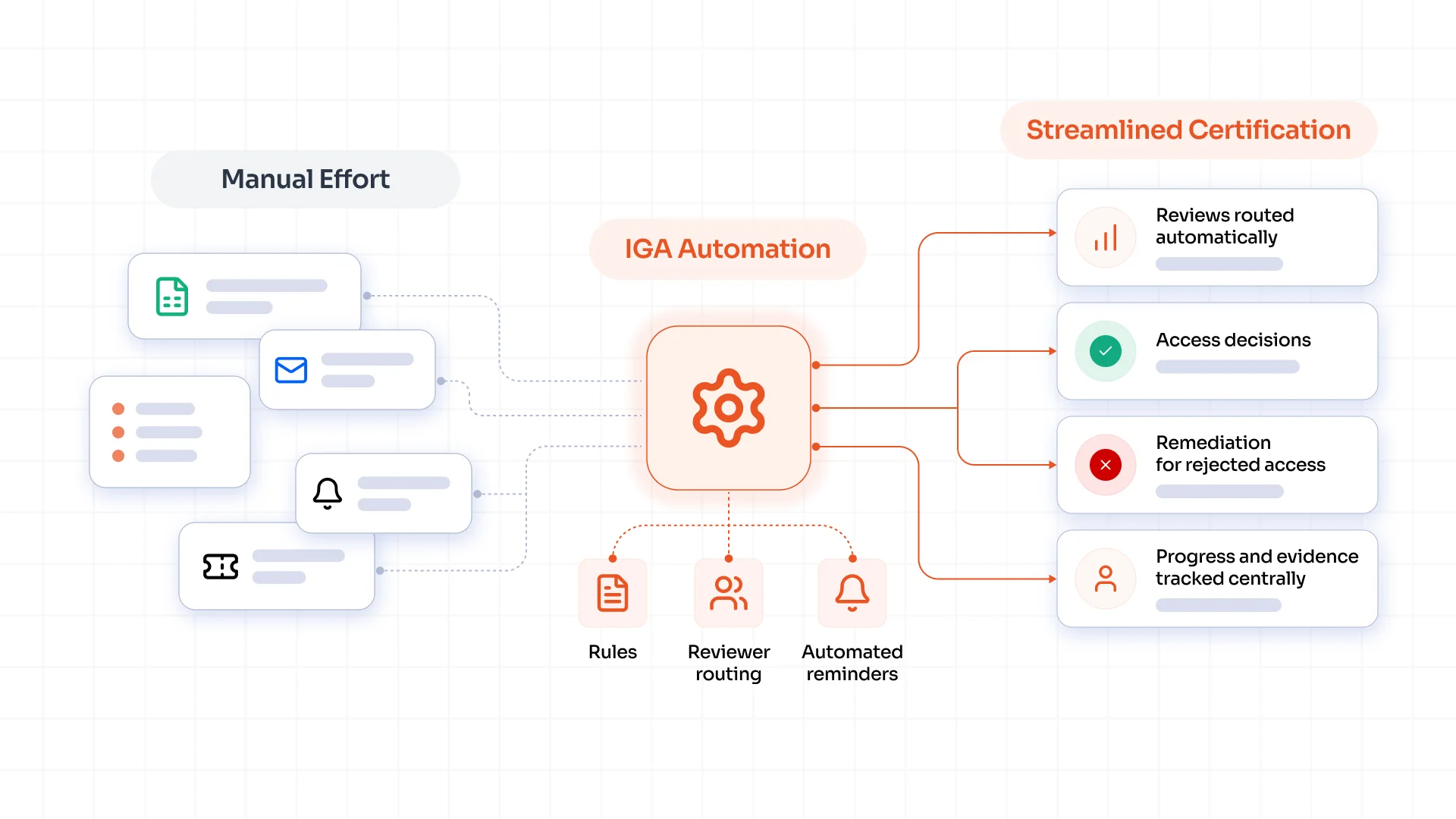
The workload adds up quickly. Access certification automation can handle much of this repetitive work while reviewers continue to make the final access decisions.
Why Access Certification Becomes a Manual Process
The review itself is only one part of the process. Your team first needs to collect current access information.
Then, someone has to identify the right reviewer and send the review request. After that, they need to track pending reviews, follow up with reviewers, and handle revoked access.
Each task may seem small. Together, they create a lot of work. Common sources of manual effort include:
- Gathering user and access information
- Finding the right reviewer
- Sending review requests and reminders
- Tracking approvals and revocations
- Removing revoked access
- Collecting audit evidence
For a detailed explanation of access certification and how the process works, know more.
How to Reduce Manual Effort in Access Certification
The best place to start is with repetitive tasks. If a task follows a clear rule, you can often automate it. This leaves reviewers with the part that actually needs their judgment: deciding whether a user should keep their access.
1. Centralize User and Access Data
Reviewers need a clear view of a user's access before they can decide whether it should stay.
Bring details such as the user's role, applications, and permissions into one place. Reviewers can then see the information they need without checking several systems.
This also gives the certification workflow the data it needs to create reviews, assign reviewers, and track decisions.
2. Simplify Reviewer Assignment
Once the access data sits in one place, the next question is simple: Who should review it?
The answer can depend on the type of access. A manager may review an employee's access, while an application owner may review access to a specific system.
Set rules for these cases and let the system assign each review automatically. Your team no longer has to decide who should receive each review. The right person gets the certification based on the rules you set.
3. Automate Review Workflows
The review still needs to reach completion after it reaches the right person. Scheduled campaigns can start reviews based on your policies.
Automated reminders can go to reviewers who have pending decisions. If someone misses the deadline, an escalation can route the review to the right authority.
This helps teams automate access certification without manual campaign tracking or repeated follow-up emails.
4. Prioritize High-Risk Access
You can make the review more focused once the basic workflow runs on its own. Not every permission carries the same level of risk.
Access to a critical business application or a privileged account may need closer review than access to a routine application.
Give greater attention to sensitive applications, privileged accounts, critical roles, and unusual access. This allows reviewers to focus on permissions that could create a greater security or compliance risk.
5. Streamline Access Remediation
The review does not end when someone selects "Revoke." The system still needs to remove that access from the application or system.
If IT has to process every revocation manually, the workload simply moves to another team. An IGA platform can trigger the required access removal after a reviewer revokes access. This connects the review decision with the next action and reduces the work for IT.
6. Maintain an Audit Trail
The review also needs a clear record. An automated process can record the reviewer's decision, the time of the decision, comments, and any remediation that follows.
Your team can then see who reviewed the access, what they decided, and whether the required change took place. That gives auditors a clear record of the certification process and saves your team from piecing evidence together later.
Manual vs. Automated Access Certification
The difference comes down to how much of the process your team has to handle themselves.
| Manual Certification | Automated Certification |
|---|---|
| Spreadsheets and emails | Centralized workflows |
| Manual reviewer assignment | Rule-based assignment |
| Manual reminders | Automated reminders |
| Manual access removal | Automated remediation |
| Status tracked across different places | Centralized tracking |
| Audit evidence collected manually | Automated audit trails |
How to Automate Access Certification With IGA
Think of IGA as the place that brings the access review process together. It pulls information about your users and their access from different systems, sends the right reviews to the right people, and records what happens next.
Here is what the process looks like:
User information → Access information → Review → Decision → Access change → Audit record
For example, an employee joins the company. Their information comes from the HR system. Their access may come from Active Directory, LDAP, SaaS applications, or other business applications.
When it is time to review that access, the IGA platform creates the review and sends it to the right person. A manager may need to review an employee's access, while an application owner may review access to a specific application.
The reviewer then decides what should happen. They can approve the access or revoke it.
If they revoke access, the IGA platform can trigger the required access removal in the connected application. It also records the decision and the action taken.
So, instead of your team moving information between different systems and tracking every step separately, IGA connects the process from start to finish.
Best Practices for Reducing Access Certification Effort
Automation can take care of a lot of the repetitive work. But a few simple rules can make the whole process much easier. Here are 6 things to get right:
1. Decide Who Should Review Access
Before a review starts, make it clear who should approve each type of access. For example, a manager can review an employee's access, while an application owner can review access to a specific application.
2. Review Important Access More Often
Not all access carries the same risk. Privileged accounts and access to critical applications deserve more attention than everyday business access. Set review schedules based on the level of risk.
3. Give Reviewers Only What They Need
A reviewer should not have to dig through a long list of access to find what matters. Show them the user's role, applications, permissions, and other details they need to make a clear decision.
4. Pay Closer Attention to Risky Access
Some access deserves a second look. Flag privileged accounts, sensitive applications, critical roles, and unusual access so reviewers can focus on the areas that matter most.
5. Set Deadlines and Follow Up Automatically
Give reviewers a clear deadline. If they do not complete the review on time, send a reminder or escalate it to the right person. This keeps reviews from sitting in someone's inbox for weeks.
6. Make Sure Revoked Access Actually Goes Away
A reviewer selecting "Revoke" is only the first step. The access should also be removed from the application. Track the change until the system reflects the reviewer's decision.
Measuring Access Certification Efficiency
You can tell whether your access certification process is working well by tracking a few simple numbers. Each metric shows a different part of the process.
Time Required to Complete a Certification Campaign: How long does it take from the start of a review to the final decision? A shorter completion time usually means fewer delays in the process.
Percentage of Reviews Completed on Time: How many reviewers finish their reviews before the deadline? A low percentage can point to unclear deadlines, too many reviews, or poor follow-up.
Number of Manual Actions Required: Count how many steps still need someone to step in, such as assigning reviewers, sending reminders, or updating access. A high number shows where your team still spends time on routine work.
Access Revocation Completion Time: How long does it take to remove access after a reviewer selects "Revoke"? A long delay can leave unnecessary access active for longer than it should be.
Number of Overdue Reviews: How many certifications are still waiting after their deadline? A growing number can indicate that reviewers have too much on their plate or that the review process needs adjustment.
Reviewer Workload: How many access reviews does each reviewer receive? A reviewer with hundreds of certifications may struggle to complete them on time, especially when the reviews include too much information.
Track these numbers over time rather than looking at them only once. They can show where your access review automation is working well and where your team still needs to make changes.
Automate Access Certification with miniOrange IGA
Reducing manual effort does not mean taking people out of the access certification process. It means giving them less administrative work to deal with.
When identity data, reviewer assignment, workflows, remediation, and audit records work together, reviewers can spend their time deciding whether access makes sense instead of chasing the process around it.
See how miniOrange can help automate access reviews, certification workflows, and access remediation across your enterprise applications.
Frequently Asked Questions
How can access certification be automated?
An IGA platform can handle routine tasks such as collecting access data, assigning reviewers, sending reminders, tracking decisions, and removing revoked access.
What is access certification automation?
Access certification automation uses software to handle routine access review tasks. It connects reviewer assignment, reminders, decisions, remediation, and audit records in one process.
How does IGA automate access reviews?
IGA brings user and access data from different systems into one place. It can create reviews, send them to the right people, track decisions, and trigger access changes.
What parts of access certification can be automated?
Organizations can automate data collection, reviewer assignment, review campaigns, reminders, escalations, status tracking, access removal, and audit records.
How often should access certification be performed?
Review frequency depends on the type and risk of access. Privileged accounts and critical applications may need more frequent reviews than routine business access.
Leave a Comment