
Many major fraud incidents happen because one user has too much access. An employee can create vendors and approve payments. An admin can provision accounts and certify their own access.
These access combinations create opportunities for fraud or human error.
Segregation of Duties (SoD) is a foundational risk control that prevents a single person from having enough access to misuse systems or bypass oversight. It separates critical responsibilities and strengthens your access controls.
In this article, you will learn how SoD works and how to implement it across your organization.
What Is Segregation of Duties?
Segregation of Duties (SoD) divides critical business tasks among multiple people or identities so that no single user controls an entire high-risk process.
Consider standard accounting workflows. The team member who enters payment details into the system should never be the person who approves the payout. When one user holds both privileges, you create dangerous SoD conflicts.
SoD controls function by separating four key operational responsibilities:
- Authorization
- Asset custody
- Record keeping
- Reconciliation
SoD is a core element of access risk management. It helps organizations enforce appropriate access boundaries across business-critical processes.
Before enforcing SoD, you need to identify which permissions or roles shouldn't exist together. You can use automated conflict detection to scan your entire IT ecosystem. This process flags overlapping permissions before anyone exploits a security gap.
Why SoD Breaks: The Risk Landscape
Implementing SoD might sound straightforward, but maintaining it across today's enterprise environments is much harder.
As your organization scales, you'll be onboarding new employees, promoting existing ones, implementing new software, and maybe even having mergers. If there's no governance, the existing permissions will keep accumulating, and SoD conflicts will become harder to detect. Your access risk increases.
Several factors play a role in this:
Spreadsheets
Many security and compliance teams still use spreadsheet matrices to map permissions. As spreadsheets are static, they become inaccurate the instant an employee changes roles or receives a temporary promotion.
Multiple Applications
At the same time, most organizations no longer operate a single ERP or directory. They have multiple applications spread across cloud, on-premises, or SaaS environments. Each has its own permissions and approval processes, making access risk more difficult to manage.
Legacy Software
Traditional tools only alert you after a policy breach happens. They leave preventive risk management out of the equation entirely. On top of that, as employees move through your company, they keep legacy permissions while taking on new ones.
Non-Human Identities
These make the situation even harder to manage. Service accounts, software bots, and API tokens often hold elevated privileges without any human monitoring.
Cloud Adoption
This further complicates things. Employees frequently gain access through multiple SaaS applications that operate outside traditional IAM processes. It weakens your broader risk control framework as traditional IT controls are bypassed.
Toxic Access Combinations: Understanding the Risk
Toxic access combinations occur when a user holds two or more conflicting permissions that grant unchecked control over a high-value process. Individually, each permission may be appropriate. Together, they create a conflict that weakens internal controls.
Here are a few examples of how these combinations create risk across different industries:
- ERP Financial Controls: A user who can create new vendors and release payments can easily route corporate funds to personal accounts.
- Healthcare Systems: A practitioner who can prescribe medication and approve pharmacy distribution can divert controlled substances without raising red flags.
- Cloud Infrastructure: A cloud system owner who also acts as system auditor can modify core databases and erase system logs to hide their actions.
Cross-system access makes these conflicts even harder to detect. A user might hold harmless permissions in your CRM, but combining them with access in your ERP software creates an overlap.
You must use automated risk scoring to identify cross-application conflicts and prioritize your remediation efforts based on potential business impact.
Preventive vs. Detective SoD Risk Controls
Effective SoD programs combine preventive, detective, and compensating controls to reduce risk at different stages of the access lifecycle.
What Are Preventive Controls
Preventive controls evaluate requested access against predefined SoD policies and block assignments that would create risky access combinations. These checks happen before access is granted, helping you avoid any potential mistakes.
Examples include:
- Rejecting an access request that creates a known SoD conflict
- Requiring additional approvals for privileged roles
- Enforcing least privilege through role-based access policies
- Validating new role assignments against an SoD policy engine
What Are Detective Controls
Detective controls continuously monitor identities, compare existing permissions against SoD rules, and alert administrators when violations occur.
Common detective controls include:
- Scheduled SoD scans
- Access certification campaigns
- Audit reports
- Continuous policy monitoring
- Conflict detection dashboards
What Are Compensating Controls
Sometimes removing a conflicting permission isn't practical. For instance, an organization might not have enough personnel to fully separate responsibilities.
In these situations, organizations implement compensating controls, also known as mitigating controls, to reduce the associated risk.
Examples include:
- Requiring manager approval before sensitive actions
- Recording privileged sessions
- Increasing audit frequency
- Requiring dual authorization for high-value transactions
- Limiting elevated access to specific time windows
Why Continuous Monitoring Matters
Many organizations still evaluate SoD during annual audits.
That approach leaves long periods where new conflicts can slip by.
Continuous monitoring changes this model by evaluating access whenever roles, permissions, or business responsibilities change. Instead of discovering violations months later, security teams receive ongoing visibility into their current risk posture.
Building a SoD Risk Matrix
A SoD risk matrix (or simply an SoD matrix) serves as the core blueprint for your access policies. Here's a practical way to build one.
Step 1: Identify Critical Business Activities
Map out sensitive business transactions, financial workflows, and data changes where unauthorized actions could result in problems. These activities usually represent your highest-risk processes.
Step 2: Map Roles to Entitlements
Group granular permissions under specific job roles across all your software tools. An access control matrix can help visualize which roles grant which permissions across your environment.
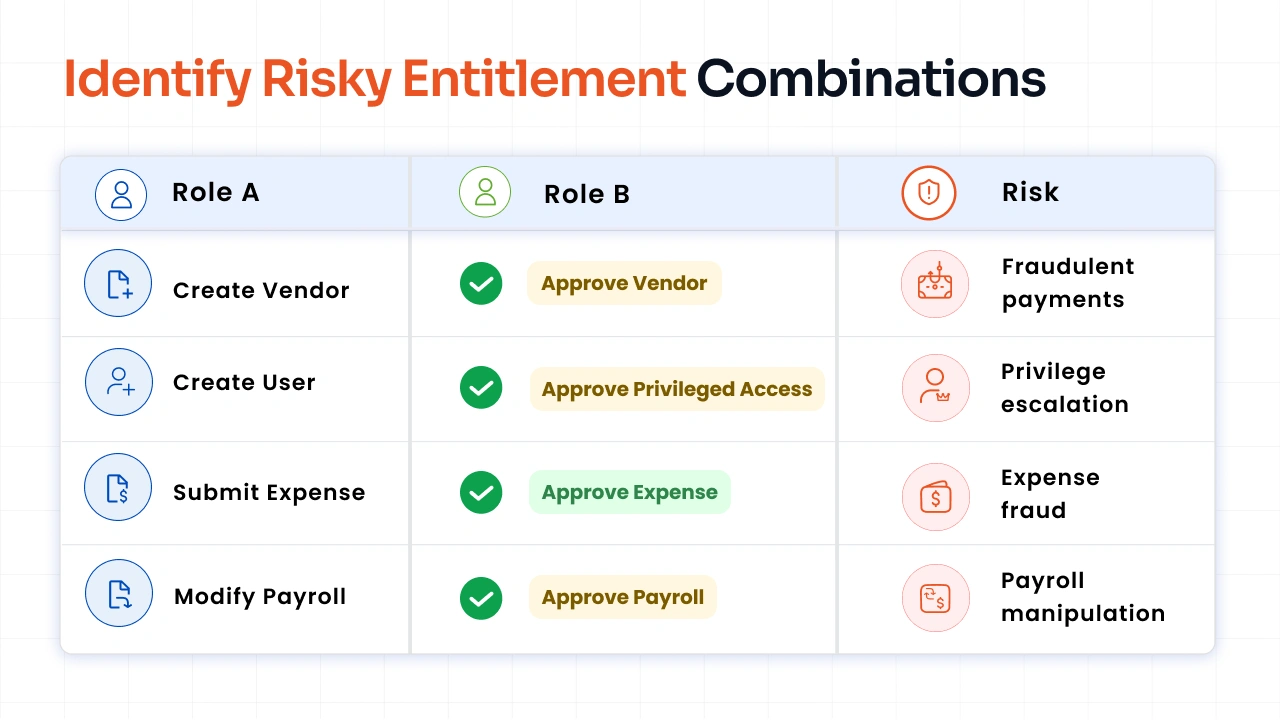
Step 3: Define Conflicting Pairs
Now, identify which entitlement pairs create unacceptable business risks when assigned together. For example:
Step 4: Set Severity/Impact Levels
Assign high, medium, or low risk levels based on financial loss or regulatory impact. You can leverage prioritized risk scoring to focus remediation efforts on the highest-risk conflicts first.
Step 5: Assign Ownership
Designate business leaders to review, approve, or remediate specific conflict pairs. This ensures your policies remain accurate as business processes evolve.
Your access control matrix should be dynamic. You need to update it as you integrate new applications, complete mergers, restructure your organization, or make any change that introduces new access relationships.
SoD Risk Analysis: Methods and Tools
Performing a manual SoD risk analysis can take hundreds of hours. It also doesn't guarantee complete accuracy, as complex nested permissions can be easy to overlook.
Modern SoD solutions automate this process by continuously evaluating user permissions against predefined rules. They perform access risk analysis across ERP platforms, HR systems, and cloud applications, then use prioritized risk scoring to rank SoD conflicts based on their potential business impact.
Security teams can focus on the highest-risk violations instead of reviewing every conflict manually.
Implementing SoD as a Risk Control
To implement SoD as a reliable security control, follow a structured, risk-focused roadmap:
- Assess Your Landscape: Map all active users and permissions across every application. Implement identity discovery and visibility tools to find blind spots.
- Prioritize by Impact: Address high-severity conflicts first to reduce financial and regulatory risk.
- Pilot Preventive Controls: Deploy real-time blocking rules in key departments before rolling them out across your company.
- Monitor Continuously: Embed automated policy checks into your end-to-end identity lifecycle management process.
- Adapt as Roles Evolve: Update your access policies whenever business workflows or software setups change.
Integrate SoD rules directly into your enterprise identity governance strategy. This approach maintains audit readiness and keeps your access controls effective over time.
miniOrange Identity Governance combines identity discovery, lifecycle management, and access risk management to help you govern identities.
FAQs
What's the difference between a SoD risk and an access risk?
A SoD risk occurs when one identity has conflicting permissions that could enable fraud, unauthorized actions, or errors. An access risk is broader and includes excessive privileges, dormant accounts, orphaned accounts, privileged misuse, and SoD conflicts. In other words, SoD risk is one category of access risk.
How do you identify and prioritize SoD risks in your organization?
Start by identifying critical business activities and defining conflicting role combinations. Then perform SoD analysis across your applications, assign risk scoring based on business impact, and use prioritized risk scoring to remediate the highest-risk violations first.
Why are preventive SoD risk controls better than detective controls?
Preventive controls reduce risk by blocking conflicting access before it is granted. Detective controls identify violations after access already exists. Most organizations benefit from using both, but preventive controls generally reduce exposure earlier in the access lifecycle.
What is an access control matrix?
An access control matrix maps users, roles, or groups to the permissions they hold. Organizations often use it to identify conflicting permissions, support SoD reviews, and validate access policies across applications.
Can non-human identities create SoD risks?
Yes. Service accounts, bots, APIs, and other non-human identities can accumulate conflicting permissions just like human users. They should be included in SoD reviews and continuous access governance processes.
What is prioritized risk scoring in SoD?
Prioritized risk scoring ranks SoD conflicts based on factors such as financial impact, privilege level, compliance exposure, and likelihood of misuse. This helps security teams address the highest-risk violations before lower-priority issues.
About the Author

Senior Content Writer
Chinmay has extensive experience in writing thought leadership and marketing content for B2B IT companies. He specializes in cybersecurity, AI, ERP, CRM, and custom software development, creating content that not just informs, but sells.
Leave a Comment