

Shopify is deprecating Legacy Customer Accounts, and if your store relies on custom login flows, B2B approvals, or third-party integrations, the impact goes further than a login page redesign.
While the platform move is mandatory, the priority for any merchant is maintaining continuity across logins, onboarding, and the connected systems that keep the business running.
This guide walks you through the transition in a structured way. We will cover how to plan your move, avoid disruption for both B2C and B2B users, and keep your critical business workflows intact as you upgrade your store architecture.
What You’re Moving Toward: A Centralized Identity System in Shopify Customer Accounts
Customer accounts have evolved into a centralized, identity-based model, rather than just a collection of Liquid templates inside your theme.
In the legacy setup, a merchant could easily go into their theme files and add custom code to the registration page. In the new framework, Shopify manages authentication and account handling at the platform level, providing a more standardized and secure environment.
In practice, this means your customer identity is now part of the store’s core architecture. For example, in the legacy model, you might have used a theme-level app to add a "Company Name" field to a registration form.
Under the new identity-based model, these interactions are governed by Shopify’s Customer Accounts framework, meaning those old theme customizations will not work the same way. Merchants now need to treat customer accounts as a store-wide system, not just a set of individual pages.
What a Successful Transition from Legacy Accounts Looks Like
Before you begin the technical work, define what a successful transition should preserve and what it should improve. This keeps the migration focused on business continuity rather than platform mechanics.
A successful transition should ensure that customers can still browse, purchase, and access their accounts without disruption. It should also preserve the business rules that control access, pricing, segmentation, and customer-specific experiences.
What Should Be Preserved During the Migration
Core customer journeys
Analyze how a customer enters your store. How customers browse, add to cart, check out, and return for repeat purchases is not affected by this migration. The entry points to the customer accounts, header icons, account drawers, "My Account" menu links also stay where they are.
What changes is where those entry points lead: instead of opening a customized page in the store, they hand off to Shopify's hosted Customer Accounts experience.
This is an important distinction for planning. You do not need to redesign your navigation, restructure the storefront, or retrain customers on where to find things. The shopping flow is preserved.
Existing business rules
Business rules such as pricing visibility, segmentation, restricted product access, and company-level permissions should remain intact. These rules are part of how the store operates and should not be affected by the move to Customer Accounts.
For B2B stores, this also includes company catalogs, customer roles, and approval-based access. The account model may change, but the business logic behind access control should stay consistent.
Customer data requirements
The data your store collects does not need to change just because the account framework changes. Profile fields, addresses, order history, and customer-level attributes can still remain part of the customer record.
What changes is where that data is handled. In legacy setups, much of it was tied to theme-based customer account templates. Under Shopify Customer Accounts, that data is handled through Shopify’s hosted account framework and customer-scoped APIs.
Key integrations
CRM, ERP, loyalty, and subscription apps do not need to be replaced by default. They do need to be validated against the new account structure. Most issues here come from assumptions about how identity is passed between systems.
If an app previously relied on templates designed for legacy accounts or older storefront customer flows, it needs to be checked carefully to confirm that it still works with the new model.
What Should Improve When Migrating to Shopify Customer Accounts
How customer identity is managed
This is where the main implementation shift happens. With Customer Accounts, Shopify manages identity at the platform level using a more standardized account framework.
That means customer identity is no longer tied to editable theme templates. Instead, it is handled through Shopify’s hosted account surfaces and customer-scoped APIs. For merchants, this usually means a cleaner and more secure setup. For developers, it means any custom logic built around older account behavior needs to be reworked.
Where onboarding and account logic are implemented
Under legacy accounts, login, registration, password reset, and store pages were all part of the theme. Merchants could change those pages directly. That is no longer the case.
With Customer Accounts, the account surface is hosted by Shopify. Customization moves into two places:
- the storefront entry point, such as your account drawer or its respective CTA
- the post-login account experience, which is extended through Shopify account extensions
Any logic that used to live in the theme, such as conditional content, custom messaging, or embedded app blocks, needs to be moved into an extension or handled through a separate identity layer.
How onboarding and registration flows are structured
Registration is no longer a theme-level form that merchants can freely edit. For B2B stores, this means that company onboarding, including registration requests, approval steps, and company assignment, needs to move out of the old registration flow. In simple B2C setups, the change may be easier to absorb. In B2B and hybrid stores, it usually requires a more structured onboarding model.
How identity is passed and validated across systems
The biggest technical impact is on how customer identity moves between systems. Under the new model, identity is handled through a token-based flow that works across Shopify surfaces.
For headless or custom storefronts, that means authentication needs to move to the Customer Accounts API flow. For existing apps and middleware, it means validating how customer sessions are created, stored, refreshed, and passed into connected systems.
Define Your Transition Using a Practical Planning Lens
| What Should Remain Unchanged | What Should Improve or Change |
|---|---|
| Core customer journeys (how users browse, purchase, and interact with the store) | How customer identity is managed and validated |
| Existing business rules (who gets access to what, pricing logic, segmentation) | Where authentication and onboarding logic are implemented |
| Customer data requirements (what information you need to collect and store) | How onboarding and registration flows are structured |
| Key integrations (CRM, ERP, loyalty, subscriptions) | How identity is passed and validated across systems |
Audit Your Current Customer Accounts Setup
Map your current architecture across three specific areas to prevent data loss or broken journeys.
1. Shopify Customer Accounts touchpoints
Start by listing every place where customer account behavior appears in the store. This includes any customer-facing messaging tied to signed-in state, gated content, order history, customer dashboards, and any flows that change based on tags or customer type.
The point of this audit is to document the complete account experience as customers see it today. That makes it easier to see what must be rebuilt, what can be extended, and what can remain unchanged.
2. User segments
All customers have unique requirements. You must identify your different audience types:
- B2C Users: These customers usually expect low-friction experiences, such as simple email OTP access.
- B2B Users: These users often require structured access, gated catalogs, and specific pricing tiers.
- Hybrid Audiences: Stores that serve both groups need separate, logic-based experiences for each segment.
3. Theme and app dependencies
This is the area most merchants underestimate. Theme-level customizations such as branded headers, custom copy, embedded widgets, conditional content, and links to internal tools may not carry over to Customer Accounts.
The same applies to apps that render content inside legacy account pages. Those features need to be checked carefully to confirm whether they support the new customer account model or need to be rebuilt using account extensions.
Rebuild the Customer Flows That Matter Most
The transition to Shopify Customer Accounts requires merchants to actively redesign certain parts of the customer journey. The focus should be on flows that directly impact user access and business operations.
1. Redesign Customer Onboarding
Onboarding becomes more important because account creation is no longer handled in the same way. Instead of relying on default registration flows, Shopify merchants need to define how users enter the system and what information is required.
This involves deciding what data should be collected, when validation is necessary, and how onboarding aligns with business requirements. For simple B2C use cases, a basic flow may be sufficient. For more structured environments, additional validation and data capture may be required.
2. Build Structured B2B Onboarding
B2B onboarding requires a more controlled approach. Unlike standard customer flows, Shopify B2B users often need to be verified and mapped to specific company accounts before gaining access.
An ideal flow for B2B onboarding in Shopify should include:
- submission of a company registration request
- admin review and approval
- mapping users to company accounts
- granting access only after validation
This ensures that access to pricing, catalogs, and resources is restricted to authorized users.
3. Customer Routing and Access Logic
The same applies to customer routing after access is granted. Users should reach the correct catalog, dashboard, or account view based on their role, region, domain, or company. If that logic was previously embedded in the theme or in custom scripts, it should now be reimplemented in a way that works with the new customer account structure.
Why this matters: If these workflows are left unaddressed, the store may still function at a surface level, but the customer experience will become inconsistent. That is where migration issues usually appear.
Plan Your Authentication Approach
Choosing an authentication method is a strategic decision that shapes your entire customer account ecosystem. After the move to Customer Accounts, merchants need to decide how users should enter the store based on the kind of experience the business needs to support.
For some stores, retaining email-password login in Shopify Customer Accounts makes sense because existing customers already expect that flow.
For others, OTP via phone or email is a better fit because it removes password friction and works well for faster, low-touch access.
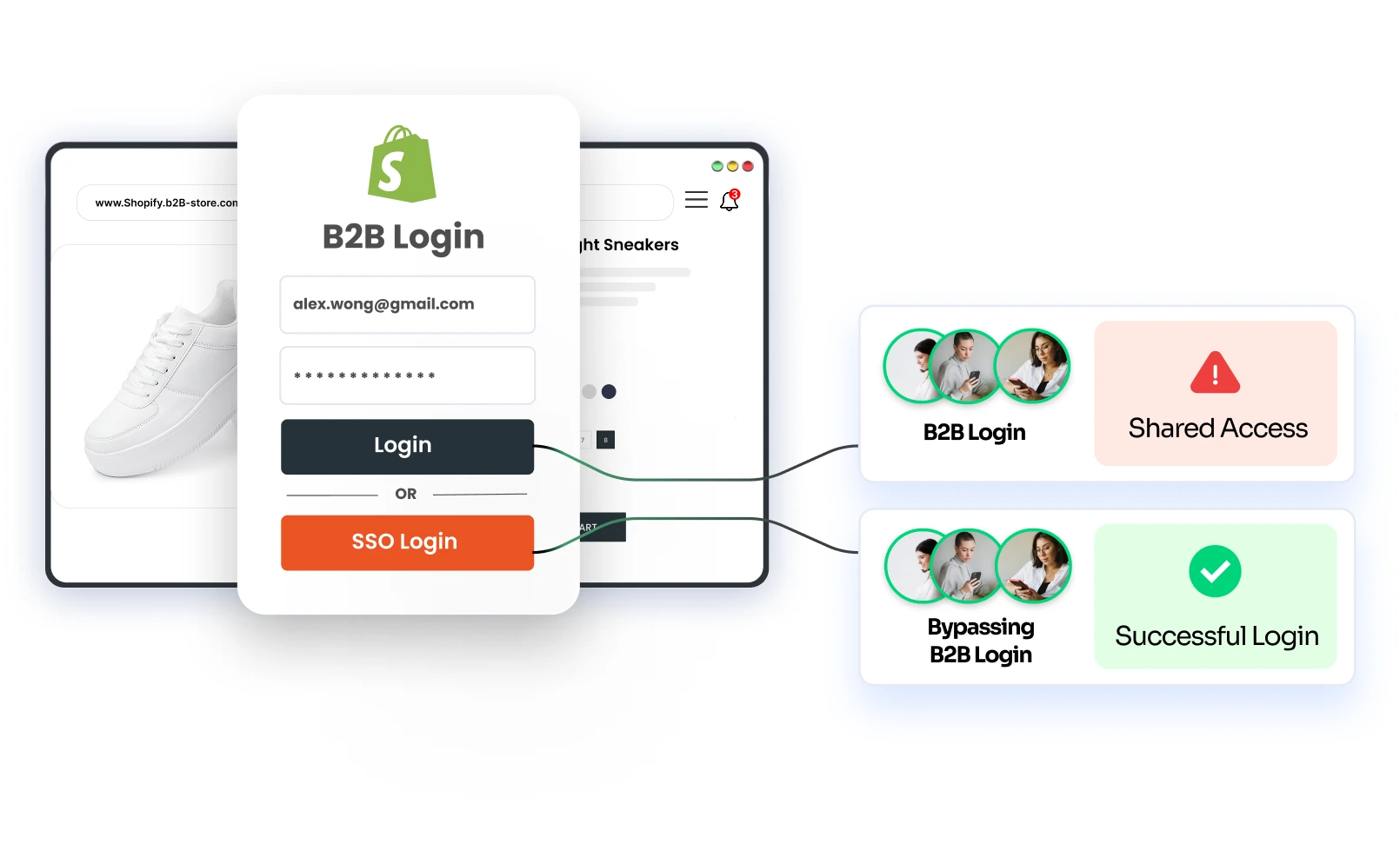
In B2B or internal use cases, enterprise SSO is often the better option because it supports controlled access and aligns with an authorized corporate identity provider.
The right approach depends on three factors:
- How much friction the store can tolerate
- How much control is needed before access is granted
- How different user groups should enter the store
Your authentication strategy should align with your broader business objectives.
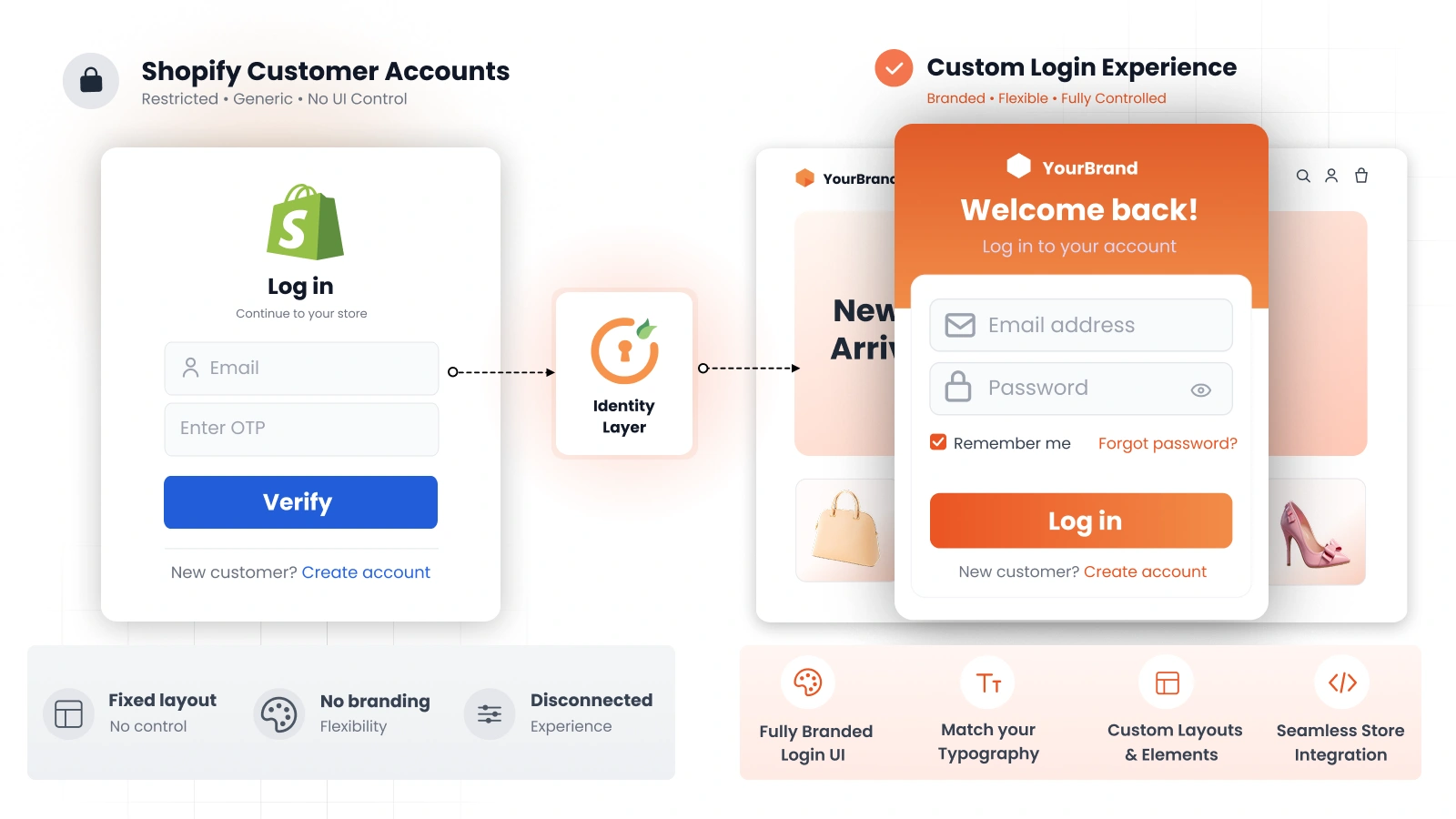
Restore Flexibility with an Identity Layer - miniOrange
Shopify’s Customer Accounts framework standardizes how identity is handled, but it does not address every business requirement, particularly for merchants who need more control over who gets in and how.
This gap becomes visible when:
- Onboarding requires validation before granting access
- B2B users need approval before they can log in
- Different user segments require different entry experiences
- Post-login routing depends on business logic
Since these flows are no longer handled at the theme level, they need to be implemented outside Shopify’s native account system.
An identity layer like miniOrange’s Shopify B2B solution helps address this by working alongside Shopify’s framework. Instead of modifying the core system, it allows merchants to build the required logic around it.
With this approach, merchants can:
- Customize customer onboarding flows based on business requirements
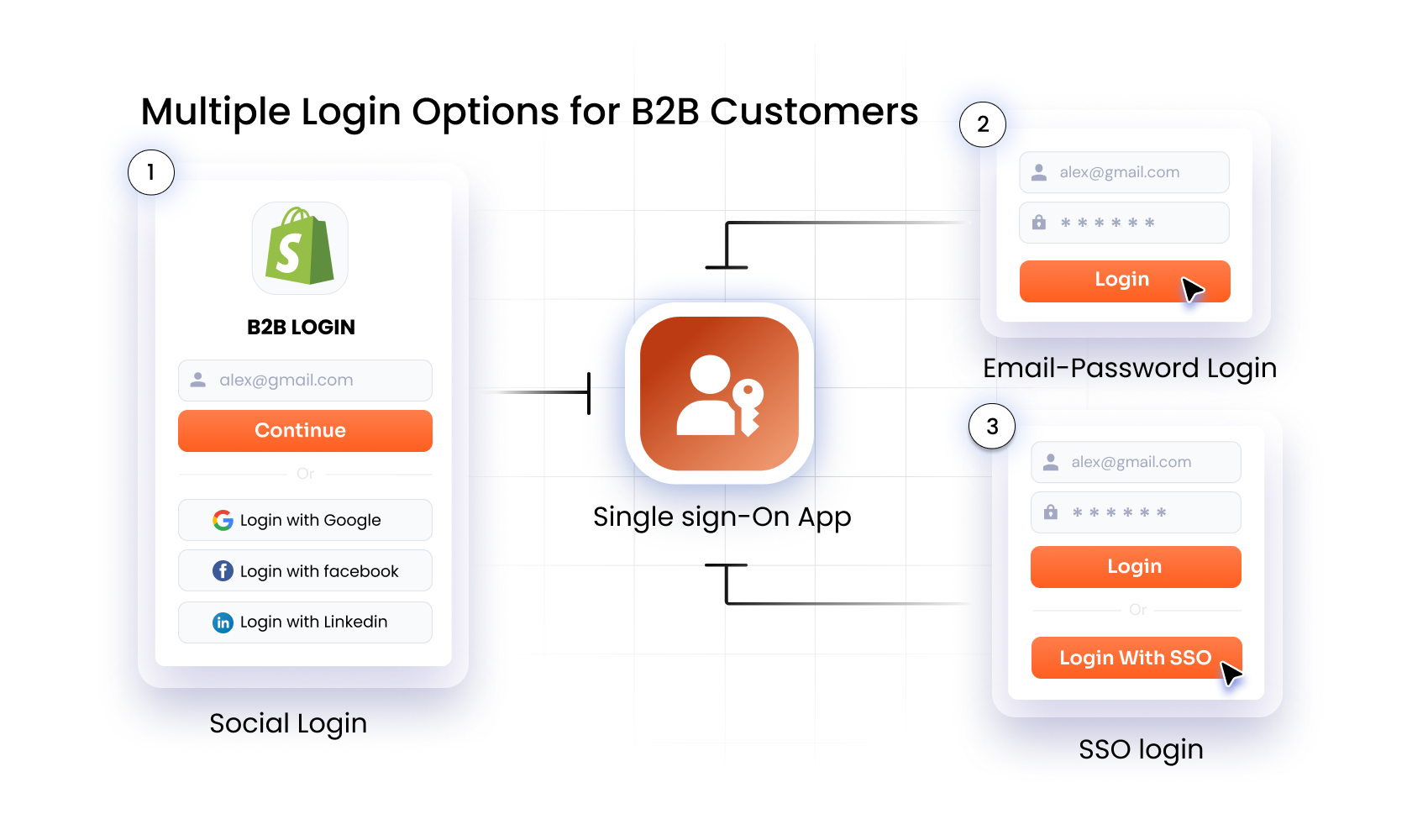
- Support multiple authentication methods (email-password, phone OTP, shop app login, social login) within the same store
- Integrate external identity providers to enable SSO for B2B users
- Manage B2B and B2C experiences separately
- Route users dynamically based on tags, domains, or roles
- Maintain branded, embedded login pages that align with the overall storefront look & feel
This is especially important for stores where access cannot be open by default, such as B2B storefronts or employee-only corporate stores.
miniOrange enables these capabilities without requiring a complete rebuild. It allows merchants to extend the default flow of Shopify Customer Accounts in a way that aligns with their existing workflows.
The outcome is practical: Shopify manages the core account framework, while you retain control over how users are onboarded, authenticated, and routed within your store.
Migration Checklist for a Smooth Rollout
The transition from Legacy Accounts to Shopify Customer Accounts impacts more than just how customers log in.
Several parts of the existing setup, especially those built into themes or custom workflows, do not carry over and need to be reworked. The checklist below outlines the best practices to ensure a smooth transition without breaking the customer experience:
- Audit your current setup: Review existing login and registration flows, theme-level customizations, and any integrations tied to legacy customer accounts.
- Identify impact areas: Map out where changes will affect your business, especially B2B workflows, multi-region setups, and how customer data flows across systems.
- Plan your authentication strategy: Define how users will log in going forward (email-password, Phone OTP, SSO via external identity providers).
- Rebuild critical flows: Recreate key experiences like onboarding, approval processes, access control, and post-login behavior that no longer exist natively.
- Validate integrations and prepare rollout: Test all connected systems (loyalty, subscriptions, external platforms), run staging checks, communicate changes to users, and ensure a rollback plan is in place.
Frequently Asked Questions (FAQs)
Is this transition only about login changes?
No. While the login experience does change with the shift to email OTP-only authentication, the transition also impacts how customer data is structured and how external apps interact with your store’s identity system.
Do I need to rebuild my entire customer accounts setup?
No. The goal is not to rebuild everything, but to identify what depends on legacy behavior. Focus on flows that directly impact access and operations, such as onboarding, B2B approvals, etc. Many integrations and frontend experiences can remain unchanged if they are validated properly.
How should I handle B2B onboarding in Shopify Customer Accounts?
B2B onboarding needs to be handled as a controlled process, not a standard signup flow. This typically includes capturing company details, validating requests, mapping users to company accounts, and granting access only after approval.
Can I support multiple login methods on Customer Accounts?
Yes. By using an external layer like miniOrange’s Shopify B2B solution, you can offer flexible login options like email-password login for returning customers, SSO for corporate or B2B customers or passwordless login via phone/email OTP for retail customers.
How do I avoid customer disruption during migration?
Start by mapping your existing flows and identifying dependencies. Rebuild only the critical parts such as onboarding and access control, validate integrations and test complete user journeys in staging. A phased rollout with clear communication ensures that customers are not affected during the transition.
Conclusion
The move to Shopify Customer Accounts is a necessary step toward a more secure and scalable store. While this change is unavoidable, business disruption is not.
This transition is an opportunity to improve your onboarding structure and create more consistent journeys for both your B2B and B2C audiences.
Need help bridging the gap between Shopify’s native features and your specific business requirements? A dedicated Shopify B2B solution can provide the control you need.
Talk to our team today about your specific migration requirements and we'll show you exactly how miniOrange fits in.
Leave a Comment