

Getting access inside an organization may sound simple. A user needs access to a tool, requests it, and IT provides it. In reality, it rarely works that smoothly.
Access requests come from different users, for different systems, and often involve varying levels of risk. Some require approvals, some need additional validation, and some should not be granted at all.
Without a structured process, access requests can quickly turn into long email threads, missed approvals, and inconsistent decisions.
That’s why access request management is a key part of Identity and Access Management (IAM). It brings structure to how access is requested, reviewed, and granted, while ensuring security and compliance are maintained.
In this blog, we will explore what an access request is, how the process works, and the best practices to manage it effectively.
What is an Access Request?
An access request is a formal request made by a user to gain access to a system, application, or resource. In the context of IAM, it is the starting point of the access lifecycle. It ensures that access is not granted arbitrarily but follows a defined process.
Access requests are also referred to as:
- Access Request Management
- User Access Request
- Access Control Requests
At a simple level, it answers a basic need: A user needs access to something they don’t currently have.
From a technical perspective, it triggers a workflow that validates the request, routes it for approval, and then provisions access based on policies.
Why Are Access Requests Important?
Access requests are not just about granting access when someone asks for it. They play a key role in ensuring that access is controlled, validated, and aligned with organizational policies. A well-defined access request process helps maintain consistency, reduce risks, and improve overall visibility into how access is managed.
Here are the key reasons why access requests are important:
1. Prevent Unauthorized Access
Without a structured process, users may gain access without proper validation or oversight. This increases the risk of unauthorized access to sensitive systems and data. Access requests ensure that every request goes through predefined checks and approvals before access is granted, reducing the chances of unintended or risky access.
2. Enforce Least Privilege
Users should only have access to what is necessary for their role, nothing more. However, without proper controls, it’s easy for users to receive more permissions than required. Access requests help enforce the principle of least privilege by ensuring that access is reviewed and granted based on actual needs rather than assumptions.
3. Improve Compliance
Many regulations require organizations to track how access is requested, approved, and granted. Without proper documentation, it becomes difficult to demonstrate compliance during audits. Access request workflows create a clear record of decisions, approvals, and actions, making it easier to meet regulatory requirements and maintain accountability.
4. Reduce Manual IT Workload
Handling access requests through emails or support tickets can slow down the process and increase the burden on IT teams. It often leads to delays, missed approvals, and inconsistent handling of requests. A structured access request system simplifies this by automating workflows, reducing manual effort, and ensuring that requests are processed efficiently.
How Does Access Request Work? Step-by-Step Process
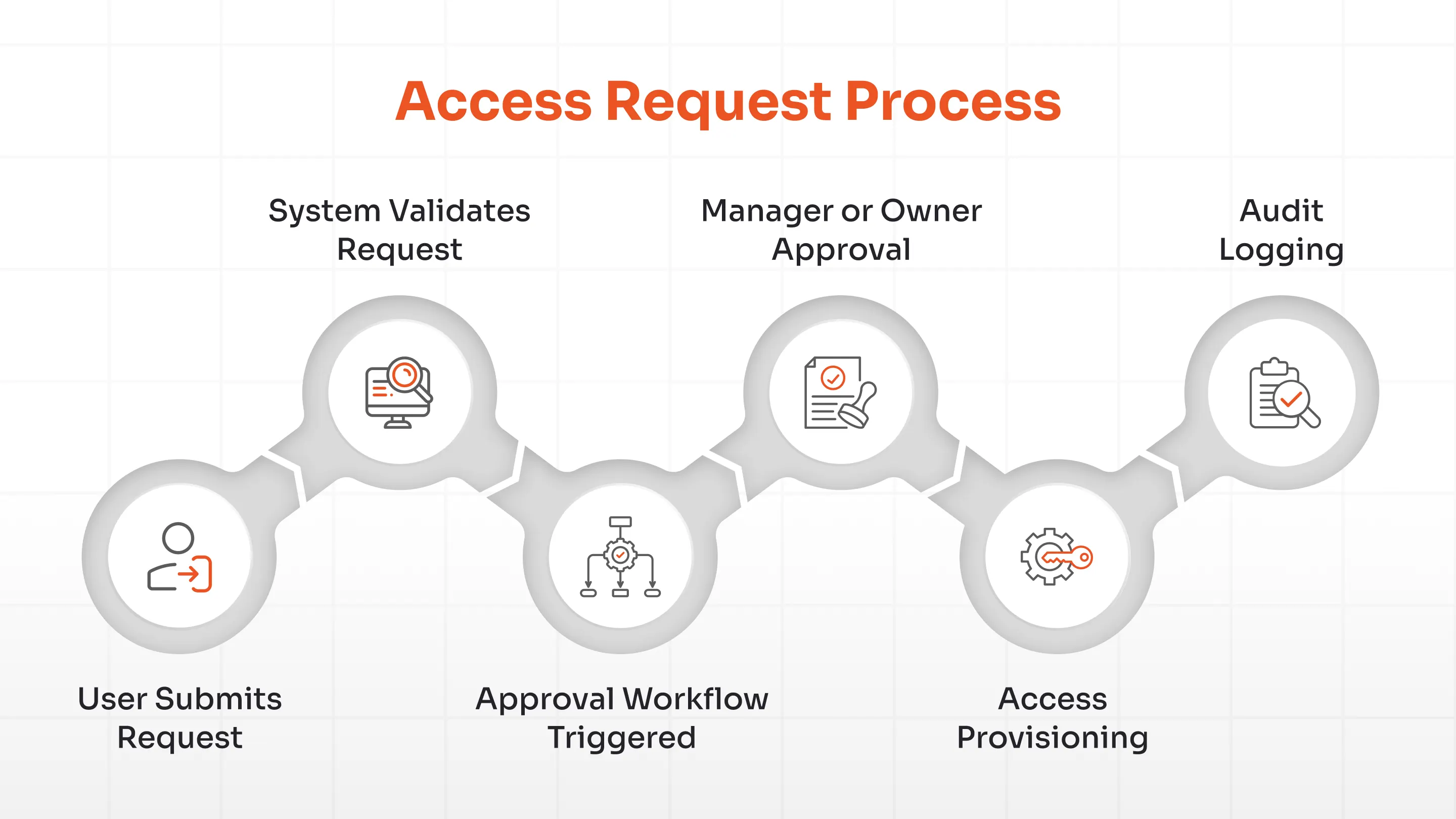
Access requests follow a structured process to ensure that access is granted in a controlled, consistent, and secure manner. Each step is designed to validate the request, involve the right stakeholders, and maintain visibility throughout the process.
Here’s how the access request process works step by step:
1. User Submits Request
The process begins when a user requests access to a specific system, application, or resource they do not currently have access to. This is typically done through a self-service access request portal or a centralized request system, where users can select the required access and provide a justification for the request.
2. System Validates Request
Once the request is submitted, the system performs initial validation checks to ensure the request meets predefined conditions. This may include verifying the user’s identity, checking their role, and confirming whether they are eligible to request that level of access based on policies.
3. Approval Workflow Triggered
After validation, the request is automatically routed through an approval workflow. The workflow is usually predefined based on factors such as the type of access, the sensitivity of the system, and the user’s role, ensuring that the request reaches the appropriate reviewers.
4. Manager or Owner Approval
The request is then reviewed by relevant stakeholders, such as the user’s manager, application owner, or security team. They evaluate whether the access is necessary and appropriate, and can choose to approve, reject, or modify the request based on business and security requirements.
5. Access Provisioning
Once the request is approved, the system proceeds to provision access. This involves assigning the required permissions, roles, or entitlements to the user through automated provisioning tools or integrated systems.
6. Audit Logging
Every step in the process is recorded, including who submitted the request, who approved it, and when access was granted. These records create a complete audit trail, which is essential for compliance, reporting, and tracking access-related activities over time.
Access Request Workflow Explained
An access request workflow defines how a request moves through different approval stages before access is granted. Instead of following a fixed path, the workflow adapts based on the type of access, the user requesting it, and the level of risk involved.
Below is a simplified view of how an access request workflow typically works:
Step 1: Multi-Level Approvals
Once a request is submitted, it is routed through multiple approval levels to ensure proper validation.
For example, a request may first go to the user’s manager to confirm business need, and then to the application owner or security team to validate access from a system or risk perspective.
This layered approval approach ensures that access is reviewed from both business and security angles before it is granted.
Step 2: Conditional Approvals
Not all access requests follow the same path. The workflow adjusts dynamically based on predefined conditions such as the type of access requested, the system involved, or the user’s context.
For instance, a low-risk request may require only one approval, while a request for sensitive data may trigger additional validation steps.
This makes the workflow flexible, allowing organizations to apply stricter controls only when necessary.
Step 3: Role-Based Approvals
Approval workflows are often designed around user roles and responsibilities. Users in similar roles, such as employees within the same department, typically follow a predefined approval path, ensuring consistency across requests.
This reduces ambiguity in decision-making and helps standardize how access is granted across the organization.
Step 4: Risk-Based Workflows
For high-risk or sensitive access requests, the workflow applies additional scrutiny. Requests are evaluated based on factors such as system sensitivity, access level, and potential impact, and may require extra approvals or security checks.
This ensures that critical access is handled with greater control, reducing the chances of misuse or unauthorized exposure.
Access Request Lifecycle
An access request is not a one-time activity. It follows a lifecycle that ensures access is requested, evaluated, granted, used, and eventually removed in a controlled and consistent manner. Each stage plays a role in maintaining security, visibility, and alignment with user responsibilities.
Below is a detailed explanation of the access request lifecycle:
1. Request Initiation
The lifecycle begins when a user submits a request for access to a system, application, or resource. This is typically done through a self-service portal, where the user selects the required access and provides a justification.
Capturing this context at the beginning helps reviewers understand the purpose of the request and ensures more accurate decision-making in the next stages.
2. Approval
Once the request is submitted, it moves through an approval process involving managers, application owners, or security teams. These stakeholders evaluate whether the requested access is necessary and appropriate for the user’s role.
This step ensures that access is granted based on actual business need rather than assumption, reducing the risk of unnecessary or excessive permissions.
3. Provisioning
After approval, the requested access is provisioned to the user through automated or integrated systems. This may involve assigning roles, permissions, or entitlements across one or more platforms.
Automated provisioning helps ensure that access is granted quickly, accurately, and consistently, without manual delays or errors.
4. Monitoring
Once access is granted, it is important to monitor how it is being used over time. Monitoring helps identify unusual behavior, misuse, or access that may no longer be relevant.
This ongoing visibility ensures that access remains appropriate and adds an extra layer of control beyond the initial approval.
5. Revocation
Access should not remain active indefinitely. When it is no longer required due to role changes, project completion, or user exit, it must be removed promptly.
Timely revocation helps reduce security risks and ensures that access remains aligned with current responsibilities.
Types of Access Requests
Access requests can vary based on the type of access needed and the level of sensitivity involved. Understanding these different types helps organizations apply the right level of control, approval, and monitoring.
Below are the key types of access requests:
- User Access Request: User access requests are the most common and typically involve access to systems or applications required for daily work. These requests are closely tied to a user’s role and responsibilities and usually follow standard approval workflows. They help ensure that users have the access they need to perform their tasks without unnecessary delays.
- Application Access Request: Application access requests are specific to individual tools or platforms, such as CRM systems, HR software, or internal dashboards. These requests are usually reviewed by application owners to ensure the access aligns with the user’s role. This helps maintain control over critical applications and prevents unnecessary or unauthorized access.
- Privileged Access Request: Privileged access requests involve elevated permissions, such as administrator or super-user access. Since these permissions provide a higher level of control, they require stricter validation and multiple levels of approval. Careful handling of these requests is essential to prevent misuse and protect sensitive systems.
- Temporary (Just-in-Time) Access Request: Temporary access requests provide access for a limited duration, usually for specific tasks or short-term needs. This supports Just-in-Time (JIT) access, where permissions are granted only when required and removed afterward. This approach reduces standing privileges and limits long-term exposure to risk.
- Emergency Access Request: Emergency access requests are used in urgent situations where immediate access is required to resolve an issue. These requests may bypass standard workflows but are closely monitored and logged. They are typically reviewed after the fact to ensure that the access was justified and not misused.
Access Request vs Access Provisioning vs Access Certification
| Aspect | Access Request | Access Provisioning | Access Certification |
|---|---|---|---|
| Definition | User requests access to a system or resource | Access is granted based on approval | Existing access is reviewed for relevance |
| Purpose | Capture and validate access need | Deliver approved access | Ensure access is still required |
| Stage | Initial stage | Execution stage | Review stage |
| Trigger | User request | Post-approval | Periodic review |
| Focus | Justification and approval | Access assignment | Access validation |
| Key Activity | Submit request with reason | Assign roles/permissions | Review or revoke access |
| Decision | Should access be granted? | How is access granted? | Should access continue? |
| Risk Addressed | Unauthorized requests | Incorrect access assignment | Excess or outdated access |
| Output | Approved or rejected request | Access granted | Access retained or removed |
| Example | Requesting access to CRM | Granting CRM role | Reviewing CRM access later |
These three concepts are part of the same access management flow, but each one serves a different purpose at a different stage.
Access Request is where everything begins. It represents the moment a user identifies the need for access and formally submits that request. At this stage, the focus is on capturing the requirement and ensuring the request is justified before any action is taken.
Access Provisioning comes into play after the request has been reviewed and approved. It is responsible for turning that approved request into actual access by assigning permissions, roles, or entitlements across systems. This step focuses on execution and ensures that the right access is delivered to the right user.
Access Certification, on the other hand, looks at access from a different angle. Instead of initiating or granting access, it focuses on reviewing existing access at regular intervals. The goal is to confirm that users still need the access they have and to remove anything that is no longer relevant.
A simple way to understand the difference is by looking at the flow over time. Access request is about asking for access, provisioning is about granting it, and certification is about revisiting it later to ensure it still makes sense.
Together, these stages create a continuous loop where access is requested, granted, and then re-evaluated, helping organizations maintain control and reduce unnecessary risk.
Benefits of Access Request Automation
Access Request Automation brings structure and efficiency to how access is requested, approved, and granted. Instead of relying on manual processes, it helps standardize workflows, reduce delays, and improve overall control.
Here are the key benefits of Access Request Automation:
- Faster Approvals: Automated workflows remove delays caused by manual handoffs and back-and-forth communication. Requests are routed instantly to the right stakeholders based on predefined rules. As a result, decisions happen faster, and users get access without unnecessary waiting.
- Reduced Manual Effort: Handling access requests through emails or tickets increases the workload for IT teams. Automation takes over repetitive tasks such as routing, approvals, and provisioning. This allows IT teams to focus on higher-priority work instead of administrative overhead.
- Improved Security: When access requests follow a defined workflow, the chances of errors or unauthorized access are reduced. Each request is validated and approved based on policies. This ensures access is granted in a controlled and consistent manner.
- Better Audit Trails: Automation records every step in the access request process, including submissions, approvals, and provisioning actions. These records provide clear visibility into decisions and make it easier to demonstrate compliance during audits.
- Enhanced User Experience: A self-service approach allows users to request access without relying on IT teams or long email threads. The process becomes faster, more transparent, and easier to follow for everyone involved.
Access Request in Identity Governance (IGA)
Access requests are a key part of Identity Governance and Administration (IGA). IGA connects access requests with broader identity processes.
It integrates with:
- RBAC (Role-Based Access Control)
- PAM (Privileged Access Management)
- SSO (Single Sign-On)
- User Lifecycle management
This ensures that access is not only requested and granted but also governed and monitored.
Common Challenges in Access Requests
While access requests are essential, managing them without structure can lead to inefficiencies and security gaps. As organizations scale, these challenges become more noticeable.
- Manual Approvals: Email-based approvals or disconnected tools slow down the process and create inconsistencies. Different requests may be handled in different ways, leading to confusion. Over time, managing access becomes difficult to track and standardize.
- Lack of Visibility: Without a centralized system, tracking the status of requests or understanding who approved them becomes challenging. This lack of clarity can lead to delays, missed approvals, and gaps in accountability.
- Delayed Provisioning: Even after approval, access may not be granted immediately due to manual steps or system limitations. Such delays impact productivity and create frustration for users waiting to get started.
- Over-Provisioning: In some cases, users receive more access than required due to unclear requirements or a lack of validation. This increases exposure and creates unnecessary security risks across systems.
- Compliance Risks: When access requests are not tracked properly, demonstrating control during audits becomes difficult. Missing documentation or inconsistent processes can increase compliance risks.
Access Request Best Practices
Managing access requests effectively requires a structured approach that balances speed, control, and security. As organizations scale, having the right practices in place ensures that access is granted consistently, tracked properly, and aligned with both business needs and security policies.
Here are some of the key best practices for managing access requests effectively:
1. Approval Hierarchy & Multi-level Approvals
Not all access requests carry the same level of risk, which is why a defined approval hierarchy is important. Multi-level approvals ensure that requests are reviewed by the right stakeholders, such as managers, application owners, or security teams. This adds an extra layer of validation and reduces the chances of unauthorized or inappropriate access being granted.
2. Segregation of Duties (SoD)
Segregation of Duties ensures that no single user has excessive control over critical processes or systems. By separating responsibilities, organizations can prevent conflicts of interest and reduce the risk of misuse or fraud. Integrating SoD checks into access requests helps identify and block risky access combinations before they are approved.
3. Standardized Access Request Templates
Using standardized templates ensures that every access request captures the necessary details, such as access type, justification, and duration. This eliminates ambiguity and makes it easier for approvers to make informed decisions. It also helps maintain consistency across requests and reduces delays caused by incomplete information.
4. Time-bound Access (Expiry-based Access)
Access should not remain active indefinitely, especially for temporary or high-risk permissions. Time-bound access ensures that permissions are automatically revoked after a defined period. This reduces the risk of unused or forgotten access and keeps permissions aligned with current requirements.
5. Real-time Notifications & Alerts
Real-time notifications keep stakeholders informed about request status, approvals, and any changes in access. Alerts help ensure that no request is missed and that actions are taken promptly. This improves responsiveness, reduces delays, and provides better visibility into the overall access request process..
Use Cases of Access Request
Access requests play a key role in managing access across different scenarios where control, visibility, and timely approvals are essential. They ensure access is granted based on need, tracked properly, and aligned with organizational policies. This becomes especially important during JML (Joiner, Mover, Leaver) processes, where access needs to be assigned, updated, or revoked as users join the organization, change roles, or leave.
Here are some of the key use cases of access requests:
Employee Onboarding
New employees need access to multiple tools and systems to begin their work effectively. A structured access request process ensures permissions are granted quickly and aligned with predefined role requirements. As a result, onboarding delays are reduced, and new hires can start contributing from day one.
Role Changes
When users move into new roles, their access requirements change as well. Access requests help assign relevant permissions while removing access that no longer applies. Over time, this prevents permission buildup and keeps access aligned with current responsibilities.
Third-Party Access
Vendors and contractors often require temporary access to internal systems for specific tasks. Access requests help define both the scope and duration of that access, ensuring proper control. External users are limited to only what is necessary, reducing the risk of lingering access.
Cloud Application Access
With multiple SaaS applications in use, managing access across platforms can become complex. Access requests provide a centralized way to control and track access across these systems. Better visibility makes it easier to identify unnecessary or unauthorized access.
Privileged Account Management
Requests for admin or elevated permissions require stricter validation due to the level of control involved. Access requests ensure such permissions go through proper approvals and are granted only when necessary. Stronger oversight helps protect critical systems and reduces the chances of misuse.
Simplify Compliance with miniOrange IGA solution
As organizations grow, managing access requests manually becomes increasingly difficult. More users, more applications, and more systems mean requests come from multiple places and often lack consistency. Tracking who requested access, who approved it, and whether it was granted correctly quickly becomes time-consuming and error-prone.
This is where Identity Governance and Administration (IGA) help.
IGA brings structure to the entire access request lifecycle, from request initiation and approval to provisioning and compliance. Instead of relying on emails or disconnected tools, organizations can centralize access requests, automate approval workflows, and maintain consistent control across systems.
miniOrange Identity Governance and Administration (IGA) builds on this approach by providing a unified platform to manage access requests, identities, and compliance from a single place.
It integrates seamlessly with:
- Role-Based Access Control (RBAC)
- Privileged Access Management (PAM)
- Identity lifecycle management
With features like self-service access requests, automated approval workflows, and policy-based provisioning, organizations can ensure that access is granted quickly while still following the right controls.
This not only reduces manual effort but also improves visibility, consistency, and accuracy across access request workflows.
FAQs
How often should access requests be reviewed?
Access requests should be reviewed regularly to ensure that granted permissions are still relevant. This is especially important during role changes or offboarding, where outdated access can create security risks. Regular reviews help maintain alignment between access and current responsibilities.
How does an access request workflow work?
An access request workflow starts with a user submitting a request, followed by validation and approval from relevant stakeholders. Once approved, access is provisioned and all actions are recorded for tracking and compliance.
What is the difference between access request and provisioning?
Access request is the step where a user asks for access, while provisioning is where that access is actually granted. One initiates the process, and the other executes it.
Why is access request automation important?
Access request automation reduces manual effort and speeds up approvals by routing requests through predefined workflows. It also improves consistency, security, and tracking across the process.
What is a self-service access request system?
A self-service access request system allows users to request access through a centralized portal without relying on IT teams. It simplifies the process and improves visibility into request status.


Leave a Comment