

Managing multiple Shopify stores creates a problem most merchants underestimate at first: inventory fragmentation.
A product may sell out in one store while still showing as available in another, and that gap can lead to overselling, canceled orders, frustrated customers, and extra manual work for your team. The more stores you run, the harder it becomes to keep stock numbers consistent without a system in place.
This is why merchants need a reliable way to sync inventory between two Shopify stores. Instead of updating quantities store by store, inventory changes can be reflected across connected stores automatically. This ensures product availability remains accurate and reduces the risk of stock discrepancies.
For merchants handling separate stores for different regions, brands, B2B customers, or wholesale operations, this is especially important, as even a small mismatch can create fulfillment problems.
In this blog, we will explore how inventory sync works across Shopify stores, why it matters, and what merchants should consider before setting it up. This will provide a clearer view of how to streamline Shopify multi-store management without relying on manual updates.
Does Shopify Support Sync Across Multiple Stores Natively?
Shopify does support inventory management across multiple locations within a single store. You can track stock separately at each location, use the same SKU across locations, and transfer inventory between them. That model works well when one store fulfills from warehouses, retail outlets, or other stocked locations.
What Shopify does not provide natively is automatic inventory synchronization between two separate Shopify stores.
In other words, Shopify’s built-in inventory system is designed around a single store with multiple locations, not a shared real-time stock pool across independent stores. That distinction matters in Shopify multi-store management, because a sale in Store A will not automatically reflect in Store B unless you use an external integration or custom app layer.
So, if your setup includes two or more stores for different regions, brands, or B2B and wholesale operations, you may need an automated stock sync solution outside Shopify’s default inventory tools.
Depending on your store size and inventory volume, there are several ways to approach multi-store inventory synchronization.
Method 1: The Manual CSV Export/Import
For merchants managing a small catalog or infrequent inventory updates, the simplest way to sync inventory between two Shopify stores is through Shopify’s built-in CSV export and import process. This is a manual method but works reasonably well for low-volume operations with limited stock changes.
The process typically starts by exporting product data from the source Shopify store using a CSV file. Merchants can then update inventory quantities or retain only the required inventory-related fields before importing the file into the second store. Shopify matches products primarily through handles and variant data during the import process, so SKU consistency across stores is crucial to avoid mismatches.
This approach is commonly used when:
- Both stores share a relatively small product catalog
- Inventory updates happen only occasionally
- Merchants are testing multi-store operations before investing in automation
However, manual CSV syncing has distinct operational limitations. Inventory updates are not real-time, meaning stock levels can become inaccurate between exports. The process also becomes difficult to manage as order volume increases, especially when multiple variants or frequent stock adjustments are involved. Even a delayed import can result in overselling or inconsistent inventory visibility across stores.
For growing businesses, the CSV method is usually a temporary solution rather than a scalable long-term inventory sync strategy.
Method 2: Custom Shopify API Integration
For businesses that need more control and real-time synchronization, a custom Shopify API integration is a more scalable way to sync inventory between two Shopify stores. This method uses Shopify’s Admin APIs to monitor inventory changes in one store and automatically update the corresponding products in another store.
The setup usually works by connecting both stores through a private integration or middleware service. When inventory changes because of certain events like an order, return, cancellation, or manual adjustment, the integration captures the update using Shopify webhooks and pushes the revised stock quantity to the connected store through inventory APIs. To make this work reliably, products in both stores must share consistent identifiers such as SKUs or variant IDs.
This approach is commonly used for:
- Real-time inventory synchronization
- Multi-brand or regional storefronts
- B2B and wholesale operations
- High-volume Shopify multi-store management
A custom integration also allows merchants to define sync rules, such as syncing only selected products, excluding specific locations, or prioritizing inventory from a primary store.
However, this method requires development resources and ongoing maintenance. API authentication, webhook reliability, rate limits, and error handling all need to be managed properly to prevent inventory inconsistencies across stores.
Method 3: Automated Syncing via Shopify Apps
For merchants seeking simpler inventory management, automated syncing through a Shopify app is often the most practical option.
Instead of manually exporting files or building a custom integration, a dedicated Shopify Inventory Sync application updates stock automatically across connected stores. That means fewer stock mismatches, less repetitive work, and a lower risk of overselling when orders come in from different storefronts.
This approach is especially useful when you are managing multiple stores for different regions, customer segments, or business models. Once products are mapped correctly, the app can keep quantities synchronized automatically, so teams do not have to update each store separately every time inventory changes. It also gives merchants a more scalable way to handle Shopify multi-store management without relying on ongoing technical maintenance.
For businesses that want to reduce manual effort without moving into a fully custom build, this kind of app-based setup offers a middle ground: more control than spreadsheets, less complexity than custom development.
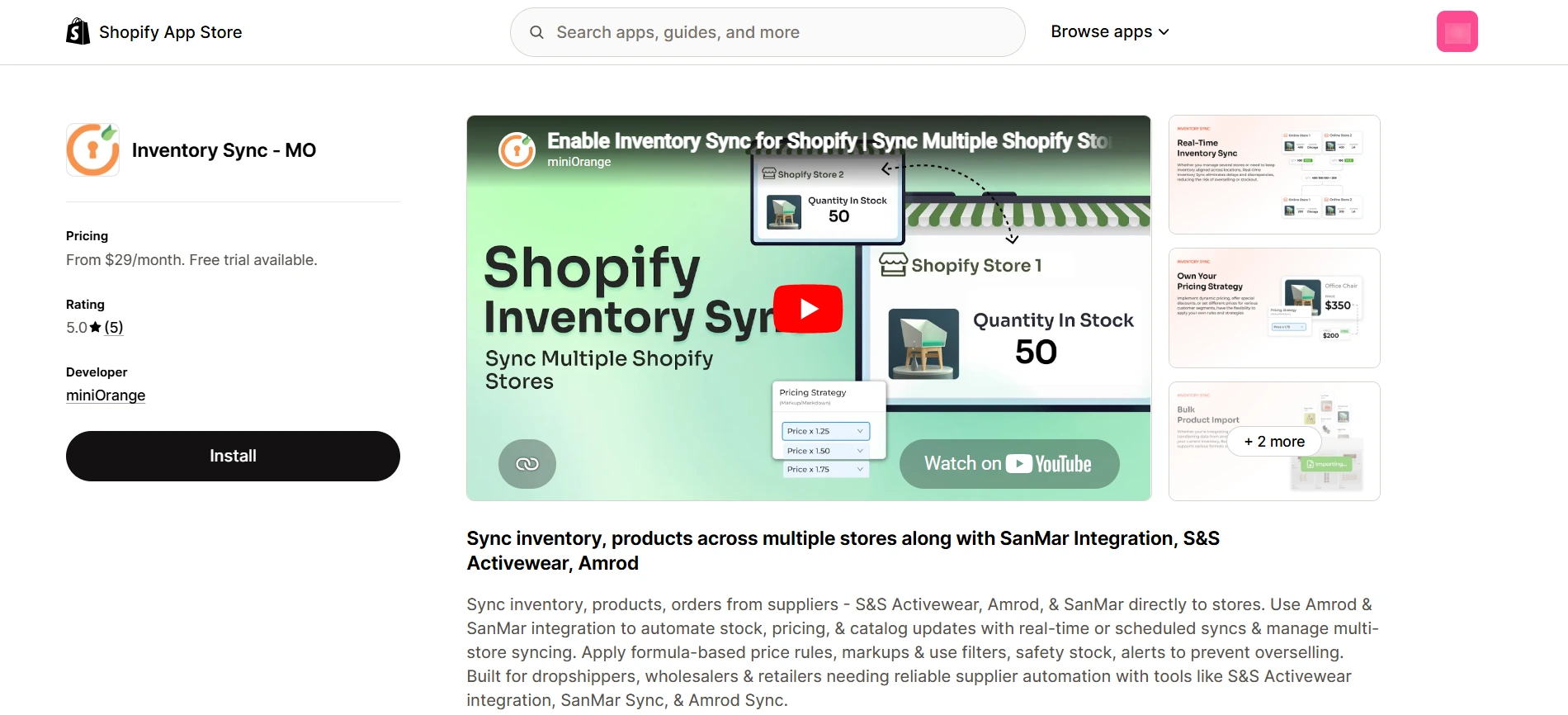
Solutions like the Shopify Inventory Sync app by miniOrange are designed to support this kind of automation.
Step-by-Step Setup: How to Connect Your Shopify Stores with Shopify Inventory Sync
Setting up inventory sync between two Shopify stores is primarily about connecting the stores correctly and defining how inventory should move between them.
Here’s the step-by-step process to achieve this using the Inventory Sync application:
- Install the Shopify Inventory Sync app on both the source and destination Shopify stores.
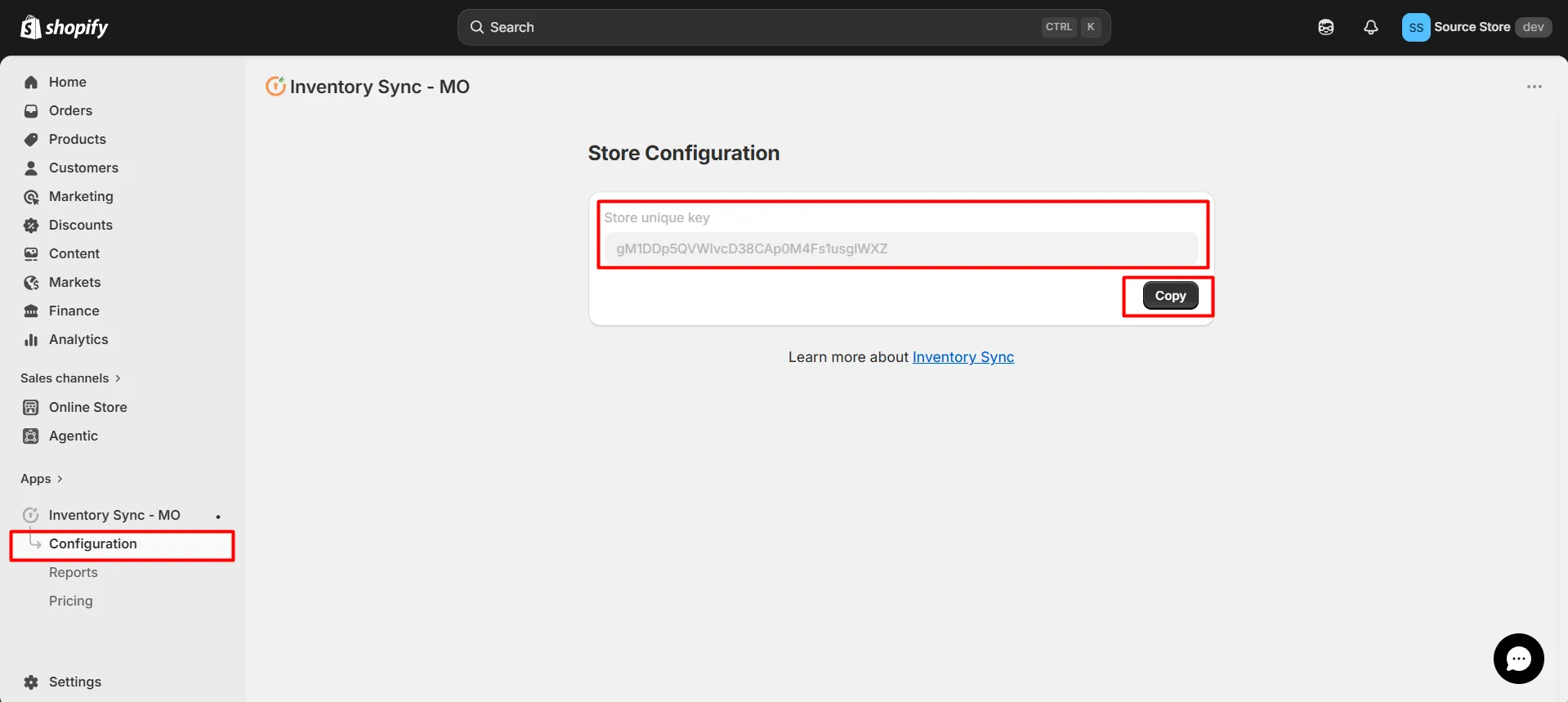
- Generate and copy the Store Key from the source store. This unique key is used to identify and securely connect the source store with the destination store.
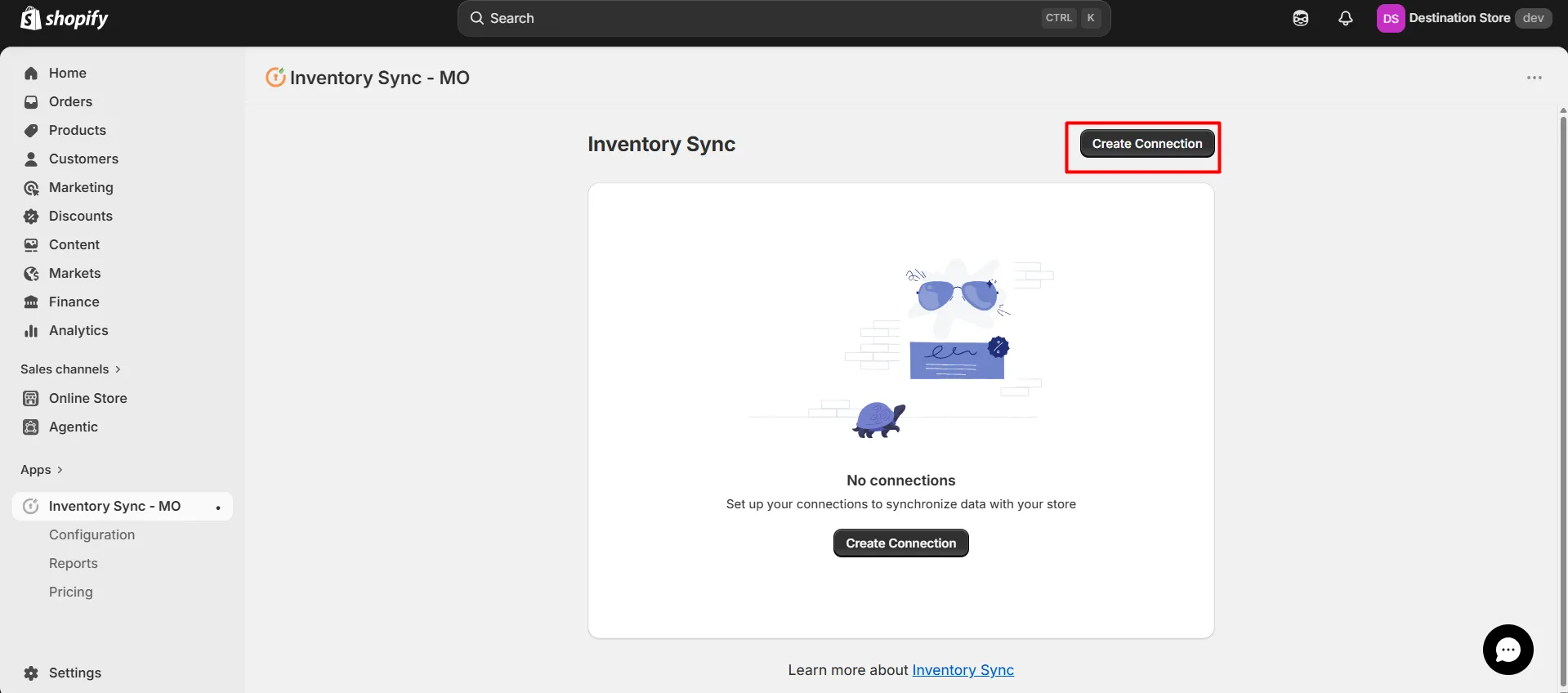
- Create a new connection from the destination store by pasting the Store Key and verifying the connection to ensure both stores are linked successfully.
- Once the stores are connected, map the source and destination locations to ensure inventory updates are synced between them.
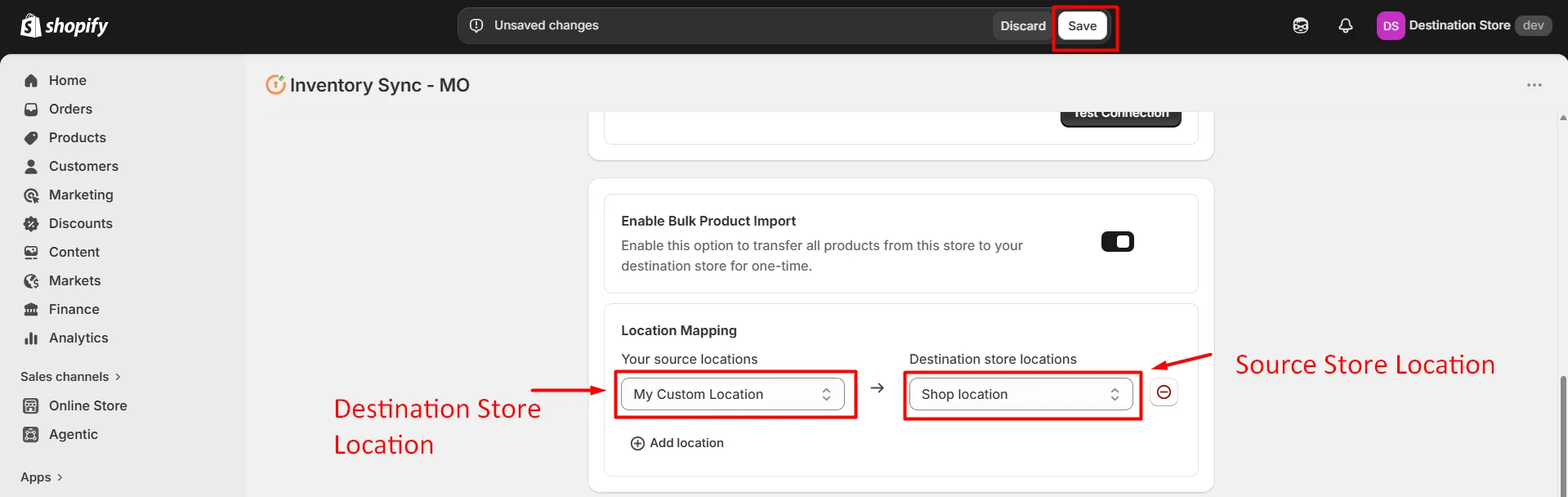
- Review the sync settings and save the configuration. After activation, inventory updates will automatically sync across the connected Shopify stores, maintaining stock consistency and minimizing manual adjustments.
Where Inventory Sync Matters Most in Multi-Store Setups
When merchants start managing more than one Shopify store, the same inventory challenge shows up in different forms. Sometimes it is about regions, sometimes it is about business models, and sometimes it’s about ensuring inventory remains consistent across multiple storefronts with minimal admin effort.
Here are some of the common situations where a structured store-to-store inventory sync setup becomes useful:
Keeping Regional Stores in Sync
A merchant running separate Shopify stores for different regions requires synchronized inventory so one store does not oversell stock that was already sold elsewhere. With automated sync, stock changes flow between stores automatically, making Shopify multi-store management easier so product availability remains accurate across connected storefronts.
Managing B2B and Retail Inventory Together
When one Shopify store serves retail buyers and another handles wholesale or B2B orders, inventory can split quickly if both stores sell the same SKUs. A connected setup helps sync Shopify stores so order activity in one storefront is reflected in the other. That keeps stock levels consistent, reduces fulfillment errors, and gives teams a clearer view of available inventory.
Coordinating Multiple Brand or Storefront Operations
Some merchants manage more than one storefront for different brands, product lines, or business units. In that setup, inventory mismatches create unnecessary work and confusion. Automated inventory sync maintains consistent stock across stores, reducing duplicate data entry.
Frequently Asked Questions (FAQs)
Can I sync stock across more than two stores?
Yes. Automated inventory sync setups can support multiple Shopify stores. This is useful for merchants managing regional storefronts, separate B2B and retail stores, or multiple brand operations that share the same inventory pool.
Can I sync inventory between two Shopify stores with different currencies?
Yes. Inventory sync works independently of store currency because it tracks stock quantities rather than pricing. As long as the products are mapped correctly across stores, inventory remains synchronized across stores, regardless of currency differences.
Will syncing inventory affect my order fulfillment logic?
Not directly. Inventory sync ensures stock consistency across all stores. Your existing fulfillment workflows, shipping settings, and warehouse operations continue to function separately unless you intentionally modify them.
What happens if I change a product SKU?
If your sync setup relies on SKUs for product mapping, changing a SKU can interrupt synchronization between stores. In most cases, you will need to update the mapping so the correct products continue syncing accurately.
How often should inventory sync between stores?
That depends on the sync method you use. Manual CSV updates happen only when files are imported or exported, while automated apps and API integrations can sync inventory in near real time, which is usually the better option for active stores.
Conclusion
Keeping inventory aligned across multiple Shopify stores starts with choosing the right sync method for your operation. For smaller catalogs, manual updates may work for a while, but as order volume and storefront complexity grow, automation becomes much harder to avoid.
The main takeaway is simple: the more connected your stores are, the more important it is to keep stock synchronized in a way that reduces manual work and prevents overselling. The Shopify Inventory Sync app by miniOrange is designed to simplify this process by helping merchants automate inventory updates across connected stores and maintain consistency as their operations scale.
Looking for a more efficient way to sync inventory between two Shopify stores? Get in touch with our team to see how automated inventory sync can work for your setup.
Leave a Comment